Category:Scraping Use Cases
Scraping Google Maps: Search Results, Reviews, and Place Details Using Python

Software Engineer


Finding the best burger spot in the city you're visiting is EASY in Google Maps.
Extracting names, websites, and phone numbers of a few thousand businesses across tens of different cities?
A week's work.
Well, not anymore.
Google Maps is the largest local business database on the internet. And even if it really does not want you downloading it, you can.
Three extraction layers make this possible: search result listings, individual place details, and user reviews. Each has a working Python script and structured JSON output. All requests go through Scrape.do with super=true to handle Google's bot protection. If you are working on other Google properties, the Google search results scraping guide covers the general SERP approach.
You can find the complete scripts in the GitHub repository.
If you'd rather skip the protobuf and parsing entirely, Scrape.do also offers a dedicated Google Maps API. One HTTP call returns parsed JSON for search, place details, and reviews. No scripting, no regex, no maintenance.
Scraping Google Maps Search Results
Google Maps search results contain business names, ratings, review counts, categories, addresses, coordinates, and thumbnail images. The typical approach would be to render the page in a headless browser and parse the HTML, similar to scraping JavaScript-rendered pages. But Google exposes a better path.
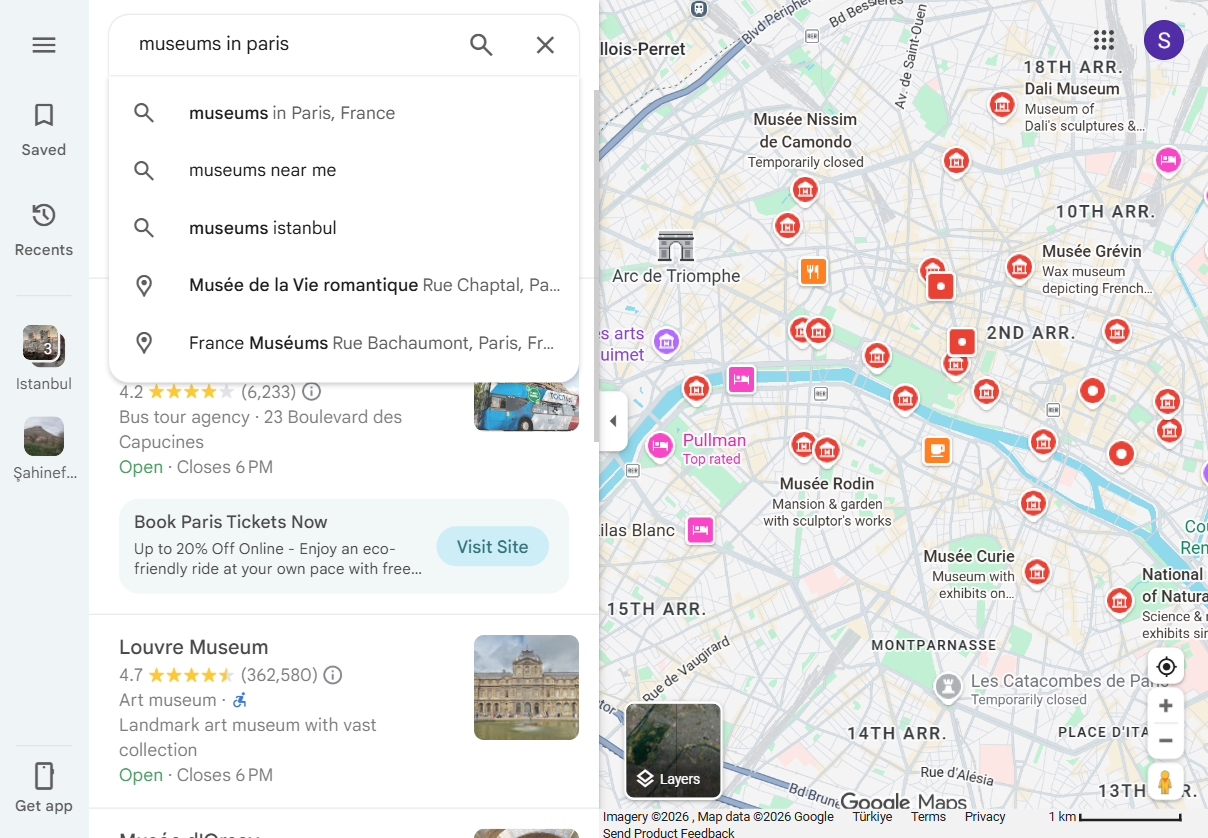
The tbm=map search endpoint returns structured protobuf-over-JSON data instead of HTML. No BeautifulSoup, no CSS selectors, no waiting for JavaScript to render a page. The response is a serialized nested array that can be parsed with regex against predictable field patterns.
This approach is more stable than scraping rendered HTML because the data structure follows Google's internal schema rather than a front-end layout that changes with A/B tests.
And it is significantly faster: one HTTP request instead of a full browser page load.
Prerequisites
The search scraper uses only requests and standard library modules:
pip install requestsA Scrape.do account is needed for the API token. Free tier available at scrape.do/register.

The token goes into the TOKEN variable at the top of each script. All scripts use the placeholder <your_token>.
Understanding the tbm=map Endpoint
Google Maps search queries can be sent to https://www.google.com/search?tbm=map instead of the standard Maps URL. The pb (Protocol Buffers) parameter controls which data fields the server returns. It acts as a field selector: !7i20 requests 20 results per page, and other segments enable metadata like coordinates, ratings, and place types.
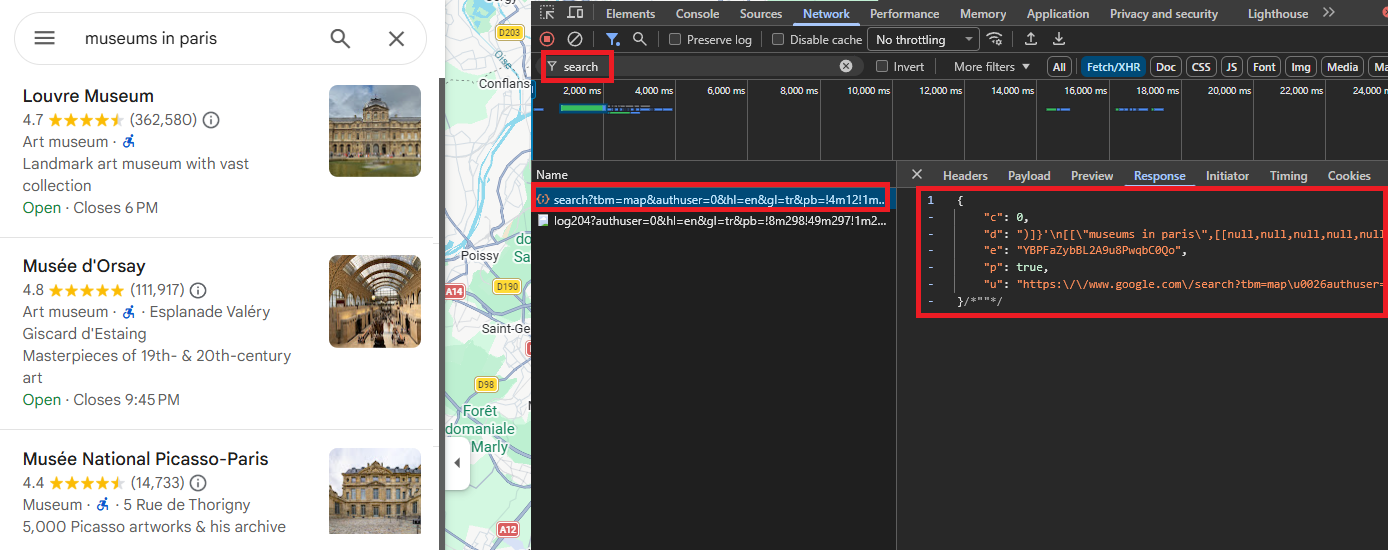
The response starts with )]}'\n, an anti-XSSI prefix Google adds to prevent direct JSON hijacking. Strip this prefix and you get a massive nested JSON array.
Here is how the script sets up the search query and protobuf parameter:
import json
import re
import urllib.parse
import requests

TOKEN = "<your_token>"
SEARCH_QUERY = "museums in paris"

SEARCH_PB = (
    "!1s{query}!7i20!10b1"
    "!12m6!1m1!18b1!2m1!20e3!6m1!114b1"
    "!17m1!3e1"
    "!20m57!2m2!1i203!2i100!3m2!2i4!5b1"
    "!6m6!1m2!1i86!2i86!1m2!1i408!2i240"
    "!7m33!1m3!1e1!2b0!3e3!1m3!1e2!2b1!3e2!1m3!1e2!2b0!3e3"
    "!1m3!1e8!2b0!3e3!1m3!1e10!2b0!3e3!1m3!1e10!2b1!3e2"
    "!1m3!1e10!2b0!3e4!1m3!1e9!2b1!3e2!2b1!9b0"
    "!15m8!1m7!1m2!1m1!1e2!2m2!1i195!2i195!3i20"
)
Each ! segment in the SEARCH_PB string is a protobuf field selector. The {query} placeholder gets URL-encoded before insertion, and the full target URL points to google.com/search?tbm=map.
Sending the Request Through Scrape.do
Google Maps blocks direct requests from datacenter IPs and requires cookie/session handling to avoid CAPTCHAs. Rotating proxies are essential here. Scrape.do's super=true parameter handles residential proxy rotation and anti-bot bypass in a single API call.
pb = SEARCH_PB.format(query=urllib.parse.quote_plus(SEARCH_QUERY))

TARGET_URL = (
    f"https://www.google.com/search?tbm=map&hl=en&gl=us"
    f"&q={urllib.parse.quote_plus(SEARCH_QUERY)}"
    f"&pb={urllib.parse.quote(pb, safe='')}"
)

api_url = (
    f"http://api.scrape.do/?token={TOKEN}"
    f"&url={urllib.parse.quote(TARGET_URL)}"
    f"&geoCode=us&super=true"
)

response = requests.get(api_url, timeout=60)
The target URL is URL-encoded and passed as the url parameter to api.scrape.do. The geoCode=us parameter ensures the proxy IP is US-based, which affects which business listings Google returns. The response validation checks for the )]}'\n prefix to confirm the response is genuine Google data, not an error page.
Parsing Place Data with Regex
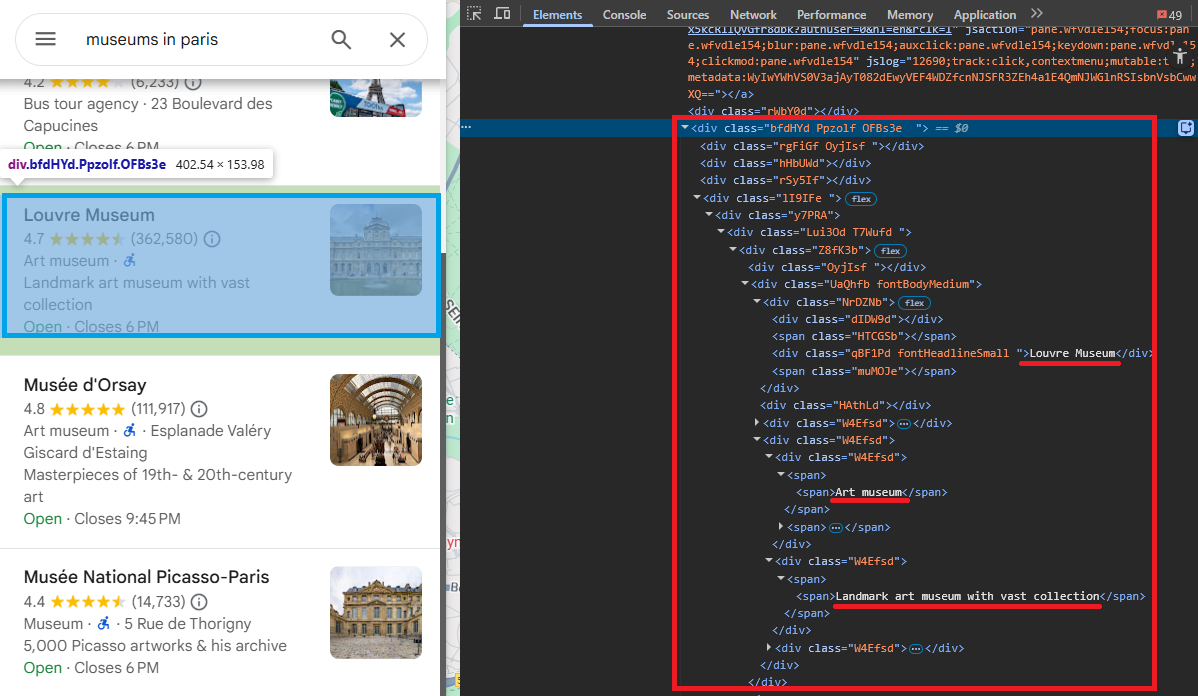
The response is a deeply nested JSON array. Navigating it by array indices is brittle because Google shifts positions between updates. A regex-based approach targets predictable field patterns that remain consistent: rating and review count appear as rating, review_count], followed by the feature ID in hex format, the place name, a null separator, and a type array.
PLACE_PATTERN = re.compile(
    r',\s*(\d\.\d),\s*(\d+)\]'          # rating, review_count
    r'.*?'                                # intervening metadata
    r'"(0x[0-9a-f]+:0x[0-9a-f]+)"'       # feature_id
    r',\s*"([^"]{2,80})"'                # name
    r',\s*null'                           # null separator
    r',\s*\[((?:"[^"]*"(?:,\s*)?)+)\]',  # ["type1", "type2", ...]
    re.DOTALL,
)
Five capture groups pull out the key fields: rating (e.g., 4.7), review count (e.g., 362532), feature ID (e.g., 0x47e671d877937b0f:0xb975fcfa192f84d4), place name (e.g., Louvre Museum), and type array (e.g., "Art museum", "Museum"). A seen set deduplicates by feature ID since the same place can match multiple times in the response.
For each regex match, the script grabs a context window (500 chars before, 5000 chars after) and searches for nearby fields:
for m in PLACE_PATTERN.finditer(text):
    fid = m.group(3)
    if fid in seen:
        continue
    seen.add(fid)

    name = m.group(4)
    start = max(0, m.start() - 500)
    end = min(len(text), m.end() + 5000)
    ctx = text[start:end]

    addr_match = re.search(
        r'"' + re.escape(name) + r',\s*([^"]+)"', ctx
    )
    address = addr_match.group(1).strip() if addr_match else None
Address extraction looks for the pattern "Place Name, address string" in the surrounding context. Website extraction grabs the first non-Google HTTPS URL. Coordinates come from the [null, null, latitude, longitude] pattern. And image URLs match the lh3.googleusercontent.com/gps-cs-s/ prefix.
Each place ends up as a dict with 10 fields: name, feature_id, rating, review_count, types, address, website, latitude, longitude, and image.
Saving Search Results to JSON
The results write to maps_search_results.json with ensure_ascii=False for international characters (French museum names, accented addresses).
with open("maps_search_results.json", "w", encoding="utf-8") as f:
    json.dump(all_results, f, indent=2, ensure_ascii=False)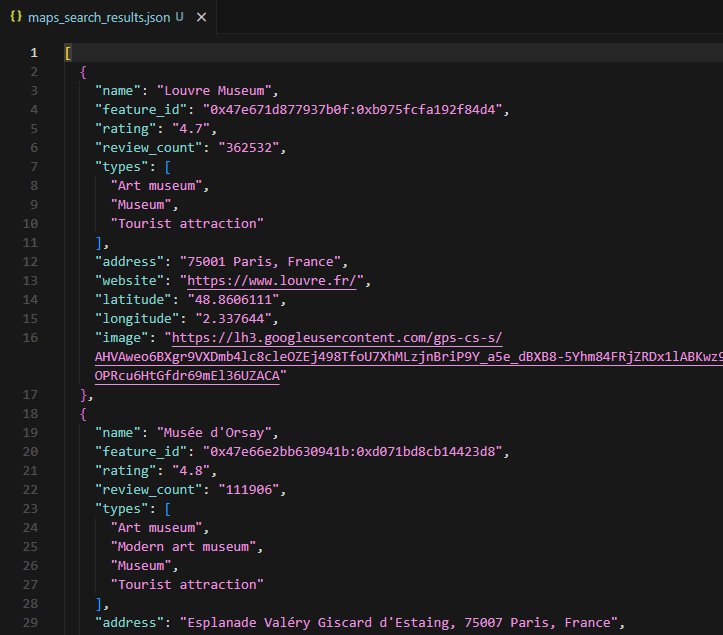
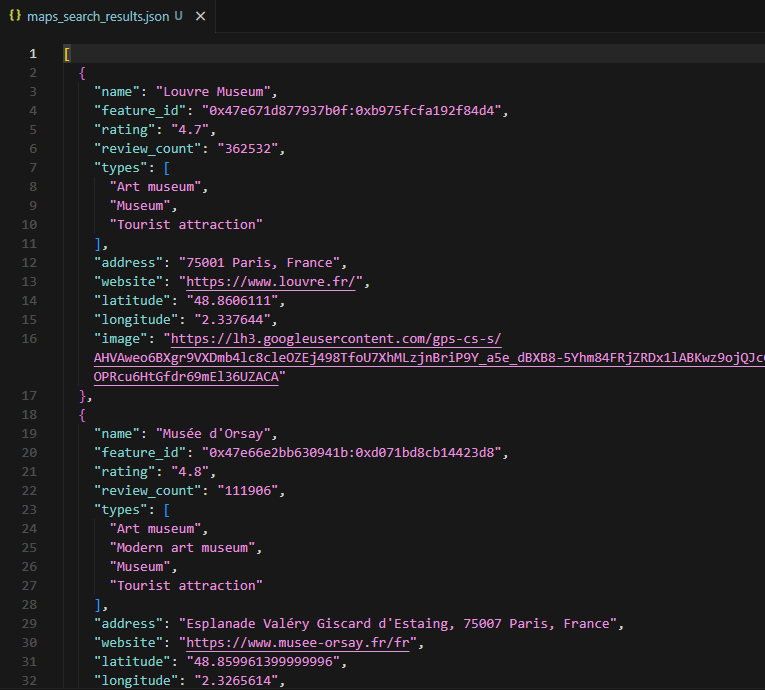
The sample output for "museums in paris" contains 20 places. The Louvre Museum shows up with rating 4.7, 362,532 reviews, types ["Art museum", "Museum", "Tourist attraction"], address "75001 Paris, France", and coordinates 48.86/2.34.
The feature ID is the key field here. It is the unique identifier that connects search results to the detail and review scrapers. Every feature ID from this output can feed directly into the next two scripts.
Search: The Quick Way
If you don't want to manage the protobuf parsing or paginate manually, the /plugin/google/maps/search endpoint handles everything and returns the same fields as parsed JSON. Each request costs 10 credits.
curl "https://api.scrape.do/plugin/google/maps/search?q=museums+in+paris&hl=fr&gl=fr&google_domain=google.fr&token=<your_token>"The response includes local_results[] with place_id, data_id, gps_coordinates, rating, reviews, address, operating_hours, phone, website, and 20+ more fields per place. Pass start=20, 40, 60… to paginate (up to ~120 results per query). No regex, no offset arithmetic.
{
  "local_results": [
    {
      "position": 1,
      "title": "Louvre Museum",
      "place_id": "ChIJD3uTd9hx5kcR1IQvGfr8dbk",
      "data_id": "0x47e66e2964e34e2d:0xb9756db3a9643894",
      "rating": 4.7,
      "reviews": 362532,
      "type": "Art museum",
      "address": "75001 Paris, France",
      "gps_coordinates": { "latitude": 48.8606, "longitude": 2.3376 }
    }
  ]
}
Extracting Place Details from a Single Location
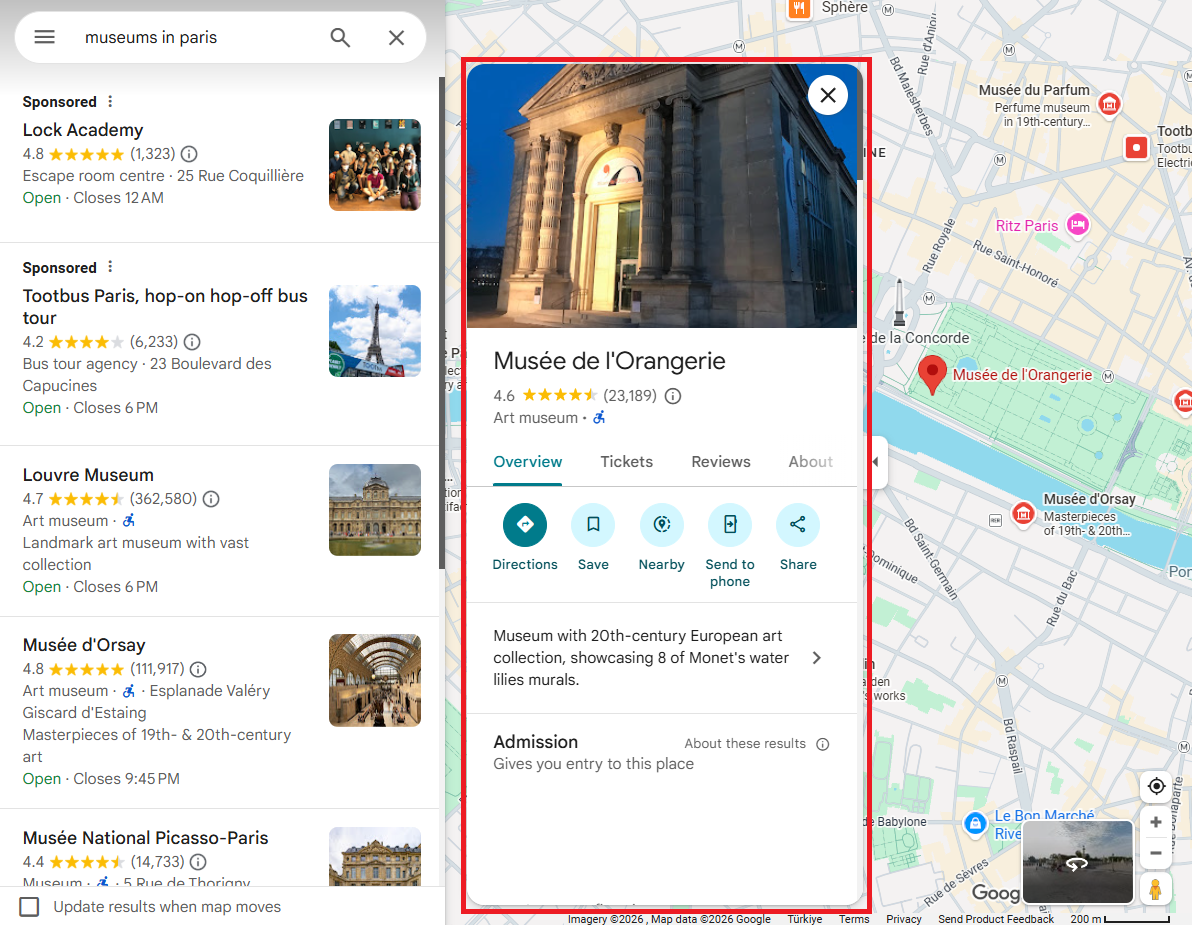
Search results provide summary data: name, rating, address, types. But a full place detail page adds phone number, website, business hours, editorial description, and higher-resolution images. If you are building a lead database, you need these fields.
Google exposes place details through a /maps/preview/place endpoint that also returns protobuf-over-JSON. The input is a feature ID, which can come from the search results scraper or directly from a Google Maps URL.
Look at this URL for Musee de l'Orangerie:
https://www.google.com/maps/place/Mus%C3%A9e+de+l'Orangerie/...
/data=!4m10!...!1s0x47e66e2eeaaaaaa3:0xdc3fd08aa701960a!...
The feature ID 0x47e66e2eeaaaaaa3:0xdc3fd08aa701960a is right there in the URL. That is the input the detail scraper needs.
Building the Detail Request
The /maps/preview/place endpoint takes a pb parameter with the feature ID embedded. The pb string includes field selectors for all detail data.
TOKEN = "<your_token>"
FEATURE_ID = "0x47e66e2eeaaaaaa3:0xdc3fd08aa701960a"

DETAIL_PB = (
    "!1m14!1s{fid}"
    "!3m9!1m3!1d5000!2d0!3d0!2m0!3m2!1i1024!2i768!4f13.1"
    "!4m2!3d0!4d0"
    "!13m1!2m0"
    "!15m47!1m8!4e2!18m5!3b0!6b0!14b1!17b1!20b1!20e2!4b1"
    "!10m1!8e3!11m1!3e1!17b1!20m2!1e3!1e6!24b1!25b1!26b1!29b1"
    "!30m1!2b1!36b1!43b1!52b1!55b1!56m1!1b1"
    "!65m5!3m4!1m3!1m2!1i224!2i298"
    "!22m1!1e81!29m0!30m6!3b1!6m1!2b1!7m1!2b1!9b1!32b1!37i771"
)
The !1s{fid} segment injects the feature ID. Other segments request specific data fields: !1i1024!2i768 sets the viewport for photo resolution, !4e2 enables review metadata, !17b1 enables business hours. The target URL points to google.com/maps/preview/place with the encoded pb parameter.
The Scrape.do API call uses the same super=true and geoCode=us parameters as the search scraper:
TARGET_URL = (
    f"https://www.google.com/maps/preview/place"
    f"?authuser=0&hl=en&gl=us"
    f"&pb={urllib.parse.quote(pb, safe='')}"
)

api_url = (
    f"http://api.scrape.do/?token={TOKEN}"
    f"&url={urllib.parse.quote(TARGET_URL)}"
    f"&geoCode=us&super=true"
)

response = requests.get(api_url, timeout=60)
The response validation checks for the same )]}'\n anti-XSSI prefix. If it is missing, the response is likely an error page or CAPTCHA.
Extracting Detail Fields
Each field is extracted with a targeted regex pattern against the serialized response. Same strategy as the search scraper, but with more field-specific patterns.
Name and types:
fid_match = re.search(
    r'"(0x[0-9a-f]+:0x[0-9a-f]+)",'
    r'\s*"([^"]+)",\s*null,'
    r'\s*\[((?:"[^"]*"(?:,\s*)?)+)\]',
    text,
)
name = fid_match.group(2) if fid_match else None
types = re.findall(r'"([^"]+)"', fid_match.group(3)) if fid_match else []
The regex matches "feature_id", "name", null, ["type1", "type2"]. Rating and review count sit before the feature ID block in the response, following the rating, review_count] pattern.
The full address appears as "Place Name, full address string" in the response. The detail page returns the complete address including street number, which the search results sometimes truncate.
Website extraction is more specific here. The URL appears before the feature ID, paired with a clean domain string:
if fid_match:
    before_fid = text[:fid_match.start()]
    for wm in re.finditer(
        r'"(https?://[^"]+)",\s*"([a-z0-9][a-z0-9.-]+\.[a-z]{2,})"',
        before_fid
    ):
        url = wm.group(1)
        if "google" not in url and "gstatic" not in url:
            website = url
            break
Phone number matches the international format pattern "+digits and spaces". Coordinates use the same [null, null, lat, lng] pattern. Editorial description sits in arrays like [null, "Description text", null, null, null, 1], and the regex filters out URLs and hex strings to avoid false matches.
Business hours require their own pattern. Each day appears as ["Monday", ...[[" 9 AM-5 PM":
hours = {}
days_pattern = re.findall(
    r'\["(Monday|Tuesday|Wednesday|Thursday|Friday|Saturday|Sunday)"'
    r'.*?\[\["([^"]+)"',
    text,
)
for day, time_str in days_pattern:
    if day not in hours:
        cleaned = re.sub(r"[\u200b\u202f\xa0]", " ", time_str)
        hours[day] = cleaned.replace("\u2013", "-").replace("\u2014", "-")
Unicode whitespace characters (\u200b, \u202f, \xa0) need cleaning, and Google's special dash characters get normalized to standard hyphens. (Ask me how I found out about the invisible zero-width spaces. The hard way.)
Saving Place Details to JSON
The script assembles all 12 fields into a single dict and writes to maps_place_details.json.
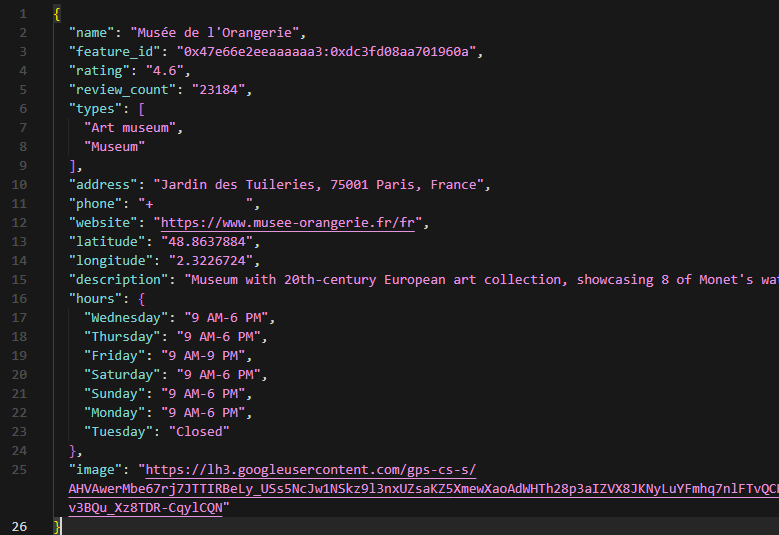
The output for Musee de l'Orangerie shows: rating 4.6, 23,184 reviews, types ["Art museum", "Museum"], full address "Jardin des Tuileries, 75001 Paris, France", phone "+33 1 44 50 43 00", website, coordinates, editorial description ("Museum with 20th-century European art collection, showcasing 8 of Monet's water lilies murals."), and business hours for all 7 days (Tuesday: Closed).
Compared to the search results entry for the same place, the detail scraper adds three critical fields for lead generation: phone, description, and hours. These are not available in the tbm=map response.
Place Details: The Quick Way
The /plugin/google/maps/place endpoint takes a place_id or data_cid from the search response and returns the enriched record: phone, hours, description, menu link, popular times, user reviews, plus code, rating summary, editorial summary, and a full images array. Each request costs 10 credits.
curl "https://api.scrape.do/plugin/google/maps/place?place_id=ChIJD3uTd9hx5kcR1IQvGfr8dbk&token=<your_token>"{
"place_results": {
"title": "Louvre Museum",
"address": "75001 Paris, France",
"rating": 4.7,
"reviews": 362532,
"phone": "+33 1 40 20 50 50",
"operating_hours": { "monday": "9 AM–6 PM", "tuesday": "Closed", "wednesday": "9 AM–6 PM" },
"popular_times": { "saturday": [{ "hour": 14, "busyness": 95 }] },
"menu": null,
"summary": "Iconic museum housing the Mona Lisa and 35,000 other works of art."
}
}Scraping Google Maps Reviews
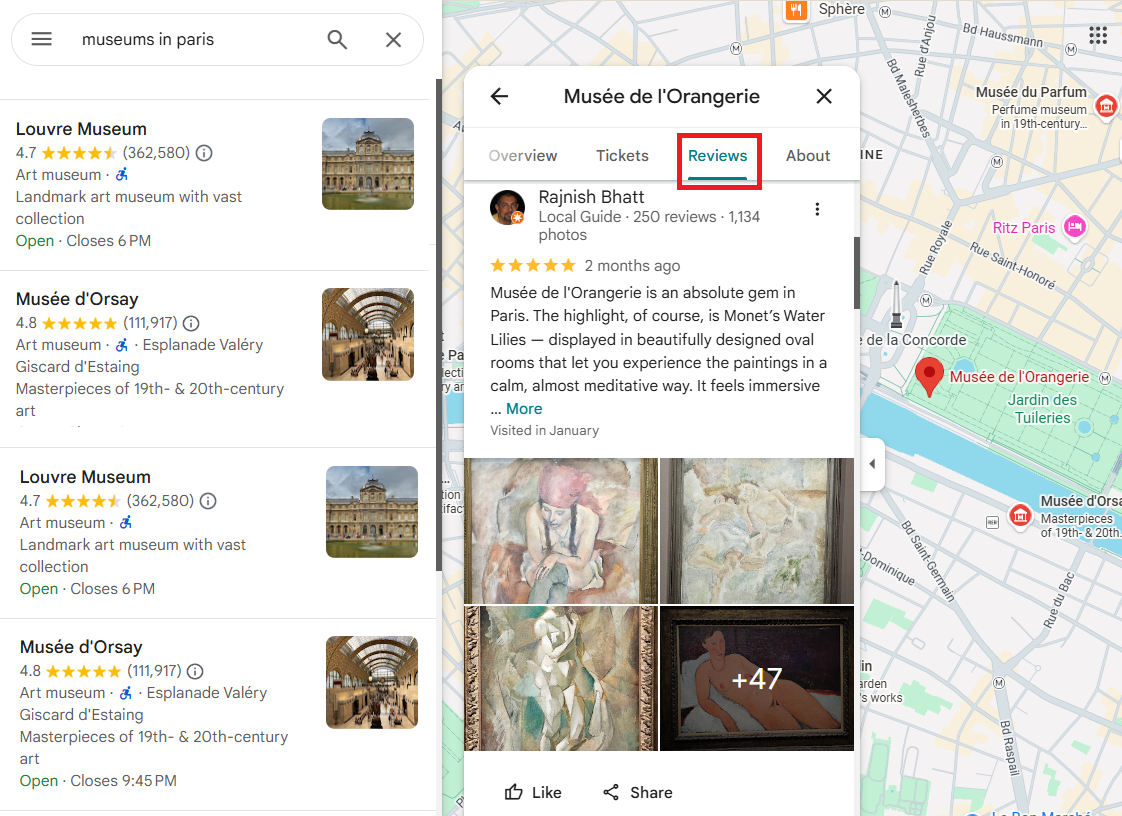
Google Maps reviews contain rating, review text, timestamp, reviewer name, reviewer badge (e.g., "Local Guide"), visited date, and language tag. For businesses looking to analyze customer sentiment or competitors researching service quality, reviews are the most actionable data layer on Google Maps. Researchers working with academic institutions listed on Maps can complement this location data with citation metrics from Google Scholar.
Reviews are served through a separate RPC endpoint: /maps/preview/review/listentitiesreviews. This endpoint returns pure JSON (after stripping the anti-XSSI prefix), not HTML. A single request returns up to 10 reviews, and incrementing the offset by 10 paginates through the full review set.
The endpoint supports four sort modes: 1 = most relevant, 2 = newest, 3 = highest rated, 4 = lowest rated.
Converting the Feature ID for the Reviews Endpoint
The reviews endpoint requires the feature ID in a different format. The two hex halves need to be converted to signed 64-bit integers.
import json
import sys
import struct
import urllib.parse
import requests

sys.stdout.reconfigure(encoding="utf-8")

TOKEN = "<your_token>"
FEATURE_ID = "0x47e66e00f9521b7d:0xc8c16b75253918c1"

parts = FEATURE_ID.split(":")
fid1 = struct.unpack(">q", bytes.fromhex(parts[0][2:]))[0]
fid2 = struct.unpack(">q", bytes.fromhex(parts[1][2:]))[0]
Each hex half is stripped of the 0x prefix, converted to bytes with bytes.fromhex(), then unpacked as a signed 64-bit big-endian integer with struct.unpack(">q", ...). The sys.stdout.reconfigure(encoding="utf-8") line handles international characters in reviews (Japanese, Turkish, etc.) that would break on default Windows console encoding.
Building the Review Request
The pb parameter controls pagination and sorting:
SORT_RELEVANT = 1
OFFSET = 0

pb = (
    f"!1m2!1y{fid1}!2y{fid2}"
    f"!2m1!2i{OFFSET}"
    f"!3e{SORT_RELEVANT}"
    f"!4m5!3b1!4b1!5b1!6b1!7b1"
    f"!5m2!1s{FEATURE_ID}!7e81"
)

TARGET_URL = (
    f"https://www.google.com/maps/preview/review/listentitiesreviews"
    f"?authuser=0&hl=en&gl=us"
    f"&pb={urllib.parse.quote(pb, safe='')}"
)
!1m2!1y{fid1}!2y{fid2} passes the two signed integer halves. !2m1!2i{OFFSET} sets the page offset (0 for the first 10 reviews, 10 for the next 10). !3e{SORT_RELEVANT} controls the sort order. And !4m5 enables review text, photos, badges, and language fields.
The Scrape.do API URL follows the same pattern as the other two scrapers.
Parsing the Review Response
Unlike the search and detail scrapers, the review response is clean enough for direct JSON parsing instead of regex:
if text.startswith(")]}'"):
    text = text[text.index("\n") + 1:]

data = json.loads(text)
Aggregate stats sit in data[5], which holds the star distribution as a 5-element array: [1-star count, 2-star count, 3-star count, 4-star count, 5-star count]. Overall rating is calculated as a weighted average.
dist = data[5] if data[5] else []
total_reviews = sum(dist) if dist else 0
overall_rating = (
    round(sum((i + 1) * c for i, c in enumerate(dist)) / total_reviews, 1)
    if total_reviews
    else None
)
Individual reviews live in data[2]. Each review is a nested array with fields at specific indices:
for rev in raw_reviews:
    author_info = rev[0] if rev[0] else []
    reviews.append({
        "reviewer": author_info[1] if len(author_info) > 1 else None,
        "rating": rev[4],
        "time": rev[1],
        "text": rev[3],
        "language": rev[32] if len(rev) > 32 else None,
        "visited": rev[45] if len(rev) > 45 and rev[45] else None,
    })
rev[0] holds author info (name, profile URL, photo). rev[4] is the star rating. rev[1] is the relative timestamp ("2 weeks ago", "3 months ago"). rev[3] is the full review text. And the reviewer's badge (like "Local Guide" with review count) is buried deep at rev[12][1][10].
Pagination and Sort Options
Each request returns up to 10 reviews. To collect more, increment OFFSET by 10 and send another request. A production loop would start at OFFSET = 0, check if data[2] returned results, increment by 10, and repeat until no more reviews come back.
The four sort modes produce different review sets. 1 (relevant) gives Google's default ranking, mixing recent and high-engagement reviews. 2 (newest) is chronological, useful for monitoring recent sentiment. 3 (highest) returns 5-star reviews first, good for extracting positive testimonials. 4 (lowest) returns 1-star reviews first, useful for complaint analysis.
Changing the sort value in the pb parameter is all that is needed. No other request parameters change.
Saving Reviews to JSON
The output dict includes feature_id, overall_rating, total_reviews, rating_distribution (per-star counts), extracted_count, and the reviews array. It writes to maps_reviews.json.
The sample output for Carnavalet Museum contains 20 reviews. Star distribution: 8,899 five-star, 2,060 four-star, 407 three-star, 112 two-star, 128 one-star. The overall rating calculates to 4.7 from 11,606 total reviews. Reviews include text in English with relative timestamps and visited dates.
Reviews: The Quick Way
The /plugin/google/maps/reviews endpoint takes a data_id or place_id and returns paginated reviews with star rating, ISO dates, full text, images, user profile data (including Local Guide badge and review/photo counts), guided review details (food/service/atmosphere ratings for restaurants, bed/location for hotels), and inline owner responses. First page also returns topics[] with the keyword clusters Google identified across the place's reviews.
curl "https://api.scrape.do/plugin/google/maps/reviews?data_id=0x47e66e2964e34e2d:0xb9756db3a9643894&sort_by=newestFirst&token=<your_token>"{
"place_info": {
"title": "Louvre Museum",
"rating": 4.7,
"reviews": 362532
},
"topics": [
{ "keyword": "mona lisa", "mentions": 4892 },
{ "keyword": "tickets", "mentions": 1230 }
],
"reviews": [
{
"rating": 5,
"iso_date": "2026-04-19T14:00:00Z",
"snippet": "Incredible. Plan for at least 4 hours.",
"user": { "name": "Marc D.", "local_guide": true, "reviews": 312 },
"details": { "atmosphere": 5 }
}
],
"pagination": { "next_page_token": "CAESY0NB..." }
}sort_by accepts newestFirst, ratingHigh, ratingLow (or omit for relevance). topic_id from the topics array filters reviews to a specific topic; query filters by keyword search. Each request costs 10 credits.
Conclusion
Three extraction layers cover the full Google Maps data pipeline: search listings for bulk discovery, place details for complete business profiles, and reviews for sentiment and feedback data. If your pipeline also requires media monitoring, the same proxy-based approach applies to Google News.
The tbm=map and /maps/preview/ endpoints return structured protobuf-over-JSON, avoiding HTML parsing entirely. For approaches that do require HTML parsing, BeautifulSoup is the standard Python web scraping tool. Scrape.do's super=true parameter handles the anti-bot layer so the scripts focus on data extraction rather than request engineering.
The feature ID acts as the connector between all three layers. Search results return feature IDs, which feed into the detail and review scrapers. A pipeline that combines all three gives you name, category, phone, website, hours, ratings, and full review text for every business in a search query.
For teams evaluating structured API alternatives instead of raw scraping, the best SERP APIs comparison covers 8 providers with Google Search endpoints.
So what does this look like in practice? A single search query returns 20 businesses. Expand that across 50 cities and you have a lead list of 1,000 businesses with verified phone numbers, websites, ratings, and customer sentiment. For e-commerce businesses, pairing this with Google Shopping product data creates a complete competitive picture. That is the kind of dataset that turns cold outreach into informed outreach.
Get 1000 free credits and start scraping with Scrape.do
FAQ
How many results does a single Google Maps search request return?
The !7i20 segment in the protobuf parameter requests 20 results per page. Google typically returns between 15 and 20 results depending on the query and location. The same pb parameter can be modified to request different page sizes, though 20 is the practical maximum per request.
Can the reviews scraper collect all reviews for a place?
Each request returns up to 10 reviews. Pagination through the offset parameter (!2m1!2i{offset}) allows collecting the full review set. A place with 11,606 reviews (like Carnavalet Museum) would require approximately 1,161 paginated requests. Rate limiting and Scrape.do credit consumption should be factored into large-scale extraction plans.
Why use the tbm=map endpoint instead of scraping the regular Maps page?
The regular Google Maps page loads results through JavaScript rendering, requiring a headless browser. The tbm=map endpoint returns the same data as structured JSON (protobuf format), parseable with regex or direct JSON indexing. Faster (single HTTP request vs. browser page load), more reliable (no rendering failures), and cheaper (no render=true parameter required on Scrape.do).
What does the super=true parameter do?
super=true activates Scrape.do's premium proxy pool with residential IPs and advanced anti-bot bypass. Google Maps aggressively blocks datacenter IPs and requires valid browser fingerprints. The super=true mode handles TLS fingerprinting, cookie management, and IP rotation automatically. Without it, Google returns CAPTCHAs or empty responses for most Maps endpoints.
Is it possible to filter reviews by language?
The reviews endpoint returns reviews in all languages by default. The hl=en parameter in the request URL influences which language Google prioritizes but does not filter exclusively. Each review includes a language field (e.g., "en", "fr", "ja") that can be used for post-extraction filtering in Python.
Software Engineer








