Category:Scraping Use Cases
How to Scrape Google Scholar: Extract Search Results and Author Profiles with Python

Head of Marketing


Google Scholar is the go-to search engine for finding academic papers.
It seems pretty straightforward to set up bots to scrape data at scale, but scraping Google is never easy.
In this guide we're handling all that, extracting: search results with pagination, paper content downloads via Scrape.do's markdown output, and author profiles with full citation data.
You can find the complete scripts in the GitHub repository.
Scraping Google Scholar Search Results
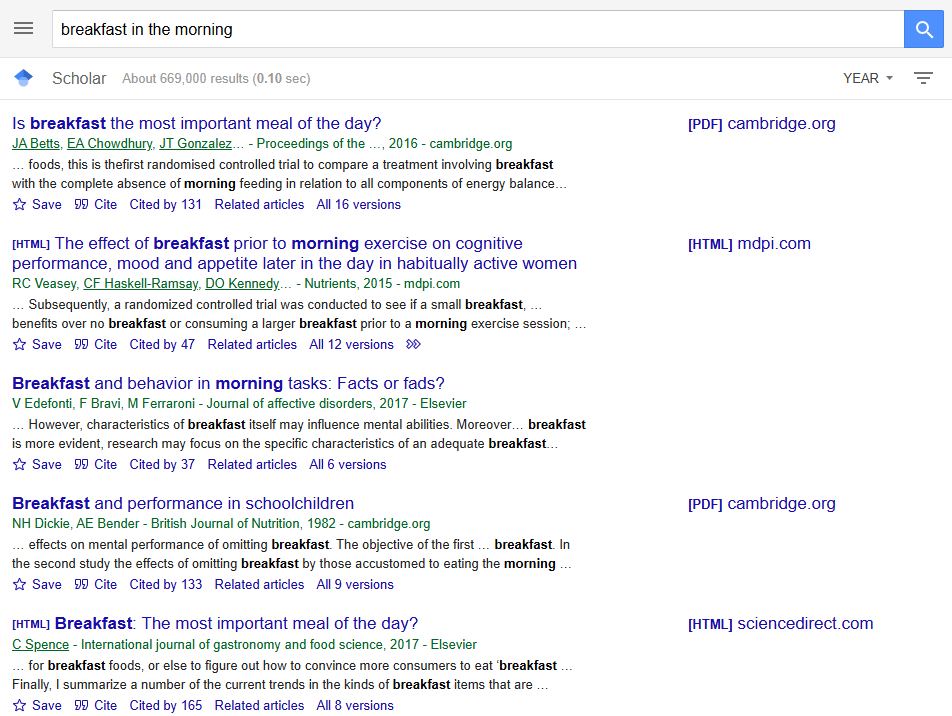
Google Scholar serves fully server-side rendered HTML. That means the HTML comes back with everything in it.
The target data per result: paper title, author line, snippet/description, and direct link to the source. Scholar returns 10 results per page, with pagination controlled by a start URL parameter (0, 10, 20, etc.).
Prerequisites
The scraper uses requests and beautifulsoup4:
pip install requests beautifulsoup4A Scrape.do account provides the API token. Free tier available at scrape.do/register.

Building the Search Query URL
Scholar search URLs follow the pattern: https://scholar.google.com/scholar?hl=en&as_sdt=0%2C5&q={query}&btnG=. The q parameter holds the search query, URL-encoded via urllib.parse.quote_plus(). The hl=en forces English interface, and as_sdt=0%2C5 sets the search type to articles.
import json
import os
import urllib.parse
import requests
from bs4 import BeautifulSoup
import time

TOKEN = "<your_token>"
SEARCH_QUERY = "breakfast in the morning"
TARGET_URL = (
    f"https://scholar.google.com/scholar?hl=en&as_sdt=0%2C5"
    f"&q={urllib.parse.quote_plus(SEARCH_QUERY)}&btnG="
)
MAX_PAGES = 3
The script constructs the base URL once, then appends &start={offset} for subsequent pages. MAX_PAGES controls how deep the pagination goes.
Parsing Search Result HTML
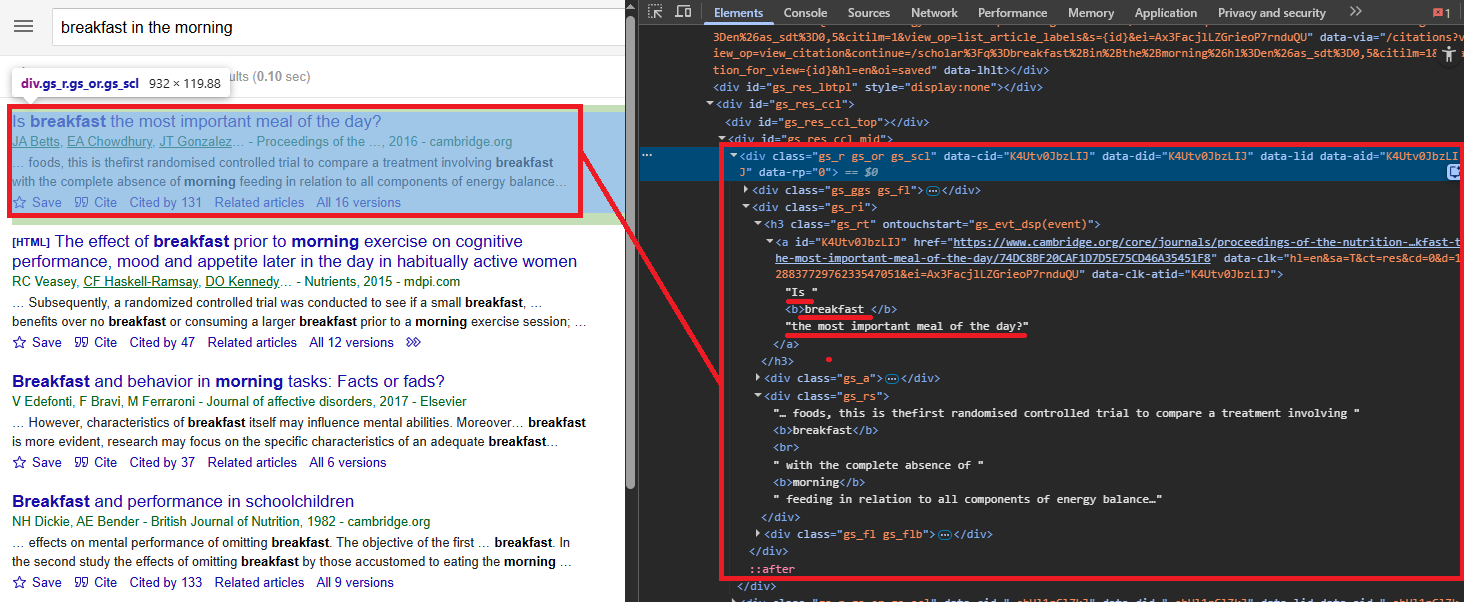
Each search result lives inside a div.gs_ri container. The paper title is in an h3.gs_rt element, which wraps an <a> tag linking to the source. Some results (citations, books) lack a clickable link. The snippet sits in div.gs_rs, and the author line (authors, journal, year, publisher) is in div.gs_a.
all_results = []

for page_num in range(MAX_PAGES):
    start_index = page_num * 10
    page_url = (
        TARGET_URL if page_num == 0
        else f"{TARGET_URL}&start={start_index}"
    )

    api_url = (
        f"http://api.scrape.do/?token={TOKEN}"
        f"&url={urllib.parse.quote(page_url)}&super=true"
    )
    response = requests.get(api_url, timeout=60)
    soup = BeautifulSoup(response.text, "html.parser")
The page loop iterates MAX_PAGES times, calculates the start index as page_num * 10, and sends each URL through Scrape.do with super=true. No render parameter needed since Scholar is server-side rendered.
For each result container, the script pulls four fields:
    for result in soup.find_all("div", class_="gs_ri"):
        title_elem = result.find("h3", class_="gs_rt")
        if not title_elem:
            continue

        link_elem = title_elem.find("a")
        title = (
            link_elem.get_text(strip=True) if link_elem
            else title_elem.get_text(strip=True)
        )
        link = link_elem.get("href") if link_elem else None

        snippet_elem = result.find("div", class_="gs_rs")
        author_elem = result.find("div", class_="gs_a")

        all_results.append({
            "title": title,
            "description": snippet_elem.get_text(strip=True) if snippet_elem else None,
            "authors": author_elem.get_text(strip=True) if author_elem else None,
            "link": link,
        })

    time.sleep(1)
The title heading wraps an <a> tag with the actual link to the paper. Some results (like citations or books) might not have a clickable link, so the script falls back to extracting the title text directly from the heading.
A 1-second delay between pages avoids triggering Scholar's rate limits. The time.sleep(1) is not optional here. Scholar will block your IP faster than any other Google property if you skip it.
Saving Search Results to JSON
The script writes all_results to scholar_search_results.json with json.dump(), using indent=2 and ensure_ascii=False for readable Unicode output.
with open("scholar_search_results.json", "w", encoding="utf-8") as f:
    json.dump(all_results, f, indent=2, ensure_ascii=False)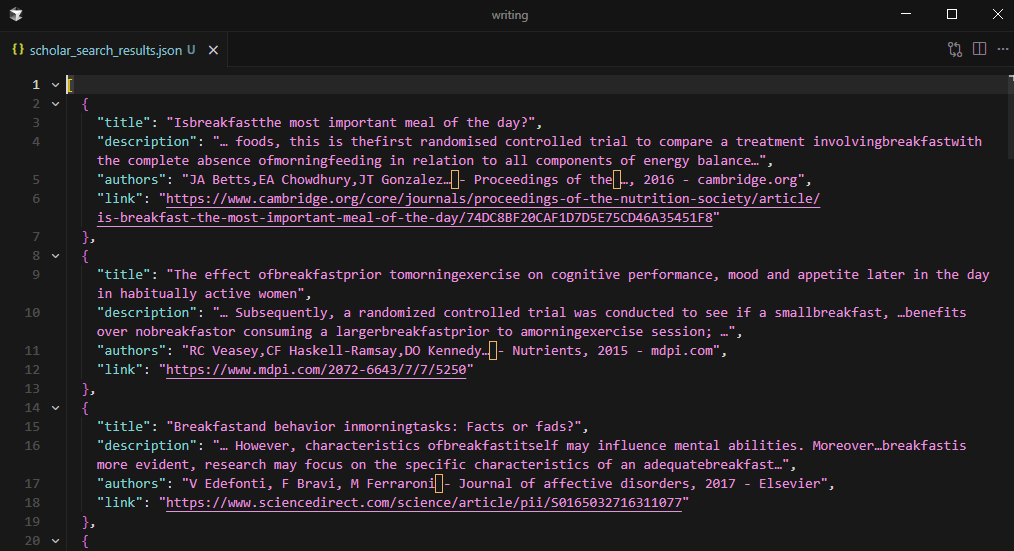
Three pages of results produce approximately 30 papers, each with title, description, authors, and link.
Downloading Paper Content
The search scraper produces a list of paper URLs. The next step converts those URLs into readable content using Scrape.do's output=markdown parameter.
Paper URLs point to diverse hosts: Elsevier, Springer, Cambridge, MDPI, arXiv, and dozens more. Each has different anti-bot measures and rotating proxy requirements. A single request strategy does not work for all of them.
The Fallback Chain Strategy
Three request tiers attempt each paper URL in order, escalating cost and processing time only when necessary:
os.makedirs("scholar_articles", exist_ok=True)

strategies = [
    ("basic", ""),
    ("super", "&super=true"),
    ("super+render", "&super=true&render=true"),
]Basic: no special parameters. Cheapest and fastest. Works for open-access HTML pages with minimal protection (arXiv, PubMed Central).
Super mode (super=true): engages Scrape.do's advanced anti-bot bypass. Handles most publisher paywalls and Cloudflare-protected pages.
Super + Render (super=true&render=true): full headless browser rendering. Required for pages that load content via JavaScript after initial page load.
A response is considered successful only if the status code is 200 AND the returned text is longer than 100 characters. Short responses usually indicate a blocked or empty page.
Downloading and Saving Markdown Files
For each result with a valid link, the script iterates through the three strategies:
for i, r in enumerate(all_results):
    if not r["link"]:
        continue

    content = None
    for strategy_name, params in strategies:
        api_url = (
            f"http://api.scrape.do/?token={TOKEN}"
            f"&url={urllib.parse.quote(r['link'])}"
            f"&output=markdown{params}"
        )
        resp = requests.get(api_url, timeout=90)
        if resp.status_code == 200 and len(resp.text.strip()) > 100:
            content = resp.text
            break

    if content:
        safe_name = "".join(
            c if c.isalnum() or c in " -_" else ""
            for c in r["title"]
        )[:80].strip()
        with open(
            f"scholar_articles/{i + 1:02d}_{safe_name}.md",
            "w", encoding="utf-8"
        ) as f:
            f.write(content)

    time.sleep(1)
The output=markdown parameter tells Scrape.do to convert the fetched HTML into clean Markdown on the server side. Navigation, ads, headers, footers, and other non-content elements get stripped. Only the readable text of the paper or abstract comes back. This avoids writing custom parsing logic for each publisher's unique HTML structure.
Filenames combine a zero-padded index with a sanitized version of the paper title: 01_Paper_Title.md, 02_Paper_Title.md. A 1-second delay between downloads prevents rate-limiting across potentially 30+ sequential requests.
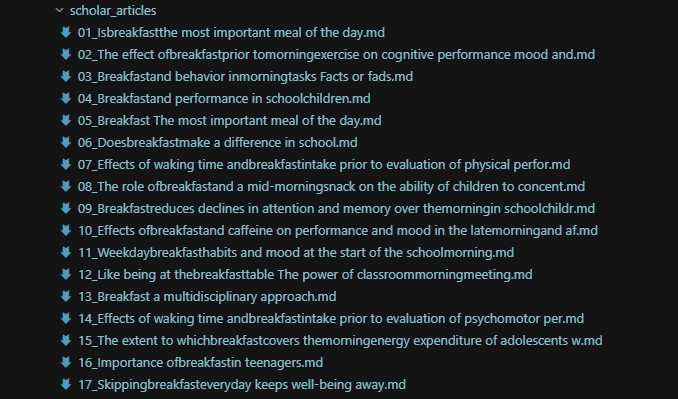
If all three strategies fail for a given URL, the script logs the failure and moves on. PDF-only papers and hard paywalls are the most common failure cases.
Scraping Author Profiles and Citations
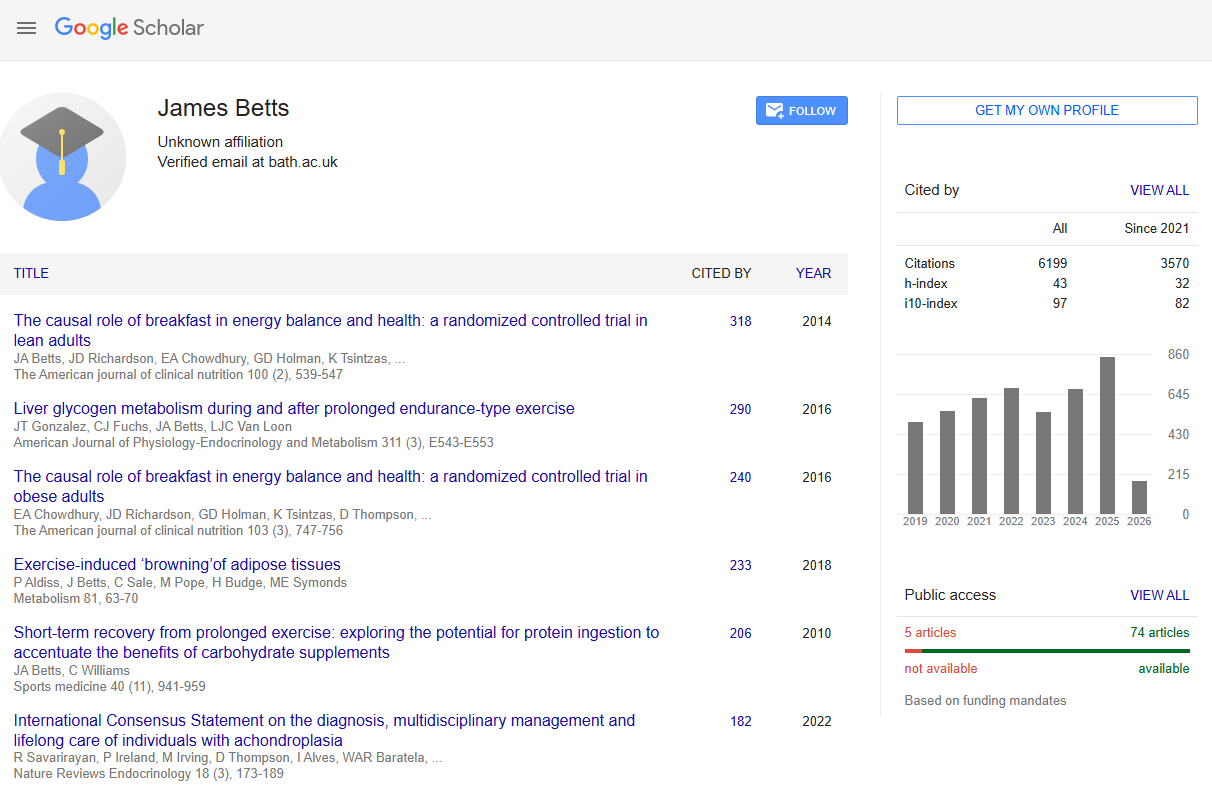
Google Scholar author profile pages contain structured academic metadata: name, institutional affiliation, verified email domain, citation metrics (total and recent), and a paginated list of all published articles. The profile URL format is https://scholar.google.com/citations?user={user_id}, where user_id is a unique Scholar identifier.
Like search results, profile pages are server-side rendered and parseable with BeautifulSoup. The super=true parameter handles bot detection.
Extracting Profile Header Data
The author's name, affiliation, and verified email are in the profile header section:
import json
import urllib.parse
import requests
from bs4 import BeautifulSoup
import time

TOKEN = "<your_token>"
AUTHOR_URL = "https://scholar.google.com/citations?user=qNuSIPAAAAAJ"

api_url = (
    f"http://api.scrape.do/?token={TOKEN}"
    f"&url={urllib.parse.quote(AUTHOR_URL)}&super=true"
)
response = requests.get(api_url, timeout=60)
soup = BeautifulSoup(response.text, "html.parser")
Three elements, three selectors, all plain text:
name = soup.find("div", id="gsc_prf_in")
name = name.get_text(strip=True) if name else None

affiliation_elem = soup.find("div", class_="gsc_prf_il")
affiliation = affiliation_elem.get_text(strip=True) if affiliation_elem else None

email_elem = soup.find("div", id="gsc_prf_ivh")
verified_email = email_elem.get_text(strip=True) if email_elem else None
div#gsc_prf_in for name, div.gsc_prf_il for affiliation, div#gsc_prf_ivh for the verified email notice. No JavaScript rendering needed.
Extracting Citation Metrics
The citation statistics table has the ID gsc_rsb_st. It has three rows: Citations, h-index, i10-index. Each row has columns for "All" and "Since 2020".
total_citations = None
citations_since_2020 = None
citation_table = soup.find("table", id="gsc_rsb_st")

if citation_table:
    for row in citation_table.find_all("tr"):
        cells = row.find_all("td")
        if len(cells) >= 3 and "Citations" in cells[0].get_text():
            total_citations = cells[1].get_text(strip=True)
            citations_since_2020 = cells[2].get_text(strip=True)
The script targets the Citations row specifically, extracting both the all-time and recent counts. Citation counts are plain text in <td> cells. Straightforward.
Paginating Through the Full Article List
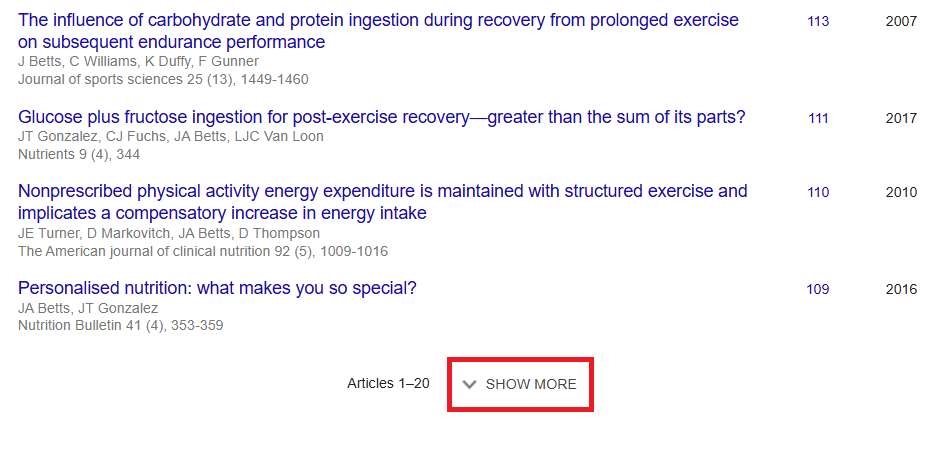
Scholar author pages show 20 articles by default. A "Show More" button triggers an AJAX call for more. But instead of simulating button clicks with a headless browser, the script manipulates URL parameters directly: cstart (starting index) and pagesize (articles per request, max 100).
all_articles = []
PAGE_SIZE = 100
start = 0

while True:
    page_url = f"{AUTHOR_URL}&cstart={start}&pagesize={PAGE_SIZE}"
    api_url = (
        f"http://api.scrape.do/?token={TOKEN}"
        f"&url={urllib.parse.quote(page_url)}&super=true"
    )
    response = requests.get(api_url, timeout=60)
    page_soup = BeautifulSoup(response.text, "html.parser")

    article_rows = page_soup.find_all("tr", class_="gsc_a_tr")
    if not article_rows:
        break
The pagination loop requests 100 articles at a time and continues until a page returns fewer rows than PAGE_SIZE, indicating the end of the list. This avoids browser rendering entirely.
Each article row (tr.gsc_a_tr) contains five fields:
    for row in article_rows:
        title_elem = row.find("a", class_="gsc_a_at")
        if not title_elem:
            continue

        title = title_elem.get_text(strip=True)
        href = title_elem.get("href", "")
        article_link = (
            f"https://scholar.google.com{href}" if href else None
        )

        gray_divs = row.find_all("div", class_="gs_gray")
        authors = gray_divs[0].get_text(strip=True) if len(gray_divs) > 0 else None
        journal = gray_divs[1].get_text(strip=True) if len(gray_divs) > 1 else None

        citations_elem = row.find("a", class_="gsc_a_ac")
        year_elem = row.find("span", class_="gsc_a_h")

        all_articles.append({
            "title": title,
            "authors": authors,
            "journal": journal,
            "citations": citations_elem.get_text(strip=True) if citations_elem else "0",
            "year": year_elem.get_text(strip=True) if year_elem else None,
            "link": article_link,
        })

    if len(article_rows) < PAGE_SIZE:
        break

    start += PAGE_SIZE
    time.sleep(1)
Title in a.gsc_a_at, with an href to the article's Scholar detail page (relative path, needs the https://scholar.google.com prefix). Author and journal info in div.gs_gray elements (first div = authors, second div = journal/venue). Citation count in a.gsc_a_ac. Publication year in span.gsc_a_h.
Saving Author Data to JSON
After pagination completes, the script calculates availability stats: articles with a valid Scholar detail link vs. citation-only entries (no link).
available = sum(1 for a in all_articles if a["link"])
unavailable = len(all_articles) - available

with open("scholar_author_articles.json", "w", encoding="utf-8") as f:
    json.dump(all_articles, f, indent=2, ensure_ascii=False)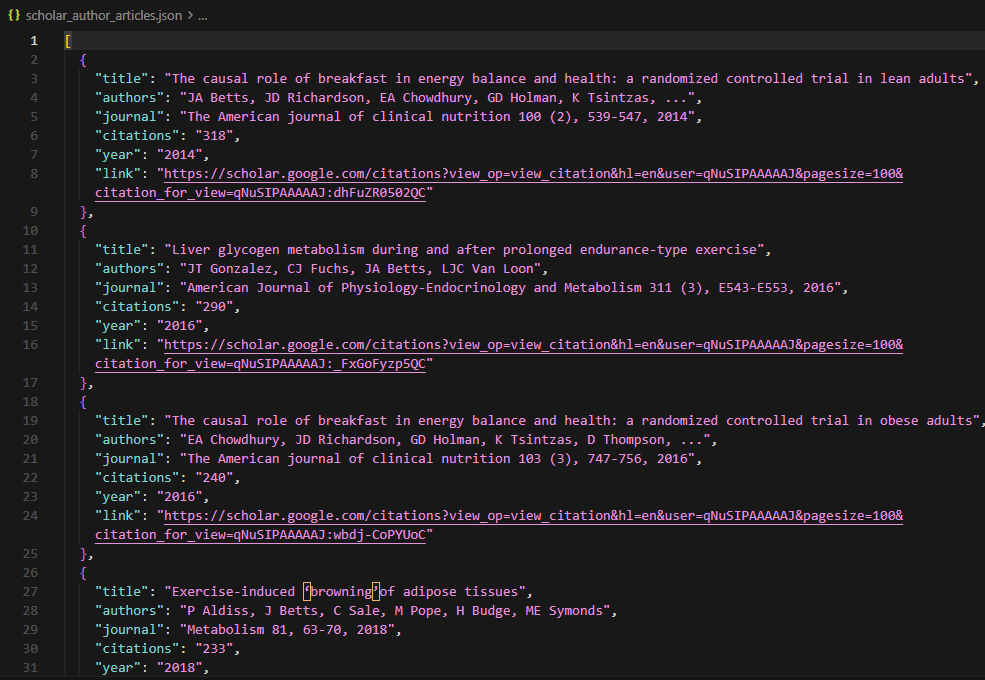
The full article list saves to scholar_author_articles.json. A prolific researcher's profile can contain thousands of articles, and the scraper collects every one of them by paginating with pagesize=100 until no more results return. Each pagination page costs one Scrape.do API call with super=true.
Conclusion
Three data types, three extraction approaches. Search results via paginated queries. Paper content via the markdown download pipeline. And author profiles via URL parameter manipulation.
The super=true parameter is non-negotiable for all Scholar requests. Scholar blocks harder than anything else Google runs, and skipping it means CAPTCHAs on every request.
The fallback chain (basic, super, super+render) for paper downloads balances cost efficiency with coverage across diverse publisher sites. arXiv and PubMed Central work with basic requests. Elsevier and Springer need super mode. JavaScript-heavy journal sites need the full render.
For large-scale research pipelines, combining search result extraction with author profile scraping provides both breadth (topic coverage) and depth (citation metrics, full publication lists). If you are evaluating structured SERP APIs for Google data extraction, the SerpApi alternatives comparison benchmarks six providers on cost and output depth.
Get 1000 free credits and start scraping with Scrape.do
FAQ
Is scraping Google Scholar legal?
Google Scholar's Terms of Service prohibit automated access. The legality depends on jurisdiction, the data being collected, and how it is used. Publicly available academic metadata (titles, abstracts, citation counts) is generally lower-risk than downloading full paper content. Consult legal counsel for commercial or large-scale use cases.
Why does Google Scholar block scrapers so aggressively?
Scholar has stricter rate limits than most Google properties because its user base is smaller and request patterns from scrapers stand out more clearly. Even moderate request volumes (10-20 pages/minute) trigger CAPTCHA challenges. Using super=true through Scrape.do handles these challenges by rotating IPs and managing browser fingerprints.
Can the search scraper handle advanced Scholar search operators?
Google Scholar supports operators like author:, intitle:, source:, and date range filters (as_ylo, as_yhi URL parameters). These operators can be appended directly to the SEARCH_QUERY string or added as URL parameters. The scraper's parsing logic does not change since result HTML structure remains the same regardless of query type.
How many articles can the author profile scraper extract?
The scraper uses pagesize=100 and paginates until no more results return, so it collects the complete publication list. Scholar author profiles can contain thousands of articles (prolific researchers or lab accounts). Each pagination page costs one Scrape.do API call with super=true.
What is the output=markdown parameter doing in the paper download section?
Scrape.do's output=markdown converts the fetched HTML page into clean Markdown text on the server side before returning the response. This strips navigation, ads, headers, footers, and other non-content elements, returning only the readable text of the paper or abstract. It avoids the need to write custom parsing logic for each publisher's unique HTML structure.
Head of Marketing








