Category:Scraping ErrorsView as Markdown
Error 429 Too Many Requests: What It Means and How to Fix It

Founder @ Scrape.do


You opened a page, called an API or ran a script, and the server answered 429 Too Many Requests.
Short answer: A 429 Too Many Requests error means the server counted too many requests from you (your IP address, account or API key) in a set time window and is refusing more for now. It's temporary. Check the
Retry-Afterheader for how long to wait, then slow down instead of retrying right away.
Not a developer? Wait a few minutes and don't keep refreshing, because every refresh is another request against the same limit. If the error comes back, the fixes for users are below. If you're writing code, skip to the developer section. It has a backoff function we tested against a local rate limiter, plus the output of every run.
A 429 is one of the easier errors to fix. The server wants you to slow down, and it often says exactly how long to wait.
What you should do depends on who you are, so the fixes below are split three ways: users, developers and site owners.
What Does 429 Too Many Requests Mean?
429 Too Many Requests is the HTTP status code a server sends when you've made too many requests in a given amount of time. It means you hit a rate limit. The code was defined in RFC 6585 in 2012, and the server may add a Retry-After header telling you how long to wait.
The spec is short. Three details in it explain most of the confusion around this error:
- The wait is optional. RFC 6585 says a 429 "MAY include a Retry-After header". Plenty of servers skip it, and then you have to guess.
- The counting is up to the server. The spec doesn't define how the server identifies you or counts your requests. It can count per IP, per account, per API key or per cookie, on one page or across a whole site.
- It's never cached. Responses with a 429 must not be stored by a cache, so a fresh request always gets a fresh answer.
Here's what one looks like on the wire. We wrote a small local server that allows 3 requests per 10 seconds (the code is in the site owner section), sent 3 requests, then looked at the fourth with curl:
for i in 1 2 3; do curl -s -o /dev/null http://127.0.0.1:8429/; done
curl -si http://127.0.0.1:8429/HTTP/1.0 429 Too Many Requests
Server: BaseHTTP/0.6 Python/3.9.6
Retry-After: 10
Content-Type: text/plain
429 Too Many RequestsRetry-After: 10 means "come back in 10 seconds". MDN's own example uses Retry-After: 3600, a full hour, which is closer to what an hourly API quota sends.
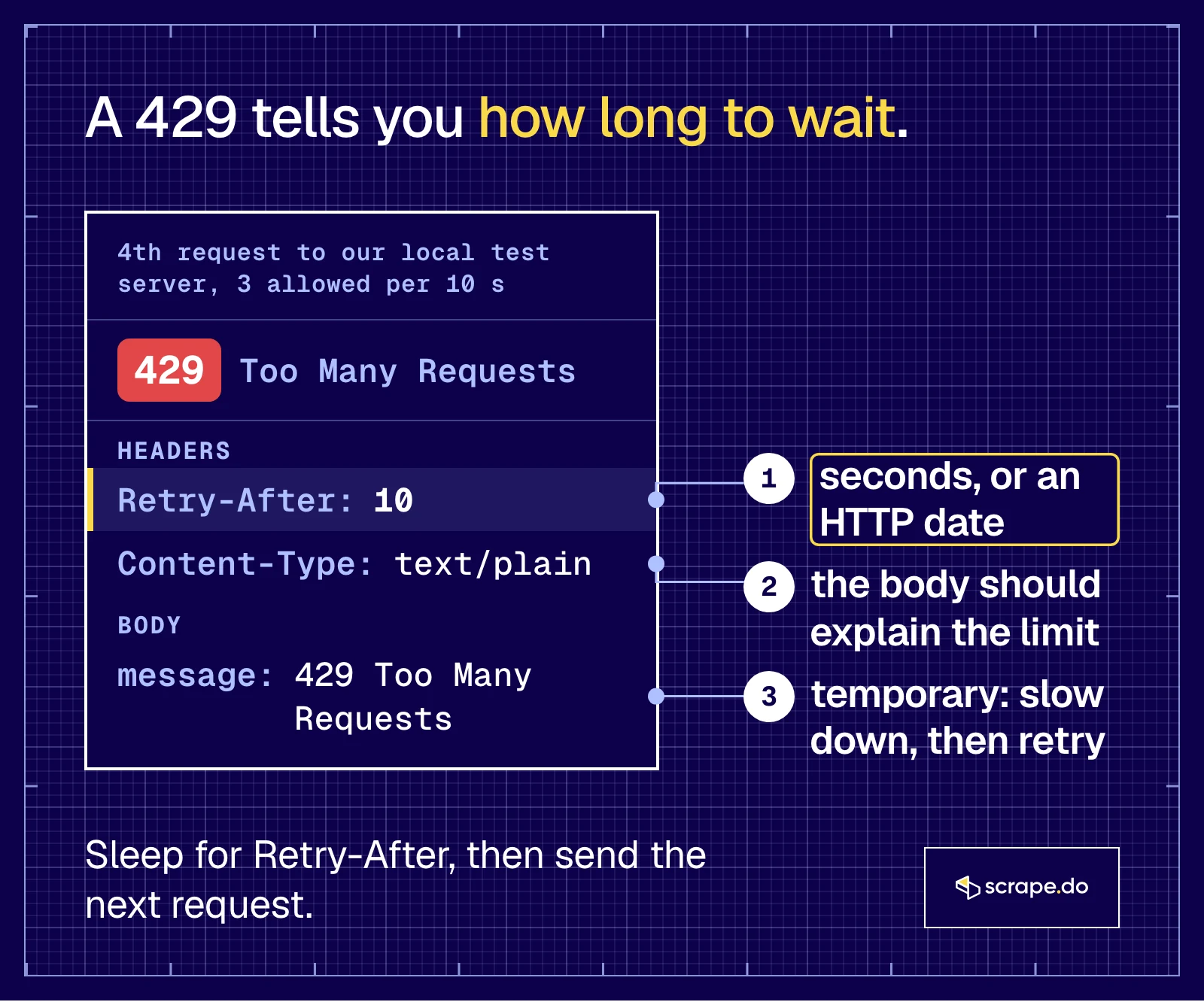
The header has two legal forms, both defined in RFC 9110: a number of seconds (Retry-After: 120) or an HTTP date (Retry-After: Fri, 31 Dec 1999 23:59:59 GMT). Your code has to handle both, and the developer section shows how.
The server that sent the 429 isn't always the one you think. It can be the website itself, an API gateway, a CDN in front of the site, or your own scraping API.
On Cloudflare sites it usually arrives as the Error 1015 "You are being rate limited" page, which is a 429 with Cloudflare branding.
How Long Does a 429 Error Last?
As long as the server decides, because there's no standard duration. Some APIs ask for 2 seconds. Cloudflare lets site owners block for anywhere from 10 seconds to a day, and an hourly quota can keep you waiting up to an hour. When the Retry-After header is there, it gives the exact wait.
This is what the services people search for most say in their docs:
| Where you see it | What the docs say | How long |
|---|---|---|
| Shopify REST Admin API | A bucket of 40 requests per app per store that refills at 2 per second (400 and 20 on Plus) | Seconds; the docs' example is Retry-After: 2.0 |
| Cloudflare rate limiting rules (Error 1015) | The site owner picks a timeout | 10 seconds to 86,400 seconds (one day) |
| GitHub REST API, signed out | 60 requests per hour | Until the time in x-ratelimit-reset |
| Discord API | A retry_after field in the JSON body, in seconds |
Usually seconds, per route |
| Binance API | Keep sending after a 429 and the IP is banned with a 418 | 2 minutes to 3 days, growing for repeat offenders |
| MDN's reference example | Retry-After: 3600 |
One hour |
Sources: Shopify, Cloudflare, GitHub, Discord, Binance, checked in October 2026.
Burst limits come with short waits and quotas with long ones. The longest waits go to clients that keep pushing after the first 429.
Is a 429 Error Your Fault?
Not always. A 429 means requests from your IP address, account or API key went over a limit, but you may not have sent them. A shared office or school network, a VPN exit, a browser extension or an app retrying in the background can use up the limit for you.
That's also the answer to "why does my phone keep saying 429 too many requests?" An app that refreshes or retries on its own sends requests you never see, and every one of them counts against the same limit.
If the error follows you across networks and devices, the limit is on your account. If it disappears when you switch from Wi-Fi to mobile data, it was on the IP address.
If You're a User: How to Fix a 429 Error
Stop refreshing and wait a few minutes, because repeated attempts can extend the block. If it keeps coming back, close duplicate tabs and pause extensions, sign in if the site has a lower limit for anonymous visitors, or switch from Wi-Fi to mobile data to get a different IP address.
In a Browser
- Wait, then load the page once. Cloudflare's advice for its rate limit page is to avoid repeated attempts in a short time, "as this may extend the block."
- Close duplicate tabs and pause extensions. Tabs that auto-refresh and extensions that poll a site spend your requests in the background.
- Sign in. Many sites give signed-in users a higher limit. GitHub's API, for example, allows only 60 requests per hour without authentication.
- Change networks. Switching from Wi-Fi to mobile data, or turning a VPN off (or on), gives you a different IP address and a fresh counter.
- Contact the site. If nothing works, the limit is too strict for normal use, and only the site owner can change it.
Clearing cookies helps only when the site counts per session cookie, which you can't see from outside. It's worth one try, not ten.
ChatGPT and the OpenAI API
On the API side, OpenAI's error docs list several kinds of 429, and they need different fixes:
- "Rate limit reached for requests" and "Slow down" are speed limits. Pace your requests and follow
Retry-Afterwhen it's present. - "Credit balance exhausted", "Organization spend limit reached" and "Project spend limit reached" are money limits. Waiting won't fix them; adding credits or raising the limit will.
Watch out for the second group. A retry loop on a billing 429 runs forever, so read the error code before you retry.
In the ChatGPT app, wait before you send again, and check status.openai.com if everyone seems to be getting errors.
YouTube and yt-dlp
When yt-dlp or a similar downloader prints HTTP Error 429: Too Many Requests, the yt-dlp FAQ says the service is blocking your IP address because of overuse. Its fix is to open YouTube in a browser, solve the CAPTCHA it shows, then pass that browser's cookies to yt-dlp (--cookies-from-browser) from the same IP. If there's no CAPTCHA, a different IP (--proxy or --source-address) is the other way out.
Shopify
If you're a merchant and an app, sync tool or integration reports a 429, the app went over Shopify's API limit for your store. The REST Admin API gives each app a bucket of 40 requests per store that refills at 2 per second, and returns 429 with a Retry-After header when the bucket is full.
A well-built app waits and retries on its own. If it fails instead, that's a bug to report to the app's developer, not a problem with your store.
Discord Bots
Discord answers a rate-limited bot with a 429 and a JSON body that includes retry_after (seconds to wait) and global (whether you hit the 50 requests per second limit for the whole bot). Ignore those and you risk a bigger penalty. An IP that makes 10,000 invalid requests (401, 403 or 429) in 10 minutes is temporarily restricted from the API. A bot that keeps hitting 429s usually has a loop sending far more than it should.
If You're a Developer: How to Handle 429 in Code
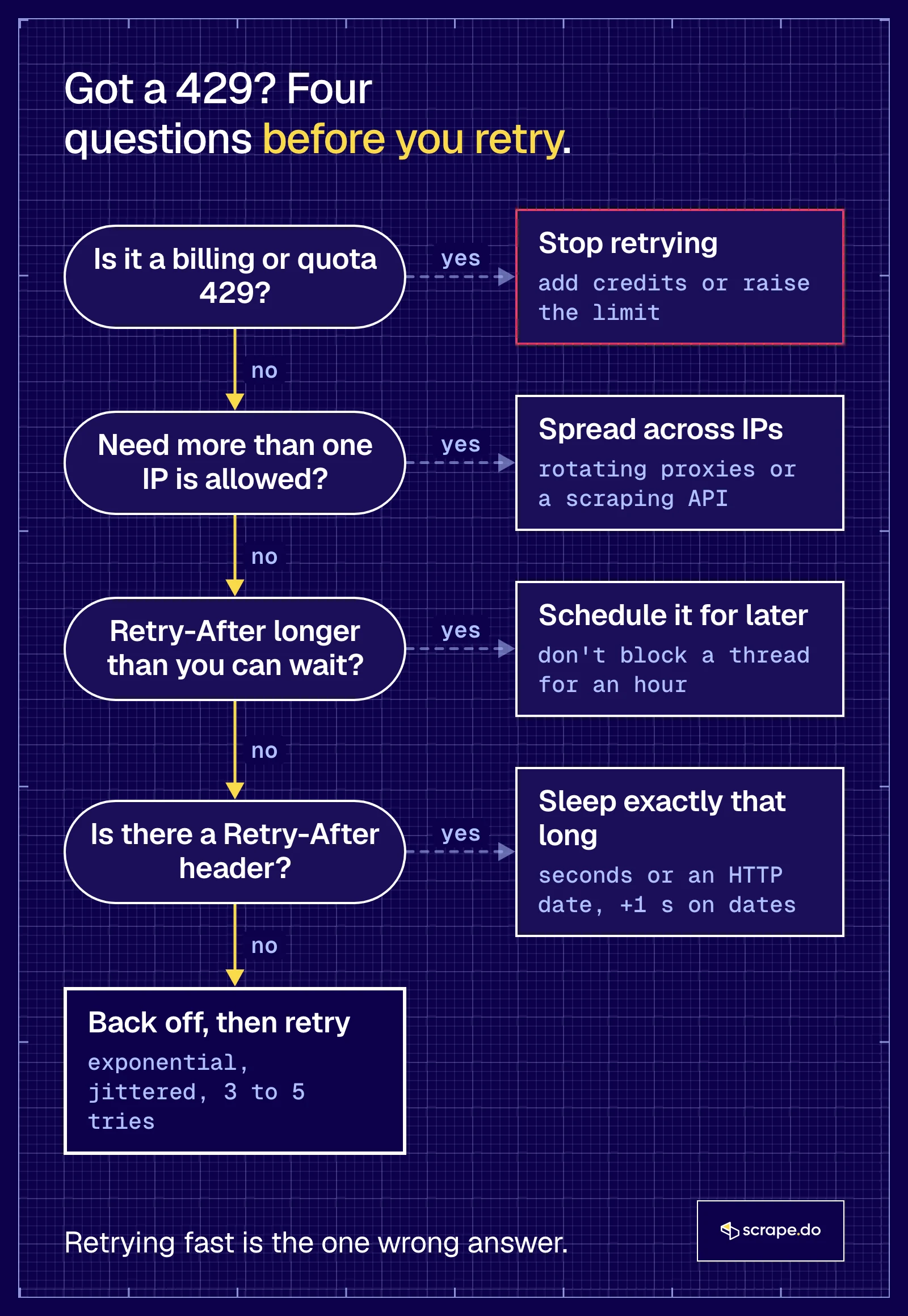
Read Retry-After and sleep exactly that long. It can be a number of seconds or an HTTP date. When the header is missing, back off exponentially with jitter and give up after a few tries. Never retry in a tight loop, because on some APIs that turns a short throttle into a ban.
We tested the retry code below against our own local server, not a real website. It allows 3 requests per 10 seconds per IP and answers the fourth with a 429. It can send Retry-After as seconds, as an HTTP date, as 10.0 (the decimal style in Shopify's docs) or not at all. And like Binance's API, it bans an IP for 60 seconds with a 418 once that IP goes over the limit four times in a row.
Versions: Python 3.9.6, requests 2.32.3, urllib3 2.6.3, macOS, October 2026.
What Happens When You Ignore a 429
Here's the naive client: 10 requests back to back, no checks.
import requests

URL = "http://127.0.0.1:8429/"

for i in range(10):
    r = requests.get(URL, timeout=10)
print(f"{i + 1}: {r.status_code} {r.reason}, Retry-After: {r.headers.get('Retry-After')}")1: 200 OK, Retry-After: None
2: 200 OK, Retry-After: None
3: 200 OK, Retry-After: None
4: 429 Too Many Requests, Retry-After: 10
5: 429 Too Many Requests, Retry-After: 10
6: 429 Too Many Requests, Retry-After: 10
7: 418 I'm a Teapot, Retry-After: 60
8: 418 I'm a Teapot, Retry-After: 60
9: 418 I'm a Teapot, Retry-After: 60
10: 418 I'm a Teapot, Retry-After: 60Three requests through, three 429s asking for 10 seconds, then a 60-second ban. The client didn't listen, and the wait went from 10 seconds to 60.
There are real servers that answer 418 instead of 429 once you've ignored the first warning. Binance documents this behavior for its API.
Step 1: Parse Retry-After in Both Forms
from datetime import datetime, timezone
from email.utils import parsedate_to_datetime


def retry_after_seconds(response):
    """Seconds to wait from a Retry-After header, or None if it's missing or unreadable."""
    value = response.headers.get("Retry-After")
    if value is None:
        return None
    try:
        return max(0.0, float(value))  # "120", and Shopify's "2.0"
    except ValueError:
        pass
    try:
        when = parsedate_to_datetime(value)  # "Wed, 21 Oct 2015 07:28:00 GMT"
    except (TypeError, ValueError):
        return None
    if when.tzinfo is None:
        when = when.replace(tzinfo=timezone.utc)
    # An HTTP-date has whole seconds only and depends on two clocks: add 1 s of margin
    return max(0.0, (when - datetime.now(timezone.utc)).total_seconds()) + 1
Two details came from running it. We parse with float() instead of int(), because Shopify's docs show Retry-After: 2.0. That isn't a valid number of seconds under RFC 9110, but it's what you'll receive.
The date form also gets one second of margin. Our first version didn't have it. It computed 9.4 seconds from the date, woke up too early, got a second 429 and had to sleep again, because an HTTP date can't express fractions of a second.
Step 2: Back Off, With Retry-After First
import random
import time

import requests


def get_with_backoff(url, max_retries=5, base=1.0, cap=60.0):
    for attempt in range(max_retries + 1):
        response = requests.get(url, timeout=30)
        if response.status_code not in (429, 503) or attempt == max_retries:
            return response
        wait = retry_after_seconds(response)
        if wait is None:  # no header: exponential backoff, half fixed and half random
            delay = min(cap, base * 2**attempt)
            wait = random.uniform(delay / 2, delay)
        elif wait > cap:  # longer than we're willing to block: stop, schedule it for later
            return response
        print(f"  {response.status_code}, Retry-After: {response.headers.get('Retry-After')}, sleeping {wait:.1f}s")
        time.sleep(wait)
    return response
The order matters. The server's Retry-After wins when it's there. We fall back to exponential backoff only when it's missing, with jitter so a fleet of workers doesn't retry in lockstep. And when the server asks for longer than cap, the function returns instead of sleeping for an hour inside a request.
We ran 6 requests through it (python backoff_client.py http://127.0.0.1:8429/), first with Retry-After in seconds:
Request 1: 200 after 0.0s
Request 2: 200 after 0.0s
Request 3: 200 after 0.0s
  429, Retry-After: 10, sleeping 10.0s
Request 4: 200 after 10.0s
Request 5: 200 after 10.0s
Request 6: 200 after 10.0s
One 429, one 10-second sleep, six successes. The same run with the HTTP date form:
Request 1: 200 after 0.0s
Request 2: 200 after 0.0s
Request 3: 200 after 0.0s
  429, Retry-After: <date>, sleeping 10.4s
Request 4: 200 after 10.4s
Request 5: 200 after 10.4s
Request 6: 200 after 10.4s
Step 3: When There's No Retry-After, Your Guess Has to Be Long Enough
Without the header, you're guessing the window. The textbook start is a 1-second base:
Request 1: 200 after 0.0s
Request 2: 200 after 0.0s
Request 3: 200 after 0.0s
  429, Retry-After: None, sleeping 0.7s
  429, Retry-After: None, sleeping 1.7s
  429, Retry-After: None, sleeping 2.1s
Request 4: 418 after 4.6s
Request 5: 418 after 4.6s
Request 6: 418 after 4.6s
The backoff looked polite on paper and still got banned. It made three retries in under 5 seconds against a 10-second window. With base=5, it waited 4.2 and then 9.3 seconds and got through:
Request 1: 200 after 0.0s
Request 2: 200 after 0.0s
Request 3: 200 after 0.0s
  429, Retry-After: None, sleeping 4.2s
  429, Retry-After: None, sleeping 9.3s
Request 4: 200 after 13.6s
Request 5: 200 after 13.6s
Request 6: 200 after 13.6s
Don't treat base=5 as the answer. A missing header makes the window your problem, so measure how long a target's block lasts before you pick a base. Keep the retry count low too, because every retry inside the window is another strike.
The Built-In Way, and Where It Breaks
requests can do this without your own loop. urllib3's Retry honors Retry-After for 413, 429 and 503 responses:
import sys

import requests
from requests.adapters import HTTPAdapter
from urllib3.util.retry import Retry

url = sys.argv[1] if len(sys.argv) > 1 else "http://127.0.0.1:8429/"
retry = Retry(total=5, backoff_factor=1, status_forcelist=[429, 503], respect_retry_after_header=True)
session = requests.Session()
session.mount("http://", HTTPAdapter(max_retries=retry))

for i in range(6):
    try:
        r = session.get(url, timeout=30)
        print(f"Request {i + 1}: {r.status_code}")
    except Exception as e:
        print(f"Request {i + 1}: {type(e).__name__}: {e}")
Against Retry-After: 10, all six requests came back 200 in 10.1 seconds. Against Retry-After: 10.0, the Shopify style, it crashed instead of waiting:
Request 1: 200
Request 2: 200
Request 3: 200
Request 4: InvalidHeader: Invalid Retry-After header: 10.0
Request 5: InvalidHeader: Invalid Retry-After header: 10.0
Request 6: InvalidHeader: Invalid Retry-After header: 10.0
urllib3 2.6.3 accepts only whole seconds or an HTTP date, so a decimal value raises InvalidHeader. It also caps Retry-After at 21,600 seconds by default, which means a session can hold a thread for up to six hours. If you use Retry, set retry_after_max and know which APIs send decimals. Our Python requests retry guide covers the adapter in depth.
When Retrying Won't Help
Some 429s don't clear with time:
- Billing and quota 429s, like OpenAI's credit and spend limits. Check the error code and stop.
- A 403 that follows your 429s. Many sites escalate from "slow down" to "go away". That's a block, not a rate limit, and our 403 Forbidden guide for Python requests covers it.
- You need more than one IP is allowed to send. If the target allows 3 requests per 10 seconds and you need 300, no backoff gets you there. You have to spread requests across IP addresses, and our guide to rate limits in web scraping walks through the options.
Spreading Requests Across IPs With Scrape.do
We pointed plain requests at a Cloudflare-protected demo page, scrapingtest.com, which rate limits fast on purpose:
import requests

URL = "https://scrapingtest.com/cloudflare-rate-limit"

for i in range(6):
    r = requests.get(URL, timeout=30)
print(f"{i + 1}: {r.status_code} {r.reason}, Retry-After: {r.headers.get('Retry-After')}")1: 200 OK, Retry-After: None
2: 429 Too Many Requests, Retry-After: 10
3: 429 Too Many Requests, Retry-After: 9
4: 429 Too Many Requests, Retry-After: 9
5: 429 Too Many Requests, Retry-After: 9
6: 429 Too Many Requests, Retry-After: 8Look at the countdown. Cloudflare's Retry-After goes 10, 9, 9, 9, 8, because it's the time left on the block, not a fixed number.
Then the same page through Scrape.do, which routes each request through its rotating proxies and retries failed requests on its side (get a free API token here):
import urllib.parse

import requests

token = "<your_token>"
target = urllib.parse.quote("https://scrapingtest.com/cloudflare-rate-limit")

for i in range(5):
    r = requests.get(f"https://api.scrape.do/?token={token}&url={target}", timeout=90)
print(f"{i + 1}: {r.status_code} {r.reason}")1: 200 OK
2: 200 OK
3: 200 OK
4: 200 OK
5: 200 OKFive for five, back to back. No sleeps, no proxy setup, no 429s. Failed requests aren't charged, so a retry Scrape.do makes on its side costs you nothing. For harder targets, the super=true parameter switches to 95M+ residential and mobile IPs.
Scrape.do can return a 429 of its own. It means you're sending more requests at once than your plan's concurrency allows. Those responses aren't charged either (status codes in the docs). Treat it like any other 429 and slow down, or check your remaining concurrency with the usage endpoint.
If You Own the Site: How to Send a Good 429
Send 429, not 503 or 403, when a client goes over a rate limit, and always include Retry-After as a whole number of seconds. Explain the limit in the body and never let a cache store the response. Set windows wide enough that normal bursts of traffic don't trip them.
- Check what your rate limiter actually sends. nginx's
limit_reqmodule rejects excess requests with a 503 by default (limit_req_status 503;). Clients and crawlers read a 503 as "the server is down", not "you're too fast". One line fixes it:
limit_req_zone $binary_remote_addr zone=one:10m rate=1r/s;

server {
    location / {
        limit_req zone=one burst=5 nodelay;
        limit_req_status 429;
    }
}
That config follows the nginx docs and allows 1 request per second per IP on average, with bursts of up to 5.
- Send
Retry-Afteras an integer. Our test above showed urllib3 crashing on10.0. Whole seconds worked with both clients we tried. - Say what the limit is. RFC 6585's example body tells the user the limit is 50 requests per hour. A sentence in the body saves you support tickets.
- On Cloudflare, rate limiting rules return 429 by default for the Block action, and you can change the status code and body. If a rule blocks real visitors and its counting period is very short, such as one second, Cloudflare's advice is to raise it to 10 seconds.
- If you escalate to a ban, document it, the way Binance documents its 418. A client can't respect a rule it can't see.
Here's the core of the limiter we tested against, in Python. It counts requests per IP in a 10-second window and bans IPs that keep going:
LIMIT, WINDOW, BAN, STRIKES = 3, 10, 60, 3
hits, strikes, banned = {}, {}, {}


class Handler(BaseHTTPRequestHandler):
    def do_GET(self):
        ip, now = self.client_address[0], time.time()
        if banned.get(ip, 0) > now:
            return self.reply(418, banned[ip] - now)
        recent = [t for t in hits.get(ip, []) if now - t < WINDOW]
        if len(recent) >= LIMIT:
            strikes[ip] = strikes.get(ip, 0) + 1
            if strikes[ip] > STRIKES:
                banned[ip], strikes[ip] = now + BAN, 0
                return self.reply(418, BAN)
            return self.reply(429, WINDOW - (now - recent[0]))
        hits[ip], strikes[ip] = recent + [now], 0
        self.reply(200)
reply() rounds the wait up and writes it into Retry-After. Rounding up matters, because a client that sleeps the rounded-down value comes back a fraction of a second early and gets another 429.
429 vs 403 vs 503 vs 1015 vs 418
A 429 says slow down, and it usually clears on its own. A 403 says no, and waiting rarely changes that. A 503 means the server is temporarily unavailable. Cloudflare's 1015 is a 429 with a branded page, and a 418 from an API like Binance means you ignored the 429s and got banned.
| Code | What it means | Who usually sends it | Retry-After? | Does waiting help? | What to do |
|---|---|---|---|---|---|
| 429 Too Many Requests | Too many requests in a time window | The site, an API, a CDN or WAF | Often | Yes | Wait for Retry-After, then slow down |
| 403 Forbidden | The server understood and refuses | A WAF or the site itself | No | Rarely | Fix headers or fingerprint, change IP (403 guide) |
| 503 Service Unavailable | Overload or maintenance | The server or a load balancer; nginx limit_req by default |
Sometimes | Yes | Retry with backoff |
| 1015 (Cloudflare) | A site's rate limiting rule blocked your IP | Cloudflare, as an HTTP 429 | Yes, on the demo page | Yes | Same as 429 (1015 guide) |
| 418 I'm a Teapot | An April Fools' code, now used by some APIs as a ban | Binance, after ignored 429s | On Binance, yes | After the ban ends | Stop, wait, lower your rate (418 guide) |
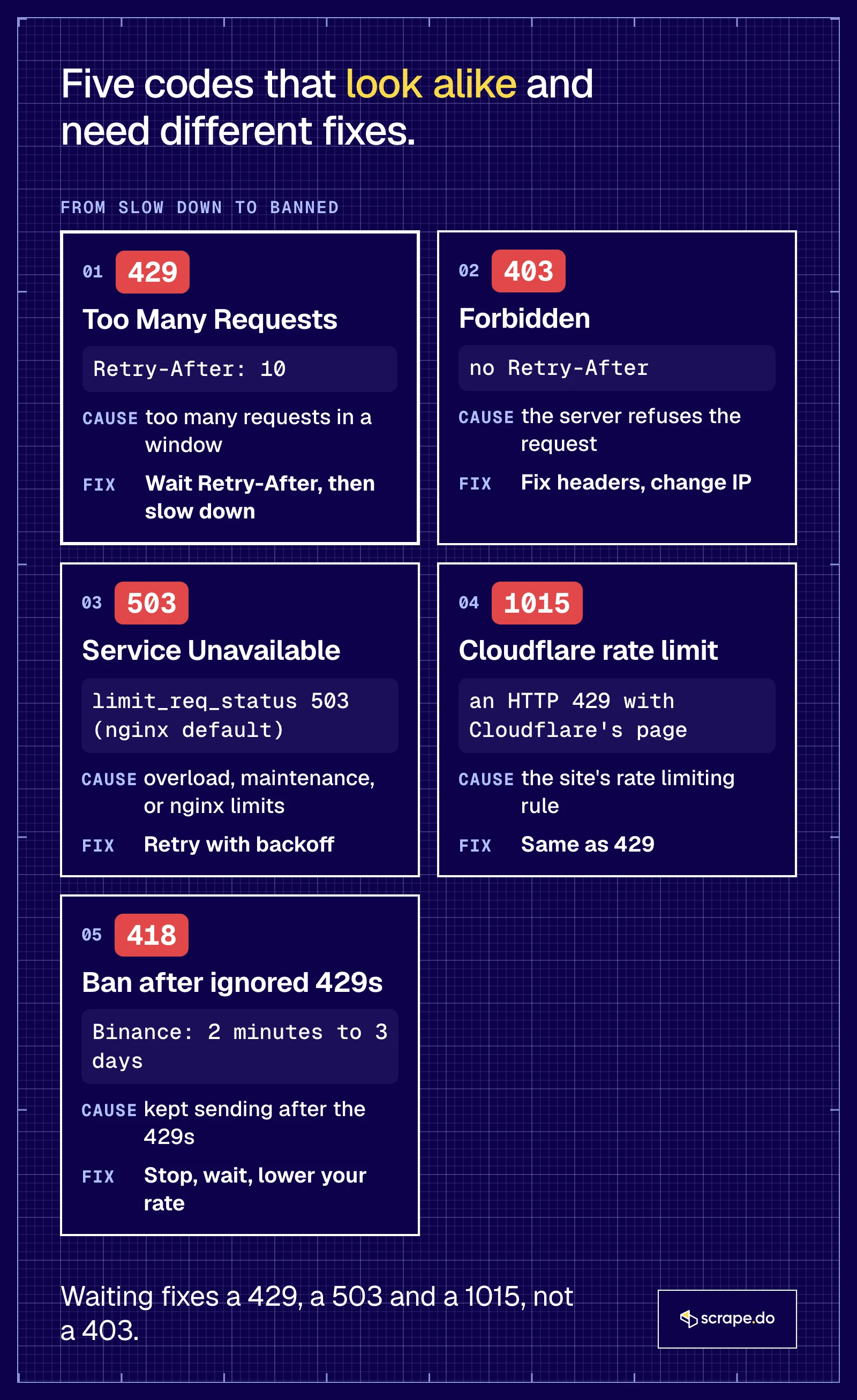
Two overlaps trip people up. GitHub returns either a 403 or a 429 when you exceed its primary rate limit, with x-ratelimit-remaining: 0, so check the headers before you decide which one you got. And RFC 9110 lists 418 as reserved, because it was "deployed as a joke often enough" that no real code can take its number.
Frequently Asked Questions
How do I fix API error 429?
Slow your request rate to what the API allows. Read the Retry-After header on the 429 and wait that long before the next request. Without the header, back off exponentially. If the API has a usage endpoint or X-RateLimit-Remaining headers, pace yourself with them so you don't hit the limit at all.
Should you retry on a 429?
Yes, but only after the wait the server asks for, and only a few times. Retrying immediately makes it worse, because every retry counts against the same limit and some APIs ban clients that keep pushing. Don't retry billing or quota 429s, such as OpenAI's credit balance errors. Time won't fix those.
How long should I wait after a 429 Too Many Requests?
Exactly as long as Retry-After says. If there's no header, start with a few seconds and double the wait on each retry. In a browser, a few minutes is usually enough. Documented waits range from about 2 seconds on Shopify's API to a day on a strict Cloudflare rule.
Why does it say too many requests when I only opened one page?
Because the limit counts everyone and everything behind your IP address or account, not only you. A shared network, a VPN exit, background tabs, extensions and apps that retry on their own all add up. One page can also load dozens of resources from the same server.
Does a VPN fix error 429?
Sometimes. If the limit is per IP address, a VPN gives you a new one and a fresh counter. If you're already on a VPN, turning it off can work for the same reason, since VPN exits are shared by many users. It won't help when the limit is on your account or API key.
What does "Request failed with status code 429" mean?
That's how the axios HTTP client for JavaScript reports a 429 response. The server rate limited your request. The fix is the same as in Python. Read error.response.headers['retry-after'], wait that long, and retry with backoff.
How can I trigger a 429 error to test my code?
Run a local rate limiter, like the Python server in the site owner section above, and send requests faster than it allows. Don't trigger 429s on websites you don't own to test your code. Our backoff function was tested only against our local server.
Is error 429 a client or a server error?
It's a client error, which is why it's in the 4xx range. The server is working fine; it's telling the client that it sent too many requests. That's the opposite of a 503, a 5xx code, where the server itself is the problem.
Founder @ Scrape.do








