Category:Scraping ErrorsView as Markdown
Python Requests Retry: Backoff, Retry-After and Jitter Done Right

Head of Marketing


To retry failed requests in Python, mount an HTTPAdapter with a urllib3 Retry on a requests.Session. Give it total, a backoff_factor and a status_forcelist of 429, 500, 502, 503 and 504, and urllib3 waits out Retry-After, backs off on everything else and raises RetryError when it runs out. Never retry 403, 404 or 418.
Your scraper hits one 503 at 2 a.m. and the whole run dies.
So you add retries. Now it survives the 503, but it also fires a second request the same instant a server asked for 2 seconds of quiet, and it retries a 403 five times as if the sixth try will be different.
A retry means coming back later, not knocking louder.
We wanted every number here to come from a real run, not a docstring. So we wrote a 25-line local server that fails on purpose: two 429s with Retry-After: 2, three 503s, an endpoint that never recovers, and 403, 404 and 418 responses that never go away. Every pattern below ran against it in October 2026, on Python 3.13.16 with requests 2.34.2, urllib3 2.8.0 and tenacity 9.2.1.
How Do You Retry a Request in Python Requests?
Build a urllib3 Retry with total, backoff_factor and status_forcelist, then mount it on a requests.Session with HTTPAdapter(max_retries=retry), once for http:// and once for https://. From then on, every request through that session retries on those status codes and on connection errors, with exponential backoff between attempts.
import time
import requests
from requests.adapters import HTTPAdapter
from urllib3.util import Retry

retry = Retry(total=5, backoff_factor=1, status_forcelist=[429, 500, 502, 503, 504])
session = requests.Session()
session.mount("http://", HTTPAdapter(max_retries=retry))
session.mount("https://", HTTPAdapter(max_retries=retry))

start = time.monotonic()
response = session.get("http://127.0.0.1:8765/429/quick", timeout=10)
print(response.status_code, f"after {time.monotonic() - start:.2f}s")
The script prints one line, and the test server logs three hits:
200 after 4.04s

  0.00s  GET  /429/quick       hit 1 -> 429
  2.01s  GET  /429/quick       hit 2 -> 429
  4.03s  GET  /429/quick       hit 3 -> 200
Two 429s, two waits of 2 seconds, then the 200. Those 2 seconds come from the server's Retry-After header, not from backoff_factor. Without the retry, the same request returns the first 429 and your code has to deal with it.
The Test Server Behind Every Number Here
Save this as server.py and run it in a second terminal. It uses only the standard library:
import time
from http.server import BaseHTTPRequestHandler, ThreadingHTTPServer
from urllib.parse import urlsplit
PLANS = {  # first path segment: (status while failing, failures before a 200, headers)
    "429": (429, 2, {"Retry-After": "2"}), "503": (503, 3, {}), "down": (503, 99, {}),
    "403": (403, 99, {}), "404": (404, 99, {}), "418": (418, 99, {}), "slow": (200, 2, {})}
hits, first = {}, {}
class Handler(BaseHTTPRequestHandler):
    def do_GET(self):
        path = urlsplit(self.path).path  # self.path is a full URL when we act as a proxy
        n = hits[path] = hits.get(path, 0) + 1
        t = (now := time.monotonic()) - first.setdefault(path, now)
        status, fails, headers = PLANS.get(path.split("/")[1], (200, 0, {}))
        if n > fails:
            status, headers = 200, {}
        elif path.startswith("/slow"):
            time.sleep(3)  # longer than the client's read timeout
        print(f"{t:6.2f}s  {self.command:4} {path:16} hit {n} -> {status}", flush=True)
        self.send_response(status)
        for k, v in headers.items(): self.send_header(k, v)
        self.end_headers()
        self.wfile.write(b"ok\n" if status == 200 else b"try again\n")
    do_POST = do_GET
    log_message = lambda self, *args: None  # keep only our own log line
ThreadingHTTPServer(("127.0.0.1", 8765), Handler).serve_forever()
Every new path gets its own counter and its own clock, so /503/a and /503/b fail independently and each log line shows seconds since that path's first hit:
/429/<id>: 429 withRetry-After: 2twice, then 200/503/<id>: 503 three times, then 200/down/<id>: 503 forever/403/<id>,/404/<id>,/418/<id>: that status forever/slow/<id>: hangs for 3 seconds on the first two hits
It also answers proxy-style requests (a full URL in the request line), so later it can stand in for a working proxy.
Which HTTP Errors Should You Retry?
Retry the codes that describe a temporary problem: 429 Too Many Requests, 500, 502, 503 and 504, plus connection errors and timeouts on idempotent requests. Don't retry 400, 401, 403, 404, 407 or 418. Those are about your request or your reputation, and sending the same request again gets the same answer.
| Status | What it tells a scraper | Retry? | How |
|---|---|---|---|
| 429 Too Many Requests | You went over a rate limit | Yes | Wait Retry-After if it's there, otherwise back off |
| 500 Internal Server Error | The server broke on this request | Yes, a few times | Backoff |
| 502 Bad Gateway | A gateway or proxy got a bad answer upstream | Yes | Backoff; through a proxy, try another exit |
| 503 Service Unavailable | Overloaded or in maintenance | Yes | Retry-After if it's there, otherwise backoff |
| 504 Gateway Timeout | Something upstream was too slow | Yes | Backoff, and check your own timeout |
| Connection error, timeout | Nothing usable came back | Yes, idempotent methods only | Backoff, a fresh connection or proxy |
| 403 Forbidden | You are blocked | No | Change what the server sees (403 fixes) |
| 404 Not Found | The page isn't there | No | Fix the URL |
| 407 Proxy Authentication Required | Your proxy rejected your credentials | No | Fix the proxy auth |
| 418 I'm a teapot | A server telling a client it flagged as a bot to go away | No | Slow down for real, change the approach (HTTP 418) |
The decision fits in four questions:
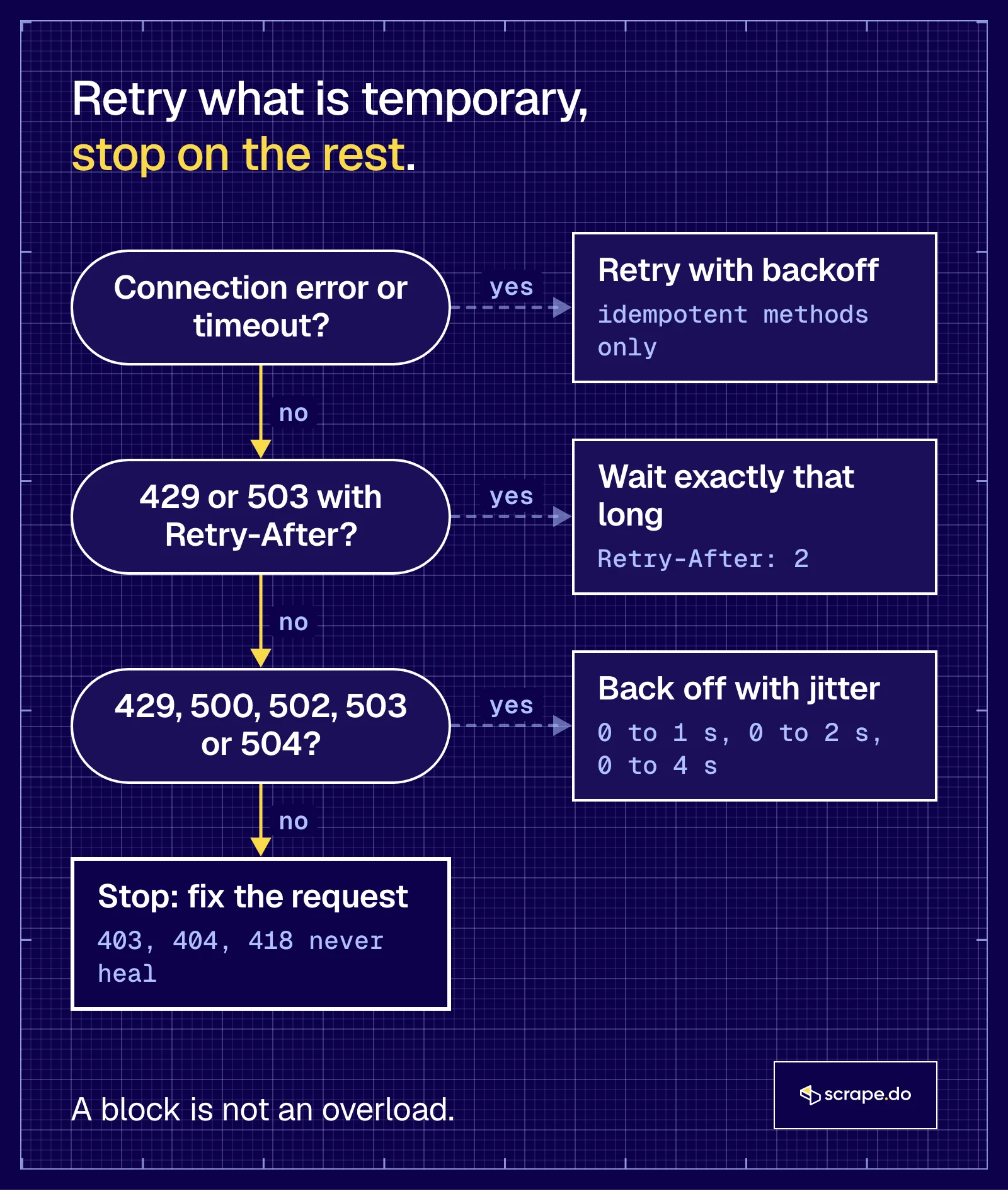
Or, in one line:
429 and 503 say "not now". 403 and 418 say "not you".
Retry a "not you" and you send the same IP, the same headers and the same TLS fingerprint back to a server that has already made up its mind about them. Best case, you get the same answer. Worst case, a longer ban.
How Does urllib3 Retry Work with HTTPAdapter?
The requests library leaves the retrying to urllib3, and HTTPAdapter(max_retries=...) is how your Retry object gets there. urllib3 then checks whether a failure is retryable (method, status, error type), sleeps (Retry-After first, then backoff) and tries again until a counter like total or status runs out.
Out of the box, nothing retries. requests 2.34.2 sets DEFAULT_RETRIES = 0 and builds Retry(0, read=False) when you don't pass anything.
This script runs the same session setup against each failure mode, changing one option at a time:
import time
import requests
from requests.adapters import HTTPAdapter
from urllib3.util import Retry

def run(path, retry, method="GET"):
    session = requests.Session()
    session.mount("http://", HTTPAdapter(max_retries=retry))
    start = time.monotonic()
    try:
        r = session.request(method, "http://127.0.0.1:8765" + path, timeout=10)
        retried_on = [h.status for h in r.raw.retries.history]
        print(f"{method} {path}: {r.status_code} after {time.monotonic() - start:.2f}s, retried on {retried_on}")
    except requests.RequestException as e:
        print(f"{method} {path}: {type(e).__name__} after {time.monotonic() - start:.2f}s")

policy = dict(total=4, backoff_factor=1, status_forcelist=[429, 500, 502, 503, 504])
run("/429/a", Retry(**policy))                                    # waits what Retry-After says
run("/503/a", Retry(**policy))                                    # exponential backoff
run("/429/b", Retry(**policy, respect_retry_after_header=False))  # ignores the header
run("/429/c", Retry(total=4))                                     # no status_forcelist at all
run("/503/b", Retry(**policy), method="POST")                     # POST is not in allowed_methods
run("/503/c", Retry(**policy, allowed_methods=None), method="POST")
run("/403/a", Retry(**policy))                                    # not in the list
run("/down/a", Retry(**policy)) # never recoversGET /429/a: 200 after 4.02s, retried on [429, 429]
GET /503/a: 200 after 6.02s, retried on [503, 503, 503]
GET /429/b: 200 after 2.01s, retried on [429, 429]
GET /429/c: 200 after 4.01s, retried on [429, 429]
POST /503/b: 503 after 0.00s, retried on []
POST /503/c: 200 after 6.06s, retried on [503, 503, 503]
GET /403/a: 403 after 0.01s, retried on []
GET /down/a: RetryError after 14.03sr.raw.retries.history is urllib3's own record of every failed attempt, and it's handy for logging.
backoff_factor: The Real Formula
Your waits come from these lines in urllib3/util/retry.py (2.8.0):
        consecutive_errors_len = len(
            list(
                takewhile(lambda x: x.redirect_location is None, reversed(self.history))
            )
        )
        if consecutive_errors_len <= 1:
            return 0

        backoff_value = self.backoff_factor * (2 ** (consecutive_errors_len - 1))
        if self.backoff_jitter != 0.0:
            backoff_value += random.random() * self.backoff_jitter
        return float(max(0, min(self.backoff_max, backoff_value)))
The first retry never waits. After one failure the history holds one entry, and anything at or below 1 returns 0. From there the wait doubles, so backoff_factor=1 gives 0, 2, 4, 8 seconds, not 1, 2, 4, 8, capped by backoff_max (120 seconds by default).
The server log for /down/a shows exactly that:
  0.00s  GET  /down/a          hit 1 -> 503
  0.00s  GET  /down/a          hit 2 -> 503
  2.01s  GET  /down/a          hit 3 -> 503
  6.02s  GET  /down/a          hit 4 -> 503
14.02s GET /down/a hit 5 -> 503| backoff_factor | Wait before retry 1 | Retry 2 | Retry 3 | Retry 4 | Retry 5 |
|---|---|---|---|---|---|
| 0.5 | 0 s | 1 s | 2 s | 4 s | 8 s |
| 1 | 0 s | 2 s | 4 s | 8 s | 16 s |
| 2 | 0 s | 4 s | 8 s | 16 s | 32 s |
We computed the table from the formula. The run confirms the backoff_factor=1 row.
What changed in urllib3 2? Not the math. We ran the same policy on urllib3 1.26.20 and 2.8.0 against the same endpoint and got 14.03 s and 14.02 s, five hits at the same offsets.
Version 2.0.0 did make backoff_max a constructor argument (before, you changed the class-level DEFAULT_BACKOFF_MAX) and added backoff_jitter, which adds a random 0 to N seconds on top of each backoff. Version 2.6.3 started capping Retry-After at 6 hours. The docstring got rewritten too (1.26 says 2 ** ({number of total retries} - 1), 2.x says 2 ** ({number of previous retries})), but both describe the same code.
Retry-After Wins Over Backoff
Retry.sleep() looks for a Retry-After header first and only falls back to the backoff when there isn't one. That's why /429/a retried at 2.01 and 4.01 seconds, when its backoff alone would have waited 0 and then 2.
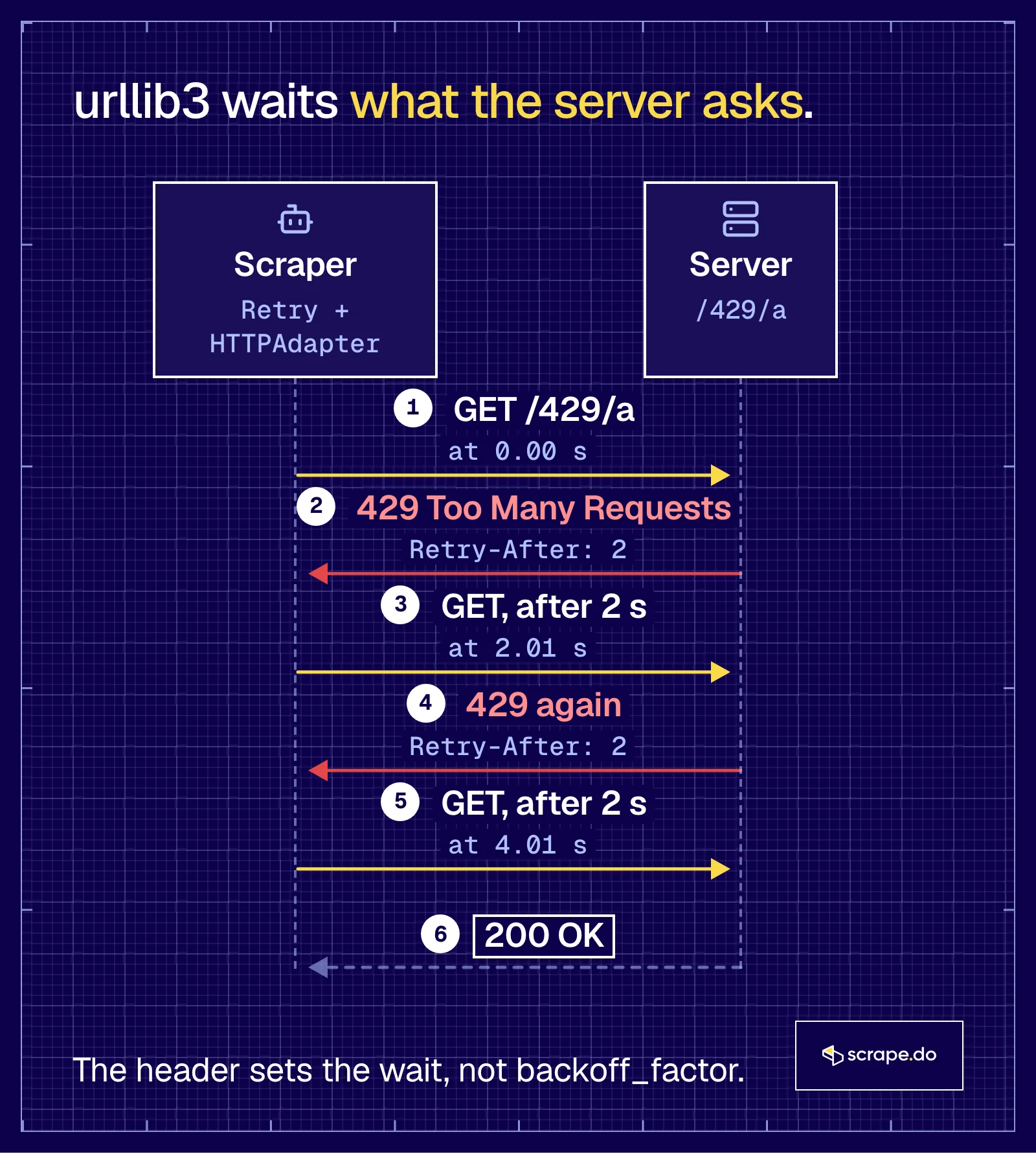
Three things about it surprised us in the runs and the source:
- It retries without a
status_forcelist./429/cused a bareRetry(total=4)and still retried both 429s. urllib3 keepsRETRY_AFTER_STATUS_CODES = frozenset([413, 429, 503])and retries those whenever the response carriesRetry-After. - Turn it off and you get rude. With
respect_retry_after_header=False,/429/bfinished faster (2.01 s), because the second request landed at 0.00 s, right after the server asked for 2 seconds. backoff_maxdoesn't cap it. ARetry-After: 3600means an hour-longtime.sleep()in your worker. In 2.8.0 the only ceiling isretry_after_max, 21,600 seconds (6 hours) by default. If your job can't wait that long, it should stop, which is what the custom loop below does.
allowed_methods: Why Your POST Never Retries
POST /503/b came back as a 503 after 0.00 seconds with an empty history. urllib3 only retries methods in DEFAULT_ALLOWED_METHODS: HEAD, GET, PUT, DELETE, OPTIONS and TRACE. The idea is that those are safe to repeat, and a POST might have created something before it failed.
To opt in, pass allowed_methods=None (any method) or your own set. With None, POST /503/c retried all three 503s. Do that only for POSTs that are safe to repeat, like a search form or a GraphQL query. Never for a checkout or anything that writes.
When the Retries Run Out
/down/a raised requests.exceptions.RetryError after 14.03 seconds, and the exception doesn't hand you the last response. If you'd rather get the final 503 back and decide yourself, pass raise_on_status=False and urllib3 returns the last response instead of raising.
The 403 went the other way. It isn't in status_forcelist, so it came back after 0.01 seconds with no retries. That's the behavior you want.
How Do You Write Your Own Retry Loop with Exponential Backoff and Jitter?
Loop over a fixed number of attempts and return the first response whose status isn't retryable. Between attempts, sleep for Retry-After when the server sends it. Otherwise pick a random wait between 0 and base * 2 ** attempt, capped, which is full jitter and keeps many workers from retrying in sync.
urllib3's Retry is great until you need something it can't do: rotate the proxy between attempts, look at the body (a 200 with a CAPTCHA page is still a failure), or give up when a server asks for more patience than your job has. Its backoff_jitter is also additive, a random 0 to N seconds on top of a fixed exponential wait, not full jitter.
import random
import time
import requests

RETRY_ON = {429, 500, 502, 503, 504}
def get_with_backoff(session, url, attempts=5, base=1.0, cap=30.0, timeout=(3.05, 10)):
    for attempt in range(attempts):
        try:
            response, error = session.get(url, timeout=timeout), None
            if response.status_code not in RETRY_ON:
                return response
            retry_after = response.headers.get("Retry-After", "")
        except (requests.ConnectionError, requests.Timeout) as e:
            response, error, retry_after = None, e, ""
        if attempt == attempts - 1 or (retry_after.isdigit() and int(retry_after) > cap):
            break                                                     # out of attempts, or told to wait too long
        if retry_after.isdigit():
            delay = int(retry_after)                                  # the server said how long
        else:
            delay = random.uniform(0, min(cap, base * 2 ** attempt))  # full jitter
        print(f"  attempt {attempt + 1}: {type(error).__name__ if error else response.status_code}, sleeping {delay:.2f}s")
        time.sleep(delay)
    if response is None:
        raise error
    return response
We called it on three paths with one session:
GET /429/loop
  attempt 1: 429, sleeping 2.00s
  attempt 2: 429, sleeping 2.00s
  -> 200 after 4.05s
GET /503/loop
  attempt 1: 503, sleeping 0.73s
  attempt 2: 503, sleeping 0.35s
  attempt 3: 503, sleeping 3.91s
  -> 200 after 5.03s
GET /404/loop
  -> 404 after 0.00s
The 429 waits are exact because the server said 2. The 503 waits are random draws from windows of 0 to 1, 0 to 2 and 0 to 4 seconds. That's why the second wait (0.35 s) is shorter than the first (0.73 s). Each wait is random, and only the window it's drawn from grows.
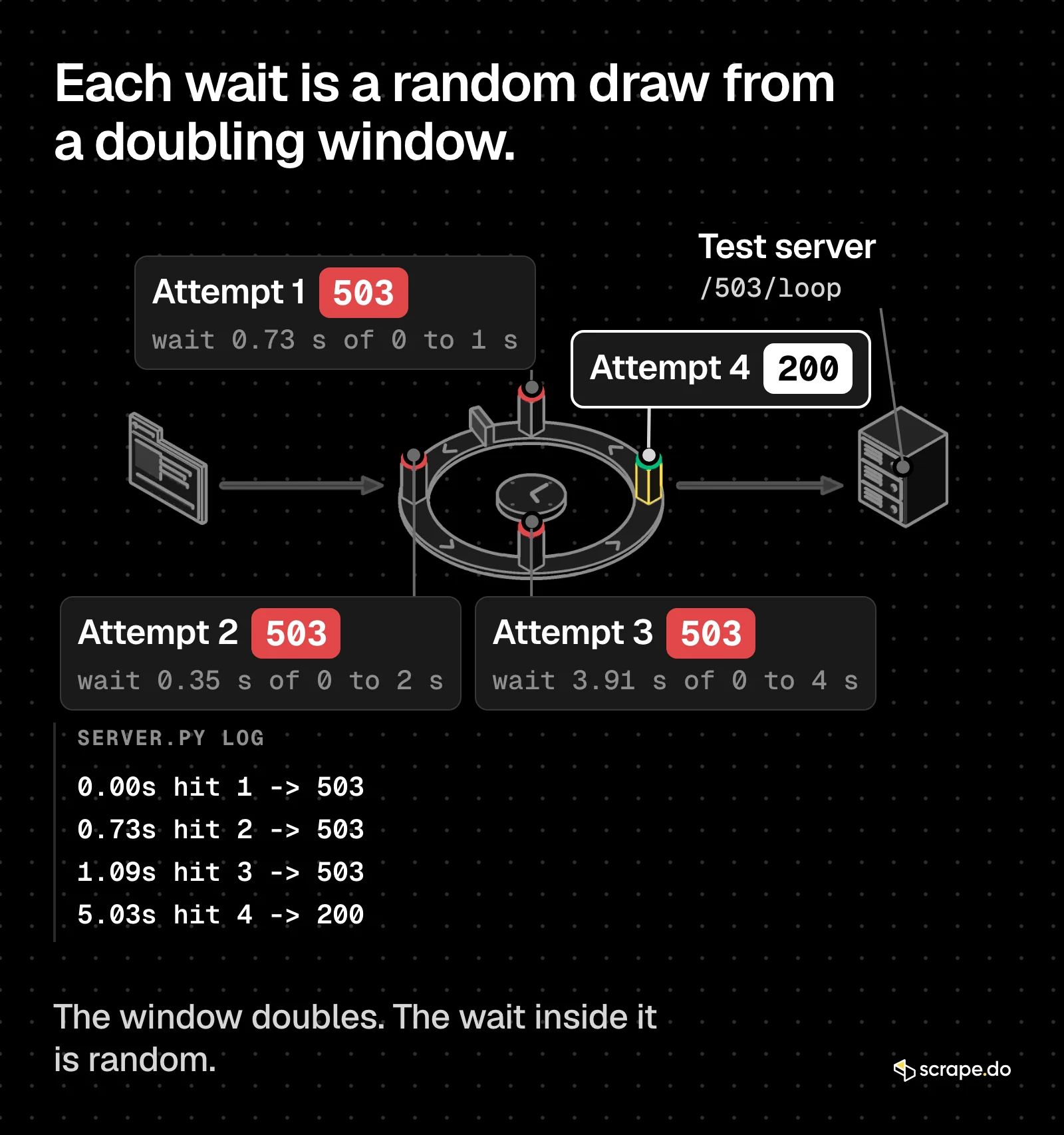
One bug we hit on the way, because it will bite you too.
The first version printed response.status_code if response else type(error).__name__, and every failed attempt printed NoneType. A requests Response is falsy for 4xx and 5xx, since bool(response) is response.ok. Test response is None, never if response.
Why Jitter Matters: 50 Workers, One Server
Exponential backoff spreads one client's retries over time. It does nothing for 50 clients that failed at the same moment. They all wait 1 second, all retry together, then all wait 2 seconds.
This script sends 50 threads at /503/ paths (three failures each, then 200) and measures the busiest 100 ms window across the retries:
import random
import threading
import time
import requests

def worker(i, jitter, sends):
    session = requests.Session()
    for attempt in range(4):                     # /503/ fails 3 times, then 200
        sends.append(time.monotonic())
        if session.get(f"http://127.0.0.1:8765/503/{jitter}-{i}", timeout=10).status_code == 200:
            return
        delay = 2 ** attempt                     # 1, 2, 4 s
        time.sleep(random.uniform(0, delay) if jitter == "full" else delay)

for jitter in ["none", "full"]:
    sends, start = [], time.monotonic()
    threads = [threading.Thread(target=worker, args=(i, jitter, sends)) for i in range(50)]
    [t.start() for t in threads]
    [t.join() for t in threads]
    retries = sorted(s - start for s in sends)[50:]   # skip the first 50 sends
    peak = max(sum(1 for r in retries if w <= r < w + 0.1) for w in retries)
    print(f"jitter={jitter}: {len(sends)} requests in {time.monotonic() - start:.1f}s, "
          f"busiest 100 ms window held {peak} retries")
We ran it three times:
| Run | No jitter: busiest 100 ms | Full jitter: busiest 100 ms | Total time, no jitter vs full |
|---|---|---|---|
| 1 | 50 of 150 retries | 11 | 7.2 s vs 6.0 s |
| 2 | 49 | 14 | 7.2 s vs 6.3 s |
| 3 | 50 | 11 | 7.1 s vs 6.2 s |
Without jitter, the server log shows each worker retrying at 1.00, 3.01 and 7.02 seconds, all 50 of them inside the same tenth of a second, three times in a row. With full jitter, the busiest tenth of a second held 11 to 14 retries, and the whole run finished sooner because a random wait between 0 and N averages N/2.
Same retries, same server, a quarter of the spike.
That's why tenacity's wait_random_exponential and the AWS Architecture Blog's Exponential Backoff And Jitter both land on full jitter.
How Do You Retry Requests with tenacity?
Put @retry on the function that makes the request and give it three things: a retry= condition (status codes or exceptions), a wait= strategy such as wait_random_exponential, and a stop= rule such as stop_after_attempt(5). Because tenacity retries the whole function, it can also retry on what the page says.
tenacity doesn't read Retry-After from a response by itself, so the version below adds a small wait function that does, and refuses to retry when the server asks for more than 30 seconds:
import requests
from tenacity import (RetryError, retry, retry_if_exception_type, retry_if_result,
                      stop_after_attempt, wait_random_exponential)
RETRY_ON, CAP = {429, 500, 502, 503, 504}, 30

def should_retry(r):                              # retryable, and not told to wait longer than CAP
    ra = r.headers.get("Retry-After", "")
    return r.status_code in RETRY_ON and not (ra.isdigit() and int(ra) > CAP)
def retry_after_or_jitter(state):
    if not state.outcome.failed:                  # we got a response, not an exception
        ra = state.outcome.result().headers.get("Retry-After", "")
        if ra.isdigit():
            return int(ra)
    return wait_random_exponential(multiplier=1, max=CAP)(state)
@retry(retry=retry_if_result(should_retry)
       | retry_if_exception_type((requests.ConnectionError, requests.Timeout)),
       wait=retry_after_or_jitter, stop=stop_after_attempt(5),
       before_sleep=lambda s: print(f"  attempt {s.attempt_number}: sleeping {s.next_action.sleep:.2f}s"))
def fetch(url):
    return requests.get(url, timeout=(3.05, 10))
for path in ["/429/ten", "/503/ten", "/down/ten"]:
    try:
        print(path, "->", fetch("http://127.0.0.1:8765" + path).status_code)
    except RetryError as e:
print(path, "-> gave up:", e.last_attempt.result().status_code) attempt 1: sleeping 2.00s
attempt 2: sleeping 2.00s
/429/ten -> 200
attempt 1: sleeping 0.93s
attempt 2: sleeping 1.34s
attempt 3: sleeping 1.88s
/503/ten -> 200
attempt 1: sleeping 0.16s
attempt 2: sleeping 2.00s
attempt 3: sleeping 3.18s
attempt 4: sleeping 1.38s
/down/ten -> gave up: 503wait_random_exponential(multiplier=1) draws from 0 to 1, 0 to 2, 0 to 4 and 0 to 8 seconds, the same full jitter as the hand-written loop. When stop_after_attempt(5) hits, tenacity raises RetryError, and e.last_attempt still holds the final response.
This is where tenacity beats urllib3 for scrapers. retry_if_result sees the whole response, so you can swap should_retry for a check like "captcha" in r.text.lower() and a 200 with a challenge page becomes a retry. No status_forcelist can express that.
How Should Retries Work with Proxies and Timeouts?
Always pass a (connect, read) timeout, since requests has none by default, and count retries into your time budget: attempts times timeout, plus every backoff. With proxies, retry through a different exit. urllib3's Retry reuses the same proxy, so a dead one fails the same way on every attempt.
import time
import requests
from requests.adapters import HTTPAdapter
from urllib3.util import Retry

def timed(label, fn):
    start = time.monotonic()
    try:
        result = fn().status_code
    except requests.RequestException as e:
        result = type(e).__name__
    print(f"{label}: {result} after {time.monotonic() - start:.2f}s")

session = requests.Session()
retry = Retry(total=3, connect=3, read=2, backoff_factor=1, status_forcelist=[429, 500, 502, 503, 504])
session.mount("http://", HTTPAdapter(max_retries=retry))

# 1. read timeout: /slow/ hangs 3 s on the first two hits, the read timeout is 1 s
timed("slow server, read retries", lambda: session.get("http://127.0.0.1:8765/slow/a", timeout=(3.05, 1)))

# 2. a dead proxy: nothing listens on port 9, so every retry fails the same way
dead = {"http": "http://127.0.0.1:9"}
timed("dead proxy, same proxy retried", lambda: session.get("http://127.0.0.1:8765/429/p", proxies=dead, timeout=5))slow server, read retries: 200 after 4.01s
dead proxy, same proxy retried: ProxyError after 6.01sThe read timeout worked the way the backoff formula predicts. Hit 1 hung, so the client gave up after 1 second and retried at once (backoff 0). Hit 2, at 1.00 s, hung too. The client waited 2 seconds, and hit 3 at 4.01 s answered. urllib3 retries read errors only for methods in allowed_methods, since the server may have processed the request before it went quiet.
The dead proxy is the expensive one. Four attempts went to the same dead proxy, with 6 seconds of backoff in between, before the ProxyError. Same exit, same failure.
Do the math before you pick numbers. With total=4, a (3.05, 10) timeout and backoff_factor=1, one URL can spend five attempts of up to about 13 seconds each plus 14 seconds of backoff before it fails, close to 80 seconds.
For proxies, rotate on the retry instead. Our test server stands in for the live proxy here:
import itertools
import random
import time
import requests

PROXIES = ["http://127.0.0.1:9", "http://127.0.0.1:8765"]   # a dead one, then a live one
RETRY_ON = {429, 500, 502, 503, 504}

def get_rotating(url, attempts=4):
    pool = itertools.cycle(PROXIES)
    for attempt in range(1, attempts + 1):
        proxy = next(pool)                            # a new exit for every attempt
        try:
            r = requests.get(url, proxies={"http": proxy}, timeout=(3.05, 10))
            print(f"  attempt {attempt} via {proxy}: {r.status_code}")
            if r.status_code not in RETRY_ON:
                return r
        except (requests.ConnectionError, requests.Timeout) as e:
            print(f"  attempt {attempt} via {proxy}: {type(e).__name__}")
        time.sleep(random.uniform(0, 0.5 * 2 ** attempt))  # still back off, with jitter
    raise RuntimeError(f"gave up on {url}")

start = time.monotonic()
r = get_rotating("http://127.0.0.1:8765/ok/rot")
print(f"-> {r.status_code} after {time.monotonic() - start:.2f}s") attempt 1 via http://127.0.0.1:9: ProxyError
attempt 2 via http://127.0.0.1:8765: 200
-> 200 after 0.30s0.30 seconds instead of 6, because the second attempt went somewhere new. The proxy guide for Python requests covers building the pool itself.
Retrying Through Scrape.do
If you send requests through Scrape.do, part of this already happens before your client sees anything. Scrape.do retries failed requests on its side, and the retry settings docs give you two controls:
retryTimeout: how long Scrape.do waits for the target before it sends a new request, 15000 ms by default, between 5000 and 55000 msdisableRetry=true: no retries on Scrape.do's side, for when you run your own retry logic
A separate timeout parameter (5000 to 120000 ms) caps the whole request.
On your side, two status codes are worth a client retry, per the status codes page: 429, which on Scrape.do means you went over your concurrency limit, and 502, "Request has failed. Please try again". Neither costs credits. 2xx and 404 responses do, so a client-side retry on a 404 through Scrape.do is a retry you pay for.
import requests
from requests.adapters import HTTPAdapter
from urllib3.util import Retry

TOKEN = "<your_token>"
retry = Retry(total=3, backoff_factor=1, backoff_jitter=1.0, status_forcelist=[429, 502])
session = requests.Session()
session.mount("https://", HTTPAdapter(max_retries=retry))

params = {"token": TOKEN, "url": "https://httpbin.co/anything", "timeout": 30000}
r = session.get("https://api.scrape.do/", params=params, timeout=(3.05, 45))
print(r.status_code, "cost:", r.headers.get("Scrape.do-Request-Cost"), "credit(s)")200 cost: 1 credit(s)The client's read timeout (45 s) sits above Scrape.do's timeout (30 s), so Scrape.do answers before your client hangs up. A client that cancels first shows up as a 510 in your dashboard logs.
When Do Retries Stop Helping?
Retries help while the failure is about time, like a rate limit window, an overloaded server or a flaky connection. Once the failure is about you, they stop helping. A 403 block, a 418, a CAPTCHA page or a Cloudflare 1015 that keeps coming back needs a different request, not the same one again.
Signs you crossed that line:
- The same status on every attempt. Three 403s in a row is an answer.
Retry-Afterlonger than your job can wait. Both loops above stop instead of sleeping through it.- The 429 comes back right after the wait. The limit is tighter than one retry can fix; slow the whole scraper down, as in the rate limit guide and the 429 fixes.
- A 200 with a challenge page. Check the content, not the status.
- A 418 or a Cloudflare 1015 that returns after you waited. Your IP or fingerprint is flagged, and the same request from the same place won't change that.
At that point the fix lives elsewhere: what the server sees on a 403, rotating proxies, or a scraping API that handles IPs, headers and its own retries for you.
Frequently Asked Questions
Does Python requests retry failed requests by default?
No. requests 2.34.2 sets DEFAULT_RETRIES = 0 in adapters.py, and an HTTPAdapter without max_retries gets Retry(0, read=False). Failed connections raise right away, and every status code comes back to your code as it is.
What does HTTPAdapter(max_retries=3) retry?
Connection errors, plus 413, 429 and 503 responses that carry a Retry-After header. An int becomes Retry(total=3) with no status_forcelist, so in our run /429/int was retried twice and succeeded, while a plain 503 without Retry-After came straight back. Pass a Retry object to control status codes and backoff.
What does backoff_factor=1 mean in urllib3?
It means waits of 0, 2, 4, 8 and 16 seconds before retries 1 to 5. urllib3 computes backoff_factor * 2 ** (consecutive_errors - 1) and returns 0 for the first retry, with backoff_max capping the result at 120 seconds by default. A Retry-After header replaces the backoff when urllib3 respects it.
How many times should a scraper retry?
Three to five attempts with a cap on the wait is a sane default, and both the custom loop and the tenacity version here use 4 retries (5 attempts) with a 30-second cap. More attempts rarely fix anything a fifth one didn't, and they multiply your time budget. If a URL keeps failing after that, log it and come back later.
Should I retry POST requests?
Only when repeating them is safe, like a search or a read-only GraphQL query. urllib3 leaves POST out of allowed_methods on purpose, so you have to opt in with allowed_methods=None or your own set. A POST that creates an order or sends a message should never be retried blindly.
What's the difference between exponential backoff and jitter?
Exponential backoff doubles the wait after each failure. Jitter randomizes it, so many clients that failed together don't retry together. Full jitter picks a wait between 0 and the doubled value. In our 50-worker run, it cut the busiest 100 ms of retries from 49 or 50 down to 11 to 14.
When the server says "not now", wait as long as it asks. When it says "not you", stop.
Head of Marketing








