Categories:Scraping Errors,ProxyView as Markdown
What HTTP 407 "Proxy Authentication Required" Means and How to Fix It in 2026

Software Engineer


A 407 looks like a block, so the first instinct is to rotate the user agent and slow the request rate. None of that touches the problem. The request stopped at the proxy and never reached the target, and on HTTPS it does not even arrive as a status code, so the check most scrapers write for it never runs.
We will read the challenge the proxy sends, work out which failure is in play, and fix it in whatever client is doing the requesting.
All scripts from this article live in the scrape.do examples repository.
What HTTP 407 Actually Means
HTTP 407 comes from a proxy server, not from the website being requested. The proxy refuses to forward anything until it receives credentials it accepts.
RFC 9110 section 15.5.8 defines it today, but the code is older: it first appeared in RFC 2068 in January 1997, with nearly identical wording. HTTP/1.0 has no 407 at all. Searching RFC 1945 for 407 or Proxy-Auth returns nothing, and its 4xx list stops at 404. Proxy authentication needed its own channel so an intermediary could demand credentials without pretending to be the origin server.
A 407 means zero bytes reached the target. Not a ban, not a rate limit, not an anti-bot challenge. Rotating headers or slowing down changes nothing, because the target never saw the request. That is what separates it from a target-side refusal like 403 Forbidden in Python requests, where the site received the request and turned it down.
The Handshake the Proxy Expects
RFC 9110 section 11.7.1 makes the challenge mandatory: a proxy MUST send at least one Proxy-Authenticate header in every 407 it generates, naming the scheme and realm. Section 11.7.2 defines the answer, a Proxy-Authorization header carrying the credentials.
GET http://example.com/ HTTP/1.1
Host: example.com

HTTP/1.1 407 Proxy Authentication Required
Proxy-Authenticate: Basic realm="Access to internal site"

GET http://example.com/ HTTP/1.1
Host: example.com
Proxy-Authorization: Basic c2NyYXBldXNlcjpzZWNyZXQ=
The third message is the first one with a header added. Those credentials are base64, not encryption, so anyone reading the connection reads the password.
Section 11.7.2 adds a detail worth keeping: credentials are hop-by-hop, consumed by the first proxy that expected them. In a chain, the second proxy never sees what the client sent to the first. That explains 407s that only appear when a corporate proxy sits in front of a commercial one.
407 vs 401, and Why the Difference Matters
Both codes mean "authenticate," and mixing them up sends the debugging effort at the wrong machine.
| 401 Unauthorized | 407 Proxy Authentication Required | |
|---|---|---|
| Who challenges | Origin server | Intermediary proxy |
| Challenge header | WWW-Authenticate |
Proxy-Authenticate |
| Credential header | Authorization |
Proxy-Authorization |
| Scope | End to end | Hop by hop, consumed by the first proxy |
| Did the request reach the target? | Yes | No |
A 401 means the target received the request and turned it down. A 407 means it never got that far.
Reading the 407 Before Fixing It
The response carries most of the diagnosis, and debugging it against a live provider is slow: it burns credits, puts a real password on the command line, and a rotating endpoint answers differently each time. A local proxy that demands Basic auth reproduces every failure mode below in about forty lines.
The Proxy-Authenticate Header Names the Scheme
The scheme decides what the client has to send. Basic is base64 credentials, Digest is a hashed challenge-response, NTLM and Negotiate are multi-step Windows handshakes. A client that only speaks Basic against a proxy demanding NTLM loops on 407 forever, no matter how correct the password is.
We need a proxy that issues a spec-correct challenge, starting with the credential check:
def credentials_ok(self):
    header = self.headers.get("Proxy-Authorization")
    if not header:
        return False
    try:
        scheme, value = header.split(None, 1)
        if scheme.lower() != "basic":
            return False
        user, pwd = base64.b64decode(value).decode().split(":", 1)
        return user == USERNAME and pwd == PASSWORD
    except Exception:
        return False
Then the challenge the spec requires, with scheme and realm attached:
def send_challenge(self):
    body = b"Proxy authentication required\n"
    self.send_response(407, "Proxy Authentication Required")
    self.send_header("Proxy-Authenticate", 'Basic realm="scrapedo-test"')
    self.send_header("Content-Length", str(len(body)))
    self.send_header("Connection", "close")
    self.end_headers()
    self.wfile.write(body)
Skip the client library and read the raw bytes with curl -i:
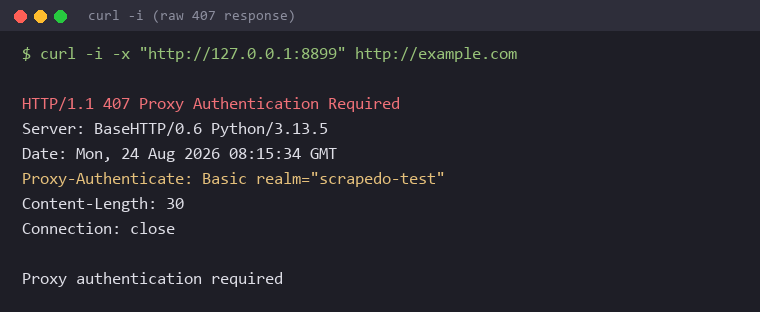
Basic realm="scrapedo-test" is the whole diagnostic. Basic means base64 credentials satisfy it, and any client can do that.
When the Challenge Header Is Missing
Since the spec makes Proxy-Authenticate mandatory, its absence is a signal. WAFs, load balancers, captive portals on hotel networks, and transparent proxies injected by an ISP all produce 407-shaped responses without playing by section 11.7.1. If the header is missing, checking the password is wasted effort.
Why the 407 Check Never Fires on HTTPS
Search this error and nearly every answer shows the same handler: check whether response.status_code equals 407. On an HTTPS target that check never runs.
CONNECT Tunnels Fail Before a Response Exists
Over plain HTTP the proxy receives the request, acts on it, and answers directly, so a 407 comes back as an ordinary response.
HTTPS works differently. The client first asks the proxy to open a raw tunnel with CONNECT. Only after that tunnel opens does TLS negotiate and the real request travel inside it, encrypted and invisible to the proxy. A 407 rejects the CONNECT itself, so the tunnel never opens and no HTTP response object is ever built.
Same proxy, same missing credentials, two different shapes:
print("HTTP target, no credentials")
response = requests.get(
    "http://example.com",
    proxies={"http": PROXY_NO_CREDS},
    timeout=10,
)
print(f"  status_code: {response.status_code}")

print("\nHTTPS target, no credentials")
try:
    response = requests.get(
        "https://example.com",
        proxies={"https": PROXY_NO_CREDS},
        timeout=10,
    )
except requests.exceptions.ProxyError as error:
    # No status_code exists here; the CONNECT tunnel never opened
    print(f"  ProxyError: {str(error)[:120]}")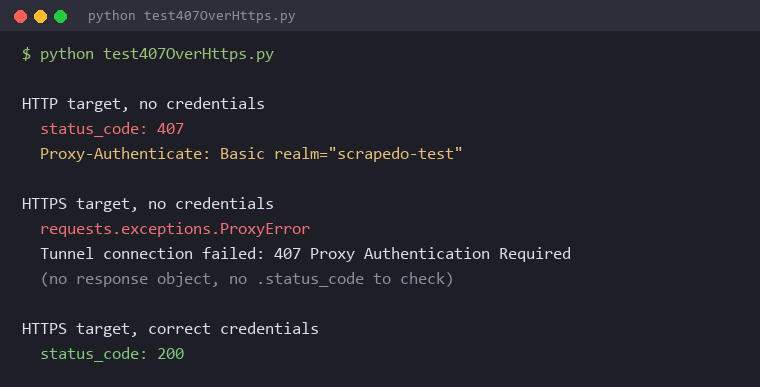
HTTP hands back status_code: 407. HTTPS raises ProxyError carrying Tunnel connection failed: 407 Proxy Authentication Required, with no response object at all. Since almost every scraping target is HTTPS, the status-code check is dead code in the exact situation it was written for.
Catching It Correctly
The handler has to catch the exception and read the 407 out of its message. A codebase hitting both transports needs both shapes:
try:
    response = requests.get(target, proxies=proxies, timeout=15)
    if response.status_code == 407:
        raise RuntimeError("Proxy rejected credentials on a plain HTTP request")
except requests.exceptions.ProxyError as error:
    if "407" in str(error):
        raise RuntimeError("Proxy rejected credentials during CONNECT")
    raise
A 407 is a configuration failure, not a transient one. Retrying without changing the credentials repeats the same failure at the same speed.
The Causes, and How to Tell Them Apart
Eight failures produce this one status code, and the fix differs for each. They group by where things break: before the request leaves, at the proxy's credential check, inside the credential string, and at the account level.
Credentials That Never Left the Client
The common one. The proxy is configured as host and port with no credentials attached, so the 407 arrives with a challenge header and the request carried no Proxy-Authorization at all.
A quieter version is attaching credentials to the wrong protocol key. A dict holding only {"http": ...} never matches an HTTPS request, so it goes out unauthenticated.
Some characters break the URL before a packet is sent. /, #, and ? terminate the authority component, so urllib3 rejects the URL locally:
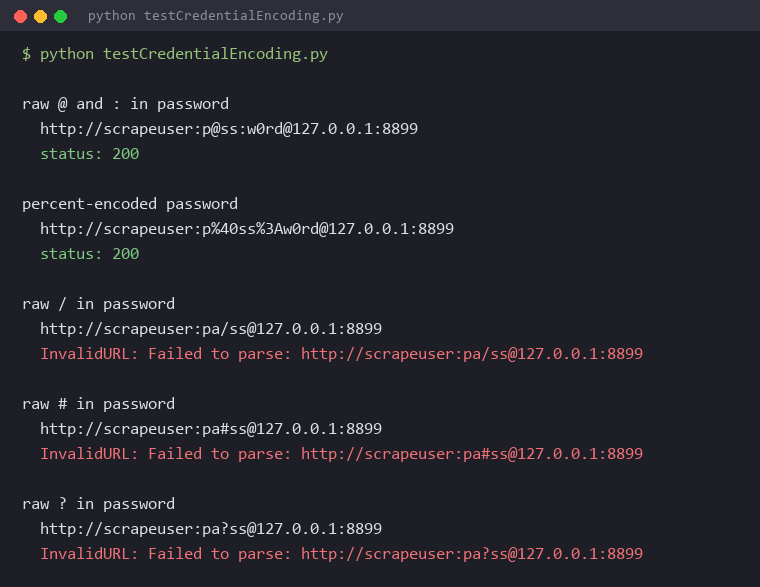
Those three never produce a 407. They raise InvalidURL on the local machine, a different problem wearing similar clothes.
Credentials the Proxy Rejected
The credentials arrived intact and the proxy said no. Proxy-Authorization is present and the answer is still 407.
Usual suspects: a typo, a password the provider rotated after a plan change, an expired subscription, a suspended sub-user. Format errors land here too. Sub-user syntax like user-session-abc123-country-us is easy to mistype, and corporate proxies often want DOMAIN\user where a bare username was supplied. An email-style username containing @ parses exactly as intended and still fails, because the proxy wanted a different format.
This is where the most repeated advice about 407 falls apart. Nearly every published guide calls unescaped special characters the leading cause. On current requests and urllib3, @ and : in a password parse fine unescaped and produce a header byte-identical to the encoded form. Both send scrapeuser:p@ss:w0rd. The advice is aimed at the wrong character.
The Percent Sign That Silently Rewrites a Password
urllib3 percent-decodes the userinfo section of a proxy URL before base64-encoding it, so a literal % in a password is read as the start of an escape sequence. A real password of pa%41ss decodes to paAss and goes out as a different string:
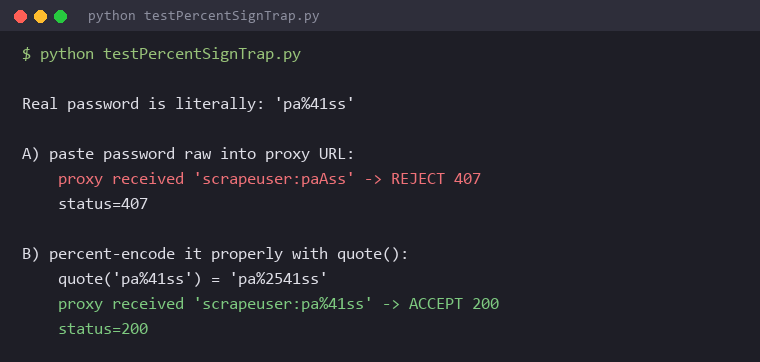
The proxy is behaving correctly. It rejected credentials that were never sent. No traceback, no warning, and the password looks right in the source code. The fix is encoding the percent sign itself as %25, which quote() handles:
import urllib.parse

username = "scrapeuser"
password = "pa%41ss"          # a literal % lives in the real password

proxy = "http://{}:{}@proxy.example.com:8080".format(
    urllib.parse.quote(username, safe=""),
    urllib.parse.quote(password, safe=""),
)
# password now travels as pa%2541ss and arrives as pa%41ss
That decoding step is also why raw and encoded forms of a password containing @ produce identical headers. Encoding is a no-op for @ and :, a local parse error for / # ?, and the whole ballgame for %.
IP Allowlists and Concurrency Limits
Many providers offer credential authentication or IP allowlisting as alternatives. An account in allowlist mode answers 407 when the request comes from an unrecognized IP, and the credentials are irrelevant to that decision. This hits CI runners, containers, cloud functions, and any machine whose ISP just rotated its public address. The code did not change. The egress IP did.
Some providers also answer 407 rather than 429 Too Many Requests when an account exceeds its concurrent session limit, which makes a rate problem look like a credential problem. For both, the distinguishing signal is the same: identical credentials work from a different machine or at lower concurrency.
Proxy chains belong here too. With a corporate proxy in front of a commercial one, the first hop consumes the credentials and the second issues its own challenge, exactly as section 11.7.2 describes.
Fixing 407 in Python Requests
Most scraping traffic starts here, and requests has behavior that produces 407s even when the password is correct. One rule prevents most of it: let the library own the credentials instead of building the header by hand.
Prerequisites
pip install requests beautifulsoup4The final section needs a Scrape.do token, free for the first 1000 credits at dashboard.scrape.do/signup. Every code block uses <your_token> as a placeholder, and the local proxy from earlier is enough to verify each fix without a paid provider.
Passing Credentials the Way urllib3 Expects
Credentials belong in the proxies dictionary as part of the URL userinfo. That hands ownership to urllib3's ProxyManager, which attaches Proxy-Authorization to the CONNECT request for HTTPS targets and to the request itself for HTTP targets.
import requests
from urllib.parse import quote

username = "scrapeuser"
password = "p@ss:w0rd"
host = "proxy.example.com:8080"

proxy_url = f"http://{quote(username, safe='')}:{quote(password, safe='')}@{host}"
proxies = {"http": proxy_url, "https": proxy_url}

response = requests.get("https://example.com", proxies=proxies, timeout=15)
print(f"Status: {response.status_code}")
Setting both keys is not optional. A dict with one key leaves the other transport unauthenticated, which accounts for a fair number of otherwise inexplicable 407s.
The Redirect That Drops the Header
A widely circulated workaround sets Proxy-Authorization manually in the headers argument. It works for exactly one request, then dies on the first redirect.
The cause is CVE-2023-32681. Before 2.31.0, requests leaked Proxy-Authorization to destination servers when following redirects to HTTPS, exposing proxy credentials to whoever received the redirect. Versions 2.3.0 through 2.30.0 are affected, scored 6.1. The fix changed Session.rebuild_proxies:
if "Proxy-Authorization" in headers:
    del headers["Proxy-Authorization"]

# urllib3 handles proxy authorization for us in the standard adapter.
# Avoid appending this to TLS tunneled requests where it may be leaked.
if not scheme.startswith("https") and username and password:
    headers["Proxy-Authorization"] = _basic_auth_str(username, password)
The del is unconditional. Every redirect strips the header regardless of scheme, and it is only re-added from credentials found in the proxies dict, and only for non-HTTPS. A header we set ourselves is never restored:
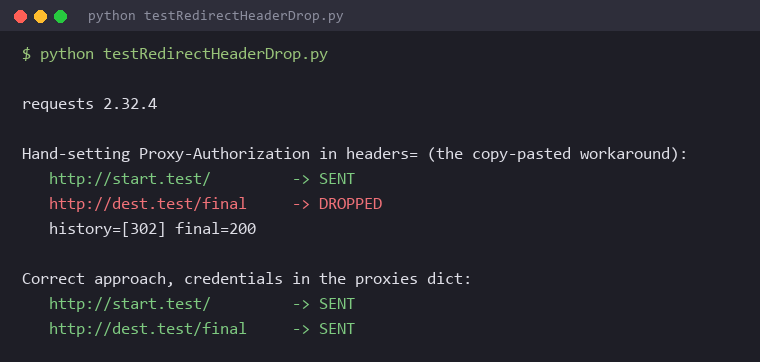
Hand-set header: SENT, then DROPPED after the 302. Credentials in the proxies dict: SENT on both. A security fix quietly became a 407 generator for anyone using the manual workaround. Delete the manual header and move the credentials into proxies.
Export to CSV
A working proxy configuration only matters if the rows land somewhere:
with open("quotes.csv", "w", newline="", encoding="utf-8") as f:
    writer = csv.DictWriter(f, fieldnames=["quote", "author", "tags"])
    writer.writeheader()
    writer.writerows(rows)

print(f"Wrote {len(rows)} rows to quotes.csv")
End to end this prints Status: 200 and Wrote 10 rows to quotes.csv, with quote, author, and tags columns filled. The page stops being a page and becomes rows.
Fixing 407 in curl and Other Clients
curl is the fastest way to find out whether a 407 is about the credentials or about the library, because it takes the library out of the picture.
Why -U Beats Credentials in the URL
# works, curl escapes the argument itself
curl -x "http://proxy.example.com:8080" -U 'scrapeuser:p@ss:w0rd' http://example.com

# fails, the URL parser splits on characters inside the password
curl -x "http://scrapeuser:p@ss:w0rd@proxy.example.com:8080" http://example.com
-U takes credentials as a literal argument, so curl handles the escaping and special characters need no manual encoding. Embedding the same string in the -x URL hands it to a parser that splits in the wrong places.
--proxy-basic is the default, with --proxy-digest, --proxy-ntlm, and --proxy-negotiate available. When the required scheme is unknown, --proxy-anyauth reads the challenge and picks one, at the cost of extra round trips.
Corporate Proxies That Speak NTLM or Negotiate
A different class of 407: the credentials are correct and the client cannot perform the handshake being demanded.
Corporate proxies commonly require NTLM or Kerberos through Negotiate, discovered through a PAC or WPAD file. Browsers handle it transparently using the logged-in Windows session, which produces the maddening pattern where the browser loads any page while npm install, apt, git, and pip all fail with 407 on the same machine.
The usual fix is setting credentials in the tool's own configuration rather than relying on the system proxy:
npm config set proxy "http://DOMAIN%5Cusername:password@proxy.example.com:8080"
npm config set https-proxy "http://DOMAIN%5Cusername:password@proxy.example.com:8080"
%5C is an encoded backslash, because these proxies usually want DOMAIN\username. Storing the password in Windows Credential Manager or macOS Keychain handles the repeated-prompt version.
When a tool cannot speak NTLM at all, a local bridge such as px or cntlm accepts unauthenticated connections from localhost and performs the handshake upstream. Postman and similar clients keep their own proxy credential fields, separate from system settings, worth checking before blaming the network.
Fixing 407 When Browsing Instead of Scraping
The same code reaches people writing no code at all, usually on a corporate or school network. A browser showing a 407 page or a repeating credential prompt means the network proxy rejected the login it was given.
Confirm the network account password has not expired, since a proxy password is often the same domain password that rotates on a schedule. On a managed device, stale credentials usually live in Windows Credential Manager or macOS Keychain rather than in the browser.
Two other causes are worth ruling out. Manual proxy settings left behind by a VPN or a previous network keep pointing at a proxy that no longer wants to talk, and switching back to automatic detection resolves it. Browser extensions that route traffic through their own proxy produce 407s independent of system settings, and a private window with extensions disabled isolates that in seconds.
Skipping Proxy Credentials Entirely
Every cause above traces back to one design: credentials packed into a URL, parsed by a client library, negotiated over a tunnel. Remove that layer and the failure mode goes with it.
Scrape.do supports both access methods. Proxy mode keeps the familiar shape, http://token:parameters@proxy.scrape.do:8080, where the token is the username and the API parameters are the password. That password field legitimately contains & and =, exactly the kind of string that needs careful encoding, and it expects the Scrape.do CA certificate to be trusted or SSL verification disabled.
API mode passes the token as a query parameter instead. No userinfo section for a parser to mangle, no CONNECT step to authenticate, no path to a 407:
import requests
from urllib.parse import quote

token = "<your_token>"
target_url = "https://quotes.toscrape.com/"

scrape_do_url = f"https://api.scrape.do/?token={token}&url={quote(target_url, safe='')}"

response = requests.get(scrape_do_url, timeout=60)
print(f"Status: {response.status_code}")
quote() encodes the target URL so its own query string does not break the outer request, the same encoding discipline the password needed earlier, applied one layer up. The request returns 200 and the parse writes 10 rows.
One honest note on error behavior. An invalid token in proxy mode does not answer with a bare 407 challenge:
{"StatusCode":401,"Message":["The API Token is inactive or incorrect."]}A smaller claim than "this never fails." It is just easier to debug a sentence than a status code.
Conclusion
Work this error in order. Check that the response carries Proxy-Authenticate, which confirms it came from the configured proxy and names the scheme. Establish whether the target is HTTP or HTTPS, because that decides whether the error is catchable as a status code or only as a ProxyError. Then walk the causes, starting with what the sent header actually contained rather than what the source code says it should.
Decode the Proxy-Authorization header on the next 407 before changing anything. It answers most of these questions on its own.
Get 1000 free credits and start scraping with Scrape.do
Frequently Asked Questions
How do I fix error 407 Proxy Authentication Required?
Confirm the response carries a Proxy-Authenticate header, which proves it came from the configured proxy and names the required scheme. Put the credentials in the client's proxy configuration rather than a hand-built header, percent-encode the password, and set both the HTTP and HTTPS keys. If the credentials are definitely correct, check whether the account uses IP allowlisting and whether the current egress IP is on the list.
What does 407 Proxy Authentication Required mean?
A proxy between the client and the target refused to forward the request because it did not receive credentials it accepts. The request never reached the destination website, so the target's anti-bot protection has nothing to do with it.
What is the difference between 401 and 407?
A 401 comes from the origin server and is answered with an Authorization header, meaning the request reached the target and was turned down there. A 407 comes from an intermediary proxy and is answered with Proxy-Authorization, meaning the request stopped at the proxy.
Why does my 407 error not have a status code in Python?
The target is HTTPS, so the request goes through a CONNECT tunnel that the proxy rejected before any HTTP response existed. requests raises ProxyError instead of returning a response object, so it has to be caught as an exception rather than read from status_code.
Do I need to URL-encode my proxy password?
For a literal %, yes, and skipping it causes a silent failure where the password is rewritten before it is sent. For /, #, and ?, yes, because they break URL parsing and raise InvalidURL before any request goes out. For @ and : it is not strictly required on current requests and urllib3, though running everything through quote(password, safe="") is the safer habit.
Software Engineer








