Category:Scraping ErrorsView as Markdown
Error 418 I'm a Teapot: Why Servers Send It to Scrapers and How to Fix It

Head of Marketing


Most status codes tell you what went wrong. This one tells you a joke.
And on a few servers, the joke is the last thing your scraper sees before a ban.
Short answer: HTTP 418 "I'm a teapot" is a joke status code from a 1998 April Fools' RFC. Real servers still send it: Binance's API answers 418 to an IP it auto-banned for ignoring 429s, and Huawei Cloud WAF uses 418 as its default block code. For a scraper, a 418 usually means you went one step past "slow down".
First the joke, then the parts that matter for a scraper: who actually sends 418, how it differs from 403 and 429, and what to change in your code. Every output on this page comes from runs we did in October 2026.
What Is HTTP 418 I'm a Teapot?
HTTP 418 I'm a teapot is a 4xx client error code that started as a joke in RFC 2324, the 1998 April Fools' coffee pot protocol. It was never part of real HTTP. Servers, APIs and firewalls send it anyway, usually to turn away a client they think is a bot or an abuser.
The joke goes like this: a client asks a teapot to brew coffee, and the teapot refuses with 418, because it's a teapot.
Nobody brews coffee over HTTP, so in the wild a 418 means one of three things:
| What sent it | What it means | Your move |
|---|---|---|
| An API rate limiter (Binance) | Your IP is auto-banned for ignoring 429s | Stop, wait the full Retry-After, then slow down |
| A WAF block page (Huawei Cloud WAF) | A rule flagged your request | Fix what the rule matched: headers, IP, payload |
| A test endpoint, an Easter egg or a bug | The server answers 418 to everyone | Nothing to fix in your scraper |
The first two are the ones that hurt a scraper. The third is the reason most articles about 418 are jokes.
Where 418 Came From
The code comes from RFC 2324, the Hyper Text Coffee Pot Control Protocol, written by Larry Masinter and published on April 1, 1998. Section 2.3.2 defines "418 I'm a teapot". In 2014, RFC 7168 extended the protocol to tea, on April 1 again.
In August 2017, Mark Nottingham, one of the editors of the HTTP specs, opened issues asking Node.js and Go to drop 418 from their HTTP libraries. That started the Save 418 campaign, run by Shane Brunswick, a high school student at the time.
418 survived. Node.js still ships it: http.STATUS_CODES[418] returns "I'm a Teapot" on Node 26. Python's http.HTTPStatus(418) and requests.codes.teapot know it too, as the test run below shows.
The current HTTP spec settled it. RFC 9110 lists 418 as "(Unused)". The joke got deployed so often that the code is unusable for anything else, so it stays reserved in the IANA registry.
That's exactly why it works as a signal. No real feature will ever claim 418, so a server that sends it means it.
Why Do Real Servers Send 418 to Scrapers?
Because a 418 is unmistakable. A 403 or a 429 can come from a dozen layers between you and the data, but nobody sends a teapot by accident. API owners and WAF vendors use it as a signature: Binance for IPs auto-banned after ignoring 429s, Huawei Cloud WAF as its default block code.
These are the cases we could verify at the source, in the vendor's own docs or code, in October 2026.
Binance: 418 Is the Ban After the 429s
Binance's Spot API docs spell out the whole ladder, from the 429 warning to the 418 ban:
- A 429 means you broke a request rate limit, and it's your job to back off.
- An IP that keeps sending after receiving 429s gets "auto-banned", and the ban comes back as HTTP 418.
- Bans "scale in duration for repeat offenders, from 2 minutes to 3 days."
- A
Retry-Afterheader comes with both codes. On a 429 it says how long to wait to avoid a ban; on a 418 it says how long until the ban is over. - Limits are counted per IP address, not per API key.
The USD-M Futures docs carry the same 418 rule and the same 2 minutes to 3 days. Binance.US uses 418 for auto-bans too, and MEXC's Spot v3 docs copy Binance's rate-limit wording almost word for word, including Retry-After on 418.
Huawei Cloud WAF: 418 Is the Default Block Code
Huawei Cloud's WAF documentation says its block page returns 418 by default, and calls 418 "a common WAF identifier in the industry." Admins can change it to something else, like 403.
Its troubleshooting page says a 418 shows up when the WAF blocks a request with a malicious payload. The docs don't say whether its bot and rate-limit rules use 418 too, so we won't claim they do.
Two 418s That Were Not About Bots
- Better WP Security, 2013. The WordPress plugin (later iThemes Security, then Solid Security) sent
HTTP/1.0 418 I'm a teapotto locked-out and banned visitors in version 3.5.3. Version 4.0.0 switched to 403 in 2014, and current versions send 403. Old forum threads about "418 on my WordPress site" come from that era. - npm, May 2018. The npm registry answered 418 to clients behind some proxies, because the proxies appended the port to the
Hostheader. npm fixed it on its side (npm/npm#20791). A bug, not a block.
We also looked for 418 in Cloudflare, AWS WAF and Akamai documentation and found nothing. Cloudflare's rate limiting answers with 429 and its Error 1015 page instead.
Who Sent the 418: Origin, WAF or API Gateway?
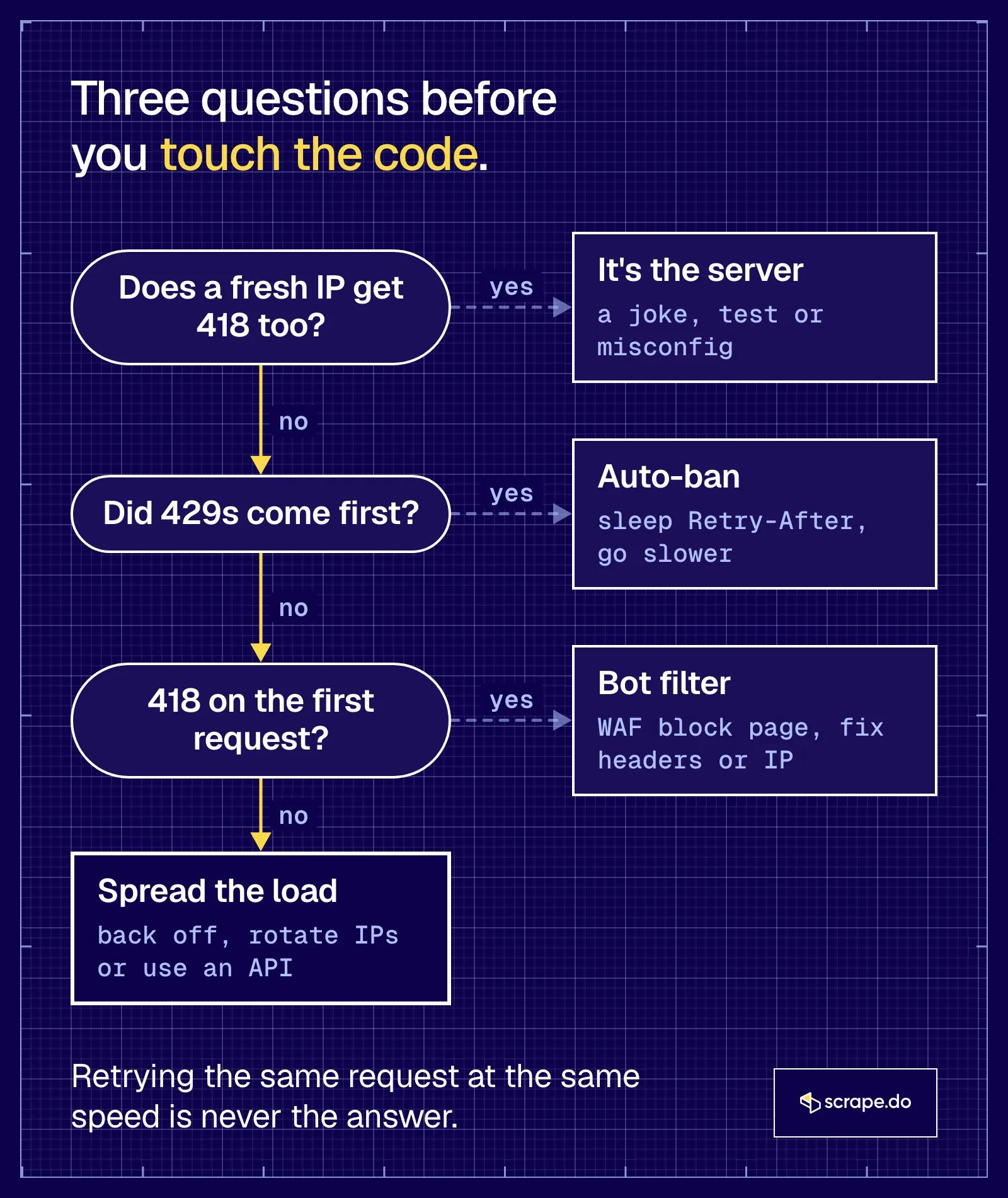
Read the response, not only the number. A JSON error with a Retry-After header points to an API rate limiter, an HTML block page points to a WAF in front of the site, and a 418 that a fresh IP or a normal browser also gets means the server answers everyone that way.
Check these four things before you change any code:
| Signal | API rate limiter | WAF block | Everyone gets it |
|---|---|---|---|
Retry-After header |
Usually, in seconds | Rarely | No |
| Body | Short JSON error | HTML block page, often with an event or request ID | Anything, even ASCII art |
| Came after 429s? | Yes | Usually not, it can be the first request | Not related |
| Fresh IP or browser | Works | Works if the rule matched your client | Same 418 |
If you scrape through Scrape.do, the Scrape.do-Initial-Status-Code response header shows the first status code the target website sent, so you know the 418 came from the site and not from the API in between.
418 vs 403 vs 429: What's the Difference?
A 403 says a rule refuses you, a 429 says you're too fast and should wait, and a 418, on servers that use it for abuse, says you were already told to wait and didn't. Retrying fixes a 429, rarely fixes a 403, and makes a 418 ban worse.
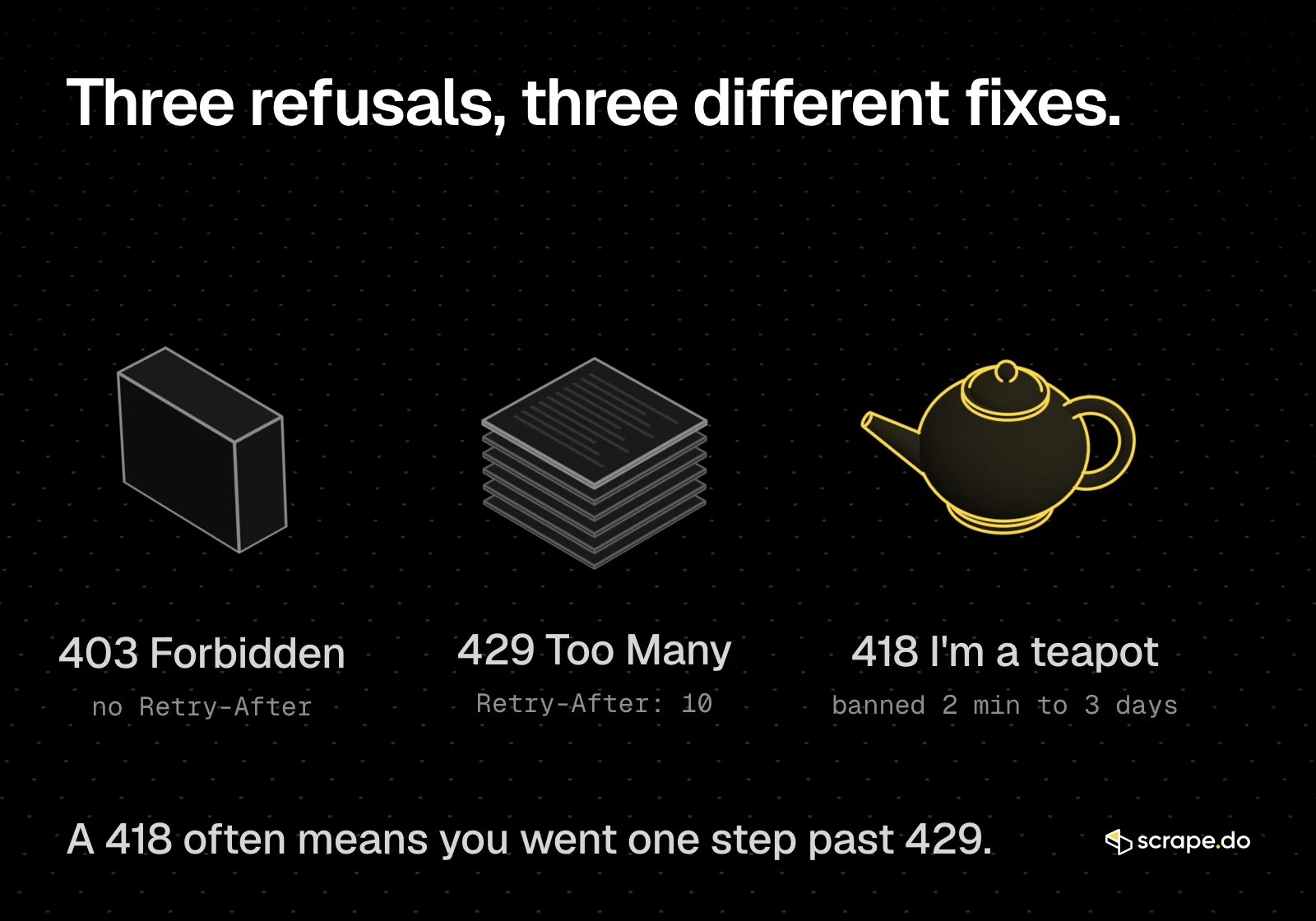
| 403 Forbidden | 429 Too Many Requests | 418 I'm a teapot | |
|---|---|---|---|
| Defined in | RFC 9110 | RFC 6585 | RFC 2324, "(Unused)" in RFC 9110 |
| What it means for a scraper | A rule blocks your IP, headers or session | You crossed a rate limit | An auto-ban after 429s, or a WAF block |
Retry-After |
Rare | Common | Binance: yes, until the ban ends |
| Does waiting help? | No | Yes | Yes for a ban, no for a WAF rule |
| Main fix | Fix headers, sessions or IP | Honor Retry-After, slow down | Stop, wait it out, then fix your rate |
The line between them isn't always clean. Some sites skip 429 and jump straight to a 403 ban, and the rate limit guide covers that escalation. A 418 is the most honest version of it.
Where Does a Scraper Sit on the 200, 429, 418 Ladder?
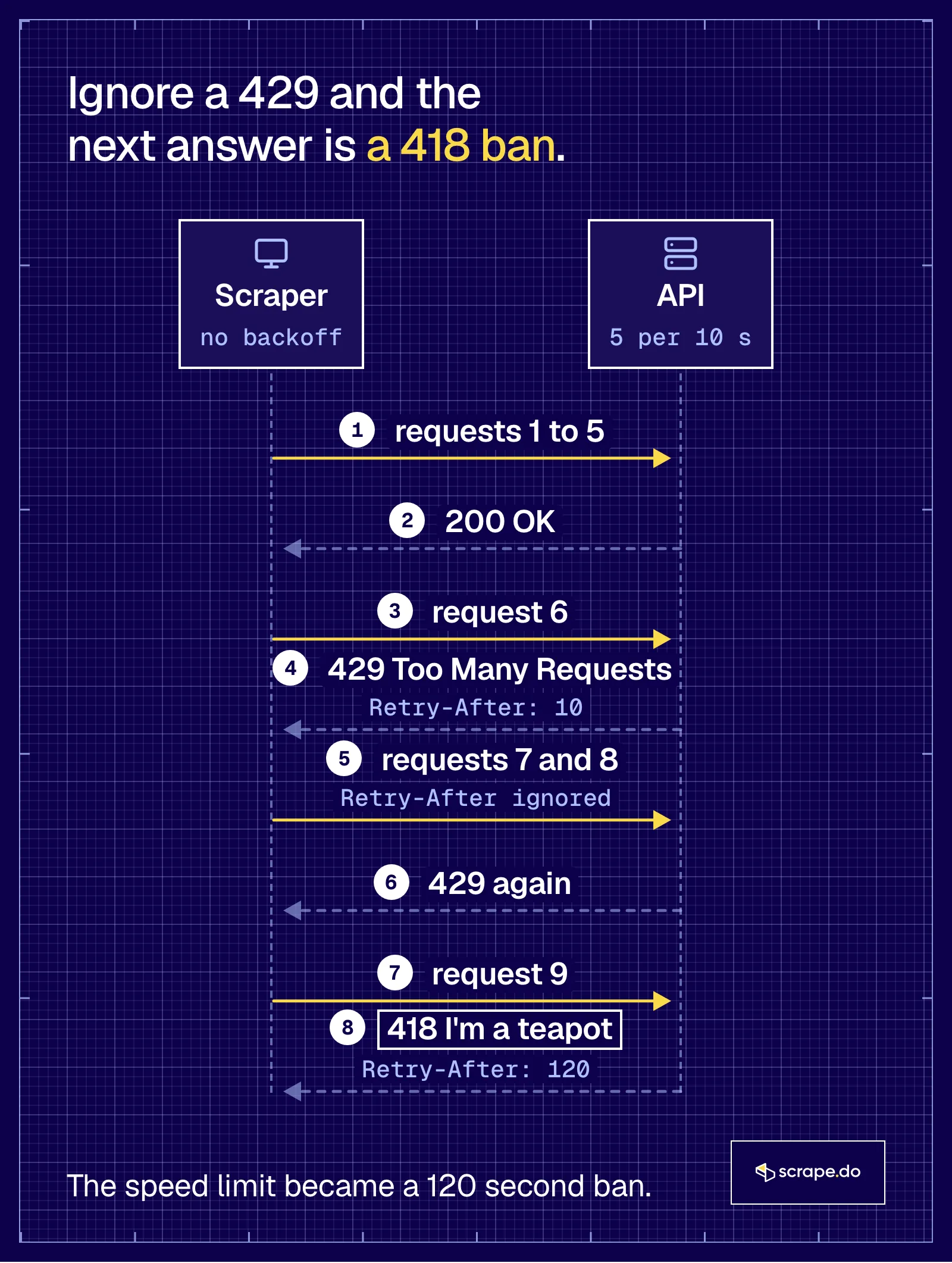
A scraper climbs the ladder one ignored warning at a time: 200s while it stays under the limit, a 429 with Retry-After the moment it crosses it, and a 418 ban once it keeps sending during the wait. The only step you can see coming is the 429.
We didn't want to trigger a real ban on Binance to show this, so we built a small local server that follows the same rules (mock_ladder.py):
- up to 5 requests per 10 seconds per IP get a 200
- over the limit, a 429 with
Retry-Afterset to the seconds left in the window - 3 requests during that wait, and the IP gets a 418 with
Retry-After: 120
We picked the thresholds so a run takes seconds. Binance's real limits are different, and its bans run from 2 minutes to 3 days.
A scraper with no backoff, sending 10 requests in a row:
 1: 200 OK                 Retry-After: -
 2: 200 OK                 Retry-After: -
 3: 200 OK                 Retry-After: -
 4: 200 OK                 Retry-After: -
 5: 200 OK                 Retry-After: -
 6: 429 Too Many Requests  Retry-After: 10
 7: 429 Too Many Requests  Retry-After: 10
 8: 429 Too Many Requests  Retry-After: 10
 9: 418 I'm a teapot       Retry-After: 120
10: 418 I'm a teapot       Retry-After: 120
Request 6 was a warning. Requests 7 and 8 ignored it. Request 9 turned a 10-second wait into a 120-second ban.
How Do You Fix a 418 in a Scraper?
Stop sending first. Read Retry-After and wait the full time, because requests during a ban can extend it. Then fix the cause: lower your request rate, honor Retry-After on every 429, back off exponentially when there's no header, spread requests across IPs, or send them through a scraping API.
1. Stop and Wait Out the Ban
A 418 ban isn't a retryable error. Every request you send during the ban counts against you, and Binance's bans get longer for repeat offenders.
Log the Retry-After value, stop the worker for that IP, and resume after the full wait. If there's no header, wait minutes, not seconds.
2. Honor Retry-After on Every 429
The ban only happens if you ignore the 429 before it, so the real fix lives one step earlier. When a 429 arrives, sleep exactly as long as Retry-After says, and treat a 418 as a hard stop:
import random
import time

import requests


def polite_get(url, max_tries=5):
    for attempt in range(max_tries):
        r = requests.get(url, timeout=10)
        if r.status_code == 418:  # a ban, not a speed bump: stop and report
            raise RuntimeError(f"418 ban, Retry-After {r.headers.get('Retry-After')}s")
        if r.status_code != 429:
            return r
        retry_after = r.headers.get("Retry-After")
        wait = int(retry_after) if retry_after else 2 ** attempt + random.random()
        print(f"    429, Retry-After: {retry_after}. Sleeping {wait}s")
        time.sleep(wait)
    return r
Against the same local server, 12 requests through polite_get:
 1: 200 after 0s
 2: 200 after 0s
 3: 200 after 0s
 4: 200 after 0s
 5: 200 after 0s
    429, Retry-After: 10. Sleeping 10s
 6: 200 after 10s
 7: 200 after 10s
 8: 200 after 10s
 9: 200 after 10s
10: 200 after 10s
    429, Retry-After: 10. Sleeping 10s
11: 200 after 20s
12: 200 after 20s
Two 429s, zero 418s, and all 12 requests came back 200 in 20 seconds. The naive scraper got 5 pages and a two-minute ban.
Retry-After can also be an HTTP date instead of seconds; the 429 guide has a version that handles both forms.
3. Back Off Exponentially When There's No Retry-After
Not every server tells you how long to wait. The fallback in the code above doubles the wait on each attempt and adds up to a second of random jitter, so parallel workers don't all retry at the same moment.
For urllib3's Retry, backoff_factor and the full pattern, see Python requests retry with exponential backoff.
4. Slow Down Below the Limit
Backoff reacts to a limit. Throttling keeps you under it, so the 429 never comes.
Measure the limit, then stay below it with a fixed rate or random delays. The rate limit guide covers how limits are counted, and the Error 1015 guide shows the same fix against a Cloudflare rate limit.
5. Spread Requests Across IPs
Binance counts limits per IP, and so do most WAF rate rules. Spreading requests over a pool of IPs keeps each one under the limit.
Rotation isn't a way to keep hammering a server that already banned you. An IP that got a 418 stays parked until its Retry-After runs out, and the overall rate still has to make sense for the site.
6. Use a Scraping API
If you'd rather not run the proxy pool and the retry logic yourself, a scraping API does both. Here's what Scrape.do's docs say it handles:
- Every request goes out through a rotating pool of 90,000+ datacenter IPs by default.
super=trueswitches to 95,000,000+ residential and mobile IPs, for 10 credits per request instead of 1. - Failed requests are retried automatically. You can tune the wait with
retryTimeoutor turn it off withdisableRetry=trueif you run your own logic. - Requests that fail on Scrape.do's side come back as a 502 and cost nothing. A definitive answer from the target is billed even when it's an error code, like the 418 below, and the docs count 2xx, 400, 404 and 410 as successful results.
import urllib.parse

import requests

token = "<your_token>"
target = urllib.parse.quote("https://httpbin.org/status/418")

response = requests.get(f"https://api.scrape.do/?token={token}&url={target}", timeout=90)
print(response.status_code, response.headers.get("Scrape.do-Initial-Status-Code"))
One honest note from that run: httpbin's teapot answers 418 to everyone, so the API passed the 418 straight through, with Scrape.do-Initial-Status-Code: 418, and billed 1 credit for it. Rotation helps with bans tied to an IP. It can't change an endpoint that returns 418 by design.
Test It Yourself: httpbin /status/418
httpbin.org/status/418 returns a real 418 to every client, so it's the safe way to see what your HTTP library does with a teapot without getting banned anywhere. Over HTTP/1.1 the reason phrase is I'M A TEAPOT; over HTTP/2 there's no reason phrase at all.
On our machine, curl negotiated HTTP/2 by default:
curl -i https://httpbin.org/status/418HTTP/2 418
content-length: 135
server: gunicorn/19.9.0
x-more-info: http://tools.ietf.org/html/rfc2324
access-control-allow-origin: *
access-control-allow-credentials: trueThe body is a small ASCII teapot. HTTP/2 doesn't send reason phrases, so "I'm a teapot" isn't on the wire at all. Force HTTP/1.1 and it comes back:
curl -i --http1.1 https://httpbin.org/status/418HTTP/1.1 418 I'M A TEAPOT
Content-Length: 135
Connection: keep-alive
Server: gunicorn/19.9.0
x-more-info: http://tools.ietf.org/html/rfc2324That matters when you log errors. On HTTP/2, any "I'm a teapot" text in your logs came from your client library, not from the server.
In Python, with requests 2.32.3 on Python 3.12:
from http import HTTPStatus

import requests

response = requests.get("https://httpbin.org/status/418", timeout=15)

print("status:", response.status_code, response.reason)
print("ok:", response.ok)
print("x-more-info:", response.headers.get("x-more-info"))
print("retry-after:", response.headers.get("Retry-After"))
print("teapot code:", requests.codes.teapot, HTTPStatus(418).phrase)

try:
    response.raise_for_status()
except requests.HTTPError as err:
print("raise_for_status:", err)status: 418 I'M A TEAPOT
ok: False
x-more-info: http://tools.ietf.org/html/rfc2324
retry-after: None
teapot code: 418 I'm a Teapot
raise_for_status: 418 Client Error: I'M A TEAPOT for url: https://httpbin.org/status/418raise_for_status() treats 418 like any other 4xx, so a scraper that only catches HTTPError will see "418 Client Error" and nothing about a ban. Check the status code and Retry-After yourself, the way polite_get does.
Frequently Asked Questions
Is a 418 error my fault?
If it came after a run of 429s, yes: the server warned you to slow down and your scraper kept going. If a fresh IP and a normal browser get the same 418, it's the server, and nothing in your code will change it.
How long does a 418 ban last?
As long as the server decides. Binance documents bans from 2 minutes to 3 days, longer for repeat offenders, and sends the remaining time in Retry-After. Read that header instead of guessing.
Should I retry a 418?
Not right away. Requests sent during a ban count against you and can make it longer. Wait the full Retry-After, lower your request rate, and only then try again.
Is 418 a real HTTP status code?
It's a real registered number with a joke behind it. RFC 2324 defined it in 1998 as an April Fools' joke, and RFC 9110 now lists it as "(Unused)" and keeps it reserved so no real feature can take it.
What's the difference between 418 and 429?
A 429 asks you to slow down and usually says how long to wait. On servers like Binance, a 418 is what you get after you ignore that request: an automatic ban on your IP.
How do I fix error 418 in a browser?
Wait a few minutes and reload. If it keeps happening on one site, try another network, and if it still doesn't go away, contact the site. A shared IP, like an office network or a VPN exit, can trip a limit even if you only opened a few pages.
Head of Marketing








