Category:Scraping Use Cases
Scraping Google Shopping with Python (Search, Products, Sellers, Reviews)

Software Engineer


64% of consumers use AI chatbots for shopping today.
Google knows this. They're pushing AI shopping features into Search and Gemini and building a universal commerce protocol to feed product data directly to AI agents.
Google Shopping already aggregates listings from virtually every major retailer into one interface, much like Google Maps does for local businesses. Scraping it means you're not scraping one store, you're scraping the product catalog of the entire web.
But Google doesn't make it easy. Async AJAX loading, hidden backend parameters, aggressive bot detection. And now there's a second extraction path through AI Mode that didn't exist a year ago.
Below you'll find both: raw HTML scraping with async pagination for full detail extraction (sellers, reviews, hidden parameters), and the AI Mode API for structured product data with zero HTML parsing. All through Scrape.do.
Complete working code available on GitHub
Why Is Scraping Google Shopping Difficult
Google Shopping doesn't behave like a typical product listing or e-commerce page. Unlike static product pages, Google Shopping uses dynamic loading, requires hidden parameters for detailed data, and implements aggressive anti-bot measures that block automated access.
Shopping Results are Loaded Dynamically
When you search for products on Google Shopping, the URL in your browser shows something clean like google.com/search?q=wireless+headset&udm=28.
Send a request to that URL from Python using requests, and you'll get an empty response with no product data.
That's because Google Shopping doesn't serve product cards in the initial HTML response. Instead, the page loads a minimal skeleton, then fires off multiple asynchronous AJAX requests to populate the results — a pattern common across JavaScript-rendered web pages.
These backend calls use session tokens, pagination parameters, and encoded identifiers that aren't visible in your browser's address bar.
If you're planning to scrape Google Shopping, forget about the URL you see. You need to replicate the backend requests the browser makes after the page loads.
Product Detail Pages Require Hidden Parameters
Even after you extract product names and prices from the search results, you'll hit another wall when trying to access detailed information.
Each product card on Google Shopping doesn't link to a standard product page. Instead, clicking a product triggers a JavaScript call that opens a modal overlay.
That overlay is populated by a backend API request that requires multiple hidden parameters. These parameters aren't in the HTML as readable attributes. They're buried in data-* attributes on specific DOM elements, and they're required to fetch seller lists, reviews, descriptions, and comparison data.
Scrape Google Shopping Search Results
The first target is basic product information from the search results: product names, prices, images, seller names, and review counts.
The Python web scraper covers five steps:
- Setting up the environment and helper functions
- Extracting tokens from the initial page response
- Building async pagination URLs programmatically
- Fetching and parsing product data from multiple pages
- Exporting results to CSV
Setup & Prerequisites
Install the required libraries:
pip install requests beautifulsoup4You'll also need a Scrape.do API token. Sign up here for 1000 free credits, then grab your token from the dashboard:

Set up your environment:
import os
import re
import json
import urllib.parse
import requests
from bs4 import BeautifulSoup

SCRAPE_DO_TOKEN = "<your_token>"
QUERY = "wireless gaming headset"
SEARCH_URL = f"https://www.google.com/search?q={urllib.parse.quote_plus(QUERY)}&udm=28"
Now create a helper function to route all requests through Scrape.do:
def scrape_do(url: str, session: requests.Session) -> requests.Response:
    api_url = f"http://api.scrape.do/?token={SCRAPE_DO_TOKEN}&url={urllib.parse.quote(url)}"
    r = session.get(api_url)
    r.raise_for_status()
    return r
This function handles proxy rotation, header spoofing, and TLS fingerprinting automatically so Google doesn't flag your requests.
Build Backend Request
Google Shopping loads products progressively as you scroll, and each batch comes from a backend API that's hidden from the address bar.
Step 1: Open DevTools and Start Monitoring
Open Chrome DevTools (F12) and switch to the Network tab before loading Google Shopping.
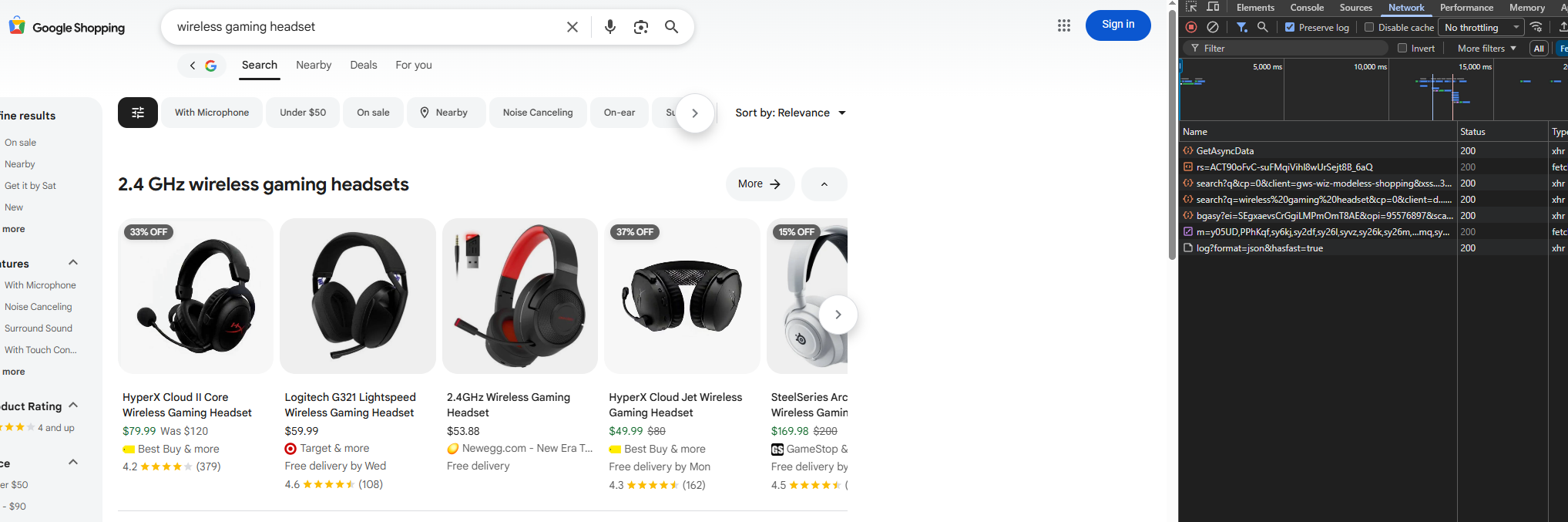
Step 2: Search and Observe Initial Load
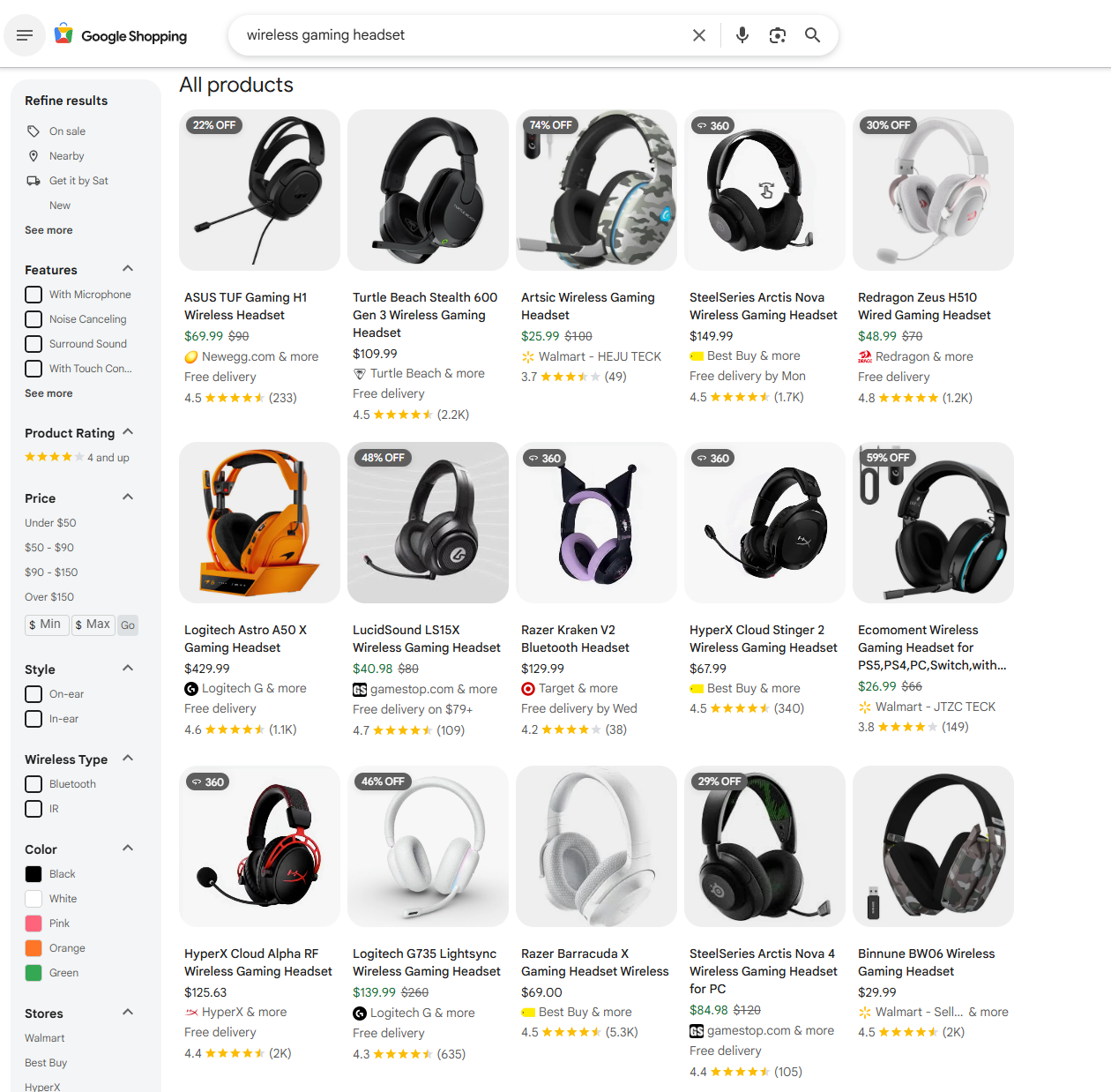
Search for something like "wireless gaming headset" on Google Shopping. You'll see the initial page load at:
google.com/search?q=wireless+gaming+headset&udm=28The udm=28 parameter tells Google to return results in Shopping format (Universal Design Mode 28).
This first request returns a skeleton page with only a few products visible.
Step 3: Scroll Down to Trigger Async Calls
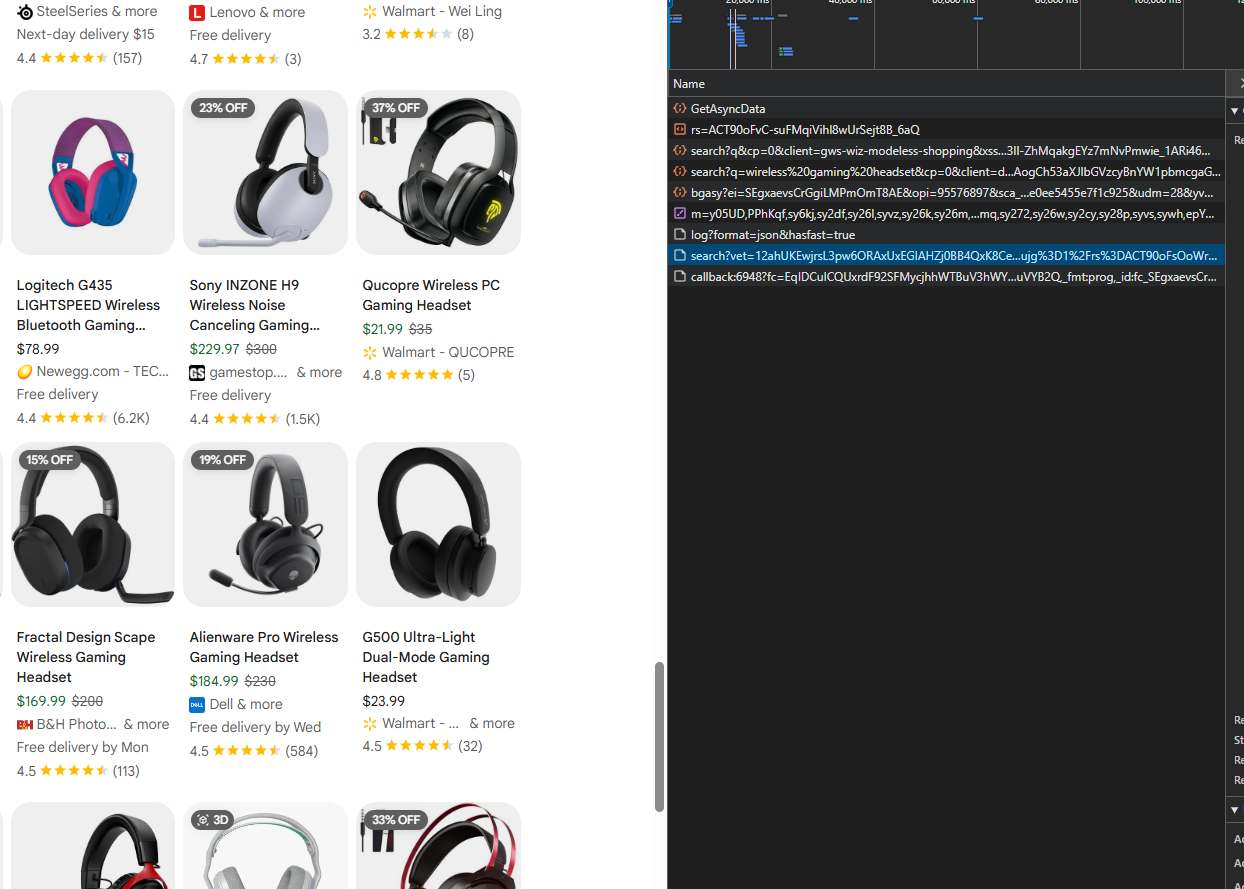
Now scroll down the page. As you scroll, Google fires additional requests to /search?async=... endpoints in the background.
These async calls load more product batches without refreshing the page.
Step 4: Inspect Async Request
Click on one of the /search?async= requests in the Network tab. Look at the Headers section to see the request URL structure.
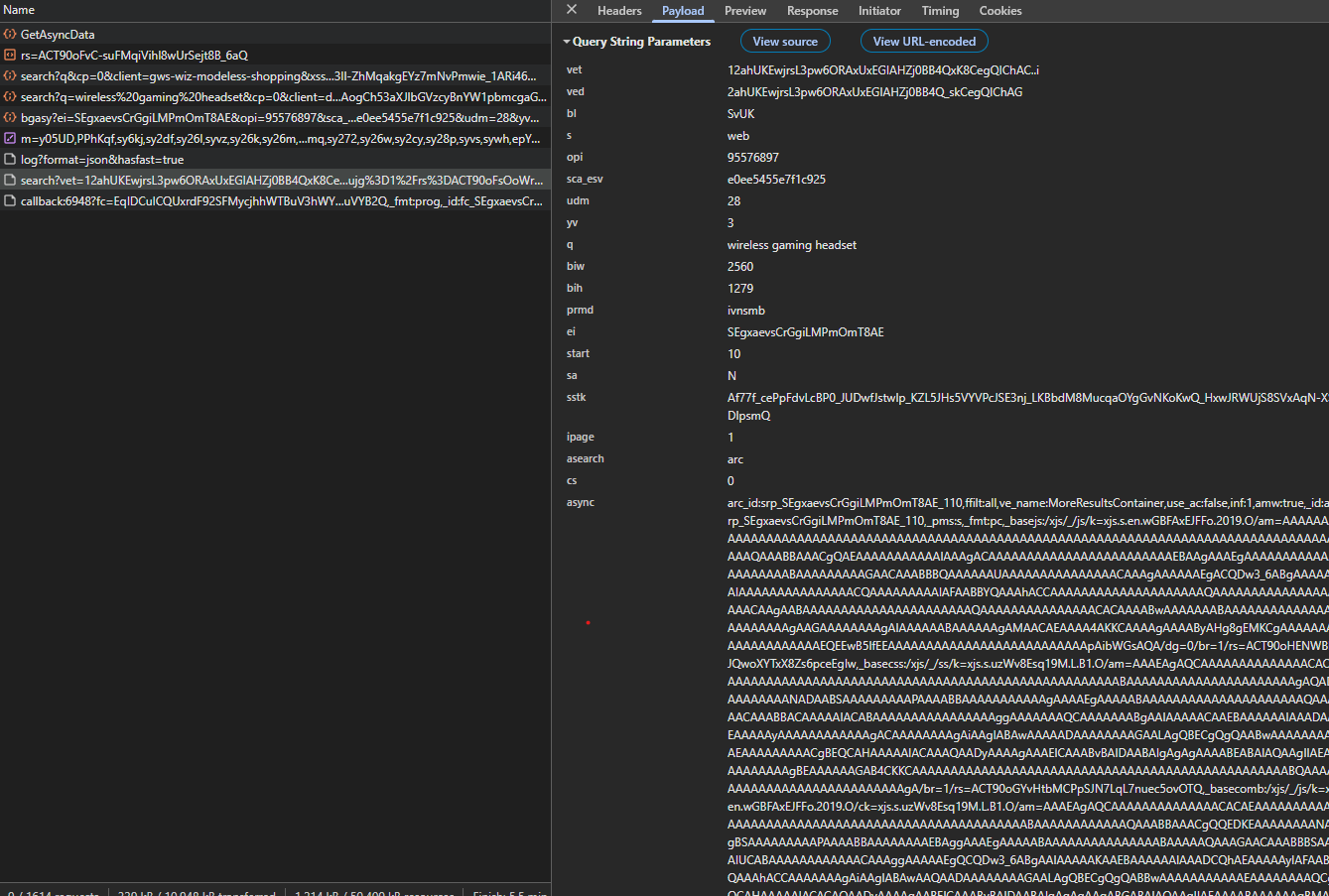
The URL contains an async parameter with encoded tokens like:
async=arc_id:srp_[ei]_10,ffilt:all,ve_name:MoreResultsContainer,...Step 5: Check Response
Switch to the Response tab for that request. You'll see JSON-wrapped HTML snippets containing the product cards:
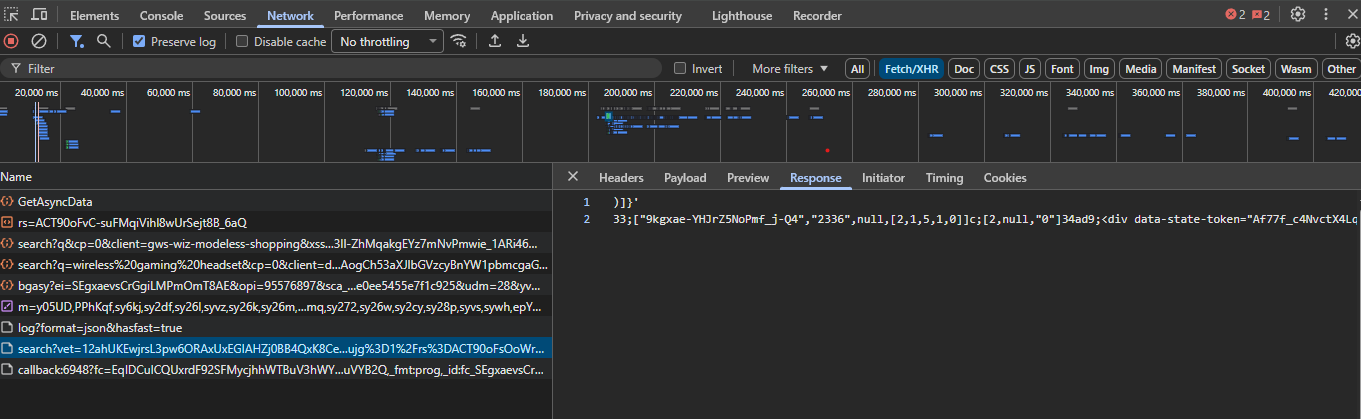
These async endpoints return the actual product data we need to parse.
To build these URLs programmatically, you need to extract several tokens from the initial page response:
ei(event identifier): Hidden in a JavaScript variablekEIin the page sourcebasejs,basecss,basecomb: Asset identifiers embedded ingoogle.xjsscript blocks
Once you have these tokens, you can construct pagination URLs like:
https://www.google.com/search?q=wireless+gaming+headset&udm=28&start=10&async=arc_id:srp_[ei]_10,...The start parameter controls pagination (0, 10, 20, etc.), and the async parameter contains all the tokens and formatting instructions.
Build Async Pagination Requests Programmatically
The async requests can be built programmatically. Extract tokens from the initial page, then construct URLs for pagination.
Extract Tokens from Initial Page
First, fetch the initial page and extract the required tokens:
session = requests.Session()
response = scrape_do(SEARCH_URL, session)
soup = BeautifulSoup(response.content, "html.parser")
Google requires four tokens to build valid async pagination URLs:
ei(Event Identifier): A session-specific identifier that tracks the search session. It's embedded in JavaScript variables in the page source, typically askEIinside a_gobject.basejs: The base path for Google's JavaScript assets. This tells Google which version of their JavaScript files to use.basecss: The base path for Google's CSS assets. Similar tobasejs, it specifies the CSS version.basecomb: A combined asset identifier that may reference bundled resources.
Here's how we extract each token:
def extract_tokens_from_initial(html_text: str, soup: BeautifulSoup):
    """Extract tokens needed for async pagination."""

    # Extract ei (event identifier) from JavaScript
    # The ei token is typically found in patterns like:
    # _g={kEI:'ABC123...'}
    # or kEI: "ABC123..."
    ei = None
    m = re.search(r"_g=\{kEI:'([^']+)'", html_text)
    if not m:
        # Fallback pattern for different JavaScript formats
        m = re.search(r'kEI[:=]\s*[\'"]([^\'"]+)[\'"]', html_text)
    if m:
        ei = m.group(1)

    # Extract basejs, basecss, basecomb from google.xjs script block
    # These are found in a script tag containing "google.xjs" with a structure like:
    # google.xjs = {basejs: "/path/to/js", basecss: "/path/to/css", basecomb: "..."}
    basejs = basecss = basecomb = None
    for script in soup.find_all("script"):
        text = script.string or ""
        if not text:
            continue
        if "google.xjs" in text:
            # Find the object assignment: google.xjs = {...}
            obj = re.search(r"google\.xjs\s*=\s*(\{.*?\})", text, re.DOTALL)
            if obj:
                body = obj.group(1)
                # Extract key-value pairs from the object
                pairs = re.findall(r"(\w+)\s*:\s*['\"]([^'\"]+)['\"]", body)
                if pairs:
                    d = {}
                    for k, v in pairs:
                        # Unescape common HTML/JS encoding
                        # \x3d = "=", \x22 = '"', \x26 = "&"
                        v = v.replace("\\x3d", "=").replace("\\x22", '"').replace("\\x26", "&")
                        d[k] = v
                    basejs   = d.get("basejs", basejs)
                    basecss  = d.get("basecss", basecss)
                    basecomb = d.get("basecomb", basecomb)
    return ei, basejs, basecss, basecomb

# Extract tokens from the initial page
ei, basejs, basecss, basecomb = extract_tokens_from_initial(response.text, soup)
Build Async Pagination URLs
With the tokens extracted, we can build URLs for the async pagination endpoint. The URL construction uses both dynamic values (tokens, query, pagination offset) and static parameters that tell Google how to format and return the response.
def build_async_url(ei, basejs, basecss, basecomb, q, start):
    """Build URL for async pagination endpoint."""
    # Build dynamic identifiers using ei token and start offset
    arc_id = f"srp_{ei or 'X'}_{start}"
    _id    = f"arc-srp_{ei or 'X'}_{start}"

    # Construct the async parameter string
    # This contains instructions for Google's async response handler
    async_parts = [
        f"arc_id:{arc_id}",              # Async request container ID (dynamic)
        "ffilt:all",                      # Filter: show all results
        "ve_name:MoreResultsContainer",   # View element name: the container for more results
        "use_ac:false",                   # Don't use autocomplete
        "inf:1",                          # Information flag: enable info display
        "_pms:s",                         # Parameter mode: "s" (search mode)
        "_fmt:pc",                        # Format: "pc" (page content format)
        f"_id:{_id}",                     # Container ID (dynamic)
    ]
    # Add asset identifiers if available
    if basejs:   async_parts.append(f"_basejs:{basejs}")
    if basecss:  async_parts.append(f"_basecss:{basecss}")
    if basecomb: async_parts.append(f"_basecomb:{basecomb}")
    async_param = ",".join(async_parts)

    # Build the URL query parameters
    params = {
        "q": q,                    # Search query (dynamic)
        "udm": "28",               # Universal Design Mode: 28 = Shopping results
        "start": str(start),       # Pagination offset: 0, 10, 20, 30... (dynamic)
        "sa": "N",                 # Search action: "N" (new search, not continuation)
        "asearch": "arc",          # Async search type: "arc" (async request container)
        "cs": "1",                 # Client state: "1" (initial state)
        "async": async_param,      # Async instructions (dynamic, contains all async_parts)
    }
    return "https://www.google.com/search?" + urllib.parse.urlencode(params, safe=":,_")
Fetch and Parse Async Responses
The async endpoint returns JSON-wrapped HTML snippets. We need to extract and unescape them:
def _unescape_google_inline(html_fragment: str) -> str:
    """De-escape Google's inline HTML encoding."""
    def repl(m):
        return chr(int(m.group(1), 16))
    s = re.sub(r"\\x([0-9a-fA-F]{2})", repl, html_fragment)
return html.unescape(s)def fetch_async_snippets(session: requests.Session, async_url: str):
"""Fetch and parse async pagination response."""
resp = scrape_do(async_url, session)
body = resp.text
txt = body.lstrip(")]}'\n ") # Remove protection prefix
snippets = []
# Try JSON lines format (most common)
json_hits = re.findall(r'^\{.*?"html":.*\}$', txt, flags=re.M | re.S)
if json_hits:
for hit in json_hits:
try:
data = json.loads(hit)
h = data.get("html") or ""
if h:
snippets.append(_unescape_google_inline(h))
except Exception:
pass
# Fallback to raw HTML if JSON parsing fails
if not snippets:
snippets.append(txt)
return snippetsThe response starts with )]}'\n (a CSRF protection prefix). We strip that, then look for JSON objects containing "html" fields. Each HTML snippet is unescaped and can then be parsed with BeautifulSoup.
Paginate Through All Products
Now we can loop through each async page, starting from start=0, to fetch all products. The pagination logic needs to handle two key challenges:
- Deduplication: Google may return the same product across multiple pages, so we need to track what we've already seen
- Stopping condition: We need to know when we've reached the end of available results
Here's the pagination loop with detailed explanations:
all_products = []
seen = set()  # Track products we've already collected using (title, price) tuples
consecutive_empty_pages = 0  # Counter for pages with no new products
page_idx = 0
PAGE_SIZE = 10  # Products per page (Google's standard pagination size)

while consecutive_empty_pages < 3:  # Stop after 3 consecutive empty pages
    start = PAGE_SIZE * page_idx  # Calculate offset: 0, 10, 20, 30...

    # Build async URL for this page
    async_url = build_async_url(ei, basejs, basecss, basecomb, QUERY, start)

    # Fetch and parse the response
    try:
        snippets = fetch_async_snippets(session, async_url)
    except requests.HTTPError as e:
        print(f"Async request failed: {e}")
        snippets = []

    # Parse products from HTML snippets
    new_products = []
    if snippets:
        for snip in snippets:
            batch_soup = BeautifulSoup(snip, "html.parser")
            batch_products = extract_products_from_soup(batch_soup)
            new_products.extend(batch_products)

    # Deduplicate by (title, price) combination
    # This ensures we don't add the same product twice if it appears on multiple pages
    fresh = [p for p in new_products if (p["title"], p["price"]) not in seen]

    # Add newly seen products to our tracking set and results list
    for p in fresh:
        seen.add((p["title"], p["price"]))
    all_products.extend(fresh)

    # Update stopping condition
    if not fresh:
        # No new products found on this page
        consecutive_empty_pages += 1
    else:
        # Found new products, reset the counter
        consecutive_empty_pages = 0

    page_idx += 1
    time.sleep(1.0)  # Pause between requests to avoid rate limiting
Example Flow:
Page 0 (start=0): 40 new products → consecutive_empty_pages = 0
Page 1 (start=10): 30 new products → consecutive_empty_pages = 0
Page 2 (start=20): 25 new products → consecutive_empty_pages = 0
Page 3 (start=30): 0 new products → consecutive_empty_pages = 1
Page 4 (start=40): 0 new products → consecutive_empty_pages = 2
Page 5 (start=50): 0 new products → consecutive_empty_pages = 3 → Stop
This loop continues until we get 3 consecutive pages with no new products, indicating we've reached the end of the results.
Extract Product Data from Cards
Each product appears in a container with class .Ez5pwe inside a .MjjYud group. We need to parse these cards and extract the visible information from the HTML snippets returned by the async endpoint.
Here's what each field looks like:
Product Title
The product title lives in an element with classes .gkQHve.SsM98d.RmEs5b:
title_tag = card.select_one(".gkQHve.SsM98d.RmEs5b")
title = title_tag.get_text(strip=True) if title_tag else None
Price
The price sits in a .lmQWe element:
price_tag = card.select_one(".lmQWe")
price = price_tag.get_text(strip=True) if price_tag else None
Some products show a discounted price with the original price struck through. For now, we'll capture the full string.
Product Image
Product images are lazy-loaded and may use different CSS classes. We try the VeBrne selector first, then fall back to nGT6qb if the first selector doesn't find an image:
image_url = "N/A"
img = card.select_one("img.VeBrne")
if not img:
    img = card.select_one("img.nGT6qb")

if img:
    for attr in ("src", "data-src", "data-jslayout-progressive-load"):
        if img.has_attr(attr):
            attr_value = img[attr]
            # Skip base64 placeholders; keep only real URLs
            if (not attr_value.startswith("data:image") and
                not attr_value.startswith("data:image/gif") and
                (attr_value.startswith("http") or attr_value.startswith("//"))):
                image_url = attr_value
                break
We check multiple image attributes (src, data-src, data-jslayout-progressive-load) because Google may store the image URL in different attributes depending on the loading state. We skip base64-encoded placeholders (which start with data:image) and only accept real HTTP/HTTPS URLs.
Seller Name
The seller name is in a dedicated span with classes WJMUdc rw5ecc:
seller_name = "N/A"
seller_span = card.select_one("span.WJMUdc.rw5ecc")
if seller_span:
    seller_name = seller_span.get_text(strip=True)
Rating
The rating is in a span with classes yi40Hd YrbPuc:
rating = None
rating_span = card.select_one("span.yi40Hd.YrbPuc")
if rating_span:
    rating = rating_span.get_text(strip=True)
Review Count
The review count is in a span with classes RDApEe YrbPuc. We need to ensure we get the span element (not a link) and extract the number from formats like "(1.8K)":
review_count = None
review_span = card.select_one("span.RDApEe.YrbPuc")
if review_span and review_span.name == "span":
    review_text = ""
    if review_span.string:
        review_text = review_span.string.strip()
    else:
        review_text = review_span.get_text(strip=True)

    # Validate: skip if it looks like a URL or is suspiciously long
    if review_text and len(review_text) < 20:
        if not (review_text.startswith("http") or "://" in review_text or
                review_text.startswith("www.") or review_text.count("/") > 2):
            # Extract number from "(1.8K)" format
            review_match = re.search(r'\(([0-9.]+[KM]?)\)', review_text)
            if review_match:
                review_count = review_match.group(1)
            elif re.match(r'^[0-9.]+[KM]?$', review_text):
                review_count = review_text
Complete Extraction Function
Here's the complete function that processes each product card. It runs for each HTML snippet returned by the async pagination endpoint:
def extract_products_from_soup(soup: BeautifulSoup):
    """Extract products from a BeautifulSoup object."""
    products = []
    for group in soup.select(".MjjYud"):
        for card in group.select(".Ez5pwe"):
            # Extract product title
            title_tag = card.select_one(".gkQHve.SsM98d.RmEs5b")
            title = title_tag.get_text(strip=True) if title_tag else None

            # Extract price
            price_tag = card.select_one(".lmQWe")
            price = price_tag.get_text(strip=True) if price_tag else None

            # Skip products without title or price
            if not title or not price:
                continue

            # Extract image URL
            image_url = "N/A"
            img = card.select_one("img.VeBrne")
            if not img:
                img = card.select_one("img.nGT6qb")

            if img:
                for attr in ("src", "data-src", "data-jslayout-progressive-load"):
                    if img.has_attr(attr):
                        attr_value = img[attr]
                        if (not attr_value.startswith("data:image") and
                            not attr_value.startswith("data:image/gif") and
                            (attr_value.startswith("http") or attr_value.startswith("//"))):
                            image_url = attr_value
                            break

            # Extract seller name
            seller_name = "N/A"
            seller_span = card.select_one("span.WJMUdc.rw5ecc")
            if seller_span:
                seller_name = seller_span.get_text(strip=True)

            # Extract rating and review count
            rating = review_count = None
            rating_span = card.select_one("span.yi40Hd.YrbPuc")
            if rating_span:
                rating = rating_span.get_text(strip=True)

            review_span = card.select_one("span.RDApEe.YrbPuc")
            if review_span and review_span.name == "span":
                review_text = ""
                if review_span.string:
                    review_text = review_span.string.strip()
                else:
                    review_text = review_span.get_text(strip=True)

                if review_text and len(review_text) < 20:
                    if not (review_text.startswith("http") or "://" in review_text or
                            review_text.startswith("www.") or review_text.count("/") > 2):
                        review_match = re.search(r'\(([0-9.]+[KM]?)\)', review_text)
                        if review_match:
                            review_count = review_match.group(1)
                        elif re.match(r'^[0-9.]+[KM]?$', review_text):
                            review_count = review_text

            products.append({
                "title": title,
                "price": price,
                "image_url": image_url,
                "seller_name": seller_name,
                "rating": rating,
                "review_count": review_count
            })
    return products
This function is called in the pagination loop for each HTML snippet returned by fetch_async_snippets(). It processes all product cards in the snippet and returns a list of product dictionaries.
Export to CSV
Once we've collected all products, we can export them to a CSV file:
import csv

with open("google_shopping_search.csv", "w", newline="", encoding="utf-8") as f:
    writer = csv.DictWriter(f, fieldnames=["title", "price", "image_url", "seller_name", "rating", "review_count"])
    writer.writeheader()
    writer.writerows(all_products)

print(f"Exported {len(all_products)} products to google_shopping_search.csv")
This creates a CSV file with all the product information we extracted from the search results:
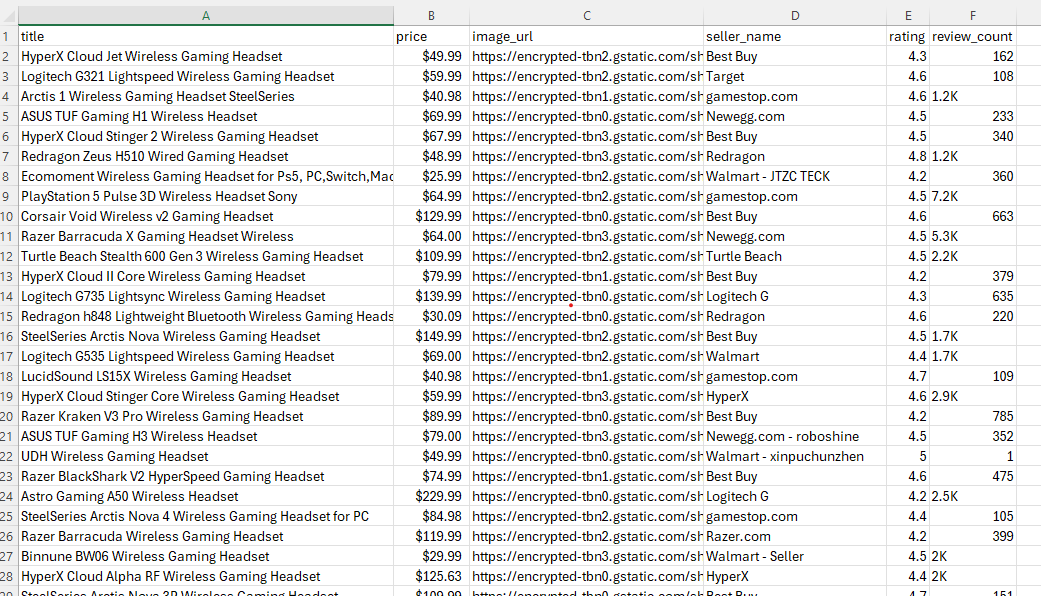
The complete working script that combines all the pieces we've covered (token extraction, async URL building, pagination, product extraction, and CSV export) is available in the GitHub repository linked at the top of this article.
For many use cases, this basic data from the search cards is enough — combine it with Google Trends data to spot which product categories are surging before diving into individual listings. But if you need detailed seller comparisons, customer reviews, and product descriptions, you'll need to go deeper with the hidden parameters.
Scrape Single Product Details
Once you have the hidden parameters for a product card, you can fetch full details for that single product: seller lists, customer reviews, product descriptions, and discussion links.
Here, we'll follow one example product all the way from the UI to the backend request and then into the JSON response.
Build Backend Request for One Product
When you click on a product card in the Google Shopping grid, a details modal pops up showing seller comparisons, reviews, and additional product information.
That modal isn't pre-loaded; Google fetches it from a backend endpoint the moment you click.
Step 1: Click Product and Monitor Request
With DevTools Network tab open, click any product card on the search results page. You'll see a new request appear in the Network tab to /async/oapv.
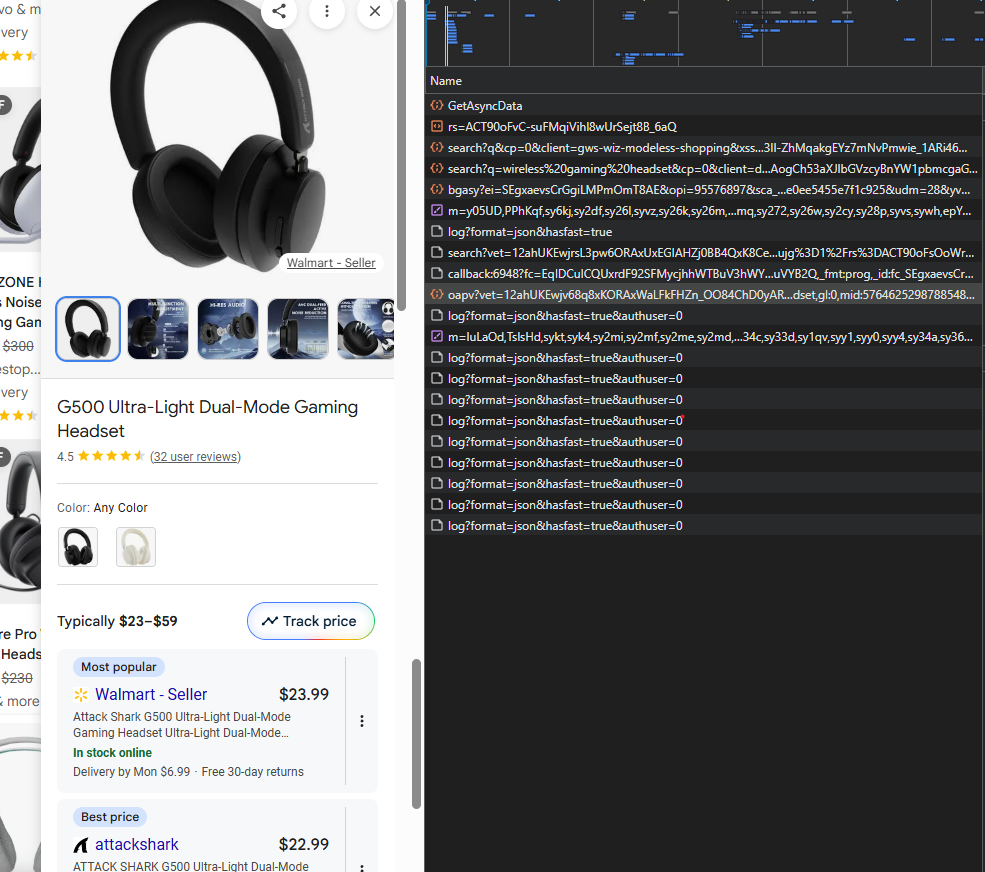
Step 2: Copy Request URL
Click on the /async/oapv request and look at the Headers tab. You'll see the full request URL in the address bar:
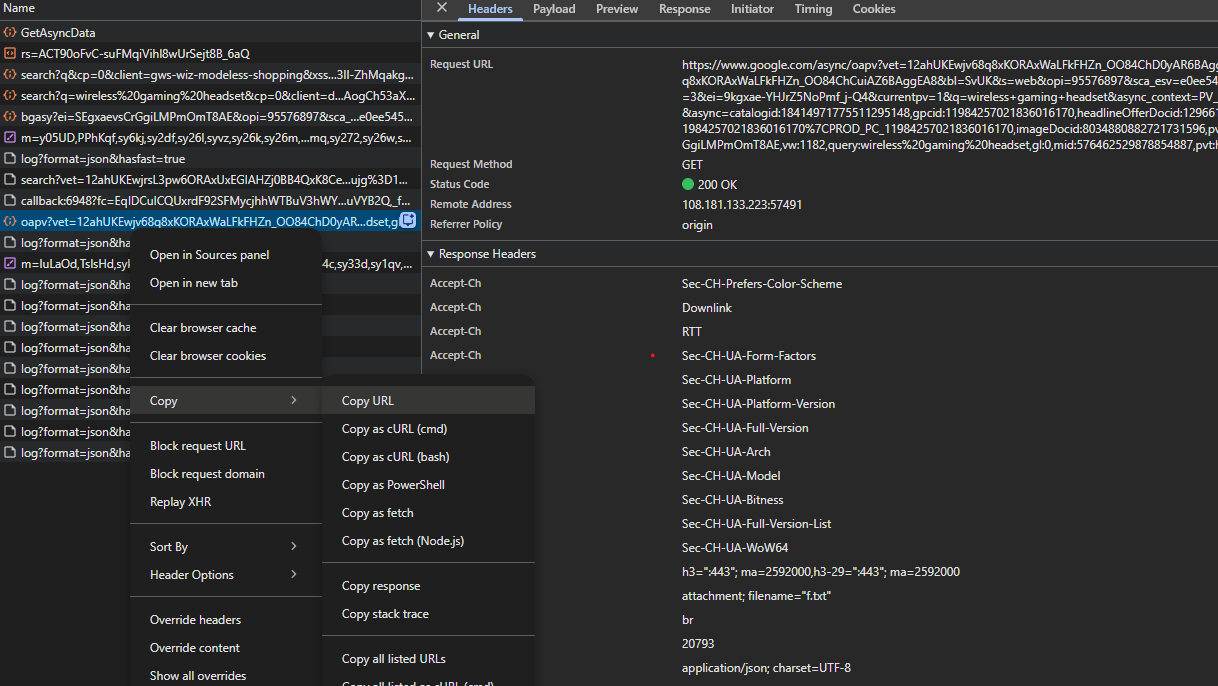
Right-click on the request and select Copy > Copy URL (or copy the URL from the address bar in the Headers tab).
The URL contains a complex async parameter with all the product identifiers:
https://www.google.com/async/oapv?udm=28&yv=3¤tpv=1&q=wireless+gaming+headset&async_context=PV_OPEN&async=catalogid:[id],gpcid:[id],headlineOfferDocid:[id],...Step 3: Send Request Programmatically
Use the copied URL to fetch product details by sending it through Scrape.do:
# Use the URL you copied from DevTools
detail_url = "https://www.google.com/async/oapv?udm=28&yv=3¤tpv=1&q=wireless+gaming+headset&async_context=PV_OPEN&async=catalogid:[id],gpcid:[id],..."
response = scrape_do(detail_url, session)Step 4: Check Response Format
The response is a JSON structure wrapped in a protection prefix. Switch to the Response tab in DevTools to see it:
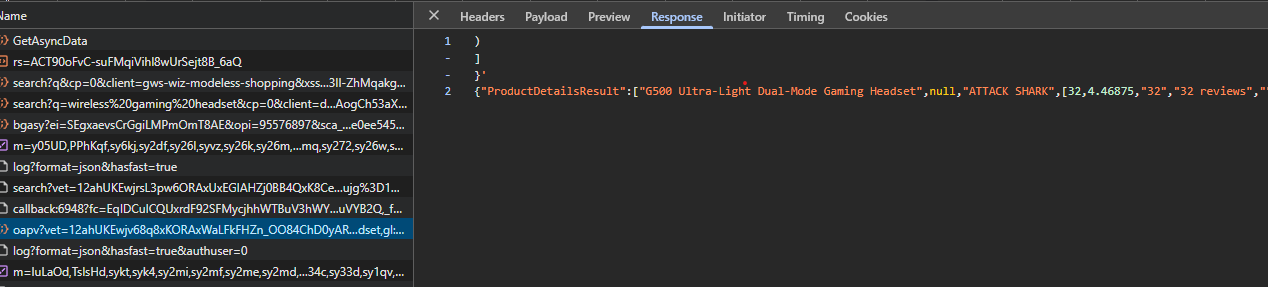
The response starts with )]}'\n to prevent CSRF attacks, followed by a deeply nested JSON array containing all product details.
This JSON response contains everything visible in the UI popup: brand, description, seller offers, reviews, forum discussions, and more.
Strip the prefix and parse the JSON:
text = response.text.lstrip(")]}'\n ")
data = json.loads(text)
The response contains a ProductDetailsResult array with nested data structures holding all the detailed information.
The ProductDetailsResult array contains everything you see in the product details popup on Google Shopping's UI. Each piece of data sits at a specific index in this array.
Here's what we extract and where it lives for that product:
| Data Type | Array Index | What's Stored | Example Value |
|---|---|---|---|
| Brand | [2] |
Product brand name | "Logitech" |
| Review Count | [3][0] |
Total number of reviews | "1234" |
| Rating | [3][1] |
Average rating score | "4.5" |
| Description | [5][0] or [5] |
Product description text | "Wireless gaming headset..." |
| Forum Links | [17] |
Array of discussion links | Reddit, YouTube reviews |
| Primary Offers | [37][6] |
Main seller offers array | Seller prices and links |
| Comparison Offers | [81][0][0] |
Additional seller variants | Alternative seller prices |
| Customer Reviews | [99][2][1][0] |
User review texts and ratings | Review text, author, date |
These indices aren't documented by Google. We found them by comparing what appears in the UI popup with the JSON array structure.
Extract Product Name and Review Count + Rating
Following the array index table above, we can extract the brand at index [2], review count at [3][0], and rating at [3][1]:
details = {}

if isinstance(data, dict):
    product_result = data.get("ProductDetailsResult")
    if product_result and isinstance(product_result, list):
        # Brand at index [2]
        if len(product_result) > 2 and product_result[2]:
            details["brand"] = product_result[2]

        # Rating and review count at index [3]
        if len(product_result) > 3 and product_result[3] and isinstance(product_result[3], list):
            rating_info = product_result[3]
            if len(rating_info) > 0:
                details["review_count"] = str(rating_info[0])  # [3][0]
            if len(rating_info) > 1:
                details["rating"] = str(rating_info[1])  # [3][1]
Extract Product Images (Single Product)
The detail endpoint response includes many image URL variants (different sizes and crops), but no single, documented "main image" field.
The single-product detail script takes a simple, predictable approach:
- We scan the full JSON response for anything that looks like an image URL
- We skip obvious favicon-sized assets
- Then we keep only the first 5 matches and expose them as a
detail_imageslist
def find_image_urls(node):
    """
    Recursively search a JSON-like structure (dict/list/str)
    for strings that look like image URLs.
    """
    candidates = set()

    def _walk(value):
        if isinstance(value, dict):
            for v in value.values():
                _walk(v)
        elif isinstance(value, list):
            for v in value:
                _walk(v)
        elif isinstance(value, str):
            text = value.strip()
            if text.startswith("http"):
                # Skip tiny favicon-style images
                if "favicon" in text.lower():
                    return
                if re.search(r"\.(jpg|jpeg|png|webp)(\?|$)", text, re.IGNORECASE) or "gstatic.com" in text:
                    candidates.add(text)

    _walk(node)
    return sorted(candidates)


def parse_product_details(response_text: str):
    """Parse detailed product information from API response."""
    details = {
        "brand": None,
        "rating": None,
        "review_count": None,
        "description": None,
        "detail_images": [],
        "reviews": [],
        "forums": [],
        "offers": []
    }

    text = response_text.lstrip(")]}'\n ")
    data = json.loads(text)

    # Collect first few image URLs from the entire detail payload.
    all_images = find_image_urls(data)
    details["detail_images"] = all_images[:5]

    # ... further parsing for brand, offers, reviews, etc ...
We intentionally limit this to five URLs so the output stays readable in examples, but you can return more (or all) of them by changing the slice in parse_product_details.
Extract Seller Names, Prices, Links
Looking at our array index table, seller offers are located at two positions: primary offers at [37][6] and comparison offers at [81][0][0].
Each offer is a 30+ element array with price, seller, URL, and rating data at specific positions.
Create a helper function to parse offers:
def extract_offer(offer, from_comparison=False):
    if isinstance(offer, list) and len(offer) > 29:
        price = offer[9] if len(offer) > 9 else None
        currency = offer[10] if len(offer) > 10 else "USD"
        original_price = None

        # Extract original price from nested structure
        if len(offer) > 27 and offer[27] and isinstance(offer[27], list):
            for price_data in offer[27]:
                if isinstance(price_data, list) and len(price_data) > 2:
                    nested = price_data[2]
                    if isinstance(nested, list):
                        for price_item in nested:
                            if isinstance(price_item, list) and len(price_item) > 6:
                                orig = price_item[6]
                                if isinstance(orig, int) and orig > 1000000:
                                    original_price = orig
                                    break

        # Extract seller name
        seller_name = None
        if from_comparison and len(offer) > 1 and isinstance(offer[1], list) and len(offer[1]) >= 2:
            seller_name = offer[1][0]
        else:
            if len(offer) > 29 and offer[29]:
                url = offer[29]
                match = re.search(r'https?://(?:www\.)?([^/]+)', url)
                if match:
                    domain = match.group(1)
                    seller_name = domain.replace('.com', '').replace('.', ' ').title()

        # Get URL
        url = None
        if from_comparison and len(offer) > 2 and isinstance(offer[2], list) and len(offer[2]) > 0:
            url = offer[2][0]
        elif len(offer) > 29:
            url = offer[29]

        return {
            "price": f"${price / 1000000:.2f}" if price else None,
            "currency": currency,
            "original_price": f"${original_price / 1000000:.2f}" if original_price else None,
            "title": offer[28] if len(offer) > 28 else None,
            "url": url,
            "seller_name": seller_name,
            "rating": offer[18] if len(offer) > 18 else None,
            "review_count": offer[19] if len(offer) > 19 else None
        }
    return None
Prices are stored in micros (millionths), so divide by 1,000,000 to get the dollar amount.
Now extract offers from both locations as specified in our array index table:
offers = []

# Primary offers at [37][6] (from table)
if len(product_result) > 37 and product_result[37] and isinstance(product_result[37], list):
    if len(product_result[37]) > 6 and product_result[37][6]:
        offers_section = product_result[37][6]
        if isinstance(offers_section, list):
            for offer in offers_section:
                offer_obj = extract_offer(offer, from_comparison=False)
                if offer_obj:
                    offers.append(offer_obj)

# Comparison offers at [81][0][0] (from table)
if len(product_result) > 81 and product_result[81] and isinstance(product_result[81], list):
    if len(product_result[81]) > 0 and product_result[81][0]:
        compare_section = product_result[81][0]
        if isinstance(compare_section, list) and len(compare_section) > 0:
            variants = compare_section[0]
            if isinstance(variants, list):
                for variant in variants:
                    if isinstance(variant, list) and len(variant) > 26 and variant[26]:
                        variant_offers = variant[26]
                        if isinstance(variant_offers, list):
                            for offer in variant_offers:
                                offer_obj = extract_offer(offer, from_comparison=True)
                                if offer_obj:
                                    offers.append(offer_obj)

# Deduplicate by URL
seen_urls = set()
unique_offers = []
for offer in offers:
    url = offer.get("url")
    if url and url not in seen_urls:
        seen_urls.add(url)
        unique_offers.append(offer)
    elif not url:
        unique_offers.append(offer)

details["offers"] = unique_offers
This gives you a complete list of sellers with their prices, URLs, and ratings.
Extract Top Insights
As shown in our array index table, product descriptions are stored at index [5][0] or sometimes directly at [5]:
if len(product_result) > 5 and product_result[5]:
    if isinstance(product_result[5], list) and len(product_result[5]) > 0:
        desc = product_result[5][0]
        if desc and isinstance(desc, str):
            details["description"] = desc
    elif isinstance(product_result[5], str):
        details["description"] = product_result[5]
Google calls these "top insights" in the UI. They're brief descriptions highlighting key product features.
Extract Featured User Reviews
Referring to our array index table, customer reviews are located at [99][2][1][0], nested several layers deep:
reviews = []

if len(product_result) > 99 and product_result[99] and isinstance(product_result[99], list):
    if len(product_result[99]) > 2 and product_result[99][2] and isinstance(product_result[99][2], list):
        if len(product_result[99][2]) > 1 and product_result[99][2][1] and isinstance(product_result[99][2][1], list):
            if len(product_result[99][2][1]) > 0 and isinstance(product_result[99][2][1][0], list):
                reviews_container = product_result[99][2][1][0]
                for review_data in reviews_container[:10]:
                    if isinstance(review_data, list) and len(review_data) > 6:
                        review_text = review_data[2] if len(review_data) > 2 else None
                        if review_text and review_text.strip():
                            reviews.append({
                                "text": review_text,
                                "source": review_data[3] if len(review_data) > 3 else None,
                                "author": review_data[4] if len(review_data) > 4 else None,
                                "rating": review_data[5] if len(review_data) > 5 else None,
                                "date": review_data[6] if len(review_data) > 6 else None,
                                "review_id": review_data[11] if len(review_data) > 11 else None
                            })

details["reviews"] = reviews
This extracts up to 10 featured customer reviews with their text, source, author, rating, and date.
Extract Discussion and Review Links
According to our array index table, forum discussions and external review links are at index [17]:
forums = []

if len(product_result) > 17 and product_result[17] and isinstance(product_result[17], list):
    forums_data = product_result[17]
    for forum in forums_data:
        if isinstance(forum, list) and len(forum) > 2:
            forums.append({
                "rating": forum[0] if len(forum) > 0 else None,
                "url": forum[1] if len(forum) > 1 else None,
                "source": forum[2] if len(forum) > 2 else None,
                "description": forum[3] if len(forum) > 3 else None,
                "title": forum[4] if len(forum) > 4 else None
            })

details["forums"] = forums
These are links to Reddit discussions, YouTube reviews, and other external content about the product. For broader product coverage, Google News surfaces editorial reviews and brand mentions from publishers in a similar extractable format.
Single-Product Output
When you run the single-product detail script with one /async/oapv URL, the script prints a single details dictionary containing:
- Basic metadata (
brand,rating,review_count,description) - A few normalized structures (
offers,reviews,forums) - A small
detail_imageslist with up to 5 example image URLs
Here's what that looks like in practice for one example product:
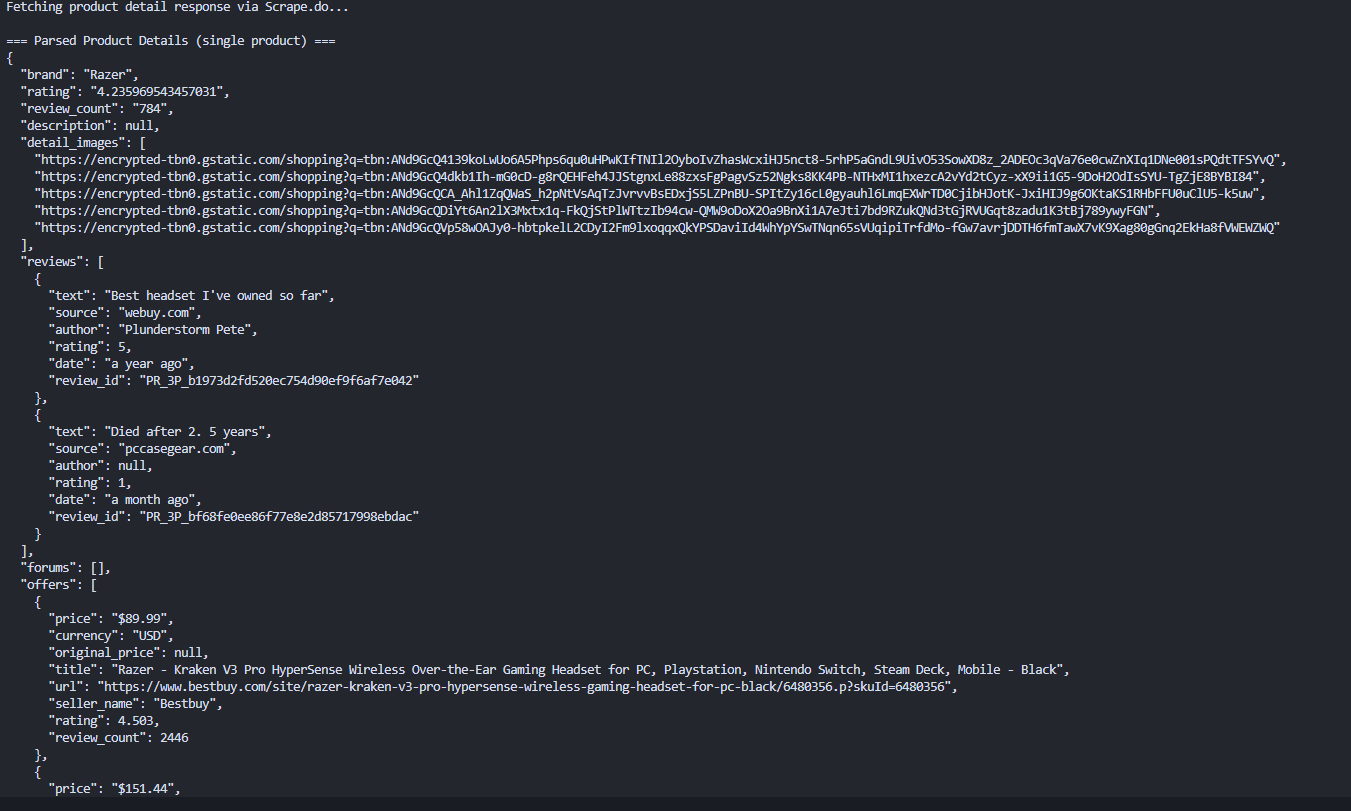
Each run will look slightly different depending on the product and how much information Google exposes for it (some products have many reviews and offers, others have very few).
We'll scale this up so you can collect parameters from all cards programmatically and combine the basic search data with detailed product data.
Scrape Product Details For All Products
The complete scraper combines the basic search extraction (card-level data like title, price, image URL, seller, rating, and review count via async pagination) with the product-detail flow (parameters fed into /async/oapv to pull offers, reviews, forums, and descriptions).
To do this, we need to collect the parameters from each card during the search extraction, then reuse the single-product detail logic at scale.
Collect Product Parameters from Cards
Each product card may contain data-* attributes needed for detail fetching. Because Google rotates the container element across different page layouts, the scraper tries multiple selectors in order ([data-cid], .MtXiu, .shntl, .sh-dgr__content) and falls back to the card itself if it carries data-cid directly:
product_container = (
    card.select_one('[data-cid]') or
    card.select_one('.MtXiu') or
    card.select_one('.shntl') or
    card.select_one('.sh-dgr__content')
)
if not product_container and card.get('data-cid'):
    product_container = card

if product_container:
    catalogid = product_container.get('data-cid')
    gpcid = product_container.get('data-gid')
    headline_offer_docid = product_container.get('data-oid')
    image_docid = product_container.get('data-iid')
    mid = product_container.get('data-mid')
    rds = product_container.get('data-rds')

    clickable_area = card.select_one('div[data-ved]')
    ved = clickable_area.get('data-ved') if clickable_area else None
We also need the ei session token from the page source. In the full scraper we reuse the same logic we used earlier for async pagination:
def extract_ei_token(html_text: str) -> str:
    m = re.search(r"_g=\{kEI:'([^']+)'", html_text)
    if not m:
        m = re.search(r'kEI[:=]\s*[\'"]([^\'"]+)[\'"]', html_text)
    return m.group(1) if m else None
Inside the main extraction loop, we combine everything into a product_params object only when all required fields are present. All products are stored regardless and those with complete parameters get a product_params dict, while the rest get product_params: None. This means you always get card-level data (title, price, image, seller, rating), and detail fetching runs only for products where the parameters exist.
ei = extract_ei_token(response.text)

for group in soup.select(".MjjYud"):
    for card in group.select(".Ez5pwe"):
        # ... basic card extraction (title, price, image, seller, rating, review_count) ...

        product_params = None
        product_container = (
            card.select_one('[data-cid]') or
            card.select_one('.MtXiu') or
            card.select_one('.shntl') or
            card.select_one('.sh-dgr__content')
        )
        if not product_container and card.get('data-cid'):
            product_container = card

        if product_container:
            catalogid = product_container.get('data-cid')
            gpcid = product_container.get('data-gid')
            headline_offer_docid = product_container.get('data-oid')
            image_docid = product_container.get('data-iid')
            mid = product_container.get('data-mid')
            rds = product_container.get('data-rds')

            clickable_area = card.select_one('div[data-ved]')
            ved = clickable_area.get('data-ved') if clickable_area else None

            if all([catalogid, gpcid, headline_offer_docid, image_docid, mid]):
                product_params = {
                    "catalogid": catalogid,
                    "gpcid": gpcid,
                    "headlineOfferDocid": headline_offer_docid,
                    "imageDocid": image_docid,
                    "mid": mid,
                    "rds": rds or "",
                    "ei": ei,
                    "ved": ved,
                }

        products.append({
            "title": title,
            "price": price,
            "image_url": image_url,
            "seller_name": seller_name,
            "rating": rating,
            "review_count": review_count,
            "product_params": product_params,
        })
Build Detail Request URL Programmatically
Now that we have the parameters, we can build the /async/oapv URL programmatically instead of copying it from the browser. This function constructs the same URL structure we saw in the previous section:
def build_product_detail_url(params: dict, query: str):
    if not params:
        return None

    async_parts = [
        f"catalogid:{params['catalogid']}",
        f"gpcid:{params['gpcid']}",
        f"headlineOfferDocid:{params['headlineOfferDocid']}",
        f"imageDocid:{params['imageDocid']}",
        f"mid:{params['mid']}",
    ]

    if params.get('rds'):
        async_parts.append(f"rds:{params['rds']}")

    async_parts.extend([
        "pvo:3",
        "isp:true",
        f"query:{urllib.parse.quote(query)}",
        "gl:0",
        "pvt:hg",
        "_fmt:jspb"
    ])

    if params.get('ei'):
        async_parts.append(f"ei:{params['ei']}")

    async_param = ",".join(async_parts)

    url_params = {
        "udm": "28",
        "yv": "3",
        "currentpv": "1",
        "q": query,
        "async_context": "PV_OPEN",
        "pvorigin": "3",
        "cs": "0",
        "async": async_param,
    }

    if params.get('ved'):
        url_params["ved"] = params['ved']
    if params.get('ei'):
        url_params["ei"] = params['ei']

    return "https://www.google.com/async/oapv?" + urllib.parse.urlencode(url_params, safe=":,_")
Merge Search Results with Product Details
The complete merged scraper combines all these pieces:
- Collects parameters from all product cards during search extraction (using the code shown above)
- Stores all products, including those with complete
product_paramsget detail-enriched data via/async/oapv, while the rest keep their card-level fields with defaultNonevalues for detail-only keys - Deduplicates products by
(title, price)- each unique product appears only once in the final output - Calls the single-product detail flow from the previous section for each product with valid
product_paramsusingbuild_product_detail_url() - Exports the enriched results (search data + detailed data) to JSON
In the complete merged scraper, each product:
- Keeps the card-level
image_urlfrom the search results as its primary image - Also gets a
detail_imageslist containing up to 5 example image URLs discovered in the detail payload
We again cap this list at 5 for clarity, but if you need every available image URL from the detail response you can remove or increase that limit in the helper that slices the image list.
Note that Google doesn't always return complete parameters for every product card. Some product cards may load with incomplete data attributes.
The complete merged scraper that combines all these pieces is available in the GitHub repository linked at the top of this article. It uses the exact parameter-collection pattern shown above to tie together search results and detailed product data at scale, and it reuses the same parse_product_details helper from the single-product section so both flows stay in sync.
Google Shopping Data via the AI Mode API
The async pagination and hidden parameter approach gives maximum detail. But it also requires maintaining token extraction logic, session management, and undocumented array indices. That is a lot of moving parts.
For use cases that need product-level data (title, price, rating, source) without that complexity, the AI Mode API provides a structured alternative.
Shopping is one of the categories where AI-powered search is moving fastest. With 64% of consumers planning to use AI chatbots for shopping in 2026 and Google building AI Mode as a conversational shopping interface, the data flowing through these AI endpoints is becoming as valuable as the traditional search results. The same AI-generated responses now appear as Google AI Overviews across informational queries. Scrape.do's AI Mode API taps directly into this data.
Single Request For Structured Output
The endpoint is https://api.scrape.do/plugin/google/search/ai-mode. For commercial queries like "wireless gaming headset", the AI Mode response includes product recommendations, pricing data, and source references, all as structured JSON:
import requests
import json

token = "<your_token>"
query = "wireless gaming headset"

url = (
    f"https://api.scrape.do/plugin/google/search/ai-mode"
    f"?token={token}&q={query}&hl=en&gl=us"
)

response = requests.get(url, timeout=60)
data = response.json()
The response contains three key fields. shopping_results is an array of products with title, price, source, rating, reviews, and product_link:
shopping = data.get("shopping_results", [])
for item in shopping:
    print(f"  {item.get('title', 'N/A')}")
    print(f"    Price: {item.get('price', 'N/A')}")
    print(f"    Source: {item.get('source', 'N/A')}")
text_blocks contains AI-generated product recommendations and comparisons. Each block has a type, snippet, and optional reference_indexes linking back to the source URLs. This is Google's AI writing product summaries and comparison notes, the same content users see in AI Mode search results.
text_blocks = data.get("text_blocks", [])
for block in text_blocks[:5]:
    snippet = block.get("snippet", "")
    if snippet:
        print(f"  [{block.get('type', '?')}] {snippet[:120]}")
references lists the source URLs cited by the AI. These are the articles, reviews, and product pages that informed the AI-generated recommendations:
references = data.get("references", [])
for ref in references[:5]:
    print(f"  {ref.get('title', 'N/A')} ({ref.get('source', 'N/A')})")
    print(f"    {ref.get('link', 'N/A')}")

with open("serp-api-shopping-results.json", "w", encoding="utf-8") as f:
    json.dump(data, f, indent=2, ensure_ascii=False)
When to Use Which Approach
The raw HTML approach (async pagination + hidden parameters + /async/oapv) gives you full seller-level detail: individual seller prices and URLs, customer reviews with text and ratings, forum discussion links, product descriptions, and complete control over every field. Use it for deep extraction pipelines, competitive price intelligence, and review monitoring.
The AI Mode API gives you quick structured product data: titles, prices, ratings, sources, and AI-generated recommendations. Zero async pagination, no parameter extraction, no session tokens. Use it for fast product monitoring, price tracking dashboards, and cases where you need structured data without maintaining scraper logic against Google's changing frontend.
And both endpoints use the same Scrape.do token. No additional setup to switch between them. For a broader comparison of structured SERP data providers, the best SERP APIs guide covers eight options.
Conclusion
Google Shopping does not make extraction easy. Async requests, hidden parameters, dynamic content loading. The search results provide basic product data, but the good stuff (seller comparisons, reviews, descriptions) hides behind backend endpoints that require parameters buried in DOM attributes.
The AI Mode API offers a second path: structured JSON with product recommendations, pricing, and source references from a single request. As AI-powered shopping grows (Google is already feeding its product catalog to AI agents through a universal commerce protocol), this endpoint gives you access to the same data that conversational shopping interfaces consume.
With Scrape.do's web scraping API, you can bypass Google's bot detection without managing proxies, handling CAPTCHAs, or rotating user agents manually. The raw HTML approach and the AI Mode API both run through the same token.
Get 1000 free credits and start scraping with Scrape.do.
Frequently Asked Questions
Is scraping Google Shopping legal?
Scraping publicly available data from Google Shopping is generally considered legal, but it depends on your jurisdiction, how you use the data, and whether you comply with Google's Terms of Service. You can check if a website allows scraping, and if you are building internal analytics tools or price monitoring systems, it is recommended to consult legal guidance before scaling.
Why does Google return 403 or 429 errors during scraping?
A 403 error means Google detected your request as automated and blocked it. A 429 means you've hit their rate limit. Both happen when you send too many requests too quickly or your headers and TLS fingerprint look like a bot.
To reduce blocks:
- Add request delays
- Rotate IPs
- Use proper TLS fingerprinting
- Avoid sending identical headers repeatedly
Using a scraping API with built-in proxy rotation and browser fingerprint handling significantly reduces these errors.
Why does Google Shopping return empty results when you use requests?
Google Shopping loads products asynchronously through AJAX calls after the initial page loads. A plain requests.get() call only fetches the skeleton HTML, which contains no product data. You need to replicate the async backend requests the browser makes, using session tokens extracted from the initial page response.
Why are some products missing catalogid or other detail parameters?
Google does not always include complete data-* attributes on every product card. Some cards lack required parameters like catalogid, gpcid, headlineOfferDocid, or mid, which are necessary to construct a valid /async/oapv request. This typically occurs with promoted listings, aggregated offers, or cards that lazy-load parameters after user interaction.
When parameters are missing, you can still collect card-level data such as title, price, image, seller, and rating, but you cannot fetch detailed seller comparisons or reviews.
Why does the /async/oapv URL stop working after some time?
The ei token and related session identifiers are session-specific. If you reuse a copied /async/oapv URL hours later, it may fail because the session expired. Instead of hardcoding URLs, build them programmatically from fresh parameters extracted from the search page.
Software Engineer








