Category:Scraping Use Cases
Scrape Full Content from Google News with Python

Head of Marketing


Google News pulls from thousands of sources into a single feed.
What's it good for?
Brand monitoring, competitor coverage, news cycle research, industry trend tracking. Media analysts and monitoring tools all need this data programmatically.
But Google News offers no bulk export and no public API.
The News tab within Google Search (tbm=nws) returns server-rendered HTML with headlines, sources, dates, and article links. But Google's bot detection blocks direct requests from scripts, so every request needs a proxy layer that handles residential IP rotation and CAPTCHA bypass.
This article builds two pipelines: one that extracts search result metadata (title, source, date, description, link) from the Google News tab with pagination, and one that downloads the full article content as markdown from each extracted URL.
A SERP API alternative provides structured JSON output with no HTML parsing for simpler use cases. For other Google data sources, see the Google search results scraping hub.
You can find the complete scripts in the GitHub repository.
Scraping Google News Search Results
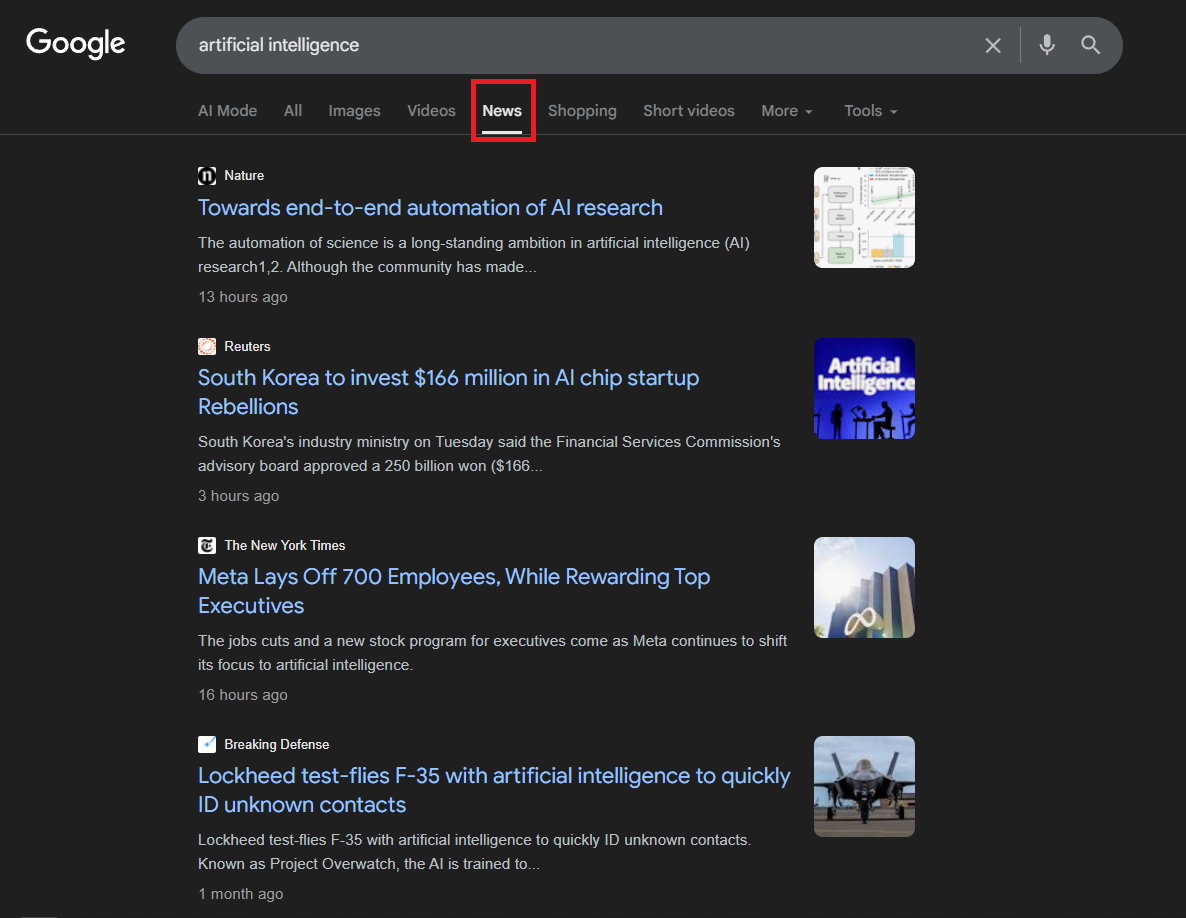
The Google News tab (tbm=nws parameter) returns server-rendered HTML with news cards containing headline, source, publication date, description snippet, and article link. Each results page shows approximately 10 articles, and pagination follows the same start= parameter pattern as regular Google search (increments of 10).
Google's bot detection blocks direct requests from scripts. Every request goes through Scrape.do with super=true to bypass bot protection.
Prerequisites
The scraper uses requests and [beautifulsoup4](https://scrape.do/blog/beautifulsoup-web-scraping):
pip install requests beautifulsoup4A free Scrape.do account provides the API token needed for all requests. Sign up at scrape.do/register and copy the token from the dashboard.

Configuring the Search Request
The scraper defines a search query, a minimum result count, and a max page limit at the top of the script. The tbm=nws parameter tells Google to return News tab results instead of regular web results.
import json
import os
import urllib.parse
import requests
from bs4 import BeautifulSoup
import time

TOKEN = "<your_token>"
SEARCH_QUERY = "artificial intelligence"
MIN_RESULTS = 20
MAX_PAGES = 5
BASE_URL = (
    f"https://www.google.com/search"
    f"?q={urllib.parse.quote_plus(SEARCH_QUERY)}&tbm=nws&hl=en"
)
The base URL structure: https://www.google.com/search?q={query}&tbm=nws&hl=en. The hl=en parameter forces English-language results regardless of the proxy's geographic location. The query string is URL-encoded with [urllib.parse.quote_plus()](https://docs.python.org/3/library/urllib.parse.html#urllib.parse.quote_plus).
Paginating Through News Pages
The pagination loop iterates from page 0 to MAX_PAGES, appending &start={page_num * 10} to the URL for each page after the first. The loop breaks early if MIN_RESULTS is already collected.
all_results = []

for page_num in range(MAX_PAGES):
    if len(all_results) >= MIN_RESULTS:
        break

    start_index = page_num * 10
    page_url = (
        BASE_URL if page_num == 0
        else f"{BASE_URL}&start={start_index}"
    )
Each page request goes through Scrape.do with super=true. If the response contains no news card containers, the scraper retries the same page with render=true added as a fallback for JS-heavy pages:
    api_url = (
        f"http://api.scrape.do/?token={TOKEN}"
        f"&url={urllib.parse.quote(page_url)}&super=true"
    )
    response = requests.get(api_url, timeout=60)
    soup = BeautifulSoup(response.text, "html.parser")

    containers = soup.select(
        "div.SoaBEf, div.dbsr, div.Gx5Zad, div.xuvV6b"
    )
    if not containers:
        containers = [
            tag.parent for tag in soup.find_all("div", {"role": "heading"})
            if tag.parent
        ]
If the first attempt returns nothing, a second request adds render=true for full browser rendering. The same selector logic runs again on the new response. A 1-second delay between page requests (time.sleep(1)) avoids rate-limiting.
Parsing News Card Elements
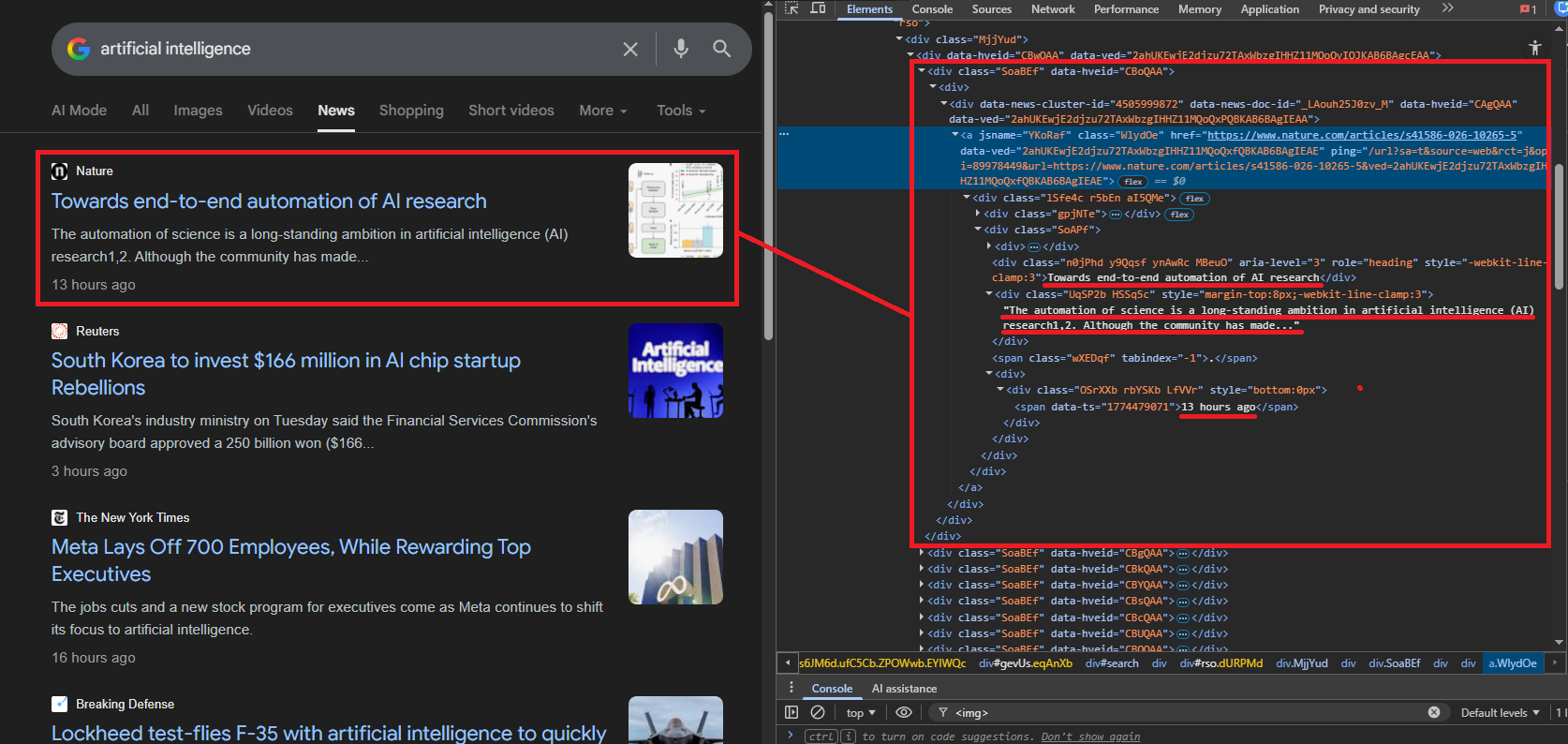
Google wraps each news result in a container div. The class names rotate between updates, so the scraper tries multiple known selectors: div.SoaBEf, div.dbsr, div.Gx5Zad, div.xuvV6b. If none match, it falls back to finding div elements with role="heading" and using their parent containers.
Each container is parsed for five data points. The link extraction handles Google's redirect wrapping:
    for card in containers:
        link_elem = card.find("a", href=True)
        if not link_elem:
            continue

        link = link_elem["href"]
        if link.startswith("/url?"):
            qs = urllib.parse.parse_qs(
                urllib.parse.urlparse(link).query
            )
            link = qs.get("q", [link])[0]
        if not link or "google.com" in link:
            continue
Google wraps article URLs in /url?q= redirects. The scraper unwraps the real URL using urllib.parse.parse_qs(). Links pointing back to google.com are filtered out.
Title extraction pulls from div[role="heading"] or <h3> elements. Cards with titles shorter than 5 characters are skipped as noise:
        title_elem = (
            card.find("div", {"role": "heading"}) or card.find("h3")
        )
        title = title_elem.get_text(strip=True) if title_elem else None
        if not title or len(title) < 5:
            continue
Source and date live in small text elements with varying class names. The scraper tries multiple selectors for each:
        source = None
        for sel in [
            "div.MgUUmf", "span.MgUUmf",
            "div.CEMjEf span", "div.ca-authority"
        ]:
            elem = card.select_one(sel)
            if elem:
                source = elem.get_text(strip=True)
                break

        date = None
        for sel in [
            "span.WG9SHc", "div.OSrXXb span",
            "time", "span.r0bn4c", "span.f"
        ]:
            elem = card.select_one(sel)
            if elem:
                date = elem.get_text(strip=True)
                break
The description is the trickiest field. The scraper iterates all div and span elements in the card, skipping any that contain nested children (to avoid duplicates), and selects the first text block longer than 40 characters that does not match the title, source, or date:
        description = None
        for elem in card.find_all(["div", "span"]):
            if elem.find(["div", "span", "a", "h3"]):
                continue
            text = elem.get_text(strip=True)
            if (text and text != title and text != source
                    and text != date and len(text) > 40):
                description = text
                break
Each result gets appended as a dict with five fields: title, source, date, description, and link.
Saving Search Results to JSON
After all pages are scraped, the results write to news_search_results.json:
with open("news_search_results.json", "w", encoding="utf-8") as f:
    json.dump(all_results, f, indent=2, ensure_ascii=False)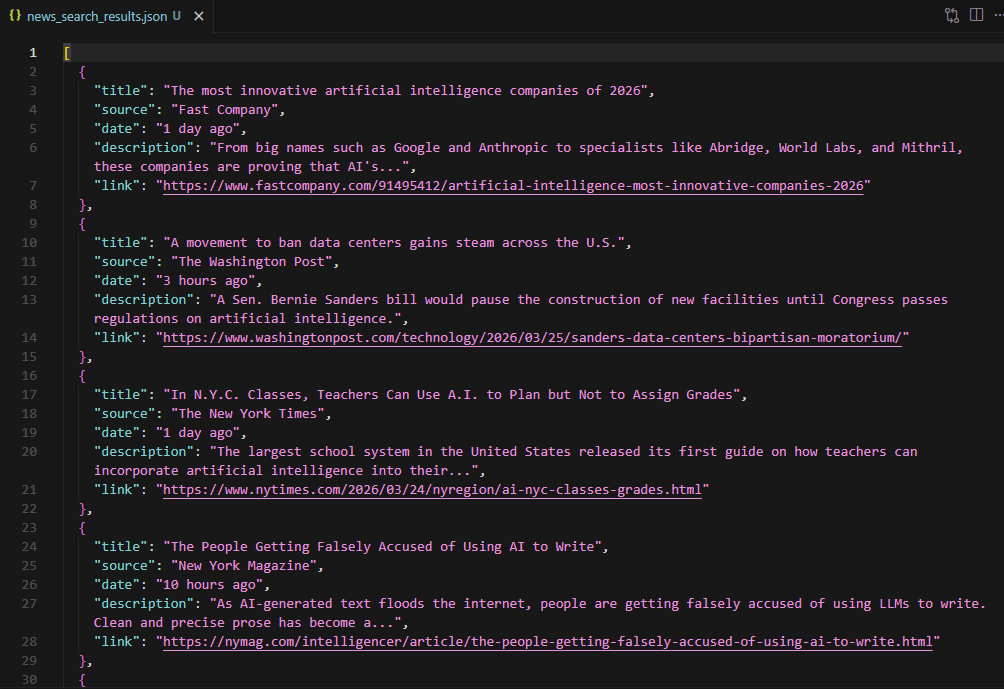
The sample output shows 20 results from sources like Fast Company, The Washington Post, The New York Times, and The Motley Fool. Each entry has title, source, date (relative timestamps like "3 hours ago"), description snippet, and the direct article link.
Using the SERP API Alternative
The Scrape.do Google Search API provides structured JSON without any HTML parsing. The endpoint is https://api.scrape.do/plugin/google/search with parameters for query (q), language (hl), and country (gl).
import requests
import json

TOKEN = "<your_token>"
query = "artificial intelligence news"

url = (
    f"https://api.scrape.do/plugin/google/search"
    f"?token={TOKEN}&q={query}&hl=en&gl=us"
)

response = requests.get(url, timeout=60)
data = response.json()
For news-related queries, the API response includes a top_stories array. Each entry groups related articles under a headline, with individual items containing title, source, and link:
top_stories = data.get("top_stories", [])
all_articles = []

for group in top_stories:
    for item in group.get("items", []):
        if not item.get("link") or "google.com" in item.get("link", ""):
            continue
        all_articles.append({
            "title": item.get("title", "N/A"),
            "source": item.get("source", "N/A"),
            "link": item.get("link", "N/A"),
        })
The API also returns discussions_and_forums data (Reddit, Quora threads) related to the query, which can supplement news coverage analysis. For product-related news queries, pairing this with Google Shopping data adds pricing and availability context.
discussions = data.get("discussions_and_forums", [])

with open("serp-api-news-results.json", "w", encoding="utf-8") as f:
    json.dump(
        {"articles": all_articles, "discussions_and_forums": discussions},
        f, indent=2, ensure_ascii=False
    )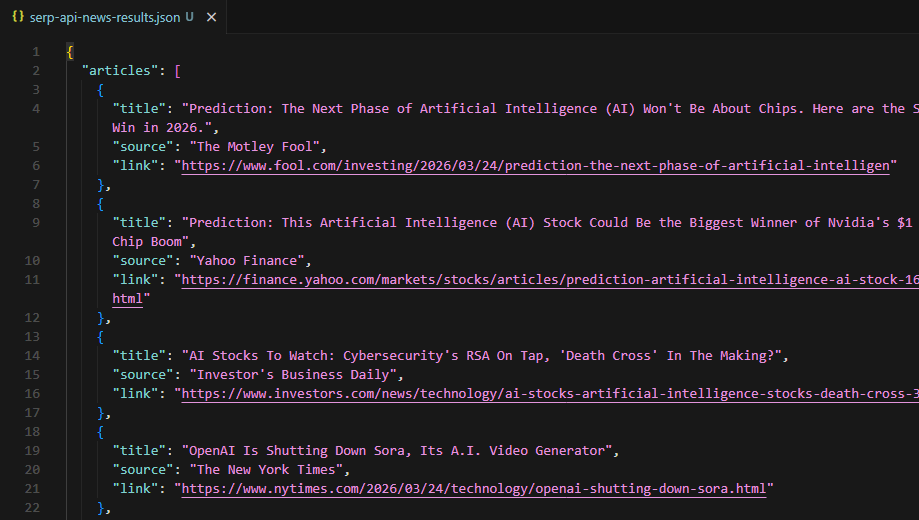
The trade-off is straightforward: the SERP API returns fewer results than the raw scraping approach (only the top stories carousel, not full paginated results) but requires zero HTML parsing and handles selector changes automatically. For quick headline monitoring, the API is the faster path. For deep result collection across multiple pages, the raw scraper wins. To correlate news coverage with search demand over time, Google Trends provides interest data and rising queries for the same topics.
Downloading Full Article Content
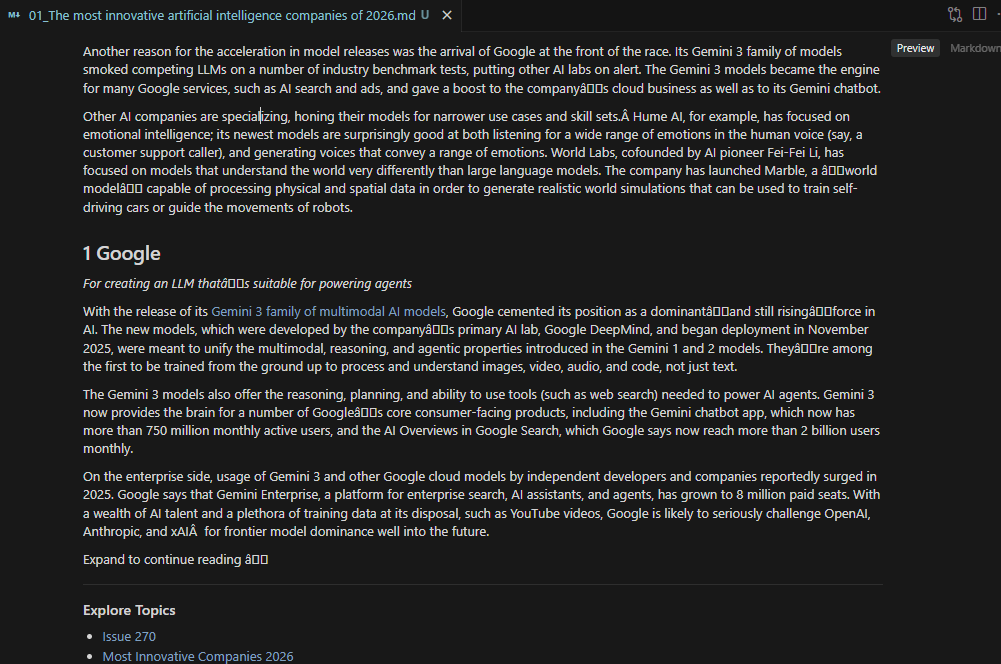
Search result metadata (title, source, date, link) only tells part of the story. Researchers and monitoring tools often need the full article text for sentiment analysis, summarization, or archival. Academic researchers can apply the same extraction approach to Google Scholar for citation data and publication metadata.
The download pipeline takes the URLs extracted in the previous section and fetches each article through Scrape.do with output=markdown, converting the rendered page into clean markdown text. News sites vary widely in their technical architecture: some serve static HTML, some require JavaScript rendering, and some enforce paywalls or bot detection. A progressive fallback strategy handles all three cases.
The Fallback Strategy
Three request tiers attempt each article URL in order, escalating cost and processing time only when necessary:
os.makedirs("news_articles", exist_ok=True)

strategies = [
    ("basic", ""),
    ("super", "&super=true"),
    ("super+render", "&super=true&render=true"),
]Basic: no extra parameters. Cheapest and fastest. Works for static news sites with no bot protection (Reuters, AP News).
Super: adds super=true. Handles most anti-bot measures including Cloudflare and similar WAFs.
Super + Render: adds both super=true and render=true. Full headless browser rendering for JavaScript-heavy sites and those requiring client-side DOM construction.
A response counts as successful only if the status code is 200 AND the returned text is longer than 100 characters. Short responses usually mean you got blocked or hit an error page.
Fetching and Saving Articles
The download loop iterates every result from the search phase. For each article, it tries the three strategies in order, breaking on the first success:
for i, r in enumerate(all_results):
    if not r["link"]:
        continue

    content = None
    for strategy_name, params in strategies:
        api_url = (
            f"http://api.scrape.do/?token={TOKEN}"
            f"&url={urllib.parse.quote(r['link'])}"
            f"&output=markdown{params}"
        )
        resp = requests.get(api_url, timeout=90)
        if resp.status_code == 200 and len(resp.text.strip()) > 100:
            content = resp.text
            break
The output=markdown parameter tells Scrape.do to convert the fetched HTML into clean Markdown on the server side. Navigation, ads, headers, footers, and other non-content elements get stripped.
Successfully downloaded articles are saved as individual markdown files in a news_articles/ directory:
    if content:
        safe_name = "".join(
            c if c.isalnum() or c in " -_" else ""
            for c in r["title"]
        )[:80].strip()
        with open(
            f"news_articles/{i + 1:02d}_{safe_name}.md",
            "w", encoding="utf-8"
        ) as f:
            f.write(content)

    time.sleep(1)
Filenames combine a zero-padded index with a sanitized version of the article title: 01_Article_Title.md, 02_Another_Article.md. Special characters are stripped, and the title is truncated to 80 characters.
Downloaded markdown files in the news_articles folder
A 1-second delay between article downloads prevents rate-limiting across the potentially 20+ sequential requests. If all three strategies fail for a given URL (hard paywalls are the most common cause), the script logs the failure and moves on.
Conclusion
Two pipelines, two different jobs. Search result scraping collects metadata (titles, sources, dates, links) from multiple pages of Google News results. The article download pipeline fetches the actual content as markdown.
The SERP API alternative trades result depth for convenience, returning structured JSON with no HTML parsing at the cost of fewer results (top stories only versus full paginated search).
For headline monitoring and source tracking, the search scraper alone is sufficient. For content analysis, sentiment tracking, or archival, combining both pipelines produces a complete dataset: metadata plus full article text from every source Google aggregates. For local business intelligence, Google Maps scraping complements news data with location reviews, ratings, and contact details.
Get 1000 free credits and start scraping with Scrape.do
FAQ
Is Google News scraping legal?
Google News aggregates publicly available articles. Scraping the search result metadata (titles, links, sources) falls under publicly accessible data. The actual article content is subject to each publisher's terms of service. Use downloaded content for research, analysis, or personal archival, not republication.
How often does Google change its News tab HTML structure?
Google rotates CSS class names and container structures periodically, sometimes multiple times per year. The scraper handles this by using multiple selector fallbacks and a generic role="heading" parent-traversal strategy. The SERP API approach avoids this problem entirely since it returns structured JSON regardless of frontend changes.
What is the difference between tbm=nws and Google News (news.google.com)?
tbm=nws is the News tab within Google Search, returning news results in the standard search interface with start= pagination support. news.google.com is a separate product with its own URL structure, different HTML layout, and topic-based navigation. The scraper targets the search News tab, not the standalone Google News site.
How many results can be scraped per session?
Each News tab page returns approximately 10 results. Google typically serves up to 30-40 pages (300-400 results) before stopping pagination. The MAX_PAGES and MIN_RESULTS configuration controls how deep the scraper goes. Rate limiting and IP blocking become factors at high volumes. The 1-second delay between requests and Scrape.do's rotating proxies mitigate this.
Why does the article downloader use a three-tier fallback?
News sites have vastly different technical stacks. A basic HTTP request works for outlets like Reuters or AP News that serve static HTML. Sites behind Cloudflare or similar protection need the super=true parameter to bypass bot detection. JavaScript-rendered sites (common with modern CMS platforms) require render=true for full headless browser execution. The progressive approach minimizes cost by only escalating when necessary.
Head of Marketing








