HTML to Markdown Converter
Paste HTML or drop an .html file and get clean Markdown back as you type. The converter strips scripts, styles, menus and footers, keeps headings, tables, links and images, and shows how many tokens you saved. It runs in your browser, so nothing you paste is uploaded.
- Free, no signup
- Runs in your browser
- Nothing is uploaded
Your Markdown shows up here as you paste. Nothing is uploaded: the conversion runs in this tab.
Get this page as Markdown via the API
Skip the copy and paste: send the URL to Scrape.do with output=markdown and the response body is Markdown.
curl "https://api.scrape.do/?token=<your_token>&url=https%3A%2F%2Fexample.com%2F&output=markdown"<your_token> with your API token. Get one free.How to convert HTML to Markdown
- Paste the HTML. Open the page, view the source (Ctrl+U on Windows and Linux, Cmd+Option+U on a Mac), copy everything and paste it into the HTML box. You can also drop an
.htmlfile on the box or use Open file. - Pick what to keep. The defaults remove scripts, styles, navigation, the site header and the footer, and keep links, images and tables. Turn on Main content only when the page has a
<main>or<article>and you want nothing else. - Copy or download. The Markdown updates as you type. Check it in the Preview tab, then copy it or download it as an
.mdfile named after the page title.
Relative links and image paths are turned into full URLs. The converter reads the base URL from the page's canonical tag, and you can type your own in Base URL.
What gets cleaned up
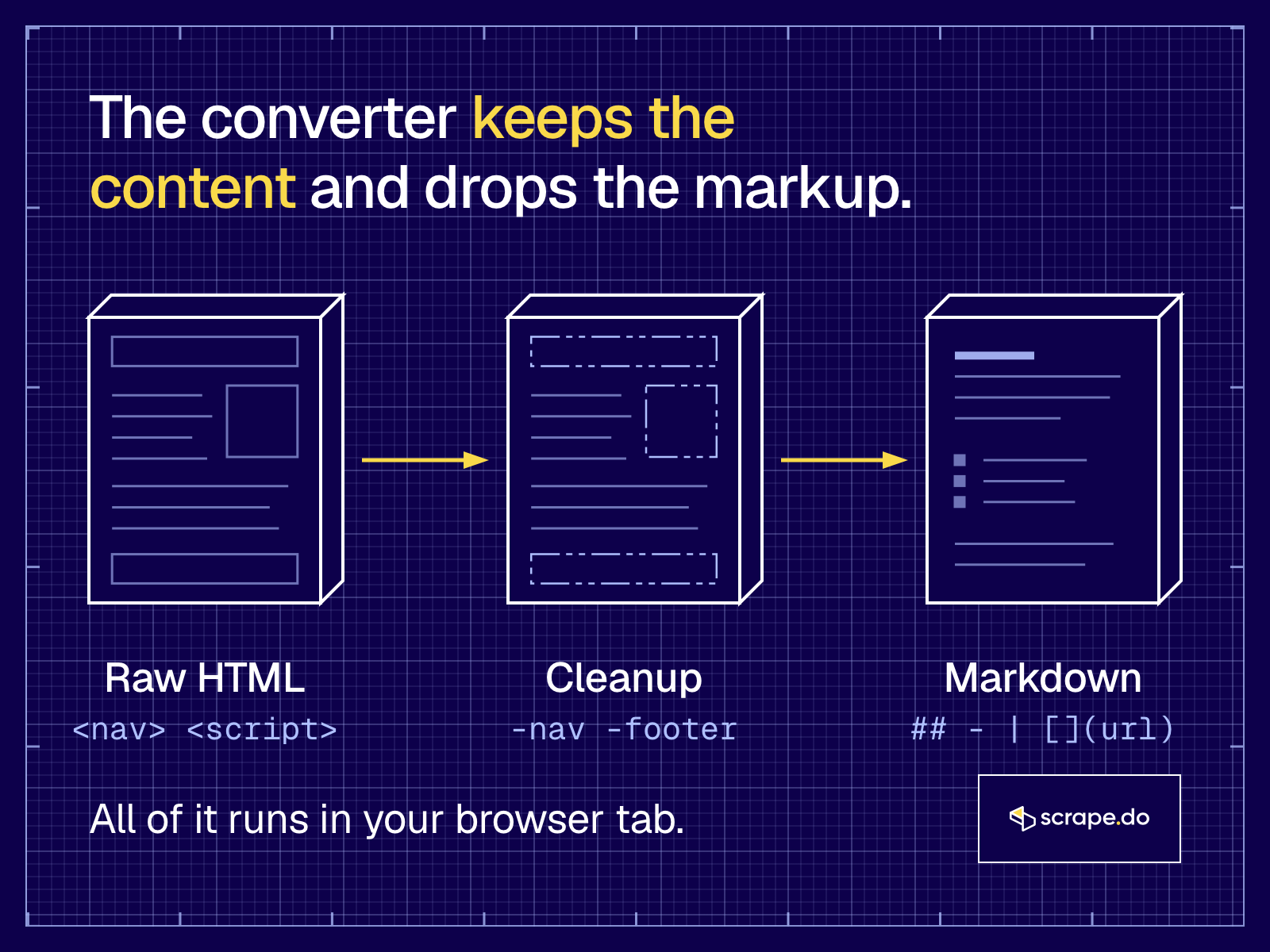
Most of a modern HTML page is not content. It's markup for the browser: scripts, inline styles, SVG icons, cookie banners, menus and footers.
Here's what each option does:
- Remove scripts and styles drops
<script>,<style>,<noscript>,<iframe>,<svg>,<canvas>and<template>. - Remove nav, header, footer drops
<nav>,<aside>,<footer>, forms, buttons, hidden elements, "Skip to content" links and the site header. A<header>inside an article stays, because that's usually where the H1 lives. - Main content only converts only the
<main>element, or the<article>when there is exactly one. - Keep links and Keep images: turn either off to get text only. Inline base64 images, 1x1 tracking pixels and images marked as decorative (
alt="") are always dropped, since they add characters and no meaning. - GFM tables writes pipe tables. Off, tables stay as HTML, which some pipelines prefer for merged cells.
- Headings switches between ATX (
## Title) and Setext (underlined H1 and H2).
Code blocks keep their language when the HTML marks it (class="language-python", lang-js, data-language), and line-number gutters are removed.
How HTML tags convert to Markdown
Each HTML element maps to one Markdown mark. This is what the converter writes with the default options:
| HTML | Markdown |
|---|---|
<h2>Pricing</h2> | ## Pricing |
<strong>bold</strong> | **bold** |
<em>italic</em> | _italic_ |
<a href="/docs/">Docs</a> | [Docs](https://example.com/docs/) |
<img src="/chart.png" alt="Chart"> |  |
<ul><li>One</li></ul> | - One |
<ol><li>First</li></ol> | 1. First |
<code>pip install</code> | `pip install` |
<pre><code class="language-python"> | a fenced block that starts with ```python |
<blockquote>Quote</blockquote> | > Quote |
<hr> | --- |
<table> | a pipe table: | Plan | Price | |
Relative URLs in the examples become absolute because the base URL here is https://example.com/.
What Markdown can't keep
Markdown is a format for text and structure, so some parts of a page have nowhere to go:
- Layout and styling. Colors, fonts, columns and spacing are dropped. That's the point for an LLM, but it means the Markdown won't look like the page.
- Merged cells. Pipe tables have no colspan or rowspan. The converter splits merged cells so the columns line up; turn off GFM tables if you need the original structure.
- Forms, buttons and widgets. Inputs, dropdowns, maps and video players have no Markdown form. They are removed.
- Content the page builds with JavaScript. If the text isn't in the HTML you pasted, it can't be converted. Paste the HTML from DevTools (the Elements panel, after the page loads) or fetch the page with a headless browser first.
Why convert HTML to Markdown for LLMs and RAG?
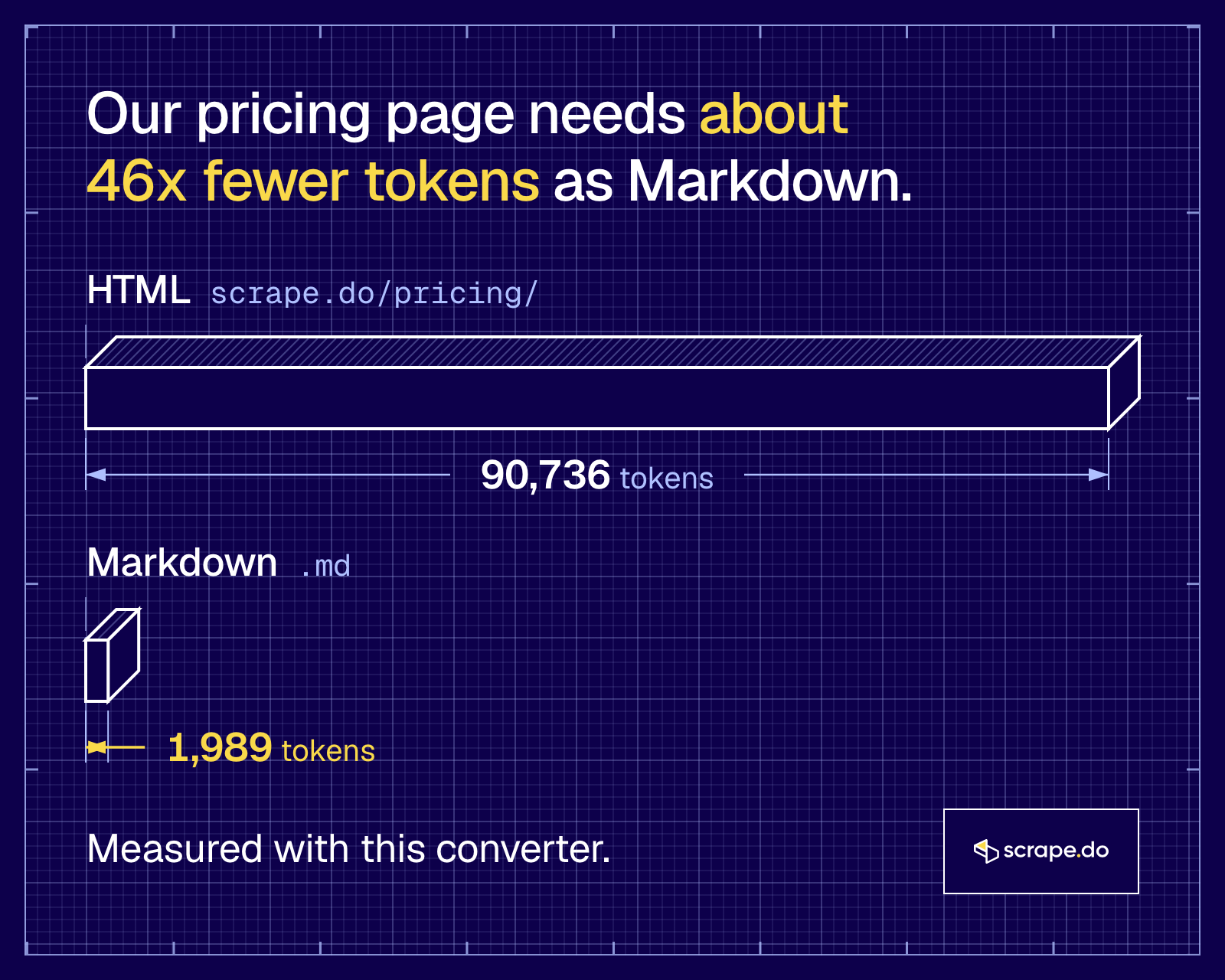
Markdown keeps the structure an LLM needs (headings, lists, tables, links) and drops the markup it doesn't. That means fewer tokens per page, cleaner chunks for retrieval and less noise in the context window. HTML spends most of its tokens on tags, classes and scripts the model has to read past.
We ran 10 real pages through this converter, from our own pricing page to MDN, the Python docs and Wikipedia, and the Markdown came out 67% to 99% smaller in estimated tokens.
Our LLM-ready data benchmark measured the same gap in real model input tokens: one Amazon product page was 338,503 input tokens as HTML and 66,594 as Markdown, and the model still answered all 10 test questions from the Markdown.
That gap shows up three ways:
- Cost and context. Every token of
<div class="...">is a token you pay for and a token that pushes real content out of the context window. - Chunking. RAG pipelines split documents into chunks. Markdown headings give you natural split points, so a chunk is one section instead of half a menu and half a paragraph.
- Answers you can cite. Links survive as
[text](url), so the model can point back to the source.
It's the same reason more sites now publish an llms.txt file with Markdown versions of their pages. If you're feeding scraped pages to a model, our guide to LLM-ready data covers the rest of the pipeline.
How do you convert a URL to Markdown?
Send the URL to a scraping API that returns Markdown. With Scrape.do, you add output=markdown to a normal request: the API fetches the page through rotating proxies, handles the anti-bot checks, converts the HTML and returns Markdown in the response body. No copy and paste, and it works in a loop.
curl "https://api.scrape.do/?token=<your_token>&url=https%3A%2F%2Fexample.com%2F&output=markdown"The same request in Python:
import requests

params = {
    "token": "<your_token>",
    "url": "https://example.com/",
    "output": "markdown",
}

response = requests.get("https://api.scrape.do/", params=params)
print(response.text)A few things worth knowing before you run it on real sites:
- Protected pages. Sites behind Cloudflare, DataDome or similar block plain HTTP clients. Scrape.do rotates proxies and headers for you; add
super=truefor residential and mobile proxies on the hard ones. - JavaScript pages. If the content is built in the browser, add
render=trueso a headless browser renders it before the conversion. - Cost. A normal request costs 1 credit,
render=truecosts 5,super=truecosts 10 and both together cost 25. Only successful requests are charged.
The response output docs have the full parameter list. Building an agent? See how we wire this into CrewAI and LangChain.
Convert HTML to Markdown in code
For HTML you already have, use a library: turndown in JavaScript (the one this tool runs), markdownify or html2text in Python, or pandoc on the command line. For pages you still have to fetch, the API call above does the fetching and the conversion in one step.
This is the core of what the converter does, in Node.js:
import TurndownService from "turndown";
import { gfm } from "turndown-plugin-gfm";

const turndown = new TurndownService({
  headingStyle: "atx",
  codeBlockStyle: "fenced",
  bulletListMarker: "-",
});
turndown.use(gfm);
turndown.remove(["script", "style", "nav", "footer"]);

const html = "<h2>Pricing</h2><p>Plans start at <strong>$0</strong>.</p><script>track()</script>";
console.log(turndown.turndown(html));It prints ## Pricing, a blank line and Plans start at **$0**. The script tag is gone. On real pages, most of the work is the cleanup before turndown runs: finding the main content, removing hidden elements and cookie banners, and fixing relative URLs.
HTML to text or HTML to Markdown?
Use plain text when all you need is the words, like a word count or a keyword check. Use Markdown when the structure matters: headings for chunking, tables for data, links for citations. For anything that goes into an LLM, Markdown is the better default, and it costs only a few tokens more than text.
To get something close to plain text here, turn off Keep links and Keep images. What's left is the text with headings, lists and tables, which still reads cleanly as text.
Related reading
- LLM-Ready Data: Comparing the Best Formats for Web-Scraped Data
- What Is llms.txt? How AI Agents and Scrapers Use It
- Scraping JavaScript-Heavy Pages into LangChain
- Web Scraping in CrewAI
- HAR File Analyzer, to find the API behind a page instead of parsing its HTML
- Scrape.do pricing, including the free plan
More free tools
All free toolsF.A.Q
Frequently asked questions
Yes. There is no signup, no daily limit and no watermark. The only cap is 5 MB per file, because the conversion runs in your browser tab and a bigger page would make it slow. For more than that, or for many pages, use the Scrape.do API with output=markdown.
No. The page parses your HTML with the browser's own DOMParser, cleans it and converts it with turndown, all inside the tab. Nothing is sent anywhere, the parsed page never loads its images or runs its scripts, and closing the tab clears everything.
Yes, into GitHub Flavored Markdown pipe tables. If a table has no header row, the first row becomes the header. Merged cells (colspan) are split so every row has the same number of columns, and old layout tables are flattened into plain blocks. Turn off GFM tables to keep tables as HTML instead.
This tool works on HTML you paste or drop. To get Markdown straight from a URL, send it to the Scrape.do API with output=markdown and the response body comes back as Markdown, with proxies and anti-bot handling included. The free plan has 1,000 credits a month, and a normal request costs 1 credit.
Not here. The converter takes one page at a time. For a folder of files, run turndown (the library this tool uses) in a loop. For a list of live URLs, send each one to the Scrape.do API with output=markdown, or use the async API for big batches.
Yes. Once the page has loaded, the conversion needs no network at all, because nothing leaves the tab. You can turn off Wi-Fi and keep converting.
It is an estimate at about 4 characters per token, which is a common rule of thumb for English text with GPT-style tokenizers. Real counts vary by model and language. Use it to compare the HTML with the Markdown, not to bill anyone.