Category:DataView as Markdown
LLM-Ready Data: Comparing the Best Formats for Web-Scraped Data

Web Scraping Expert


Selecting the optimal LLM-ready data format is essential for maximizing efficiency and output quality in web scraping pipelines. The choice of AI data format (e.g., HTML, Markdown, JSON, or plain text) can directly affect token usage, costs, processing time, and response quality.
This comparative benchmark evaluates how different data formats affect LLM performance across multiple prompts and tasks.
Does the Format Affect How AI Processes Web Data?
Most AI processing and analysis pipelines rely on data collected from web pages. This includes grounding AI responses, optimizing prices, analyzing sentiment, conducting market research, and aggregating content.
However, an AI system can receive web data in many formats, from plain HTML and Markdown to JSON and images. Each format has different characteristics. Some preserve more of the original page, while others remove irrelevant content or structure the information more efficiently. As a result, formats can differ greatly in richness, input size, and token usage.
These differences can affect processing time, but more importantly, they influence the quality and completeness of the resulting output. So, does the choice of format affect how AI processes web data? And, more specifically, which format provides the most effective LLM-ready data and AI data format for a given task? Let's find out!
TL;DR: Best Data Formats for Sending Scraped Web Data to AI
Check out the summary table below for the benchmark results on the most suitable LLM-ready data formats:
| Format | File size (KB) | Input tokens | Avg output kokens | Avg processing times (s) | Data extraction scenario | Summary scenario | Questions scenario |
|---|---|---|---|---|---|---|---|
| AI-ready HTML | 989 | 338,503 | 524.11 | 9.24 (extraction), 5.69 (summary), 4.79 (questions) | All fields populated correctly | Concise overview, features, specs, price, ratings | 10/10 answered |
| AI-ready Markdown | 148.6 | 66,594 | 628.33 | 12.87 (extraction), 3.91 (summary), 6.63 (questions) | All fields populated correctly | Thorough hitting key points comprehensively | 10/10 answered |
| JSON | 38.81 | 11,564 | 506.89 | 8.97 (extraction), 3.79 (summary), 4.00 (questions) | All fields populated correctly | Well-rounded concise covering price, features | 8/10 answered |
| Plain Text | 27.4 | 6,981 | 454.22 | 10.11 (extraction), 3.27 (summary), 4.05 (questions) | All primary fields extracted; URLs, ASIN, and Best Seller as null |
Concise capturing essentials without details | 6/10 answered |
| CSV | 30.42 | 9,604 | 530.33 | 9.18 (extraction), 3.43 (summary), 4.39 (questions) | All fields populated correctly | Compact comprehensive hitting price, specs | 8/10 answered |
| XML | 47.69 | 13,549 | 543.22 | 13.10 (extraction), 3.81 (summary), 4.96 (questions) | All fields populated correctly | Well-balanced capturing essentials, functional benefits | 8/10 answered |
| PNG | 1,554 | 32,484 | 436.78 | 11.34 (extraction), 6.76 (summary), 7.65 (questions) | All primary fields extracted; URLs, ASIN, and Best Seller as null. |
Concise well-structured capturing key details | 6/10 answered |
| 921.91 | 30,551 | 476.78 | 12.28 (extraction), 5.81 (summary), 6.20 (questions) | All primary fields extracted; URLs, ASIN, and Best Seller as null. |
Captures essentials concisely despite lack structure | 6/10 answered |
A Scientific Approach to Comparing AI Data Formats
Because LLMs are black boxes, finding the most suitable AI data format for a specific pipeline cannot be determined through assumptions alone. The impact of each format needs to be measured through controlled experiments using the same source data and comparable tasks.
Input Data Formats
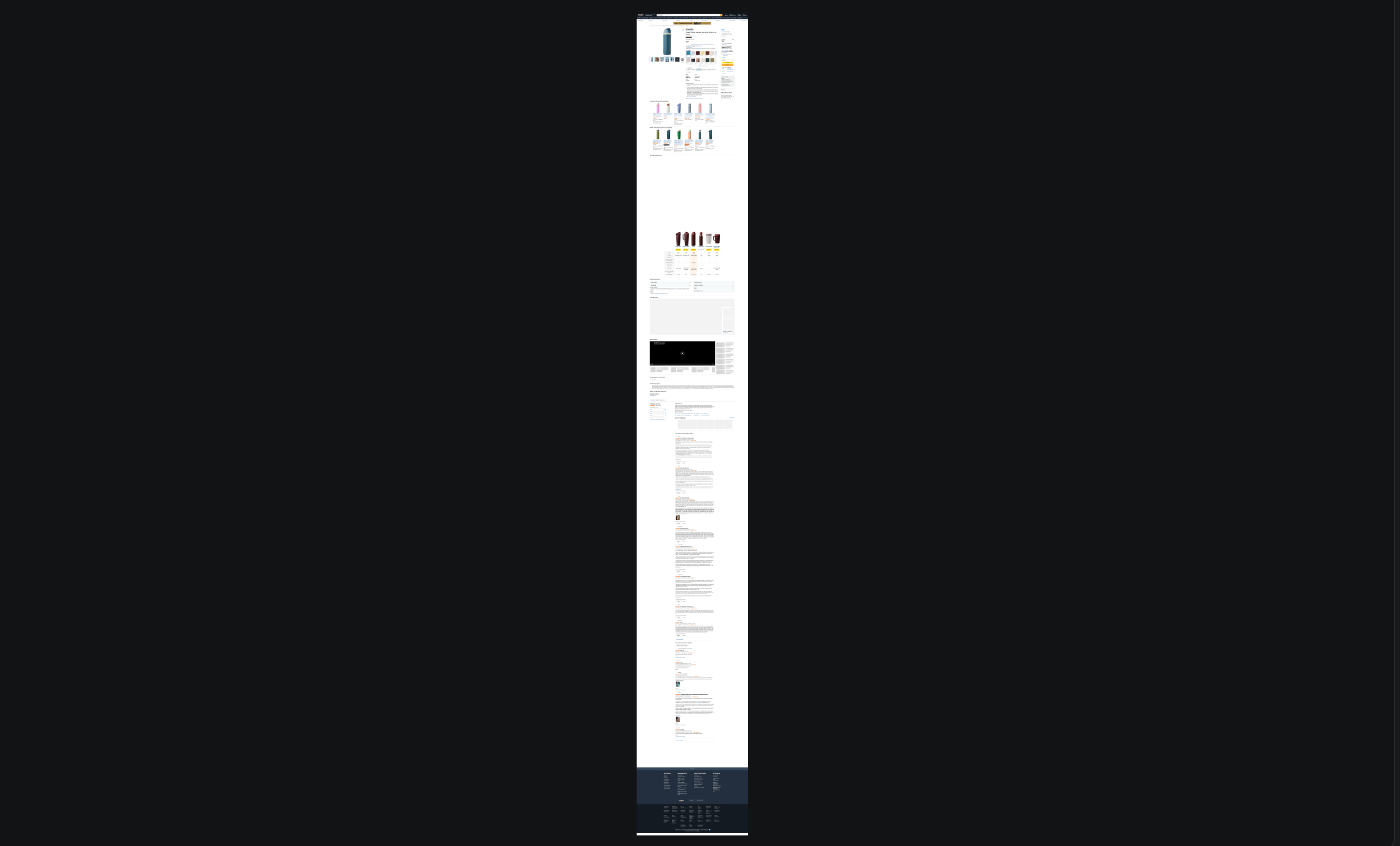
This article compares multiple representations of the same web page across different AI tasks. The source is the following Amazon product page:
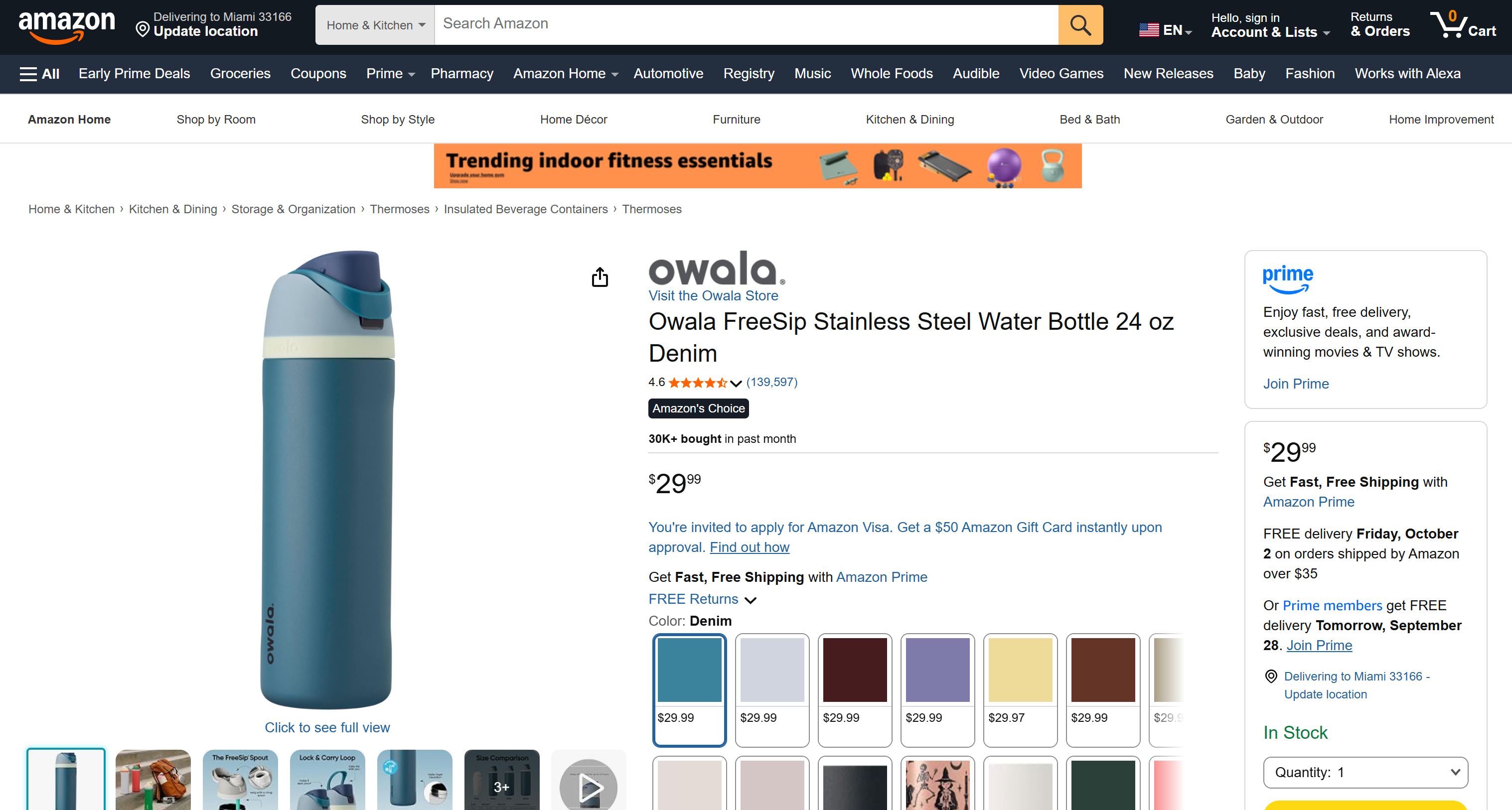
The web page is collected into the following formats:
| Format | Description |
|---|---|
| AI-ready HTML | The original web page markup, with scripts and styles removed to avoid exhausting the model's context window |
| AI-ready Markdown | A cleaned and structured Markdown representation designed to retain relevant page content while removing unnecessary HTML markup |
| JSON | Structured product data returned by an Amazon web scraper API, with information organized into predictable fields and objects |
| Plain text | The visible text rendered on the page, without HTML structure, images, URLs, or other non-textual elements |
| CSV | A tabular representation of the structured product data, with fields represented as columns |
| XML | A structured representation of the product data using hierarchical XML elements |
| PNG | A full-page screenshot representing the visual appearance of the rendered web page |
| A printable representation of the full rendered web page, preserving its visual layout across pages |
To simplify Amazon web data retrieval and conversion into multiple formats, the benchmark uses an all-in-one web scraping API such as Scrape.do, combined with custom Python logic where required.
Evaluation Prompts
Each representation of the scraped page is then tested against these prompts:
| Prompt type | What it measures |
|---|---|
| Data extraction | Tests whether the format contains enough structured and detailed information for the model to reliably extract a predefined set of product fields. |
| Summary | Tests how effectively the model can identify and condense the most relevant information while preserving important factual details. |
| Questions | Tests whether the format provides sufficient information to answer targeted questions, including information that may be difficult to extract from less structured representations. |
Note: The prompts will be run using GPT-5.6 Terra. However, the benchmark can be easily adapted to use any other AI model.
For each combination of data format and prompt, 3 independent runs are performed. Repeating each test helps verify whether results remain consistent across runs and reduces the potential impact of the probabilistic nature of LLM responses.
Metrics
The following metrics are recorded for every run:
| Metric | Description |
|---|---|
| Input file size | Size of the source file (in KB) provided to the benchmark. |
| Input tokens | Total tokens generated from the input data and sent as model input. |
| Full input tokens | Tokens attributable to the input + prompt. |
| Output tokens | Number of tokens generated by the model in its response. |
| Total tokens | Combined input and output tokens reported for the request. |
| Processing time | Time (in seconds) required to process the request and produce the model response. |
The article also includes a qualitative analysis of the output produced for each prompt during the first run for each AI data format. This could potentially be replaced with an LLM-as-a-judge workflow for a more automated evaluation.
Together, these measurements provide a practical basis for evaluating which representations are most suitable for LLM-ready data and different AI processing tasks.
Setup and Initial Steps
Discover how to get started and how the benchmarking logic has been implemented.
Prerequisites
To run the benchmark locally, make sure you have the following:
- Python 3.11 or later installed
- An OpenAI API key
- A Scrape.do API token
Clone the repository supporting this article with:
git clone https://github.com/Tonel/llm-data-formats-benchmark.gitThen, follow the “Getting Started” instructions to set up the Python virtual environment and install the required dependencies.
Getting Started With Scrape.do
Log in to your Scrape.do account. If you do not have an account yet, create one. After logging in, you will be redirected to the “Playground’ section of your account.
To get your API token, click “Copy to clipboard” in the “Your API Token” section on the bottom left:
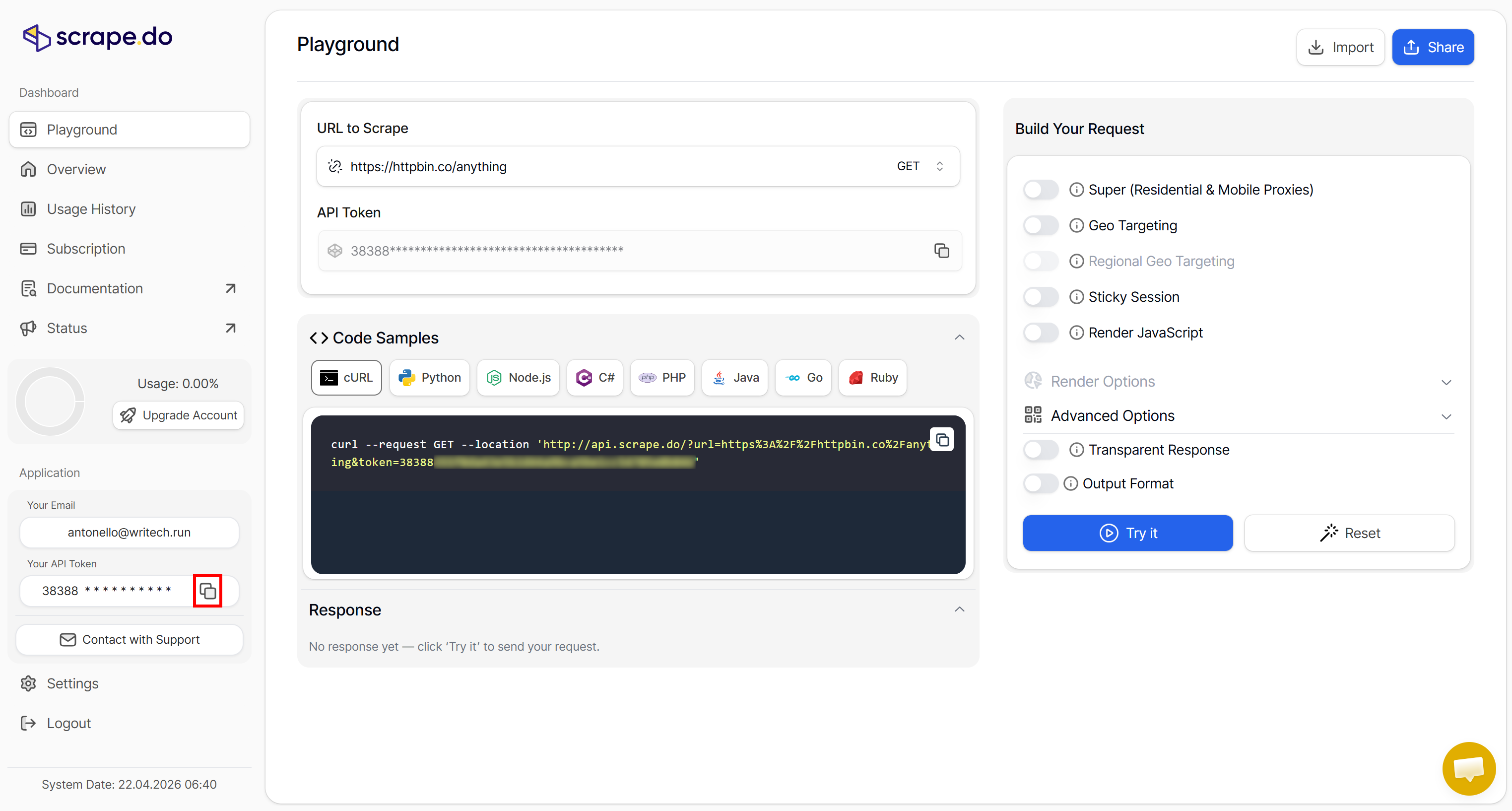
A Scrape.do API token is required to authenticate requests to the Web Scraping API, Amazon Web Scraper API, and Proxy Mode. Explore the documentation for more details.
Note: An API token is automatically generated when you subscribe. To manage your existing tokens or create a new one, go to “Settings → API Token”.
Benchmark Project
The project is based on the file structure below:
llm-data-formats-benchmark/
├── benchmark.py             # Main benchmarking script
├── get_html.py              # Collects Amazon product data in HTML format
├── get_json.py              # Collects Amazon product data in JSON format
├── get_markdown.py          # Collects Amazon product data in Markdown format
├── get_pdf.py               # Generates PDF via browser automation
├── get_csv.py               # Converts JSON data to CSV format
├── get_xml.py               # Converts JSON data to XML format
├── get_plain_text.py        # Extracts plain text version via browser automation
├── get_screenshot.py        # Captures page screenshot (in PNG) via browser automation
├── requirements.txt         # Python dependencies
├── README.md                # Project documentation
├── .env                     # Stores the required API keys
├── input/                   # Stores the data generated by the get_*.py scripts
│   ├── product.html
│   ├── product.json
│   ⋮
│   └── product.png
└── output/                  # Benchmark results generated by benchmark.py
    └── <format>/
        ├── extraction.json
        ├── summary.json
        └── questions.json
The project follows a two-phase workflow:
- Data collection: Run the
get_*.pyscripts to fetch Amazon product info and convert it to different LLM-ready data formats. - Benchmarking: Run
benchmark.pyagainst files in theinput/directory. The script processes each input file, sends it to the LLM with a specific prompt (extraction,summary, orquestions), and measures token consumption and processing time. Results are automatically saved to theoutput/directory organized by format and test case.
For detailed information on how the benchmark works, including the exact prompts, implementation logic, and other details, refer to the files in the benchmark repository.
AI-Ready HTML
HTML is the native data format used to represent web pages, but is it the most suitable format for AI processing?
Retrieving the Data
You can retrieve any web page's HTML using the Scrape. do Web Scraping API with:
from dotenv import load_dotenv
import os
import requests

# Load environment variables from .env file
load_dotenv()

# Read the Scrape.do API token from the environment variable
SCRAPE_DO_API_TOKEN = os.getenv("SCRAPE_DO_API_TOKEN")

# Scrape the target URL using the Scrape.do Web Scraping API
params = {
    "token": SCRAPE_DO_API_TOKEN,
    "url": "https://www.amazon.com/Owala-FreeSip-Insulated-Stainless-BPA-Free/dp/B0BZYCJK89/",
    "super": True,
    "geoCode": "us",
}
response = requests.get("https://api.scrape.do/", params=params)

# Retrieve the HTML content from the response
html = response.text

# HTML optimization logic...

# Export the scraped HTML content to a file
with open("input/product.html", "w", encoding="utf-8") as file:
    file.write(html)
Note the use of the super parameter to enable routing through high-quality residential proxies, improving the request’s success rate. Also note the geoCode parameter set to us, which routes the request through a US-based proxy.
For more information on how to call the Scrape.do Web Scraping API, refer to the official documentation.
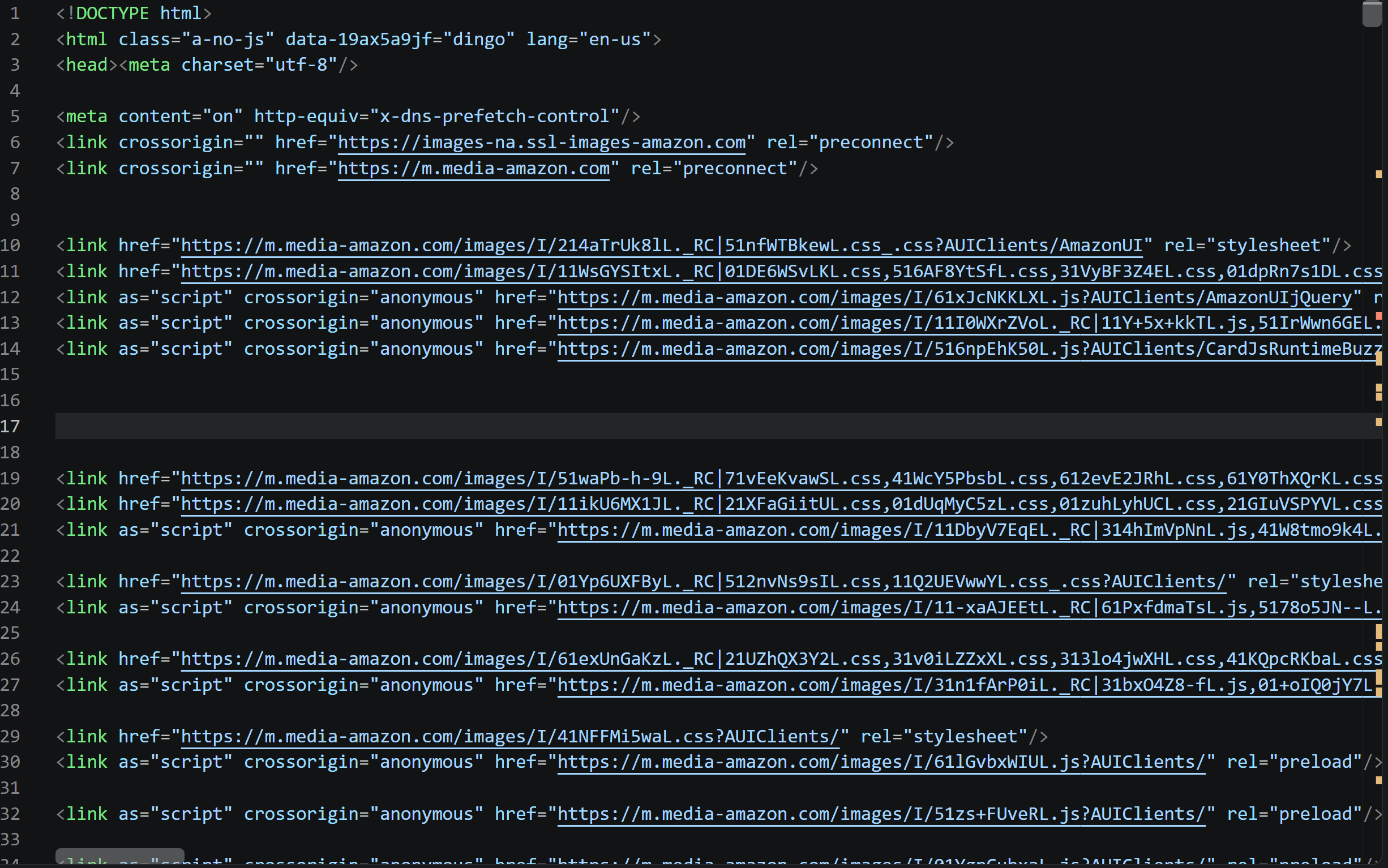
This produces input/product.html. In this case, the raw file was 2.64 MB. That is over one million tokens, exceeding the context supported by GPT-5.6 Luna. To make the test possible, the HTML was therefore stripped of <script> and <style> tags, as well as comments.
For models with larger context windows, it would be preferable to keep the HTML in its original form, especially because comments and <script> tags may contain useful data. Still, the potential need for additional processing to prepare the HTML for AI analysis already highlights one of its limitations as an AI data format.
Input Data
| Metric | Value |
|---|---|
| File size (KB) | 989 |
| Input tokens | 338,503 |
The input HTML contains the page’s data, but also a significant amount of unnecessary content(even after optimizing it for AI ingestion). As a result, the input is very large, consuming over one-third of the model’s supported context window (338K tokens out of 1,050K tokens).
Running the Benchmark
Execute the benchmark script for all three scenarios using the scraped Amazon page in HTML format with:
python benchmark.py extraction input/product.html --tests 3 --model gpt-5.6-luna
python benchmark.py summary input/product.html --tests 3 --model gpt-5.6-luna
python benchmark.py questions input/product.html --tests 3 --model gpt-5.6-luna
Benchmark Results
See the full results:
Extraction Scenario
| Run | File size (KB) | HTML input tokens | Full input tokens | Output tokens | Total tokens | Processing time (s) |
|---|---|---|---|---|---|---|
| 1 | 989.0928 | 338,503 | 339,093 | 1,019 | 340,112 | 9.8814 |
| 2 | 989.0928 | 338,503 | 339,093 | 1,016 | 340,109 | 8.8005 |
| 3 | 989.0928 | 338,503 | 339,093 | 1,042 | 340,135 | 9.0494 |
| Average | 989.0928 | 338,503.0 | 339,093.0 | 1,025.6667 | 340,118.6667 | 9.2438 |
Output analysis:
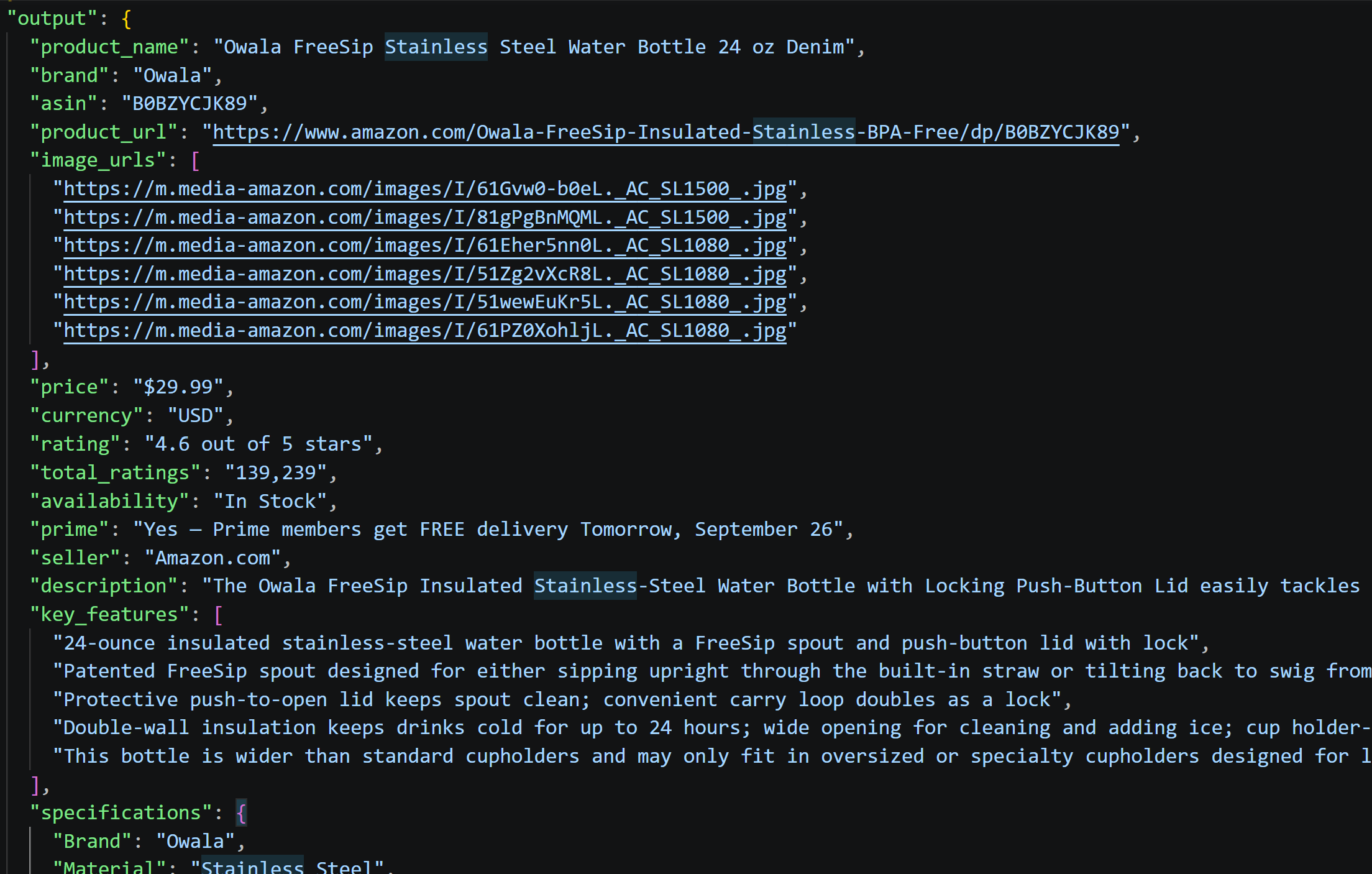
In all runs, all requested fields were populated with the correct data (as expected, since the HTML contains all the required information!)
Summary Scenario
| Run | File size (KB) | HTML input tokens | Full input tokens | Output tokens | Total tokens | Processing time (s) |
|---|---|---|---|---|---|---|
| 1 | 989.0928 | 338,503 | 338,763 | 341 | 339,104 | 5.6490 |
| 2 | 989.0928 | 338,503 | 338,763 | 347 | 339,110 | 5.4045 |
| 3 | 989.0928 | 338,503 | 338,763 | 345 | 339,108 | 6.0268 |
| Average | 989.0928 | 338,503.0 | 338,763.0 | 344.3333 | 339,107.3333 | 5.6934 |
Output analysis:

The summary captures the product’s main features, specifications, price, and ratings. They provide a complete buyer-oriented overview without omitting important information.
Questions Scenario
| Run | File size (KB) | HTML input tokens | Full input tokens | Output tokens | Total tokens | Processing time (s) |
|---|---|---|---|---|---|---|
| 1 | 989.0928 | 338,503 | 338,594 | 197 | 338,791 | 5.1326 |
| 2 | 989.0928 | 338,503 | 338,594 | 214 | 338,808 | 4.1144 |
| 3 | 989.0928 | 338,503 | 338,594 | 196 | 338,790 | 5.1181 |
| Average | 989.0928 | 338,503.0 | 338,594.0 | 202.3333 | 338,796.3333 | 4.7884 |
Output analysis:
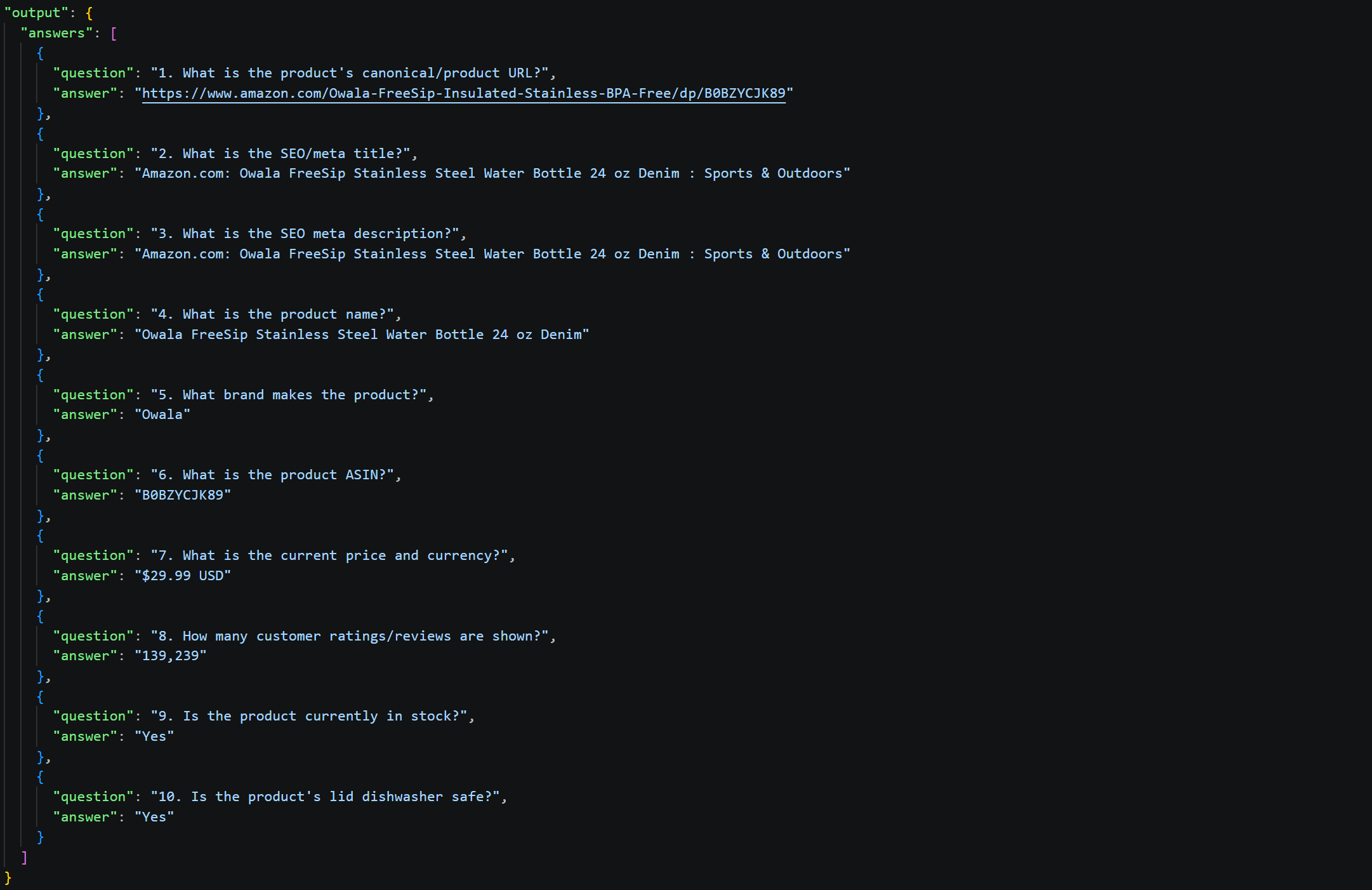
All 10 questions were answered correctly and completely. The HTML provided all required information, including SEO metadata, product details, availability, and dishwasher-safety information.
AI-Ready Markdown
Web pages converted to Markdown, with comments, <script>, <style>, and other unnecessary text-based tags removed, have already emerged as one of the strongest data formats in other LLM-ready data benchmarks.
This section evaluates how the Markdown produced by Scrape.do Web Scraping API performs, including its front matter, which provides additional information about the scraped page.
Retrieving the Data
Get the Markdown version of any web page using the Scrape.do Web Scraping API by setting the "output": "markdown" option:
from dotenv import load_dotenv
import os
import requests

# Load environment variables from the .env file
load_dotenv()

# Read the Scrape.do API token from the environment variable
SCRAPE_DO_API_TOKEN = os.getenv("SCRAPE_DO_API_TOKEN")

# Scrape the target URL using the Scrape.do Web Scraping API
params = {
    "token": SCRAPE_DO_API_TOKEN,
    "url": "https://www.amazon.com/Owala-FreeSip-Insulated-Stainless-BPA-Free/dp/B0BZYCJK89/",
    "super": True,
    "geoCode": "us",
    "output": "markdown", # To get the response in AI-ready Markdown
}
response = requests.get("https://api.scrape.do/", params=params)

# Retrieve the Markdown content from the response
markdown = response.text

# Export the scraped Markdown content to a file
with open("input/product.md", "w", encoding="utf-8") as file:
    file.write(markdown)
Input Data
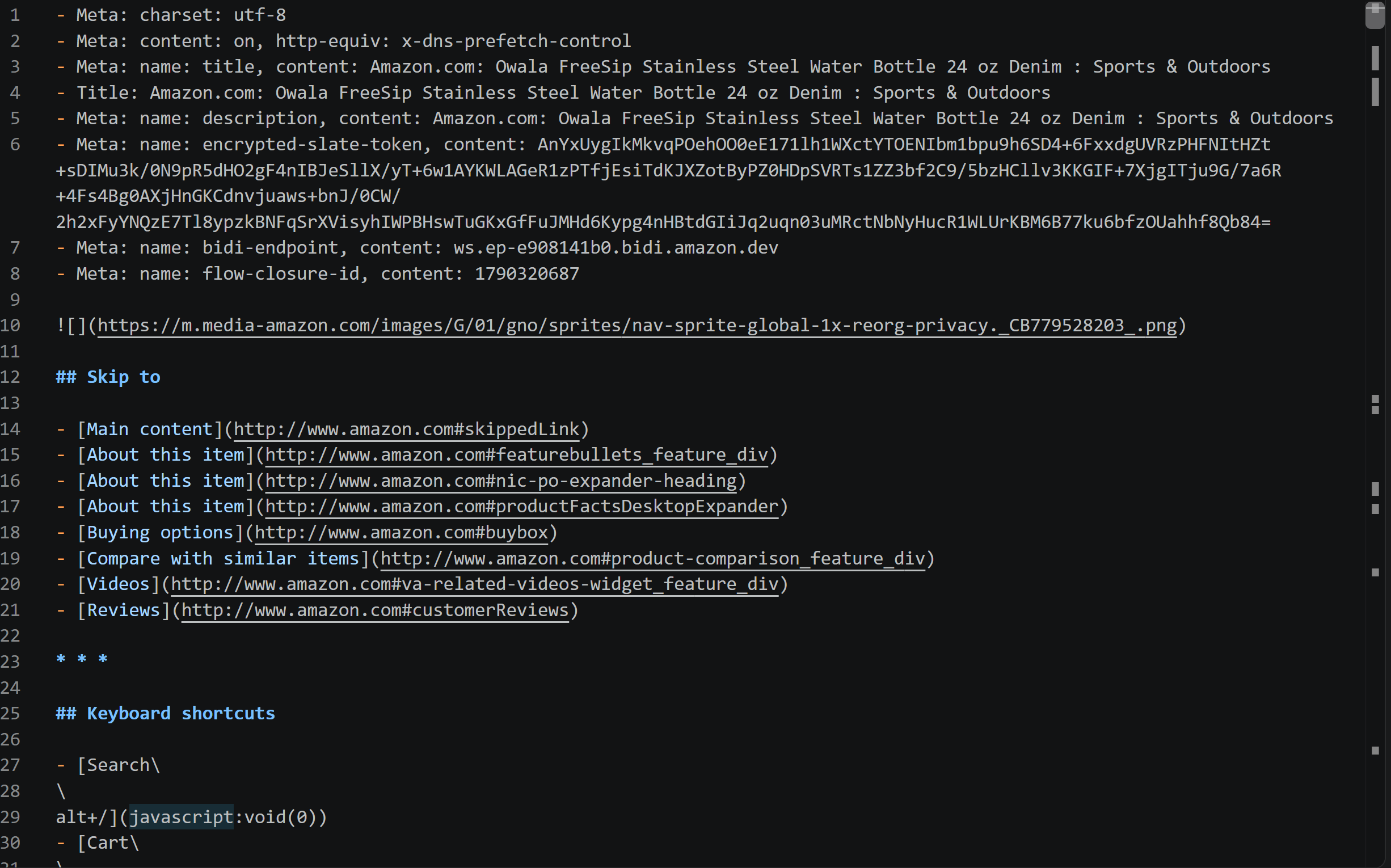
| Metric | Value |
|---|---|
| File size (KB) | 148.6 |
| Input tokens | 66,594 |
The Markdown content contains the great majority of the data from the HTML page. Thanks to the special front matter added by Scrape.do, the Markdown also includes the SEO information. That info would normally be omitted, as <meta> tags are generally removed when converting HTML to Markdown.
The Markdown output results in more than 5× fewer tokens than the HTML version of the web page. This helps explain why Markdown is generally considered one of the most suitable formats for LLM processing. Plus, most LLMs “speak” Markdown natively, so they are very familiar with it. Some sites already publish Markdown versions of their pages and list them in llms.txt files, so you can skip the conversion.
Running the Benchmark
Execute the benchmark script for all three scenarios using the scraped Amazon page in Markdown format with:
python benchmark.py extraction input/product.md --tests 3 --model gpt-5.6-luna
python benchmark.py summary input/product.md --tests 3 --model gpt-5.6-luna
python benchmark.py questions input/product.md --tests 3 --model gpt-5.6-luna
Benchmark Results
See the full results:
Extraction Scenario
| Run | File size (KB) | Markdown input tokens | Full input tokens | Output tokens | Total tokens | Processing time (s) |
|---|---|---|---|---|---|---|
| 1 | 148.6279 | 66,004 | 66,594 | 1,175 | 67,769 | 12.9603 |
| 2 | 148.6279 | 66,004 | 66,594 | 1,221 | 67,815 | 12.4712 |
| 3 | 148.6279 | 66,004 | 66,594 | 1,270 | 67,864 | 13.1831 |
| Average | 148.6279 | 66,004.0 | 66,594.0 | 1,222.0 | 67,816.0 | 12.8715 |
Output analysis:
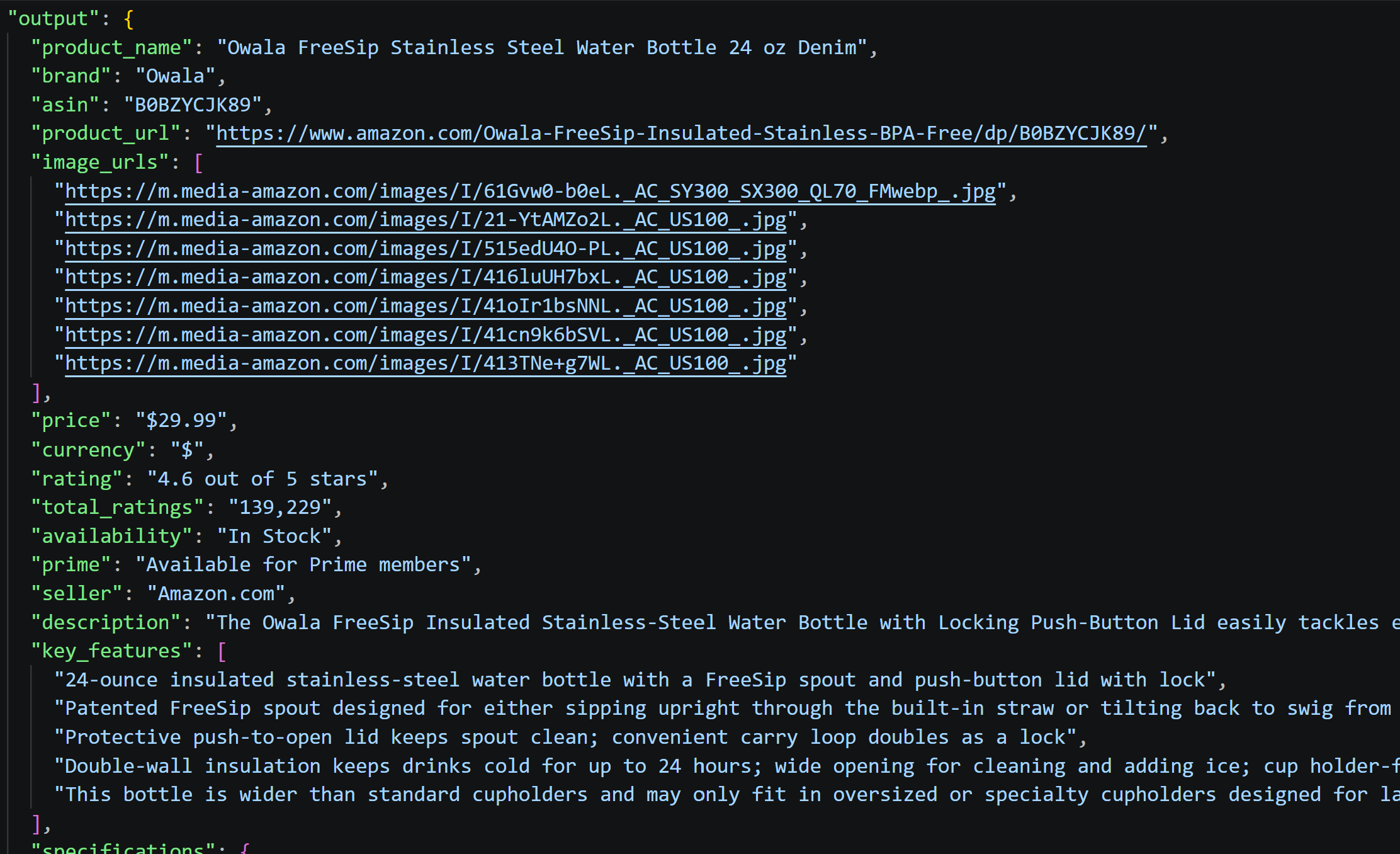
In all runs, every requested field was extracted cleanly and accurately. In this case, the AI-ready Markdown format conveyed all the essential information.
Summary Scenario
| Run | File size (KB) | Markdown input tokens | Full input tokens | Output tokens | Total tokens | Processing time (s) |
|---|---|---|---|---|---|---|
| 1 | 148.6279 | 66,004 | 66,095 | 213 | 66,308 | 4.5763 |
| 2 | 148.6279 | 66,004 | 66,095 | 196 | 66,291 | 3.6061 |
| 3 | 148.6279 | 66,004 | 66,095 | 199 | 66,294 | 3.5454 |
| Average | 148.6279 | 66,004.0 | 66,095.0 | 202.6667 | 66,297.6667 | 3.9093 |
Output analysis:

The summaries are thorough and hit all the key points (i.e., design features, specs, pricing, ratings, and care limitations). They deliver a complete buyer-focused overview without glossing over important details.
Questions Scenario
| Run | File size (KB) | Markdown input tokens | Full input tokens | Output tokens | Total tokens | Processing time (s) |
|---|---|---|---|---|---|---|
| 1 | 148.6279 | 66,004 | 66,264 | 427 | 66,691 | 6.2867 |
| 2 | 148.6279 | 66,004 | 66,264 | 513 | 66,777 | 7.3042 |
| 3 | 148.6279 | 66,004 | 66,264 | 441 | 66,705 | 6.3139 |
| Average | 148.6279 | 66,004.0 | 66,264.0 | 460.3333 | 66,724.3333 | 6.6349 |
Output analysis:
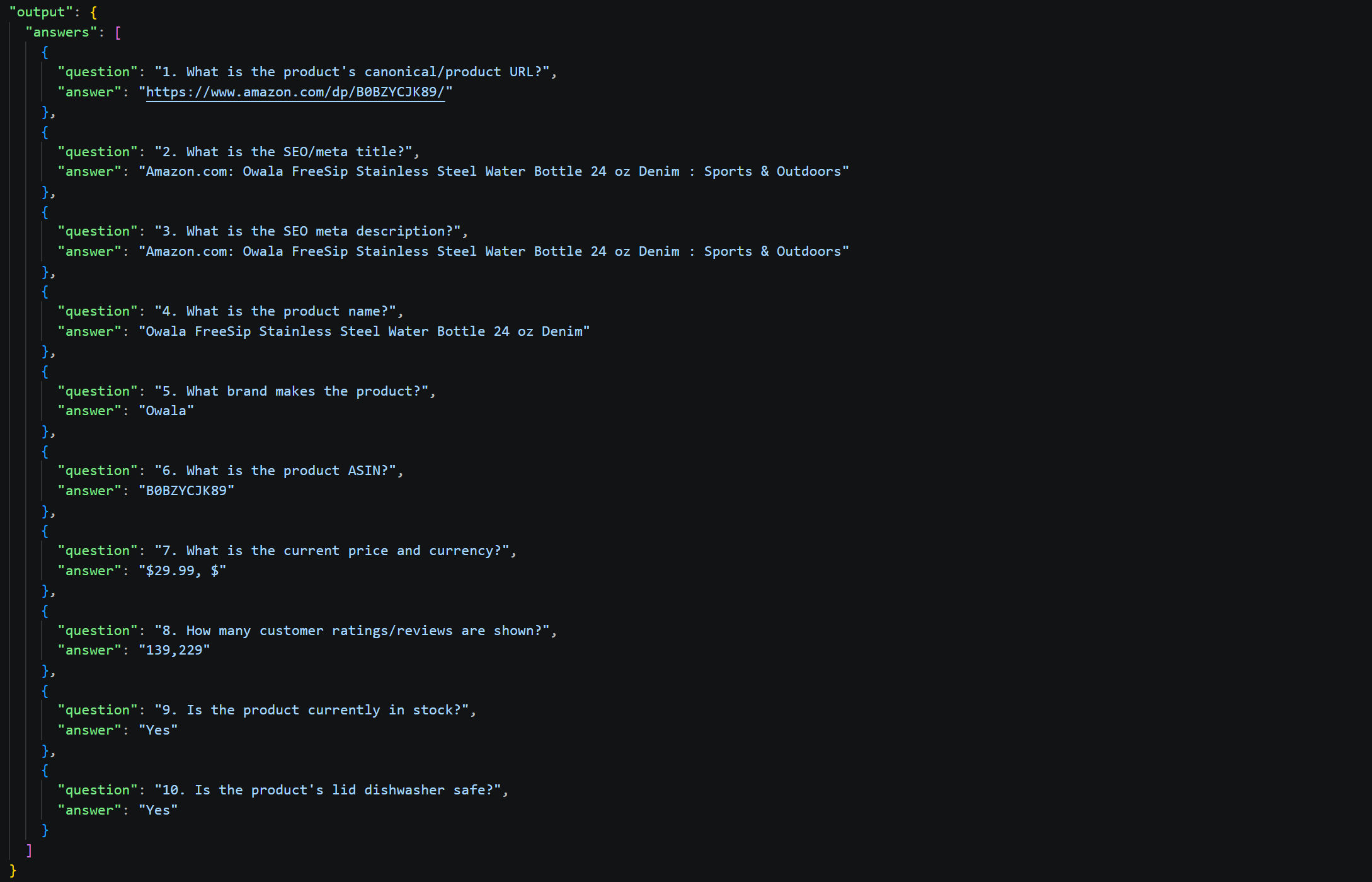
All 10 questions were answered correctly and completely. The Markdown preserved all required information, including SEO metadata (thanks to the custom front matter added by Scrape.do), product identifiers, specs, pricing, availability, and material care instructions.
JSON
JSON is the go-to format for structured web data. Web scraping APIs usually return data in JSON because it provides a clear and consistent structure that is easy for applications and AI systems to process.
Retrieving the Data
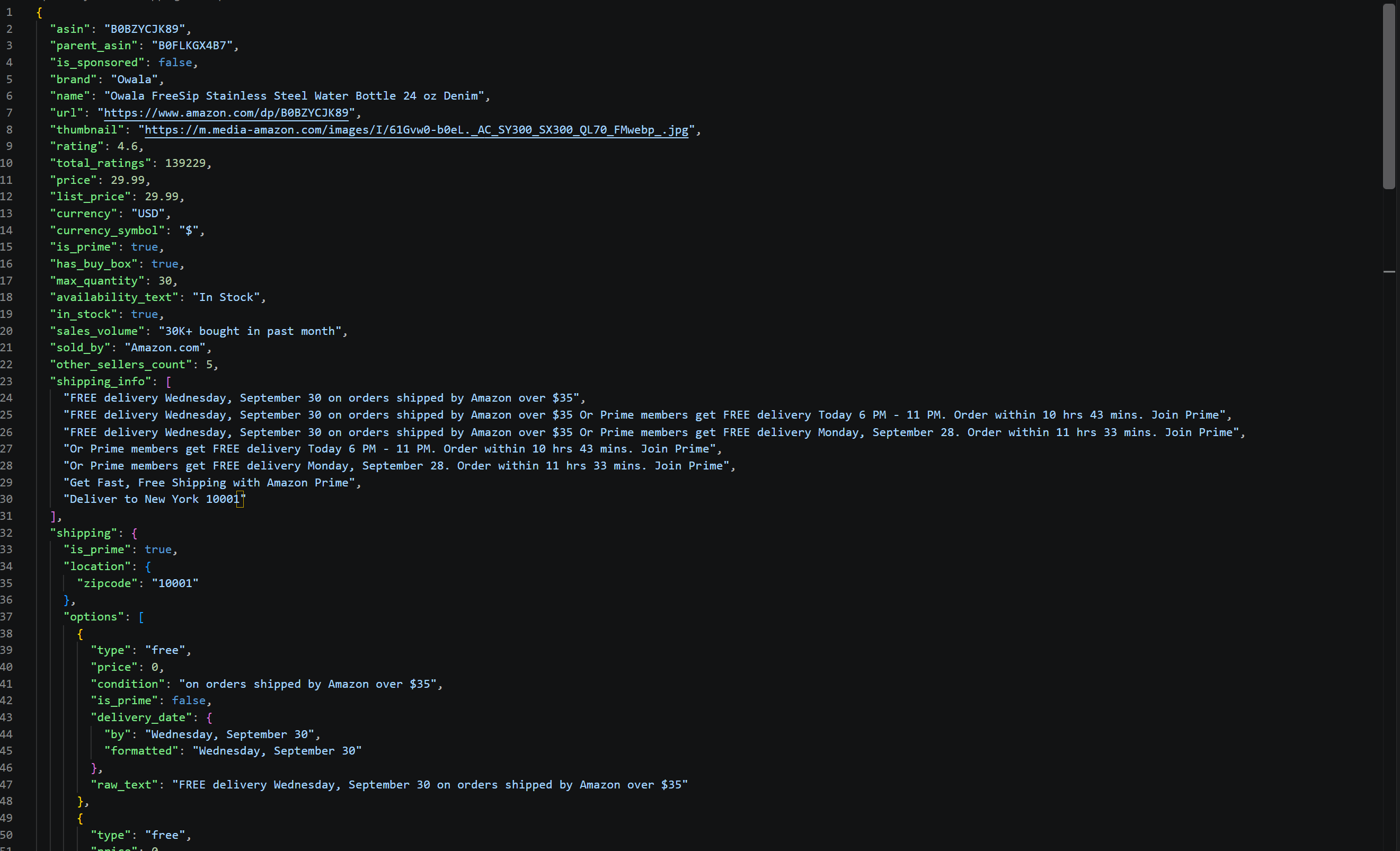
Scrape.do provides a dedicated Amazon Scraper API. Given the ASIN of an Amazon product, it retrieves the product data directly from the page and returns it in a predictable, structured JSON format.
You can use it to scrape the product page as follows:
from dotenv import load_dotenv
import os
import requests
import json

# Load environment variables from the .env file
load_dotenv()

# Read the Scrape.do API token from the environment variable
SCRAPE_DO_API_TOKEN = os.getenv("SCRAPE_DO_API_TOKEN")

# Scrape.do Amazon Scraper API PDP endpoint
url = "https://api.scrape.do/plugin/amazon/pdp"

params = {
    "token": SCRAPE_DO_API_TOKEN,
    "asin": "B0BZYCJK89", # ASIN of the Amazon product to scrape
    "super": True,
    "geocode": "us",
}

# Make the API request to the Scrape.do Amazon Scraper API
response = requests.get(
    url,
    params=params,
)

# Parse the JSON response
data = response.json()

# Export the retrieved product data to disk
with open("input/product.json", "w", encoding="utf-8") as file:
    json.dump(data, file, indent=2, ensure_ascii=False)
For more information on how this works, refer to the Scrape.do Amazon Scraper API documentation. Also, compare it with other Amazon scraper APIs.
Input Data
| Metric | Value |
|---|---|
| File size (KB) | 38.81 |
| Input tokens | 11,564 |
The response produced by the Scrape.do Amazon Scraper API is detailed and well-structured. It is the most compact input, both in terms of file size and token count, making it one of the most promising LLM-ready data formats.
Running the Benchmark
Execute the benchmark script for all three scenarios using the Amazon product data in JSON format with:
python benchmark.py extraction input/product.json --tests 3 --model gpt-5.6-luna
python benchmark.py summary input/product.json --tests 3 --model gpt-5.6-luna
python benchmark.py questions input/product.json --tests 3 --model gpt-5.6-luna
Benchmark Results
See the full results:
Extraction Scenario
| Run | File size (KB) | JSON input tokens | Input tokens | Output tokens | Total tokens | Processing time (s) |
|---|---|---|---|---|---|---|
| 1 | 38.8174 | 11,564 | 12,154 | 1,024 | 13,178 | 9.4780 |
| 2 | 38.8174 | 11,564 | 12,154 | 1,028 | 13,182 | 8.8853 |
| 3 | 38.8174 | 11,564 | 12,154 | 1,085 | 13,239 | 8.5344 |
| Average | 38.8174 | 11,564.0 | 12,154.0 | 1,045.6667 | 13,199.6667 | 8.9659 |
Output analysis:
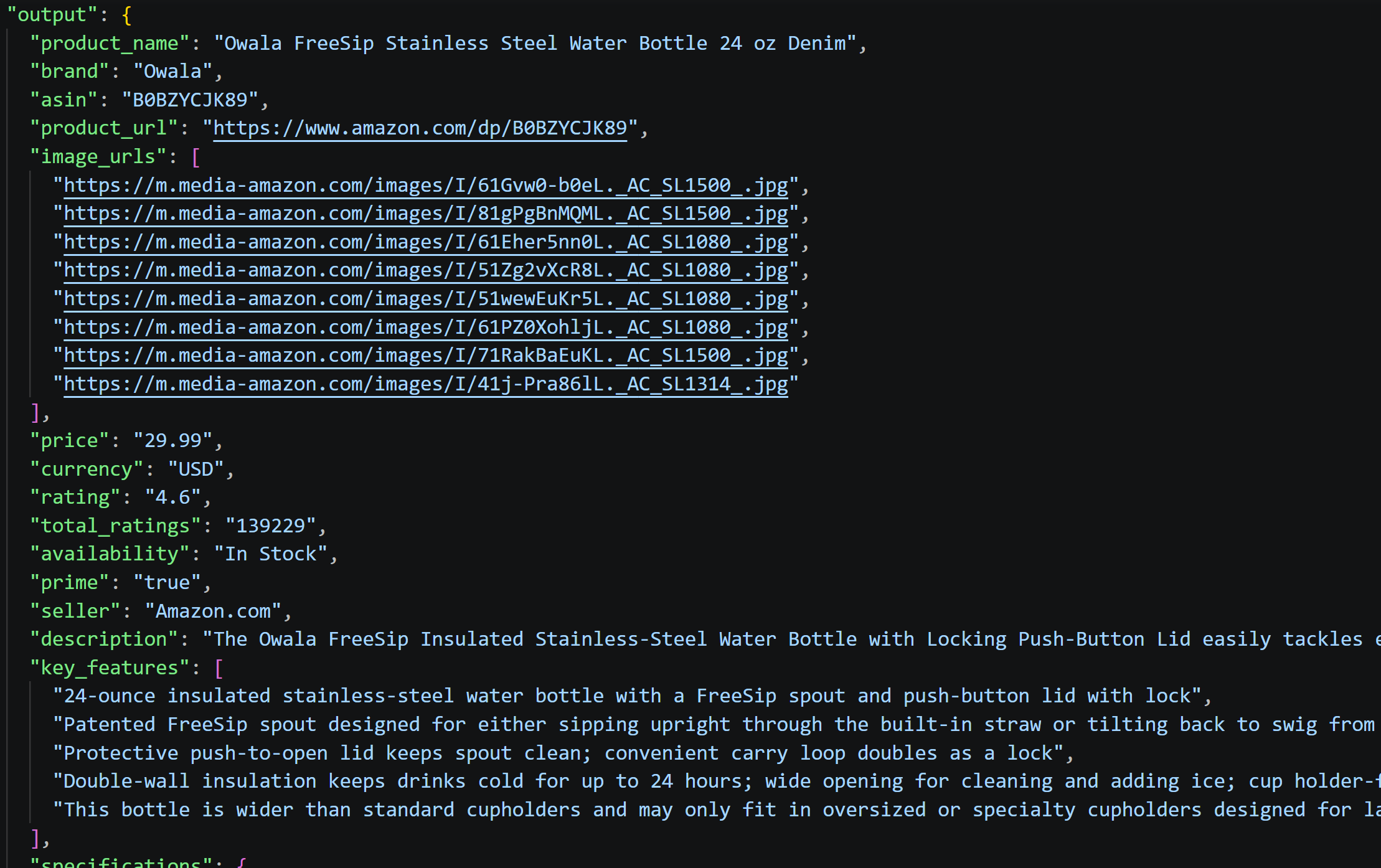
All fields were successfully extracted from the JSON structure, including nested properties like specifications and categories. The structured format makes it straightforward for the AI to parse and organize product attributes without ambiguity.
Summary Scenario
| Run | File size (KB) | JSON input tokens | Input tokens | Output tokens | Total tokens | Processing time (s) |
|---|---|---|---|---|---|---|
| 1 | 38.8174 | 11,564 | 11,655 | 189 | 11,844 | 3.9859 |
| 2 | 38.8174 | 11,564 | 11,655 | 212 | 11,867 | 3.3992 |
| 3 | 38.8174 | 11,564 | 11,655 | 208 | 11,863 | 3.9940 |
| Average | 38.8174 | 11,564.0 | 11,655.0 | 203.0 | 11,858.0 | 3.7930 |
Output analysis:

The generated summaries are well-rounded, covering price, specifications, key features, and usage restrictions. The JSON structure's clarity enables efficient information extraction without the noise present in the original HTML markup.
Questions Scenario
| Run | File size (KB) | JSON input tokens | Input tokens | Output tokens | Total tokens | Processing time (s) |
|---|---|---|---|---|---|---|
| 1 | 38.8174 | 11,564 | 11,824 | 264 | 12,088 | 4.5950 |
| 2 | 38.8174 | 11,564 | 11,824 | 272 | 12,096 | 3.6102 |
| 3 | 38.8174 | 11,564 | 11,824 | 280 | 12,104 | 3.7979 |
| Average | 38.8174 | 11,564.0 | 11,824.0 | 272.0 | 12,096.0 | 4.0010 |
Output analysis:
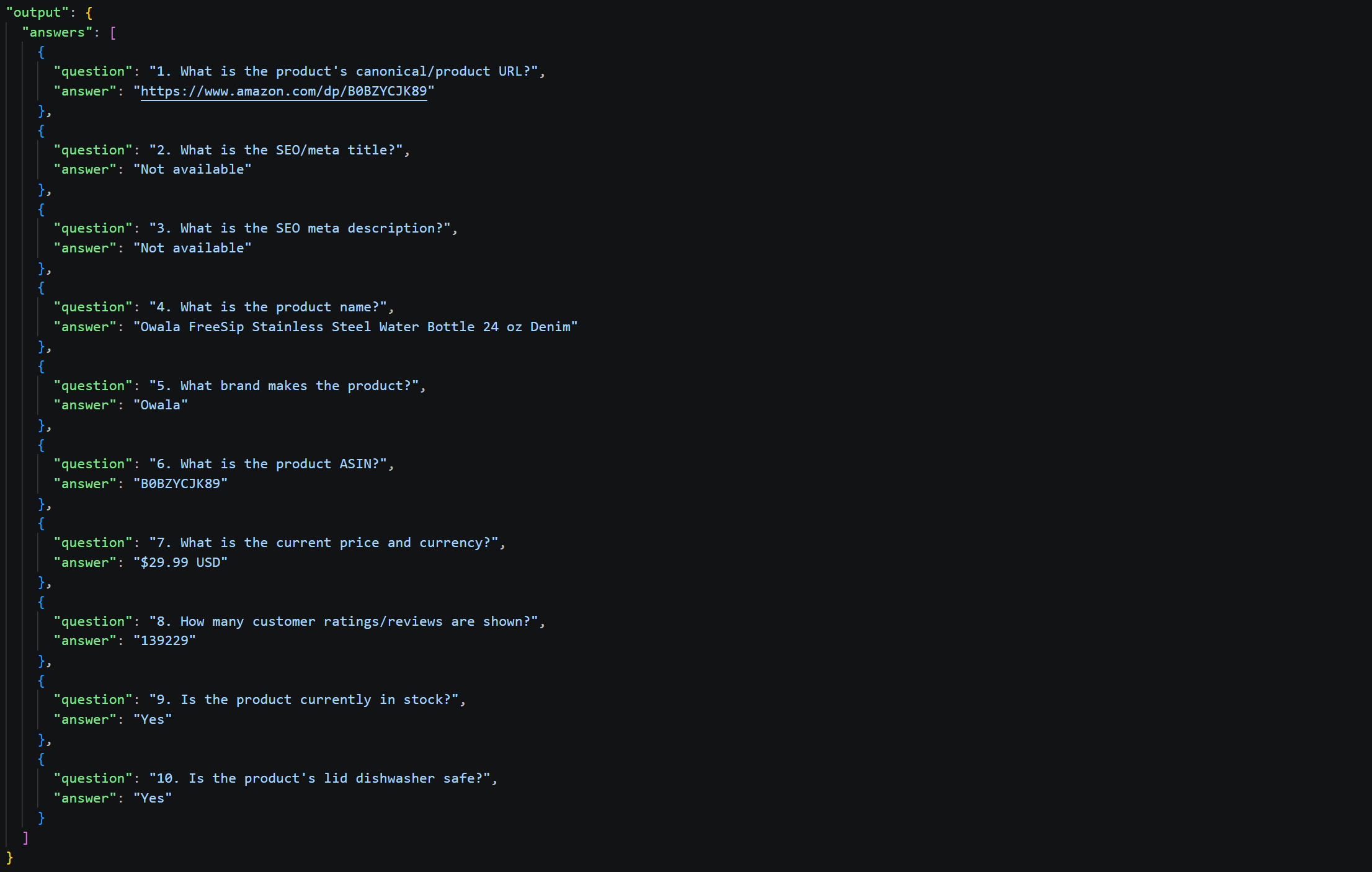
8 questions returned definitive answers from the JSON data, while the remaining questions returned "Not available" since that information is not present in the product JSON structure.
Note that the AI inferred that the canonical URL for the page is the page's own URL, based on the url field in the JSON data. This may not be correct.
Plain Text
HTML pages contain a large amount of visible text. How does plain text perform with LLMs compared with the other data formats?
Retrieving the Data
The easiest way to extract the visible text from a web page is with Playwright:
from dotenv import load_dotenv
import os
from playwright.sync_api import sync_playwright

# Load environment variables from the .env file
load_dotenv()

# Read the Scrape.do API token from the environment variable
SCRAPE_DO_API_TOKEN = os.getenv("SCRAPE_DO_API_TOKEN")

# Configuration to route Playwright requests through Scrape.do proxies
proxy = {
    "server": "http://pm.scrape.do:8080",
    "username": SCRAPE_DO_API_TOKEN,
    "password": "super=true&geoCode=us&customHeaders=true",
}

with sync_playwright() as p:
    # Initialize the browser session
    browser = p.chromium.launch(proxy=proxy)
    page = browser.new_page()

    # Navigate to the target URL
    page.goto(
        "https://www.amazon.com/Owala-FreeSip-Insulated-Stainless-BPA-Free/dp/B0BZYCJK89/",
        timeout=120000
    )

    # Retrieve the rendered page text
    plain_text = page.locator("body").inner_text()

    # Export the scraped plain text content
    with open("input/product.txt", "w", encoding="utf-8") as file:
        file.write(plain_text)

    # Release the browser connection
    browser.close()
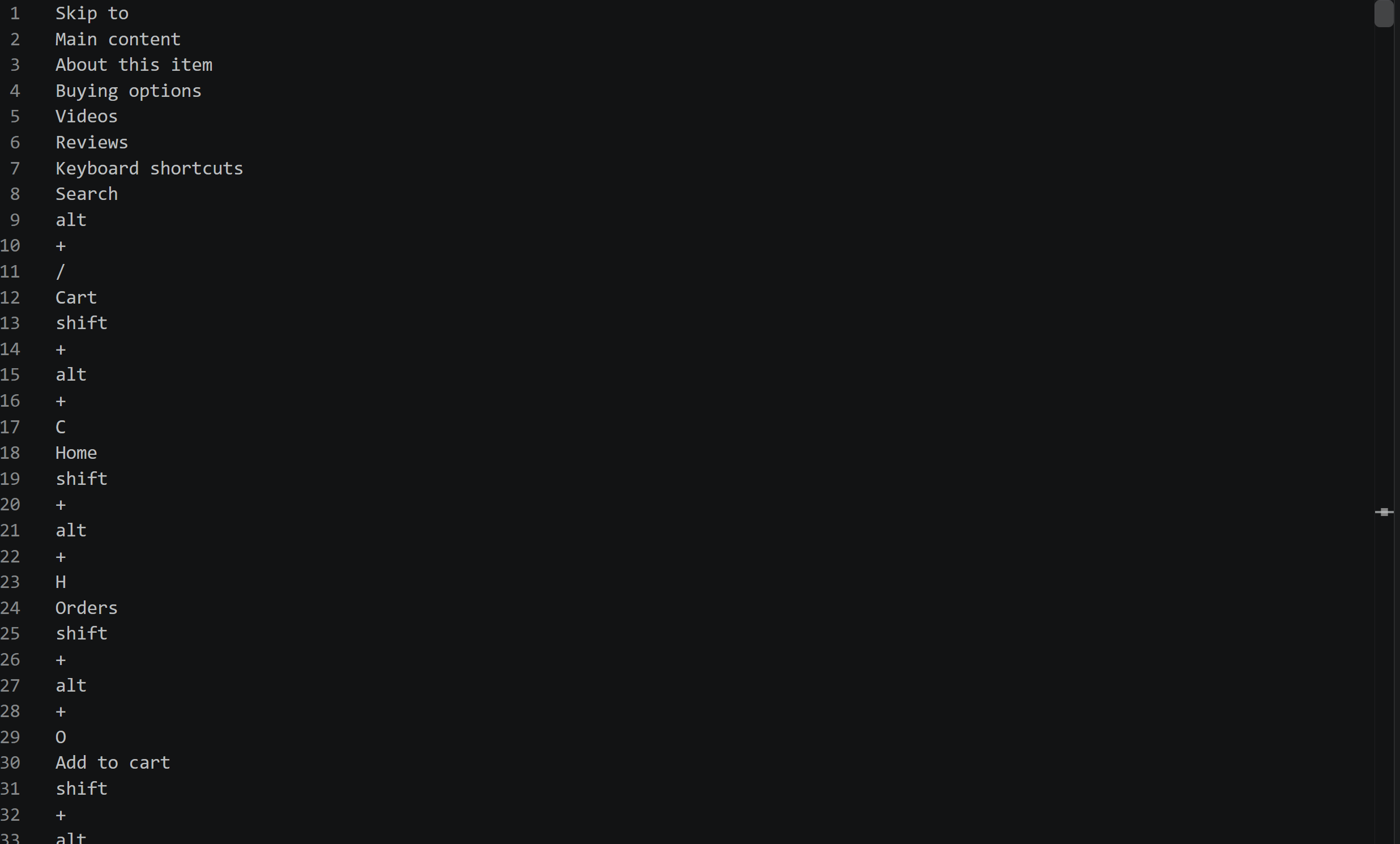
The script uses Playwright to render the page and then extracts the text contained in the page's <body> using inner_text(). The result is the visible text presented on the web page.
In this case, Scrape.do is used as the proxy provider via Proxy Mode. Routing Playwright requests through Scrape.do helps avoid blocks when accessing protected sites like Amazon.
Note: For this script to work on your machine, you must install the Scrape.do SSL certificate locally.
Input Data
| Metric | Value |
|---|---|
| File size (KB) | 27.4 |
| Input tokens | 6,981 |
The produced TXT file contains the visible text from the web page, presented line by line without any specific structure or formatting. This keeps the plain text AI data format compact compared to Markdown and HTML. However, it also means that information such as images, URLs, and other page structure is not preserved.
Running the Benchmark
Run the benchmark script for all three scenarios using the scraped Amazon page in plain text format with:
python benchmark.py extraction input/product.txt --tests 3 --model gpt-5.6-luna
python benchmark.py summary input/product.txt --tests 3 --model gpt-5.6-luna
python benchmark.py questions input/product.txt --tests 3 --model gpt-5.6-luna
Benchmark Results
See the full results:
Extraction Scenario
| Run | File size (KB) | Plain text input tokens | Full input tokens | Output tokens | Total tokens | Processing time (s) |
|---|---|---|---|---|---|---|
| 1 | 27.417 | 6,981 | 7,571 | 902 | 8,473 | 11.4722 |
| 2 | 27.417 | 6,981 | 7,571 | 890 | 8,461 | 10.4749 |
| 3 | 27.417 | 6,981 | 7,571 | 700 | 8,271 | 8.3875 |
| Average | 27.417 | 6,981.0 | 7,571.0 | 830.6667 | 8,401.6667 | 10.1115 |
Output analysis:
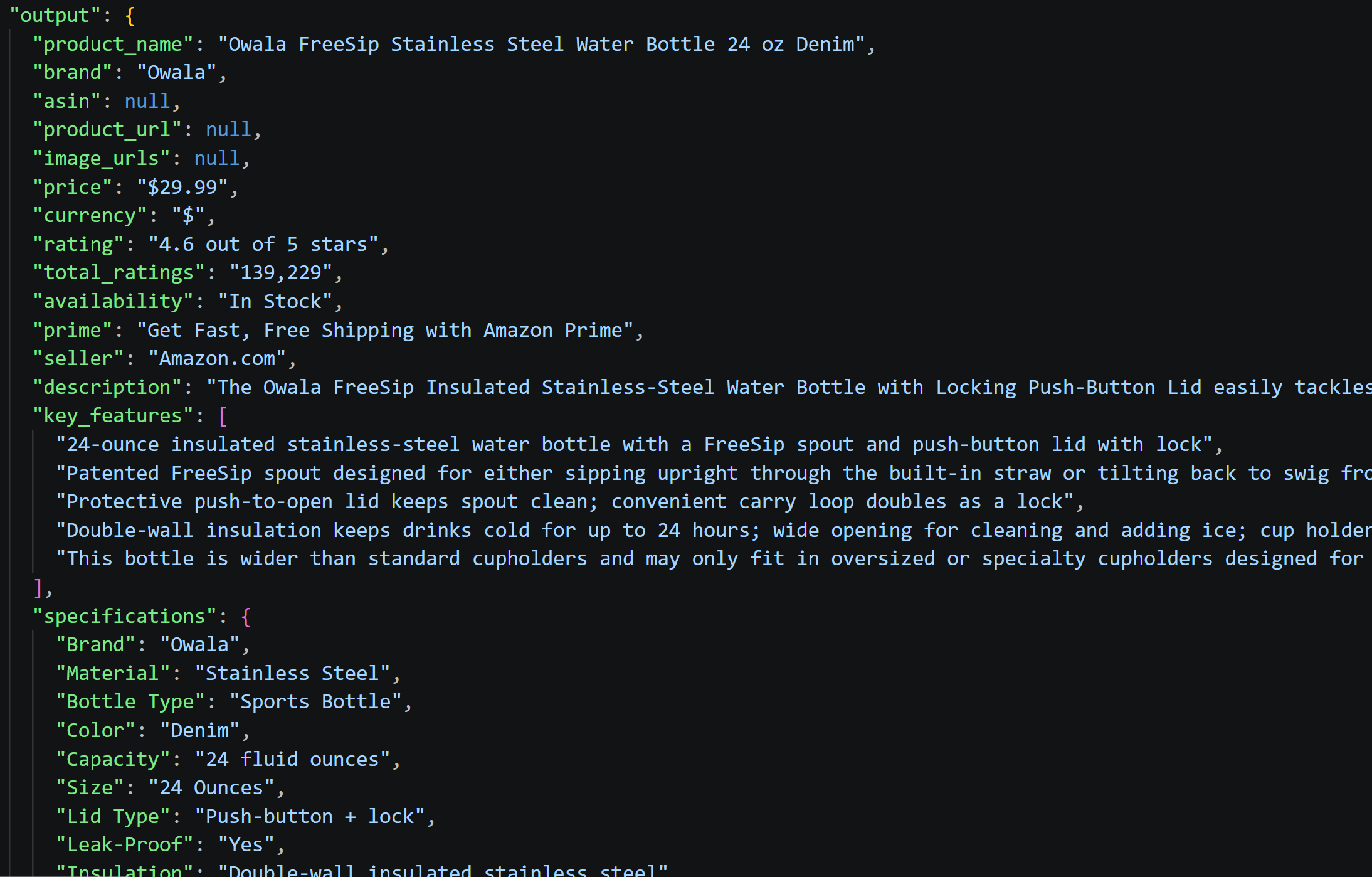
The extraction successfully populated all text-based product fields like name, brand, price, and specifications. Yet, URL-based data (e.g., product URL, ASIN, image URLs, best seller info) remained null since plain text lacks that structural metadata. The TXT format captures substantive content but loses navigational context.
Summary Scenario
| Run | File size (KB) | Plain text input tokens | Full input tokens | Output tokens | Total tokens | Processing time (s) |
|---|---|---|---|---|---|---|
| 1 | 27.417 | 6,981 | 7,072 | 192 | 7,264 | 3.4323 |
| 2 | 27.417 | 6,981 | 7,072 | 148 | 7,220 | 3.1357 |
| 3 | 27.417 | 6,981 | 7,072 | 190 | 7,262 | 3.2353 |
| Average | 27.417 | 6,981.0 | 7,072.0 | 176.6667 | 7,248.6667 | 3.2678 |
Output analysis:

The summary is descriptive, covering the main specs, pricing, insulation performance, and customer ratings. The AI was able to distill the raw text into a coherent buyer-focused overview that would guide a purchase decision without extraneous details.
Questions Scenario
| Run | File size (KB) | Plain text input tokens | Full input tokens | Output tokens | Total tokens | Processing time (s) |
|---|---|---|---|---|---|---|
| 1 | 27.417 | 6,981 | 7,241 | 362 | 7,603 | 4.0783 |
| 2 | 27.417 | 6,981 | 7,241 | 377 | 7,618 | 4.3296 |
| 3 | 27.417 | 6,981 | 7,241 | 327 | 7,568 | 3.7558 |
| Average | 27.417 | 6,981.0 | 7,241.0 | 355.3333 | 7,596.3333 | 4.0546 |
Output analysis:
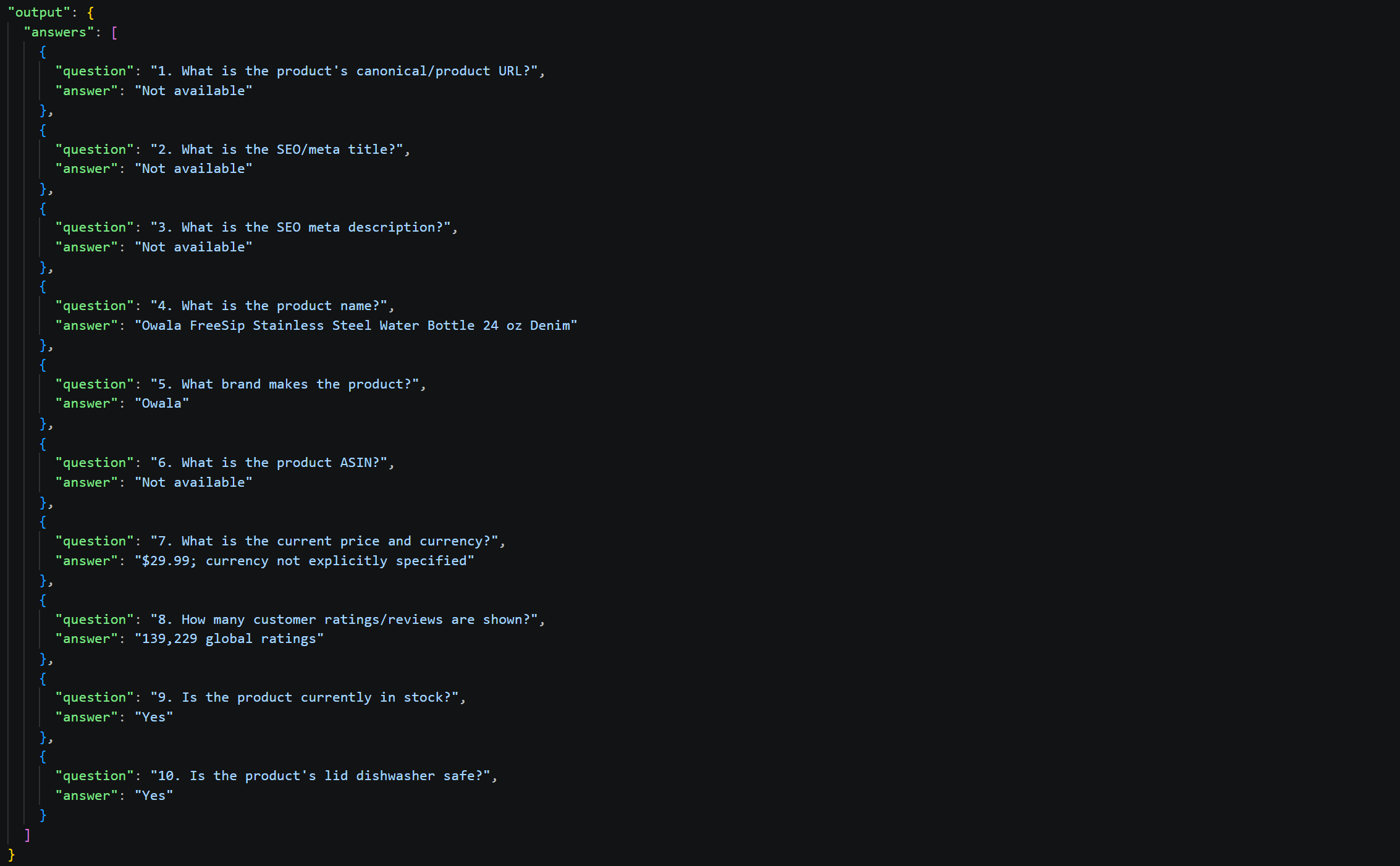
Only 6 of the 10 questions were answered because the plain-text format does not include URLs, SEO metadata, or other additional information needed to answer the remaining questions, such as the ASIN. As a result, 4 questions returned “Not available.”
This is a limitation of plain text, which omits much of the metadata and page structure. All other product details were reliably extracted from the available text.
CSV
CSV is a popular data format that is especially useful when dealing with multiple entries with the same fields.
Retrieving the Data
Obtain the CSV representation of the Amazon product data by converting the JSON input using:
import csv
import json

# Read the JSON file
json_file = "input/product.json"

with open(json_file, "r", encoding="utf-8") as file:
    json_data = json.load(file)


# Flatten the object recursively
def flatten_object(obj, prefix=""):
    flattened = {}

    for key, value in obj.items():
        new_key = f"{prefix}_{key}" if prefix else key

        if value is None:
            flattened[new_key] = ""

        elif isinstance(value, list):
            # Handle arrays
            if not value:
                flattened[new_key] = ""

            elif isinstance(value[0], dict):
                # Array of objects - convert to JSON string for CSV
                flattened[new_key] = json.dumps(
                    value,
                    ensure_ascii=False,
                )

            else:
                # Array of primitives - join with semicolon
                flattened[new_key] = "; ".join(str(item) for item in value)

        elif isinstance(value, dict):
            # Nested object - flatten it
            nested_flattened = flatten_object(value, new_key)
            flattened.update(nested_flattened)

        else:
            # Primitive value
            flattened[new_key] = value

    return flattened


# Flatten and convert to CSV
flattened_data = flatten_object(json_data)

# Write the CSV file
with open("input/product.csv", "w", encoding="utf-8", newline="") as file:
    writer = csv.DictWriter(
        file,
        fieldnames=flattened_data.keys(),
    )

    writer.writeheader()
    writer.writerow(flattened_data)
Input Data

| Metric | Value |
|---|---|
| File size (KB) | 30.42 |
| Input tokens | 9,604 |
The input CSV file is generated directly from the JSON data. It therefore stores the same information, but in a more compact format.
Running the Benchmark
Launch the benchmark script for all three scenarios using the product data in CSV format with:
python benchmark.py extraction input/product.csv --tests 3 --model gpt-5.6-luna
python benchmark.py summary input/product.csv --tests 3 --model gpt-5.6-luna
python benchmark.py questions input/product.csv --tests 3 --model gpt-5.6-luna
Benchmark Results
See the full results:
Extraction Scenario
| Run | File size (KB) | CSV input tokens | Full input tokens | Output tokens | Total tokens | Processing time (s) |
|---|---|---|---|---|---|---|
| 1 | 30.4238 | 9,604 | 10,172 | 1,210 | 11,382 | 10.4896 |
| 2 | 30.4238 | 9,604 | 10,172 | 1,069 | 11,241 | 8.529 |
| 3 | 30.4238 | 9,604 | 10,172 | 1,074 | 11,246 | 8.5082 |
| Average | 30.4238 | 9,604.0 | 10,172.0 | 1,117.6667 | 11,289.6667 | 9.1756 |
Output analysis:
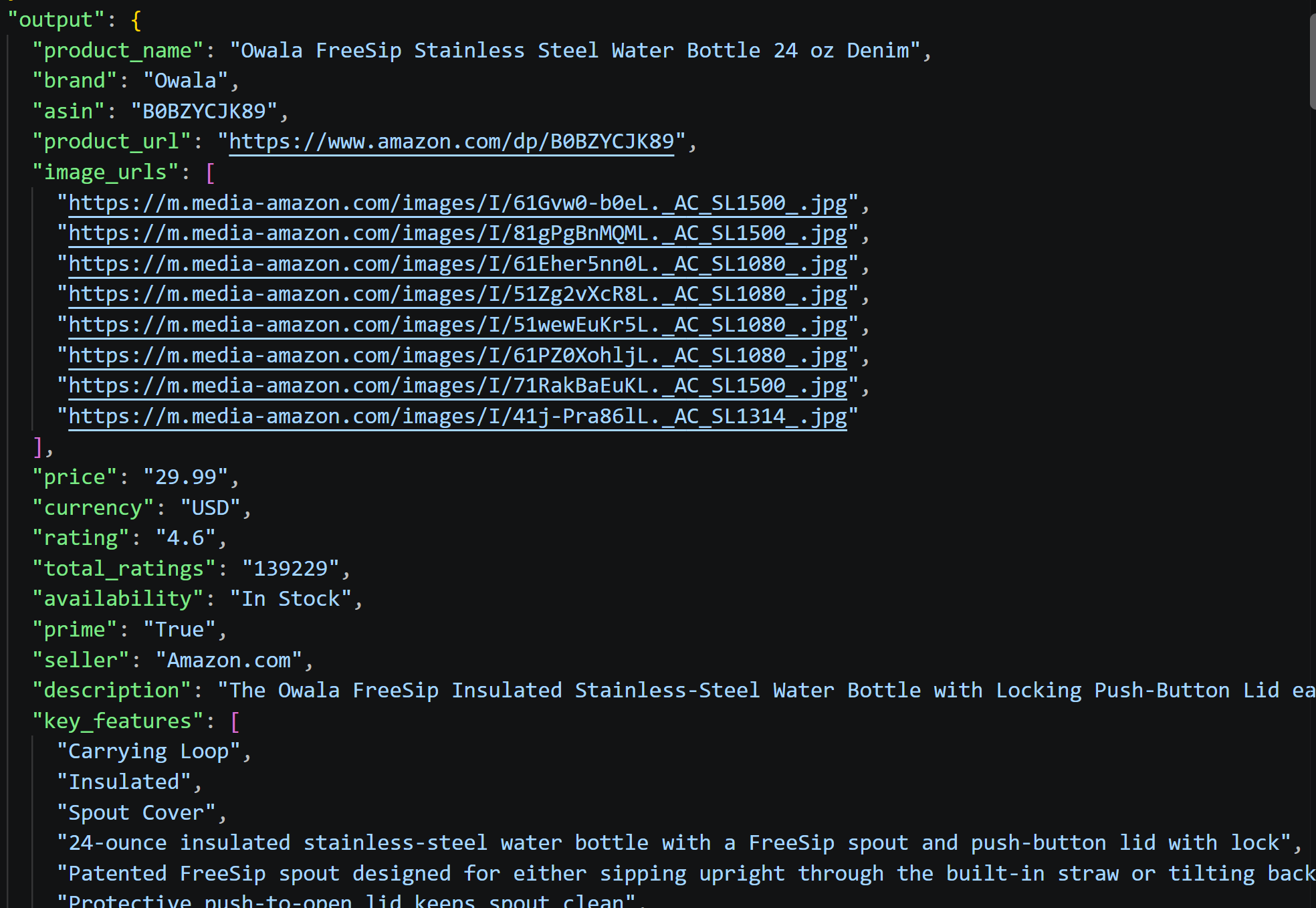
All three runs consistently extracted every requested field without omission. The CSV input provides structured, compact data, ensuring high extraction reliability across runs.
Summary Scenario
| Run | File size (KB) | CSV input tokens | Full input tokens | Output tokens | Total tokens | Processing time (s) |
|---|---|---|---|---|---|---|
| 1 | 30.4238 | 9,604 | 9,695 | 177 | 9,872 | 3.5041 |
| 2 | 30.4238 | 9,604 | 9,695 | 209 | 9,904 | 3.508 |
| 3 | 30.4238 | 9,604 | 9,695 | 197 | 9,892 | 3.2815 |
| Average | 30.4238 | 9,604.0 | 9,695.0 | 194.3333 | 9,889.3333 | 3.4312 |
Output analysis:

The summary is compact and comprehensive, hitting price, specs, ratings, availability, and key features without fluff. CSV's tabular structure naturally supports efficient extraction of essential product attributes, enabling tight, focused summaries.
Questions Scenario
| Run | File size (KB) | CSV input tokens | Full input tokens | Output tokens | Total tokens | Processing time (s) |
|---|---|---|---|---|---|---|
| 1 | 30.4238 | 9,604 | 9,864 | 287 | 10,151 | 4.4658 |
| 2 | 30.4238 | 9,604 | 9,864 | 279 | 10,143 | 3.7753 |
| 3 | 30.4238 | 9,604 | 9,864 | 271 | 10,135 | 4.9188 |
| Average | 30.4238 | 9,604.0 | 9,864.0 | 279.0 | 10,143.0 | 4.3866 |
Output analysis:
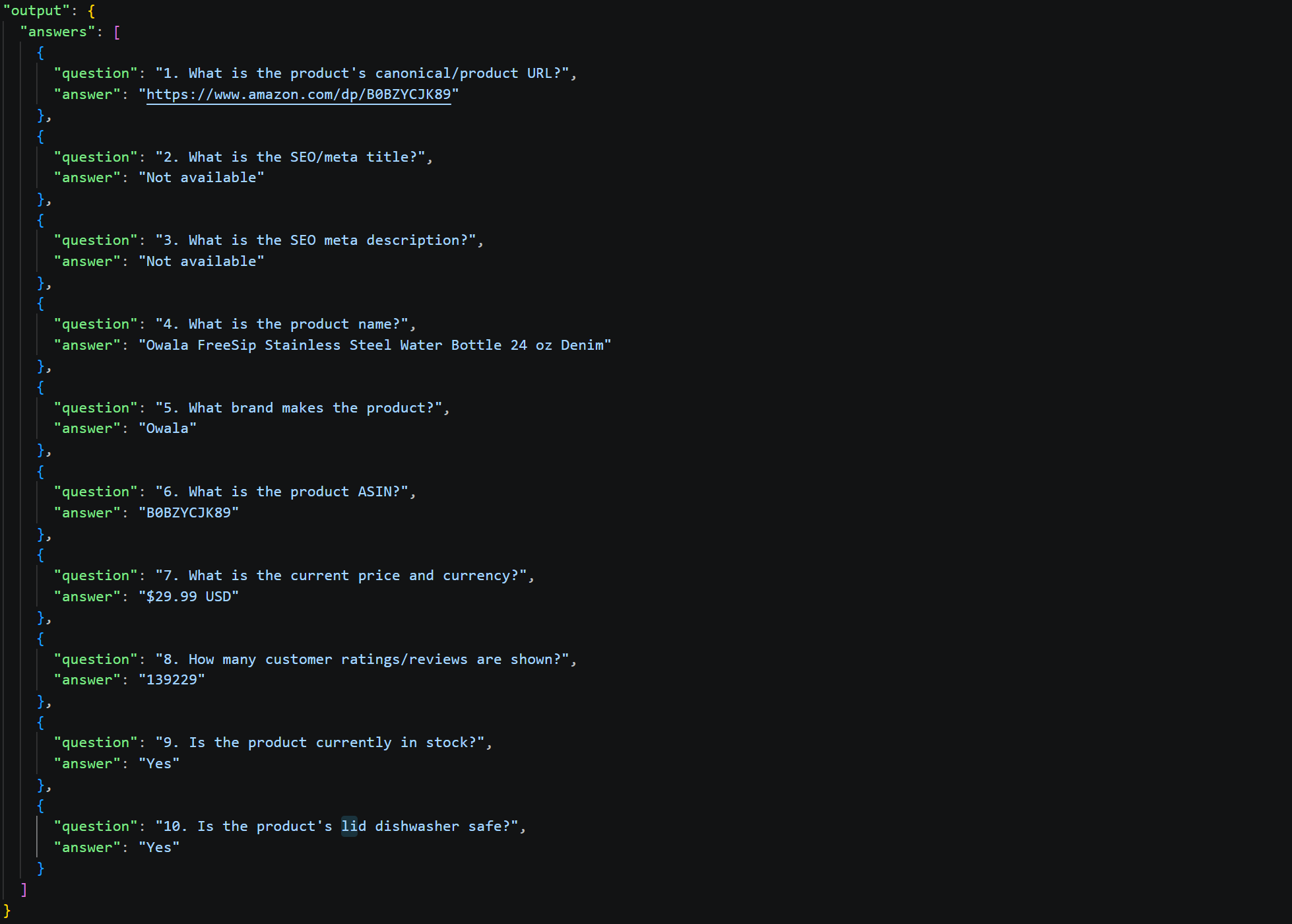
The responses match those produced in the JSON input format benchmark.
XML
XML is a widely used data format that is especially useful for representing structured and hierarchical data.
In the early days of the web, XML became a widely adopted format for exchanging and representing structured data. It remains important in many legacy systems and is still used in areas such as enterprise software, web services, and data exchange.
Retrieving the Data
Generate the XML representation of the Amazon product data by converting the JSON input using:
import json
from dicttoxml import dicttoxml
from xml.dom import minidom

# Import the JSON product data file
with open("input/product.json", "r", encoding="utf-8") as file:
    data = json.load(file)

# Convert it to XML
xml = dicttoxml(data, custom_root="product", attr_type=False)

# Pretty-print the XML
pretty_xml = minidom.parseString(xml).toprettyxml(indent="  ")

# Remove the extra blank lines created by minidom
pretty_xml = "\n".join(
    line for line in pretty_xml.splitlines() if line.strip()
)

# Save the formatted XML
with open("input/product.xml", "w", encoding="utf-8") as file:
    file.write(pretty_xml)
Input Data
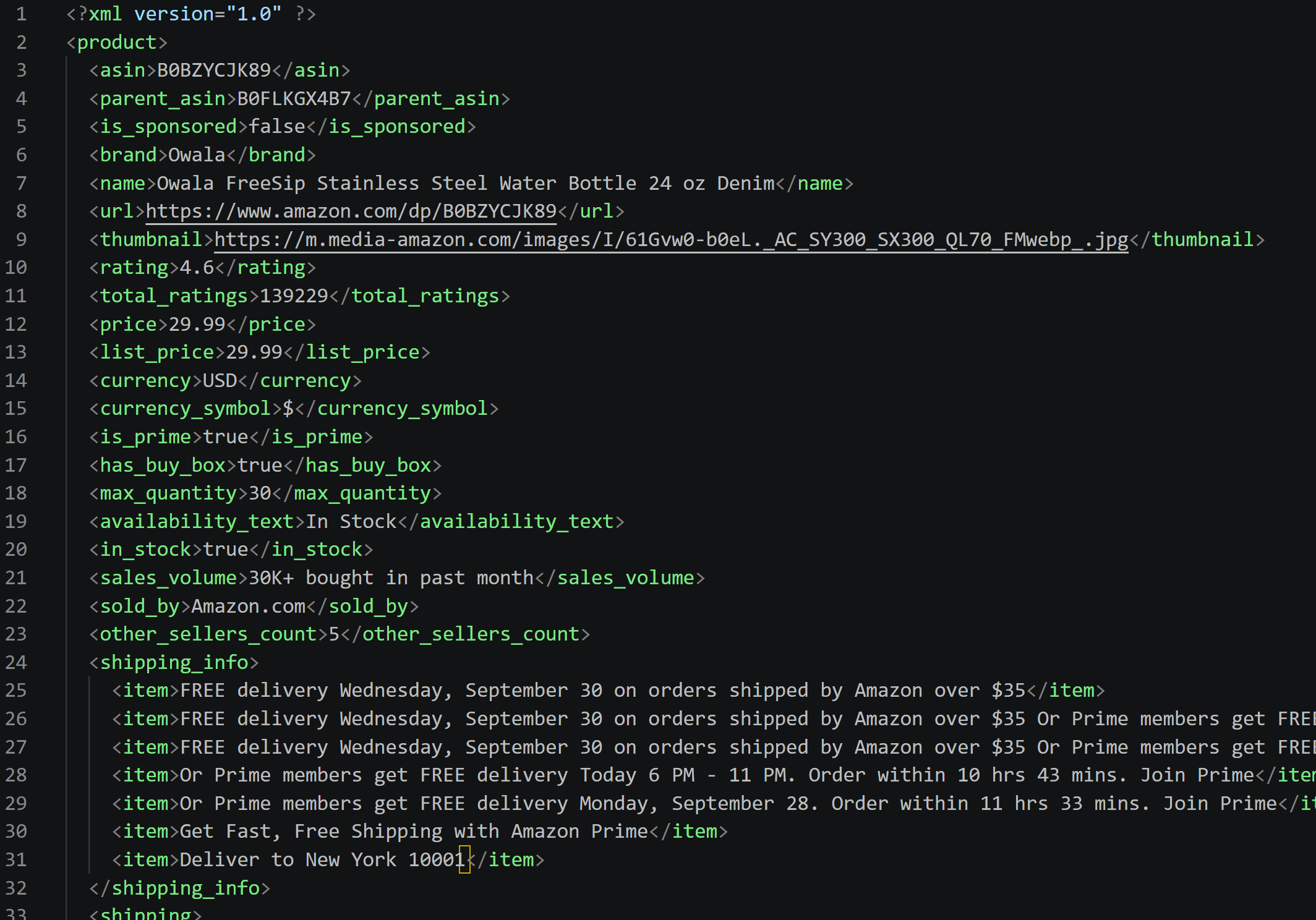
Input Data
| Metric | Value |
|---|---|
| File size (KB) | 47.69 |
| Input tokens | 13,549 |
The input XML file is generated directly from the JSON LLM-ready data output. Thus, it stores the same information, but in a more verbose and hierarchical format.
Running the Benchmark
Run the benchmark script for all three scenarios using the Amazon product data in XML format with:
python benchmark.py extraction input/product.xml --tests 3 --model gpt-5.6-luna
python benchmark.py summary input/product.xml --tests 3 --model gpt-5.6-luna
python benchmark.py questions input/product.xml --tests 3 --model gpt-5.6-luna
Benchmark Results
See the full results:
Extraction Scenario
| Run | File size (KB) | XML input tokens | Input tokens | Output tokens | Total tokens | Processing time (s) |
|---|---|---|---|---|---|---|
| 1 | 47.6953 | 13,549 | 14,117 | 1,151 | 15,268 | 13.3139 |
| 2 | 47.6953 | 13,549 | 14,117 | 1,122 | 15,239 | 12.4026 |
| 3 | 47.6953 | 13,549 | 14,117 | 1,206 | 15,323 | 13.5939 |
| Average | 47.6953 | 13,549.0 | 14,117.0 | 1,159.6667 | 15,276.6667 | 13.1035 |
Output analysis:
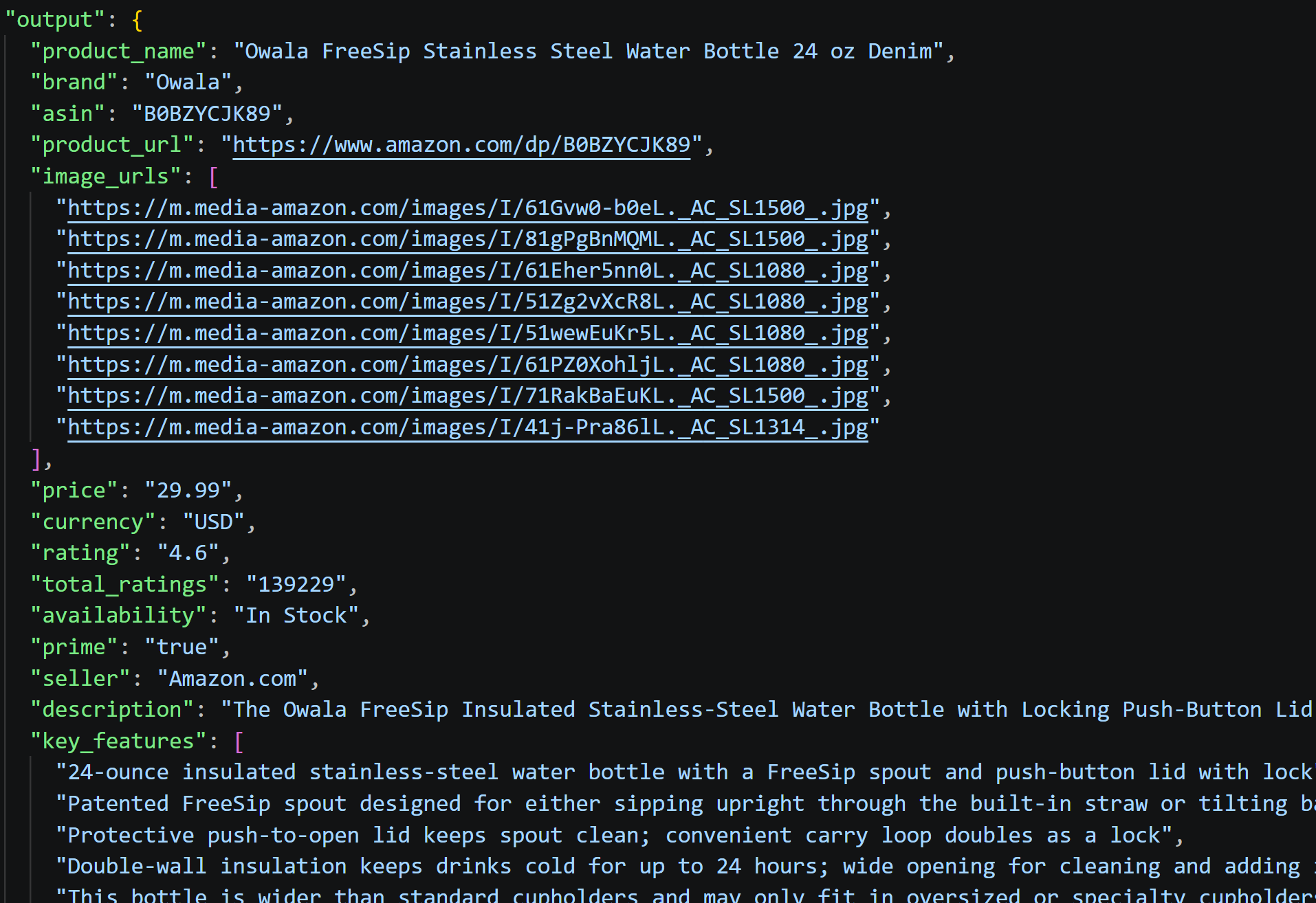
All requested fields were successfully extracted with complete information. The structured XML format ensured consistent data retrieval across all runs, with no missing values for product attributes.
Summary Scenario
| Run | File size (KB) | XML input tokens | Input tokens | Output tokens | Total tokens | Processing time (s) |
|---|---|---|---|---|---|---|
| 1 | 47.6953 | 13,549 | 13,640 | 197 | 13,837 | 4.1266 |
| 2 | 47.6953 | 13,549 | 13,640 | 206 | 13,846 | 3.2404 |
| 3 | 47.6953 | 13,549 | 13,640 | 203 | 13,843 | 4.0679 |
| Average | 47.6953 | 13,549.0 | 13,640.0 | 202.0 | 13,842.0 | 3.8116 |
Output analysis:
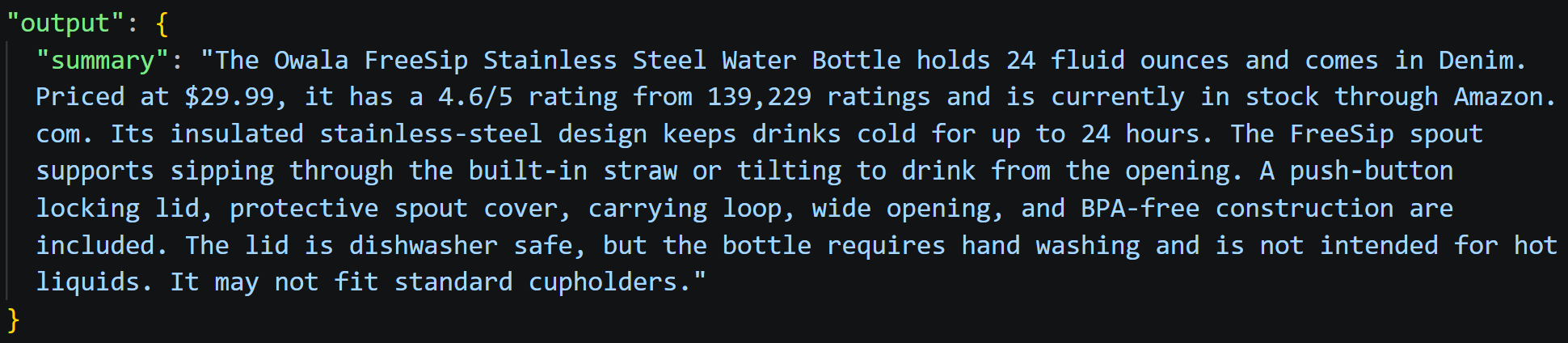
The generated summary is well-balanced, capturing product specifications, pricing, key features, and usage considerations. It highlights the patented design and functional benefits while appropriately noting compatibility limitations.
Questions Scenario
| Run | File size (KB) | XML input tokens | Input tokens | Output tokens | Total tokens | Processing time (s) |
|---|---|---|---|---|---|---|
| 1 | 47.6953 | 13,549 | 13,809 | 255 | 14,064 | 5.4441 |
| 2 | 47.6953 | 13,549 | 13,809 | 288 | 14,097 | 4.6875 |
| 3 | 47.6953 | 13,549 | 13,809 | 261 | 14,070 | 4.7597 |
| Average | 47.6953 | 13,549.0 | 13,809.0 | 268.0 | 14,077.0 | 4.9638 |
Output analysis:
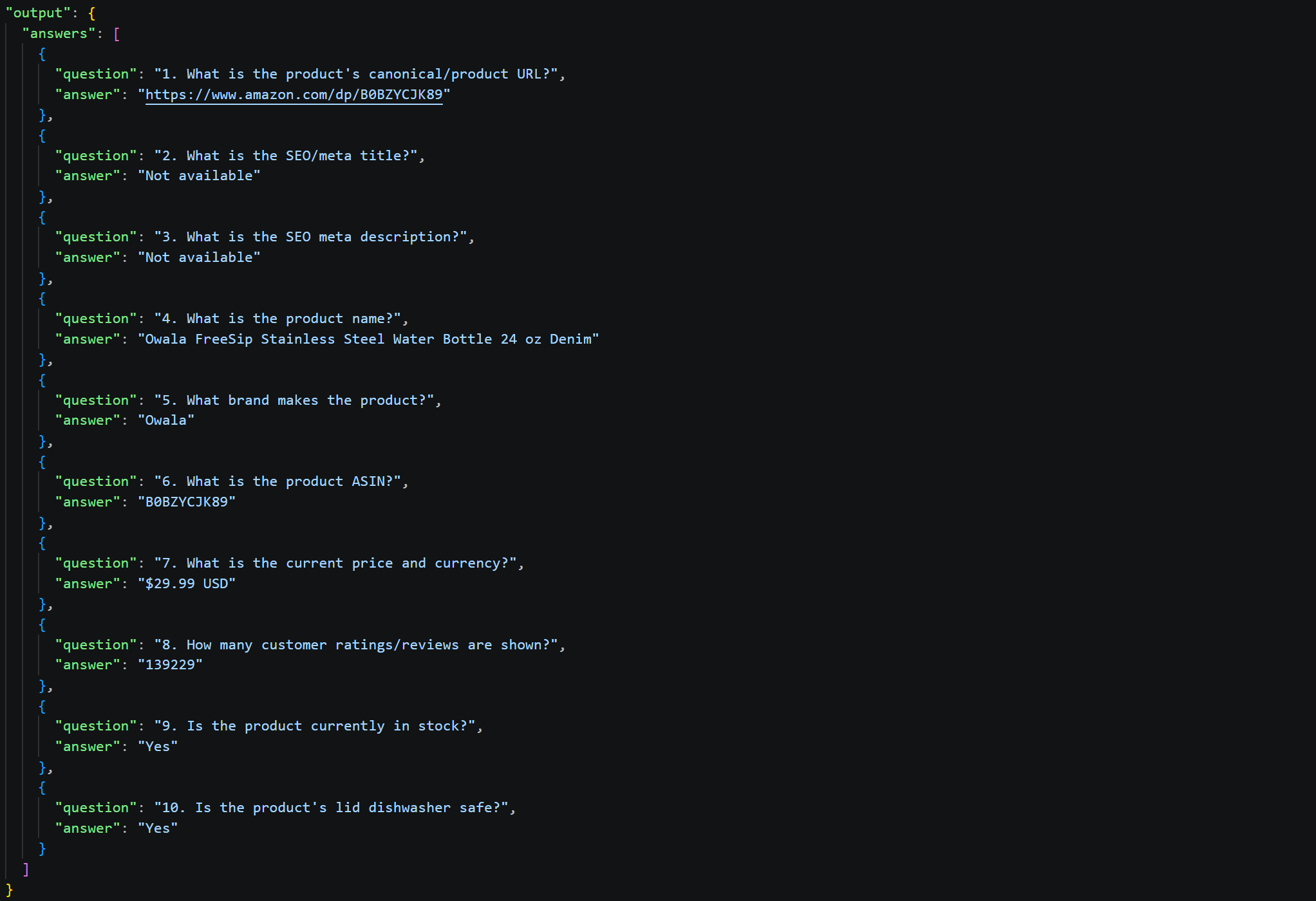
The responses match those produced using the JSON input data.
PNG (Page Screenshot)
Web page screenshots are a great source of data to keep track of UI changes, but images in general can be passed to AI for many other tasks.
Retrieving the Data
A simple way to capture a full-page screenshot of a web page is to use Playwright's page.screenshot() method:
from dotenv import load_dotenv
import os
from playwright.sync_api import sync_playwright

# Load environment variables from the .env file
load_dotenv()

# Read the Scrape.do API token from the environment variable
SCRAPE_DO_API_TOKEN = os.getenv("SCRAPE_DO_API_TOKEN")

# Configuration to route Playwright requests through Scrape.do proxies
proxy = {
    "server": "http://pm.scrape.do:8080",
    "username": SCRAPE_DO_API_TOKEN,
    "password": "super=true&geoCode=us&customHeaders=true",
}

with sync_playwright() as p:
    # Initialize the browser session
    browser = p.chromium.launch(proxy=proxy)
    page = browser.new_page(viewport={"width": 1920, "height": 1080})

    # Navigate to the target URL
    page.goto(
        "https://www.amazon.com/Owala-FreeSip-Insulated-Stainless-BPA-Free/dp/B0BZYCJK89/",
        timeout=120000
    )

    # Save a full-page screenshot
    page.screenshot(
        path="input/product.png",
        full_page=True
    )

    # Release the browser connection
    browser.close()
Again, Playwright is configured to route requests through Scrape.do's Proxy Mode to help avoid blocks when accessing the target page.
Note: Alternatively, the Scrape.do Web Scraping API also supports screenshot output.
Input Data
| Metric | Value |
|---|---|
| File size (KB) | 1,554 |
| Input tokens | ~31,894 |
The full-page screenshot contains the information that would normally be displayed visually to a user in a web browser. Because full_page=True, the screenshot captures the entire page rather than only the visible viewport. For a long page such as an Amazon product page, this produces a relatively large image.
Images are not passed to the model as plain text, so their contents cannot be tokenized directly using a text tokenizer such as tiktoken. Yet, the approximate input token count can be calculated from the token usage reported by OpenAI by subtracting the tokens used by the benchmark prompt. This gives an estimated input size of approximately 31,894 tokens for the image.
Running the Benchmark
Launch the benchmark script for all three scenarios on the screenshot of the Amazon product page in PNG format with:
python benchmark.py extraction input/product.png --tests 3 --model gpt-5.6-luna
python benchmark.py summary input/product.png --tests 3 --model gpt-5.6-luna
python benchmark.py questions input/product.png --tests 3 --model gpt-5.6-luna
Benchmark Results
See the full results:
Extraction Scenario
| Run | File size (KB) | PNG input tokens | Full input tokens | Output tokens | Total tokens | Processing time (s) |
|---|---|---|---|---|---|---|
| 1 | 1554.1611 | 32,484 | 32,484 | 719 | 33,203 | 12.1276 |
| 2 | 1554.1611 | 32,484 | 32,484 | 808 | 33,292 | 11.6483 |
| 3 | 1554.1611 | 32,484 | 32,484 | 692 | 33,176 | 10.2332 |
| Average | 1554.1611 | 32,484.0 | 32,484.0 | 739.6667 | 33,223.6667 | 11.3364 |
Output analysis:
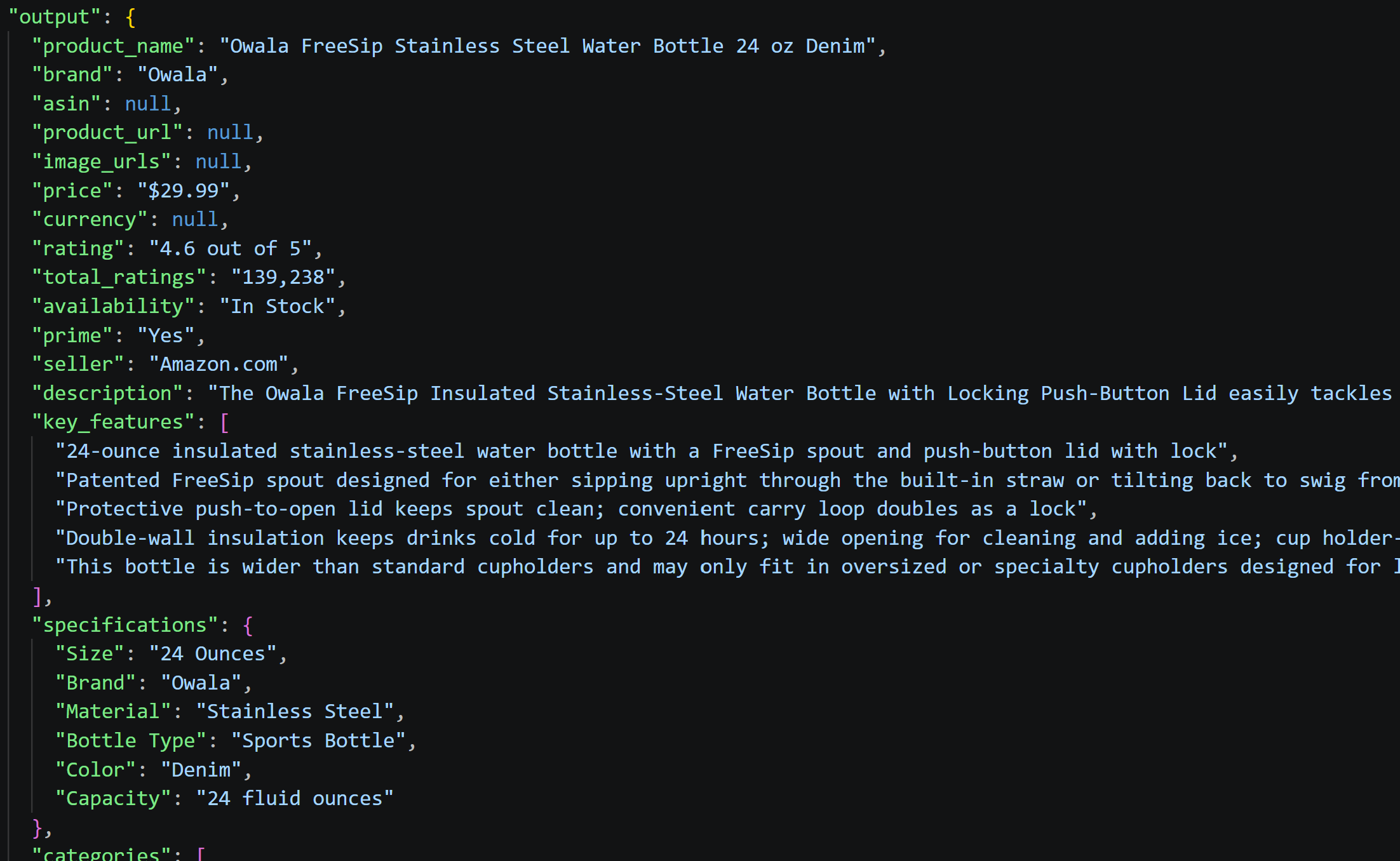
Most fields were successfully extracted from the PNG, though URLs, ASIN, and best seller data were not available in the visual format. The model reliably captured product details, specs, features, and merchant information directly from the screenshot.
Summary Scenario
| Run | File size (KB) | PNG input tokens | Full input tokens | Output tokens | Total tokens | Processing time (s) |
|---|---|---|---|---|---|---|
| 1 | 1554.1611 | 31,985 | 31,985 | 185 | 32,170 | 6.3472 |
| 2 | 1554.1611 | 31,985 | 31,985 | 176 | 32,161 | 8.2188 |
| 3 | 1554.1611 | 31,985 | 31,985 | 177 | 32,162 | 5.7025 |
| Average | 1554.1611 | 31,985.0 | 31,985.0 | 179.3333 | 32,164.3333 | 6.7562 |
Output analysis:

The summaries are concise and well-structured, capturing key details like capacity, price, insulation benefits, and limitations. Across all runs, the model consistently synthesized visual information into buyer-friendly overviews without hallucinating details absent from the screenshot.
Questions Scenario
| Run | File size (KB) | PNG input tokens | Full input tokens | Output tokens | Total tokens | Processing time (s) |
|---|---|---|---|---|---|---|
| 1 | 1554.1611 | 32,153 | 32,153 | 404 | 32,557 | 8.402 |
| 2 | 1554.1611 | 32,153 | 32,153 | 375 | 32,528 | 7.3547 |
| 3 | 1554.1611 | 32,153 | 32,153 | 395 | 32,548 | 7.2027 |
| Average | 1554.1611 | 32,153.0 | 32,153.0 | 391.3333 | 32,544.3333 | 7.6531 |
Output analysis:
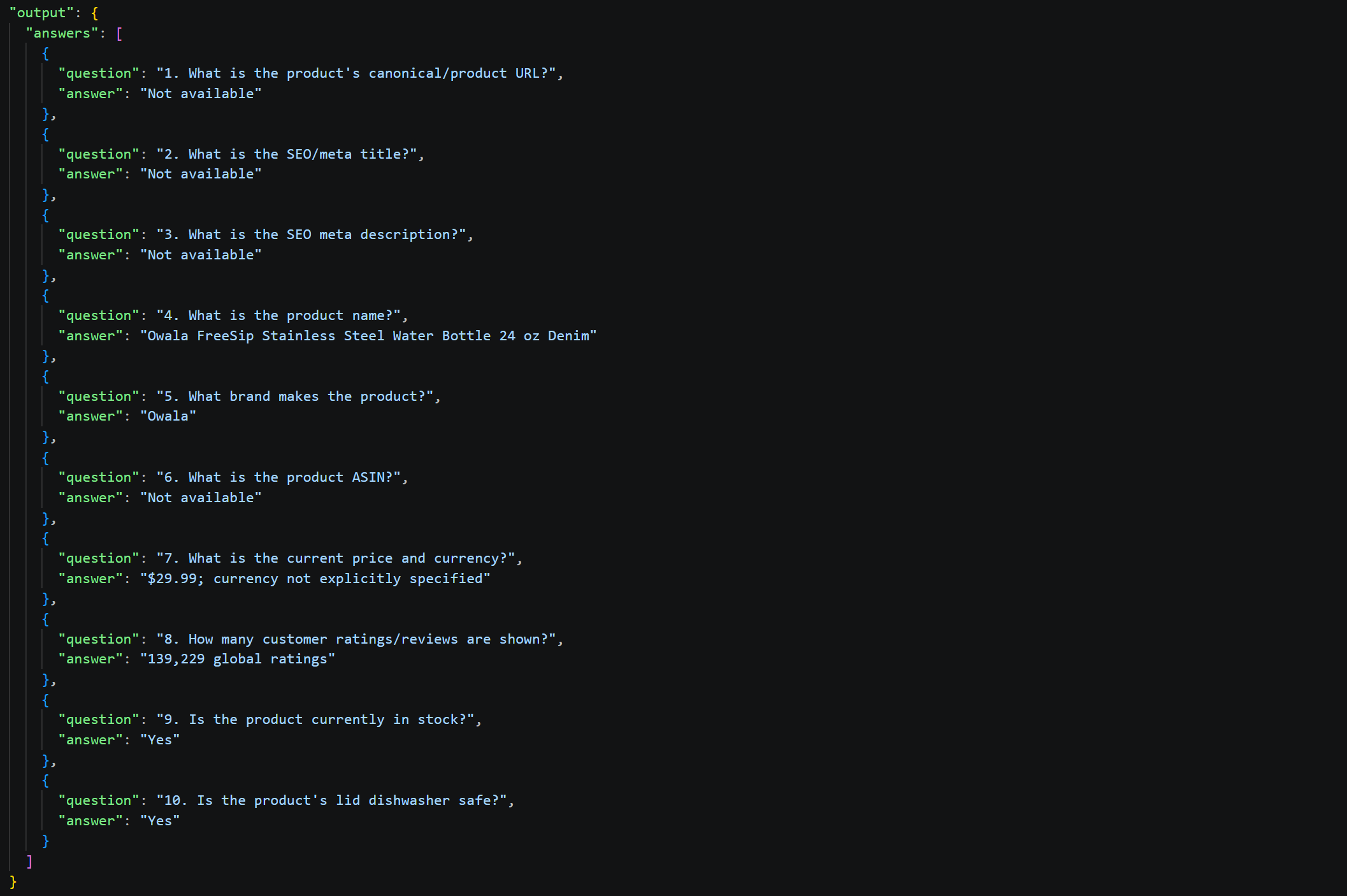
6 out of 10 questions received accurate answers, though SEO metadata and URL-related questions appropriately returned "Not available" since screenshots do not contain metadata.
The model correctly identified product name, brand, ratings, availability, and care instructions visible in the image, maintaining consistency across runs. Note that the “$” symbol was not interpreted as USD, even though the price is actually denominated in US dollars.
In business environments, PDF is one of the most common formats for sharing documents. Here, the web page can be printed to a PDF to create the input data. This raises an interesting question: will the AI process the PDF similarly to a screenshot?
Retrieving the Data
Playwright allows you to save a web page as a PDF using its page.pdf() method (only supported in Chromium):
from dotenv import load_dotenv
import os
from playwright.sync_api import sync_playwright

# Load environment variables from the .env file
load_dotenv()

# Read the Scrape.do API token from the environment variable
SCRAPE_DO_API_TOKEN = os.getenv("SCRAPE_DO_API_TOKEN")

# Configuration to route Playwright requests through Scrape.do proxies
proxy = {
    "server": "http://pm.scrape.do:8080",
    "username": SCRAPE_DO_API_TOKEN,
    "password": "super=true&geoCode=us&customHeaders=true",
}

with sync_playwright() as p:
    # Initialize the browser session
    browser = p.chromium.launch(proxy=proxy)
    page = browser.new_page(viewport={"width": 1920, "height": 1080})

    # Navigate to the target URL
    page.goto(
        "https://www.amazon.com/Owala-FreeSip-Insulated-Stainless-BPA-Free/dp/B0BZYCJK89/",
        timeout=120000
    )

    # Save the full page as a PDF
    page.pdf(
        path="input/product.pdf",
        format="A4",
    )

    # Release the browser connection
    browser.close()
Input Data
| Metric | Value |
|---|---|
| File size (KB) | 921.91 |
| Input tokens | ~29,961 |
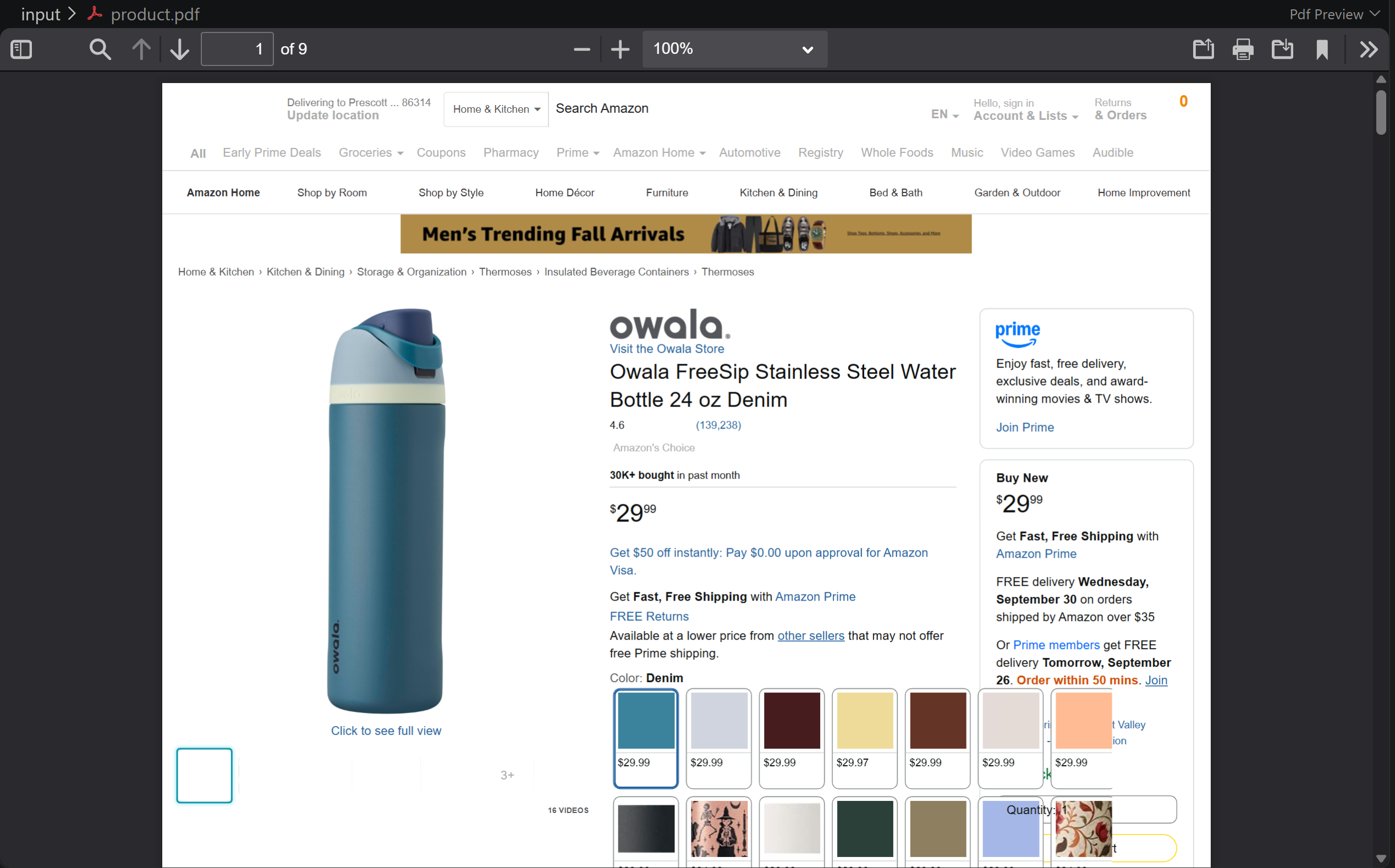
The PDF captures the full page. Similar to screenshots, its contents cannot be tokenized directly using a text tokenizer. Still, the input token count can be estimated using the same approach described for the PNG benchmark.
By subtracting the tokens used by the benchmark prompt from the total input tokens reported by OpenAI, the estimated input size is approximately 29,961 tokens. This is lower than the full-page PNG screenshot.
Running the Benchmark
Run the benchmark script for all three scenarios on the PDF document with:
python benchmark.py extraction input/product.pdf --tests 3 --model gpt-5.6-luna
python benchmark.py summary input/product.pdf --tests 3 --model gpt-5.6-luna
python benchmark.py questions input/product.pdf --tests 3 --model gpt-5.6-luna
Benchmark Results
See the full results:
Extraction Scenario
| Run | File size (KB) | PDF input tokens | Full input tokens | Output tokens | Total tokens | Processing time (s) |
|---|---|---|---|---|---|---|
| 1 | 921.9102 | 30,551 | 30,551 | 859 | 31,410 | 12.8595 |
| 2 | 921.9102 | 30,551 | 30,551 | 886 | 31,437 | 12.0658 |
| 3 | 921.9102 | 30,551 | 30,551 | 819 | 31,370 | 11.9185 |
| Average | 921.9102 | 30,551.0 | 30,551.0 | 854.6667 | 31,405.6667 | 12.2813 |
Output analysis:
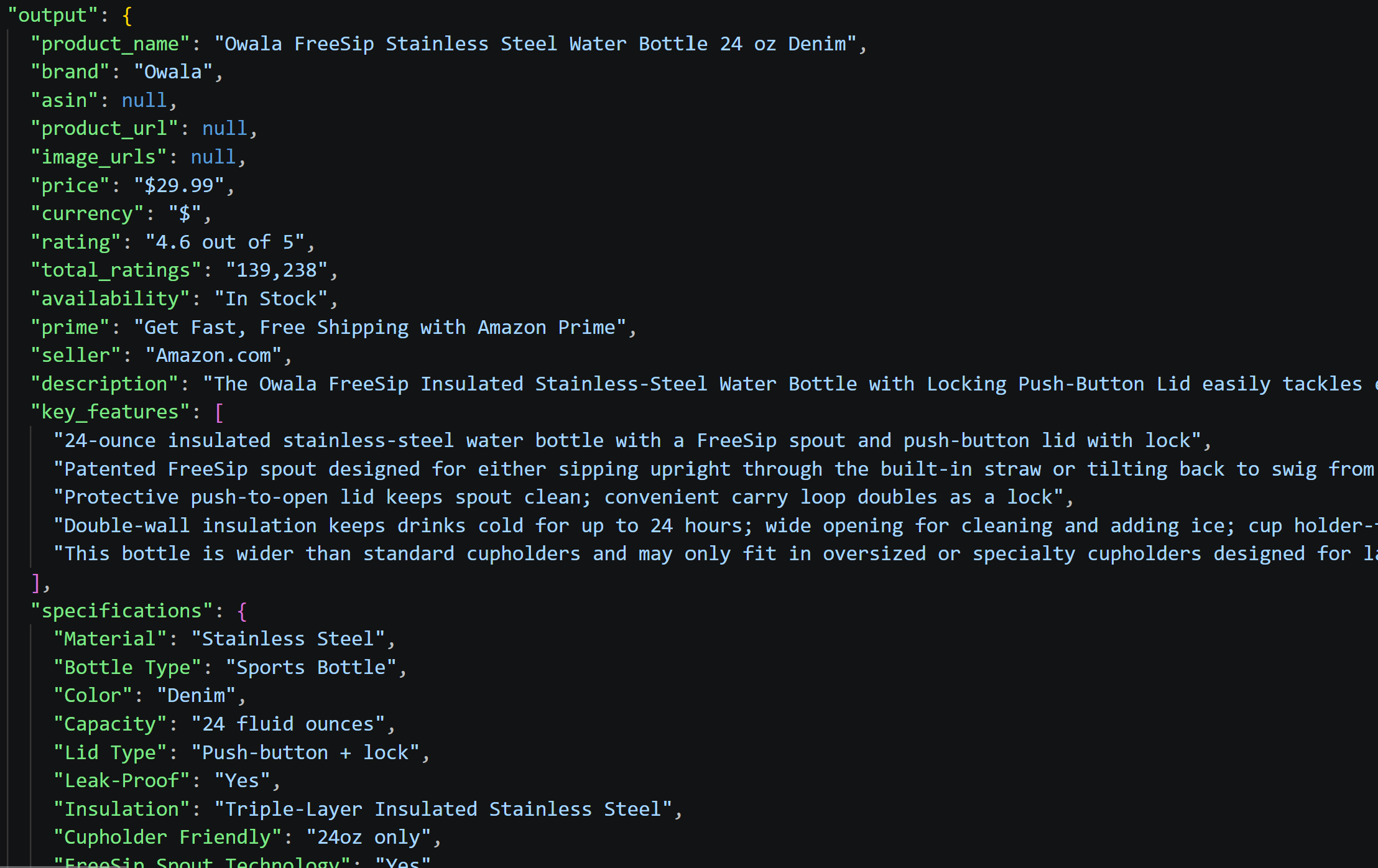
All primary fields were successfully extracted despite PDF input limitations. URL-dependent fields (ASIN, product URL, images, seller rankings) returned null, which is expected since PDFs contain no such data.
Summary Scenario
| Run | File size (KB) | PDF input tokens | Full input tokens | Output tokens | Total tokens | Processing time (s) |
|---|---|---|---|---|---|---|
| 1 | 921.9102 | 30,052 | 30,052 | 210 | 30,262 | 6.0182 |
| 2 | 921.9102 | 30,052 | 30,052 | 231 | 30,283 | 5.8448 |
| 3 | 921.9102 | 30,052 | 30,052 | 185 | 30,237 | 5.5762 |
| Average | 921.9102 | 30,052.0 | 30,052.0 | 208.6667 | 30,260.6667 | 5.8131 |
Output analysis:

The summaries capture product essentials: pricing, insulation specs, FreeSip technology, care instructions, and ratings. The output is notably concise because PDF lacks structured metadata, yet it covers all buyer-critical information effectively.
Questions Scenario
| Run | File size (KB) | PDF input tokens | Full input tokens | Output tokens | Total tokens | Processing time (s) |
|---|---|---|---|---|---|---|
| 1 | 921.9102 | 30,220 | 30,220 | 351 | 30,571 | 6.1873 |
| 2 | 921.9102 | 30,220 | 30,220 | 296 | 30,516 | 5.3677 |
| 3 | 921.9102 | 30,220 | 30,220 | 454 | 30,674 | 7.0517 |
| Average | 921.9102 | 30,220.0 | 30,220.0 | 367.0 | 30,587.0 | 6.2022 |
Output analysis:
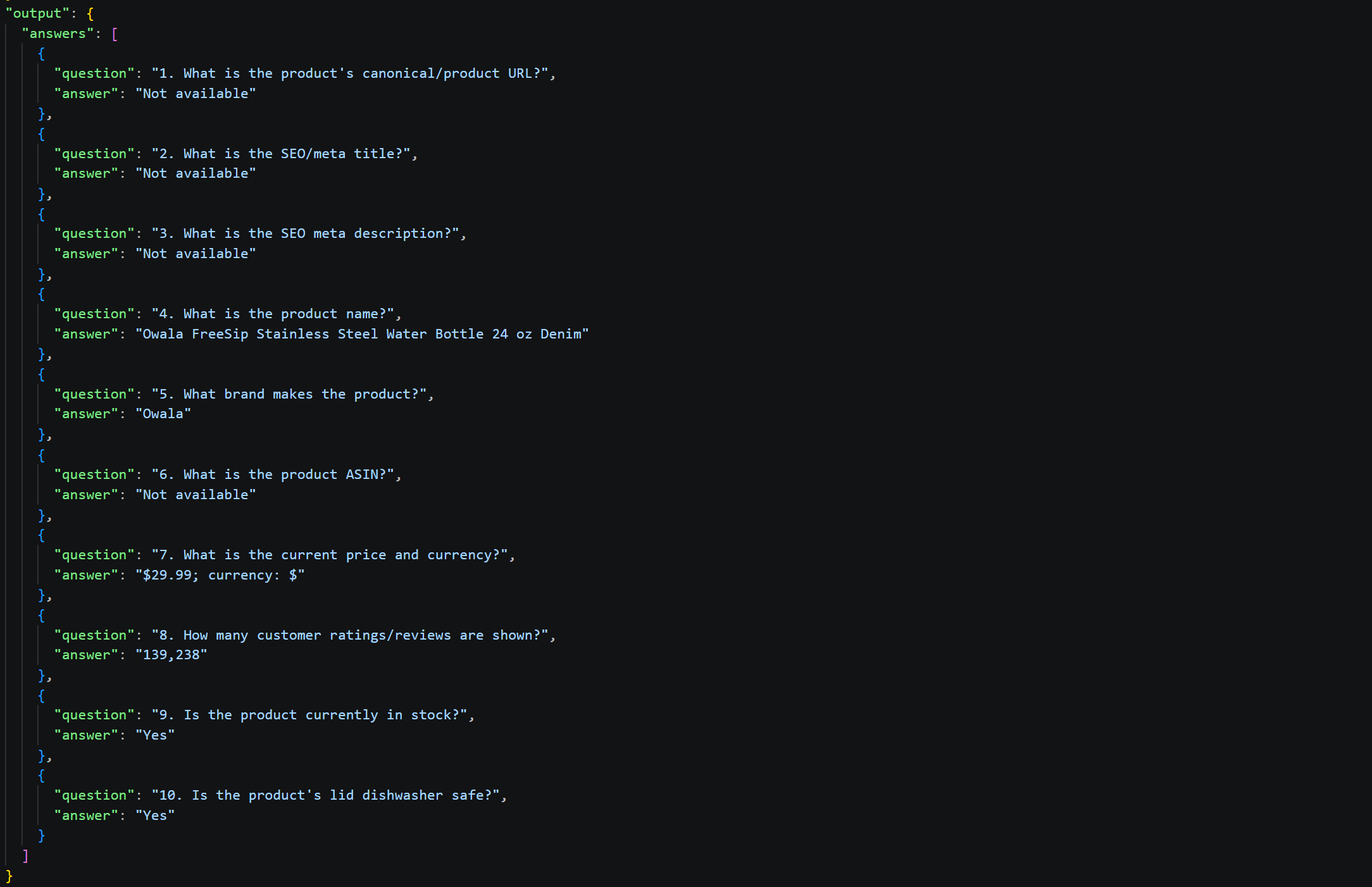
6 out of 10 questions were answered correctly (product name, brand, price, rating count, stock status, dishwasher safety). SEO metadata and ASIN remained unavailable, which is expected since PDFs cannot contain such attributes.
Choose the Right AI Data Format for Your Workflow: Complete Analysis
| Format | Natively AI ready | File size (KB) | Tokens | Best for | Use when |
|---|---|---|---|---|---|
| HTML | ❌ (requires AI optimization to avoid context exhaustion) | 989 (after optimization) | 338,503 | Complete web capture | You need everything, including styles/scripts |
| Markdown | ❌ (requires AI optimization for better results) | 148.6 (after optimization) | 66,594 | LLM processing | Balance between completeness and efficiency |
| JSON | ✅ | 38.81 | 11,564 | Structured data | Data is clean and pre-extracted |
| Plain Text | ✅ | 27.4 | 6,981 | Quick analysis | Only visible text content matters |
| CSV | ✅ | 30.42 | 9,604 | Tabular data | Data is uniform rows/columns |
| XML | ✅ | 47.69 | 13,549 | Enterprise systems | Legacy integration required |
| PNG | ✅ (if the LLM supports image inputs) | 1,554 | 32,484 | Visual analysis | Visual design/layout matters |
| ✅ (if the LLM supports PDF inputs) | 921.91 | 29,961 | Document archival | Formal record/multi-page needed |
AI-Ready HTML
🎯 Idea for:
- Full web page capture with complete DOM structure and styling
- Detecting UI changes and layout shifts over time
- Extracting metadata embedded in script tags and headers
👍 Pros:
- Contains all page information, including metadata, styling, and structure
- Preserves hyperlinks and page hierarchy
- Captures comments and script content useful for certain analyses
👎 Cons:
- Involves preprocessing to remove scripts, styles, and comments for LLM use due to context exhaustion risks
- Large file size
- Significant API costs due to token usage
AI-Ready Markdown
🎯 Idea for:
- Blog posts and article summarization
- Documentation and knowledge base processing
- Pages where visual information is less critical
👍 Pros:
- Much fewer input tokens than HTML
- Excellent semantic structure while remaining human-readable
- Native format that LLMs are inherently familiar with
👎 Cons:
- Dependent on conversion quality (varies by API/tool)
- Some visual formatting and design context is lost
- May miss information embedded in scripts or styles
JSON
🎯 Idea for:
- Structured API responses and database exports
- Nested data relationships and hierarchical information
- Systems where data validation and schema compliance is fundamental
👍 Pros:
- Compact structured format, with minimal noise
- Predictable schema makes parsing straightforward
- Industry standard for APIs and data exchange
👎 Cons:
- Requires dedicated API or conversion process
- Loses visual context and UI information completely
- Cannot capture display-only or computed values
Plain Text
🎯 Idea for:
- Quick text-based content extraction and analysis
- Simple readability scenarios
- Contexts where only visible human-readable content matters
👍 Pros:
- Small file size
- Low token count
- Simplest format to work with programmatically
👎 Cons:
- Loses all structural metadata and URLs
- No indication of heading hierarchy or content organization
- Information context often ambiguous without structure
CSV
🎯 Idea for:
- Bulk data processing of multiple records
- Tabular data with uniform field structure
- Integration with business intelligence tools
👍 Pros:
- Natural fit for tabular information
- Wide tool support and easy import/export
- Efficient for batch operations on multiple records
👎 Cons:
- Limited expressiveness for hierarchical relationships
- Column names become unwieldy with deeply nested data
- Quoted/escaped content can reduce readability
XML
🎯 Idea for:
- Enterprise system data interchange
- SOAP web services and enterprise APIs
- Advanced hierarchical document processing
👍 Pros:
- Clear hierarchical representation of nested data
- Self-describing tags provide semantic meaning
- Schema validation ensures data quality (with XSD)
👎 Cons:
- Tends to be more verbose than JSON
- More complex parsing requirements
- Visual noise from opening/closing tags
PNG (Page Screenshot)
🎯 Idea for:
- Visual regression testing and UI change detection
- Accessibility analysis and visual design review
- Brand consistency and layout verification
👍 Pros:
- Captures complete visual appearance and layout
- Preserves image content, colors, and visual hierarchy
- No parsing errors possible
👎 Cons:
- Large file size, leading to high token usage
- Not all LLMs support image processing
- Missing metadata and URL information
🎯 Idea for:
- Business document processing and analysis
- Standardized report sharing and distribution
- Long-form document analysis and summarization
👍 Pros:
- Preserves visual formatting and layout
- Can be smaller than PNG while maintaining most visual info
- Supports multi-page documents
👎 Cons:
- Large file size
- Cannot extract programmatic data embedded in page
- Not all AI models support PDF ingestion and analysis
Conclusion
In this benchmark, you can see which AI data format is most suitable for processing web-scraped information across three different scenarios. With the provided scripts and detailed methodology, you can easily adapt the benchmark to your own use case and evaluate the formats that best fit your specific requirements.
Regardless of which data format is most suitable for your scenario, Scrape.do's Web Scraping API helps you retrieve source web pages from any website in HTML, AI-optimized Markdown, and screenshot formats.
For websites such as Amazon, Google, Walmart, Home Depot, and many others, you can also retrieve structured web data in JSON format using Scrape.do's ready-made Web Scraper APIs.
Create an account and get started with a free plan today!
Frequently Asked Questions
What is the best LLM-ready data format for information extracted from web pages?
There is no universally best LLM-ready data format. In this benchmark, JSON and AI-optimized Markdown provide strong candidates because they combine compactness, structure, and relevant content. The ideal choice depends on the task and whether the pipeline requires structured data, metadata, visual information, or page context.
What is the difference between plain HTML and AI-optimized HTML?
Plain HTML preserves a web page's full structure, as returned by the target web server. AI-optimized HTML removes unnecessary content, such as HTML comments, <style> tags, and <script> tags. It can also involve minification. This reduces token usage and makes the source HTML a more efficient AI data format while preserving relevant data.
What is the difference between plain Markdown and AI-optimized Markdown?
Plain Markdown primarily preserves a web page's content in a human-readable format. AI-optimized Markdown goes further by removing unnecessary elements, adding useful front matter, and organizing content specifically for LLM processing. This can reduce token usage while retaining information relevant to AI tasks.
Which data formats does Scrape.do support for web scraping?
Scrape.do supports several output formats, including HTML, AI-ready Markdown, JSON, and screenshots. Other formats, such as CSV, XML, and PDF, can be generated using a Playwright workflow in Proxy Mode or through custom transformations of the scraped JSON data.
Web Scraping Expert








