Category:Scraping Use CasesView as Markdown
Scraping Zoopla in 2026: Extract Property Listings, Prices, and Agent Data with Python

R&D Engineer


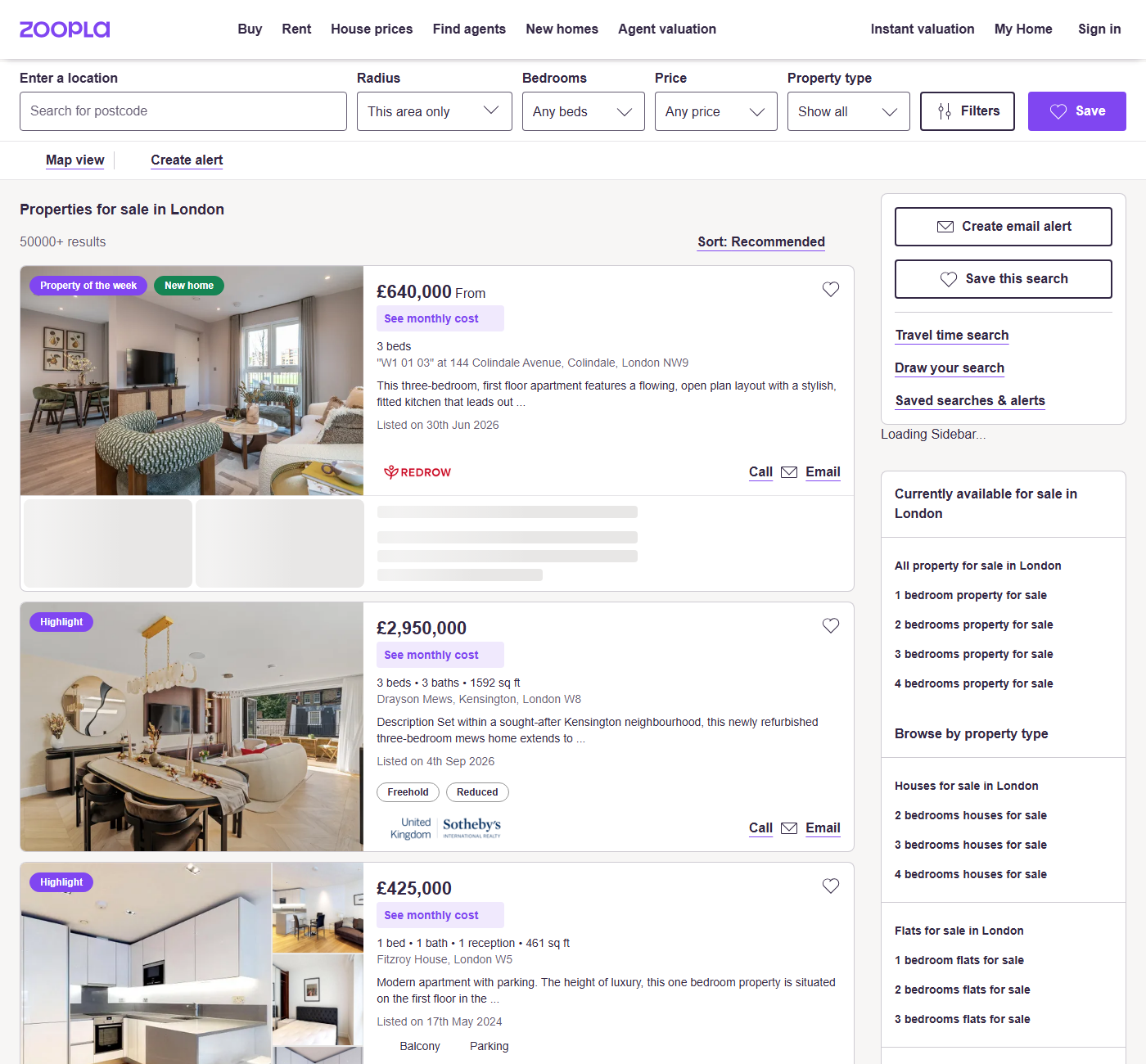
The first selector we wrote against a Zoopla search page was for the card link, and it was wrong in a way that raised no error. On a for-sale search in London, a[href*="/for-sale/details/"] matched 6 of the 28 cards on page one. The other 22 were new builds, served from a different path entirely.
That is a bad kind of bug. Zoopla is the UK's second property portal, and its cards carry reception counts and floor area that most portals leave off the search page, so a scraper that drops two thirds of a page still writes a CSV that looks complete. Nobody notices until somebody counts.
Nothing is defending the page, though. A plain request returns the full markup, and every problem left is a reading problem. We will build a listings scraper that walks a search into typed CSV columns, and a detail scraper that pulls tenure, EPC rating, agent and features off one property page, both ordinary web scraping with requests and BeautifulSoup.
Why the Rendered Markup Beats Zoopla's Page State
Zoopla runs on Next.js, so every search page ships a serialized state blob alongside the HTML to hydrate the client. The other Zoopla tutorials reach into that blob. We are not going to, and the reason is not taste.
The blob exists to hand the browser its starting state, a sensible thing for Zoopla to build and an unreasonable thing for an outside parser to depend on: its shape is an internal detail with no contract behind it. The markup is the part Zoopla has to keep working, because buyers look at it. Smart for the frontend, brittle for us.
Every card is already rendered into that markup anyway. div[id^="listing_"] returns 28 of 28 cards on page one of a London search, and holds on /new-homes/ and /to-rent/ pages too. Better still, the listing id sits in that div's id attribute as listing_73210545, which makes it the join key to the detail page.
A different starting position from Zillow's embedded listing JSON, where the structured object really is the cleanest route, and from Idealista, where DataDome sits in front of every listing before parsing is even a question.
What div[id^="listing_"] Gives You That the Hydration Blob Does Not
Two anchors exist on every card and they do different jobs, so we use both. div[id^="listing_"] is the card selector and the only one carrying the listing id. a[data-testid="listing-card-content"] is the inner link, and the detail URL comes from there.
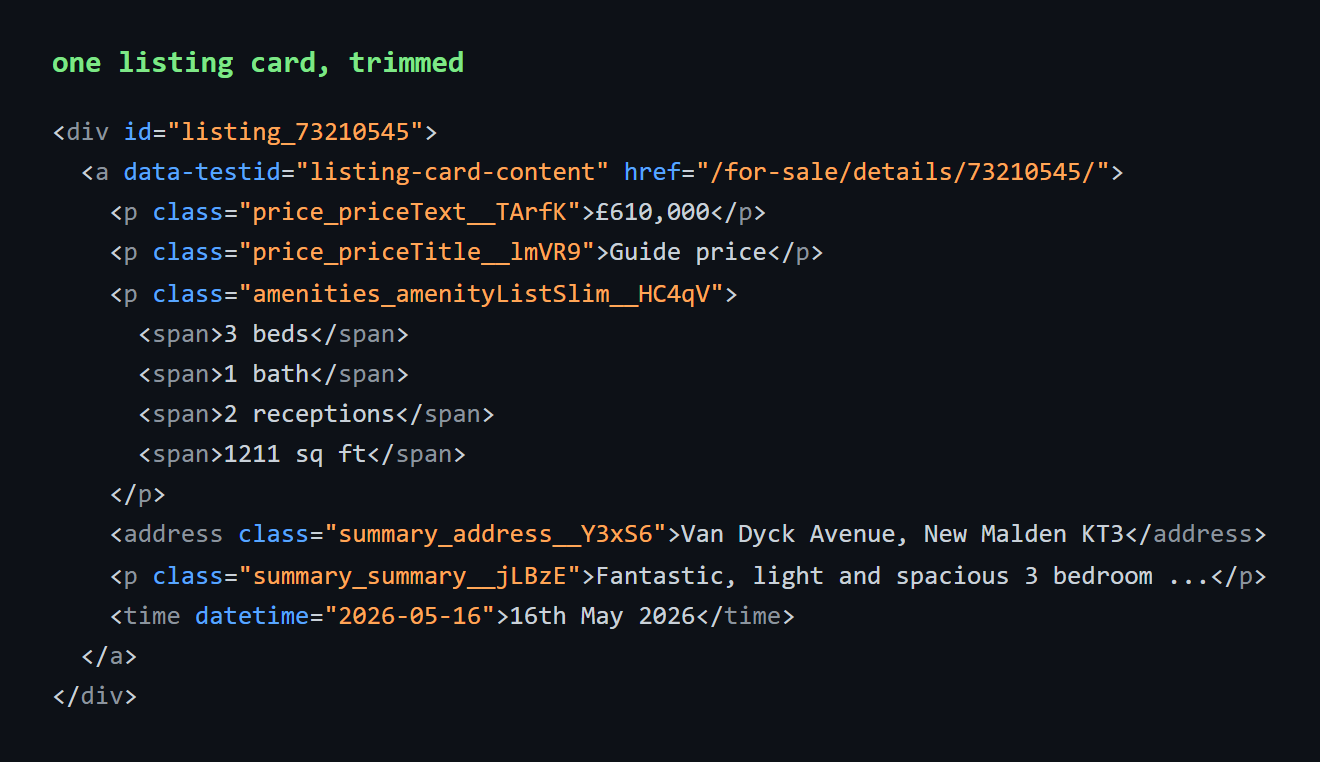
data-testid attributes exist to support Zoopla's own test suite rather than its styling, which makes them more durable than class names across a redesign. Class names need one note before we write any: Zoopla builds with CSS modules, so every class ships with a build hash appended, as in price_priceText__TArfK. Matching on the stable prefix with [class*="price_priceText"] makes the hash irrelevant, and every class selector below is a prefix match for that reason.
Request configuration is one line of evidence: every endpoint we tested returned 200 on a plain request carrying nothing but a token. We tried super=true and geoCode=gb and neither changed the response.
One counterpoint explains why a reader's first attempt may have failed. Driving a local headless Chromium straight at zoopla.co.uk lands on a Cloudflare "Just a moment..." interstitial. Proxied requests never see one. render=true is not the workaround either: it returns 502 on this host, on both page types, and the markup is complete without JavaScript execution anyway.
Scraping Zoopla Property Listings
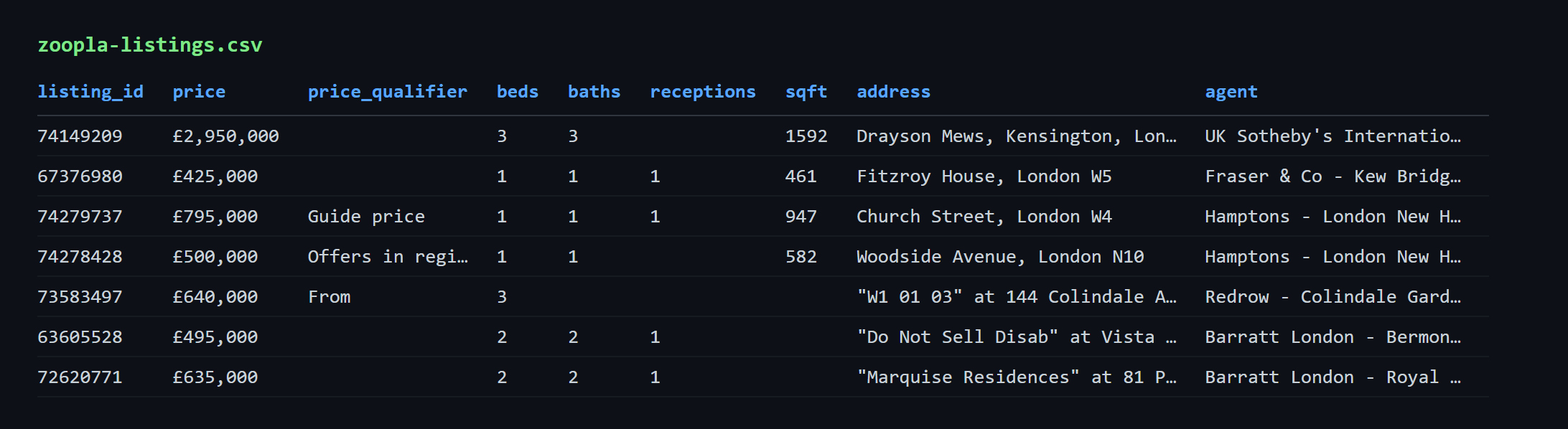
The listings scraper takes an area slug, walks a fixed number of search pages, and writes 15 columns per card to CSV: listing_id, price, price_qualifier, beds, baths, receptions, sqft, address, description, listed_on, photo_count, agent, status, badges, url. The card layout is conventional, close enough to property cards on Redfin that nothing about it surprises. Three things need explaining and the rest is mechanical: the card URL cannot be filtered by path, the amenity values are individually optional, and the pagination has a ceiling the page header lies about.
Prerequisites
Two libraries cover everything: pip install requests beautifulsoup4, with csv and re from the standard library. A Scrape.do token goes in the TOKEN constant, written as <your_token> throughout, and it is on the dashboard home screen right after signup. For the parent-topic groundwork there is Python web scraping; both finished scripts live in the GitHub repository.
We start with imports and a config block:
import requests
from bs4 import BeautifulSoup
import urllib.parse
import csv
import re

TOKEN = "<your_token>"
AREA = "london"  # any Zoopla area slug: manchester, bristol, hebden-bridge, ng1
MAX_PAGES = 3

BASE_URL = f"https://www.zoopla.co.uk/for-sale/property/{AREA}/"
Changing AREA to manchester, hebden-bridge or a postcode slug like ng1 is the whole of retargeting the scraper. We also need a small helper, because nearly every card field is optional:
def text(element, selector):
    # Most card fields are optional, so a missing element has to read as an empty string.
    found = element.select_one(selector)
    return found.get_text(strip=True) if found else ""
Without it, that ternary repeats a dozen times in the row dict. We will reuse this shape in the detail scraper.
Reading the Card URL Off the Link Instead of Filtering on /for-sale/
Here is the catch. a[href*='/for-sale/details/'] is the selector the address bar suggests, since the search lives under /for-sale/property/london/. It matched 6 of the 28 cards on page one and left 22 with empty URLs, because those 22 were new builds served from /new-homes/details/{id}/ and indistinguishable in the card layout. Across the 84-row London run the split is 49 new-homes against 35 for-sale, so a path filter throws away 58 percent of a for-sale search. Rentals add a third path, /to-rent/details/{id}/.
The fix is to read the href off the card link itself, alongside the three other lookups each card needs:
        # New builds link to /new-homes/details/ and rentals to /to-rent/details/, so read the
        # href off the card link itself instead of matching on /for-sale/.
        link = card.select_one('a[data-testid="listing-card-content"]')
        photo = card.select_one('img[alt^="Property 1 of"]')
        agent = card.select_one('img[class*="agent-logo"]')
        listed = card.select_one("time[datetime]")
That link anchor is on all three page types and its href is already correct for whichever inventory the card holds. A path filter is a hidden assumption about inventory mix, and mix shifts by area and by week: London runs majority new-build, a small market town almost none. The other three pull photo count, agent branch and an ISO date out of attributes rather than element text.
Parsing an Amenity Run Where Every Value Is Optional
Beds, baths, receptions and floor area sit together in one paragraph, p[class*="amenities_amenityList"], as sibling <span> elements. Nothing is entangled. The problem is absence: all four are optional, and the omissions are the common case. Across the 84-row London run, beds filled 83 times, baths 56, receptions 44, and floor area 28. Hebden Bridge returned 27 rows with zero floor areas, Manchester 19 of 84.
Indexing the spans by position assumes a fixed length. spans[1] is the bathroom count on a four-value card and the reception count on a card that omits bathrooms, so every column below shifts by one and the CSV looks plausible while being wrong. Studios break it first, with a run that reads 1 bath and no bed count.
We match each number to its own unit word instead:
        # Beds, baths, receptions and floor area share one paragraph and each one is optional:
        # a studio has no bed count and most listings have no sq ft. Read them with a regex.
        # Singular and plural both appear ("1 bed" / "3 beds"), so trim the trailing s for the key.
        amenities = text(card, 'p[class*="amenities_amenityList"]')
        counts = {unit.rstrip("s") if unit != "sq ft" else unit: number.replace(",", "")
                  for number, unit in re.findall(r"([\d,]+)\s+(beds?|baths?|receptions?|sq ft)", amenities)}
sq ft is exempt from the s trim, which would otherwise produce sq f, and the number group is [\d,]+ rather than \d+ because floor areas carry a thousands separator on the detail page that \d+ would truncate to 1.
Those lookups and the amenity dict then assemble the whole row:
        rows.append({
            "listing_id": card["id"].replace("listing_", ""),
            "price": text(card, 'p[class*="price_priceText"]'),
            "price_qualifier": text(card, 'p[class*="price_priceTitle"]'),  # Guide price, Offers over
            "beds": counts.get("bed", ""),
            "baths": counts.get("bath", ""),
            "receptions": counts.get("reception", ""),
            "sqft": counts.get("sq ft", ""),
            "address": text(card, "address"),
            "description": text(card, 'p[class*="summary_summary"]'),
            "listed_on": listed["datetime"] if listed else "",
            "photo_count": re.search(r"of (\d+)", photo["alt"]).group(1) if photo else "",
            "agent": agent.get("alt", "") if agent else "",
            # "Just added" and "Property of the week" sit in a separate list from the badges.
            "status": " | ".join(s.get_text(strip=True) for s in card.select('ul[class*="status_statusList"] li')),
            "badges": " | ".join(b.get_text(strip=True) for b in card.select('ul[class*="badges_badgesList"] li')),
            "url": "https://www.zoopla.co.uk" + link["href"] if link else "",
        })
A missing amenity unit yields an empty cell rather than a shifted row, and stripping the listing_ prefix turns that first column into a join key to the detail page. The price qualifier is the UK convention sitting above the number, where Guide price and Offers over say something different about how negotiable the figure is; it fills on 24 of 84 rows. Status and badges sit in their own lists, so they never reach the price or the description and no stripping is needed anywhere.
Walking Pages with ?pn=N and Knowing Where to Stop
Pagination is a page number, not an offset, so there is no arithmetic to explain. ?pn=2 is page two and page one takes no parameter at all.
for page in range(1, MAX_PAGES + 1):
    target_url = BASE_URL if page == 1 else f"{BASE_URL}?pn={page}"
    encoded_url = urllib.parse.quote(target_url, safe="")
    api_url = f"https://api.scrape.do/?token={TOKEN}&url={encoded_url}"

    response = requests.get(api_url)
    if response.status_code != 200:
        print(f"Page {page}: failed with status {response.status_code}")
        continue
The encode step matters: the whole Zoopla URL becomes one parameter value, and its own ?pn= would otherwise be read as a parameter of the API call. Price bounds, bedroom minimums, property type and sort order compose onto the same URL, so they get set in the browser and copied into BASE_URL, narrowing a search without touching the parsing code.
The ceiling is what no competing article states. ?pn=40 serves a full 28 cards; ?pn=42, ?pn=50 and ?pn=100 all return 404. Pagination tops out at 41 pages, capping any single search at roughly 1,148 results while the London page header advertises "50000+ results". Reaching deeper inventory means splitting the search by postcode district, price band or property type, each split carrying its own ceiling.
Small areas end earlier. Hebden Bridge returned 25 cards, then 2, then a 404, and the status check prints that 404 and continues rather than raising, which is why the run still wrote a complete 27-row CSV. On a long run a seen set earns its place, since a 20-page sweep produced 586 ids with two repeats from live re-ranking. Those 20 pages ran with no delay, no 429 and no degradation, so there is no throttling to design around and no need for rotating proxies here.
The write is a DictWriter with field names from the first row's keys:
with open("zoopla-listings.csv", "w", newline="", encoding="utf-8") as f:
    writer = csv.DictWriter(f, fieldnames=list(rows[0].keys()))
    writer.writeheader()
    writer.writerows(rows)

print(f"\nTotal: {len(rows)} listings saved to zoopla-listings.csv")
Three London pages produce 84 rows and 84 unique ids, every one carrying a price, an address, a description and a URL, and 56 carrying no floor area because the listings do not publish one. That last number is the point. The search stops being a page and becomes rows, blanks included.
Scraping Zoopla Property Details
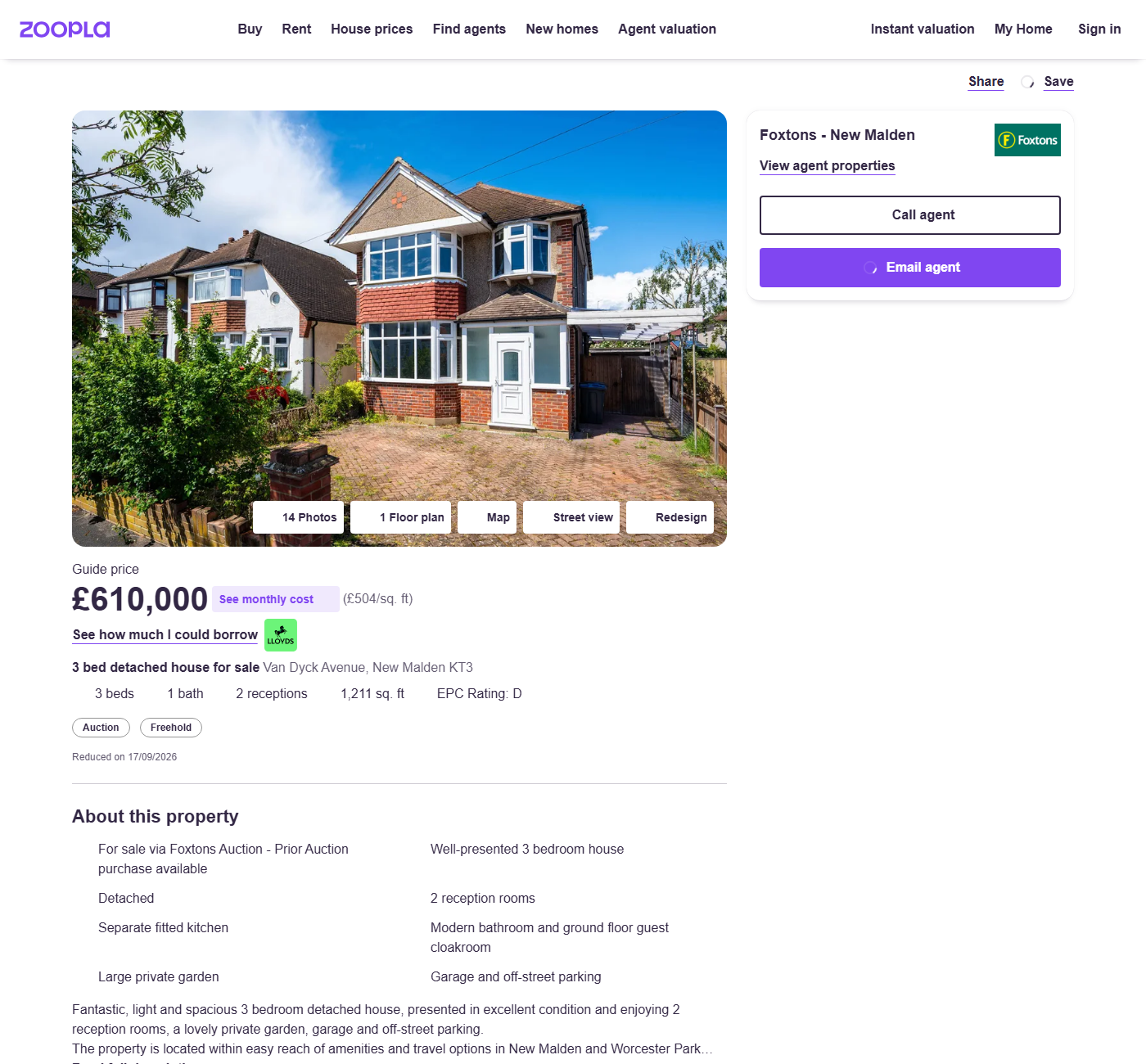
The search card is a summary. The property page behind it carries the fields that decide whether a property is worth anything, and the detail scraper reads them into 19 columns: property_id, address, price, property_type, beds, baths, receptions, sqft, tenure, council_tax_band, epc_rating, agent, listed_date, tags, features, photo_count, photo_urls, description, url. Same request, same libraries, same token. Only the selectors change.
Chaining the Card's Listing Id into a Detail Request
The two scrapers become a pipeline because the id on the card is the id in the detail URL. listing_73210545, stripped to 73210545 in the row dict above, is the same integer as the path segment on the property page, and it is the detail scraper's only config value:
TOKEN = "<your_token>"
PROPERTY_ID = "73210545"

PROPERTY_URL = f"https://www.zoopla.co.uk/for-sale/details/{PROPERTY_ID}/"
encoded_url = urllib.parse.quote(PROPERTY_URL, safe="")
api_url = f"https://api.scrape.do/?token={TOKEN}&url={encoded_url}"

response = requests.get(api_url)
if response.status_code != 200:
    print(f"Request failed with status {response.status_code}")
    exit()

soup = BeautifulSoup(response.text, "html.parser")
One correction matters here, and it is why the listings CSV also carries a url column. The id chains but the path does not: rebuilding the URL from a /for-sale/details/{id}/ template reintroduces the exact bug the listings section removed, because 49 of those 84 ids belong to new builds. The chain runs on the url column; listing_id joins the two CSVs afterwards.
The same text() helper comes back, closing over soup rather than taking a card:
def text(selector):
    # New builds drop the EPC and floor area, so every lookup has to tolerate a missing element.
    found = soup.select_one(selector)
    return found.get_text(" ", strip=True) if found else ""
The separator argument is the one difference, keeping multi-element fields from arriving as one unbroken token.
Photos need an honest sentence, because the CSV carries two columns that are not the same number:
# The gallery button carries the true photo count; the srcsets only hold the images already loaded.
photo_count = re.search(r"(\d+)\s+Photos?", text('ul[class*="MediaButtons_mediaButtonsList"]'))
photos = {candidate.strip().split(" ")[0].replace(":p", "")
          for source in soup.select("picture source[srcset]")
          for candidate in source["srcset"].split(",") if "lid.zoocdn.com" in candidate}
photo_count reads the gallery button and is correct, reporting 14 on the house and 16 on the flat. photo_urls yields about 6 unique CDN URLs, because the gallery lazy-loads the rest on interaction. The count and the URL list are not the same number.
Tenure, EPC and the Fields New Builds Leave Blank
Tenure is the field that changes what a UK property is. Freehold means the buyer owns the building and the land outright. Leasehold (989 years) means a long lease, and the bracketed number is the remaining term. That number is not decoration: a short lease changes what a property is worth and what a lender will accept against it, so it is worth keeping. EPC rating is the Energy Performance Certificate band, A through G, legally required on a marketed property in England and Wales, and it surfaces as "EPC Rating: D" so the prefix comes off.
Tenure and council tax band live in the "More information" block, which renders as title and value pairs. We read it into a dict:
# "More information" renders as title/value pairs: Tenure, Council tax band, Service charge.
info = {}
for item in soup.select('ul[class*="NtsInfo_ntsInfoList"] li'):
    title = item.select_one('p[class*="NtsInfo_ntsInfoItemTitle"]')
    value = item.select_one('div[class*="NtsInfo_ntsInfoItemTextWrapper"] p')
    if title and value:
        info[title.get_text(strip=True)] = value.get_text(strip=True)
A dict rather than a position is what makes Service charge being absent on a freehold harmless. Service charge and ground rent are leasehold-only, which is correct behaviour rather than missing data.
The detached house and the leasehold flat both filled all 19 columns. The new build filled 17, with no EPC rating and no floor area because the page publishes neither, burying the area in the features text as "Total area: 820 sq ft / 76.2 sq m". Its tenure and council tax band both read "Ask agent", a populated cell with no information in it, which a consumer checking for emptiness treats as real unless it gets filtered. Council tax read "TBC" on the house too, so treat that column as advisory.
The detail page runs its own amenity parse, the same shape as the card version with one difference:
# The summary reads "3 beds 1 bath 2 receptions 1,211 sq. ft" with any part optional.
amenities = " ".join(a.get_text(strip=True) for a in soup.select('p[class*="Amenities_amenity"]'))
counts = {unit.rstrip("s") if unit != "sq. ft" else unit: number.replace(",", "")
          for number, unit in re.findall(r"([\d,]+)\s+(beds?|baths?|receptions?|sq\. ft)", amenities)}
The detail page writes sq. ft with a period where the card writes sq ft, so the regex alternative and the dict key both change. A two-character trap for anyone copying the card regex across.
Property type comes out of the h1, which reads "3 bed detached house for sale":
# The h1 reads "3 bed detached house for sale", so the type is the text between beds and "for sale".
heading = text('h1[class*="page_titleWrapper"]')
property_type = re.search(r"\d+\s+bed\s+(.+?)\s+for sale", heading)
The non-greedy capture is deliberate, since "for sale" is the only reliable terminator. The middle of the record then reads straight out of that dict and the list elements:
    "tenure": info.get("Tenure", ""),
    "council_tax_band": info.get("Council tax band", ""),
    "epc_rating": text('p[class*="EpcRating_epcRating"]').replace("EPC Rating: ", ""),
    "agent": text('p[class*="Contact_contactTitle"]'),
    "listed_date": text('p[class*="DateLabel_dateLabel"]'),
    "tags": " | ".join(t.get_text(strip=True) for t in soup.select('ul[class*="Tags_tagsList"] li')),
    "features": " | ".join(f.get_text(" ", strip=True) for f in soup.select('ul[class*="Features_featuresList"] li')),
Pulling the Agent Name and Branch
That agent line is the whole of what the detail page publishes about the agent, giving name and branch as one string: "Foxtons - New Malden", "Barratt London - Bermondsey Heights". The search card carries the same information on the alt of the agent logo, which is why the listings CSV fills agent on 84 of 84 rows without a second request, so an agent-level dataset comes out of the search sweep alone.
Phone numbers are not available. No tel: links in the logged-out detail markup, no phone-shaped strings either, only a "Call agent" button that fetches the number on click. Worth saying outright, because the selector a reader would hunt for does not exist. If contact details are the goal, Realtor.com listings and agent data publish more of them on the page itself.
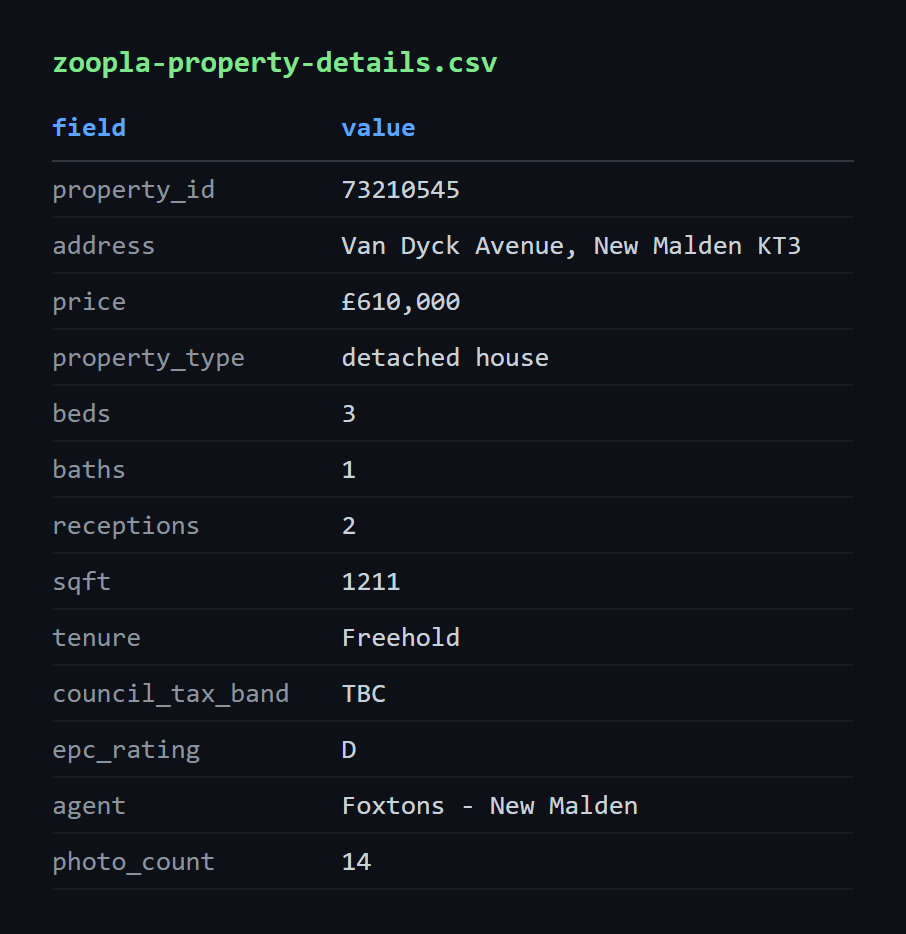
Run against the Van Dyck Avenue house, the scraper returns all 19 fields: tenure "Freehold", council tax band "TBC", EPC rating "D", agent "Foxtons - New Malden", photo count 14.
One thing this scraper does not reach: Zoopla publishes full sold and listed price history per property, but on /property/uprn/{uprn}/, and no for-sale detail page links to its own UPRN page, so getting there means matching on address text and running a second crawl. That is its own job.
Does Zoopla Have a Public API?
No. Not closed to new applicants, not member-only, not waitlisted. The programme is gone.
We checked both hosts. developer.zoopla.co.uk returns 502. developers.zoopla.co.uk returns a GitHub Pages "Site not found" 404, which is what a subdomain looks like after the repository behind it stops being published. Nothing to apply to, no key to request, no pricing page, so the "closed to new applicants" line still circulating is out of date rather than merely unhelpful.
The question keeps getting asked because the search results have not caught up. The developer subdomain still ranks at position 2 on the keyword, and a four-year-old Reddit thread on API alternatives holds page one in GB, because nobody has written the plain answer down.
Worth being honest about the cost. An API would have given versioned field names, a documented schema and a rate contract, and parsing markup gives none of those: a field can move on any deploy and nothing announces it. That is why the sections above spend their words on optional values and selector prefixes that survive a build hash change, rather than on request plumbing. The trade lands in our favour on this target only because the markup is complete and undefended.
The replacement is already above, which is why this section sits at the end rather than opening the article on a negative. The UK's other major portal answers the same question differently, and it is worth knowing both if the dataset spans them.
Conclusion
Two things here are not written down anywhere else. A Zoopla card link is not the path the address bar suggests it is, and a blank column in the output almost always means the listing has no floor area rather than that the parser broke.
Next run, point AREA at a rentals slug. /to-rent/property/london/ uses the identical selectors, so nothing in the code changes. Two things change in the output: price reads £2,350 pcm so the qualifier element is absent on every card, and badges shift to rental vocabulary like Pets allowed, Student friendly and House share.
Get 1000 free credits and start scraping with Scrape.do
FAQ
Is it legal to scrape Zoopla property listings in the UK?
Listing pages are public and need no login, which is where the analysis starts rather than where it ends. Zoopla's terms of use restrict automated access, and terms are contractual, separate from statute. UK database right protects investment in compiling a database rather than the facts inside it, so pulling a few fields from a handful of pages and reproducing Zoopla's inventory are different propositions. Agent photography and the written description sit under copyright, and UK GDPR applies wherever an agent is a named individual rather than a limited company. None of that is legal advice: anyone going beyond personal research should check what a site's terms and robots.txt permit and talk to their own counsel.
Does Zoopla have a free API or an API key?
There is no free tier, no paid tier and no key, because there is no programme to issue one. No pricing page to compare against, no application form to fill in. Anything currently sold as a "Zoopla API" is a third-party scraping service wrapping the same public pages these scripts read.
Why are the bedrooms, receptions or square footage columns empty in my CSV?
Because the listing does not publish that value. The parser matches each number to its own unit word, so an absent unit produces an empty string rather than a wrong number pulled from the neighbouring field. Floor area is blank more often than it is populated, filling 28 of 84 London rows and zero of 27 in Hebden Bridge. To tell a genuine blank from a broken parse, open one of the blank rows' URLs and look at the amenity row on the card. If the value is not there, the CSV is correct.
Can the same scraper pull Zoopla rental listings?
Yes, with no code change. Change the /for-sale/ segment in BASE_URL to /to-rent/. Card selector, amenity paragraph, status and badge lists and link anchor are all identical, and the differences land in the output: a monthly price with price_qualifier empty on every row, and rental badge vocabulary. The one that matters for correctness is the path, since rental cards point at /to-rent/details/{id}/, which is why the scraper reads the href off the link instead of asserting a path.
How is scraping Zoopla different from scraping Rightmove?
Different work, same cost per request. Scraping Rightmove listings and property details hands over a structured object on its detail pages, so the work there is reading fields out of a known shape. Zoopla asks for markup parsing on both page types, and asks the scraper to stop assuming what a card links to, because its search results mix for-sale, new-homes and to-rent paths under a single URL. Neither needs JavaScript rendering or a premium proxy tier for the pages covered here.
R&D Engineer








