Category:Scraping Use CasesView as Markdown
How to Scrape Realtor.com: Property Listings, Prices, and Agent Data

Software Engineer


Realtor.com is a high-signal source for US real estate data: active inventory, price changes, agent attribution, and the history that makes comps and market tracking possible. The platform has also expanded into AI-powered home search and launched a ChatGPT plugin for querying listings conversationally.
The catch is access. Plain requests hits 429s fast, and the HTML we get back is mostly a shell with none of the card data we expected. That is not a dead end. It is a hint that the real payload is already structured.
We will route requests through Scrape.do to stay unblocked, extract search listings from embedded JSON, then enrich a single listing via GraphQL into clean artifacts: a CSV of search results and a JSON record with agent, brokerage, history, tax data, and view and save windows.
The win condition is simple: the site stops being “a page” and becomes rows.
Get 1000 free credits and start scraping with Scrape.do
Scraping Realtor.com Search Results
The first obstacle is not selectors. It is access. Realtor.com will happily serve an HTML shell while rate limiting the requests that look automated.
Prerequisites
Install the only libraries we need to scrape search results pages:
pip install requests beautifulsoup4Set a Scrape.do token in TOKEN and start with a single search URL. Manhattan is our test bench. Once we see rows, we can swap the URL to any other city.
Extracting Listings from Embedded JSON
Here is the constraint: the “result cards” are not a stable data source in the HTML we receive. Realtor.com ships the listing rows as embedded JSON, and that is what we extract.
We fetch the search page through Scrape.do with super=true to avoid 429s. This is the stable request shape we keep.
import os
import urllib.parse

import requests

TOKEN = "<your_token>"
SEARCH_URL = "https://www.realtor.com/realestateandhomes-search/Manhattan_NY"
MAX_PAGES = 3
REQUEST_DELAY_SEC = 1.5

def fetch(target_url):
    api_url = f"http://api.scrape.do/?token={TOKEN}&url={urllib.parse.quote(target_url, safe='')}&super=true"
    r = requests.get(api_url, timeout=120)
    if r.status_code != 200:
        print(f"  HTTP {r.status_code}")
        return None
    return r
When this prints HTTP 200, we are looking at real Realtor.com HTML. Any other status code means we did not get usable content yet, so we fix the request before moving on.
The card data we want is not in the visible HTML. Realtor.com ships it as a JSON object inside a <script> tag, under props.pageProps.properties. We scan every script tag, try to parse it as JSON, and grab the first one that contains listings:
response = fetch(page_url)
if not response:
    break

soup = BeautifulSoup(response.text, "html.parser")

properties = None
for script in soup.find_all("script"):
    raw = (script.string or "").strip()
    if not raw.startswith("{"):
        continue
    try:
        data = json.loads(raw)
    except json.JSONDecodeError:
        continue
    props = data.get("props", {}).get("pageProps", {}).get("properties")
    if props:
        properties = props
        break
On a healthy search results page, properties is a non-empty list. In practice, it is often around 42 listings per page.
That is the moment we want. One request in, structured rows out.
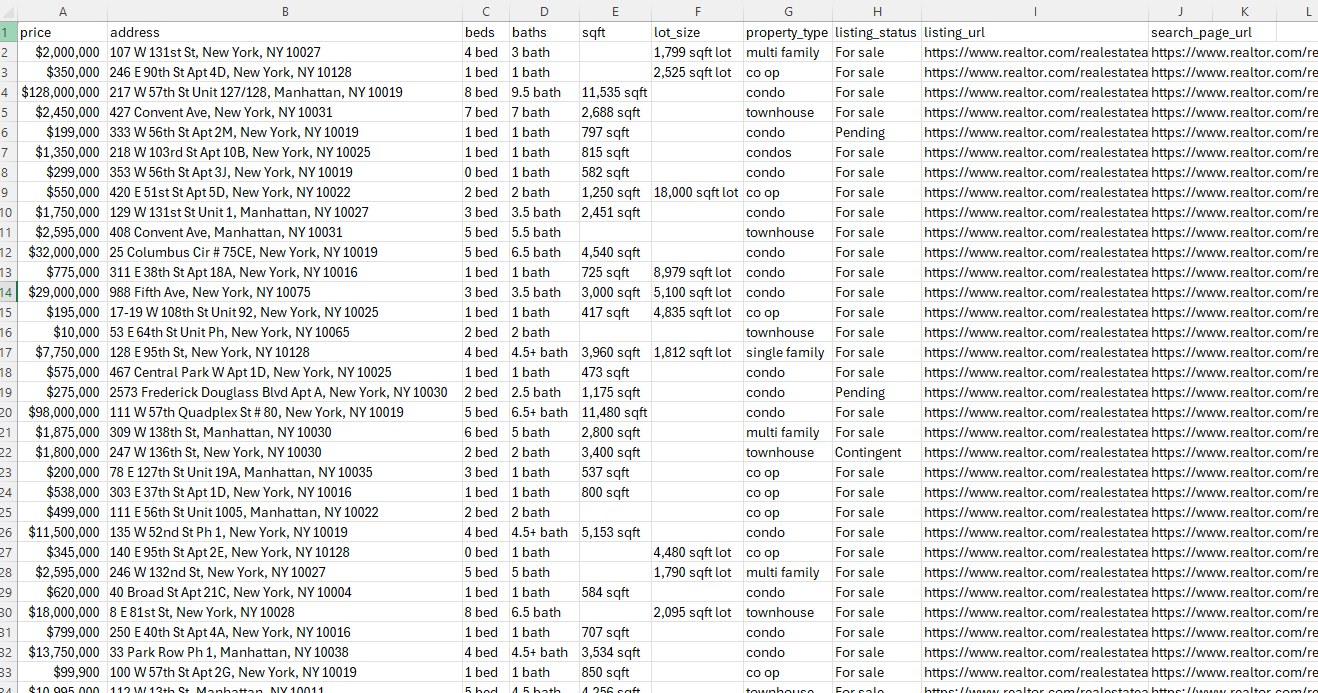
At this point, we have a list of dicts that already contains price, address, bed and bath counts, sqft, status, and the permalink needed to build a detail URL. We shape it into a CSV with these columns:
price, address, beds, baths, sqft, lot_size, property_type, listing_status, listing_url, search_page_url
Before we build each CSV row, we define three small helpers to keep formatting consistent.
format_price() normalizes list prices into a consistent $1,234,567 string:
def format_price(amount):
    if amount is None:
        return ""
    return f"${int(amount):,}"
build_address() turns the structured address object into one stable string:
def build_address(loc):
    line = (loc.get("line") or "").strip()
    city = (loc.get("city") or "").strip()
    st = (loc.get("state_code") or "").strip()
    postal = (loc.get("postal_code") or "").strip()
    right = f"{city}, {st} {postal}".strip() if city and st else " ".join(x for x in [city, f"{st} {postal}".strip()] if x)
    return ", ".join(x for x in [line, right] if x)
status_label() turns MLS status plus a few flags into a readable label for a CSV:
def status_label(status, flags):
    # Check boolean flags first, then fall back to the MLS status string
    for flag, label in [("is_pending", "Pending"), ("is_contingent", "Contingent"), ("is_coming_soon", "Coming soon"), ("is_foreclosure", "Foreclosure")]:
        if flags.get(flag):
            return label
    return STATUS_MAP.get(status, (status or "").replace("_", " ").title())
Here is the exact row shaping that fills those columns:
desc = p.get("description") or {}
loc = (p.get("location") or {}).get("address") or {}
permalink = (p.get("permalink") or "").strip()

sqft = desc.get("sqft")
lot = desc.get("lot_sqft")
beds = desc.get("beds")
baths = desc.get("baths_consolidated") or ""

all_rows.append({
    "price": format_price(p.get("list_price")),
    "address": build_address(loc),
    "beds": f"{beds} bed" if beds is not None else "",
    "baths": f"{baths} bath" if baths else "",
    "sqft": f"{sqft:,} sqft" if isinstance(sqft, int) else (str(sqft) if sqft else ""),
    "lot_size": f"{lot:,} sqft lot" if isinstance(lot, int) else "",
    "property_type": (desc.get("sub_type") or desc.get("type") or "").replace("_", " "),
    "listing_status": status_label(p.get("status") or "", p.get("flags") or {}),
    "listing_url": f"https://www.realtor.com/realestateandhomes-detail/{permalink}" if permalink else "",
    "search_page_url": page_url,
})
Following Pagination Links
Page numbers are not the cleanest surface here. The reliable move is to follow the footer’s Next link, because it tracks whatever Realtor.com decides the next search results URL should be.
This is the selector pattern we will use:
nxt = soup.select_one("a[aria-label='Go to next page']") or soup.select_one("a[aria-label^='Go to next']")
href = (nxt.get("href") or "").strip() if nxt else ""
if not href or href.startswith("#"):
    print("  No next page link.")
    break
page_url = href if href.startswith("http") else urllib.parse.urljoin("https://www.realtor.com/", href)
time.sleep(REQUEST_DELAY_SEC)
If the page has more results, page_url usually looks like the same search path with /pg-2, /pg-3, and so on. If there is no next link, we stop without guessing.
Exporting to CSV
At the end, we write everything to a single CSV with a fixed column order:
with open(OUTPUT_CSV, "w", newline="", encoding="utf-8") as f:
    writer = csv.DictWriter(f, fieldnames=CSV_FIELDS)
    writer.writeheader()
    writer.writerows(all_rows)

print(f"Wrote {len(all_rows)} rows to {OUTPUT_CSV}")
After it runs, realtor-search-results.csv contains one row per listing with the same fields we mapped above. The final line tells us how many rows were written, which is the quickest sanity check before we scale the crawl.
If we want the complete runnable version in one place, we use the GitHub link in the intro.
If you're looking to scrape Australian property listings, check out our RealEstate.com.au scraping guide.
Scraping Realtor.com Listing Details
Search pages are about breadth. Listing pages are about depth.
Here is the split: the listing page has two structured sources.
- Embedded JSON: core fields like
property_id,listing_id, beds, baths, sqft, price, agent, brokerage - GraphQL:
property_history,tax_history, and popularity windows (views and saves over time)
Fetching a Listing Page and Finding propertyDetails
We fetch a single listing URL through Scrape.do with super=true:
LISTING_URL = "https://www.realtor.com/realestateandhomes-detail/33-Park-Row-1_New-York_NY_10038_M93744-96076"

print(f"Fetching listing: {LISTING_URL}")
api_url = f"http://api.scrape.do/?token={TOKEN}&url={urllib.parse.quote(LISTING_URL, safe='')}&super=true"
response = requests.get(api_url, timeout=120)
if response.status_code != 200:
    raise SystemExit(f"HTTP {response.status_code}")
The listing page uses a different JSON path than the search page. Search listings live at props.pageProps.properties. Listing details live deeper, at props.pageProps.initialReduxState.propertyDetails. We scan the same way but look for a different key:
pd = None
for script in BeautifulSoup(response.text, "html.parser").find_all("script"):
    raw = (script.string or "").strip()
    if not raw.startswith("{"):
        continue
    try:
        data = json.loads(raw)
    except json.JSONDecodeError:
        continue
    candidate = data.get("props", {}).get("pageProps", {}).get("initialReduxState", {}).get("propertyDetails")
    if candidate and (candidate.get("listing_id") or candidate.get("property_id")):
        pd = candidate
        break
If pd is still None, we did not get the payload we need. We stop here and fix the request before trying GraphQL.
Shaping Core Listing Fields
We pull the title from the SEO block (it is always present), with an address fallback. format_price() was defined earlier. Now we shape the core record:
desc = pd.get("description") or {}
sqft = desc.get("sqft")
pps = pd.get("price_per_sqft")

# Title from SEO data, fallback to address
seo = pd.get("seo") or {}
title = (seo.get("seo_title") or seo.get("title") or "").strip()

record = {
    "listing_url": LISTING_URL,
    "property_id": str(pd.get("property_id") or ""),
    "listing_id": str(pd.get("listing_id") or ""),
    "title": title,
    "price": format_price(pd.get("list_price")),
    "price_currency": str(pd.get("list_price_currency") or "").strip(),
    "beds": str(desc.get("beds") or ""),
    "baths": str(desc.get("baths_consolidated") or ""),
    "sqft": f"{sqft:,} sqft" if isinstance(sqft, int) else (str(sqft) if sqft else ""),
    "unit_type": (desc.get("sub_type") or desc.get("type") or "").replace("_", " "),
    "price_per_sqft": f"${pps:,}/sqft" if isinstance(pps, int) else (str(pps) if pps else ""),
}
Now we have the IDs we need for enrichment, especially property_id. That ID is the key for both GraphQL calls.
Property History via GraphQL
The GraphQL endpoint is https://www.realtor.com/frontdoor/graphql. We send the POST through Scrape.do, with customHeaders=true so we can include the RDC headers Realtor expects.
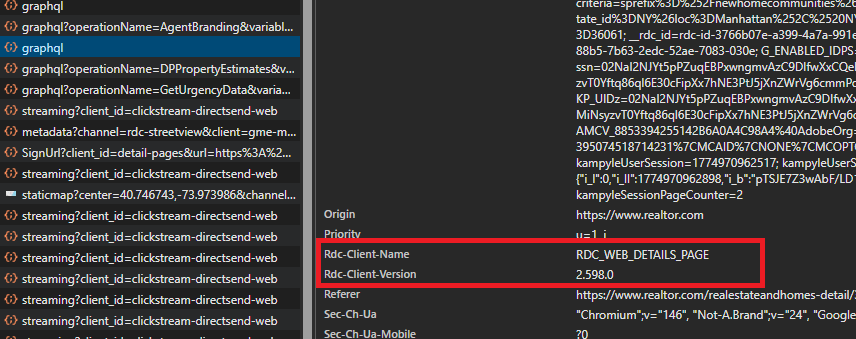
Before we call it, we need three pieces from DevTools Network on a real listing page: a client version header, the history query text, and the persisted query hash for urgency. These values change when Realtor deploys a new frontend version, so if the GraphQL calls start failing after working for weeks, refreshing these from DevTools is the first thing to check.
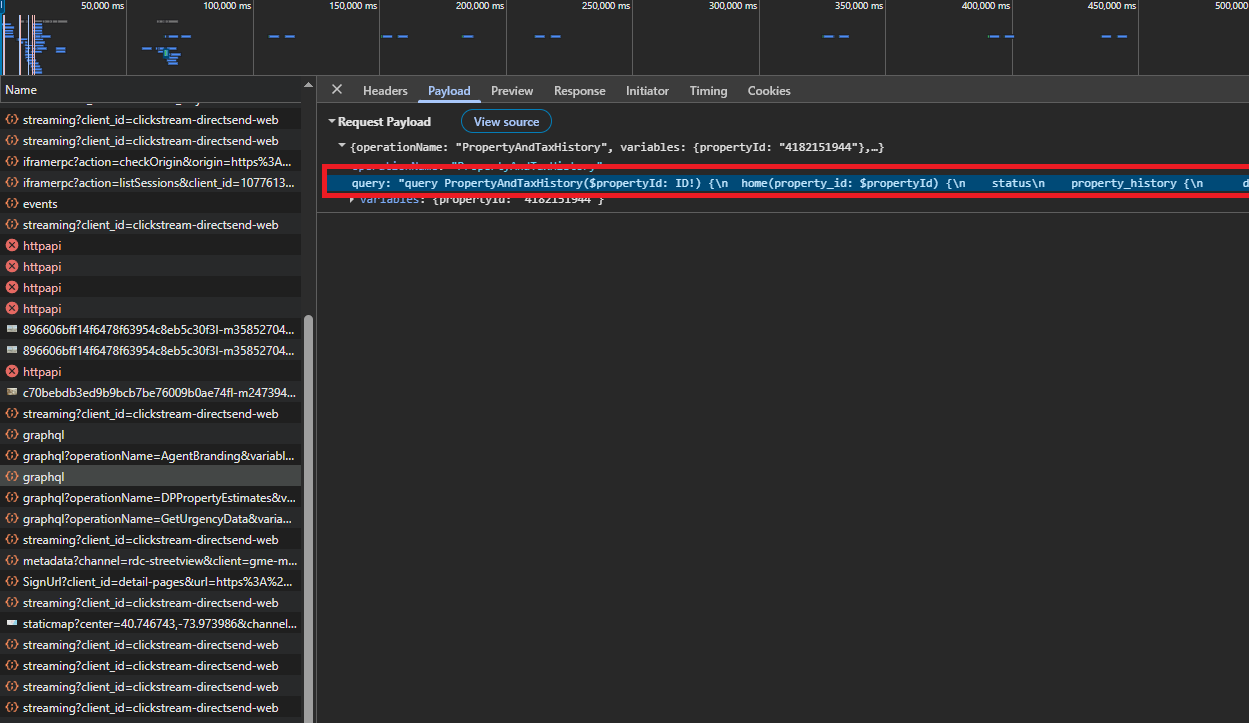
Open the listing page in Chrome, open DevTools, then go to the Network tab and filter for graphql. Click the request that contains PropertyAndTaxHistory. We want two things from that one request: the rdc-client-version header and the raw GraphQL query text.
RDC_CLIENT_VERSION: copy therdc-client-versionrequest headerHISTORY_QUERY: copy thequerystring from the Request Payload
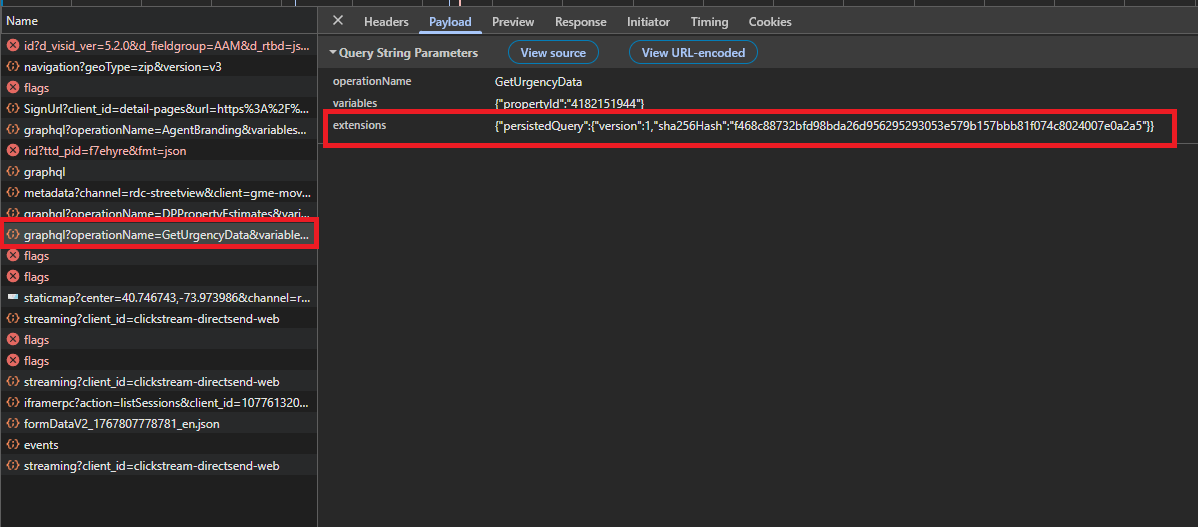
For popularity, click the request with operationName: GetUrgencyData. That one uses a persisted query. We copy the hash from extensions.persistedQuery.sha256Hash.
GET_URGENCY_HASH: copyextensions.persistedQuery.sha256Hashfrom the Request Payload
def graphql_post(body, label):
    # POST to Realtor GraphQL via Scrape.do with custom RDC headers
    api_url = "http://api.scrape.do/?" + urllib.parse.urlencode(
        {"token": TOKEN, "url": GRAPHQL_URL, "super": "true", "customHeaders": "true"}
    )
    headers = {
        "Content-Type": "application/json",
        "Referer": LISTING_URL,
        "Origin": "https://www.realtor.com",
        "rdc-client-name": "RDC_WEB_DETAILS_PAGE",
        "rdc-client-version": RDC_CLIENT_VERSION,
    }
    r = requests.post(api_url, data=json.dumps(body), headers=headers, timeout=120)
    if r.status_code != 200:
        print(f"  {label}: HTTP {r.status_code}")
        return None
    return r.json()
Now we call PropertyAndTaxHistory using the listing’s property_id:
property_id = record["property_id"]
record["property_history"] = []
record["tax_history"] = []

if property_id:
    result = graphql_post({
        "operationName": "PropertyAndTaxHistory",
        "variables": {"propertyId": property_id},
        "query": HISTORY_QUERY,
    }, "PropertyAndTaxHistory")
    home = (result or {}).get("data", {}).get("home") or {}
    record["property_history"] = home.get("property_history") or []
    record["tax_history"] = home.get("tax_history") or []
If record["property_history"] is non-empty, we know the GraphQL call is working and we are collecting the listing’s event timeline and tax rows.
If we can print a non-zero history count, we have crossed the hardest part.
Popularity and View Counts
Popularity comes from a persisted query called GetUrgencyData. We pass the hash in extensions.persistedQuery.sha256Hash and then normalize the output a bit.
record["urgency"] = None
if property_id:
    result = graphql_post({
        "operationName": "GetUrgencyData",
        "variables": {"propertyId": property_id},
        "extensions": {"persistedQuery": {"version": 1, "sha256Hash": GET_URGENCY_HASH}},
    }, "GetUrgencyData")
    popularity = (result or {}).get("data", {}).get("home", {}).get("popularity")
    if popularity:
        for row in popularity.get("periods") or []:
            row.pop("ldp_views_total", None)
        record["urgency"] = popularity
When this succeeds, record["urgency"]["periods"] contains the rolling windows with views and saves, which is useful for tracking demand changes over time.
This is the kind of signal we do not get from HTML scraping.
Exporting Listing Data to JSON
Finally, we write one JSON file for the listing:
with open(OUTPUT_JSON, "w", encoding="utf-8") as f:
    json.dump(record, f, indent=2, ensure_ascii=False)

print(f"Wrote {OUTPUT_JSON}")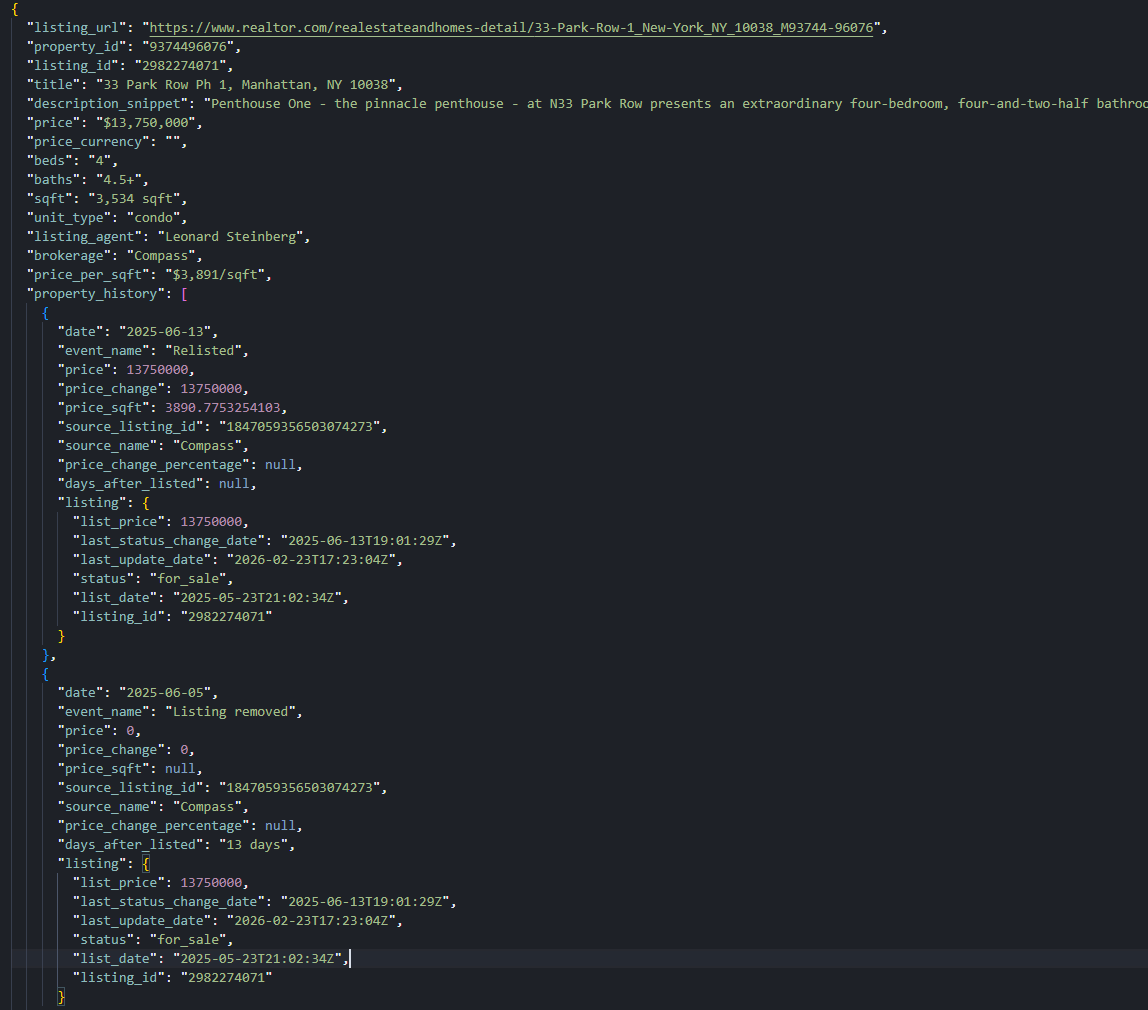
Conclusion
Realtor.com gets much easier when we stop treating it like HTML. For search results, we pull listings from embedded JSON and write a clean CSV. For a single listing, we extract propertyDetails from embedded Redux state, then enrich it with two GraphQL calls for history, tax rows, and popularity windows.
From here, we scale it the boring way. Store outputs per city and per day, keep delays modest, and keep extraction pinned to structured payloads instead of brittle selectors.
If you're looking to scrape UK property listings, check out our Rightmove scraping guide. If you're looking to scrape Spanish or Portuguese property listings, check out our Idealista scraping guide.
Get 1000 free credits and start scraping with Scrape.do
FAQ
Does Realtor.com block scraping?
Yes. In this environment, direct requests runs into 429 quickly. Routing requests through Scrape.do with super=true keeps both the HTML fetch and the GraphQL calls stable enough to build a repeatable pipeline.
How do I get property price history from Realtor.com?
Extract the listing property_id from propertyDetails, then call the GraphQL operation PropertyAndTaxHistory. The price timeline is in data.home.property_history.
Can I scrape Realtor.com without rendering JavaScript?
Yes. The approach here does not use render=true. We rely on embedded JSON that ships in the HTML plus direct GraphQL responses.
What data is available from Realtor.com search results?
The CSV export includes price, address, beds, baths, sqft, lot size, property type, listing status, the detail URL, and the search page URL that each row came from.
Software Engineer








