Category:ProxyView as Markdown
Node Unblocker for Web Scraping: Setup, Where It Breaks, and Upstream Proxies

Software Engineer


This guide sets up Node Unblocker on Express and uses it as a scraping proxy on three pages: a plain HTML catalog, a JavaScript-rendered page, and a G2 review page behind DataDome. Then it adds an upstream proxy and sends the same pages through the Scrape.do API. Every result below comes from scripts we ran, and the code is here so you can run them yourself.
What Is a Node Unblocker?
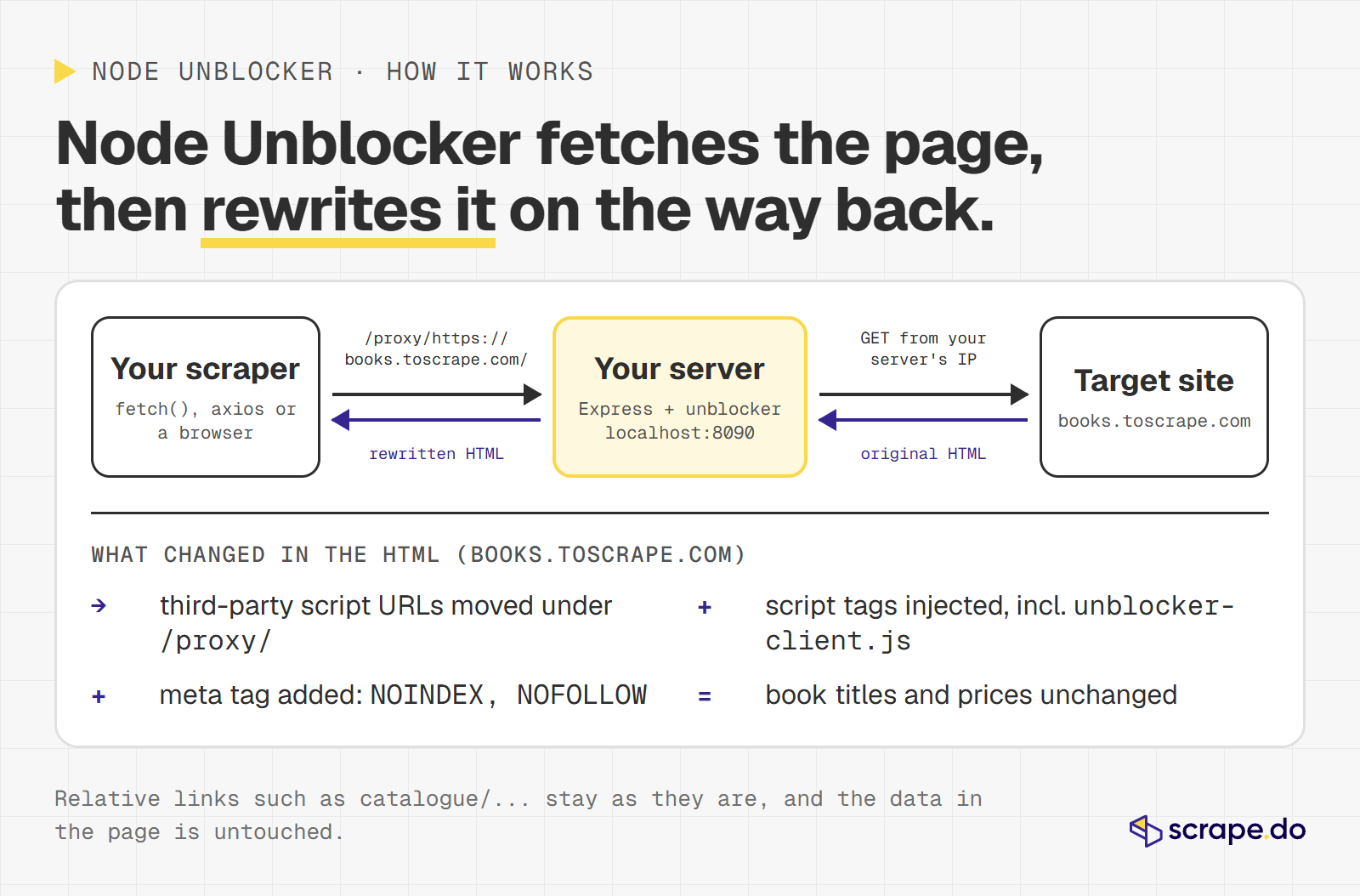
Node Unblocker is an open-source web proxy for Node.js by Nathan Friedly. You mount it as Express middleware. When a client asks your server for /proxy/https://example.com/, your server fetches that page, rewrites it so its links point back through the proxy, and sends it on.
The basics:
| npm package | unblocker |
| Source | nfriedly/node-unblocker on GitHub |
| License | AGPL-3.0 |
| Mounts as | Express middleware |
The GitHub description opens with "Web proxy for evading internet censorship". Scraping is a side use, and that origin explains most of this article: it is built to show pages to a person in a browser.
It is also not an HTTP proxy in the usual sense. You don't put it in the proxy option of an HTTP client the way our Axios proxy guide does. You prepend its address to the URL you want. And unlike a reverse proxy, which sits in front of one site, it fetches whatever site the URL names.
How Do I Set Up Node Unblocker?
Create a folder and install the package:
mkdir unblocker-test && cd unblocker-test
npm init -y
npm install unblocker@2.3.1
Express arrives as a dependency of unblocker, so the server below runs without a second install. In a real project, add express to your own package.json so an update to unblocker can't remove it from under you.
Before you put it on a public server, check its dependencies with npm audit or the OSV database. When we tested, the package itself had no advisories, but two of its dependencies, cookie and send, had low-severity ones, and the version ranges unblocker asks for did not allow the fixed releases. Do not leave the server open to the internet either. With no login, it fetches any URL for anyone who finds it, so put it behind authentication or a firewall.
Save this as server.js:
const express = require("express");
const Unblocker = require("unblocker");

const app = express();
const unblocker = Unblocker({
  prefix: "/proxy/",
  requestMiddleware: [
    (data) => {
      data.headers["user-agent"] =
        "Mozilla/5.0 (Windows NT 10.0; Win64; x64) AppleWebKit/537.36 (KHTML, like Gecko) Chrome/131.0.0.0 Safari/537.36";
    },
  ],
});

app.use(unblocker);
app.listen(8090).on("upgrade", unblocker.onUpgrade);
console.log("unblocker on http://localhost:8090/proxy/");
Each function in requestMiddleware runs before the request leaves your server. This one swaps in a browser user agent. Node Unblocker copies the client's headers onto the outgoing request, and Node's built-in fetch() sends the user agent node (we checked it against httpbin), so without this function the target sees node. The upgrade handler lets the proxy pass WebSocket connections through.
Start it with node server.js, then open http://localhost:8090/proxy/https://books.toscrape.com/ in a browser or with curl. You should get the catalog page back, served through your own server.
How Do I Scrape a Website With Node Unblocker?
From your scraper's side, using Node Unblocker means one thing: put http://localhost:8090/proxy/ in front of every URL. This script pulls the book titles and prices from the first catalog page with Node's built-in fetch():
// scrape.mjs: scrape books.toscrape.com through a local Node Unblocker (node scrape.mjs)
const PROXY = "http://localhost:8090/proxy/";
const target = "https://books.toscrape.com/";

const res = await fetch(PROXY + target);
const html = await res.text();

const books = [...html.matchAll(
  /<h3><a href="([^"]+)" title="([^"]+)">[\s\S]*?<p class="price_color">([^<]+)<\/p>/g
)].map(([, href, title, price]) => ({ title, price, url: new URL(href, target).href }));

const next = html.match(/<li class="next"><a href="([^"]+)"/)?.[1];

console.log(res.status, `${books.length} books`);
console.log(books.slice(0, 3));
console.log("next page:", new URL(next, target).href);
The output:
200 20 books
[
  {
    title: 'A Light in the Attic',
    price: '£51.77',
    url: 'https://books.toscrape.com/catalogue/a-light-in-the-attic_1000/index.html'
  },
  {
    title: 'Tipping the Velvet',
    price: '£53.74',
    url: 'https://books.toscrape.com/catalogue/tipping-the-velvet_999/index.html'
  },
  {
    title: 'Soumission',
    price: '£50.10',
    url: 'https://books.toscrape.com/catalogue/soumission_998/index.html'
  }
]
next page: https://books.toscrape.com/catalogue/page-2.html
The script resolves links against the target URL, not the proxy URL, and that is deliberate. Node Unblocker changes the HTML it passes on. On this page we compared the proxied copy with a direct fetch, line by line:
| Change | On books.toscrape.com |
|---|---|
| Script tags injected | unblocker-client.js and a call that starts it |
| URLs rewritten | Third-party scripts, such as jQuery, now load from /proxy/ URLs |
| Meta tag added | <meta name="ROBOTS" content="NOINDEX, NOFOLLOW"/> |
| Relative links | Unchanged, such as catalogue/page-2.html |
| Data | Titles and prices identical |
On a bigger page the rewriting goes further. On the G2 review page you'll meet below, fetched through Node Unblocker with the upstream proxy, every absolute link had been rewritten to start with /proxy/. If you store URLs from proxied pages, strip the /proxy/ prefix first, or resolve relative links against the real target as the script does.
For more patterns on the parsing side, our Node.js web scraping guide covers Cheerio and pagination.
Where Does Node Unblocker Break for Web Scraping?
Rewriting HTML helps a person browse through the proxy. It does nothing for four problems a scraper meets on its first real targets.
Can Node Unblocker Scrape JavaScript Pages?
quotes.toscrape.com/js/ keeps its quotes in a JavaScript array and builds the HTML in the browser. Through Node Unblocker, our fetch() got the page without a single quote in it, the same as a direct fetch. The proxy passes JavaScript along; it doesn't run it.
A real browser through the proxy is a different story. Headless Chrome loading the /js/ quotes page through the proxy rendered all the quotes in our tests, and every request the page made went through the proxy. The /scroll version, which loads quotes with an XHR call, rendered them too, again with every request on the proxy. The injected client script wraps fetch and XMLHttpRequest so those calls keep the /proxy/ prefix.
So you have two ways forward:
- Drive a browser through it. Point Puppeteer or Playwright at the
/proxy/URL. Our Puppeteer guide covers the browser side. - Skip the browser and call the page's data endpoint. Through the proxy,
/api/quotes?page=1returned the quotes as JSON, with ahas_nextflag for paging.
Which Sites Does Node Unblocker Break?
Modern front ends often don't survive the rewrite. We loaded react.dev in headless Chrome, once directly and once through the proxy:
| Direct | Through Node Unblocker | |
|---|---|---|
| Headings | Rendered | Missing |
| Visible text | The whole page | A few lines |
| Page errors | None | Minified React error #418 |
| Final address | https://react.dev/ |
/proxy/https:/react.dev |
Error #418 is a hydration mismatch: the HTML the proxy delivered no longer matched what React expected, so the page did not come up. The address bar also lost a slash. Every request the page made did go through the proxy, so nothing leaked; the page broke anyway.
The project's readme names its own limits. OAuth logins and anything that uses postMessage (Google, Facebook) "are not likely to work out of the box", and sites such as Roblox, Discord, YouTube and Instagram "do not currently work". The client script's to-do list adds postMessage, window.open, and watching the DOM for src and srcset changes. Anything a page does through those paths is not rewritten.
Why Does Node Unblocker Get Blocked?
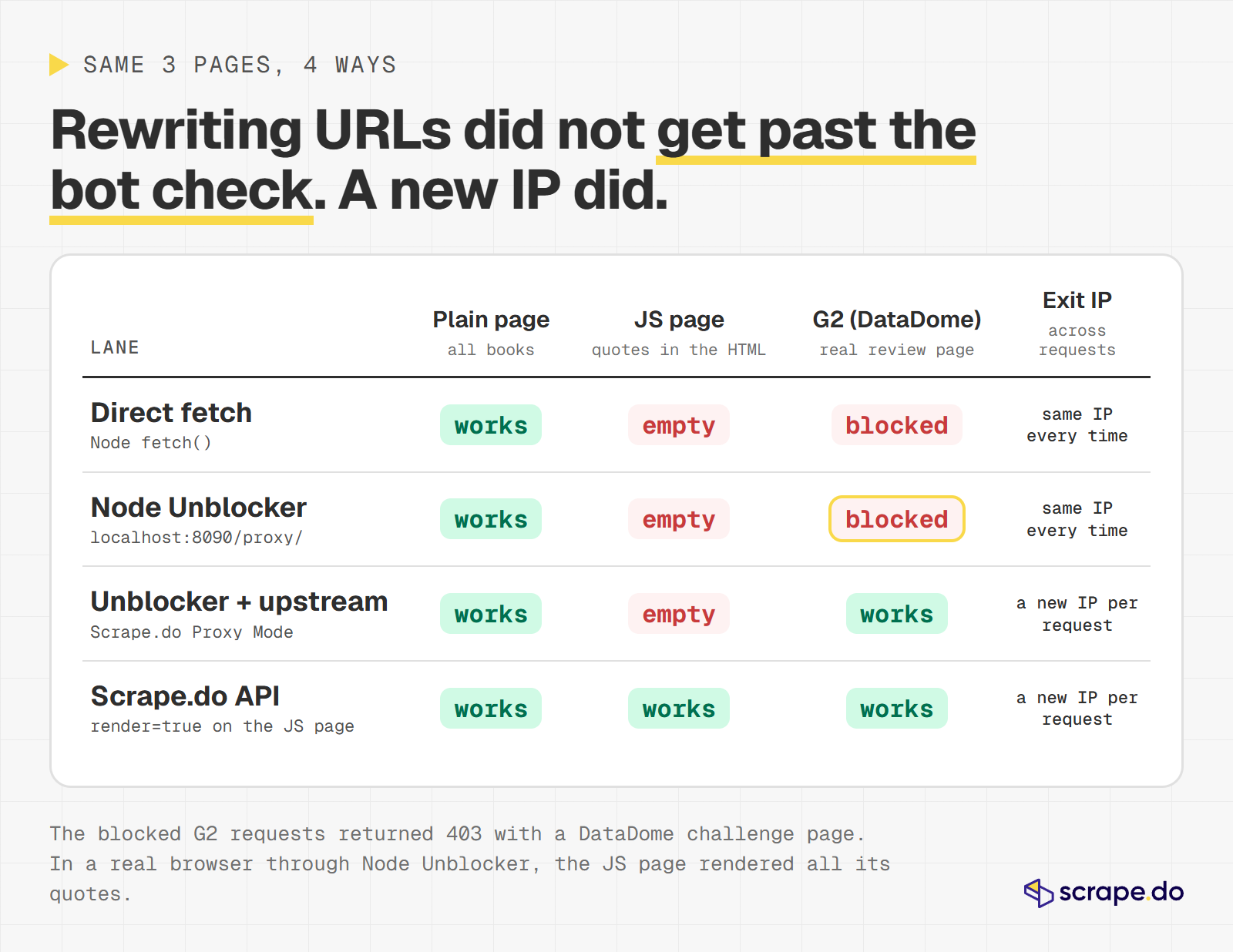
https://www.g2.com/products/slack/reviews sits behind DataDome. A direct fetch() got 403 and a DataDome challenge page. Through Node Unblocker it got the same 403 and the same challenge on every attempt, now with its links rewritten.
That result is expected. A bot check judges the connection and the client: the IP address, how the client speaks TLS and HTTP, and browser signals once JavaScript runs. Node Unblocker forwards your request from your own server through Node's HTTP client, so none of that changes.
Does Node Unblocker Rotate IP Addresses?
We sent repeated requests to httpbin.co/ip through the proxy, and every request left from the same IP: the machine running the server. Every page you scrape through Node Unblocker carries your server's address, and a site that rate-limits by IP sees all of your traffic as one client.
The next section fixes this one.
How Do I Use Node Unblocker With Rotating Proxies?
Node Unblocker accepts httpAgent and httpsAgent options, and passes them to every outgoing request. Point the HTTPS agent at a proxy and each page goes out through it. If you are still picking a pool, our guide to rotating proxies explains the options.
Node Unblocker doesn't ship a proxy agent, so this small one opens a CONNECT tunnel with Node's core modules (no extra package) and runs TLS inside it. Save it as tunnel-agent.js:
const http = require("http");
const https = require("https");
const tls = require("tls");

class TunnelAgent extends https.Agent {
  constructor(proxyUrl, options = {}) {
    super(options);
    this.proxy = new URL(proxyUrl);
  }
  createConnection(options, callback) {
    const target = `${options.host}:${options.port || 443}`;
    const { username, password, hostname, port } = this.proxy;
    const auth = Buffer.from(`${decodeURIComponent(username)}:${decodeURIComponent(password)}`).toString("base64");
    const req = http.request({ host: hostname, port: port || 80, method: "CONNECT", path: target,
      headers: { Host: target, "Proxy-Authorization": `Basic ${auth}` } });
    req.once("connect", (res, socket) => {
      if (res.statusCode !== 200) return callback(new Error(`proxy CONNECT returned ${res.statusCode}`));
      callback(null, tls.connect({ ...options, socket, servername: options.servername || options.host }));
    });
    req.once("error", callback);
    req.end();
  }
}
module.exports = TunnelAgent;
It works with any HTTP proxy that supports CONNECT, in the form http://user:pass@host:port. We used Scrape.do Proxy Mode, where the token is the username and API parameters go in the password. super=true routes requests through residential and mobile IPs. Save this as server-upstream.js:
const fs = require("fs");
const express = require("express");
const Unblocker = require("unblocker");
const TunnelAgent = require("./tunnel-agent");

const token = process.env.SCRAPEDO_TOKEN ?? "<your_token>";
const proxyUrl = `http://${token}:super=true@pm.scrape.do:8080`;

const app = express();
const unblocker = Unblocker({
  prefix: "/proxy/",
  // Proxy Mode re-signs HTTPS traffic: trust its CA for this agent only
  httpsAgent: new TunnelAgent(proxyUrl, { ca: fs.readFileSync("scrapedo_ca.crt") }),
});

app.use(unblocker);
app.listen(8091).on("upgrade", unblocker.onUpgrade);
console.log("unblocker with upstream proxy on http://localhost:8091/proxy/");
Proxy Mode needs your client to trust the Scrape.do CA certificate or to turn off TLS verification. Download it and save it next to server-upstream.js as scrapedo_ca.crt. Passing the certificate to this one agent keeps verification on for everything else. A plain rotating proxy pool needs no ca option.
The same tests through the upstream proxy:
| Test | Node Unblocker | Node Unblocker + Proxy Mode |
|---|---|---|
| G2 review page | Blocked (403, DataDome) |
The real page, on every attempt |
| Exit IP | Always the server's | A different IP on each request |
| Quotes in the JS page's HTML | None | None |
| Speed | One hop | Slower: every page takes an extra hop |
The G2 pages were the real review pages, not challenge pages. The JavaScript page still came back empty, because a proxy changes where a request comes from, not whether the page's scripts run.
When Is a Scraping API Simpler Than Node Unblocker?
By now the setup has three parts you maintain: the Express server, the tunnel agent with its certificate, and a parser that copes with rewritten HTML. A scraping API puts the proxy, the IP rotation and the browser behind one HTTPS call. We sent the same three pages to the Scrape.do API.
For the JavaScript page, add render=true so a headless browser runs the page first:
// api.mjs: the JS page through the Scrape.do API with rendering (node api.mjs)
const params = new URLSearchParams({
  token: process.env.SCRAPEDO_TOKEN ?? "<your_token>",
  url: "https://quotes.toscrape.com/js/",
  render: "true",
});

// read Scrape.do's response as it is; don't follow a Location header to the target
const res = await fetch(`https://api.scrape.do/?${params}`, { redirect: "manual" });
const html = await res.text();

const authors = [...html.matchAll(/<small class="author">([^<]+)<\/small>/g)].map((m) => m[1]);
console.log(`${authors.length} quotes, first by ${authors[0]}`);
It printed the full set of quotes, the first by Albert Einstein, on every run. The redirect: "manual" line matters: in some of our runs the API answered with status 308 and a Location header pointing at the target, with the rendered HTML in the body. Node's fetch() follows that header by default, and then you get the unrendered page straight from the target. The plain page came back exactly as a direct fetch returns it: no injected scripts, no /proxy/ prefix to strip. The G2 page came back real on every attempt, each time from a different IP.
What each setup asks of you:
| Node Unblocker | + upstream proxy | Scrape.do API | |
|---|---|---|---|
| What you run | An Express server | The server, a tunnel agent and a CA file | Nothing |
| HTML you get back | Rewritten | Rewritten | As the site sent it |
| JavaScript pages | Bring a browser | Bring a browser | render=true |
| What you pay for | Your server | Your server and the proxy traffic | Credits per request, see request costs |
Node Unblocker still makes sense for the job it was built for: a browsing proxy for people. It also fits internal tools that read unprotected pages from a fixed server location, and you can hook your own requestMiddleware and responseMiddleware into every request. For protected sites, JavaScript pages or many IPs, you end up adding the missing pieces one by one, and an API ships them together. Our web scraping proxy guide compares the proxy types if you'd rather keep running your own stack.
Conclusion
Node Unblocker sets up in a few minutes and scrapes a plain page cleanly, with injected scripts, rewritten URLs and a NOINDEX tag as the price. In our tests it returned no quotes from the JavaScript page, broke react.dev in a real browser, and got DataDome's 403 on G2 every time, all from one IP. An upstream proxy through its httpsAgent option fixed the IP and G2 problems, but not JavaScript. The Scrape.do API handled all three pages in one call each.
Get 1000 free credits and start scraping with Scrape.do
FAQ
Is Node Unblocker still maintained?
It is an active but slow-moving project. npm releases are far apart, the GitHub repository still gets commits, and the to-do list in its readme still includes postMessage support and un-prefixing URLs in form data. Check the repository's recent activity before you depend on it.
Does Node Unblocker hide your IP address?
It hides the visitor's IP, not the server's. The target site sees the IP of the machine running Node Unblocker: in our tests, every request left from the server's own IP. To change the IP the site sees, add an upstream proxy through the httpsAgent option.
Does Node Unblocker get past bot protection like DataDome?
Not in our tests. On the DataDome-protected G2 page it got 403 and a challenge page on every attempt, the same as a direct request. It rewrites URLs and nothing else about the connection. With Scrape.do Proxy Mode as its upstream, the same page loaded every time.
How do I use a proxy with Node Unblocker?
Pass an agent in the config: httpsAgent for HTTPS targets and httpAgent for HTTP ones. Node Unblocker ships no proxy agent, so use a CONNECT tunnel agent like the one above, or a package such as https-proxy-agent.
Is Node Unblocker free for commercial use?
It is free under the AGPL-3.0 license. If you modify it and let people use it over a network, the AGPL requires you to offer them your modified source code. The readme says commercial licensing is available from the author. Check with your legal team before you build a product on it.
Software Engineer