Category:Scraping ErrorsView as Markdown
"Our Systems Have Detected Unusual Traffic": Why Google Blocks Scrapers

Head of Marketing


You point a script at Google Search, and instead of results you get a short page that opens with "Our systems have detected unusual traffic from your computer network." There is no status code you were checking for, no results to parse, and the next request gets the same page.
Short answer: Google shows this page when the searches coming from your IP address look automated. It is a block on the network, sent by Google, and it clears after the automated requests stop or after a person solves the reCAPTCHA on it. A scraper avoids it by pacing its requests, by searching from IP addresses with a clean history, or by using a SERP API that hands back the results as JSON.
Not running a scraper? You probably share an IP address with something that is: a VPN, an office or school network, or a browser extension. Solve the reCAPTCHA if it appears on a real
google.com/sorry/page, turn the VPN off, and try another network. If a page tells you to press Win+R and paste a command to prove you are human, close it. Microsoft documents that trick as ClickFix, a malware lure that imitates CAPTCHA and verification checks. A real Google block page only shows a reCAPTCHA and never asks you to run a command.
In our tests, we sent searches from one IP address with plain HTTP requests and with headless Chrome, then sent the same queries through the Scrape.do Google Search API. That address was a datacenter VPN exit, not a home or office connection.
What Does "Our Systems Have Detected Unusual Traffic" Mean?
"Our systems have detected unusual traffic from your computer network" means Google decided that the searches from your IP address look automated and wants proof that a person sent the next one. The page comes from Google itself, not from your internet provider or from malware, and it lives at a google.com/sorry/index URL.
Google's help page for the message lists what it counts as automated traffic: robots, computer programs, automated services, search scrapers, and "software that sends searches to Google to find how a website or web page ranks on Google." Scrapers and rank trackers are named outright.
The block page adds the details that matter for a scraper. It says:
- "The block will expire shortly after those requests stop."
- The traffic "may have been sent by malicious software, a browser plug-in, or a script that sends automated requests."
- "A different computer using the same IP address may be responsible."
- You "may be asked to solve the CAPTCHA if you are using advanced terms that robots are known to use, or sending requests very quickly." Search operators such as
site:andinurl:are the obvious candidates for "advanced terms".
So the judgment is about the IP address and what has come from it lately. Your own requests are only part of that history.
What Does a Python Scraper Get Back From Google Search?
The obvious first scraper is a Python requests loop. From that VPN exit, it never saw a single result:
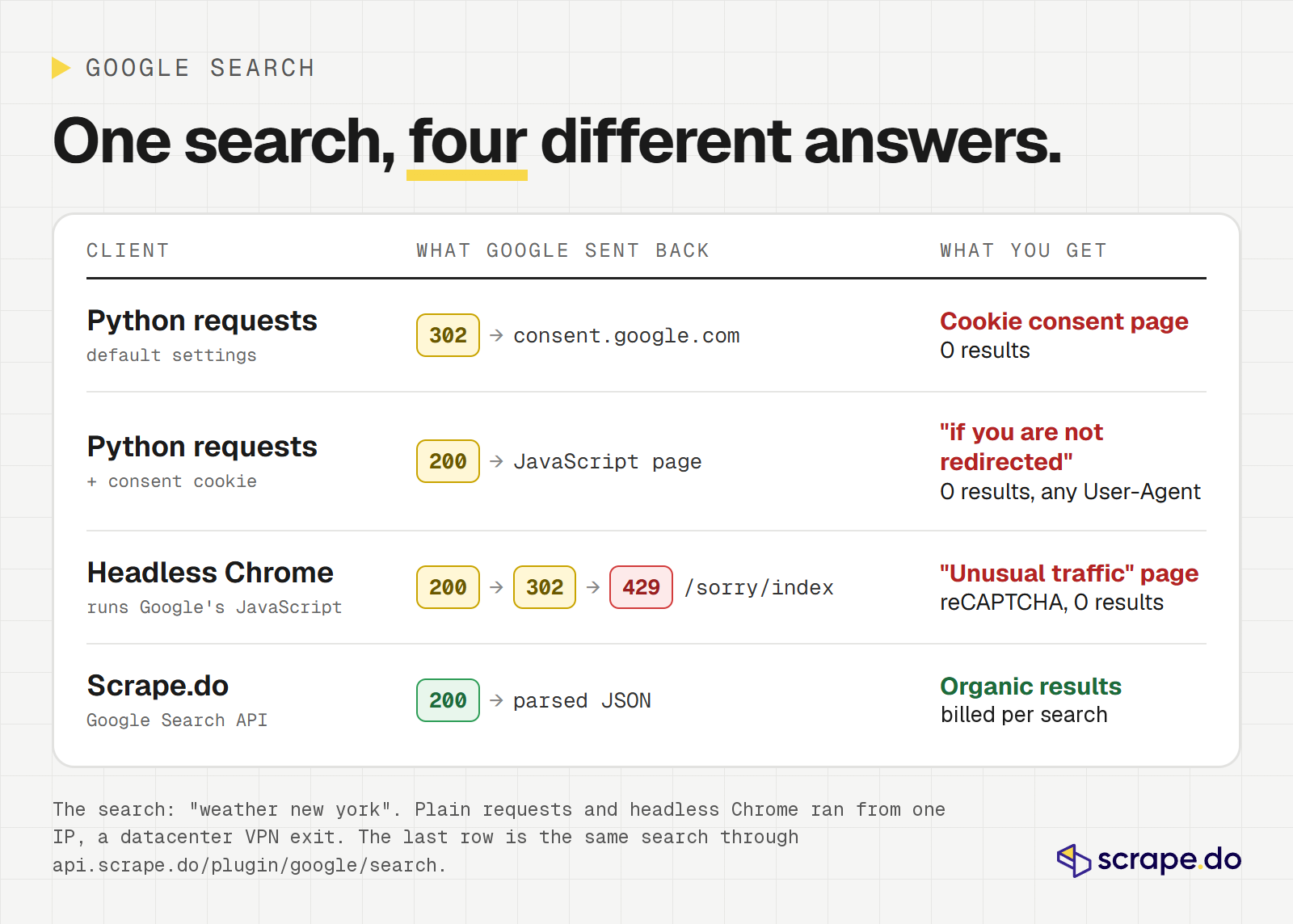
| Client (one IP) | What came back | Results |
|---|---|---|
Python requests, default settings |
302 to consent.google.com |
None |
requests with a consent cookie |
200, a page that says "Please click here if you are not redirected" |
None |
| The same, with a Chrome User-Agent string | 200, the same page |
None |
| Headless Chrome | 200, then 302 to /sorry/index, then 429 |
None |
Each row fails in a different way, and a scraper that only checks the status code misreads three of them.
Why Does Google Redirect My Scraper to consent.google.com?
Every default request came back as a 302 to consent.google.com, Google's cookie banner. requests follows redirects by default, so unless the code checks response.history or the final URL, it never sees the 302 and parses the consent page instead of results. A browser stores a consent cookie named SOCS after you click "Reject all", and sending that same cookie moved the next run past the banner.
Why Does Google Say "If You Are Not Redirected Within a Few Seconds"?
With the consent cookie, every request returned 200 and a full-size HTML page. The page has no id="rso", the container Google puts organic results in. What it has is this, inside a <noscript> tag:
<meta content="0;url=/httpservice/retry/enablejs?sei=..." http-equiv="refresh">
<div style="display:block">Please click <a href="/httpservice/retry/enablejs?sei=...">here</a> if you are not redirected within a few seconds.</div>
Google serves search results to clients that run its JavaScript, and requests does not run any. Swapping in a Chrome User-Agent string changed nothing: every request got the same page. The usual advice to "change your User-Agent" does not reach the real problem here.
What Is Google's /sorry/ Page?
Headless Chrome does run JavaScript, so it got one step further. The first search returned 200, the browser then requested the same search again with an extra sei parameter, that request got a 302 to /sorry/index, and /sorry/index answered with 429 and the block page:
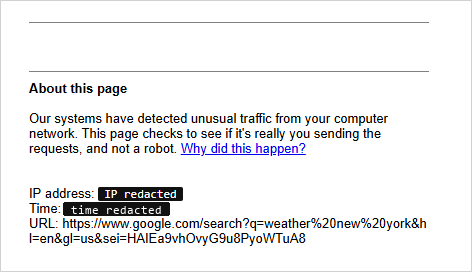
Every headless Chrome search ended there. The first one came shortly after a burst of plain requests from the same address, and the address itself was a datacenter IP behind a VPN. Our tests cannot tell which of the two weighed more, and Google's help page names both: automated searches and VPN networks. The reCAPTCHA widget did not paint in headless mode, but the HTML carries the form and everything around it:
status        429 at https://www.google.com/sorry/index?continue=<your search URL>
size          a small page
<title>       the search URL you asked for
body text     Our systems have detected unusual traffic from your computer network.
form          <form id="captcha-form" action="index" method="post"> with a g-recaptcha box
footer        IP address: <your public IP>  Time: <UTC timestamp>  URL: <your search URL>
The footer prints the exact IP Google flagged and the time in UTC. If you run through a pool of proxies, that line tells you which exit is burned.
Why Does Google Show the Unusual Traffic Page to Scrapers?
Putting our tests and Google's own wording together, these are the likely triggers:
- No JavaScript. A plain HTTP client got the JavaScript page on every request, so it never reached results at all. Pauses between requests and a browser User-Agent string did not change that.
- The IP address and its recent history. The block is tied to the address: the page says "a different computer using the same IP address may be responsible," and the help page names VPN networks. Our tests ran through a datacenter VPN exit.
- Request rate. Fast searching may set it off, according to the block page quoted above. In our tests, the next browser search after a short burst of requests from one IP was blocked.
- Search operators. These may set it off too: the block page names "advanced terms that robots are known to use", and heavy use of
site:,intitle:,inurl:andfiletype:fits that description. In our API tests below, the results for thesite:andinurl:searches came back altered, and we do not know why. - Automation in the browser. A headless browser solves the JavaScript problem but still faces the IP and behavior checks. In our tests, it hit
/sorry/on its first search.
Notice what is not on the list: the User-Agent string. Changing it did nothing in our tests.
How Do I Detect Google's Unusual Traffic Block in Python?
A pipeline that treats 200 as success parses zero results from the JavaScript page and never notices. Check where the response came from and what the body contains instead. This function covers every state we saw:
def classify_google_response(status, url, location, body):
    """Return 'results', 'consent', 'js_wall', 'blocked' or 'unknown' for one Google response."""
    if "/sorry/" in url or "/sorry/" in location or status == 429:
        return "blocked"
    if "detected unusual traffic from your computer network" in body:
        return "blocked"
    if "consent.google.com" in location:
        return "consent"
    if "/httpservice/retry/enablejs" in body and 'id="rso"' not in body:
        return "js_wall"
    if status == 200 and 'id="rso"' in body:
        return "results"
    return "unknown"
Run against one saved response of each kind, it labels each one correctly:
plain requests                status=302 -> consent
plain requests + cookie       status=200 -> js_wall
headless Chrome               status=429 -> blocked
Scrape.do API, raw HTML       status=200 -> results
Notice what the function does not do: it never searches the body for /sorry/ or enablejs on their own. A real results page contains both strings, inside Google's own scripts. A body grep for either one flags good pages as blocked.
When the function returns blocked, stop sending from that IP. The page says the block expires "shortly after those requests stop", so retrying the same address in a loop works against you.
How Do Scrapers Avoid Google's Unusual Traffic Block?
There are three ways, and they trade effort for control.
1. Does Slowing Down Requests Stop the Unusual Traffic Page?
Send one search at a time per IP, wait between searches, and leave an address alone after its first /sorry/ response. Avoid bursts of operator-heavy queries. The general backoff rules are in our 429 Too Many Requests guide, and the rate side of it in web scraping rate limits.
Pacing lowers the score, but it does not get a plain HTTP client past the JavaScript page. You still need a real browser for that, and a browser on a flagged IP lands on /sorry/, as our tests above show.
2. Do Proxies Help Avoid Google's Unusual Traffic Block?
Because Google judges the address, the IP pool matters as much as your code. Spread searches across many residential or mobile IPs instead of one datacenter or VPN exit, so no single address builds up an automated history. Our web scraping proxy guide compares residential, datacenter, ISP and mobile proxies. This is real infrastructure to run: a proxy pool, a browser fleet and the detection above, kept up to date.
3. Can a SERP API Get Google Results Without the Block?
The third way is to stop fetching Google's HTML yourself. The Scrape.do Google Search API takes a query and returns the results page as parsed JSON. The block handling, IPs and JavaScript stay on Scrape.do's side:
import requests

TOKEN = "<your_token>"

params = {"token": TOKEN, "q": "weather new york", "gl": "us", "hl": "en"}
response = requests.get("https://api.scrape.do/plugin/google/search", params=params, timeout=120)
data = response.json()

print(response.status_code, response.headers.get("Scrape.do-Request-Cost"))
for result in data["organic_results"][:3]:
    print(result["position"], result["link"])
Example output:
200 10
1 https://www.wunderground.com/forecast/us/ny/new-york/10175
2 https://www.wunderground.com/weather/us/ny/new%20york%20city/10081
3 https://www.msn.com/en-us/weather/forecast/in-New-York-City,%20NY
We also sent the plain scraper's queries through the API. The ordinary searches came back as parsed JSON with organic results plus fields such as related_questions, ai_overview and local_results.
Some operator queries did not: results for site: searches ignored the operator, and an inurl: page came back altered. If your workload is operator-heavy, check result domains before you trust the page, whichever way you fetch it.
If you need the HTML instead of JSON, send the search URL, URL-encoded, as the url parameter of the regular API (https://api.scrape.do/?token=<your_token>&url=...). That returns the full results page, which is what the detection test above used. For a full walkthrough with pagination, ads and People Also Ask, see scraping Google search results, or the Google Search Scraper product page.
How Do I Get Rid of the Unusual Traffic Message?
Google's "unusual traffic" page is a judgment on an IP address, delivered as a redirect to /sorry/index and a 429. In our tests a plain scraper never got that far: it hit a cookie redirect, then a JavaScript page that returns 200 with no results, and headless Chrome on the same IP went straight to the block. Detect all three states by the URL and the body, back off the moment you see /sorry/, and choose between running your own pacing and IP pool or letting a SERP API do the fetching.
Get 1000 free credits and start scraping with Scrape.do
FAQ
How Long Does Google's Unusual Traffic Block Last?
The block page says it "will expire shortly after those requests stop." For a person, Google's help page says the message goes away after you solve the reCAPTCHA. For a scraper, the page ties the expiry to the automated requests stopping, so retrying in a loop works against you.
Does "Unusual Traffic From Your Computer Network" Mean I Have a Virus?
Usually not. The message is about your IP address, not your device. Google's own page lists the possible sources: malicious software, a browser plug-in, or a script sending automated requests, and it adds that another computer on the same IP may be responsible. Check your VPN and extensions first, then the other devices on your network.
Why Does Google Show This Message When I Use a VPN?
Google's help page names VPN networks directly as a source of automated traffic. Our own test runs went out through a datacenter VPN exit, and headless Chrome got the block page on its first search. Turning the VPN off, or switching to a different server, is the quickest test.
Will Changing the User-Agent Stop the Unusual Traffic Page?
No. In our runs, plain requests with a Chrome User-Agent string got the same JavaScript page as the default python-requests one, with no results. Google looks at the IP address, the request rate and whether the client runs JavaScript, and changing the User-Agent touches none of those.
Can a Scraper Solve the reCAPTCHA and Keep Going?
The reCAPTCHA is there for a person who got caught in a network-wide block. For a scraper, it is a symptom: the IP address was flagged because of how it searched. Lowering the rate per IP, moving to clean IPs, or switching to a SERP API addresses that cause instead.
Head of Marketing