Category:AIView as Markdown
Crawl4AI: Setup, Markdown Output, Where It Gets Blocked, and When an API Is Simpler

Head of Marketing


This guide installs Crawl4AI 0.9.5 and runs it on four jobs: a static page to Markdown, a JavaScript page, CSS extraction to JSON and a small deep crawl. Then it points the same library at three sites behind DataDome, HUMAN and Cloudflare. Every script ran on 2026-11-05, and every output below is copied from those runs.
What Crawl4AI Is (Version 0.9.5)
Crawl4AI is an open-source Python library that drives a real Chromium browser through Playwright and hands you the page as Markdown, as JSON, or both. You run it on your own machine, so a page costs you CPU time and nothing else.
Here is where the project stands on 2026-11-05:
| Latest release | 0.9.5, published October 14, 2026 |
| License | Apache-2.0 |
| Python | 3.10 or newer |
| Browser | Playwright Chromium; Patchright for the "undetected" mode |
| Output | Raw Markdown, filtered "fit" Markdown, cleaned HTML, JSON from CSS, XPath or LLM extraction |
| Ways to run it | Python library, the crwl CLI, a self-hosted Docker server, or the maintainers' paid Crawl4AI Cloud API |
| GitHub | 86,931 stars, 9,051 forks, 311 open issues |
The library itself needs no API key. An LLM only enters the picture if you ask for LLM extraction or LLM filtering, and then you bring your own provider.
If you are still picking a stack, our list of Python web scraping libraries covers the HTTP clients and parsers that Crawl4AI sits on top of.
Install Crawl4AI and Its Browser
In a fresh virtual environment:
python3.12 -m venv .venv
source .venv/bin/activate
pip install crawl4ai
crawl4ai-setup
crawl4ai-doctor
crawl4ai-setup downloads the Chromium build that Playwright expects, and crawl4ai-doctor runs a test crawl.
On this Mac (Apple silicon, Python 3.12, 2026-11-05, installed with uv pip install crawl4ai) that meant 95 packages in a 592 MB virtual environment. crawl4ai-setup then downloaded Chrome for Testing 156 (186 MiB) and Chrome Headless Shell (99 MiB), once for Playwright and a second time for Patchright, the patched Playwright behind the undetected mode. The two browsers take 569 MB on disk, and setup took 421 seconds on a slow, shared connection. crawl4ai-doctor passed its test crawl in 6 seconds.
Check your Python version before anything else. Crawl4AI 0.7.5 raised the floor to Python 3.10, and pip does not tell you about it. It quietly picks the newest release your interpreter accepts. On the Python 3.9.6 that Apple's Command Line Tools install as python3, pip install crawl4ai resolves to 0.7.4, a release from August 2025 that predates every security fix and API change below. The OSV vulnerability database lists 29 advisories for 0.7.4 and none for 0.9.5 (checked 2026-11-05). On Python 3.12 the same command resolves to 0.9.5.
Three more things to know on a first install:
- On Linux, the browser step needs system libraries. The changes queued after 0.9.5 make
crawl4ai-setupretry without--with-deps(which needs root), print the exact command for the missing libraries, and exit with code 1 instead of printing "completed". - Since 0.9.5, setup, the first run and every blocked crawl print a short notice for Crawl4AI Cloud. Set
CRAWL4AI_NO_CLOUD_NOTICE=1to turn it off. - Crawl4AI pins
unclecode-litellm==1.81.13, which its package metadata calls a "pre-compromise fork of litellm". On 0.9.5,import crawl4aiand every class the scripts below use work without it, so a security review can drop it from environments that never call a model.
Turn a Page Into Markdown
The core loop is an AsyncWebCrawler, a CrawlerRunConfig and one arun() call. This script fetches a book page from books.toscrape.com and asks for both kinds of Markdown:
import asyncio

from crawl4ai import AsyncWebCrawler, CacheMode, CrawlerRunConfig, DefaultMarkdownGenerator
from crawl4ai.content_filter_strategy import PruningContentFilterLXML

URL = "https://books.toscrape.com/catalogue/a-light-in-the-attic_1000/index.html"


async def main():
    md_generator = DefaultMarkdownGenerator(
        content_filter=PruningContentFilterLXML(threshold=0.48, threshold_type="fixed"),
    )
config = CrawlerRunConfig(cache_mode=CacheMode.BYPASS, markdown_generator=md_generator) async with AsyncWebCrawler() as crawler:
result = await crawler.arun(URL, config=config)
print("success:", result.success, "| status:", result.status_code)
print("html chars:", len(result.html))
print("raw markdown chars:", len(result.markdown.raw_markdown))
print("fit markdown chars:", len(result.markdown.fit_markdown))
print("---- fit markdown ----")
print(result.markdown.fit_markdown[:700])
asyncio.run(main())The output:
success: True | status: 200
html chars: 9058
raw markdown chars: 1933
fit markdown chars: 1527
---- fit markdown ----
  * A Light in the Attic


# A Light in the Attic
£51.77
In stock (22 available)
**Warning!** This is a demo website for web scraping purposes. Prices and ratings here were randomly assigned and have no real meaning.
## Product Description
It's hard to imagine a world without A Light in the Attic. This now-classic collection of poetry and drawings from Shel Silverstein celebrates its 20th anniversary with this special edition. Silverstein's humorous and creative verse can amuse the dowdiest of readers. Lemon-faced adults and fidgety kids sit still and read these rhythmic words and laugh and smile and love th It's hard to imagine a world without A Light in the Attic. This now-classic colle
raw_markdown is the whole page converted. fit_markdown is what survives the content filter: PruningContentFilterLXML scores each block by text density, link density and tag type and drops the low scorers.
The filter dropped the site header, the breadcrumb links and the product image, and kept the title, price, stock line and description, which makes the fit version about a fifth smaller on a page this small. The repeated sentence at the end is in books.toscrape.com's own description text, not something Crawl4AI added.
PruningContentFilterLXML replaced PruningContentFilter in 0.9.4. The old class now raises a DeprecationWarning and gives the same output about ten times slower, according to the maintainers' changelog.
If you know what you are looking for, BM25ContentFilter(user_query="...") keeps only the blocks that match the query instead. Feed the fit version to a model when token count matters; our comparison of LLM-ready data formats shows why the format choice changes cost and answer quality.
JavaScript Pages: Wait for the Content, Then Scroll
A plain HTTP client sees what the server sends. On quotes.toscrape.com/js/ that is a script tag and an empty page, because the quotes are written into the DOM by JavaScript. Crawl4AI renders the page first, so wait_for can hold the crawl until the content exists:
import asyncio

import requests
from bs4 import BeautifulSoup
from crawl4ai import AsyncWebCrawler, CacheMode, CrawlerRunConfig

JS_URL = "https://quotes.toscrape.com/js/"
SCROLL_URL = "https://quotes.toscrape.com/scroll"


def count_quotes(html):
    return len(BeautifulSoup(html, "html.parser").select("div.quote"))


async def main():
    plain_html = requests.get(JS_URL, timeout=30).text
print("requests, /js/ quotes in HTML:", count_quotes(plain_html)) async with AsyncWebCrawler() as crawler:
js_page = await crawler.arun(
JS_URL,
config=CrawlerRunConfig(cache_mode=CacheMode.BYPASS, wait_for="css:div.quote"),
)
print("crawl4ai, /js/ quotes after render:", count_quotes(js_page.html))
scroll_page = await crawler.arun(
SCROLL_URL,
config=CrawlerRunConfig(
cache_mode=CacheMode.BYPASS,
wait_for="css:div.quote",
scan_full_page=True,
scroll_delay=1.0,
),
)
print("crawl4ai, /scroll quotes after scan_full_page:", count_quotes(scroll_page.html))
authors = BeautifulSoup(js_page.html, "html.parser").select("small.author")
print("first authors on /js/:", [a.get_text() for a in authors[:3]])
asyncio.run(main())The output:
requests, /js/ quotes in HTML: 0
crawl4ai, /js/ quotes after render: 10
crawl4ai, /scroll quotes after scan_full_page: 60
first authors on /js/: ['Albert Einstein', 'J.K. Rowling', 'Albert Einstein']
wait_for takes a CSS selector (css:...) or a JavaScript condition (js:() => ...). scan_full_page=True scrolls the page to the bottom in steps, pausing scroll_delay seconds between them, so lazy-loaded sections render before the HTML is captured.
The plain request finds no quotes; the rendered page has all 10. The infinite-scroll page is less tidy. scan_full_page returned 60 of the 100 quotes the page can load, and a second run with scroll_delay=2.0 returned 50. When a page loads its items from an API as you scroll, call that API instead: here it is /api/quotes?page=N, 10 quotes a page for 10 pages, and it needs no browser at all.
If you have built this by hand before, our guide to scraping JavaScript-rendered pages with Python shows the raw Playwright and Selenium version of the same job, and web scraping with Playwright covers the engine underneath.
Structured JSON Without an LLM
Markdown is for models. For rows and columns, JsonCssExtractionStrategy maps CSS selectors to fields and returns JSON, with no model call and no cost per page:
import asyncio
import json

from crawl4ai import AsyncWebCrawler, CacheMode, CrawlerRunConfig, JsonCssExtractionStrategy

URL = "https://books.toscrape.com/catalogue/category/books/travel_2/index.html"

schema = {
    "name": "books",
    "baseSelector": "article.product_pod",
    "fields": [
        {"name": "title", "selector": "h3 a", "type": "attribute", "attribute": "title"},
        {"name": "price", "selector": "p.price_color", "type": "text"},
        {"name": "rating", "selector": "p.star-rating", "type": "attribute", "attribute": "class"},
        {"name": "in_stock", "selector": "p.instock.availability", "type": "text"},
        {"name": "url", "selector": "h3 a", "type": "attribute", "attribute": "href"},
    ],
}async def main():
config = CrawlerRunConfig(
cache_mode=CacheMode.BYPASS,
extraction_strategy=JsonCssExtractionStrategy(schema),
)
async with AsyncWebCrawler() as crawler:
result = await crawler.arun(URL, config=config)
books = json.loads(result.extracted_content)
print("books extracted:", len(books))
print(json.dumps(books[0], indent=2, ensure_ascii=False))
print("ratings:", [book["rating"][-1] for book in books])
asyncio.run(main())The output:
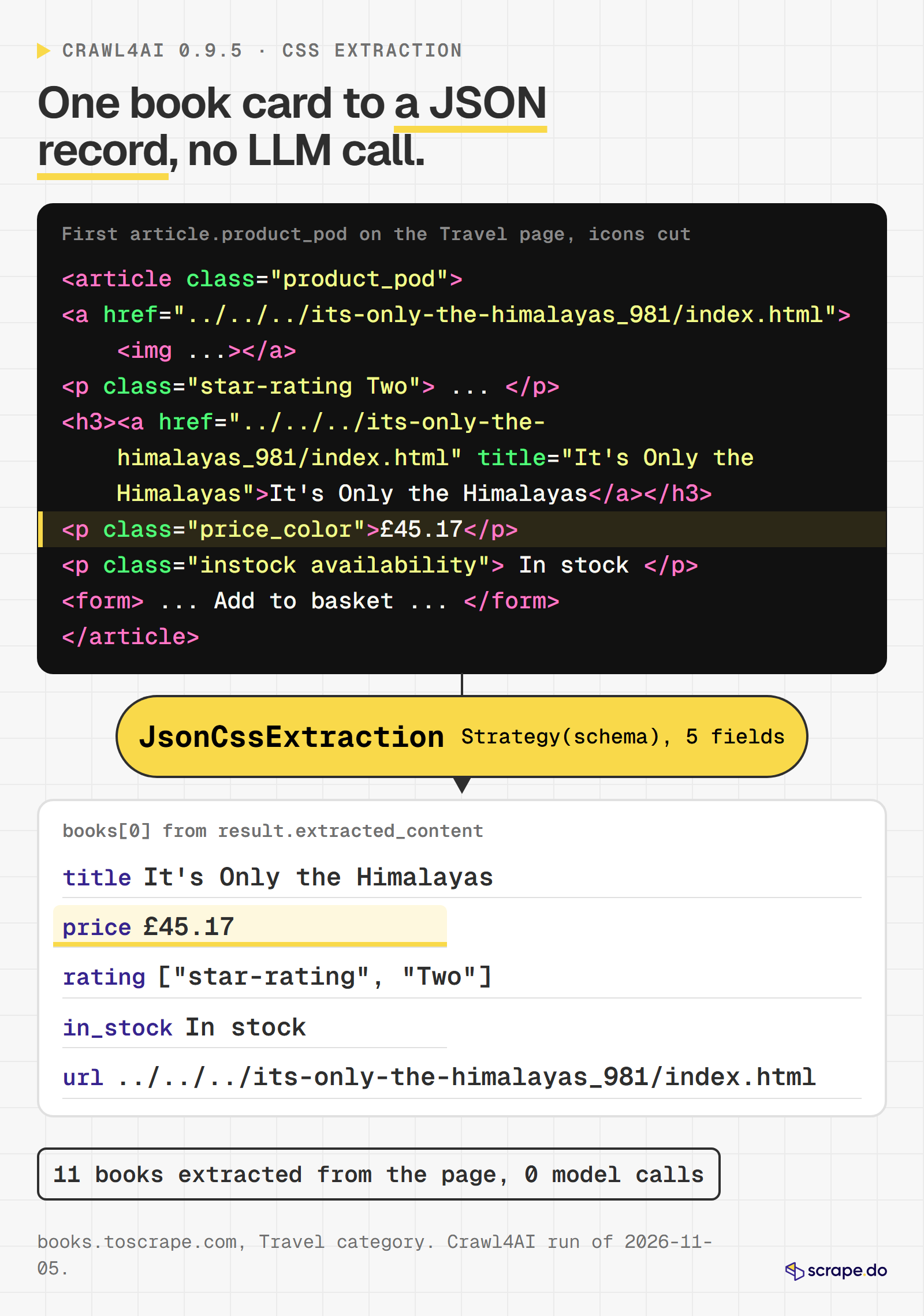
books extracted: 11
{
  "title": "It's Only the Himalayas",
  "price": "£45.17",
  "rating": [
    "star-rating",
    "Two"
  ],
  "in_stock": "In stock",
  "url": "../../../its-only-the-himalayas_981/index.html"
}
ratings: ['Two', 'Four', 'Three', 'Two', 'Three', 'Two', 'One', 'Four', 'One', 'Three', 'Five']
Eleven books, no model call. One quirk: a field with "type": "attribute", "attribute": "class" returns the class list rather than a string, so the star rating is the last item. The URLs stay relative, so join them with the page URL before you follow them.
LLMExtractionStrategy is the other option: you pass a Pydantic schema or an instruction, and an LLMConfig with any LiteLLM provider string, such as openai/gpt-4o-mini or a local ollama/... model. It handles pages with no stable selectors, and every page becomes a model call you pay for.
Deep Crawl a Small Site
A deep crawl starts from one URL and follows links under rules you set. BFSDeepCrawlStrategy goes level by level; max_pages caps the run; a FilterChain decides which links are worth following:
import asyncio
import time

from crawl4ai import AsyncWebCrawler, CacheMode, CrawlerRunConfig
from crawl4ai.deep_crawling import BFSDeepCrawlStrategy
from crawl4ai.deep_crawling.filters import FilterChain, URLPatternFilter

START_URL = "https://quotes.toscrape.com/"


async def main():
    strategy = BFSDeepCrawlStrategy(
        max_depth=2,
        max_pages=25,
        include_external=False,
        filter_chain=FilterChain([URLPatternFilter(patterns=["*/page/*", "*/tag/*"])]),
    )
config = CrawlerRunConfig(cache_mode=CacheMode.BYPASS, deep_crawl_strategy=strategy, stream=True) started = time.perf_counter()
pages = []
async with AsyncWebCrawler() as crawler:
async for result in await crawler.arun(START_URL, config=config):
depth = result.metadata.get("depth", 0)
pages.append((depth, result.url, len(result.markdown.raw_markdown)))
print(f"depth {depth} | {result.status_code} | {result.url}")
elapsed = time.perf_counter() - started
print(f"pages: {len(pages)} | seconds: {elapsed:.1f}")
print("markdown chars, total:", sum(size for _, _, size in pages))
asyncio.run(main())The output, trimmed to the first and last lines:
depth 0 | 200 | https://quotes.toscrape.com/
depth 1 | 200 | https://quotes.toscrape.com/tag/abilities/page/1/
depth 1 | 200 | https://quotes.toscrape.com/tag/adulthood/page/1/
depth 1 | 200 | https://quotes.toscrape.com/tag/be-yourself/page/1/
...
depth 1 | 200 | https://quotes.toscrape.com/tag/thinking/page/1/
depth 1 | 200 | https://quotes.toscrape.com/tag/value/page/1/
pages: 24 | seconds: 4.6
markdown chars, total: 54542
24 pages in 4.6 seconds, about 54,500 characters of Markdown in total. The budget ran out at depth 1: the homepage's 23 tag pages filled it, and the crawl never reached depth 2 or the /page/2/ link. If pagination matters more than breadth, narrow the filter to */page/* or switch to a scored strategy.
Version 0.9.5 fixed a budget bug here: BFS now counts the URLs already queued for the next level against max_pages, so max_pages=50 no longer fetches hundreds of pages. BestFirstCrawlingStrategy with a KeywordRelevanceScorer is the option when you want the most relevant pages first rather than the nearest ones. For the hand-built version, with robots.txt handling and rate limits, see our Python web crawler tutorial.
Running It as a Docker Server
Crawl4AI also ships as a REST server: the unclecode/crawl4ai image, port 11235, a /playground page for testing and MCP tools for agents. This setup follows the docs, pinned to 0.9.5; it was not part of our runs:
export CRAWL4AI_API_TOKEN="$(openssl rand -hex 32)"
docker run -d \
  -p 11235:11235 \
  --name crawl4ai \
  --shm-size=1g \
  -e CRAWL4AI_API_TOKEN="$CRAWL4AI_API_TOKEN" \
  unclecode/crawl4ai:0.9.5
curl http://localhost:11235/health
Pass the token with the explicit -e NAME="$VALUE" form. The docs warn that without a token the server binds to loopback inside the container, so the published port answers with "connection reset" while docker ps shows a healthy container.
Read the changelog before you expose it. Since 0.9.0 the server requires a token for every endpoint except /health, and it rejects request bodies that set js_code, proxy_config, magic, deep_crawl_strategy and a dozen other fields, because those used to be ways in.
Seven releases between June 1 and October 14, 2026 carried security fixes for the server, including a CVSS 9.8 sandbox escape in 0.8.7 and 14 advisories across 0.9.3, 0.9.4 and 0.9.5. Most of them concern a server that accepts URLs and options from other people. One in 0.9.5 reached the library too: Chromium launched with --ignore-certificate-errors, so ignore_https_errors=False did nothing. It works now, but the default is still True, so set it to False yourself if you want TLS checks.
Where Crawl4AI Gets Blocked
Everything so far ran against sites built for scraping practice. The real question is what happens on a site that does not want automated traffic.
We picked three public, logged-out pages, each behind a different anti-bot vendor, and confirmed the vendor with one plain request each:
| Target | Vendor | What a plain request got back (2026-11-05) |
|---|---|---|
| G2, Slack reviews | DataDome (behind Cloudflare) | 403, x-datadome: protected header, a datadome cookie, a captcha-delivery script |
| Zillow, Austin listings | HUMAN (PerimeterX) | 403, x-px-blocked: 1 header, a px-captcha block page |
| Indeed, Python developer jobs | Cloudflare | 403, server: cloudflare, a challenge-platform script |
Then each page went through Crawl4AI in three modes: the default browser, stealth (enable_stealth=True plus magic=True and wait_until="load"), and undetected (stealth plus UndetectedAdapter, which swaps Playwright for Patchright). Each combination ran three times on 2026-11-05, plus one headed run of the undetected mode, because the docs suggest headless=False for hard sites. All direct traffic left from a DigitalOcean IP in London, the kind of address a crawler gets on a cloud server. A home connection may do better.
A run counts as a success only when the Markdown contains text that the real page has ("Slack Reviews", "Austin TX", "Python Developer"). A 200 status is not enough, because challenge pages often return one.
The mode switch:
import asyncio
import time

from crawl4ai import AsyncWebCrawler, BrowserConfig, CacheMode, CrawlerRunConfig, UndetectedAdapter
from crawl4ai.async_crawler_strategy import AsyncPlaywrightCrawlerStrategy

# Public, logged-out pages. The marker is text that only the real page contains.
TARGETS = [
    ("g2 (DataDome)", "https://www.g2.com/products/slack/reviews", "Slack Reviews"),
    ("zillow (HUMAN/PerimeterX)", "https://www.zillow.com/austin-tx/", "Austin TX"),
    ("indeed (Cloudflare)", "https://www.indeed.com/q-python-developer-jobs.html", "Python Developer"),
]


def build_crawler(mode):
    if mode == "default":
        return AsyncWebCrawler(config=BrowserConfig())
    browser_config = BrowserConfig(enable_stealth=True)
    if mode == "stealth":
        return AsyncWebCrawler(config=browser_config)
    strategy = AsyncPlaywrightCrawlerStrategy(
        browser_config=browser_config, browser_adapter=UndetectedAdapter()
    )
    return AsyncWebCrawler(crawler_strategy=strategy, config=browser_config)
The crawl and the check:
async def crawl(name, url, marker, mode):
    extra = {} if mode == "default" else {"magic": True, "wait_until": "load"}
    config = CrawlerRunConfig(cache_mode=CacheMode.BYPASS, page_timeout=45000, **extra)
    started = time.perf_counter()
    async with build_crawler(mode) as crawler:
        result = await crawler.arun(url, config=config)
    seconds = time.perf_counter() - started
    markdown = result.markdown.raw_markdown if result.markdown else ""
    attempt = ((result.crawl_stats or {}).get("proxies_used") or [{}])[-1]
    print(
        f"{name} | {mode} | success={result.success} | status={result.status_code} | "
        f"blocked={attempt.get('blocked')} | reason={attempt.get('reason') or result.error_message} | "
        f"marker={marker in markdown} | md_chars={len(markdown)} | {seconds:.1f}s"
    )


async def main():
    for name, url, marker in TARGETS:
        for mode in ("default", "stealth", "undetected"):
            await crawl(name, url, marker, mode)


asyncio.run(main())
The results:
| Target | Default | Stealth | Undetected | Undetected, headed | What Crawl4AI reported |
|---|---|---|---|---|---|
| G2 (DataDome) | 0 of 3 | 0 of 3 | 0 of 3 | 0 of 1 | 403, "DataDome captcha" |
| Zillow (HUMAN) | 0 of 3 | 1 of 3 | 0 of 3 | 0 of 1 | 403, "PerimeterX block" |
| Indeed (Cloudflare) | 0 of 3 | 0 of 3 | 0 of 3 | 0 of 1 | 307 or 403, "Cloudflare JS challenge" |
One attempt in 30 got the real page: stealth mode on Zillow, in the third run, with 39,715 characters of listings. The same settings failed the two runs before it, so read it as a lucky pass, not a working configuration.
The detector did its job. Every block came back with success=False and the right vendor name, which beats a "successful" crawl full of challenge markup. Two details from the logs: Indeed's challenge arrives as a 307 redirect in two of the three modes, and the 1,352 to 1,777 characters of Markdown it produces are the challenge page. Every blocked crawl also printed a banner for Crawl4AI Cloud.
Crawl4AI's own docs describe the next step for a blocked page: rotate through better proxies, retry, and as a last resort call a fetch function you provide. That last hook is where an outside service plugs in. For the background on each vendor's checks, see how CAPTCHAs work and our Cloudflare bypass guide.
Routing Crawl4AI Through Scrape.do
Full disclosure: this is our blog and Scrape.do is our product. The same three pages, the same content check, the same day.
Crawl4AI gives you two places to put a scraping API: as the fallback fetcher or as the proxy.
As the Fallback Fetcher
fallback_fetch_function receives the URL and must return HTML. Crawl4AI calls it only after its own attempts come back blocked, then runs the returned HTML through the normal Markdown and extraction pipeline. The function below asks the Scrape.do API for the page with default settings, which were enough for all three targets:
import asyncio
import os
import time

import requests
from crawl4ai import AsyncWebCrawler, CacheMode, CrawlerRunConfig

TOKEN = os.getenv("SCRAPEDO_TOKEN", "<your_token>")

TARGETS = [
    ("g2", "https://www.g2.com/products/slack/reviews", "Slack Reviews"),
    ("zillow", "https://www.zillow.com/austin-tx/", "Austin TX"),
    ("indeed", "https://www.indeed.com/q-python-developer-jobs.html", "Python Developer"),
]


async def scrapedo_fetch(url: str) -> str:
    params = {"token": TOKEN, "url": url}
    response = await asyncio.to_thread(
        requests.get, "https://api.scrape.do/", params=params, timeout=120
    )
    response.raise_for_status()
    print(f"  scrape.do: {url} | credits={response.headers.get('Scrape.do-Request-Cost')}")
return response.textasync def main():
config = CrawlerRunConfig(cache_mode=CacheMode.BYPASS, fallback_fetch_function=scrapedo_fetch)
async with AsyncWebCrawler() as crawler:
for name, url, marker in TARGETS:
started = time.perf_counter()
result = await crawler.arun(url, config=config)
stats = result.crawl_stats or {}
markdown = result.markdown.raw_markdown if result.markdown else ""
print(
f"{name} | success={result.success} | resolved_by={stats.get('resolved_by')} | "
f"fallback_used={stats.get('fallback_fetch_used')} | marker={marker in markdown} | "
f"md_chars={len(markdown)} | {time.perf_counter() - started:.1f}s"
)
asyncio.run(main())The output:
  scrape.do: https://www.g2.com/products/slack/reviews | credits=25
g2 | success=True | resolved_by=fallback_fetch | fallback_used=True | marker=True | md_chars=42974 | 12.1s
  scrape.do: https://www.zillow.com/austin-tx/ | credits=1
zillow | success=True | resolved_by=fallback_fetch | fallback_used=True | marker=True | md_chars=10179 | 12.0s
  scrape.do: https://www.indeed.com/q-python-developer-jobs.html | credits=10
indeed | success=True | resolved_by=fallback_fetch | fallback_used=True | marker=True | md_chars=43344 | 10.8s
All three pages came back with the real content in all four runs. resolved_by=fallback_fetch confirms the order: Crawl4AI's own attempt was blocked first, then the fallback returned the page. The Scrape.do-Request-Cost header put G2 at 25 credits (a per-domain price), Zillow at 1 and Indeed at 10.
The blocked attempt still happens first, so each page also costs a failed browser load (1 to 4 seconds in the runs above). For a domain you already know blocks you, skip that step: fetch the HTML yourself and pass it to arun() as raw:<html>, and Crawl4AI runs only its Markdown and extraction steps.
One open bug to know about. In 0.9.5, CrawlerRunConfig.clone() drops fallback_fetch_function, and the deep crawl strategies clone the config for every batch. So a fallback that works with arun() is silently skipped inside a deep crawl (issue #2379, open on 2026-11-05). We reproduced it:
original config: fallback
config.clone(stream=True): None
Until it is fixed, call arun_many() on the URLs you discovered, or subclass CrawlerRunConfig so clone() copies the function over, as the issue suggests.
As the Proxy
Scrape.do's Proxy Mode takes your token as the proxy username and API parameters as the password. Two settings matter for a browser: customHeaders=true, so the browser's own cookies and user agent reach the site, and ignore_https_errors=True (the 0.9.5 default, set here on purpose), because Proxy Mode re-signs HTTPS traffic with the Scrape.do CA certificate:
import asyncio
import os
import sys
import time

from crawl4ai import AsyncWebCrawler, BrowserConfig, CacheMode, CrawlerRunConfig, ProxyConfig

TOKEN = os.getenv("SCRAPEDO_TOKEN", "<your_token>")
PROXY_PARAMS = sys.argv[1] if len(sys.argv) > 1 else "customHeaders=true"

TARGETS = [
    ("g2", "https://www.g2.com/products/slack/reviews", "Slack Reviews"),
    ("zillow", "https://www.zillow.com/austin-tx/", "Austin TX"),
    ("indeed", "https://www.indeed.com/q-python-developer-jobs.html", "Python Developer"),
]
The proxy goes on the run config, so each crawl can use a different proxy, or none:
async def main():
    proxy = ProxyConfig(server="http://pm.scrape.do:8080", username=TOKEN, password=PROXY_PARAMS)
    browser_config = BrowserConfig(ignore_https_errors=True, text_mode=True)
    config = CrawlerRunConfig(
        cache_mode=CacheMode.BYPASS,
        proxy_config=proxy,
        wait_until="load",
        page_timeout=60000,
        capture_network_requests=True,
    )
The loop counts every response the browser received and adds up the cost headers Scrape.do sent back:
    async with AsyncWebCrawler(config=browser_config) as crawler:
        for name, url, marker in TARGETS:
            started = time.perf_counter()
            result = await crawler.arun(url, config=config)
            markdown = result.markdown.raw_markdown if result.markdown else ""
            events = result.network_requests or []
            responses = [e for e in events if e.get("event_type") == "response"]
            credits = sum(int(e["headers"].get("scrape.do-request-cost", 0)) for e in responses)
            print(
                f"{name} | params={PROXY_PARAMS} | success={result.success} | status={result.status_code} | "
                f"marker={marker in markdown} | md_chars={len(markdown)} | responses={len(responses)} | "
                f"credits_in_headers={credits} | {time.perf_counter() - started:.1f}s"
            )


asyncio.run(main())
The output:
g2 | params=customHeaders=true | success=False | status=None | marker=False | md_chars=0 | responses=0 | credits_in_headers=0 | 60.2s
zillow | params=customHeaders=true | success=True | status=502 | marker=False | md_chars=386 | responses=1 | credits_in_headers=0 | 59.2s
indeed | params=customHeaders=true | success=True | status=200 | marker=True | md_chars=52653 | responses=128 | credits_in_headers=1271 | 49.3s
Indeed loaded in all three runs, with 119 to 128 responses per page and 1,181 to 1,271 credits on the meter. That is about 120 times the 10 credits the same page costs as one API call, and it took 45 to 49 seconds. G2 never finished loading within the 60-second timeout. Zillow returned a 502 twice and timed out once, and Crawl4AI marked the 502 as success=True with 386 characters of Markdown: one more reason to check the content, not the flag. A run with render=false in place of customHeaders=true changed nothing for G2 and Indeed.
A browser does not send one request per page. It sends one for the document and one for every script, stylesheet, API call and tracking pixel the page asks for, and through a proxy each of those is a separate billed request. text_mode=True drops images, which helps, but the count above is the real cost driver. If Proxy Mode throws 407 Proxy Authentication Required, the token is wrong; see what a 407 means. On these three targets, the fallback lane did the same job with one request per page.
When an API Is Simpler
If the goal is Markdown for a model, and the pages are protected, there is a shorter path: ask the API for Markdown directly. output=markdown converts any text/html response, so there is no browser to install, no Chromium to keep updated and one request per page:
import os
import time

import requests

TOKEN = os.getenv("SCRAPEDO_TOKEN", "<your_token>")

TARGETS = [
    ("g2", "https://www.g2.com/products/slack/reviews", "Slack Reviews"),
    ("zillow", "https://www.zillow.com/austin-tx/", "Austin TX"),
    ("indeed", "https://www.indeed.com/q-python-developer-jobs.html", "Python Developer"),
]


def fetch_markdown(url):
    params = {"token": TOKEN, "url": url, "output": "markdown"}
return requests.get("https://api.scrape.do/", params=params, timeout=120)for name, url, marker in TARGETS:
started = time.perf_counter()
response = fetch_markdown(url)
seconds = time.perf_counter() - started
print(
f"{name} | status={response.status_code} | "
f"credits={response.headers.get('Scrape.do-Request-Cost')} | "
f"marker={marker in response.text} | md_chars={len(response.text)} | {seconds:.1f}s"
)The output:
g2 | status=200 | credits=25 | marker=True | md_chars=45030 | 33.4s
zillow | status=200 | credits=1 | marker=True | md_chars=13405 | 12.3s
indeed | status=200 | credits=10 | marker=True | md_chars=44441 | 10.9s
Every page came back with the real content in all four runs, in 5 to 34 seconds. The Markdown is about the size Crawl4AI produced from the same HTML in the fallback lane (42,000 to 45,000 characters for G2 and Indeed in both lanes), so the trade is Crawl4AI's filters and extraction against one HTTP call. Zillow needed no residential proxy here: a plain request cost 1 credit, and the first run with super=true cost 10. Indeed billed 10 credits without super=true, which is why the docs tell you to trust the header over the price table.
All four lanes side by side:
| Lane (2026-11-05) | G2 | Zillow | Indeed | Requests per page | Credits per page |
|---|---|---|---|---|---|
| Crawl4AI alone, all modes | 0 of 10 | 1 of 10 | 0 of 10 | 1 browser load | 0 |
| Crawl4AI + Scrape.do as fallback (script 07) | 4 of 4 | 4 of 4 | 4 of 4 | 1 blocked load + 1 API call | 25 / 1 / 10 |
| Crawl4AI browser through Proxy Mode (script 08) | 0 of 3 | 0 of 3 | 3 of 3 | 119 to 128 | 1,181 to 1,271 (Indeed) |
Scrape.do API, output=markdown (script 06) |
4 of 4 | 4 of 4 | 4 of 4 | 1 | 25 / 1 / 10 |
Success means the page's own text was in the output. Crawl4AI alone counts 9 headless attempts and 1 headed attempt per site.
When Crawl4AI Is the Better Choice
The block matrix is one part of the picture. Crawl4AI wins on its own terms in plenty of cases:
- Unprotected and friendly sites. Docs sites, your own properties, public datasets, most blogs. A local browser costs nothing per page, and none of the runs above needed a proxy for the practice sites.
- You need control of the pipeline. Content filters, chunking, CSS or LLM extraction, deep crawl scoring, hooks, sessions and page interaction all run in your process, and you can read the source when something looks wrong.
- The data cannot leave your machine. Nothing goes to a third party unless you send it there, which matters for internal sites and regulated data.
- You already have HTML. Pass
raw:<html>or afile://path and Crawl4AI runs only the Markdown and extraction steps. - You want to pick the model. Any LiteLLM provider, including local ones, or none at all. If the pages feed a RAG pipeline, our LangChain scraping guide shows the loader side.
The API lane wins when the targets fight back, when you do not want to run and patch a browser fleet, and when you need geo-targeted residential IPs on demand. Hosted Markdown APIs are a third option; our Firecrawl alternatives list compares them.
Conclusion
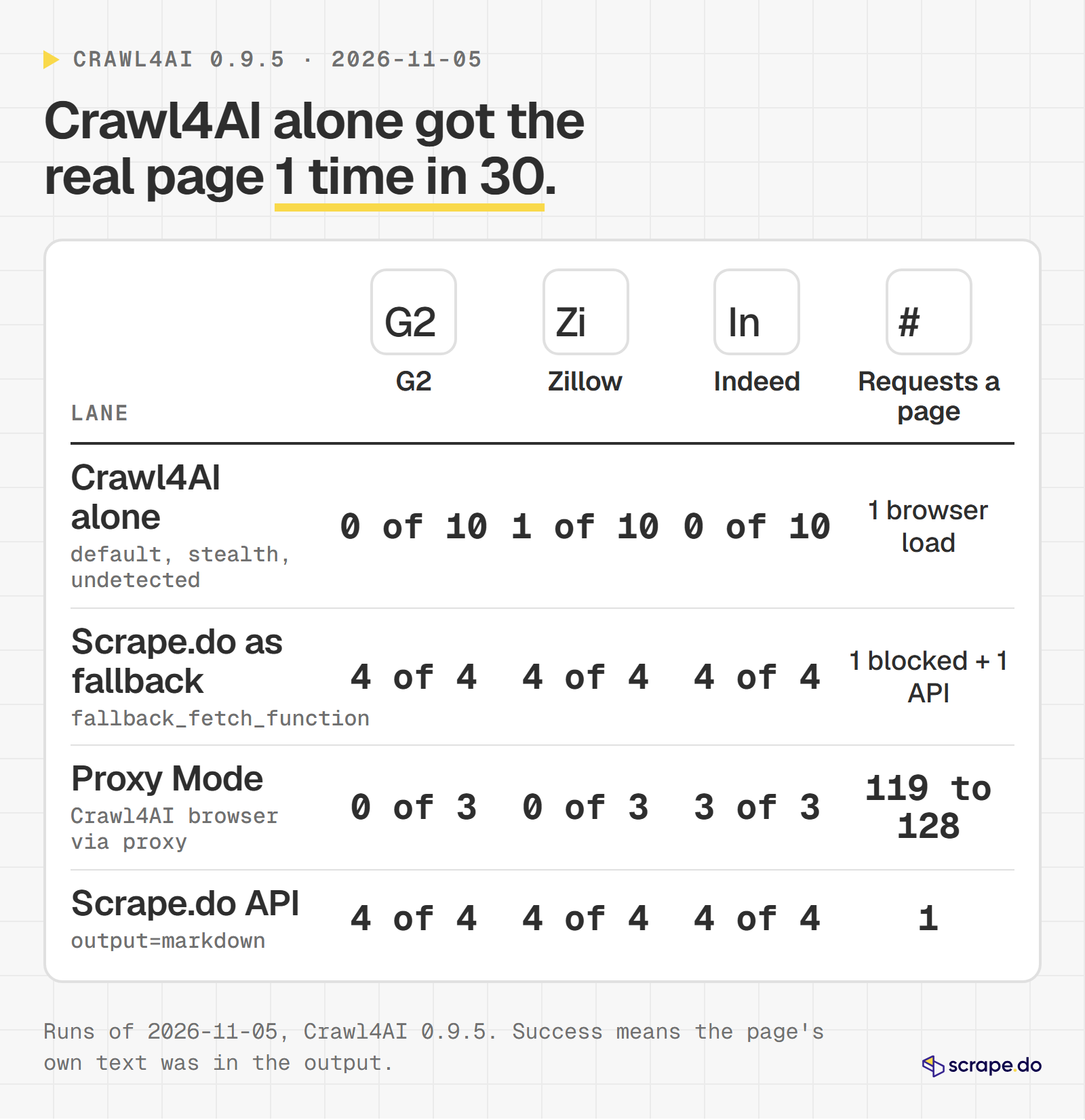
Crawl4AI 0.9.5 handled every practice site in these runs: Markdown with a content filter, JavaScript rendering, CSS extraction to JSON and a 24-page deep crawl. On the three protected sites it got the real page once in 30 attempts, and it reported each block correctly. Its fallback_fetch_function hook closed that gap with one API call per blocked page. When you only need Markdown from protected pages, output=markdown skips the browser altogether.
Get 1000 free credits and start scraping with Scrape.do
FAQ
Is Crawl4AI free?
Yes. The library is open source under the Apache-2.0 license, and running it locally costs nothing per page. You pay only for what you add: proxies, an LLM provider for LLM extraction, or the maintainers' hosted Crawl4AI Cloud, which advertises 1,000 free credits a month.
Does Crawl4AI need an OpenAI API key?
No. Crawling, Markdown generation, the Pruning and BM25 filters and CSS or XPath extraction all run without any key. A key is needed only for LLMExtractionStrategy or LLMContentFilter, and it can be for any LiteLLM provider, including a local Ollama model that needs none.
Can Crawl4AI bypass Cloudflare?
Not reliably, in our runs. On 2026-11-05, Crawl4AI 0.9.5 hit Cloudflare's JS challenge on Indeed in all 10 attempts, across default, stealth and undetected modes, from a cloud server IP. It does detect the block (success=False, "Cloudflare JS challenge"), and its fallback_fetch_function hook lets a scraping API fetch the page when that happens.
What is the difference between Crawl4AI and Firecrawl?
Crawl4AI is a library you run yourself (Apache-2.0): free, local, and as strong against anti-bot systems as the browser and proxies you give it. Firecrawl is a hosted API first, billed in credits per page, with an AGPL-3.0 core you can self-host. Both now sell a hosted Markdown API, so the real choice is "run the browser yourself or pay per page", not "open source or not".
How do I use a proxy with Crawl4AI?
Pass a ProxyConfig to CrawlerRunConfig(proxy_config=...) with the server, username and password. A list of ProxyConfig objects is tried in order on each retry round, and ProxyConfig.DIRECT in the list means "try without a proxy". For a rotating pool, RoundRobinProxyStrategy cycles through proxies loaded with ProxyConfig.from_env(). Our web scraping proxy guide covers which proxy type to put in that list.
Head of Marketing