Category:Scraping Use CasesView as Markdown
How to Scrape Amazon Reviews (Behind Login Too)

Software Engineer


If you are running market research, training an AI model on customer sentiment, or just looking for well-performing products to resell, Amazon's review data is invaluable.
But it isn't all in one place.
Featured reviews are embedded directly into the product page, while the full review history sits behind pagination and a login wall.
In this guide, we'll cover both.
Find full working code for scraping Amazon product data, reviews, and search results here ⚙ and here's more on how to scrape Amazon.
Scrape Featured Reviews
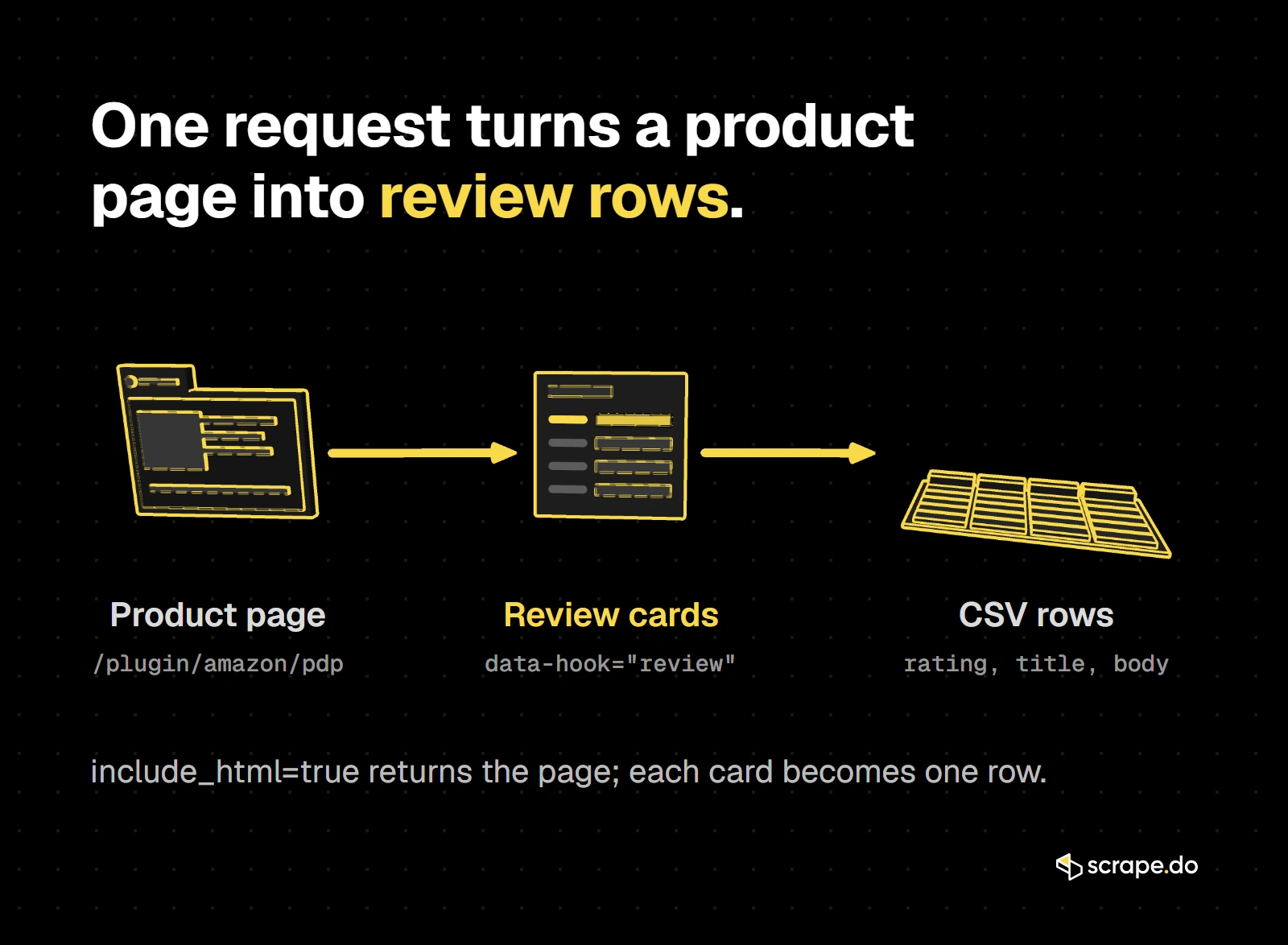
Update (October 2026): The Amazon Scraper API PDP endpoint no longer returns the featured reviews in its JSON. They are still on the product page, so we now ask the same endpoint for the page HTML with
include_html=trueand read the reviews out of it. It is still one request and one credit per product, and the JSON gives you the rating summary on top.
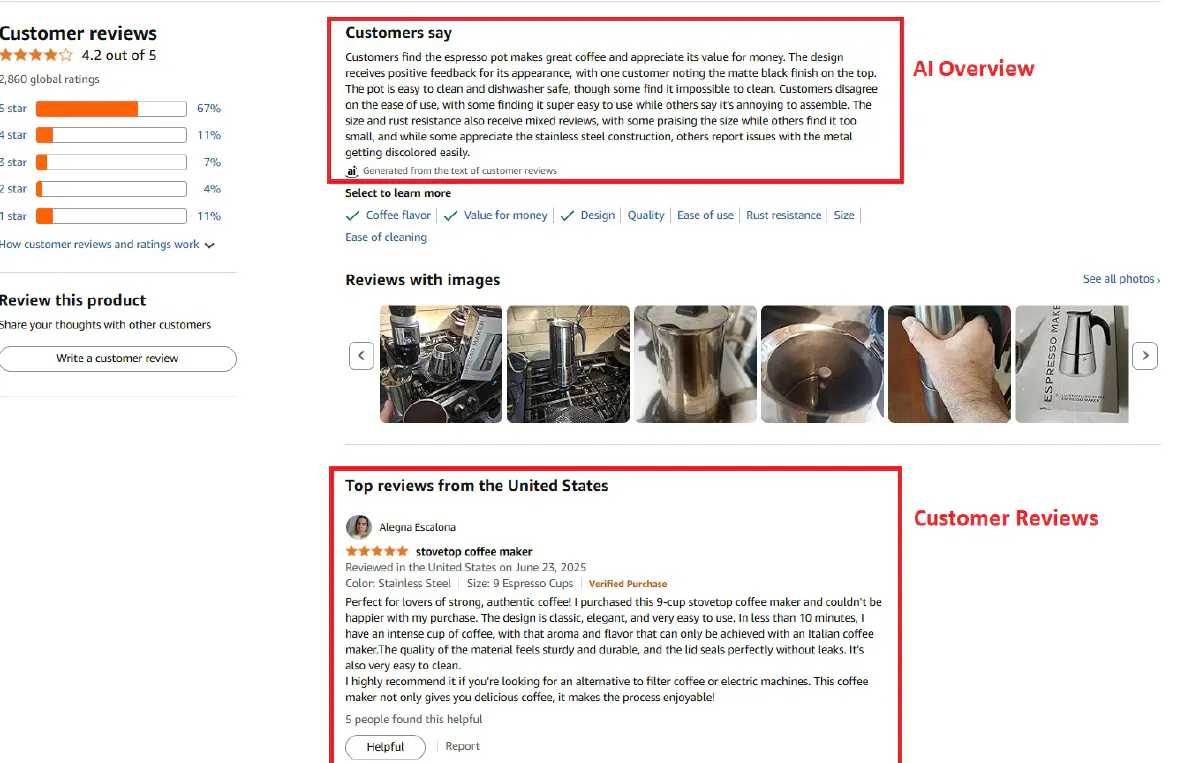
Amazon product pages display a handful of "Featured Reviews" that sum up how a product is landing with buyers.
These reviews usually represent a mix of positive, negative, and most helpful feedback, making them valuable for sentiment analysis, quality checks, or customer research.
In our October 2026 tests, every product page that carried them had exactly 13: 8 from the marketplace we requested and 5 from other countries.
That's enough for a quick read on a product, so let's pull them.
Prerequisites
We'll install two libraries, get our Scrape.do token, and build the request.
1. Install Required Libraries
We'll use requests for the HTTP call, BeautifulSoup to read the reviews out of the page HTML, and Python's built-in csv and re modules for the export and a bit of text cleanup.
pip install requests beautifulsoup42. Get Your Scrape.do Token
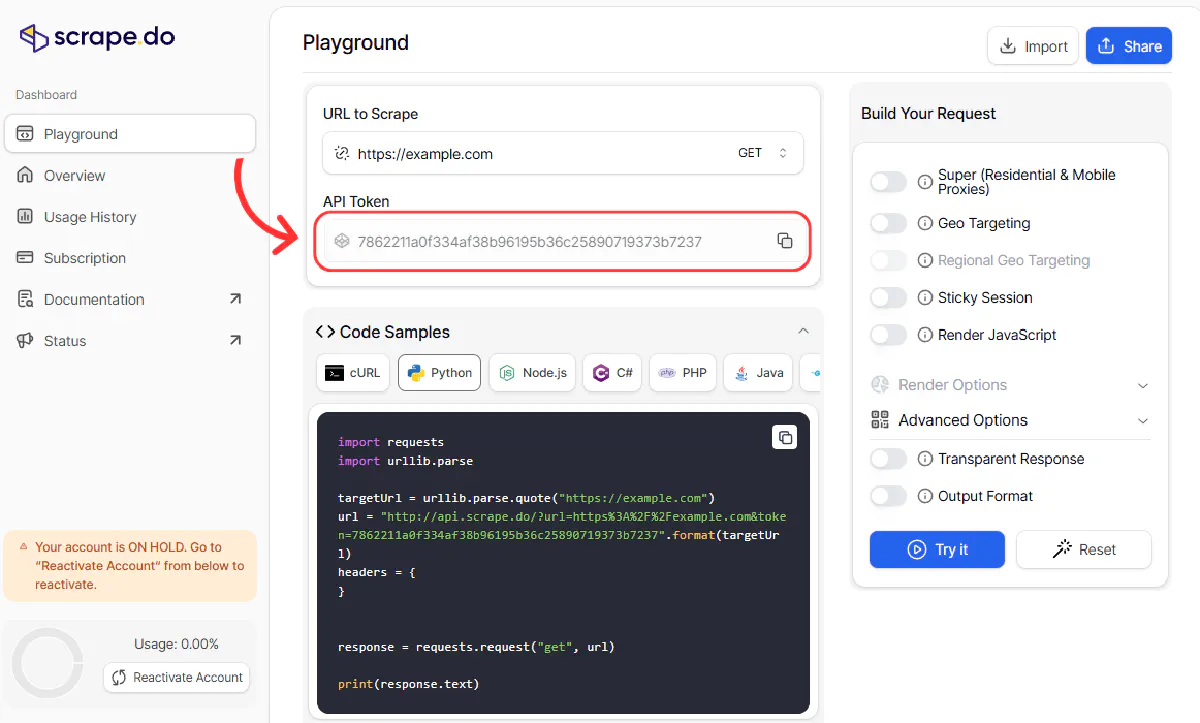
- Create a Scrape.do account for FREE.
- Open the Dashboard and copy your API Token from the top of the screen.
3. Build the Request
The ASIN is the 10-character ID in any product URL. For https://www.amazon.com/dp/B06X3SSTD8, the ASIN is B06X3SSTD8.
We'll send it to the PDP endpoint of Scrape.do's Amazon Scraper API with geocode=us for the US marketplace, a zipcode so price and availability resolve to a real location, and include_html=true so the response carries the page HTML next to the parsed product fields.
One thing to plan for: Amazon doesn't serve the review block every time. In 2 of our 9 test calls for the same product, the page came back with the rating summary but without a single review card. So the function checks for a review card and retries up to three times. Each attempt is a separate request and costs a credit.
import csv
import re

import requests
from bs4 import BeautifulSoup

token = "<your_token>"
asin = "B06X3SSTD8"
Then the request itself, with the retry:
def fetch_product(asin, attempts=3):
    """Get the product JSON plus its page HTML. Retry when the page came back without review cards."""
    for _ in range(attempts):
        data = requests.get(
            "https://api.scrape.do/plugin/amazon/pdp",
            params={
                "token": token,
                "asin": asin,
                "geocode": "us",
                "zipcode": "10001",
                "include_html": "true",
            },
            timeout=120,
        ).json()
        if 'data-hook="review"' in data.get("html", ""):
            break
    return data


data = fetch_product(asin)
print(f"{data['name'][:45]}: {data['rating']} from {data['total_ratings']} ratings")
soup = BeautifulSoup(data["html"], "html.parser")
The parsed fields already tell you how the product is doing overall:
Mixpresso 9 Cup Greca Moka Pot, Stainless Ste: 4.2 from 2645 ratingsExtract Review Data
Each featured review sits in an element with data-hook="review".
Don't target the CSS classes on these cards. They are hashed build names like _Y3Itd_single-review-title_2aKRE and change whenever Amazon ships a new frontend. The data-hook attributes name what each element is, and they are what we select on:
| Field | Where it comes from |
|---|---|
review_id |
the card's id attribute |
author |
.a-profile-name |
rating |
data-hook="review-star-rating" ("5 out of 5 stars") |
title |
data-hook="reviewTitle" |
country, date |
data-hook="review-date" ("Reviewed in the United States on August 4, 2026") |
verified_purchase |
whether a data-hook="avp-badge" exists |
helpful_votes |
data-hook="helpful-vote-statement" ("4 people found this helpful") |
body |
data-hook="reviewRichContentContainer" |
For the body, we take the rich content container instead of the reviewText element around it. That outer element also holds Amazon's hidden screen-reader strings ("Brief content visible, double tap to read full content."), which would end up at the start of every review.
def text(el):
    return el.get_text(" ", strip=True) if el else ""


def parse_reviews(soup, asin):
    reviews = []
    for card in soup.select('[data-hook="review"]'):
        stars = text(card.select_one('[data-hook="review-star-rating"] .a-icon-alt'))
        helpful = text(card.select_one('[data-hook="helpful-vote-statement"]'))
        votes = re.match(r"(One|[\d,]+) (?:person|people) found this helpful", helpful)
        date_line = text(card.select_one('[data-hook="review-date"]'))

        reviews.append({
            "asin": asin,
            "review_id": card.get("id", ""),
            "author": text(card.select_one(".a-profile-name")),
            "rating": float(stars.split(" out of")[0]) if stars else None,
            "title": text(card.select_one('[data-hook="reviewTitle"]')),
            "country": re.sub(r"^Reviewed in (the )?| on .*$", "", date_line),
            "date": date_line.split(" on ")[-1],
            "verified_purchase": card.select_one('[data-hook="avp-badge"]') is not None,
            "helpful_votes": (1 if votes.group(1) == "One" else int(votes.group(1).replace(",", ""))) if votes else 0,
            "body": text(card.select_one('[data-hook="reviewRichContentContainer"]')),
        })
    return reviews
Run it on the page we fetched:
reviews = parse_reviews(soup, asin)
print(f"{len(reviews)} featured reviews, {sum(r['country'] == 'United States' for r in reviews)} from the US")
for r in reviews[:3]:
    print(f"{r['rating']:.0f}/5  {r['country']:<14} {r['title'][:44]}")
Here's what that printed for the moka pot:
13 featured reviews, 8 from the US
5/5  United States  Easy to use and nice .
5/5  United States  Love love love
5/5  United States  Quick morning expression coffee
The country field matters more than it looks. Five of the 13 reviews come from other marketplaces (the UAE, Australia and India for this product), so filter on it if your analysis should only cover US buyers.
Get the Star Breakdown
Thirteen reviews are a sample. The star histogram on the same page covers every rating the product has, and Amazon writes each row's share into an aria-label such as "69 percent of reviews have 5 stars".
It was present in every one of our calls, including the ones that came back without review cards:
def parse_breakdown(soup):
    """Star breakdown from the histogram, e.g. {5: 69, 4: 11, 3: 6, 2: 3, 1: 11} (percent)."""
    breakdown = {}
    for row in soup.select("#histogramTable [aria-label]"):
        m = re.match(r"(\d+) percent of reviews have (\d) stars?", row["aria-label"])
        if m:
            breakdown[int(m.group(2))] = int(m.group(1))
    return breakdown


print(parse_breakdown(soup)){5: 69, 4: 11, 3: 6, 2: 3, 1: 11}We select any element with an aria-label rather than only links, because a star level with 0% is rendered without a link. Selecting only a tags silently drops it.
Export Reviews to CSV
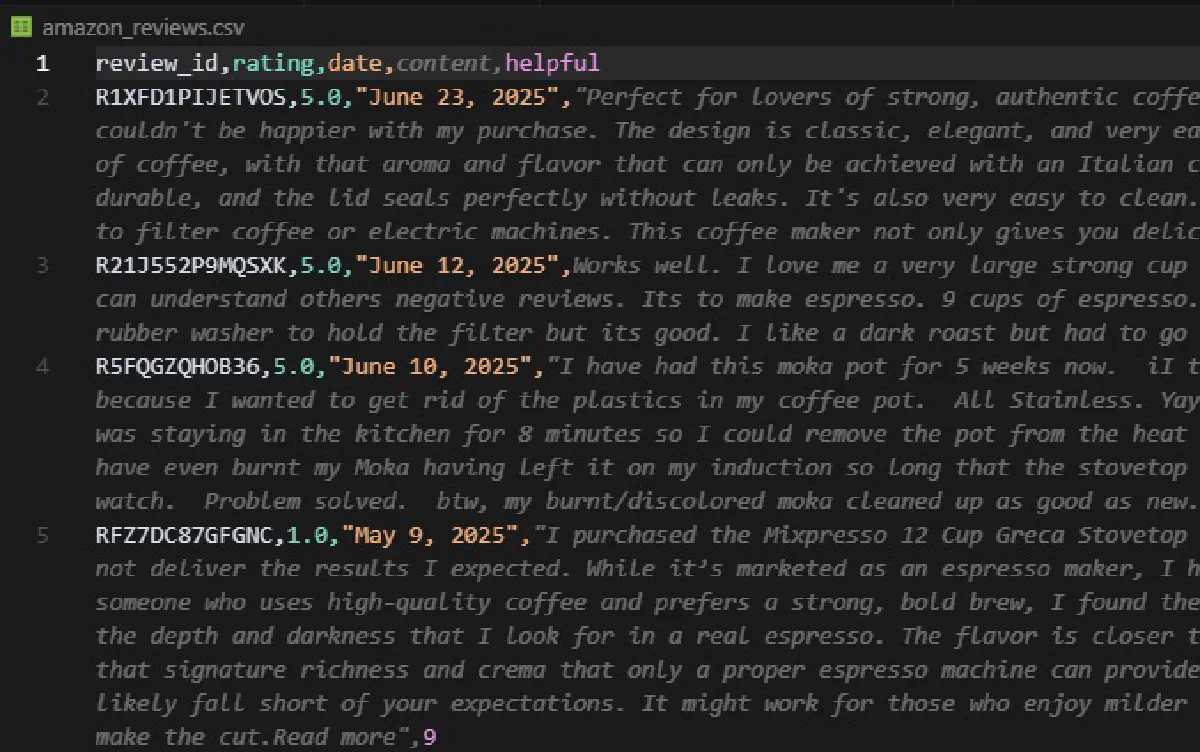
We can export the reviews to a CSV for easier storage and analysis. csv.DictWriter takes the field names straight from our dictionaries:
with open("amazon_reviews.csv", "w", newline="", encoding="utf-8") as f:
    writer = csv.DictWriter(f, fieldnames=reviews[0].keys())
    writer.writeheader()
    writer.writerows(reviews)

print("Reviews saved to amazon_reviews.csv")
This creates amazon_reviews.csv in your working directory with one row per review and ten columns: ASIN, review ID, author, rating, title, country, date, verified purchase, helpful votes, and the full review body.
Keep in mind that the featured set is a sample Amazon picks, not the product's full review history. Pair it with the star breakdown and you have a decent read on how a product is landing with buyers.
Scrape Reviews for Many Products
One product is a snapshot. Market research usually needs a list of them, and the functions above already take the ASIN as an argument, so scaling up is a loop:
asins = ["B06X3SSTD8", "B0BSHF7WHW"]
all_reviews = []

for asin in asins:
    data = fetch_product(asin)
    soup = BeautifulSoup(data["html"], "html.parser")
    reviews = parse_reviews(soup, asin)
    all_reviews.extend(reviews)
    print(f"{asin} {data['name'][:45]}: {data['rating']} from {data['total_ratings']} ratings")
    print(f"  breakdown: {parse_breakdown(soup)}")
    print(f"  {len(reviews)} featured reviews, {sum(r['country'] == 'United States' for r in reviews)} from the US")

with open("amazon_reviews.csv", "w", newline="", encoding="utf-8") as f:
    writer = csv.DictWriter(f, fieldnames=all_reviews[0].keys())
    writer.writeheader()
    writer.writerows(all_reviews)

print(f"Saved {len(all_reviews)} reviews to amazon_reviews.csv")B06X3SSTD8 Mixpresso 9 Cup Greca Moka Pot, Stainless Ste: 4.2 from 2645 ratings
breakdown: {5: 69, 4: 11, 3: 6, 2: 3, 1: 11}
13 featured reviews, 8 from the US
B0BSHF7WHW Apple 2023 MacBook Pro Laptop with Apple M2 P: 4.7 from 384 ratings
breakdown: {5: 88, 4: 6, 3: 3, 2: 0, 1: 3}
13 featured reviews, 8 from the US
Saved 26 reviews to amazon_reviews.csvThe asin column keeps every row tied to its product, so one CSV holds the whole list.
Each product costs one credit, plus one for every retry. For hundreds or thousands of ASINs, the Async API runs the same amazon/pdp plugin as batch jobs of up to 1,000 tasks each, so you don't have to manage the loop and its timeouts yourself.
What You Can Get Without Logging In
Before going further, it helps to know where the public data stops. We checked each source on US product pages in October 2026:
| Data | Where it comes from | Logged out |
|---|---|---|
| Average rating and total ratings | PDP JSON (rating, total_ratings) |
Yes |
| Star breakdown, % per star | product page HTML | Yes |
| Featured reviews | product page HTML | Yes, 13 per product (8 local, 5 from other countries) |
| Full review history, star filters, sorting | /product-reviews/{ASIN}/ and /portal/customer-reviews/{ASIN}/ |
No, both return Amazon's Sign-in page |
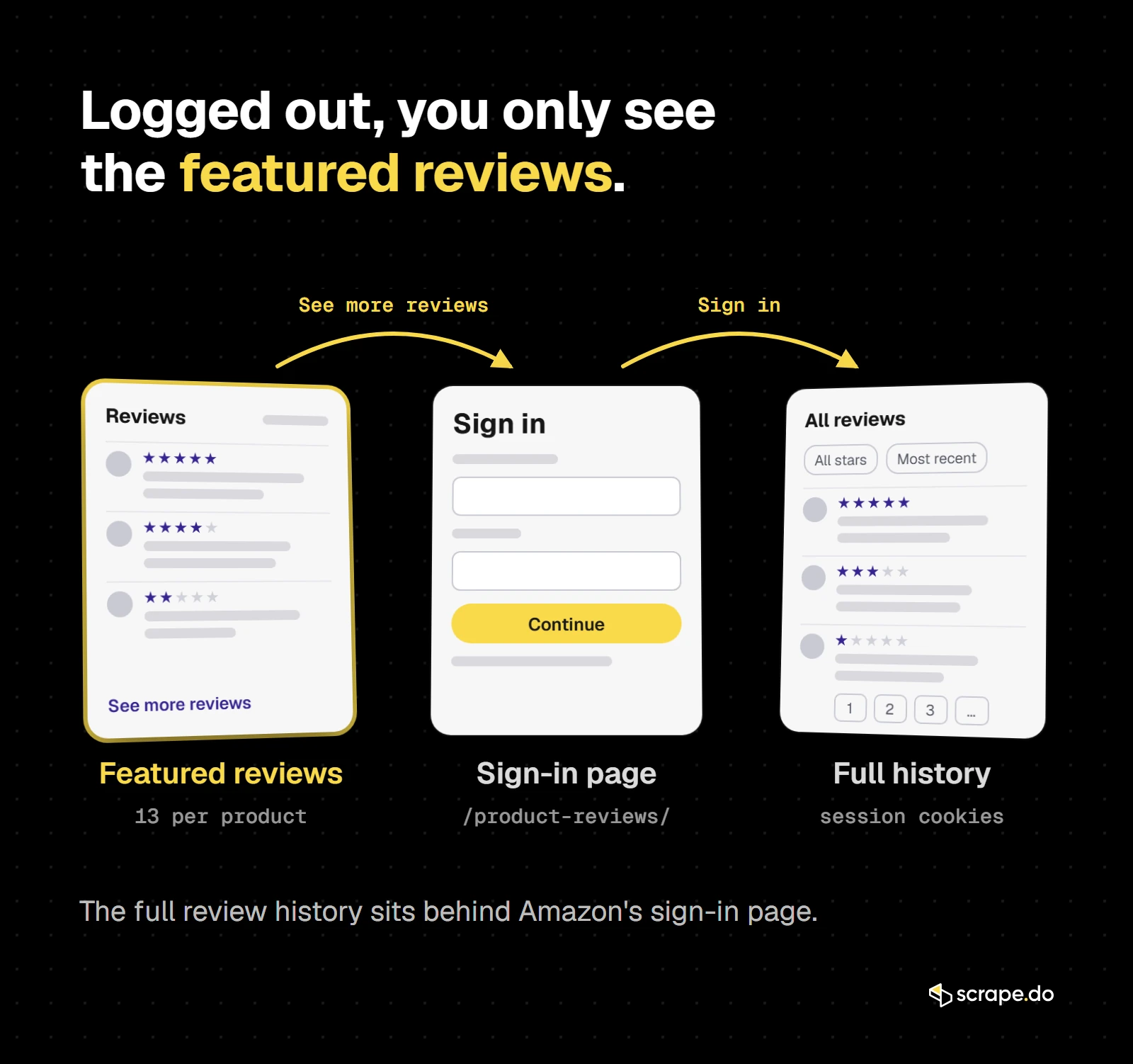
For most research, the first three rows are what you need. The last row is where the login wall starts.
Scrape All Reviews Behind Login
Warning: Before we dive into the code, there's something you need to read carefully.
Scraping Amazon while logged in is not the same as scraping public product pages.
If you log into your Amazon account and then scrape data:
- You are bound by Amazon's Terms of Service: these explicitly prohibit the use of data mining tools, robots, or data gathering and extraction tools.
- Data behind a login wall may not be considered public data, which means scraping and re-using it can be illegal in many countries.
Doing this at scale can lead to:
- Permanent account bans (losing access to your purchases, history, and Prime membership)
- Legal action from Amazon
We do not endorse or recommend scraping logged-in data at scale.
What changed (checked October 2026): Logged out, both review page URLs, the classic
/product-reviews/<ASIN>/and the newer/portal/customer-reviews/<ASIN>/that product pages now link to, return Amazon's Sign-in page. ThepageNumberloop below only works with valid session cookies. Logged in, Amazon caps how much of the full history it serves (first noted in May 2026). For most use cases the featured reviews and star breakdown from the first method are enough. Reach for the logged-in method only when you specifically need more depth for a product you own or purchased.
That said, if you want to scrape review data for personal use without reutilizing it, for example, researching a product you purchased or tracking reviews of your own listings, we'll walk you through how to do it safely:
Collecting Necessary Cookies
To fetch Amazon's full review history, you'll need a handful of your own session cookies from Chrome DevTools.
These prove you're logged in and let Amazon serve you the complete reviews data.
Open the reviews page for your target product while signed in, then right-click and choose Inspect. In the DevTools panel, switch to the Application tab and look under Storage → Cookies for https://us.amazon.com (or whichever Amazon domain matches your geoCode).
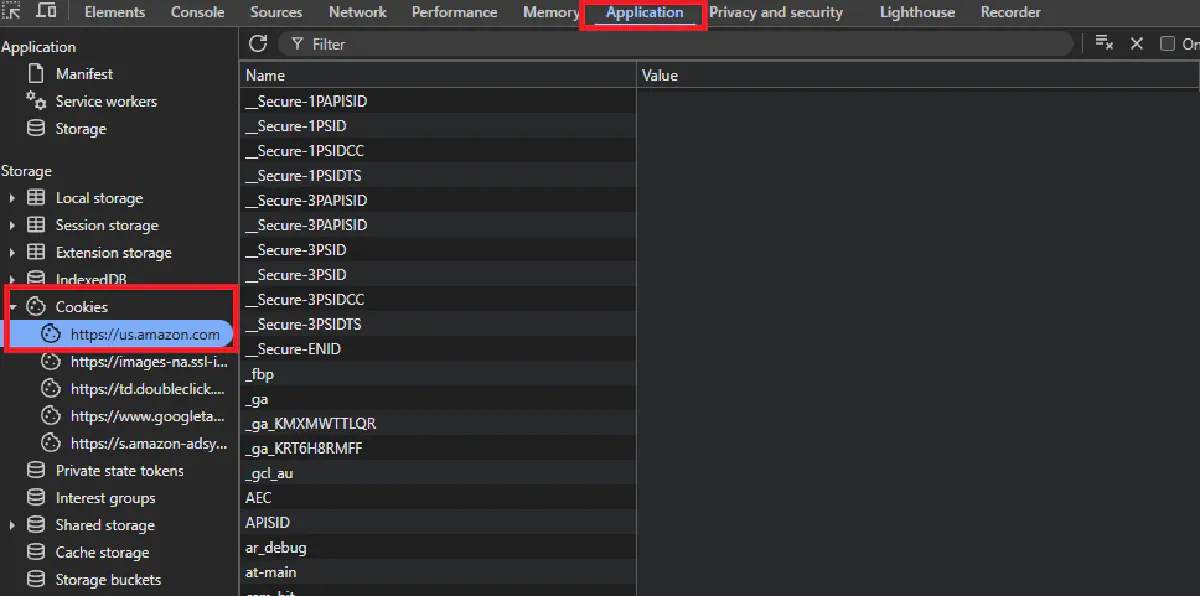
Here, locate the cookies named at-main, sess-at-main, session-id, session-id-time, session-token, ubid-main, and x-main.
Copy their Value fields exactly, without quotes or spaces, and join them into a single string separated by semicolons and a space. The final string should look like:
at-main=...; sess-at-main=...; session-id=...; session-id-time=...; session-token=...; ubid-main=...; x-main=...Make sure the region in the cookie domain matches the one you'll scrape; a mismatch will return a login page instead of reviews, and expired cookies will need to be refreshed before they work again.
Injecting Cookies into Your Request
Once you have your cookie string, you can pass it to Scrape.do using the setCookies parameter.
This tells Amazon's servers that your scraper is already logged in with your account, so they return the full reviews page instead of a limited public version.
Before sending, URL-encode the cookie string so it can safely travel inside the request URL. Python's urllib.parse.quote handles this for us.
Then, build the Scrape.do API request with your token, the target reviews page URL, your geoCode, and the encoded cookies.
import requests
import urllib.parse

token = "<your_token>"

encodedCookies = urllib.parse.quote(
    "at-main=YOUR_AT_MAIN_VALUE; "
    "sess-at-main=YOUR_SESS_AT_MAIN_VALUE; "
    "session-id=YOUR_SESSION_ID; "
    "session-id-time=YOUR_SESSION_ID_TIME; "
    "session-token=YOUR_SESSION_TOKEN; "
    "ubid-main=YOUR_UBID_MAIN; "
    "x-main=YOUR_X_MAIN_VALUE; "
)

target_url = "https://us.amazon.com/product-reviews/B06X3SSTD8/"
targetUrl = urllib.parse.quote(target_url, safe="")

api_url = (
    f"https://api.scrape.do/?token={token}"
    f"&url={targetUrl}"
    f"&geoCode=US"
    f"&setCookies={encodedCookies}"
)
api_url contains everything needed to make an authenticated request and pull reviews that are normally hidden behind the login wall.
Taking a Full Page Screenshot & More
Let's now add a few extra parameters, so we can have Scrape.do render the page in a headless browser, capture a full-page screenshot, and send back the results as JSON.
This will be useful for confirming that the cookies worked and that we're seeing the complete logged-in review list before parsing.
We enable rendering with render=true, request a full screenshot with fullScreenShot=true, and choose returnJSON=true so the HTML, screenshots, and other data come in a structured JSON response.
The screenshot is returned as a Base64-encoded string, which we can decode and save locally, the full code looks like this with these added:
import requests
import urllib.parse
import base64
import json

token = "<your_token>"

encodedCookies = urllib.parse.quote(
    "at-main=YOUR_AT_MAIN_VALUE; "
    "sess-at-main=YOUR_SESS_AT_MAIN_VALUE; "
    "session-id=YOUR_SESSION_ID; "
    "session-id-time=YOUR_SESSION_ID_TIME; "
    "session-token=YOUR_SESSION_TOKEN; "
    "ubid-main=YOUR_UBID_MAIN; "
    "x-main=YOUR_X_MAIN_VALUE; "
)

# Target an authenticated page to verify login
target_url = "https://us.amazon.com/product-reviews/B06X3SSTD8/"

targetUrl = urllib.parse.quote(target_url, safe="")

url = f"https://api.scrape.do/?token={token}&url={targetUrl}&geoCode=US&setCookies={encodedCookies}&fullScreenShot=true&render=true&returnJSON=true"

resp = requests.get(url, timeout=60)

json_map = json.loads(resp.text)
image_b64 = json_map["screenShots"][0]["image"]
image_bytes = base64.b64decode(image_b64)
file_path = "amazon_screenshot.png"
with open(file_path, "wb") as file:
    file.write(image_bytes)

print(f"Full screenshot saved as {file_path}")
If all works, you should have a clear view of the reviews page with your own account logged in.
To extract the reviews while logged in, drop the
render,returnJSONandfullScreenShotparameters and start from theparse_reviews()function in the first section. The review page has its own layout, so confirm in DevTools that its cards still carry the samedata-hookattributes before you rely on them. To loop through the pages, add&pageNumber=2to the end of the target URL and increase the page number until no more reviews come back.One parsing note: helpful-vote counts are shown on only some reviews, so a value of 0 means "not shown" rather than "zero votes."
Next Steps
Featured reviews and the star breakdown are easy to scrape for a quick snapshot, while logged-in scraping unlocks more of the review history but comes with higher risk and strict legal limits. We only suggest this for personal use.
But you can't just pick random products to scrape reviews from. You need a source of product ASINs first.
To build your product list, you can either scrape Amazon search results for a specific keyword or category, or scrape Amazon best sellers to get the top-performing products in any category. Both methods give you ASINs you can then feed into your review scraper.
If you're evaluating different tools for Amazon scraping, check out our comparison of the best Amazon scraper APIs to find the right solution for your needs.
If you run your own browser setup instead, expect Amazon's one-click "Continue shopping" challenge. Here is how to bypass Amazon CAPTCHA with each of the main approaches.
Scrape.do handles the heavy lifting by providing proxies, geo-targeting, rendering, and session management. You can focus on extracting the data you need.
Get 1000 free credits and start scraping →
FAQ
Can you view Amazon reviews without logging in?
Only a sample. Logged out, a product page shows 13 featured reviews (in our tests, 8 from the marketplace you are on and 5 from other countries), the average rating, the total number of ratings, and the star breakdown.
The full review pages, /product-reviews/ and the newer /portal/customer-reviews/, send logged-out visitors to the Sign-in page. Everything in the first method of this guide is public product page data; the full history is not available unless you log in.
Is there a free Amazon reviews scraper?
The code above is free to use, and Scrape.do's free plan includes 1,000 credits. Each product page request costs 1 credit, so the free credits cover the featured reviews and star breakdown of up to 1,000 products, a little fewer if some requests need a retry.
Is scraping Amazon reviews allowed by terms of service?
No. Amazon's Terms of Service explicitly prohibit "the use of data mining, robots, or similar data gathering and extraction tools."
That said, scraping public data like product pages and search results sits in a legal gray area. Since you never agreed to the ToS (you didn't log in), the enforceability of those terms is questionable in many jurisdictions.
But scraping reviews behind a login is different. You've actively agreed to the ToS by creating an account, and the data isn't publicly accessible. Doing this commercially or at scale can result in serious backlash, including account bans, legal threats, or worse.
Our recommendation: stick to featured reviews on public product pages for any commercial use.
Software Engineer








