Category:Scraping Use CasesView as Markdown
Scraping Etsy Product Data, Categories, and Reviews with Python

Software Engineer


Etsy is the #1 website for selling arts and crafts with millions of unique handmade and vintage products.
But scraping it is harder than your average e-com platform.
Etsy sits behind DataDome's bot protection, blocks most proxy services instantly, and geo-restricts data based on your IP location. Most scrapers fail before they can pull a single product listing.
In this guide, we'll bypass those obstacles and scrape product details from Etsy using Python and Scrape.do.
Find the complete working code on GitHub ⚙
Why Is Scraping Etsy Difficult?
Etsy doesn't make it easy to extract data programmatically.
Between heavy bot detection and IP-based filtering, you'll need more than basic requests and free proxies to pull product information at scale.
DataDome Protection
Etsy is protected by DataDome, one of the most aggressive anti-bot systems available.
They're proud of it too; Etsy even has a public success story on DataDome's site highlighting how they block unwanted traffic and reduce computing costs.
DataDome analyzes your TLS fingerprint, browser behavior, mouse movements, and request patterns. If anything looks automated, you're blocked instantly with a challenge page or a hard 403.
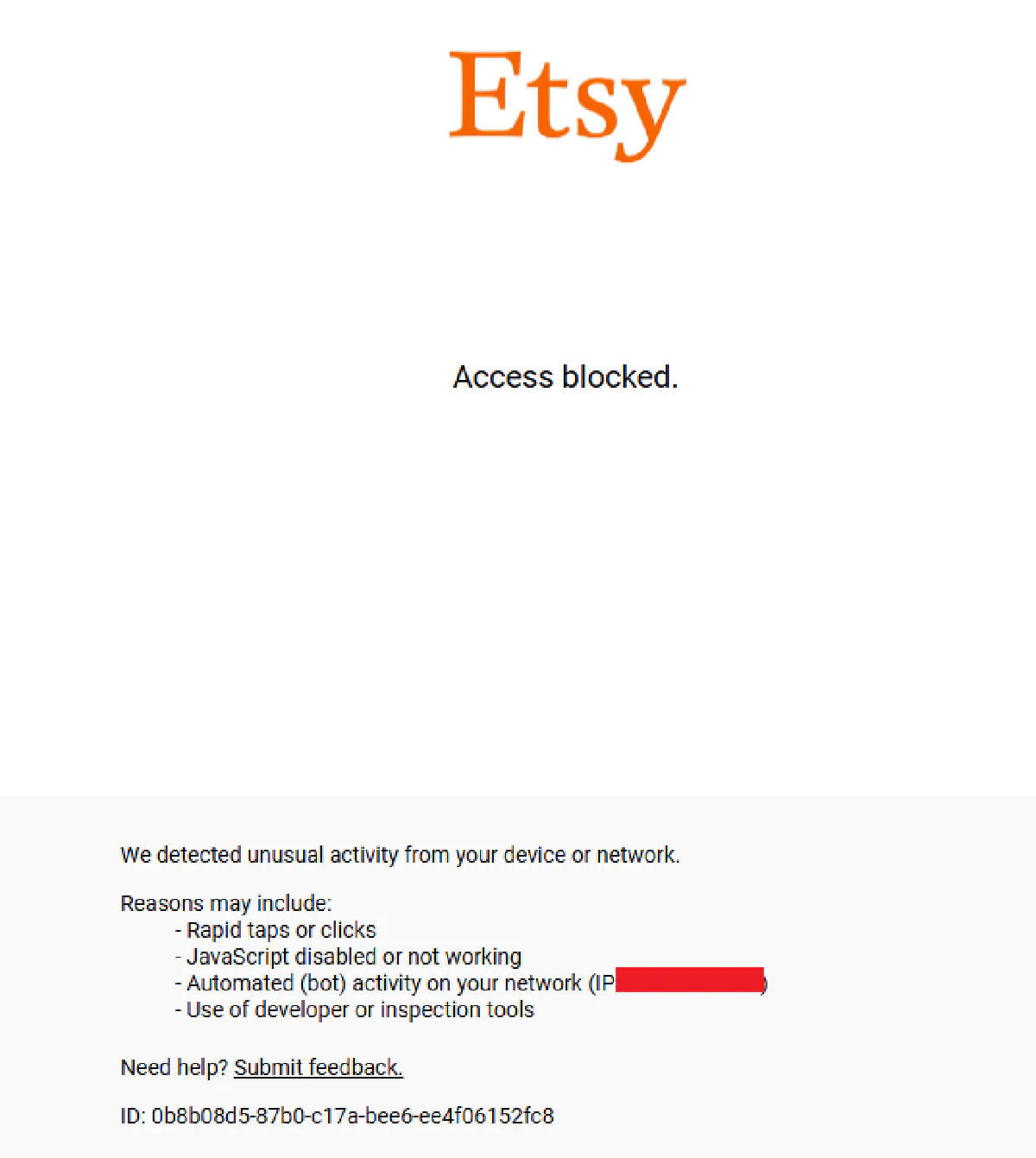
This means simple Python requests won't work, and most headless browser setups get flagged within seconds.
Basic Proxies Provide Limited Access
Free or low-quality proxies aren't completely blocked by Etsy, but they won't get you far either.
You can usually access the homepage and browse category pages with datacenter IPs, but the moment you try to scrape search results tailored to a specific country or load product pages with pricing and shipping details, you'll hit a wall.
For reliable access to product data, reviews, and localized pricing, you need high-quality residential proxies that mimic real user traffic from the target region.
How Scrape.do Bypasses Etsy
Scrape.do handles Etsy's defenses by:
- Rotating residential proxies from real ISPs to avoid DataDome fingerprinting
- Spoofing TLS fingerprints to pass bot detection checks
- Managing sessions automatically so requests appear as organic browsing behavior
- Geo-targeting requests with
geoCodeto access location-specific pricing and availability
This means you send a single API request and get clean HTML back, without worrying about blocks or proxy rotation.
Scrape Product Data from Etsy Product Pages
We'll scrape this birth flower ring listing and extract all the product details embedded in its structured data.
Note: This guide originally used a wooden sign listing (
/listing/468670752/) that has since been removed from Etsy, so its page now returns "This item is unavailable" with no product data. We've replaced it with the active birth flower ring listing above. If any listing you test goes offline, just swap in another live product URL and the same code works.
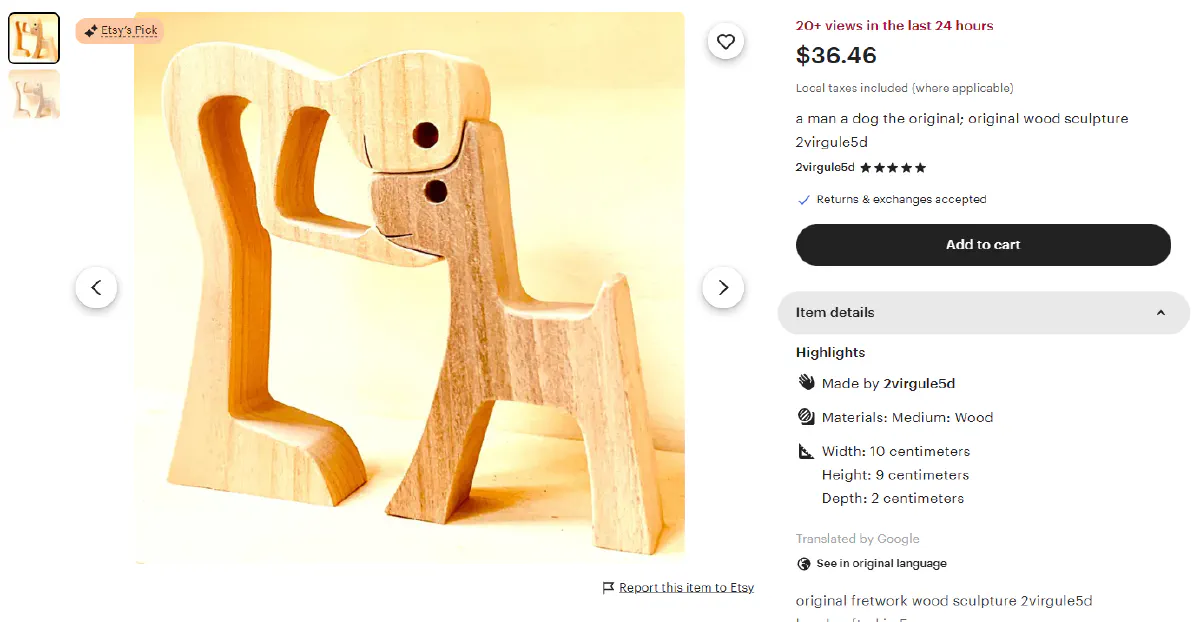
Etsy embeds full product information inside JSON-LD schema blocks in the HTML. This makes scraping much cleaner than parsing individual DOM elements, because the data is already structured and ready to parse.
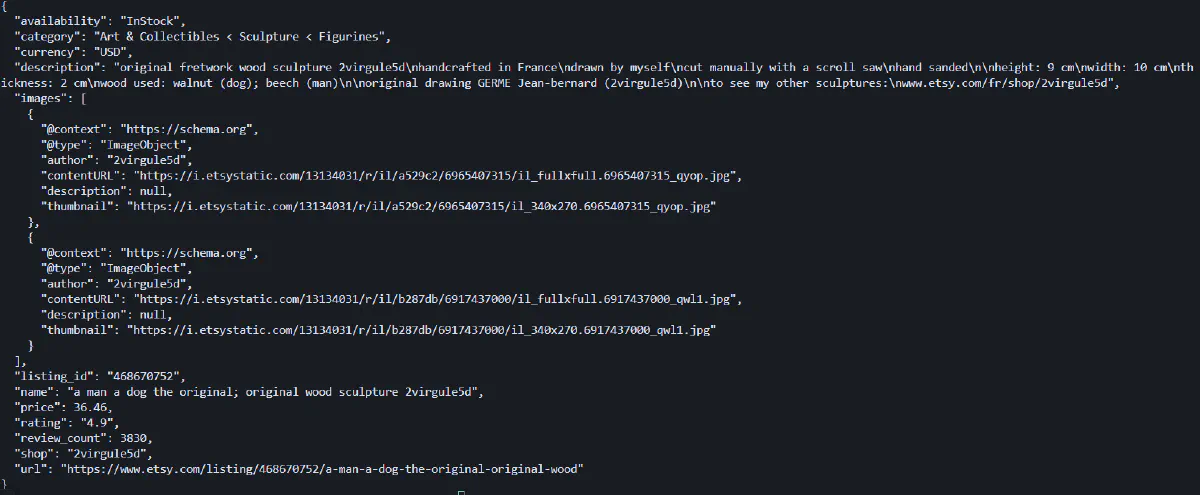
We'll extract:
- Product name and description
- Shop/brand name
- Category
- Images
- Price and currency
- Availability
- Rating and review count
Setup and Prerequisites
Before we start scraping, we need to install the required libraries and set up our Scrape.do API credentials.
Install the necessary Python packages:
pip install requests beautifulsoup4These libraries handle HTTP requests and HTML parsing.
Next, sign up at Scrape.do to get your API token. You'll get 1000 free credits every month to start scraping immediately.
Once you're logged in, copy your token from the top of the dashboard:
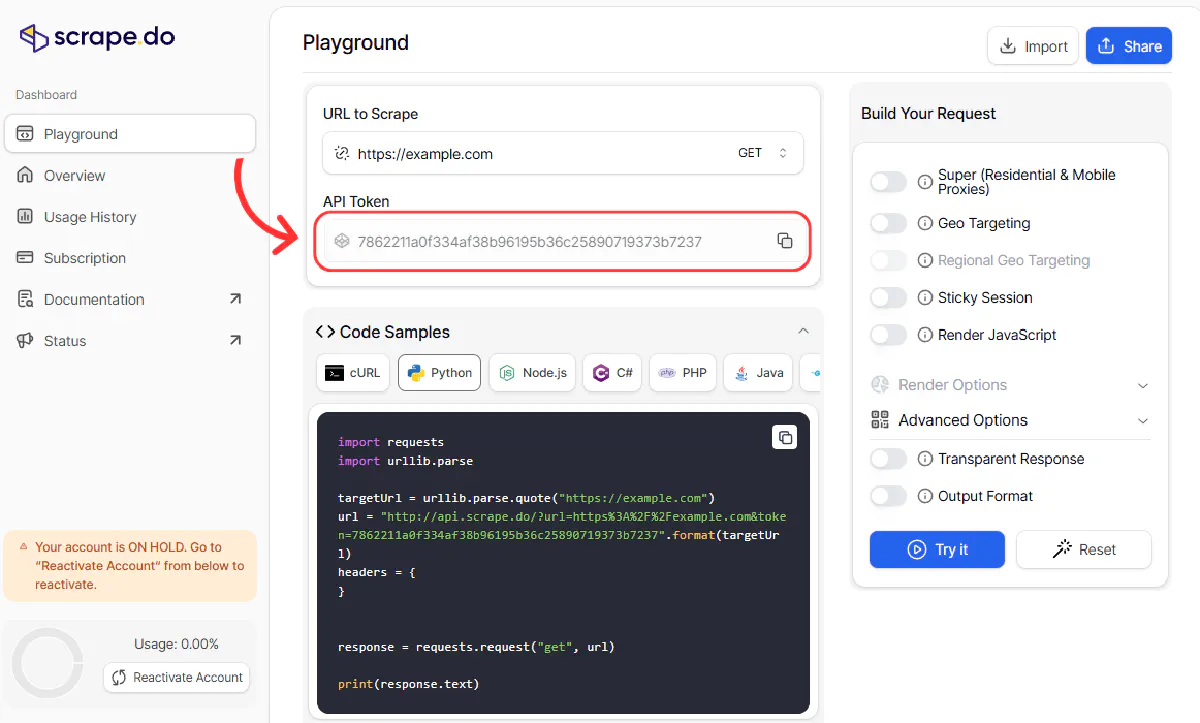
Now we'll build the request to fetch the product page. We're using super=true for premium residential proxies, geoCode=us to get US-specific pricing and shipping details.
We're also passing
"sd-x-detected-locale": "USD|en-US|US"as extra headers created specifically for Etsy through Scrape.do.
import requests
import urllib.parse
from bs4 import BeautifulSoup
import json
import re

# Configuration
token = "<your-token>"
product_url = "https://www.etsy.com/listing/4306368113/birth-flower-ring-925-sterling-silver"

# Make API request
encoded_url = urllib.parse.quote_plus(product_url)
api_url = f"https://api.scrape.do?token={token}&url={encoded_url}&geoCode=us&super=true&extraHeaders=true"
headers = {"sd-x-detected-locale": "USD|en-US|US"}
response = requests.get(api_url, headers=headers)

soup = BeautifulSoup(response.text, "html.parser")
This sends the request through Scrape.do's infrastructure, bypassing DataDome and returning the fully rendered HTML. The extraHeaders parameter ensures our custom locale header is included in the request.
Extract Product Data from JSON
Etsy includes structured product data inside <script type="application/ld+json"> tags using JSON-LD format. We'll parse these blocks to extract all the details we need.
Start by initializing a product dictionary and extracting the listing ID from the URL:
# Initialize product data
product = {"url": product_url}

# Extract listing ID from URL
listing_match = re.search(r"/listing/(\d+)", product_url)
if listing_match:
    product["listing_id"] = listing_match.group(1)
The listing ID is useful for tracking products or building URLs programmatically later.
Find JSON-LD Script Tags
Etsy embeds multiple JSON-LD blocks in the page. We need to find the one with "@type": "Product":
# Extract JSON-LD structured data
for script in soup.find_all("script", attrs={"type": "application/ld+json"}):
    try:
        data = json.loads(script.string)
        objs = data if isinstance(data, list) else [data]

        for obj in objs:
            product_type = obj.get("@type")
            if product_type == "Product" or (isinstance(product_type, list) and "Product" in product_type):
This loop finds all JSON-LD scripts, parses them, and checks if they contain product data. Some pages have multiple schema objects, so we handle both single objects and arrays.
Extract Name, Description, and Category
Once we've found the Product object, we extract basic product information:
                # Extract basic info
                product["name"] = obj.get("name")
                product["description"] = obj.get("description")
                product["category"] = obj.get("category")
These fields give us the product title, full description, and the category it's listed under.
Extract Shop/Brand Name
The shop name is stored in the brand field, which can be either a string or a dictionary:
                # Extract shop/brand
                brand = obj.get("brand")
                if isinstance(brand, dict):
                    product["shop"] = brand.get("name")
                elif isinstance(brand, str):
                    product["shop"] = brand
We check the type and extract the name accordingly. This gives us the seller's shop name.
Extract Images
Product images are stored in the image field, which can be a single URL or an array of URLs:
                # Extract images
                image_data = obj.get("image")
                if isinstance(image_data, list):
                    product["images"] = image_data
                elif image_data:
                    product["images"] = [image_data]
                else:
                    product["images"] = []
We normalize this into a list format so downstream code always gets an array of image URLs.
Extract Price and Currency
Price information lives inside the offers object. Etsy sometimes uses price or lowPrice depending on whether there are variations:
                # Extract price from offers
                offers = obj.get("offers")
                if isinstance(offers, list):
                    offers = offers[0] if offers else {}

                price = (offers or {}).get("price") or (offers or {}).get("lowPrice")
                product["price"] = float(price) if price else None
                product["currency"] = (offers or {}).get("priceCurrency")
This captures the price as a float and the currency code (like "USD").
Extract Availability
The availability field tells us if the product is in stock:
                # Extract availability
                avail = (offers or {}).get("availability") or ""
                if "/" in avail:
                    product["availability"] = avail.split("/")[-1]
                elif avail:
                    product["availability"] = avail
If the availability value contains a slash, we take the last part; otherwise we use the value as-is.
Extract Rating and Review Count
Finally, we pull the aggregate rating data:
                # Extract rating
                agg = obj.get("aggregateRating") or {}
                product["rating"] = agg.get("ratingValue")
                product["review_count"] = agg.get("reviewCount")
                break
    except:
        continue

# Print results
print(json.dumps(product, indent=2, sort_keys=True))
This gives us the average star rating and total number of reviews, completing our product data extraction.
Running Full Code
Here's the complete script that extracts all product data from an Etsy listing:
import requests
import urllib.parse
from bs4 import BeautifulSoup
import json
import re

# Configuration
token = "<your-token>"
product_url = "https://www.etsy.com/listing/4306368113/birth-flower-ring-925-sterling-silver"

# Make API request
encoded_url = urllib.parse.quote_plus(product_url)
api_url = f"https://api.scrape.do?token={token}&url={encoded_url}&geoCode=us&super=true&extraHeaders=true"
headers = {"sd-x-detected-locale": "USD|en-US|US"}
response = requests.get(api_url, headers=headers)

soup = BeautifulSoup(response.text, "html.parser")

# Initialize product data
product = {"url": product_url}

# Extract listing ID from URL
listing_match = re.search(r"/listing/(\d+)", product_url)
if listing_match:
    product["listing_id"] = listing_match.group(1)

# Extract JSON-LD structured data
for script in soup.find_all("script", attrs={"type": "application/ld+json"}):
    try:
        data = json.loads(script.string)
        objs = data if isinstance(data, list) else [data]

        for obj in objs:
            product_type = obj.get("@type")
            if product_type == "Product" or (isinstance(product_type, list) and "Product" in product_type):
                # Extract basic info
                product["name"] = obj.get("name")
                product["description"] = obj.get("description")
                product["category"] = obj.get("category")

                # Extract shop/brand
                brand = obj.get("brand")
                if isinstance(brand, dict):
                    product["shop"] = brand.get("name")
                elif isinstance(brand, str):
                    product["shop"] = brand

                # Extract images
                image_data = obj.get("image")
                if isinstance(image_data, list):
                    product["images"] = image_data
                elif image_data:
                    product["images"] = [image_data]
                else:
                    product["images"] = []

                # Extract price from offers
                offers = obj.get("offers")
                if isinstance(offers, list):
                    offers = offers[0] if offers else {}

                price = (offers or {}).get("price") or (offers or {}).get("lowPrice")
                product["price"] = float(price) if price else None
                product["currency"] = (offers or {}).get("priceCurrency")

                # Extract availability
                avail = (offers or {}).get("availability") or ""
                if "/" in avail:
                    product["availability"] = avail.split("/")[-1]
                elif avail:
                    product["availability"] = avail

                # Extract rating
                agg = obj.get("aggregateRating") or {}
                product["rating"] = agg.get("ratingValue")
                product["review_count"] = agg.get("reviewCount")
                break
    except:
        continue

# Print results
print(json.dumps(product, indent=2, sort_keys=True))
When you run this script, you'll get structured JSON output with all the extracted data:
Scrape Etsy Reviews
Product reviews are the best way to find the products that are loved, or hated, by the consumer.
So obviously, we need to scrape that too.
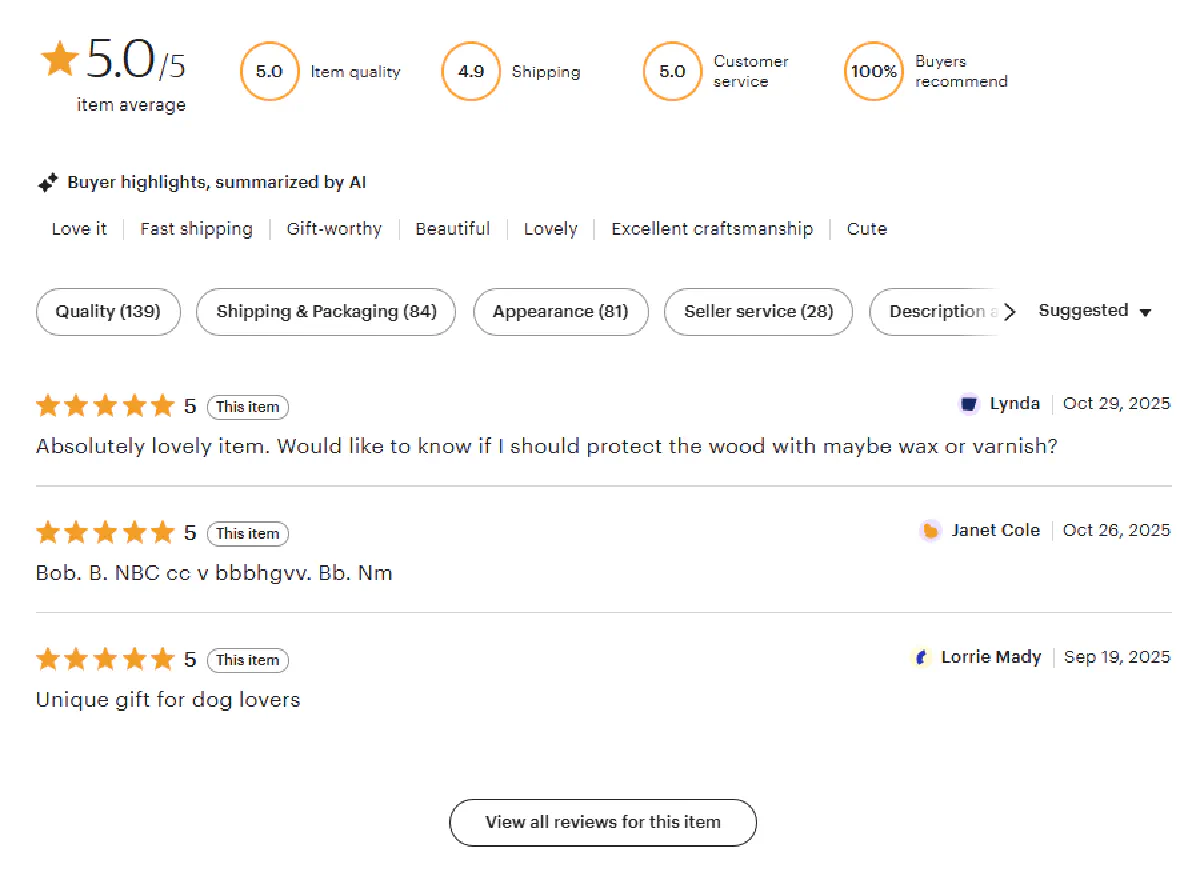
Heads up: Earlier versions of this guide fetched reviews by POSTing to Etsy's internal
deep_dive_reviewsGraphQL endpoint with a CSRF token. Etsy has since changed how that endpoint works, and it now returns an empty loading placeholder instead of review HTML, so that approach no longer returns any reviews. The good news is that Etsy renders the first page of reviews directly inside the product page HTML, so we can parse them straight from the page we already fetched. That's what this section now does, and it's simpler and more reliable.
The reviews live inside <div class="review-card"> blocks in the same HTML we fetched for the product data. Each card holds the star rating, the review text, the reviewer name, and the date. We just need to locate those cards and pull the fields out of each one.
Fetch the Product Page
We start exactly like the product scraper: send the listing URL through Scrape.do to get past DataDome and return the full HTML.
import requests
import urllib.parse
from bs4 import BeautifulSoup
import csv
import re

# Configuration
token = "<your-token>"
product_url = "https://www.etsy.com/listing/4306368113/birth-flower-ring-925-sterling-silver"

# Fetch the product page through Scrape.do
encoded_url = urllib.parse.quote_plus(product_url)
api_url = f"https://api.scrape.do?token={token}&url={encoded_url}&geoCode=us&super=true&extraHeaders=true"
headers = {"sd-x-detected-locale": "USD|en-US|US"}
response = requests.get(api_url, headers=headers)
html = response.text
This returns the fully rendered HTML, which already contains the review cards for the first page of reviews.
Extract the Listing ID
We keep the listing ID alongside each review so the output is easy to join back to a product later:
# Extract listing ID from the URL
listing_id = None
listing_match = re.search(r"/listing/(\d+)", product_url)
if listing_match:
    listing_id = int(listing_match.group(1))
Find the Review Cards
Parse the HTML and grab every review card on the page:
soup = BeautifulSoup(html, "html.parser")
review_cards = soup.find_all("div", class_="review-card")
Each element in review_cards is one review, and we loop over them to extract the fields.
Extract the Rating
The star rating is stored as the value of a hidden input element inside the card:
all_reviews = []
for card in review_cards:
    # Extract rating from the hidden rating input
    rating = None
    rating_input = card.find("input", attrs={"name": "rating"})
    if rating_input and rating_input.get("value"):
        rating = float(rating_input.get("value"))
Extract the Review Text
The review body sits in a wt-text-body element:
    # Extract review text
    review_text_div = card.find("div", class_="wt-text-body")
    review_text = review_text_div.get_text(strip=True) if review_text_div else None
Extract the Author and Date
Etsy puts the reviewer name and the date together inside the small text paragraph, formatted as <author><date> (for example, PheliciaJul 8, 2025). We split the trailing date off the end to separate the two:
    # Extract author and date (rendered together as "<author><date>")
    author = None
    created_at = None
    date_p = card.find("p", class_="wt-text-body-small")
    if date_p:
        raw = date_p.get_text(" ", strip=True)
        # Match a trailing date like "Jul 8, 2025" and split it off the name
        match = re.search(r"([A-Z][a-z]{2}\s+\d{1,2},\s+\d{4})$", raw)
        if match:
            created_at = match.group(1)
            author = raw[: match.start()].strip() or None
        else:
            author = raw or None

    all_reviews.append({
        "listing_id": listing_id,
        "review_id": card.get("data-review-region"),
        "rating": rating,
        "text": review_text,
        "author": author,
        "created_at": created_at
    })

print(f"Found {len(all_reviews)} reviews on the product page")
The data-review-region attribute gives us a stable per-review ID, which is handy for deduplication if you scrape the same product again later.
Export Reviews to CSV
Finally, we write the collected reviews out to a CSV file. Here's the complete script:
import requests
import urllib.parse
from bs4 import BeautifulSoup
import csv
import re

# Configuration
token = "<your-token>"
product_url = "https://www.etsy.com/listing/4306368113/birth-flower-ring-925-sterling-silver"

# Fetch the product page through Scrape.do
encoded_url = urllib.parse.quote_plus(product_url)
api_url = f"https://api.scrape.do?token={token}&url={encoded_url}&geoCode=us&super=true&extraHeaders=true"
headers = {"sd-x-detected-locale": "USD|en-US|US"}
response = requests.get(api_url, headers=headers)
html = response.text

# Extract listing ID from the URL
listing_id = None
listing_match = re.search(r"/listing/(\d+)", product_url)
if listing_match:
    listing_id = int(listing_match.group(1))

# Etsy renders the first page of reviews directly in the product page HTML,
# inside <div class="review-card"> blocks, so we parse them from there.
soup = BeautifulSoup(html, "html.parser")
review_cards = soup.find_all("div", class_="review-card")

all_reviews = []
for card in review_cards:
    # Extract rating from the hidden rating input
    rating = None
    rating_input = card.find("input", attrs={"name": "rating"})
    if rating_input and rating_input.get("value"):
        rating = float(rating_input.get("value"))

    # Extract review text
    review_text_div = card.find("div", class_="wt-text-body")
    review_text = review_text_div.get_text(strip=True) if review_text_div else None

    # Extract author and date (rendered together as "<author><date>")
    author = None
    created_at = None
    date_p = card.find("p", class_="wt-text-body-small")
    if date_p:
        raw = date_p.get_text(" ", strip=True)
        match = re.search(r"([A-Z][a-z]{2}\s+\d{1,2},\s+\d{4})$", raw)
        if match:
            created_at = match.group(1)
            author = raw[: match.start()].strip() or None
        else:
            author = raw or None

    all_reviews.append({
        "listing_id": listing_id,
        "review_id": card.get("data-review-region"),
        "rating": rating,
        "text": review_text,
        "author": author,
        "created_at": created_at
    })

print(f"Found {len(all_reviews)} reviews on the product page")

# Export to CSV
fields = ["listing_id", "review_id", "rating", "text", "author", "created_at"]

with open("etsy_reviews.csv", "w", newline="", encoding="utf-8") as f:
    writer = csv.DictWriter(f, fieldnames=fields)
    writer.writeheader()
    for review in all_reviews:
        writer.writerow({k: review.get(k) for k in fields})

print(f"Saved {len(all_reviews)} reviews to etsy_reviews.csv")
Running this script prints how many reviews it found and writes them to etsy_reviews.csv:
Found 4 reviews on the product page
Saved 4 reviews to etsy_reviews.csv
The resulting etsy_reviews.csv file contains the star rating, review text, author, and date for each review, ready for sentiment analysis or quality monitoring.
Want every review, not just the first page? Etsy loads additional review pages through client-side requests that change often, so the most durable option for full review history is to render the page with a headless browser and click through the review pagination, or to scrape the same listing on a schedule and deduplicate on
review_id. For most monitoring use cases, the on-page reviews above are enough to track new feedback as it comes in.
Extract All Items from Categories
We're going from bottom-to-top, but the last step you need for your complete Etsy scraping workspace is the category scraper, which will extract dozens of items and their prices per request:
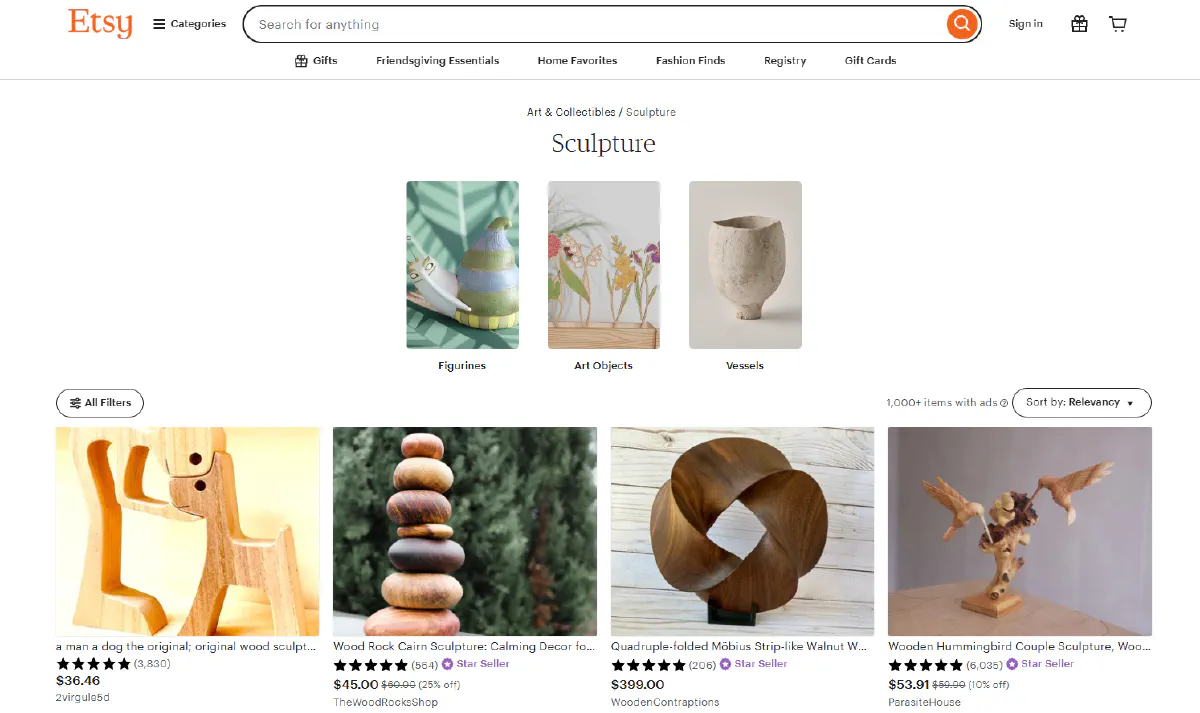
We'll scrape category pages to extract product details, pricing, ratings, and seller information from multiple listings in a single request.
Understanding Categories Page Structure
Etsy category pages like Art & Collectibles > Sculpture display 48 products per page by default.
Each product card contains:
- Product name and URL
- Current price and original price (if discounted)
- Discount percentage
- Product image
- Star rating and review count
- Shop ID
- Badges like "Star Seller" or "Free shipping"
- Urgency indicators like "Only 3 left"
The page structure uses standard HTML with CSS classes, making it relatively straightforward to parse with BeautifulSoup once you've bypassed DataDome.
Pagination works through URL query parameters. Adding ?page=2 to the category URL loads the second page of results.
Search results pages follow nearly identical structure to category pages, so the same scraping logic works for both.
Loop Through All Pages of Categories
We'll build a loop that iterates through multiple pages, constructing the paginated URLs and fetching each one:
import requests
import urllib.parse
from bs4 import BeautifulSoup
import csv
import re
import time

# Configuration
token = "<your-token>"
base_url = "https://www.etsy.com/c/jewelry"
max_pages = 3

# Scrape all pages
all_products = []
seen = set()

for page_num in range(1, max_pages + 1):
    # Build paginated URL
    url_parts = urllib.parse.urlsplit(base_url)
    params = urllib.parse.parse_qs(url_parts.query)
    params["page"] = [str(page_num)]
    target_url = urllib.parse.urlunsplit((
        url_parts.scheme, url_parts.netloc, url_parts.path,
        urllib.parse.urlencode({k: v[0] for k, v in params.items()}),
        url_parts.fragment
    ))

    # Make API request
    encoded_url = urllib.parse.quote_plus(target_url)
    api_url = f"https://api.scrape.do?token={token}&url={encoded_url}&geoCode=us&super=true&extraHeaders=true"
    headers = {"sd-x-detected-locale": "USD|en-US|US"}
    response = requests.get(api_url, headers=headers)

    soup = BeautifulSoup(response.text, "html.parser")
This code properly handles existing query parameters and adds the page parameter to paginate through results.
Scrape Product Details
Now we extract product information from each card on the page. We start by finding all product links and using them as anchors to locate the full product cards:
    page_items = 0

    # Extract product cards
    for a_tag in soup.select('a[href*="/listing/"]'):
        try:
            # Get listing ID
            url = a_tag.get("href") or ""
            if url.startswith("/"):
                url = "https://www.etsy.com" + url
            listing_match = re.search(r"/listing/(\d+)", url)
            listing_id = listing_match.group(1) if listing_match else None

            if not listing_id or listing_id in seen:
                continue
            seen.add(listing_id)
We track seen listing IDs to avoid processing duplicates, since some links may appear multiple times on the page.
Extract Name and Image
The product name is typically in the link's title attribute or text content:
            # Navigate to card parent
            card = a_tag
            for _ in range(3):
                if card.parent:
                    card = card.parent

            text = card.get_text(" ", strip=True)

            # Extract name
            name = a_tag.get("title") or a_tag.get_text(" ", strip=True) or "N/A"

            # Extract image
            image_url = None
            img = card.select_one("img")
            if img:
                image_url = img.get("src") or img.get("data-src") or img.get("data-srcset")
                if image_url and " " in image_url and "http" in image_url:
                    image_url = [p for p in image_url.split() if p.startswith("http")][0]
We navigate up the DOM tree to find the full product card, then extract the image from various possible attributes.
Extract Prices and Discount Rate
Price information can include both current and original prices if the item is on sale:
            # Extract prices
            current_price = original_price = discount_rate = None
            currency = None

            currency_elem = card.select_one('span.currency-symbol')
            if currency_elem:
                currency = currency_elem.get_text(strip=True)

            price_elem = card.select_one('p.wt-text-title-01.lc-price span.currency-value')
            if price_elem:
                price_text = price_elem.get_text().replace("$", "").replace(",", "").strip()
                current_price = float(price_text) if price_text else None

            orig_price_elem = card.select_one('p.wt-text-caption.search-collage-promotion-price span.currency-value')
            if orig_price_elem:
                orig_text = orig_price_elem.get_text().replace("$", "").replace(",", "").strip()
                original_price = float(orig_text) if orig_text else None

            if current_price and original_price and original_price > current_price:
                discount_rate = round(100 * (original_price - current_price) / original_price, 2)
We calculate the discount rate as a percentage if both prices are present.
Extract Rating and Review Count
Rating is stored in aria-label attributes, and review count appears in parentheses:
            # Extract rating
            rating = None
            aria_elem = card.select_one('[aria-label*="out of 5"]')
            if aria_elem:
                rating_match = re.search(r"([\d.]+)\s*out of 5", aria_elem.get("aria-label", ""))
                if rating_match:
                    rating = float(rating_match.group(1))

            # Extract review count
            review_count = None
            review_match = re.search(r"\((\d{1,5})\)", text)
            if review_match:
                review_count = int(review_match.group(1))
Extract Shop ID and Status Flags
Finally, we extract the shop identifier and various status indicators:
            # Extract shop ID. Etsy no longer prints the shop name on category
            # cards, but each card carries the numeric shop_id in a data attribute.
            shop_id = None
            shop_elem = card.find(attrs={"data-shop-id": True})
            if shop_elem:
                shop_id = shop_elem.get("data-shop-id")

            # Extract flags
            star_seller = bool(re.search(r"\bStar Seller\b", text, re.I))
            free_shipping = bool(re.search(r"\bFree shipping\b", text, re.I))

            left_match = re.search(r"Only\s+(\d+)\s+left", text, re.I)
            only_left = int(left_match.group(1)) if left_match else None

            all_products.append({
                "listing_id": listing_id,
                "name": name,
                "shop_id": shop_id,
                "price": current_price,
                "original_price": original_price,
                "discount_rate": discount_rate,
                "currency": currency,
                "rating": rating,
                "review_count": review_count,
                "star_seller": star_seller,
                "free_shipping": free_shipping,
                "only_left": only_left,
                "image": image_url,
                "url": url
            })
            page_items += 1
        except:
            continue

    print(f"📄 Page {page_num}: {page_items} items | Total: {len(all_products)}")

    if page_num > 1 and page_items == 0:
        break

    time.sleep(1)
We use regex to search for these indicators in the card text, and track urgency with the "Only X left" pattern.
Export to CSV
After scraping all pages, we export the product data to a CSV file with this full code:
import requests
import urllib.parse
from bs4 import BeautifulSoup
import csv
import re
import time

# Configuration
token = "<your-token>"
base_url = "https://www.etsy.com/c/jewelry"
max_pages = 3

# Scrape all pages
all_products = []
seen = set()

for page_num in range(1, max_pages + 1):
    # Build paginated URL
    url_parts = urllib.parse.urlsplit(base_url)
    params = urllib.parse.parse_qs(url_parts.query)
    params["page"] = [str(page_num)]
    target_url = urllib.parse.urlunsplit((
        url_parts.scheme, url_parts.netloc, url_parts.path,
        urllib.parse.urlencode({k: v[0] for k, v in params.items()}),
        url_parts.fragment
    ))

    # Make API request
    encoded_url = urllib.parse.quote_plus(target_url)
    api_url = f"https://api.scrape.do?token={token}&url={encoded_url}&geoCode=us&super=true&extraHeaders=true"
    headers = {"sd-x-detected-locale": "USD|en-US|US"}
    response = requests.get(api_url, headers=headers)

    soup = BeautifulSoup(response.text, "html.parser")
    page_items = 0

    # Extract product cards
    for a_tag in soup.select('a[href*="/listing/"]'):
        try:
            # Get listing ID
            url = a_tag.get("href") or ""
            if url.startswith("/"):
                url = "https://www.etsy.com" + url
            listing_match = re.search(r"/listing/(\d+)", url)
            listing_id = listing_match.group(1) if listing_match else None

            if not listing_id or listing_id in seen:
                continue
            seen.add(listing_id)

            # Navigate to card parent
            card = a_tag
            for _ in range(3):
                if card.parent:
                    card = card.parent

            text = card.get_text(" ", strip=True)

            # Extract name
            name = a_tag.get("title") or a_tag.get_text(" ", strip=True) or "N/A"

            # Extract image
            image_url = None
            img = card.select_one("img")
            if img:
                image_url = img.get("src") or img.get("data-src") or img.get("data-srcset")
                if image_url and " " in image_url and "http" in image_url:
                    image_url = [p for p in image_url.split() if p.startswith("http")][0]

            # Extract prices
            current_price = original_price = discount_rate = None
            currency = None

            currency_elem = card.select_one('span.currency-symbol')
            if currency_elem:
                currency = currency_elem.get_text(strip=True)

            price_elem = card.select_one('p.wt-text-title-01.lc-price span.currency-value')
            if price_elem:
                price_text = price_elem.get_text().replace("$", "").replace(",", "").strip()
                current_price = float(price_text) if price_text else None

            orig_price_elem = card.select_one('p.wt-text-caption.search-collage-promotion-price span.currency-value')
            if orig_price_elem:
                orig_text = orig_price_elem.get_text().replace("$", "").replace(",", "").strip()
                original_price = float(orig_text) if orig_text else None

            if current_price and original_price and original_price > current_price:
                discount_rate = round(100 * (original_price - current_price) / original_price, 2)

            # Extract rating
            rating = None
            aria_elem = card.select_one('[aria-label*="out of 5"]')
            if aria_elem:
                rating_match = re.search(r"([\d.]+)\s*out of 5", aria_elem.get("aria-label", ""))
                if rating_match:
                    rating = float(rating_match.group(1))

            # Extract review count
            review_count = None
            review_match = re.search(r"\((\d{1,5})\)", text)
            if review_match:
                review_count = int(review_match.group(1))

            # Extract shop ID from the card's data attribute
            shop_id = None
            shop_elem = card.find(attrs={"data-shop-id": True})
            if shop_elem:
                shop_id = shop_elem.get("data-shop-id")

            # Extract flags
            star_seller = bool(re.search(r"\bStar Seller\b", text, re.I))
            free_shipping = bool(re.search(r"\bFree shipping\b", text, re.I))

            left_match = re.search(r"Only\s+(\d+)\s+left", text, re.I)
            only_left = int(left_match.group(1)) if left_match else None

            all_products.append({
                "listing_id": listing_id,
                "name": name,
                "shop_id": shop_id,
                "price": current_price,
                "original_price": original_price,
                "discount_rate": discount_rate,
                "currency": currency,
                "rating": rating,
                "review_count": review_count,
                "star_seller": star_seller,
                "free_shipping": free_shipping,
                "only_left": only_left,
                "image": image_url,
                "url": url
            })
            page_items += 1
        except:
            continue

    print(f"📄 Page {page_num}: {page_items} items | Total: {len(all_products)}")

    if page_num > 1 and page_items == 0:
        break

    time.sleep(1)

# Export to CSV
fields = ["listing_id", "name", "shop_id", "price", "original_price", "discount_rate", "currency",
          "rating", "review_count", "star_seller", "free_shipping", "only_left", "image", "url"]

with open("etsy_collection.csv", "w", newline="", encoding="utf-8") as f:
    writer = csv.DictWriter(f, fieldnames=fields)
    writer.writeheader()
    for product in all_products:
        writer.writerow({k: product.get(k) for k in fields})

print(f"✅ Saved {len(all_products)} products to etsy_collection.csv")
The resulting etsy_collection.csv file will contain all the product data structured and ready for analysis:
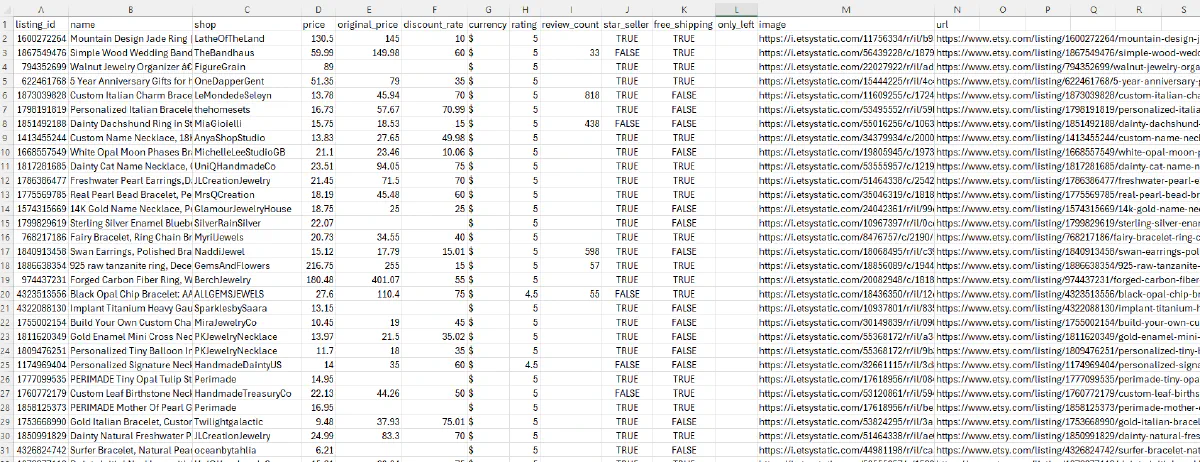
Each row represents a product with fields like listing ID, name, shop, prices, discounts, ratings, review counts, and status flags like Star Seller and Free Shipping.
Conclusion
We covered three core scraping workflows:
- Product pages - Extract structured data from JSON-LD schema for names, prices, ratings, images, and availability
- Reviews - Make authenticated POST requests to Etsy's internal API to fetch paginated review data with ratings, text, and timestamps
- Categories - Parse category and search result pages to build product catalogs with pricing, discounts, seller info, and status indicators
While you scrape thousands of pages from Etsy, Scrape.do handles the hard part:
- Premium residential proxies from real ISPs
- TLS fingerprint spoofing to bypass DataDome
- Automatic session and cookie management
- Geo-targeting for location-specific pricing and shipping
Software Engineer








