Category:Scraping Use CasesView as Markdown
How to Scrape IKEA: Search, Categories, Prices, and Stock with Python

Software Engineer


Fetching an IKEA product page hands back over a megabyte of HTML with no catalog data we can point a selector at, and the JSON-LD inside describes breadcrumbs and a 3D model instead of the product. Meanwhile prices, discounts, ratings, and live stock status for the whole catalog sit a layer deeper, fully structured, waiting for anyone who finds where they actually live. We will pull all of it into three CSVs (search results, complete categories, and per-product price and stock) using nothing but requests.
Where IKEA Keeps Its Product Data
IKEA.com is a React storefront, and the HTML it serves is scaffolding. Watching the Network tab with the Fetch/XHR filter on while browsing reveals two real data sources, and neither is the page markup.
The first is an internal search and listing API on its own subdomain: sik.search.blue.cdtapps.com. Search results load through /us/en/search-result-page, category listings through /us/en/product-list-page, both returning clean JSON. Store and language ride in the URL path, so /us/en/ pins the US store without any cookie or geolocation dance.
The second source is the product pages themselves, which embed their entire data payload in <script type="text/hydrate"> JSON blocks: price, currency, package measurements, description, and a complete availability response with stock status. Between six and nine of these blocks per page. The schema.org route, by contrast, is a dead end here: the product page's JSON-LD carries a BreadcrumbList and a 3DModel node, but no Product. IKEA will tell a crawler what aisle the bookcase is in and what it looks like in augmented reality, but not what it costs. An odd choice on IKEA's part.
One more thing worth stating plainly, because most scraping guides overstate the enemy: IKEA did not block a single plain-Python request during our research. No Cloudflare wall, no CAPTCHA, 200s across the board at polite volume. The hard part of this target is finding the data, not breaking in. Where the proxy layer earns its place is scale: a price or stock monitor polling hundreds of products on a schedule from one IP is exactly the traffic pattern that gets throttled, so every request in this guide runs through Scrape.do, which rotates that risk away with its default request. No parameters, and no render=true either, since the search API is already JSON and the product HTML arrives with its hydrate blocks complete.
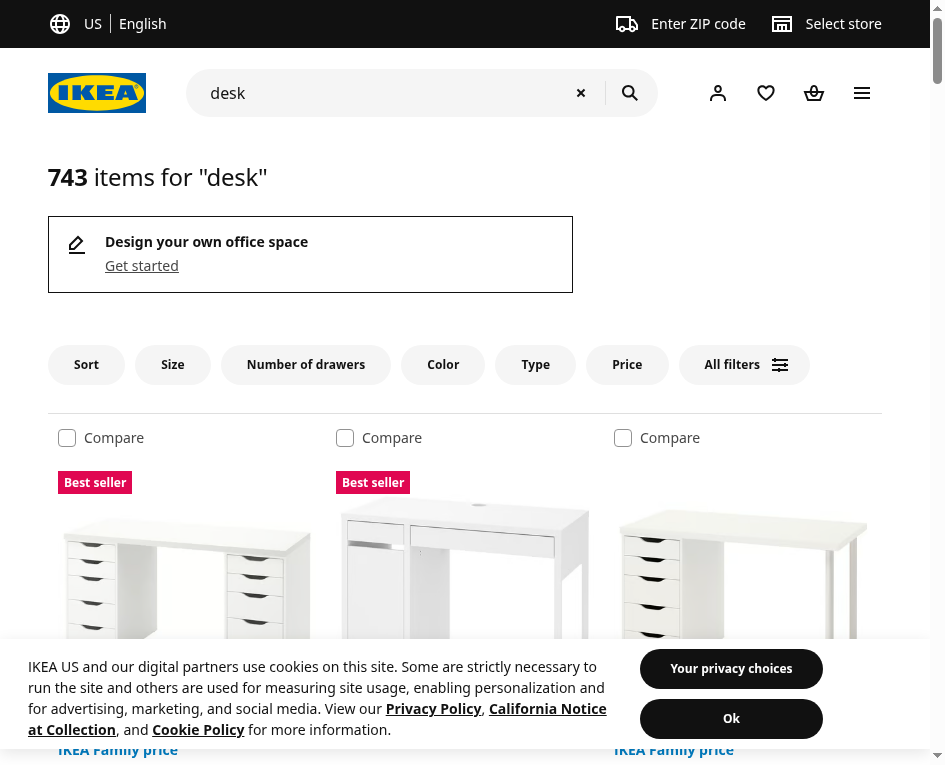
That 743-item count in the browser will show up again in a moment, byte for byte, in an API field. When the number on the page and the number in the JSON agree, we know we found the real source.
Scraping IKEA Search Results
Search is the fastest route to a price dataset: one JSON call returns two dozen products with names, current prices, pre-discount prices, ratings, and product URLs. We warm up here because every field we learn to read now reappears in the category and product scrapers.
Prerequisites
The external dependency list is one item:
pip install requestscsv, re, json, and urllib.parse are standard library. The remaining piece is a Scrape.do token: the free plan includes 1,000 credits a month, and the token is on the dashboard right after signup.
All three scrapers call the same way: the target URL goes through quote(url, safe='') and rides the url parameter of the Scrape.do endpoint. Nothing else to configure.
The Search Endpoint
GET https://sik.search.blue.cdtapps.com/us/en/search-result-page?q={query}&size=24 returns search results as JSON, with products parked at searchResultPage.products.main.items[]. Each item wraps a product object carrying name, typeName, itemNo, pipUrl (the product page URL), an image URL, sellability, and the rating with its count.
Price lives in salesPrice: numeral is the current price, and previous.numeral appears only when the item is discounted. That conditional field is the whole price-tracker use case in miniature: capture both columns on a schedule and discounts announce themselves.
Two response fields matter beyond the products: max, the total match count, and moreToken, the pagination cursor. And one trap: not every item in the list is a product. IKEA mixes content widgets into the results, so a parser that assumes 24 products per page over-reads. We key on the presence of the product field and skip the rest.
We start with configuration and the two helpers:
import requests
from urllib.parse import quote
import csv

# 1. Configuration
token = "<your_token>"
query = "standing desk"
page_size = 24
max_pages = 3  # first page + moreToken pages

# 2. Fetch helper (IKEA's search API answers with JSON; Scrape.do carries the request)
def fetch(url):
    api = f"http://api.scrape.do/?token={token}&url={quote(url, safe='')}"
    response = requests.get(api)
    return response.json() if response.status_code == 200 else None
We write the parser once and feed it pages from both endpoints:
def parse_items(items, rows):
    for it in items:
        p = it.get("product")
        if not p:  # skip non-product widgets mixed into the result list
            continue
        sp = p.get("salesPrice") or {}
        rows.append({
            "name": p.get("name"),
            "type": p.get("typeName"),
            "item_no": p.get("itemNo"),
            "price": sp.get("numeral"),
            "currency": sp.get("currencyCode"),
            "old_price": (sp.get("previous") or {}).get("numeral", ""),
            "rating": p.get("ratingValue", ""),
            "rating_count": p.get("ratingCount", ""),
            "online_sellable": p.get("onlineSellable"),
            "url": p.get("pipUrl"),
            "image": p.get("mainImageUrl"),
        })
One function, eleven fields, and it will serve the category scraper unchanged in the next section since PLP products share this exact shape.
Paginating with moreToken
Page two onward comes from a different path: GET /us/en/search-result-page/more?token={moreToken}. Items sit at more.items[], the next cursor at more.moreToken, roughly 24 items a page.
Here is the catch. The cursor does not stop when the real matches run out. It rolls straight into related and recommended products and keeps handing back fresh tokens as if nothing happened. We measured it: a query with 46 matches happily served 70 items across three pages. A scraper that loops on "token exists" quietly pads its CSV with products the user never searched for. The fix is to treat max as the finish line:
# 3. First page, then follow the moreToken cursor
rows = []
first = fetch(f"https://sik.search.blue.cdtapps.com/us/en/search-result-page?q={quote(query)}&size={page_size}")
main = first["searchResultPage"]["products"]["main"]
parse_items(main["items"], rows)
token_next = main.get("moreToken")
total_matches = main.get("max", 0)
print(f"page 1: {len(rows)} products of {total_matches}")

# the cursor keeps serving related products past the real match count, so we stop at max
for page in range(2, max_pages + 1):
    if not token_next or len(rows) >= total_matches:
        break
    more = fetch(f"https://sik.search.blue.cdtapps.com/us/en/search-result-page/more?token={token_next}")
    block = more["more"]
    before = len(rows)
    parse_items(block["items"], rows)
    token_next = block.get("moreToken")
    print(f"page {page}: {len(rows) - before} products")
rows = rows[:total_matches]
The final truncation handles the boundary page where real matches and filler share one response.
Export to CSV
# 4. Export
with open("search-results.csv", "w", newline="", encoding="utf-8") as f:
    writer = csv.DictWriter(f, fieldnames=rows[0].keys())
    writer.writeheader()
    writer.writerows(rows)
print(f"total: {len(rows)} products")
A run for "standing desk" lands 70 products from 192 matches:
page 1: 22 products of 192
page 2: 24 products
page 3: 24 products
total: 70 products
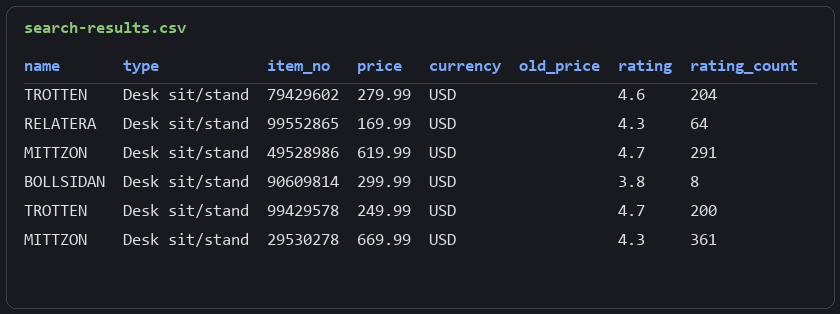
Page one shows the widget skimming in action: 22 products out of 24 items. The CSV starts like this:
name,type,item_no,price,currency,old_price,rating,rating_count,online_sellable,url,image
TROTTEN,Desk sit/stand,79429602,279.99,USD,,4.6,204,True,https://www.ikea.com/us/en/p/trotten-desk-sit-stand-white-s79429602/,...
RELATERA,Desk sit/stand,99552865,169.99,USD,,4.3,64,True,...
We also ran "söderhamn" to test special characters: exactly 46 rows out, the overshoot cap holding the line. Structured search across the catalog, one query string away.
Scraping Full Categories
Search answers a question; categories enumerate the shelf. For price monitoring we want the systematic version: every one of the 517 shelving products, every desk, in one deterministic pass.
Category IDs hide in plain sight at the end of category URLs: /cat/bookcases-shelving-units-st002/ gives st002. They also arrive in every search row's categoryPath field, so a search scrape doubles as category discovery.
The Product List Endpoint
GET https://sik.search.blue.cdtapps.com/us/en/product-list-page?category={id}&size={n} returns the listing as productListPage.productWindow[], in the same product shape we already parse, plus a productCount total.
The natural next move fails. There is no page two: offset returns 400 Unrecognized parameter, and so does start. The endpoint has no pagination at all. Smart for a frontend that renders one window, awkward for us. Until we noticed what size tolerates.
Probe Then Fetch Everything
size is an elastic window. Ask for 517 and the endpoint returns 517, in about five seconds, in one response. So instead of paginating we probe the count with a one-item request and then ask for everything:
import requests
from urllib.parse import quote
import csv

# 1. Configuration
token = "<your_token>"
category = "st002"  # from the category URL: /cat/bookcases-shelving-units-st002/

# 2. Fetch helper
def fetch(url):
    api = f"http://api.scrape.do/?token={token}&url={quote(url, safe='')}"
    response = requests.get(api)
    return response.json() if response.status_code == 200 else None

# 3. The PLP endpoint has no offset param; probe the total first, then request it all in one window
base = f"https://sik.search.blue.cdtapps.com/us/en/product-list-page?category={category}"
probe = fetch(f"{base}&size=1")
total = probe["productListPage"]["productCount"]
print(f"category {category}: {total} products")

full = fetch(f"{base}&size={total}")
products = full["productListPage"]["productWindow"]
Two requests per category, however big the category is. The parse loop flattens the same fields as search:
# 4. Parse + export
rows = []
for p in products:
    sp = p.get("salesPrice") or {}
    rows.append({
        "name": p.get("name"),
        "type": p.get("typeName"),
        "item_no": p.get("itemNo"),
        "price": sp.get("numeral"),
        "currency": sp.get("currencyCode"),
        "old_price": (sp.get("previous") or {}).get("numeral", ""),
        "rating": p.get("ratingValue", ""),
        "rating_count": p.get("ratingCount", ""),
        "online_sellable": p.get("onlineSellable"),
        "url": p.get("pipUrl"),
    })
No cursor bookkeeping, no boundary conditions. The pagination section of this scraper is the absence of one.
Export to CSV
with open("category-products.csv", "w", newline="", encoding="utf-8") as f:
    writer = csv.DictWriter(f, fieldnames=rows[0].keys())
    writer.writeheader()
    writer.writerows(rows)
print(f"exported: {len(rows)} products")
The shelving category comes back complete:
category st002: 517 products
exported: 517 products
We validated the same script against a 264-product desk category and a 70-product niche category by changing one config line each time; all three exported their full counts. Rows look identical to search output, BILLY variants and all:
name,type,item_no,price,currency,old_price,rating,rating_count,online_sellable,url
BILLY,Bookcase,40477340,69.0,USD,,4.6,3088,True,https://www.ikea.com/us/en/p/billy-bookcase-black-oak-effect-40477340/
BILLY,Bookcase,40594928,59.0,USD,,4.7,2243,True,https://www.ikea.com/us/en/p/billy-bookcase-blue-40594928/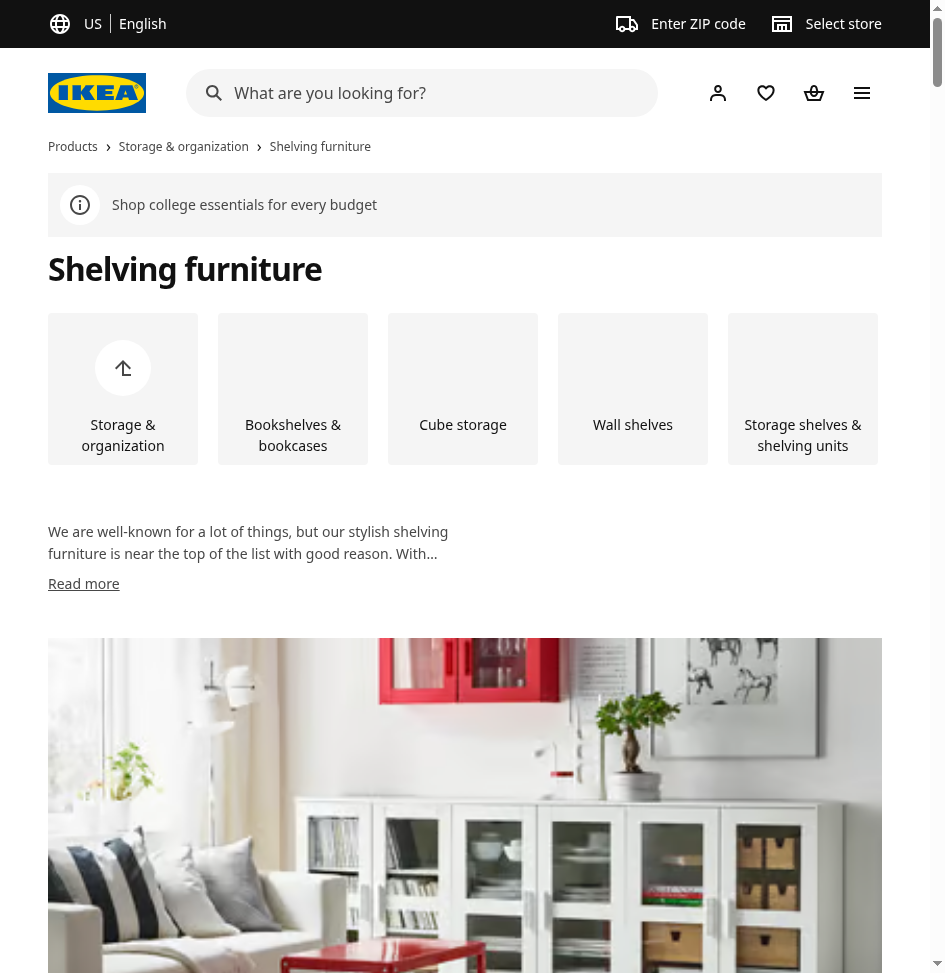
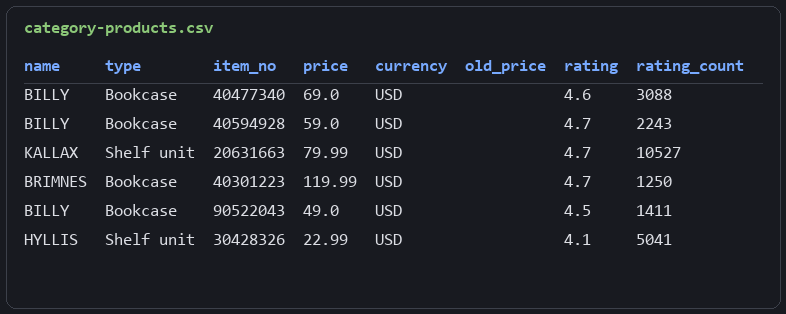
An entire category as a diffable price snapshot, two requests deep.
Scraping Product Prices and Stock
List rows tell us what a product costs. The product page tells us whether anyone can buy it: live stock status, home delivery, click and collect, package count and weight, review totals. This is the layer a price tracker and a stock checker are actually built on.
The Hydrate Blocks
Each product page ships its data in several <script type="text/hydrate"> JSON blocks scattered through the ~1.1 MB of HTML. A regex pulls the blocks, json.loads opens them, and two are interesting: the one holding both product and availabilityResponse keys (price, measurements, stock) and the one holding pageProps (review count, designer). No BeautifulSoup, no CSS selectors, no DOM.
Two URL lessons from testing before we write the loop. First, bare range links (a BILLY link without an item number) redirect to collection pages that list variants instead of one product; the dependable inputs are the pipUrl values our search and category CSVs already contain. Second, dead product URLs do not 404. The SPA serves its page shell with a 200, and the only tell is that no hydrate block contains a product key. We guard on exactly that.
import requests
from urllib.parse import quote
import re
import json
import csv

# 1. Configuration
token = "<your_token>"
product_urls = [
    "https://www.ikea.com/us/en/p/billy-bookcase-white-20522046/",
    "https://www.ikea.com/us/en/p/lagkapten-alex-desk-white-s99431982/",
    "https://www.ikea.com/us/en/p/kallax-shelf-unit-white-80275887/",
]
Building the Product Scraper
We fetch each page and sort its hydrate blocks into the two we care about:
# 2. Fetch + parse each product page's hydrate JSON
rows = []
for url in product_urls:
    api = f"http://api.scrape.do/?token={token}&url={quote(url, safe='')}"
    response = requests.get(api)
    if response.status_code != 200:
        print(f"{url}: request failed ({response.status_code})")
        continue

    # product data ships in <script type="text/hydrate"> JSON blocks, no HTML parsing needed
    blocks = re.findall(r'<script type="text/hydrate">(.*?)</script>', response.text, re.S)
    product, availability, page_product = {}, {}, {}
    for b in blocks:
        try:
            d = json.loads(b)
        except json.JSONDecodeError:
            continue
        if "product" in d and "availabilityResponse" in d:
            product = d["product"]
            availability = (d["availabilityResponse"] or {}).get("availability", {})
        elif "pageProps" in d:
            page_product = d["pageProps"].get("product", {})

    if not product:  # dead URLs return a 200 page shell with no hydrate product block
        print(f"{url}: no product data found, skipping")
        continue
The guard is the 200-shell defense: a URL that fetches fine but carries no product block gets reported and skipped instead of producing a row of empty cells.
Checking Stock and Delivery
The availability object is the stock checker. homeDelivery.stockStatus gives a level (HIGH_IN_STOCK on every product we tested, with low and out-of-stock variants in the same enum), and the homeDelivery.isAvailable and clickCollect.isAvailable booleans split online from in-store pickup. Run this on a schedule, alert when a status transitions, and the restock-refresh ritual becomes a cron job.
    measures = (product.get("packageMeasurements") or [{}])[0]
    rows.append({
        "item_no": product.get("visibleItemNo"),
        "name": product.get("name"),
        "type": product.get("typeName"),
        "price": product.get("price"),
        "currency": product.get("currencyCode"),
        "review_count": page_product.get("reviewCount", ""),
        "stock_status": (availability.get("homeDelivery") or {}).get("stockStatus", ""),
        "home_delivery": (availability.get("homeDelivery") or {}).get("isAvailable", ""),
        "click_collect": (availability.get("clickCollect") or {}).get("isAvailable", ""),
        "packages": product.get("numberOfPackages"),
        "weight": (measures.get("weight") or {}).get("text", ""),
        "url": url,
    })
    print(f"{product.get('name')}: ${product.get('price')} | {rows[-1]['stock_status']}")
visibleItemNo is the dotted article number printed on IKEA labels (205.220.46), handy for matching rows against receipts or store apps. Weight arrives pre-formatted ("88 lb 1 oz") next to numeric values; we export the readable form.
Export to CSV
# 3. Export
with open("product-details.csv", "w", newline="", encoding="utf-8") as f:
    writer = csv.DictWriter(f, fieldnames=rows[0].keys())
    writer.writeheader()
    writer.writerows(rows)
print(f"total: {len(rows)} products")
The run covers a plain bookcase, a multi-package desk combination, and a KALLAX:
BILLY: $79 | HIGH_IN_STOCK
LAGKAPTEN / ALEX: $239.99 | HIGH_IN_STOCK
KALLAX: $79.99 | HIGH_IN_STOCK
total: 3 productsitem_no,name,type,price,currency,review_count,stock_status,home_delivery,click_collect,packages,weight,url
205.220.46,BILLY,bookcase,79,USD,3088,HIGH_IN_STOCK,True,True,1,88 lb 1 oz,...
994.319.82,LAGKAPTEN / ALEX,desk,239.99,USD,755,HIGH_IN_STOCK,True,True,3,,...
802.758.87,KALLAX,shelf unit,79.99,USD,8928,HIGH_IN_STOCK,True,True,1,45 lb 8 oz,...We also fed it a fabricated URL during validation; the shell guard caught it and the CSV stayed clean.
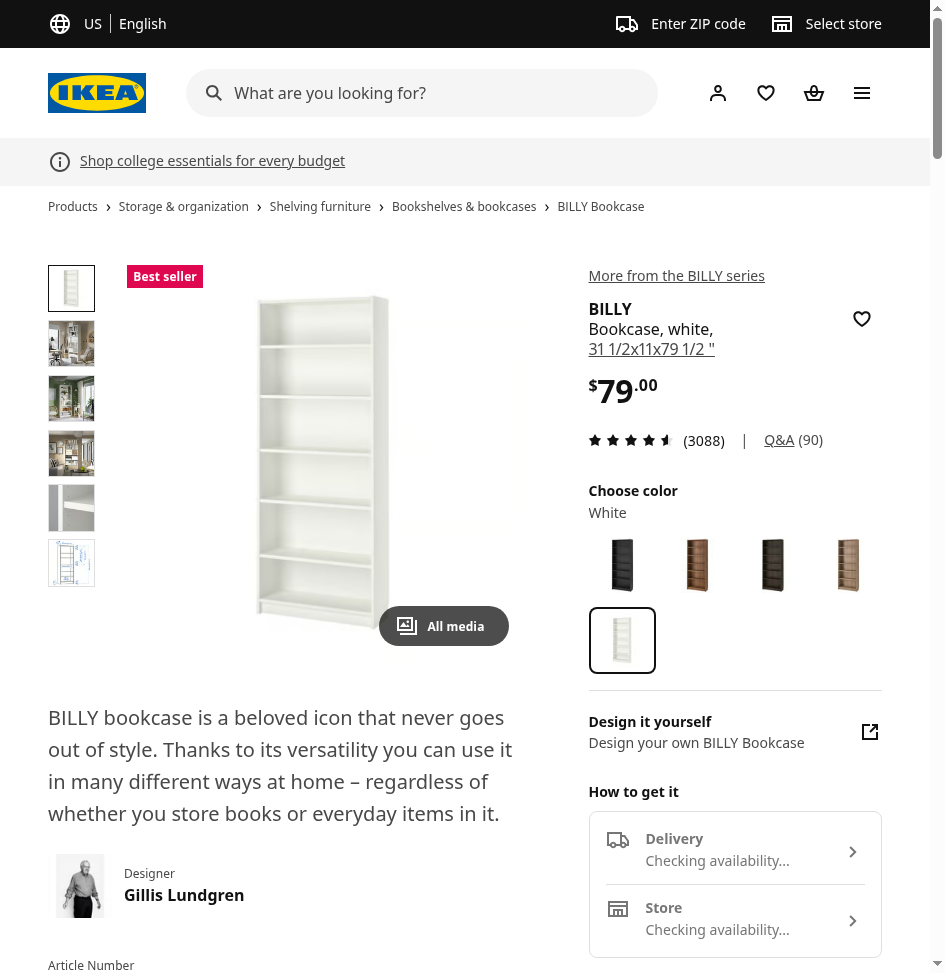
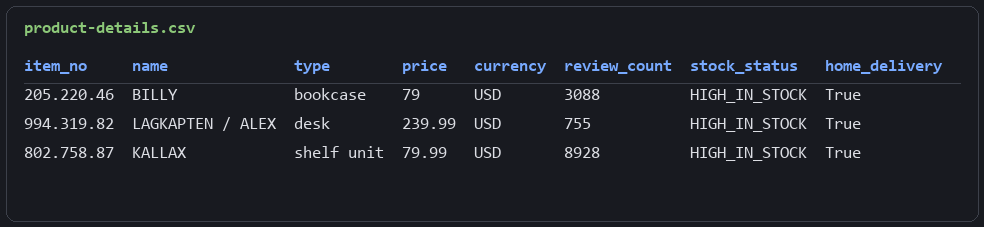
Price, discounts, reviews, and live stock per article number. The tracker has everything it needs.
FAQ
Does IKEA have a public API?
No official public product API exists. The community client libraries on GitHub wrap internal endpoints and break whenever those shift, and several are archived. The practical sources are the internal search API at sik.search.blue.cdtapps.com and the hydrate JSON on product pages: no authentication, plain JSON, and the same data the site itself renders.
Can IKEA prices be tracked automatically?
Yes. Every search and category row carries salesPrice.numeral (current price) and, only when an item is discounted, salesPrice.previous.numeral. Scheduled category runs cost two requests per category regardless of size, which makes catalog-wide daily snapshots cheap; diffing consecutive snapshots surfaces price drops and new discounts.
How to check IKEA stock programmatically?
Product pages embed an availability response with stockStatus, home delivery availability, and click-and-collect availability. Polling a URL list and alerting on status transitions covers the online-stock use case. Per-store shelf stock for a specific location is a different, authenticated surface and outside this guide's scope.
Why do dead IKEA product URLs return 200?
The React storefront serves its page shell for unknown routes instead of a 404 status, so HTTP codes cannot distinguish a live product from a dead link. The reliable check is content-based: a real product page contains a text/hydrate block with a product key, and a shell does not.
Three surfaces, three CSVs, and not one CSS selector: the work on IKEA was locating the real sources, an internal API on a subdomain nobody links to and JSON blocks buried in the page. Each quirk we hit (a cursor that oversells, a listing with no pages, dead URLs wearing a 200) cost one guard clause, and the guards are all in the scripts above.
Software Engineer








