Category:Scraping Use CasesView as Markdown
How to Scrape YouTube: Search, Videos, Comments, and Channels

Software Engineer


YouTube takes in more than 500 hours of video every minute and serves it back to a base of 2.49 billion monthly active users. It works fine in a browser. The problem starts when we try to fetch a video URL with requests: we get back a 200, but the HTML has zero search results, zero comments, and a full-screen consent overlay where the page should be.
That is actually good news. Once past the consent wall, every piece of data on every YouTube surface lives in a place we can reach with one HTTP call. No headless browser. No JavaScript engine. The win condition is simple: turn the consent wall into structured rows of search results, video metadata, comments, and channel data.
We will route every request through Scrape.do with super=true, pull ytInitialData and ytInitialPlayerResponse straight from the page HTML, then page through InnerTube continuation tokens for everything that loads after the first screen. Four clean outputs: a CSV of search results, a JSON record per video, a JSON tree of comments with nested replies, and a JSON file per channel with paginated video lists.
If you'd rather skip InnerTube parsing entirely, Scrape.do offers a dedicated YouTube API. One HTTP call returns the full search page as structured JSON: videos, channels, playlists, Shorts shelves, and ads, with sp tokens for sort, duration, 4K/HD/LIVE/CC, upload date, and result type. Jump to the Plugin API section for examples.
Challenges with Scraping YouTube
YouTube's anti-bot is aggressive but probabilistic. From a datacenter IP (cloud VMs, VPS, shared hosting), a clean Python request almost always lands on a bot-detection consent wall: HTTP 200, HTML that looks like a real page, but with none of the data we wanted. From a residential IP the same request may succeed today and fail tomorrow.
This is the kind of target we like. The failure mode is predictable when it fires, the data is already structured once we get past the gate, and Scrape.do absorbs the gate so we can stick with requests instead of building our own anti-detection stack.
YouTube fingerprints every request against IP reputation, TLS handshake, browser fingerprint, and JavaScript challenge solving. Datacenter IPs fail every check. Residential IPs pass most of them, but any flag we trip (rapid requests, suspicious User-Agent, missing cookie) still lands us on a 200 with a consent wall instead of a 403. The fix is to route every request through Scrape.do with super=true, which sends each request from a residential IP with a real browser fingerprint and a challenge solver attached.
Every request needs the parameter. The initial GET, every continuation POST, every reply continuation POST. Skip it and we are back to rolling dice with YouTube's anti-bot on every call.
Two Data Sources: Embedded JSON vs. InnerTube API
Two JavaScript variables in the page HTML carry almost every field we need. ytInitialData holds the rendered page state. ytInitialPlayerResponse holds the player-specific fields on watch pages.
We pull both out of the HTML the same way:
m = re.search(r"var ytInitialData\s*=\s*", html)
data = json.JSONDecoder().raw_decode(html, m.end())[0]
Nothing fancy. Two lines, both blobs out. We will reuse this pattern under video (twice, once per blob), channel, and comments.
Anything that loads after the first page comes from InnerTube, YouTube's internal POST API. The endpoint name changes per surface: /youtubei/v1/search, /youtubei/v1/browse, /youtubei/v1/next. The body shape stays the same on all three: a context.client block plus a continuation token from the previous page.
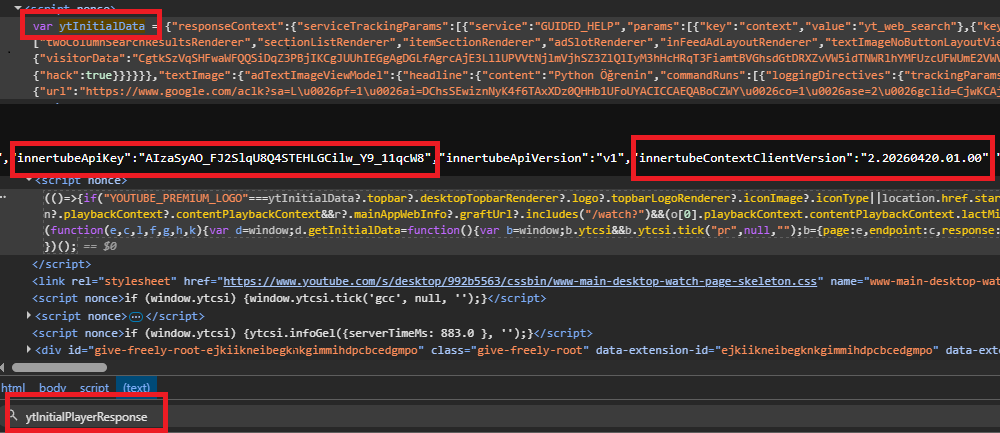
Two more things to grab from the initial HTML before we can call InnerTube: the embedded API key and the WEB client version. Both are one-line regex matches against the page source. The client version rolls forward roughly once a week with YouTube's frontend deploys, so we read it fresh on every run.
Scraping YouTube Search Results
Search results come first because the page exposes every pattern we will lean on later: the embedded blob extract, the WEB client version regex, the InnerTube continuation loop.
A search like web scraping python returns about 18 organic videos on the first page, plus zero or more "Shorts shelves" interleaved through the results. Each shelf groups 10 to 30 short-form videos in a different schema than regular video results, so we dispatch on item type as we walk the list.
The Quick Way
If you don't want to maintain the InnerTube parsing yourself, the /plugin/google/youtube endpoint returns the same data as one HTTP call. Each request costs 10 credits.
# Basic search
curl "https://api.scrape.do/plugin/google/youtube?search_query=best+laptop+2025&token=<your_token>"{
"search_parameters": {
"engine": "google_youtube",
"search_query": "best laptop 2025",
"hl": "en",
"gl": "us"
},
"video_results": [
{
"position_on_page": 2,
"title": "The Best Laptops of 2025",
"link": "https://www.youtube.com/watch?v=PKshhTHyoZU",
"video_id": "PKshhTHyoZU",
"channel": {
"name": "Just Josh",
"verified": true
},
"published_date": "4 months ago",
"views": 313829,
"length": "12:38",
"extensions": ["4K"],
"live": false
}
],
"shorts_results": [
{
"position_on_page": 5,
"shorts": [
{
"title": "Top 3 Laptops",
"video_id": "abc123",
"views": 2100000
}
]
}
],
"pagination": {
"next_page_token": "EqwDEhBiZXN0..."
}
}The endpoint takes a search_query plus an optional sp token. sp doubles as a filter and pagination cursor: short values control sort (CAM== view count, CAI== upload date), result type (EgIQAg== channels only, EgIQAw== playlists only), duration (EgIYAg== over 20min), features (EgJwAQ== 4K, EgJAAQ== LIVE), and upload date (EgIIAg== today, EgIIAw== this week). Long values are continuation tokens from the previous response's pagination.next_page_token. The plugin routes both automatically.
Two clean wins for this use case: views come back parsed as integers ("1.2M views" → 1200000), and channel.verified, extensions: ["4K"], and live: true/false are already extracted on every entry. No runs array walking, no view-string regex, no continuation-token bookkeeping.
The rest of this article walks through doing it manually: same data, fewer abstractions, helpful when you want to learn the InnerTube model or extract fields the plugin doesn't expose.
Prerequisites
One library:
pip install requestsNo BeautifulSoup, no headless browser. Every parsing step works against JSON blobs.
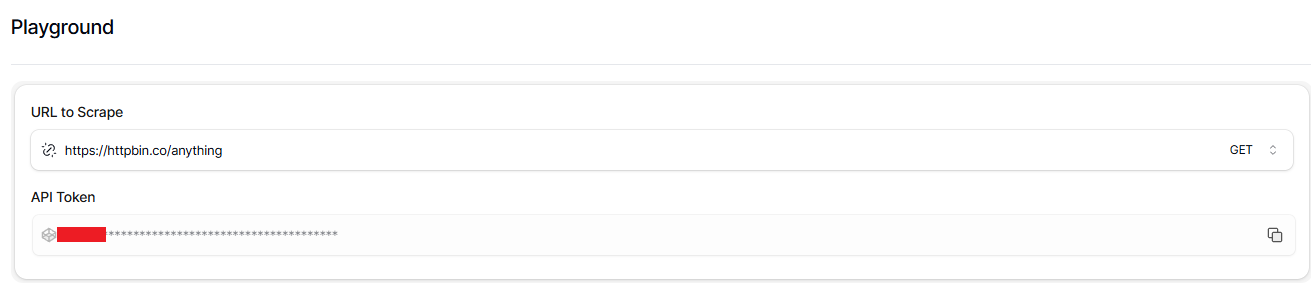
The other prerequisite is a Scrape.do account. Sign up at scrape.do for a free account that includes 1,000 monthly requests, which is enough to run everything we cover here on multiple targets. The dashboard shows the API token at the top of the home page. We will paste it into a TOKEN constant at the top of every code block.
Imports and the config we will tweak per run:
import csv
import json
import re
import urllib.parse

import requests

TOKEN = "<your_token>"
SEARCH_QUERY = "web scraping python"
MAX_RESULTS = 60
OUTPUT_CSV = "youtube-search.csv"
We need a fetch helper that wraps every Scrape.do call, so one URL pattern handles both GETs and POSTs:
def fetch(target_url, method="GET", body=None):
    api = (
        "http://api.scrape.do/?"
        + urllib.parse.urlencode(
            {"token": TOKEN, "url": target_url, "super": "true"},
            quote_via=urllib.parse.quote,
        )
    )
    if method == "POST":
        api += "&customMethod=POST"
        r = requests.post(api, json=body, timeout=120)
    else:
        r = requests.get(api, timeout=120)
    if r.status_code != 200:
        raise SystemExit(f"HTTP {r.status_code} for {target_url}")
    return r.text
The customMethod=POST parameter is the one quirk: Scrape.do needs it to forward the request method correctly to YouTube. We will hit this fetch helper again when we get to video, comments, and channel.
Parsing ytInitialData for Videos and Shorts
The search-results page response includes a <script> tag with var ytInitialData = {...}; near the bottom of the document. Every field on the page sits inside that blob. We pull it out with the two-line pattern from earlier:
search_url = f"https://www.youtube.com/results?search_query={urllib.parse.quote(SEARCH_QUERY)}"

html = fetch(search_url)
client_version = re.search(r'"INNERTUBE_CLIENT_VERSION":"([^"]+)"', html).group(1)
m = re.search(r"var ytInitialData\s*=\s*", html)
data = json.JSONDecoder().raw_decode(html, m.end())[0]
The result list lives a few levels deep inside data.contents. Each entry is either an itemSectionRenderer (containing the actual results) or a continuationItemRenderer (carrying the next-page token).
Inside the itemSectionRenderer.contents, items are tagged by type. A videoRenderer is a regular video result. A gridShelfViewModel containing nested shortsLockupViewModel items is a Shorts shelf. A third type, lockupViewModel, appears for playlists or channels and we skip it.
We write a small parser for regular videos:
def parse_video_renderer(vr, position):
    snippet_runs = (vr.get("detailedMetadataSnippets") or [{}])[0].get("snippetText", {}).get("runs", [])
    description = "".join(r.get("text", "") for r in snippet_runs) or None
    thumbs = vr.get("thumbnail", {}).get("thumbnails", [])
    base = (vr.get("ownerText", {}).get("runs") or [{}])[0]
    channel_path = base.get("navigationEndpoint", {}).get("browseEndpoint", {}).get("canonicalBaseUrl", "")
    return {
        "position": position,
        "type": "video",
        "video_id": vr.get("videoId"),
        "title": (vr.get("title", {}).get("runs") or [{}])[0].get("text"),
        "channel": base.get("text"),
        "channel_url": f"https://www.youtube.com{channel_path}" if channel_path else None,
        "views": (vr.get("viewCountText") or {}).get("simpleText"),
        "short_views": (vr.get("shortViewCountText") or {}).get("simpleText"),
        "upload_date": (vr.get("publishedTimeText") or {}).get("simpleText"),
        "duration": (vr.get("lengthText") or {}).get("simpleText"),
        "video_url": f"https://www.youtube.com/watch?v={vr.get('videoId')}",
        "thumbnail": thumbs[-1]["url"] if thumbs else None,
        "description": description,
    }
The title and channel name come back as runs arrays because YouTube splits strings into typed segments when they include hyperlinks or bold formatting. We rebuild the full string by joining the runs. The thumbnail at index [-1] is the highest-resolution variant YouTube ships.
Shorts use a different schema. The shelf hands us only video ID, title, view count, and thumbnail. Channel name, duration, and upload date are not exposed for Shorts on the search page, only on the individual short's watch page. We write the parser around those limitations:
def parse_shorts_shelf(gsv, start_pos):
    rows = []
    for i, item in enumerate(gsv.get("contents", [])):
        sl = item.get("shortsLockupViewModel")
        if not sl:
            continue
        video_id = sl.get("onTap", {}).get("innertubeCommand", {}).get("reelWatchEndpoint", {}).get("videoId")
        sources = sl.get("thumbnail", {}).get("sources", [])
        rows.append({
            "position": start_pos + i,
            "type": "short",
            "video_id": video_id,
            "title": sl.get("overlayMetadata", {}).get("primaryText", {}).get("content"),
            "channel": None,
            "channel_url": None,
            "views": None,
            "short_views": sl.get("overlayMetadata", {}).get("secondaryText", {}).get("content"),
            "upload_date": None,
            "duration": None,
            "video_url": f"https://www.youtube.com/shorts/{video_id}" if video_id else None,
            "thumbnail": sources[0]["url"] if sources else None,
            "description": None,
        })
    return rows
Both row shapes share the same column set so a single CSV holds videos and Shorts side by side. Fields the search page does not provide for Shorts come out as None, and a type column lets us split them later.
We add a dispatcher that walks the section list and hands each item to the right parser:
def extract_items(item_list, position_start):
    rows = []
    pos = position_start
    cont_token = None
    for item in item_list:
        if "itemSectionRenderer" in item:
            for sub in item["itemSectionRenderer"].get("contents", []):
                if "videoRenderer" in sub:
                    rows.append(parse_video_renderer(sub["videoRenderer"], pos))
                    pos += 1
                elif "gridShelfViewModel" in sub:
                    shelf_rows = parse_shorts_shelf(sub["gridShelfViewModel"], pos)
                    rows.extend(shelf_rows)
                    pos += len(shelf_rows)
        elif "continuationItemRenderer" in item:
            cont_token = (item["continuationItemRenderer"]
                          .get("continuationEndpoint", {})
                          .get("continuationCommand", {})
                          .get("token"))
    return rows, cont_token
That is all the dispatching we need, routing three renderer types to two parsers. The position counter threads through the loop so page-2 results start where page-1 left off, and the continuation token at the end is what we need for the next page.
InnerTube Continuation Pagination
After the first 18 organic results, more pages come from POST https://www.youtube.com/youtubei/v1/search. The body asks for two things: a context.client block (using the WEB client version we extracted earlier) telling YouTube which web client we are pretending to be, and a continuation token from the previous page.
If the loop suddenly returns empty pages even though tokens are still coming back, the client version is the first thing to check. It looks like 2.20260416.01.00 and rolls forward roughly once per week with YouTube's frontend deploys.
We loop until the row count hits the cap or the continuation token comes back empty:
sections = data["contents"]["twoColumnSearchResultsRenderer"]["primaryContents"]["sectionListRenderer"]["contents"]
all_rows, cont_token = extract_items(sections, 1)

page = 2
while cont_token and len(all_rows) < MAX_RESULTS:
    inner = "https://www.youtube.com/youtubei/v1/search?prettyPrint=false"
    body = {
        "context": {"client": {"clientName": "WEB", "clientVersion": client_version, "hl": "en", "gl": "US"}},
        "continuation": cont_token,
    }
    resp = json.loads(fetch(inner, method="POST", body=body))
    items = []
    for cmd in resp.get("onResponseReceivedCommands", []):
        if "appendContinuationItemsAction" in cmd:
            items = cmd["appendContinuationItemsAction"].get("continuationItems", [])
    page_rows, cont_token = extract_items(items, len(all_rows) + 1)
    if not page_rows:
        break
    all_rows.extend(page_rows)
    page += 1
Each response ships the next batch of items inside appendContinuationItemsAction.continuationItems, in the same renderer shape as the initial page. We feed them through the same extract_items we used the first time. If a page comes back empty even though the token was set, we stop early.
Export to CSV
Every row, video or short, has the same column set, so we write everything out with DictWriter using the first row's keys as the header:
all_rows = all_rows[:MAX_RESULTS]

with open(OUTPUT_CSV, "w", encoding="utf-8", newline="") as f:
    w = csv.DictWriter(f, fieldnames=list(all_rows[0].keys()))
    w.writeheader()
    w.writerows(all_rows)

print(f"Wrote {len(all_rows)} rows to {OUTPUT_CSV}")
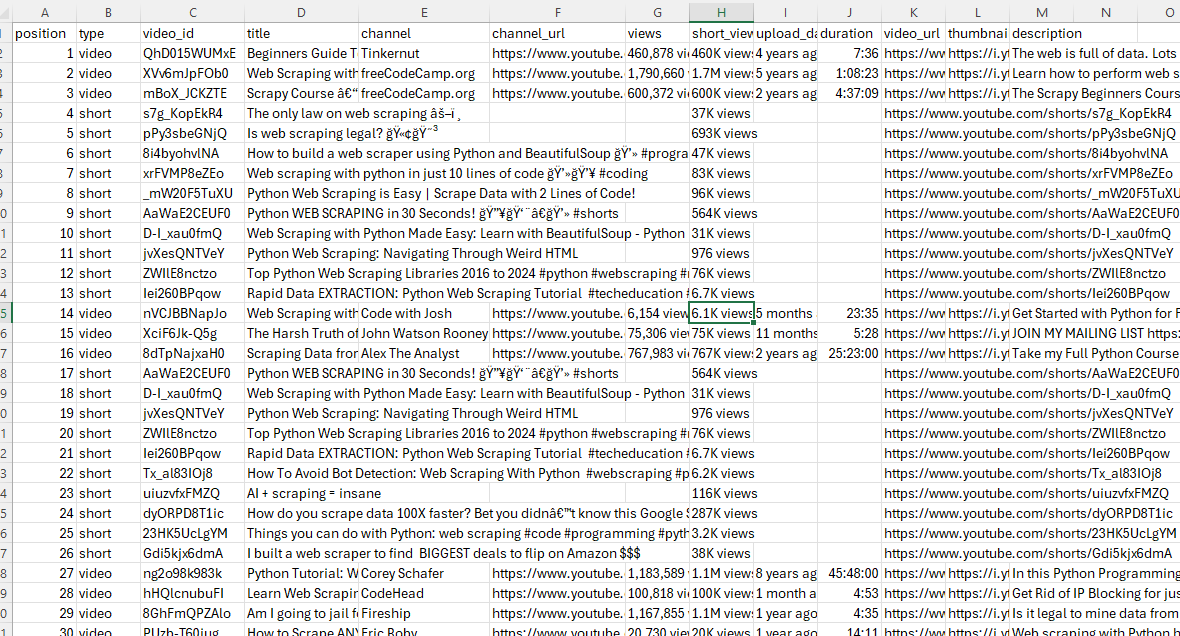
A run with SEARCH_QUERY = "web scraping python" and MAX_RESULTS = 60 produces a CSV with 60 rows split between regular videos (full metadata) and Shorts (with None in the columns the search page does not populate for short-form content). Two pages of pagination, ~37 items on the first page and ~36 on the second, sliced to exactly 60.
Fetching: https://www.youtube.com/results?search_query=web%20scraping%20python
  page 1: 37 items
  page 2: +36 (total 73)
Wrote 60 rows to youtube-search.csv
The search page stops being a page and becomes 60 rows of CSV.
Scraping YouTube Video Metadata
Single-video metadata is the simplest case: one HTTP call, every field in the same response, no pagination.
The catch is that the data splits across two blobs, not one. ytInitialPlayerResponse is the authoritative source for raw machine-readable fields: integer view count, integer like count, ISO upload date, video duration in seconds. ytInitialData holds the formatted display strings that the page renders to the user: subscriber count ("478M subscribers"), view count with commas, the comment count display ("2.4M Comments").
We read both blobs and merge them into a single record. Comment count needs a special detour because it lives in a separate engagement panels array, not next to the other display fields.
Three constants for this script: the video URL, the output filename, and the same token we set earlier.
TOKEN = "<your_token>"
VIDEO_URL = "https://www.youtube.com/watch?v=dQw4w9WgXcQ"
OUTPUT_JSON = "youtube-video.json"
Reading ytInitialPlayerResponse and ytInitialData Together
Both blobs sit as consecutive var <name> = {...}; declarations in the watch page HTML. We use one helper to extract either:
def extract_json_blob(html, anchor):
    m = re.search(rf"var {anchor}\s*=\s*", html)
    if not m:
        raise RuntimeError(f"{anchor} not found")
    return json.JSONDecoder().raw_decode(html, m.end())[0]
Before the fetch we normalize any /shorts/<id> URL to /watch?v=<id>. The next H3 explains why; for now this is the four-line guard at the top of the script:
m = re.search(r"/shorts/([A-Za-z0-9_-]{11})", VIDEO_URL)
target_url = f"https://www.youtube.com/watch?v={m.group(1)}" if m else VIDEO_URL
We make a single GET inline since this is the only HTTP call we need here:
api = (
    "http://api.scrape.do/?"
    + urllib.parse.urlencode(
        {"token": TOKEN, "url": target_url, "super": "true"},
        quote_via=urllib.parse.quote,
    )
)
r = requests.get(api, timeout=120)
if r.status_code != 200:
    raise SystemExit(f"HTTP {r.status_code} for {target_url}")
html = r.text

player = extract_json_blob(html, "ytInitialPlayerResponse")
initial = extract_json_blob(html, "ytInitialData")
The player response gives us videoDetails (videoId, title, author, channelId, lengthSeconds, viewCount, keywords, isLiveContent, isPrivate, thumbnails) and microformat.playerMicroformatRenderer (description, likeCount, uploadDate, publishDate, ownerProfileUrl, category, isFamilySafe, isShortsEligible).
vd = player.get("videoDetails", {})
micro = player.get("microformat", {}).get("playerMicroformatRenderer", {})
The display strings come from ytInitialData. Three values we want, scattered across two renderer types:
prim = (initial.get("contents", {}).get("twoColumnWatchNextResults", {})
        .get("results", {}).get("results", {}).get("contents", []))
subscriber_count = display_date = view_display = description_html = None
for item in prim:
    if "videoPrimaryInfoRenderer" in item:
        vpi = item["videoPrimaryInfoRenderer"]
        display_date = vpi.get("dateText", {}).get("simpleText")
        view_display = (vpi.get("viewCount", {}).get("videoViewCountRenderer", {})
                        .get("viewCount", {}).get("simpleText"))
    elif "videoSecondaryInfoRenderer" in item:
        vsi = item["videoSecondaryInfoRenderer"]
        subscriber_count = (vsi.get("owner", {}).get("videoOwnerRenderer", {})
                            .get("subscriberCountText", {}).get("simpleText"))
        description_html = vsi.get("attributedDescription", {}).get("content")
Both forms of every value end up on the output object. The integer view count for analytics, the formatted display string for UI replication.
Handling /shorts/ URLs
We normalized the URL above without saying why. Here it is.
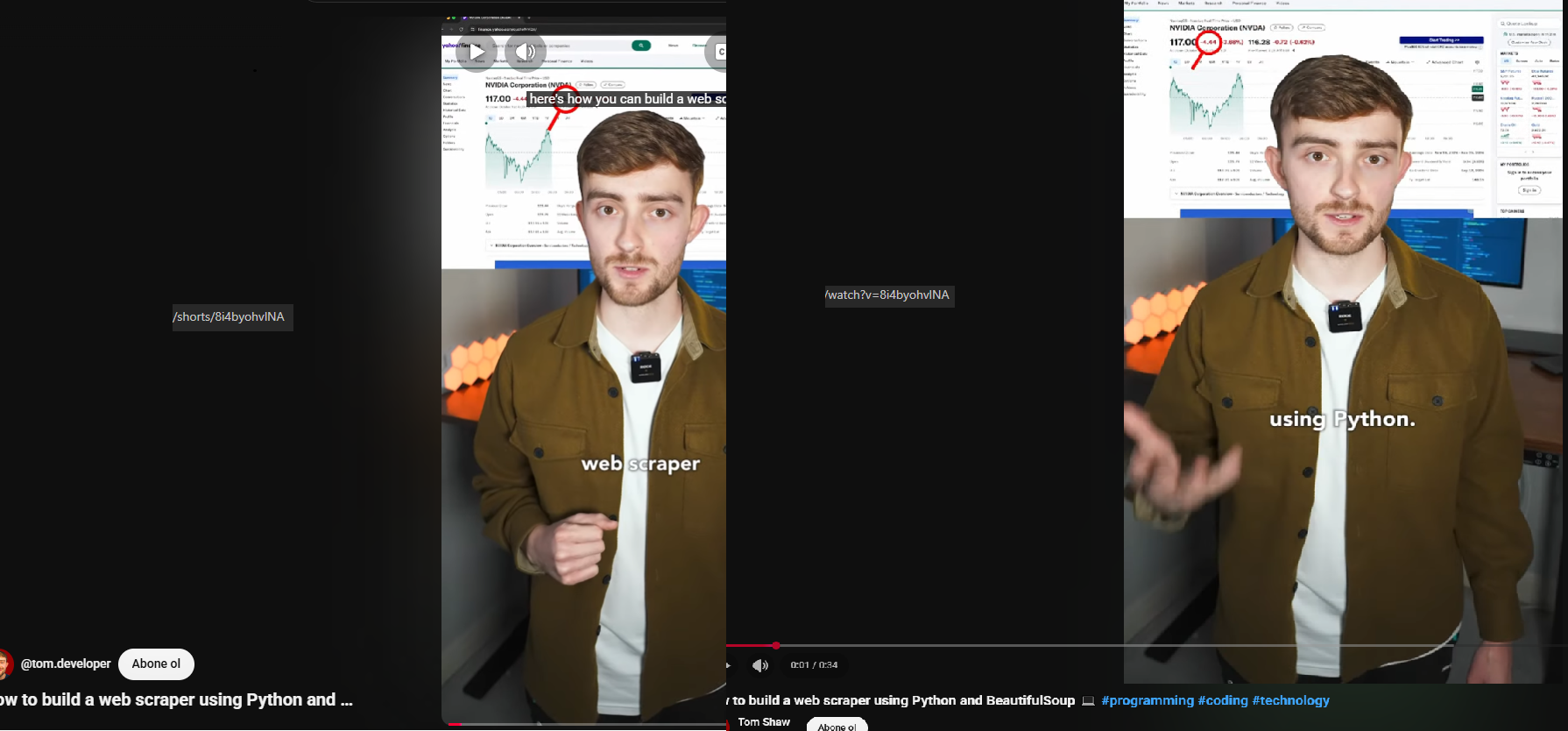
YouTube exposes the same Short under two URLs. /shorts/<id> serves the vertical full-screen overlay player. /watch?v=<id> serves the regular watch page with the same video.
The Shorts overlay uses a different layout where ytInitialData.contents is empty. The entire page state lives in an overlay-specific renderer that we are not parsing. ytInitialPlayerResponse is identical between the two URLs, but every renderer path we walk for display strings is missing on the Shorts version.
No /watch URL, no display strings.
After the rewrite at the top, every renderer path we already walked works without changes for both URL types. We will use the same trick again in the comments section.
Extracting Comment Count from the Engagement Panel
The formatted comment count display ("2.4M Comments") is not next to the other display strings in videoPrimaryInfoRenderer or videoSecondaryInfoRenderer. It lives in a separate engagementPanels array on ytInitialData, inside the panel whose panelIdentifier equals "engagement-panel-comments-section". The identifier is almost self-documenting, which is rare for YouTube internals.
The text comes back as either a runs array (more recent format) or a simpleText string (older format), so we handle both:
comment_count = None
for panel in initial.get("engagementPanels", []):
    epr = panel.get("engagementPanelSectionListRenderer", {})
    if epr.get("panelIdentifier") == "engagement-panel-comments-section":
        ci = epr.get("header", {}).get("engagementPanelTitleHeaderRenderer", {}).get("contextualInfo", {})
        comment_count = "".join(run.get("text", "") for run in ci.get("runs", [])) or ci.get("simpleText")
        break
The integer comment count is not exposed anywhere on the watch page in any blob. Only the formatted display string. Getting the actual integer means either hitting the comments endpoint (we cover that next) or counting parsed comments after pagination.
Export to JSON
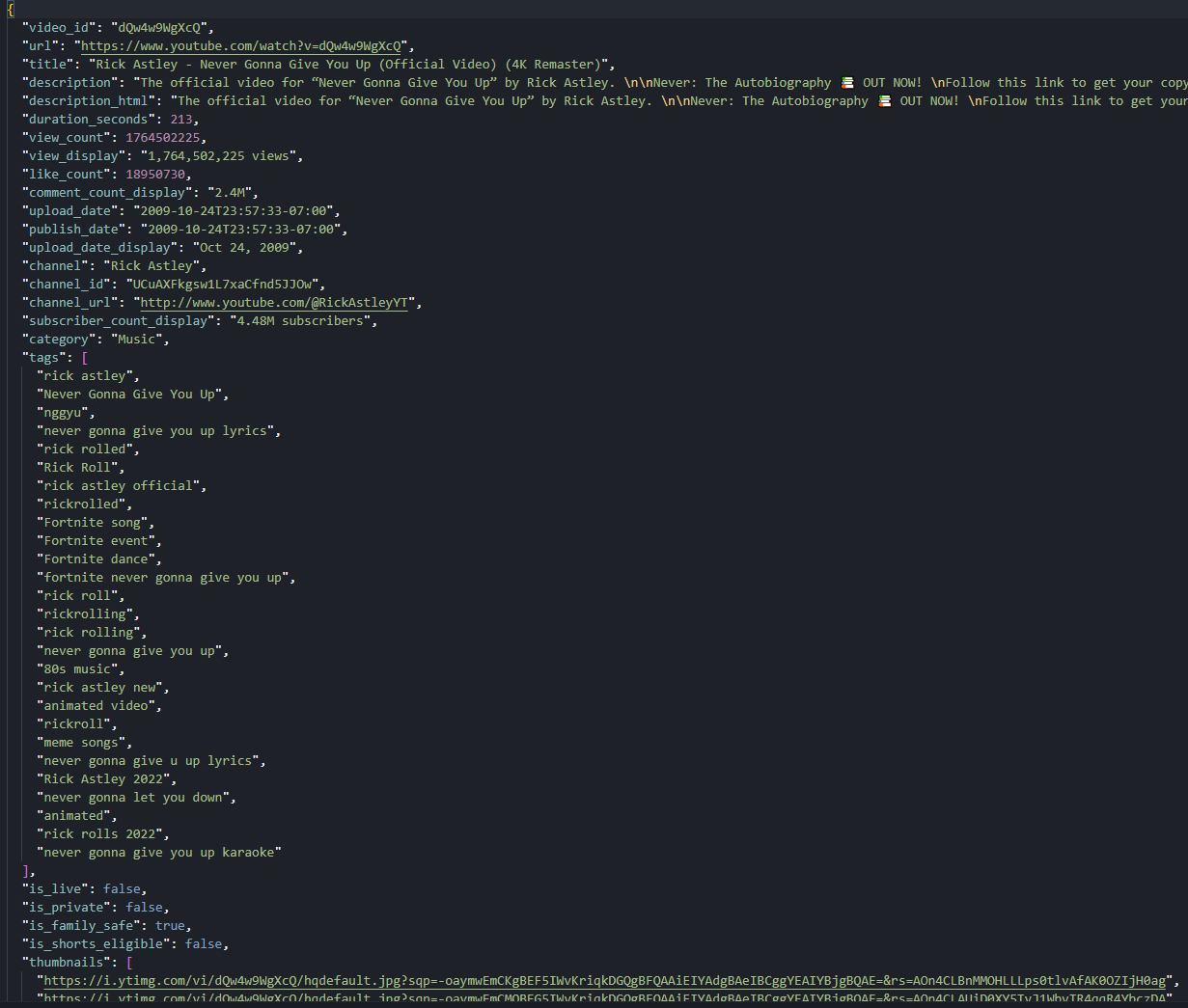
We assemble the output record as a single JSON object covering identity, title and description (raw and HTML), engagement counts (integer and display), timestamps (ISO and display), authorship, classification, and the thumbnail set. We keep both forms of every value, since different consumers want different things:
record = {
    "video_id": vd.get("videoId"),
    "url": micro.get("canonicalUrl") or target_url,
    "title": vd.get("title") or micro.get("title", {}).get("simpleText"),
    "description": micro.get("description", {}).get("simpleText") or vd.get("shortDescription"),
    "description_html": description_html,
    "duration_seconds": int(vd.get("lengthSeconds", 0)) or None,
    "view_count": int(vd.get("viewCount", 0)) or None,
    "view_display": view_display,
    "like_count": int(micro.get("likeCount", 0)) or None,
    "comment_count_display": comment_count,
Then the timestamps, channel context, classification flags, and thumbnail set:
    "upload_date": micro.get("uploadDate"),
    "publish_date": micro.get("publishDate"),
    "upload_date_display": display_date,
    "channel": vd.get("author"),
    "channel_id": vd.get("channelId"),
    "channel_url": micro.get("ownerProfileUrl"),
    "subscriber_count_display": subscriber_count,
    "category": micro.get("category"),
    "tags": vd.get("keywords", []),
    "is_live": vd.get("isLiveContent"),
    "is_private": vd.get("isPrivate"),
    "is_family_safe": micro.get("isFamilySafe"),
    "is_shorts_eligible": micro.get("isShortsEligible"),
    "thumbnails": [t.get("url") for t in vd.get("thumbnail", {}).get("thumbnails", [])],
}

with open(OUTPUT_JSON, "w", encoding="utf-8") as f:
    json.dump(record, f, ensure_ascii=False, indent=2)
A run against the Rick Astley "Never Gonna Give You Up" watch URL gives us view_count: 1764213403, like_count: 18949050, comment_count_display: "2.4M Comments", 27 tags, category "Music", duration 213 seconds. The same code against a /shorts/<id> URL produces the same shape after the rewrite, with smaller numbers and tags: [] (Shorts rarely set keywords).
One page, two blobs, 25 fields. The watch page is now a single record.
Scraping YouTube Comments
Comments are the one surface that breaks the pattern. The watch page HTML does not contain any comment text. None. The page only ships the initial continuation token for the comments section. Trying to parse ytInitialData for comment data finds zero rows.
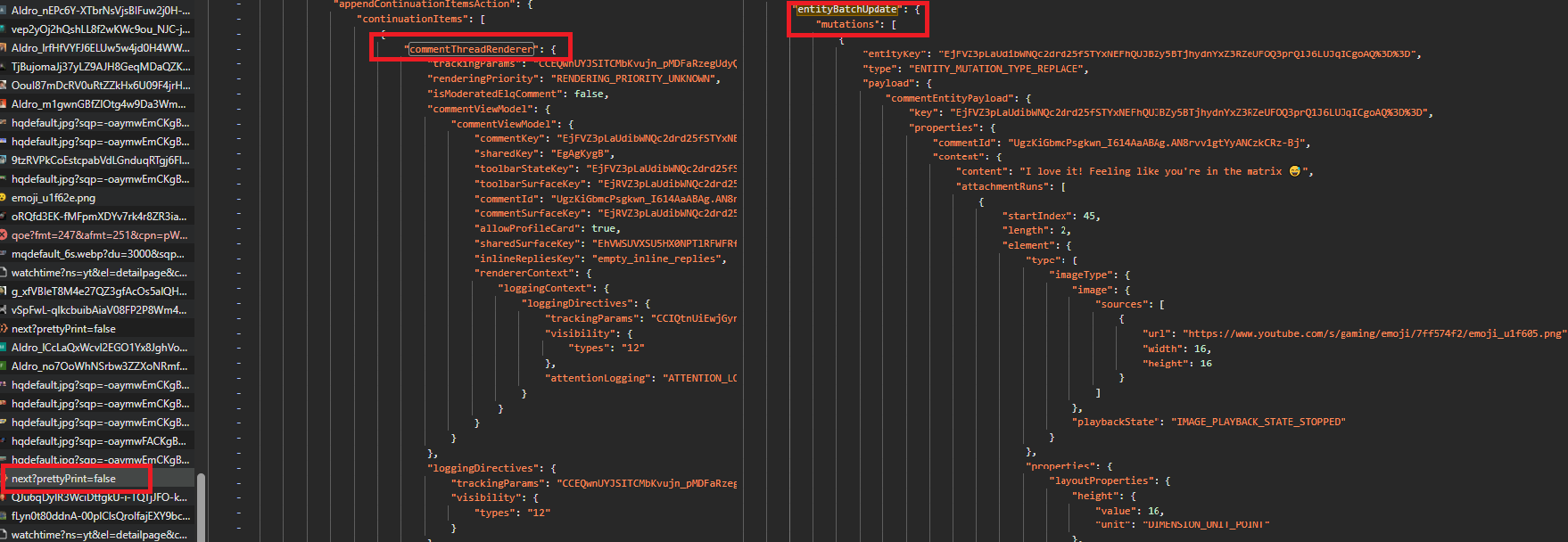
Here is the catch. The InnerTube response splits comment data across two parallel structures. A commentThreadRenderer array describes the thread layout and reply continuation tokens. A separate frameworkUpdates.entityBatchUpdate.mutations array stores the actual text and authorship inside commentEntityPayload objects. Same response, two arrays, joined by commentId. The architecture is smart for partial updates, a little painful to scrape.
Replies under each top-level comment require a second continuation request per thread. We do them inline as we walk the threads so the output structure ends up naturally nested.
Five constants for this script: the video URL, the comment and reply caps, the output filename, and the same token from before.
TOKEN = "<your_token>"
VIDEO_URL = "https://www.youtube.com/watch?v=dQw4w9WgXcQ"
MAX_COMMENTS = 40
MAX_REPLIES = 5
OUTPUT_JSON = "youtube-comments.json"
We add a small wrapper for the InnerTube body:
def post_continuation(client_version, token):
    body = {
        "context": {"client": {"clientName": "WEB", "clientVersion": client_version, "hl": "en", "gl": "US"}},
        "continuation": token,
    }
    inner = "https://www.youtube.com/youtubei/v1/next?prettyPrint=false"
    return json.loads(fetch(inner, method="POST", body=body))
The body shape is identical for top-level pagination and for reply pagination. Only the token changes.
Finding the Initial Continuation Token
Same fetch shape as the video section, plus we grab the video ID for the output and the InnerTube client version for the POST body:
m = re.search(r"/shorts/([A-Za-z0-9_-]{11})", VIDEO_URL)
target_url = f"https://www.youtube.com/watch?v={m.group(1)}" if m else VIDEO_URL

html = fetch(target_url)
client_version = re.search(r'"INNERTUBE_CLIENT_VERSION":"([^"]+)"', html).group(1)
video_id = re.search(r'"videoId":"([^"]+)"', html).group(1)
m = re.search(r"var ytInitialData\s*=\s*", html)
initial = json.JSONDecoder().raw_decode(html, m.end())[0]
The watch page renderer list inside ytInitialData includes an itemSectionRenderer whose sectionIdentifier is "comment-item-section". Inside that section's contents is a continuationItemRenderer carrying the initial token for the comments feed.
We match by identifier instead of array position because the section order shifts when YouTube ships frontend changes:
sections = (initial.get("contents", {}).get("twoColumnWatchNextResults", {})
            .get("results", {}).get("results", {}).get("contents", []))
token = None
for sec in sections:
    isr = sec.get("itemSectionRenderer")
    if isr and isr.get("sectionIdentifier") == "comment-item-section":
        for it in isr.get("contents", []):
            cir = it.get("continuationItemRenderer")
            if cir:
                token = cir["continuationEndpoint"]["continuationCommand"]["token"]
                break

if not token:
    raise SystemExit("Comments disabled or initial token not found")
If the section is missing because comments are turned off on the video, we raise SystemExit with a clear message. Failing loud beats failing quiet for the kind of bug that produces zero rows on a successful HTTP response.
Joining commentEntityPayload Mutations to Threads
Each InnerTube response from /youtubei/v1/next wraps items in either reloadContinuationItemsCommand (first page) or appendContinuationItemsAction (subsequent pages). We write one helper to handle both shapes:
def collect_continuation_items(resp):
    items = []
    actions = (resp.get("onResponseReceivedEndpoints", [])
               + resp.get("onResponseReceivedActions", [])
               + resp.get("onResponseReceivedCommands", []))
    for a in actions:
        for k in ("appendContinuationItemsAction", "reloadContinuationItemsCommand"):
            if k in a:
                items.extend(a[k].get("continuationItems", []))
    return items
What comes back is a list of commentThreadRenderer items (one per top-level comment) plus a continuationItemRenderer at the end (the next-page token). The thread items expose layout metadata, comment IDs, and reply tokens, but not the comment text or author.
That data lives in frameworkUpdates.entityBatchUpdate.mutations. Each mutation has a payload keyed by entity type. We only care about commentEntityPayload:
def index_entities(resp):
    by_id = {}
    mutations = resp.get("frameworkUpdates", {}).get("entityBatchUpdate", {}).get("mutations", [])
    for m in mutations:
        cep = m.get("payload", {}).get("commentEntityPayload")
        if cep:
            cid = cep.get("properties", {}).get("commentId")
            if cid:
                by_id[cid] = cep
    return by_id
A commentEntityPayload packs everything we want per comment: text, published time, reply level, author display name and channel ID, avatar URL, verified/creator/artist flags, like count, reply count. We write a small parser to flatten those into a single dictionary:
def parse_comment(cep):
    props = cep.get("properties", {})
    author = cep.get("author", {})
    toolbar = cep.get("toolbar", {})
    return {
        "comment_id": props.get("commentId"),
        "text": (props.get("content") or {}).get("content"),
        "published": props.get("publishedTime"),
        "reply_level": props.get("replyLevel"),
        "author": author.get("displayName"),
        "author_channel_id": author.get("channelId"),
        "author_avatar": author.get("avatarThumbnailUrl"),
        "is_verified": author.get("isVerified"),
        "is_creator": author.get("isCreator"),
        "is_artist": author.get("isArtist"),
        "like_count": toolbar.get("likeCountNotliked"),
        "reply_count": toolbar.get("replyCount"),
    }
The join is the easy part. For each thread item, read the commentId from inside its commentViewModel, look it up in the entity map, hand it to parse_comment. Both arrays arrive in the same response, so the lookup never misses on a healthy run.
Why Top-Level Threads and Reply Items Have Different Wrappers
A top-level thread item wraps commentViewModel twice. Yes, twice. The shape looks like this:
{
  "commentThreadRenderer": {
    "commentViewModel": {
      "commentViewModel": {
        "commentId": "...",
        ...
      }
    },
    "replies": { ... }
  }
}
The actual data is in the inner commentViewModel. A reply item, returned by a reply continuation request, is exactly that inner piece standing alone: no commentThreadRenderer wrapper, no outer commentViewModel.
This means the lookup path differs between contexts. Top-level threads need it["commentThreadRenderer"]["commentViewModel"]["commentViewModel"]["commentId"]. Replies need it["commentViewModel"]["commentId"]. Mixing them up returns None and silently skips the comment with no error raised.
This is the single most error-prone part of the whole comments scraper. Each context needs its own code path:
# Top-level threads: doubly-nested wrapper
cvm = (ctr.get("commentViewModel") or {}).get("commentViewModel", {})
cep = entities.get(cvm.get("commentId"))

# Reply items: flat wrapper
cvm = it.get("commentViewModel")
cep = entities.get(cvm.get("commentId"))
Two snippets that look almost identical, except one has an extra .get("commentViewModel") at the top-level path. That one extra call is the difference between 0 comments and N comments parsed.
Fetching Reply Threads
Each commentThreadRenderer comes with a replies.commentRepliesRenderer.contents array. If that array contains a continuationItemRenderer, its token is the reply continuation for that thread. We post it to the same /youtubei/v1/next endpoint, which returns a flat list of commentViewModel items plus an optional next-page token for further reply pages:
def fetch_replies(client_version, reply_token, max_replies):
    out = []
    token = reply_token
    while token and len(out) < max_replies:
        resp = post_continuation(client_version, token)
        entities = index_entities(resp)
        items = collect_continuation_items(resp)
        token = None
        for it in items:
            cvm = it.get("commentViewModel")
            if cvm:
                cep = entities.get(cvm.get("commentId"))
                if cep:
                    out.append(parse_comment(cep))
            elif "continuationItemRenderer" in it:
                ce = it["continuationItemRenderer"].get("continuationEndpoint", {})
                token = (ce.get("continuationCommand") or {}).get("token")
    return out[:max_replies]
We call fetch_replies once per top-level comment, immediately after parsing it, before moving to the next thread. That keeps the output structure cleanly nested but makes the request count grow fast. Forty top-level comments with up to five replies each on the Rick Astley video came out to 37 InnerTube POSTs total: two for the top-level pages (20 threads per page) and one per thread that has a reply continuation.
We tie everything together in the top-level pagination loop. For each item in the response we either parse a thread (and fetch its replies) or grab the next-page token:
comments = []
page = 0

while token and len(comments) < MAX_COMMENTS:
    page += 1
    resp = post_continuation(client_version, token)
    entities = index_entities(resp)
    items = collect_continuation_items(resp)
    token = None
    for it in items:
        if "commentThreadRenderer" in it:
            ctr = it["commentThreadRenderer"]
            cvm = (ctr.get("commentViewModel") or {}).get("commentViewModel", {})
            cep = entities.get(cvm.get("commentId"))
            if not cep:
                continue
            comment = parse_comment(cep)
The reply token sits inside the thread's replies block. We pull it, then call fetch_replies with it (or attach an empty array if the thread has no replies) and append the assembled comment:
            reply_token = None
            for ci in (ctr.get("replies", {}).get("commentRepliesRenderer", {}).get("contents", []) or []):
                if "continuationItemRenderer" in ci:
                    ce = ci["continuationItemRenderer"].get("continuationEndpoint", {})
                    reply_token = (ce.get("continuationCommand") or {}).get("token")
            comment["replies"] = (fetch_replies(client_version, reply_token, MAX_REPLIES)
                                   if reply_token and MAX_REPLIES > 0 else [])
            comments.append(comment)
            if len(comments) >= MAX_COMMENTS:
                break
        elif "continuationItemRenderer" in it:
            ce = it["continuationItemRenderer"].get("continuationEndpoint", {})
            token = (ce.get("continuationCommand") or {}).get("token")
The doubly-nested wrapper is on the third line of the outer loop. The flat wrapper is inside fetch_replies. Each path matches the shape of the surrounding context.
Export to JSON
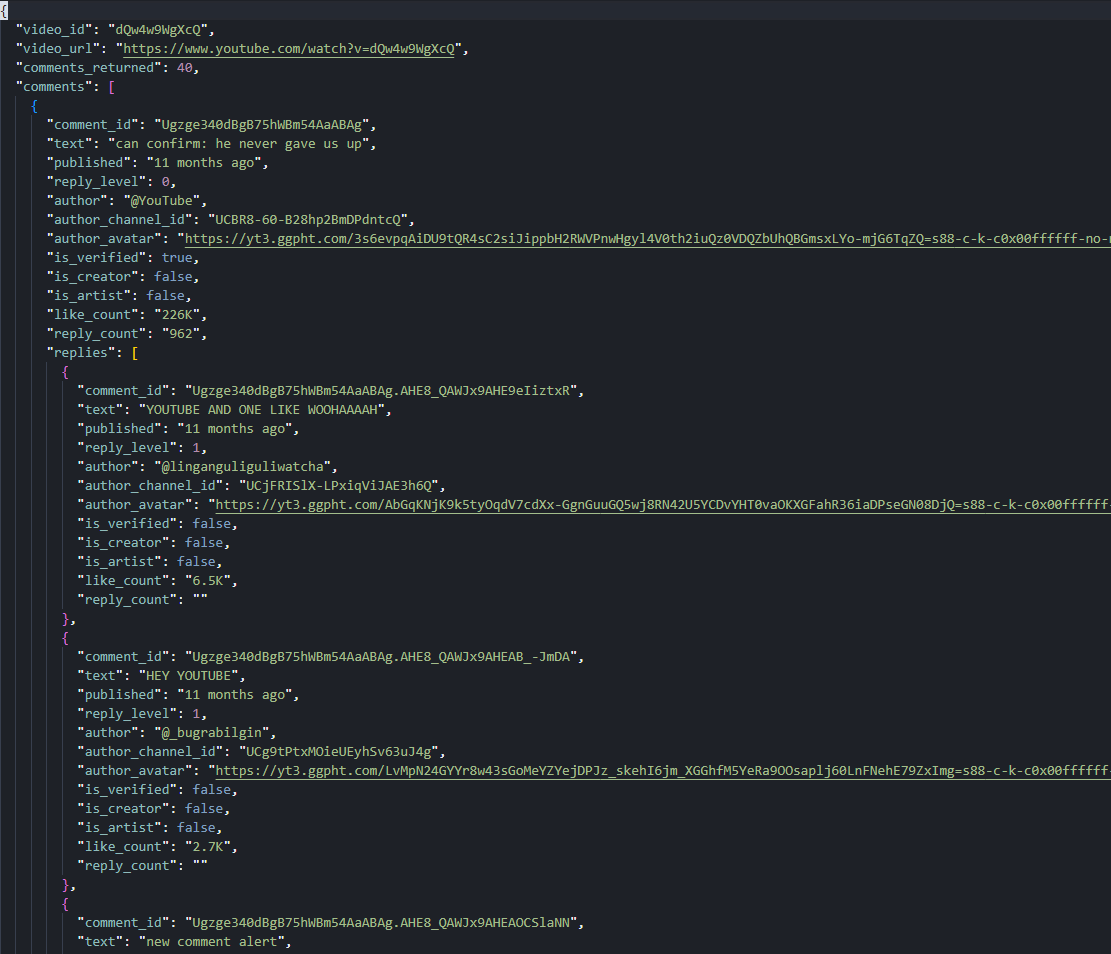
We write the output as a single JSON file with the video ID, URL, a count, and an array of comment objects. Each comment holds a replies array of the same shape, with reply_level set to 1 instead of 0:
comments = comments[:MAX_COMMENTS]
total_replies = sum(len(c.get("replies", [])) for c in comments)

with open(OUTPUT_JSON, "w", encoding="utf-8") as f:
    json.dump({"video_id": video_id, "video_url": target_url,
               "comments_returned": len(comments), "comments": comments},
              f, ensure_ascii=False, indent=2)

print(f"Wrote {OUTPUT_JSON}  ({len(comments)} comments, {total_replies} replies)")
Forty top-level comments with up to five replies each on the Rick Astley video produces a 168-reply JSON tree under 40 threads (most threads return the full 5, a handful return fewer or none). The pinned @YouTube comment ("can confirm: he never gave us up") sits at position one with 226K likes and 962 reply count display.
  page 1: +20 (total 20)
  page 2: +20 (total 40)
Wrote youtube-comments.json  (40 comments, 168 replies)
What started as "comments do not even live in the page" ends as a JSON tree with replies nested under every thread.
Scraping YouTube Channel Pages
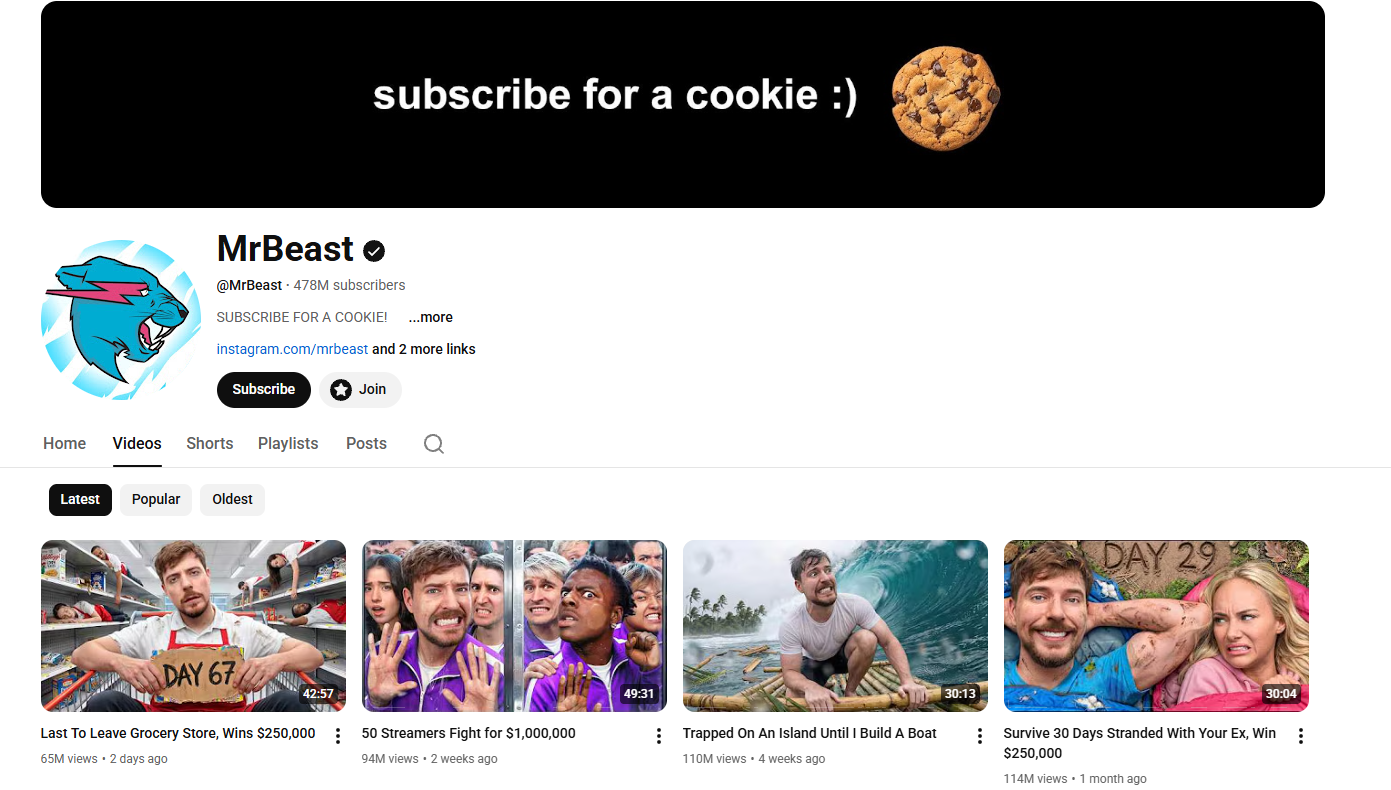
A channel page at /@<handle>/videos exposes the channel-level identity (ID, title, handle, description, vanity URL), display statistics (subscriber count, total video count), media URLs (avatar, banner), and the first 30 uploaded videos. Subsequent video pages come from InnerTube /youtubei/v1/browse with continuation tokens, the same recipe as search and comments with a different endpoint path.
Four constants for this script: the channel URL, the video cap, the output filename, and the same token from before.
TOKEN = "<your_token>"
CHANNEL_URL = "https://www.youtube.com/@MrBeast"
MAX_VIDEOS = 60
OUTPUT_JSON = "youtube-channel.json"
Channel URLs come in different shapes. @<handle>, /channel/<id>, with or without the trailing /videos. We auto-append /videos if it is missing so the response always uses the channel-page layout with the Videos tab pre-selected:
channel_url = CHANNEL_URL.rstrip("/")
if not channel_url.endswith("/videos"):
    channel_url += "/videos"
The channel-level data and the video list live in different parts of ytInitialData. We read them in two passes and merge them into one output object. The same fetch helper from earlier handles both the initial GET and every continuation POST.
Channel Header vs. Videos Tab
Same fetch shape as the comments section, then we extract the InnerTube client version (for the continuation POSTs) and ytInitialData (which carries both the header and the first page of videos):
html = fetch(channel_url)
client_version = re.search(r'"INNERTUBE_CLIENT_VERSION":"([^"]+)"', html).group(1)
m = re.search(r"var ytInitialData\s*=\s*", html)
initial = json.JSONDecoder().raw_decode(html, m.end())[0]
Channel-level metadata splits across two places. metadata.channelMetadataRenderer ships the stable identity fields (external ID, title, description, channel URL, vanity URL, keywords, family-safe flag). A deeply nested chain under header.pageHeaderRenderer stores the display-string statistics (handle, subscriber count, total videos).
The display rows are positional. Row zero, part zero is the @handle. Row one, part zero is the subscriber count display. Row one, part one is the total videos display. Channels with very low engagement may have shorter rows, so we check array lengths before indexing:
def parse_channel_info(initial):
    cm = initial.get("metadata", {}).get("channelMetadataRenderer", {})
    vm = (initial.get("header", {}).get("pageHeaderRenderer", {})
          .get("content", {}).get("pageHeaderViewModel", {}))
    rows = vm.get("metadata", {}).get("contentMetadataViewModel", {}).get("metadataRows", [])
    handle = subs = total_videos = None
    if len(rows) >= 1:
        handle = ((rows[0].get("metadataParts") or [{}])[0].get("text") or {}).get("content")
    if len(rows) >= 2:
        parts = rows[1].get("metadataParts") or []
        if len(parts) >= 1:
            subs = (parts[0].get("text") or {}).get("content")
        if len(parts) >= 2:
            total_videos = (parts[1].get("text") or {}).get("content")
Then the avatar and banner pulls (the next H3 explains why those paths run so deep), followed by the dict assembly:
    avatar_sources = (vm.get("image", {}).get("decoratedAvatarViewModel", {})
                      .get("avatar", {}).get("avatarViewModel", {})
                      .get("image", {}).get("sources", []))
    banner_sources = (vm.get("banner", {}).get("imageBannerViewModel", {})
                      .get("image", {}).get("sources", []))
    return {
        "channel_id": cm.get("externalId"),
        "title": cm.get("title"),
        "handle": handle,
        "description": cm.get("description"),
        "channel_url": cm.get("channelUrl"),
        "vanity_url": cm.get("vanityChannelUrl"),
        "keywords": cm.get("keywords"),
        "is_family_safe": cm.get("isFamilySafe"),
        "subscriber_count_display": subs,
        "total_videos_display": total_videos,
        "avatar": avatar_sources[-1].get("url") if avatar_sources else None,
        "banner": banner_sources[-1].get("url") if banner_sources else None,
    }
We call it on the extracted blob:
channel_info = parse_channel_info(initial)The video list lives under a tab structure. twoColumnBrowseResultsRenderer.tabs is an array of six tabs (Home, Videos, Shorts, Playlists, Posts, Search). We pick the tab whose title equals "Videos" instead of relying on a position index, because the order shifts when channels disable certain tabs or YouTube reorders them:
videos_tab = None
for t in initial["contents"]["twoColumnBrowseResultsRenderer"]["tabs"]:
    tr = t.get("tabRenderer") or {}
    if tr.get("title") == "Videos":
        videos_tab = tr
        break
if not videos_tab:
    raise RuntimeError("Videos tab not found")
Each video on the tab is a richItemRenderer containing a videoRenderer with the same field shape we already parsed for search results. We reuse that shape, dropping the channel name since channel context is implicit on a channel page:
def parse_video(vr):
    return {
        "video_id": vr.get("videoId"),
        "title": (vr.get("title", {}).get("runs") or [{}])[0].get("text"),
        "url": f"https://www.youtube.com/watch?v={vr.get('videoId')}",
        "duration": (vr.get("lengthText") or {}).get("simpleText"),
        "views": (vr.get("viewCountText") or {}).get("simpleText"),
        "short_views": (vr.get("shortViewCountText") or {}).get("simpleText"),
        "upload_date": (vr.get("publishedTimeText") or {}).get("simpleText"),
        "thumbnail": (vr.get("thumbnail", {}).get("thumbnails") or [{}])[-1].get("url"),
        "description_snippet": "".join(
            r.get("text", "") for r in (vr.get("descriptionSnippet") or {}).get("runs", [])
        ) or None,
    }
Pulling Avatar and Banner URLs from pageHeaderViewModel
The avatar (channel profile picture) is buried six levels deep inside pageHeaderViewModel. Six levels deep for one image URL is aggressive even by YouTube standards. The sources array at the bottom carries 2 to 3 size variants (typically 72×72, 120×120, 160×160), and we want the largest.
The banner (channel header image) is four levels deep, under pageHeaderViewModel.banner, with 5 to 7 size variants from 1060×175 (mobile) up to 2560×424 (desktop ultrawide).
Both URLs point at yt3.googleusercontent.com with rendering directives baked into the path (=s120-c-k-c0x00ffffff-no-rj for avatars, =w2560-fcrop64=1,... for banners). The [-1] index in the dict above picks the largest variant in each list. The conditional handles the rare case of a channel with no banner uploaded: when banner_sources is empty, the banner field comes out as None.
Paginating the Videos Tab
The Videos tab opens with 30 richItemRenderer items followed by one continuationItemRenderer. The token from that last item posts to InnerTube /youtubei/v1/browse with the same body shape we used for search and comments, just a different endpoint path.
We write a small helper to walk any item array (initial or continuation) and return the next token if present:
def collect_from_grid(items, videos):
    next_token = None
    for it in items:
        if "richItemRenderer" in it:
            vr = it["richItemRenderer"]["content"].get("videoRenderer")
            if vr:
                videos.append(parse_video(vr))
        elif "continuationItemRenderer" in it:
            next_token = (it["continuationItemRenderer"]
                          .get("continuationEndpoint", {})
                          .get("continuationCommand", {}).get("token"))
    return next_token
The InnerTube /youtubei/v1/browse response uses both onResponseReceivedActions (newer YouTube responses) and onResponseReceivedCommands (older format). We concatenate both before iterating, which handles either shape without branching:
videos = []
token = collect_from_grid(videos_tab["content"]["richGridRenderer"]["contents"], videos)

page = 2
while token and len(videos) < MAX_VIDEOS:
    inner = "https://www.youtube.com/youtubei/v1/browse?prettyPrint=false"
    body = {
        "context": {"client": {"clientName": "WEB", "clientVersion": client_version, "hl": "en", "gl": "US"}},
        "continuation": token,
    }
    resp = json.loads(fetch(inner, method="POST", body=body))
    actions = resp.get("onResponseReceivedActions", []) + resp.get("onResponseReceivedCommands", [])
    token = None
    before = len(videos)
    for act in actions:
        cont = act.get("appendContinuationItemsAction", {}).get("continuationItems", [])
        new_token = collect_from_grid(cont, videos)
        token = new_token or token
    if len(videos) == before:
        break
    page += 1
The loop stops when the row count hits the cap or when a response returns no items. MAX_VIDEOS = 60 produces two pagination passes (30 + 30) for any active channel.
Export to JSON
We bundle the channel info object, an integer count, and the video array into one JSON file:
videos = videos[:MAX_VIDEOS]

with open(OUTPUT_JSON, "w", encoding="utf-8") as f:
    json.dump({"channel": channel_info, "videos_returned": len(videos), "videos": videos},
              f, ensure_ascii=False, indent=2)

print(f"Wrote {OUTPUT_JSON}  ({channel_info['title']}: {len(videos)} videos)")
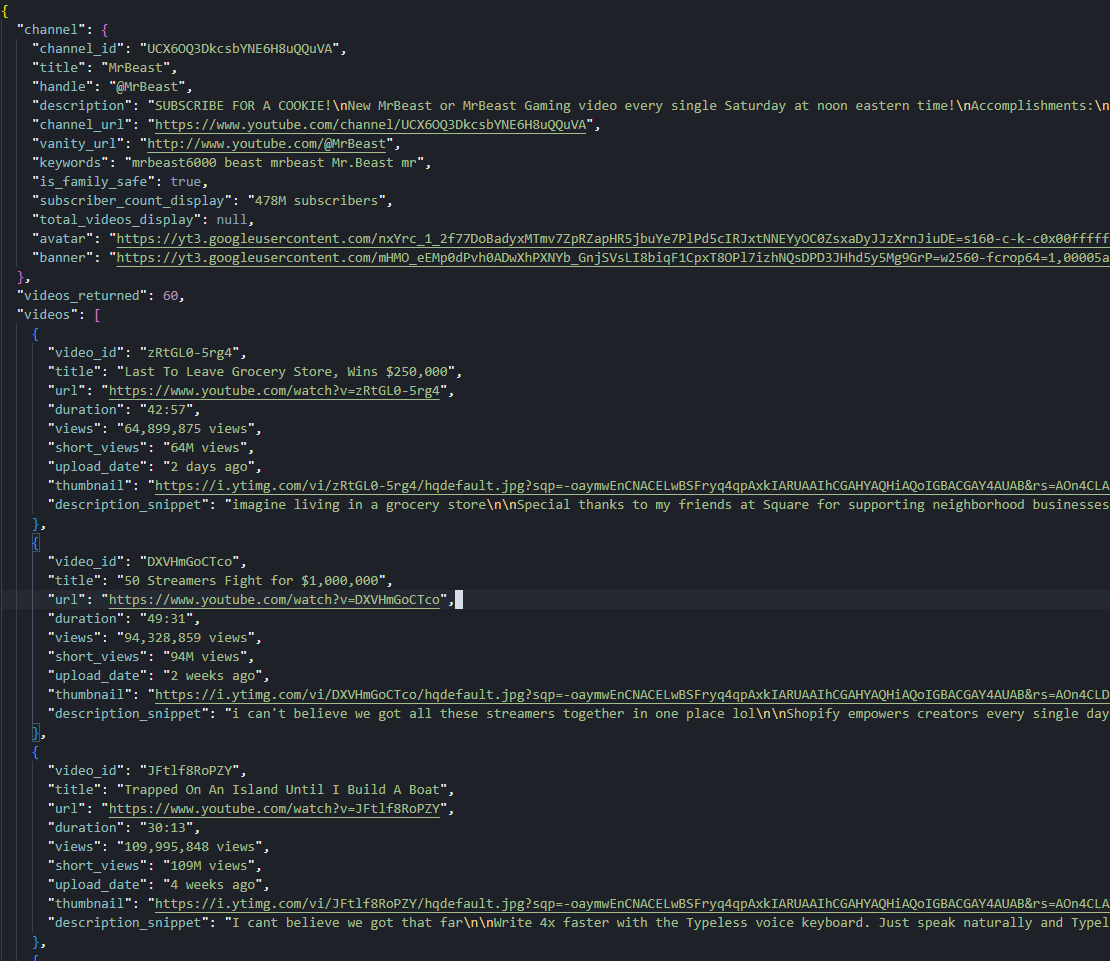
A run against https://www.youtube.com/@MrBeast with MAX_VIDEOS = 60 writes a JSON file with the channel header (478M subscribers, 966 total videos, the avatar and banner URLs) plus 60 videos from two pagination passes. The same code runs unchanged against smaller channels: @Fireship returns 4.18M subscribers and 803 videos, @leerob returns 78K subscribers and 109 videos.
Fetching: https://www.youtube.com/@MrBeast/videos
  page 1: 30 videos
  page 2: +30 (total 60)
Wrote youtube-channel.json  (MrBeast: 60 videos)
Channel header on the outside, paginated video list on the inside. The channel page is now structured.
Conclusion
YouTube ships data through three mechanisms across the four surfaces we covered. ytInitialData holds the rendered page state on every page type. ytInitialPlayerResponse handles the raw machine-readable fields on watch pages. The InnerTube endpoints (/youtubei/v1/search, /youtubei/v1/browse, /youtubei/v1/next) serve every paginated continuation through POST requests with continuation tokens.
The same two-line regex pulls embedded blobs out of every page type. One WEB client version powers every InnerTube call across all three endpoints. One proxy parameter (super=true) covers the anti-bot layer for everything else. From here we scale the boring way: swap a single search query, video URL, or channel URL for a list, throttle the request rate, and watch the InnerTube client version because YouTube rotates it weekly.
FAQ
Does Scrape.do have a managed YouTube API?
Yes. The YouTube API (/plugin/google/youtube) is a managed endpoint that returns the full search page as structured JSON in one HTTP call: videos, channels, playlists, Shorts shelves, ads, and discovery rails. Views come back as parsed integers, extensions: ["4K"] is already extracted, and the sp parameter handles every filter (sort, result type, duration, features, upload date) plus pagination cursors. Each call costs 10 credits flat. Use the manual approach in this article when you want to learn the InnerTube model or pull fields the plugin doesn't expose; use the plugin in production.
Does YouTube block web scraping?
Yes. YouTube fingerprints every request against IP reputation, browser fingerprint, TLS handshake, and JavaScript challenge solving. A clean Python session lands on a cookie consent wall (HTTP 200 with no ytInitialData) instead of the real page. Routing requests through Scrape.do with super=true bypasses the wall.
What is InnerTube and why does it matter for scraping?
InnerTube is YouTube's internal JSON API used by the website to load any data after the first page render. It powers search pagination, channel video lists, comment loading, and Shorts feeds. It matters because the first page of any list loads in HTML, but every subsequent page requires an InnerTube POST. A scraper that only parses the embedded JSON gets the first 18 to 30 items and nothing else.
Why do comments load through a separate API instead of the page HTML?
YouTube's comments architecture uses a streaming-update pattern. The watch page only embeds the initial continuation token for the comments section; the actual comment payloads stream in through /youtubei/v1/next POSTs as the user scrolls. A commentThreadRenderer array describes thread layout and reply continuations, while a parallel frameworkUpdates.entityBatchUpdate.mutations array stores the actual text and author. Both arrive in the same response but require a join by commentId.
How do I scrape YouTube Shorts data?
Shorts appear in two contexts. As items inside regular search results, they live in a gridShelfViewModel shelf using the shortsLockupViewModel schema, which exposes only video ID, title, view count, and thumbnail. As standalone pages at /shorts/<id>, they serve a different HTML layout where ytInitialData.contents is empty. The fix is to rewrite any /shorts/<id> URL to /watch?v=<id> before fetching, which returns the full watch-page layout.
Why is trending not covered?
YouTube deprecated the unauthenticated /feed/trending page in 2024 and announced in 2025 it is retiring the Trending Tab entirely. The remaining /category/trending URLs (gaming, music, news, etc.) are editorial catalog feeds, not real-time popularity data: they surface evergreen content alongside recent uploads. For real-time popularity, the recommended approach is a search query with sp=CAMSAhAB (the URL-encoded filter for "this week, sorted by view count") which the search code supports through the SEARCH_QUERY constant. YouTube Music charts cover music-only popularity.
Software Engineer








