Category:Scraping Use CasesView as Markdown
Scraping Autotrader in 2026: Extract Car Listings, Vehicle Details, and Dealer Data with Python

Full Stack Developer


Autotrader.com answers a plain requests.get() with a "page unavailable" screen, and once we get past that, the search page HTML holds thirty empty placeholder boxes where the cars should be. Rendering the page in a browser does not fill them either. Every scraper tutorial we found for this site either targets the UK version with Selenium or has already broken once.
The listings, the prices, the KBB fair value, the VIN, the dealer's phone number: all of it exists, and the site's own frontend fetches it as clean JSON from one endpoint that nobody documents. We found it by reading the JavaScript bundle. This guide turns that endpoint into two CSVs with requests and csv, and nothing else: one for car listings across a search with pagination and filters, one for a single vehicle with features and dealer contact.
Why the Obvious Routes Into Autotrader Fail
Autotrader runs Akamai Bot Manager. A direct request from a datacenter IP, a residential IP, or a local headless Chromium all land on the same "Autotrader - page unavailable" placeholder. There is no 403 to read; the site answers 200 with nothing in it. The static JavaScript chunks are behind the same gate, which matters later.
Routing through Scrape.do clears the gate on the plain datacenter tier, 1 credit per request, and that is where the second problem shows up. The search results page is a Next.js app. The server-rendered HTML carries the filter sidebar, the "413 Matches" bar, three sponsored cards, and thirty ListingPlaceholder divs. The organic result cards render on the client, after hydration. BeautifulSoup has nothing to select.
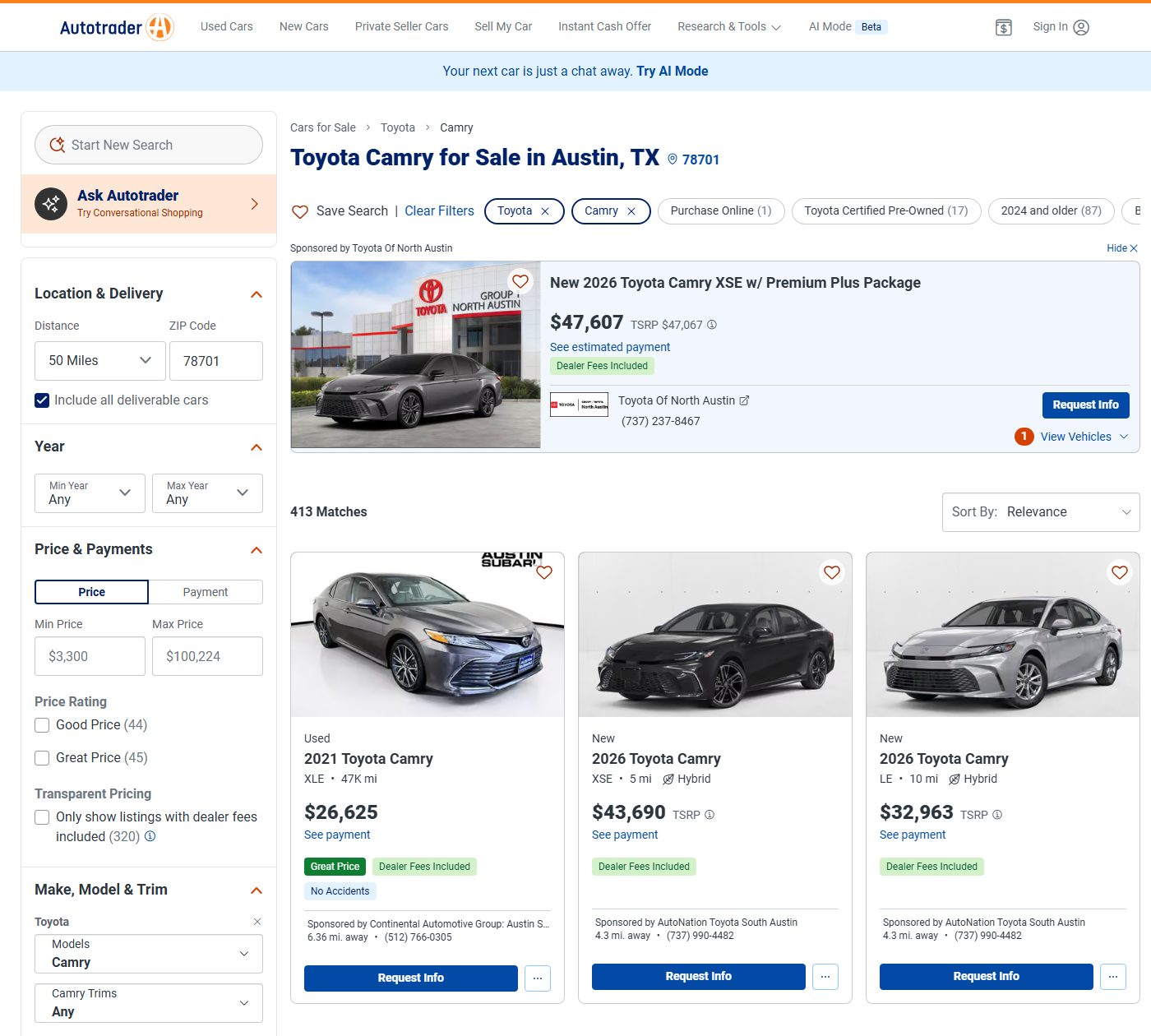
render=true does not fix it. Scrape.do's browser returns the same unhydrated shell, and the wait parameters that would let the cards load (customWait, waitSelector) come back as a 400 on this host. We have seen this pattern on other Next.js targets: the page is a shell, the data arrives through fetch calls, and rendering the shell buys nothing.
The page does embed a __NEXT_DATA__ script tag with the listings inside it, and that is the route most people would take next. We tested it. It works, and it is ugly: a 274 KB blob, an inventory map that mixes organic results with repeated spotlight ads, and a regex to cut it out of the HTML. The frontend does not read its own data that way, so neither will we.
Does Autotrader Have an API?
Not a public one. Autotrader has no developer program, no documented endpoints, no API keys. The question shows up in Google's People Also Ask box for every scraping query about the site, and the honest answer is that the API exists, it is internal, and the site's own JavaScript tells us where it is.
Akamai blocks the JavaScript chunks for direct requests, so we fetched the _app bundle through Scrape.do and searched it for /rest/. Three paths came up. /rest/lsc/listing?listingId= hydrates the compare tray. /rest/lsc/listing/vin/ looks a car up by VIN. /rest/lsc/dealerlot/v2/multiple powers a dealer widget. The first one is the interesting one, because it accepts far more than a listing id.
A GET to /rest/lsc/listing with makeCode, modelCode, zip, and searchRadius returns the search results as JSON: a listings array, an owners array with every dealer on the page, and a totalResultCount. No headers beyond what requests sends by default. No cookies. No super=true. We ran about sixty calls in a row during research without a delay, and every one came back 200 in one to four seconds.
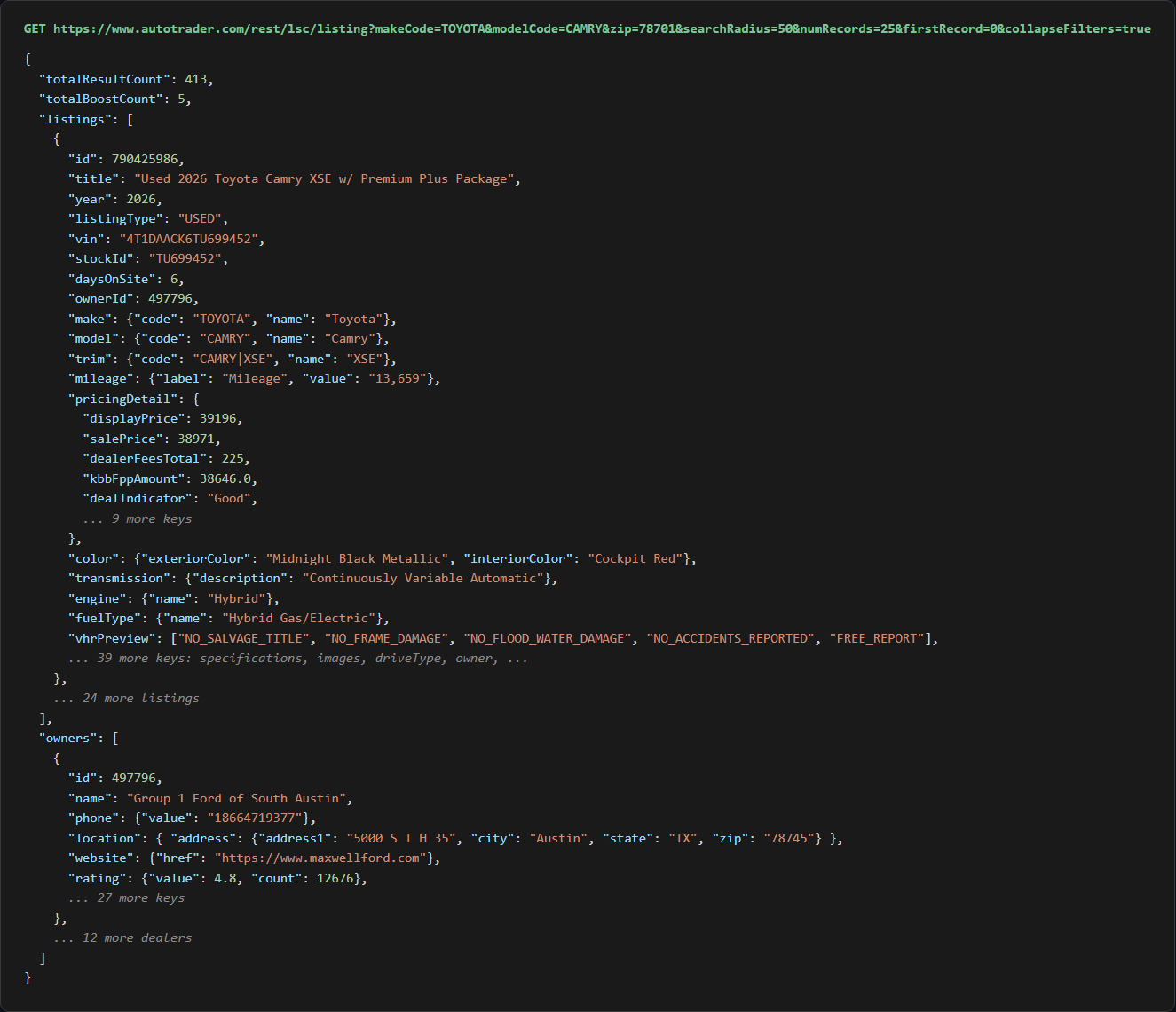
Translation: the scraping problem collapses into an API problem. Build the query string, decode the JSON, write rows. Two short scripts cover it.
Scraping Autotrader Car Listings
Listings first. This is the surface where the data starts looking like rows, and it is the one that teaches us the endpoint's quirks before we lean on it for single vehicles.
The win condition: a make, a model, and a zip code in, one CSV row per car out, with the dealer's name and phone joined onto each row.
Prerequisites
One install:
pip install requestscsv and urllib.parse ship with Python. The other requirement is a Scrape.do token; a free account comes with 1,000 credits, and the token sits on the dashboard after signup. Every request in this guide has the same shape: the target URL, encoded once with quote(url, safe=''), appended to the Scrape.do endpoint with the token.
Finding Make and Model Codes
The endpoint filters on codes, not names, and the codes are not always what the URL slug suggests. TOYOTA and CAMRY are what we would guess. Porsche is POR, a 718 Cayman is POR718CAY, a Toyota C-HR is TOYCHR. Get one wrong and the API does not error; it drops the filter and returns the whole zip code's inventory.
The trick is to run one search with makeCode alone and read the codes off the response. Every listing carries make.code and model.code next to the display names. One request, and the full code list for that brand is in the JSON. We will do that once for Toyota and then use the codes in the script.
Two more rules we learned by testing: modelCode is ignored unless makeCode is also set, and the list-style makeCodeList parameter that older tutorials mention is ignored outright.
Building the Listings Scraper
We start with the configuration. The search is a Camry within 50 miles of downtown Austin:
import requests
import urllib.parse
import csv

# 1. Configuration
TOKEN = "<your_token>"
MAKE_CODE = "TOYOTA"  # codes are not always the marketing name: Porsche is POR, Macan is PORMACAN
MODEL_CODE = "CAMRY"
ZIP_CODE = "78701"
SEARCH_RADIUS = 50  # miles
NUM_RECORDS = 100  # per request, the API caps anything higher to 100
MAX_PAGES = 3  # demo limit; the API stops answering past firstRecord=300, so 4 pages of 100 is the ceiling

API_URL = "https://www.autotrader.com/rest/lsc/listing"
listings = []
NUM_RECORDS is 100 because that is the largest page the API serves. Ask for 150 and it hands back 100 without a warning. The reason we want the biggest page possible shows up in the pagination section.
We loop over pages, build the query string with urlencode, and wrap the whole target URL for Scrape.do:
for page in range(MAX_PAGES):
    first_record = page * NUM_RECORDS
    if first_record > 300:
        break
    params = {"makeCode": MAKE_CODE, "modelCode": MODEL_CODE, "zip": ZIP_CODE, "searchRadius": SEARCH_RADIUS,
              "numRecords": NUM_RECORDS, "firstRecord": first_record, "collapseFilters": "true"}
    target_url = f"{API_URL}?{urllib.parse.urlencode(params)}"
    api_url = f"https://api.scrape.do/?token={TOKEN}&url={urllib.parse.quote(target_url, safe='')}"

    # 2. Request
    response = requests.get(api_url)
    if response.status_code != 200:
        print(f"Page {page + 1}: request failed with status {response.status_code}")
        break
collapseFilters=true drops the facet block (every engine size, every color, every price band the sidebar could show) from the response. It is about a tenth of the payload and we never read it. The first_record > 300 guard is the ceiling check; more on that below.
Each page ships its dealers once, in owners, and every listing points at one of them through ownerId. We build a lookup dict per page and then read each car:
    # 3. Parse: dealers come once per page in owners[], every listing points at one through ownerId
    data = response.json()
    if not data.get("listings"):
        break
    dealers = {owner["id"]: owner for owner in data["owners"]}

    for car in data["listings"]:
        pricing = car.get("pricingDetail", {})
        dealer = dealers.get(car.get("ownerId"), {})
        listings.append({
            "listing_id": car["id"],
            "title": car.get("title", ""),
            "year": car.get("year", ""),
            "make": car.get("make", {}).get("name", ""),
            "model": car.get("model", {}).get("name", ""),
            "trim": car.get("trim", {}).get("name", ""),
            "listing_type": car.get("listingType", ""),
            "price": pricing.get("displayPrice", ""),  # the all-in price shown on the site, blank when "Contact Dealer For Price"
            "kbb_fair_price": pricing.get("kbbFppAmount", ""),
            "deal_indicator": pricing.get("dealIndicator", ""),  # Great / Good / Fair, used and certified cars only
displayPrice is the one price field present on new, used, and certified cars alike; it is the all-in number the site shows with dealer fees included. salePrice looks tempting and is a trap: some dealers put the all-in price there, others the pre-fee price, and new cars do not have it at all. kbbFppAmount is Kelley Blue Book's fair purchase price for that exact car, and dealIndicator is the Great / Good / Fair badge the site derives from it.
The rest of the row is vehicle specs and the dealer join:
            "mileage": car.get("mileage", {}).get("value", ""),
            "exterior_color": car.get("color", {}).get("exteriorColor", ""),
            "transmission": car.get("transmission", {}).get("description", ""),
            "engine": car.get("engine", {}).get("name", ""),
            "drive_type": car.get("driveType", {}).get("name", ""),
            "fuel_type": car.get("fuelType", {}).get("name", ""),
            "dealer_name": dealer.get("name", ""),
            "dealer_phone": dealer.get("phone", {}).get("value", ""),
            "dealer_city": dealer.get("location", {}).get("address", {}).get("city", ""),
            "days_on_site": car.get("daysOnSite", ""),
            "vin": car.get("vin", ""),
            "listing_url": f"https://www.autotrader.com/cars-for-sale/vehicle/{car['id']}",
        })
    print(f"Page {page + 1}: {len(data['listings'])} listings ({len(listings)} of {data['totalResultCount']} total)")
Every ownerId we saw resolved against its own page's owners list, on 25-record pages and 100-record pages alike. The listing URL is not in the response; it is the vehicle id on the end of /cars-for-sale/vehicle/, which is the same URL the site's cards link to. Mileage arrives as a string with a thousands separator ("13,659"), and we leave it that way.
Pagination and the 400-Record Ceiling
firstRecord is an offset and numRecords is the page size, which is as plain as pagination gets. Here is the catch. Any firstRecord above 300 returns an empty listings array with no totalResultCount and no error. firstRecord=300 still serves a full page, so offsets 0, 100, 200, 300 at 100 per page give 400 rows, and that is the most a single query will ever return. At 25 per page the same wall lands at 325.
That is why the script asks for 100 per page and stops at 300. On a Honda Civic search in Los Angeles (1,330 matches) the loop stopped itself after four pages with 400 rows. On the Camry search in Austin (413 matches), three pages returned 300 unique rows.
The site's own results page has the same limit; it never shows more than 400 cars for one search either. To get everything, split the search so each slice stays under 400. minPrice and maxPrice apply server-side and cut the Civic search into 72, 138, and 1,097; the last band still needs a startYear / endYear or a listingType split. A tighter searchRadius is the other lever.
Filters and Sorting
The search accepts listingType (NEW, USED, CERTIFIED), startYear, endYear, minPrice, maxPrice, and sortBy. Add any of them to the params dict and they apply server-side. For sortBy we verified relevance (the default), derivedpriceASC, derivedpriceDESC, distanceASC, mileageASC, yearDESC, and datelistedDESC by reading the first eight results of each. A typo in the sort value does not error; the API falls back to a distance-like order, so check the first row when adding a new one.
One thing worth knowing about the default order: relevance ranking shifts slightly between calls, and two of the 400 Civic ids repeated across pages. Sorting by a stable key such as derivedpriceASC removes that, and deduplicating on listing_id covers it either way.
Export to CSV
We write the rows with the dict keys as the header:
# 4. Export
with open("autotrader-listings.csv", "w", newline="", encoding="utf-8") as f:
    writer = csv.DictWriter(f, fieldnames=listings[0].keys())
    writer.writeheader()
    writer.writerows(listings)
print(f"Saved {len(listings)} listings to autotrader-listings.csv")
Three pages of the Austin Camry search produce 300 rows: 144 used, 139 new, 17 certified, and not one blank price, mileage, vin, or dealer_name.
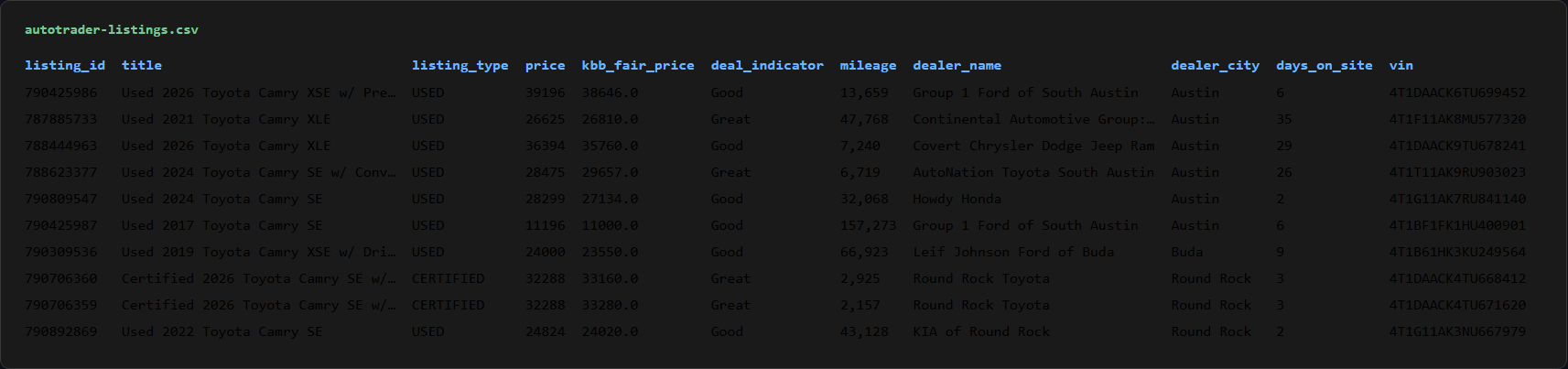
Twenty-two columns per car from a JSON endpoint the site never advertises. The shape we wanted.
Scraping Autotrader Vehicle Details
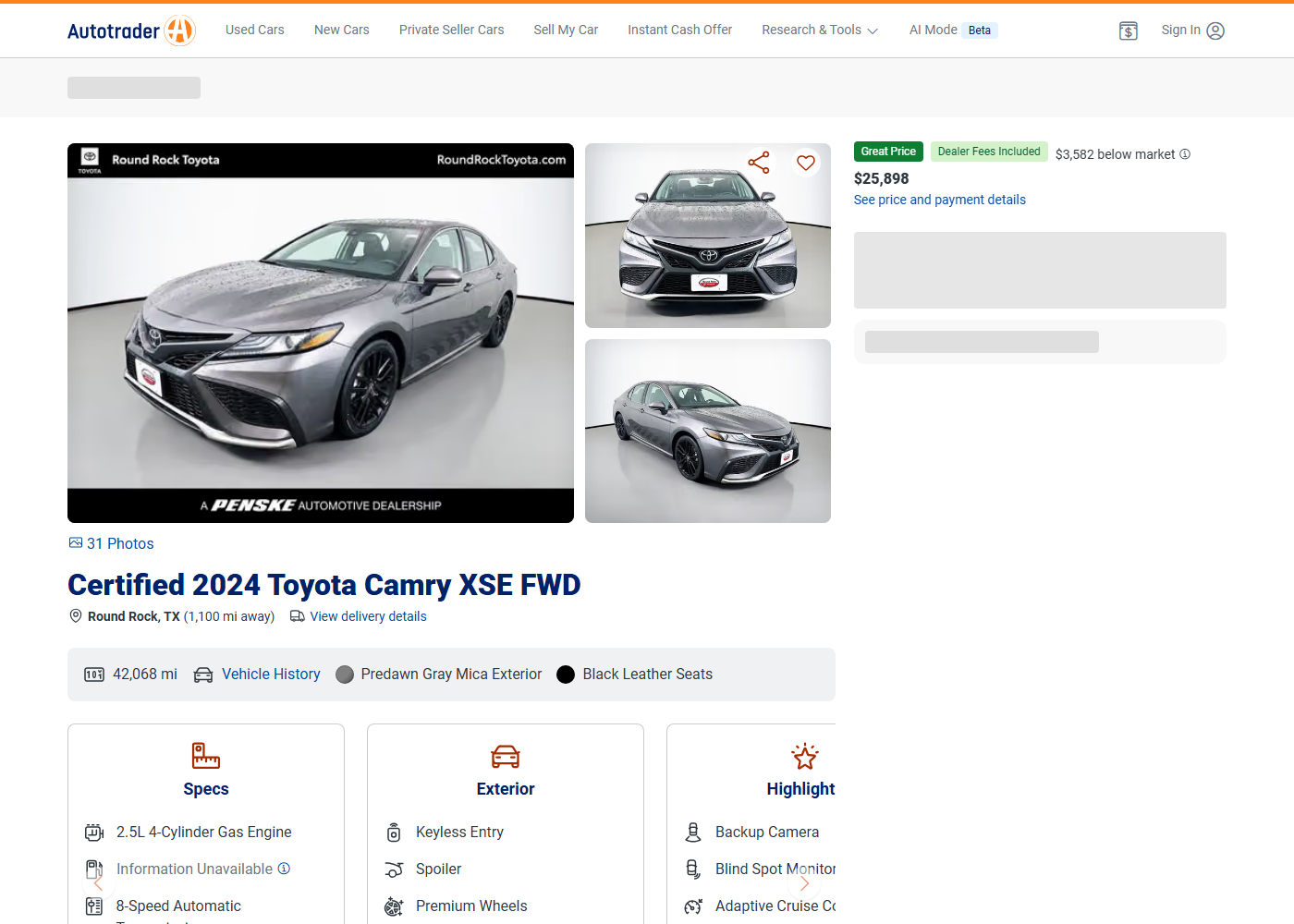
The listings feed already carries a lot, and the vehicle detail page carries more: the full feature list by category, itemized dealer fees, the vehicle history flags, the dealer's address and website, thirty-plus photos. Same endpoint, different parameter.
The Single-Listing Endpoint
/rest/lsc/listing?listingId={id} returns one entry in listings and its dealer in owners[0]. The id is the number on the end of any vehicle URL. Add includeFeatures=true and the response grows a features object with the car's equipment grouped under exterior, interior, mechanical, safety, technology, and other. Without that flag the features are absent.
Two variants of the same call we will not build a script around but are worth having. listingId=a,b,c&numRecords=3 returns several cars in one request, which is how the site's compare tray works. /rest/lsc/listing/vin/{VIN} finds a listing by VIN, useful when the id has expired and the car has been relisted.
Building the Details Scraper
We set the id and make the request:
import requests
import urllib.parse
import csv

# 1. Configuration
TOKEN = "<your_token>"
LISTING_ID = "771797689"  # the number at the end of any /cars-for-sale/vehicle/ URL

target_url = f"https://www.autotrader.com/rest/lsc/listing?listingId={LISTING_ID}&includeFeatures=true&collapseFilters=true"
api_url = f"https://api.scrape.do/?token={TOKEN}&url={urllib.parse.quote(target_url, safe='')}"

# 2. Request
response = requests.get(api_url)
if response.status_code != 200:
    print(f"Request failed with status {response.status_code}")
    exit()
Listing ids expire when a car sells, and the endpoint answers an expired id with an empty listings array rather than a 404. Pick a fresh id from the listings CSV when running this.
The interesting objects sit two levels down. We pull them out once and flatten the pricing and spec fields:
# 3. Parse: one listing, its dealer in owners[0], features grouped by category
data = response.json()
car = data["listings"][0]
dealer = data["owners"][0]
pricing = car.get("pricingDetail", {})
specs = car.get("specifications", {})
address = dealer.get("location", {}).get("address", {})

vehicle = {
    "listing_id": car["id"],
    "title": car.get("title", ""),
    "listing_type": car.get("listingType", ""),
    "year": car.get("year", ""),
    "make": car.get("make", {}).get("name", ""),
    "model": car.get("model", {}).get("name", ""),
    "trim": car.get("trim", {}).get("name", ""),
    "vin": car.get("vin", ""),
    "stock_id": car.get("stockId", ""),
    "price": pricing.get("displayPrice", ""),  # all-in price shown on the site
    "price_before_fees": pricing.get("preFeeDerivedPrice", ""),
    "dealer_fees": pricing.get("dealerFeesTotal", ""),
    "msrp": pricing.get("msrp", ""),  # new cars only
    "kbb_fair_price": pricing.get("kbbFppAmount", ""),
    "deal_indicator": pricing.get("dealIndicator", ""),  # used and certified only
The pricing arithmetic holds: on every one of the fifty listings we checked, preFeeDerivedPrice plus dealerFeesTotal equals displayPrice. The individual fees are itemized in dealerFeeItems if a reader wants them; for this car it is a single $150 dealer fee.
Specs, history flags, photos, and the dealer round out the row, and the feature categories become one column each:
    "mileage": specs.get("mileage", {}).get("value", ""),
    "mpg": specs.get("mpg", {}).get("value", ""),  # new cars only
    "exterior_color": specs.get("color", {}).get("value", ""),
    "interior_color": specs.get("interiorColor", {}).get("value", ""),
    "transmission": specs.get("transmission", {}).get("value", ""),
    "engine": specs.get("engine", {}).get("value", ""),
    "drive_type": specs.get("driveType", {}).get("value", ""),
    "fuel_type": specs.get("fuelType", {}).get("value", ""),
    "history_flags": "; ".join(car.get("vhrPreview", [])),  # NO_ACCIDENTS_REPORTED, ONE_OWNER, ... (not on new cars)
    "days_on_site": car.get("daysOnSite", ""),
    "image_urls": "; ".join(img["src"] for img in car.get("images", {}).get("sources", [])[:5]),
    "dealer_name": dealer.get("name", ""),
    "dealer_phone": dealer.get("phone", {}).get("value", ""),
    "dealer_address": f"{address.get('address1', '')}, {address.get('city', '')}, {address.get('state', '')} {address.get('zip', '')}",
    "dealer_website": dealer.get("website", {}).get("href", ""),
    "listing_url": f"https://www.autotrader.com/cars-for-sale/vehicle/{car['id']}",
}
for category, items in car.get("features", {}).items():  # exterior, interior, mechanical, safety, technology, other
    vehicle[f"features_{category}"] = "; ".join(items)
vhrPreview is the vehicle history summary the site turns into badges: NO_ACCIDENTS_REPORTED, ONE_OWNER, NO_SALVAGE_TITLE. The images.sources list runs to thirty-plus photos on most listings; we keep five. Dealer rating and opening hours are in the same owners[0] object if a reader wants to go further.
Fields by Listing Type
The API describes new and used cars differently, and a scraper that expects every field on every car will see blanks. What we saw across the validation runs:
| Field | NEW | USED / CERTIFIED |
|---|---|---|
displayPrice, kbbFppAmount |
yes | yes |
msrp |
yes | no |
specifications.mpg |
yes ("52 City / 49 Highway") | no |
dealIndicator (Great / Good / Fair) |
no | yes, when KBB has a match |
vhrPreview history flags |
no | yes |
features (with includeFeatures=true) |
usually | usually, but some dealer feeds ship none |
The script handles this with .get() defaults rather than branches, so a new car writes an empty deal_indicator and a used car writes an empty msrp. A certified Porsche from one Austin dealer came back with no features block at all, so that row has 31 columns instead of 37. Dealer feeds vary; the endpoint passes that variance straight through.
What the Endpoint Does Not Return
Three things live only in the vehicle page's __NEXT_DATA__ blob: pricingHistory (the price drops over the listing's life), safetyRecall, and the full seller description. The API's description.label is cut off with a hasMore: true flag. If price history is the point of a project, the page blob is the source for that one field, and it is a render-free 1-credit fetch of the vehicle URL followed by a regex on the script tag. For everything else in this guide, the endpoint is cleaner and smaller.
Export
One row, one file:
# 4. Export
with open("autotrader-vehicle-details.csv", "w", newline="", encoding="utf-8") as f:
    writer = csv.DictWriter(f, fieldnames=vehicle.keys())
    writer.writeheader()
    writer.writerow(vehicle)
print(f"Saved {vehicle['title']} ({len(vehicle)} fields) to autotrader-vehicle-details.csv")
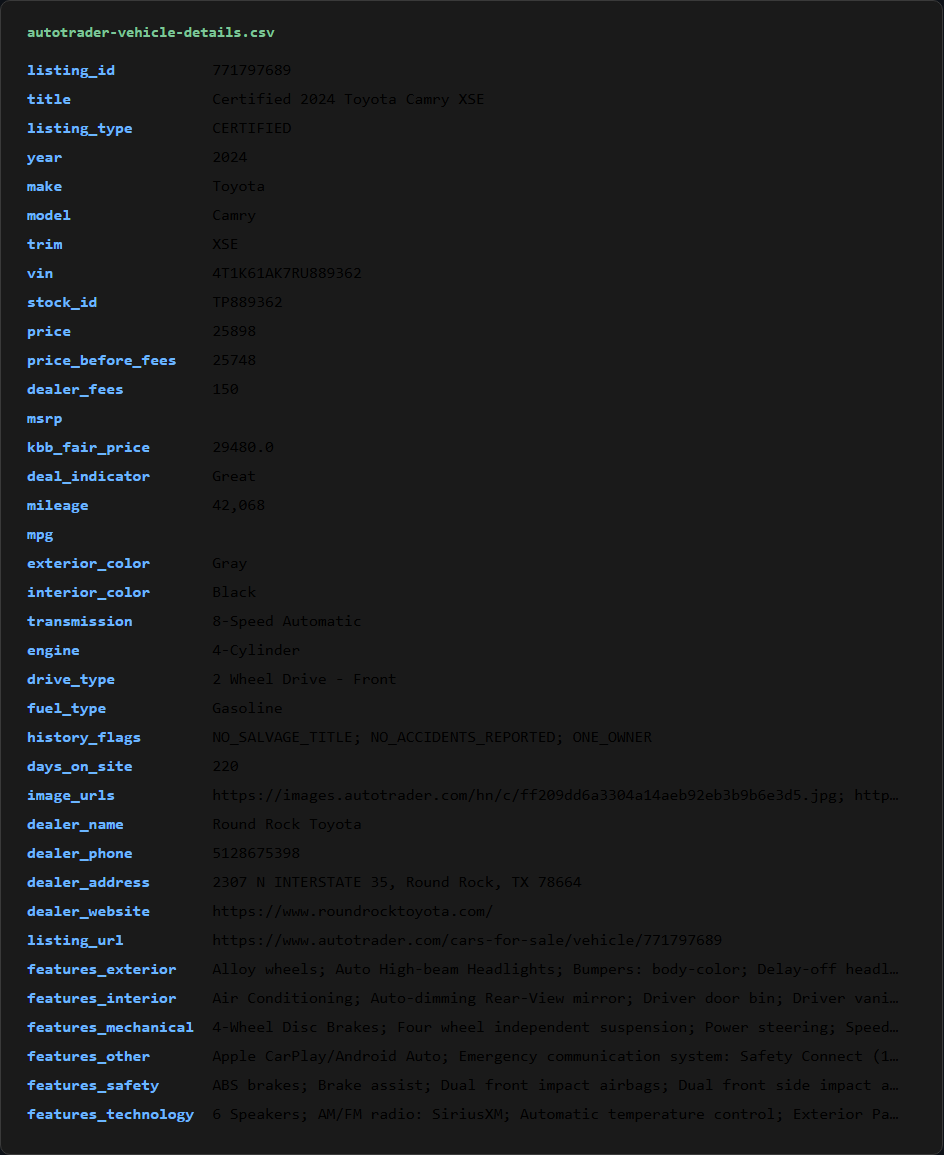
For the certified 2024 Camry XSE the row has 37 fields, 73 features across six categories, three history flags, and Round Rock Toyota's phone, street address, and website.
Chain the two together by reading listing_id out of the listings CSV and looping this script over it, or batch ten ids per request with the comma-separated form.
Conclusion
Autotrader looks like a hard target and turns out to be an API with a bot manager in front of it. Scrape.do handles the bot manager on the plain tier, and /rest/lsc/listing handles the data: search results with dealers attached, filters and sorting server-side, and a single-listing mode that adds features and history flags. No HTML parsing, no browser rendering, no blob mining.
The 400-record ceiling is the one constraint that shapes larger projects. Split searches by price band or radius, sort by a stable key, and dedupe on listing id. The same read-the-bundle approach found the endpoints behind Kick and Realtor.com, and it is the first thing to try on any Next.js site that serves placeholders instead of data.
Get 1000 free credits and start scraping with Scrape.do
FAQ
Does Autotrader have an API?
Not a public one. There is no developer program or documentation. The site's frontend fetches listings from an internal endpoint, /rest/lsc/listing, which accepts search parameters (make code, model code, zip, radius, filters, sort) and single listing ids, and returns JSON. That endpoint is what this guide uses. It is undocumented, so field names can change without notice.
Is it legal to scrape Autotrader?
Listing prices, specs, and dealer contact details are public data shown to every visitor, and scraping public data is generally lawful in the US. Autotrader's terms of use prohibit automated access, so scraping is a terms violation rather than a legal one, and the site enforces it with Akamai. Keep request volume reasonable, do not collect private seller contact details, and check whether a site allows scraping before building on it commercially.
Why does the search stop at 400 results?
The endpoint returns an empty list for any firstRecord above 300, and the site's own results page has the same cap. To collect a search with more than 400 matches, split it into slices with minPrice / maxPrice, startYear / endYear, listingType, or a smaller searchRadius so that every slice stays under 400, and dedupe on listing id when merging.
How do I find Autotrader make and model codes?
Run one search with makeCode alone (for example makeCode=POR&zip=78701&searchRadius=50) and read make.code and model.code off any listing in the response. Codes are not always the marketing name: Porsche is POR, a 718 Cayman is POR718CAY, a Toyota C-HR is TOYCHR. A wrong code does not error; the API drops the filter and returns everything in the zip code.
Can I get old or expired Autotrader listings?
Not through this endpoint. An expired listing id returns an empty listings array, and the VIN route only finds cars that are currently listed. To track a car over time, scrape it while it is live and store the rows; daysOnSite and pricingDetail on each run give the price movement without needing the page's price history field.
Full Stack Developer








