Category:Scraping Use CasesView as Markdown
How to Scrape Kick.com: Channels, Chat Logs, VODs, and Clips with Python

Software Engineer


Every direct request to Kick.com comes back as a 403, and the JSON APIs feeding the pages sit behind the same Cloudflare wall, answering with a 79-byte error before our request ever reaches the application. Behind that wall is some of the cleanest data in the streaming space, and this guide turns five of its surfaces into five CSVs: channel stats, live streams, chat logs (live and historical), VODs, and clips, all with plain requests and no WebSocket in sight.
Why Kick Blocks Every Direct Request
Kick fronts everything with Cloudflare. A clean requests.get() against any kick.com URL, HTML page or API endpoint, gets a 403 with a 79-byte body. There is no probabilistic element to it: datacenter IP, residential IP, custom headers, the wall holds either way for an unbrowser-like request.
That would be bad news if Kick were an HTML-parsing job. It is not. Kick is a React SPA, and the HTML shell carries no data at all. Open DevTools on any channel page, filter the Network tab to Fetch/XHR, and the real sources appear: internal REST endpoints under /api/v2/ and /api/v1/ serving complete JSON. Channel info, stream listings, chat, VODs, clips, every surface in this guide rides one of those endpoints. YouTube works the same way underneath; JSON-first platforms are the norm now, not the exception.
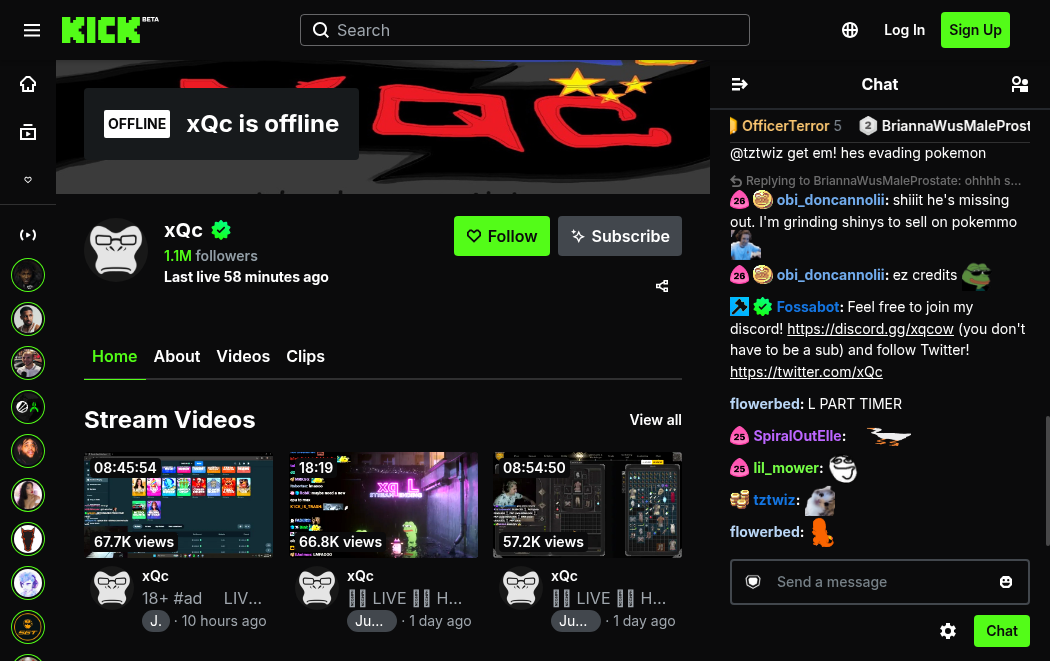
So the whole game is: clear Cloudflare once, then read JSON. No BeautifulSoup anywhere in this guide.
Clearing Cloudflare is where Scrape.do comes in, and Kick turns out to be an unusually low-effort target. The default request passes. We tested super=true on every endpoint during research: identical status codes, identical byte counts, not needed. We tested render=true too, and it actively breaks things: the response comes back 200 but wrapped in an HTML page, because the target is a REST response with no JavaScript to render. So the recipe for the entire article is the plain API call with zero extra parameters. We have rarely seen a Cloudflare site fold this cleanly.
One probing trick worth keeping: any guessed Kick "API" URL that answers with roughly 62,877 bytes of HTML is the catch-all React index.html. The endpoint does not exist. That byte count saved us hours of chasing phantom paths during research, and it will do the same for anyone exploring endpoints beyond this guide.
Scraping Kick Channel Info
Channels are the natural place to start. The channel endpoint carries followers, verification, live status, current viewers, stream title, category, and every social handle a streamer has linked, and we will need it again later: the chat section leans on this same endpoint to resolve numeric channel IDs.
The goal for this section: a list of channel slugs in, one CSV row per channel out, live or offline.
Prerequisites
One install covers the external dependencies:
pip install requestscsv and urllib.parse ship with Python. The other requirement is a Scrape.do token: a free account comes with 1,000 credits per month, and the token sits on the dashboard after signup.
Every request we send uses the same shape: the target URL, encoded with quote(url, safe='') so its own query characters survive, passed to the Scrape.do endpoint alongside the token. That is the whole integration.
The Channel Endpoint
GET https://kick.com/api/v2/channels/{slug} returns about 12 KB of JSON per channel. The interesting fields sit at three depths: slug, followers_count, and verified at the top, the username and social links inside user, and the live state inside livestream.
livestream is the field to respect. It is null when the channel is offline, and a full object when live: session_title, viewer_count, language, is_mature, start_time, plus the current category buried at livestream.categories[0].name. Any scraper that indexes into it without a guard dies on the first offline channel.
There is also a v1 variant of this endpoint that returns 87 KB of noisier JSON. Legacy. We stick with v2.
Building the Channel Scraper
We start with the token and the channels we want:
import requests
from urllib.parse import quote
import csv

# 1. Configuration
token = "<your_token>"
channels = ["xqc", "trainwreckstv", "adinross"]  # any kick.com/<slug>
Any slug from a kick.com/<slug> URL works here. Next, the loop: fetch each channel's JSON through Scrape.do and skip anything that does not come back 200, which quietly handles typos and deleted channels.
# 2. Fetch + parse each channel's JSON (Scrape.do default bypasses Kick's Cloudflare)
rows = []
for slug in channels:
    target = f"https://kick.com/api/v2/channels/{slug}"
    api = f"http://api.scrape.do/?token={token}&url={quote(target, safe='')}"
    response = requests.get(api)
    if response.status_code != 200:
        print(f"{slug}: request failed ({response.status_code})")
        continue
Then we flatten the nested JSON into one dict per channel. The or {} on livestream and user is the offline guard: when livestream is null, every lookup falls through to a default instead of raising.
    data = response.json()
    live = data.get("livestream") or {}          # null when the channel is offline
    user = data.get("user") or {}
    rows.append({
        "slug": data.get("slug"),
        "username": user.get("username"),
        "followers": data.get("followers_count"),
        "verified": data.get("verified"),
        "is_live": bool(live),
        "viewers": live.get("viewer_count", 0),
        "stream_title": live.get("session_title", ""),
        "category": (live.get("categories") or [{}])[0].get("name", ""),
        "language": live.get("language", ""),
        "is_mature": live.get("is_mature", ""),
        "started_at": live.get("start_time", ""),
    })
    print(f"{slug}: {'LIVE' if live else 'offline'} | {data.get('followers_count')} followers")
Offline channels produce a complete row too: is_live false, zero viewers, empty stream fields. No crash, no missing line in the CSV.
Export to CSV
# 3. Export
with open("channel-info.csv", "w", newline="", encoding="utf-8") as f:
    writer = csv.DictWriter(f, fieldnames=rows[0].keys())
    writer.writeheader()
    writer.writerows(rows)
Running it prints one line per channel:
xqc: LIVE | 1070667 followers
trainwreckstv: offline | 561054 followers
adinross: LIVE | 2025041 followers
The CSV catches the rest: xqc live in Forza Horizon 6 with 6,789 viewers, adinross live in front of 195,244, trainwreckstv offline with clean empty fields. During validation we also fed it a non-existent slug and a small offline channel; the status check skipped the first and the guards handled the second.
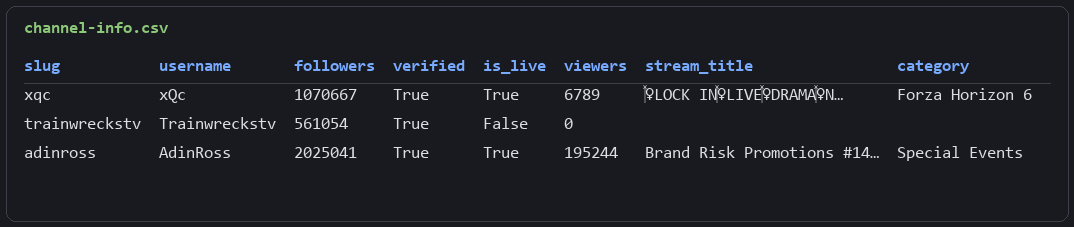
Eleven columns per channel from one GET each. The channel surface is done.
Scraping Live Streams
A single channel answers "how is this streamer doing." The listing answers the platform-level question: what is live on Kick right now, who has the viewers, which categories are hot.
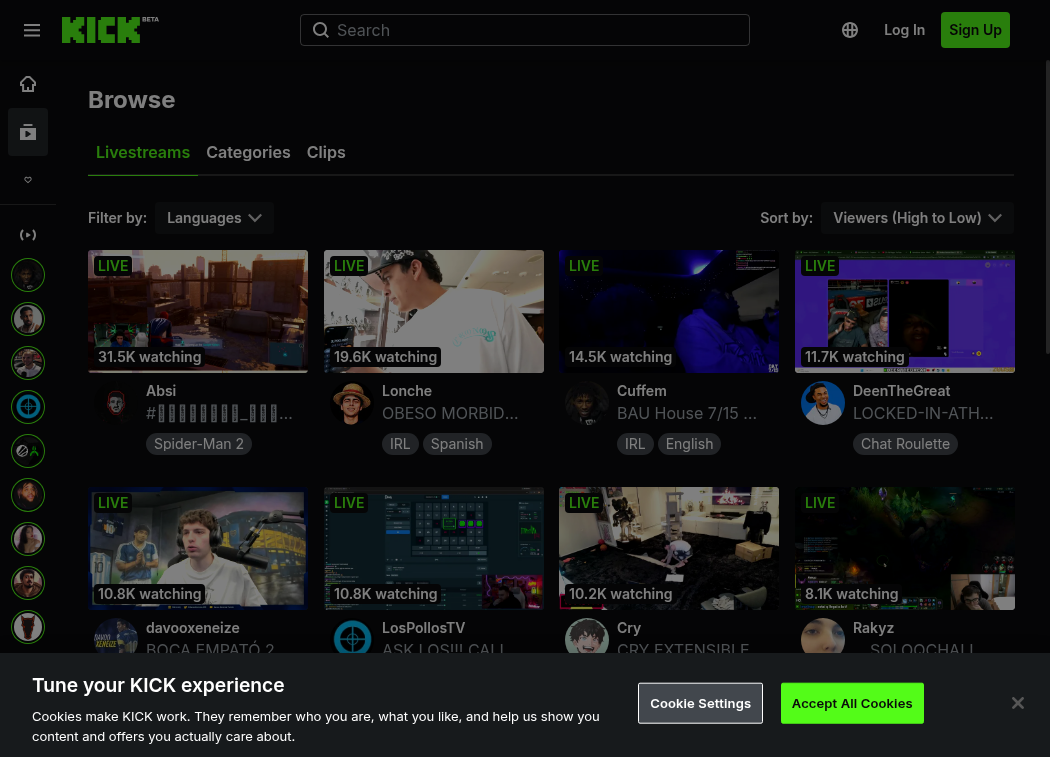 The source is the same endpoint Kick's own homepage calls, so our scraper sees exactly what a visitor sees, minus the React.
The Featured Livestreams Endpoint
GET https://kick.com/stream/featured-livestreams/en returns a Laravel paginator: a data array holding 14 streams per page plus the paginator's own bookkeeping, about 48 KB a page. Each stream item carries the title, viewer count, language, maturity flag, start time, the channel slug under channel.slug, and the category under categories[0].name.
One honest limitation before we build: there is no REST way to filter this listing by category. The endpoint accepts ?category= and ?subcategory= parameters and then ignores them, returning mixed categories anyway. Guessing at /api/v2/categories/{slug} style endpoints serves the 62,877-byte SPA shell, our tell for a path that does not exist. Kick's category browsing runs client-side. A decision that probably makes sense inside Kick, but it means per-category filtering happens in our rows, not in the request. Category metadata itself is still reachable: GET /api/v1/subcategories/{slug} returns a small JSON with live viewer totals, follower counts, and tags per category.
Paginating with next_page_url
The paginator makes this the easiest pagination in the article: each response carries a complete next_page_url, a full URL we follow as-is, null on the last page. Since we are about to hit several URLs, we write a small fetch helper first:
import requests
from urllib.parse import quote
import csv

# 1. Configuration
token = "<your_token>"
base = "https://kick.com/stream/featured-livestreams/en"  # top live streams across Kick
max_pages = 3  # demo limit

# 2. Fetch helper (Scrape.do default bypasses Kick's Cloudflare; the endpoint is a Laravel paginator)
def fetch(url):
    api = f"http://api.scrape.do/?token={token}&url={quote(url, safe='')}"
    response = requests.get(api)
    return response.json() if response.status_code == 200 else None
We will reuse this helper shape in the chat and clips sections. The walk itself is a while loop with two exits, the null URL or our demo cap:
# 3. Walk pages until next_page_url is null or the demo limit is hit
rows = []
url = base
page = 0
while url and page < max_pages:
    payload = fetch(url)
    if not payload:
        break
    for s in payload["data"]:
        channel = s.get("channel") or {}
        rows.append({
            "channel": channel.get("slug"),
            "viewers": s.get("viewer_count"),
            "title": s.get("session_title"),
            "category": (s.get("categories") or [{}])[0].get("name", ""),
            "language": s.get("language"),
            "is_mature": s.get("is_mature"),
            "started_at": s.get("created_at"),
        })
    page += 1
    url = payload.get("next_page_url")  # full URL Kick hands back, or null on the last page
    print(f"page {page}: {len(payload['data'])} streams")
Expect a quirk in the totals: consecutive pages overlap by about 2 streams per boundary, because the listing re-ranks by live viewer count between our requests. A stream that was 14th on page one is 15th by the time we fetch page two. Deduplicating on the channel column is a one-liner if exact uniqueness matters.
Export to CSV
# 4. Export
with open("live-streams.csv", "w", newline="", encoding="utf-8") as f:
    writer = csv.DictWriter(f, fieldnames=rows[0].keys())
    writer.writeheader()
    writer.writerows(rows)
print(f"total: {len(rows)} streams")
Three pages gave us 42 rows, 38 unique after the re-rank overlap:
channel,viewers,title,category,...
adinross,195244,Brand Risk Promotions #14 Live at the Meta Apex,Special Events,...
syztmz,2269,BUCKLE UP - FINAL WEEK GRIND BEGINS...,Slots & Casino,...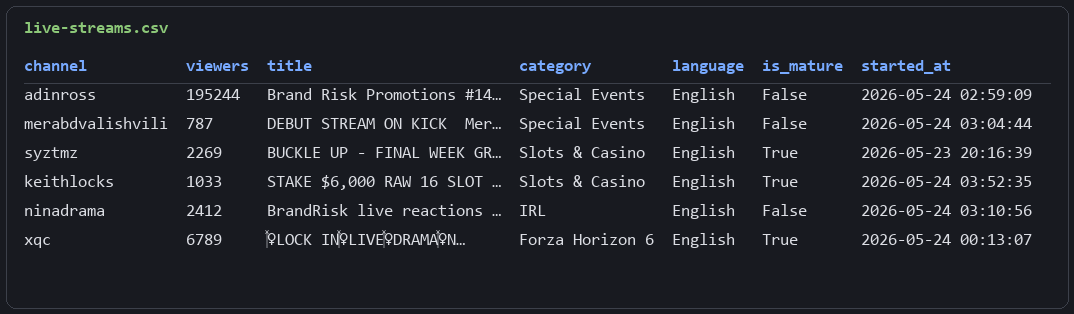
The platform snapshot is one paginated GET away, refreshed as often as we care to run it (mind the request pacing once this becomes a scheduled job).
Scraping Kick Chat: Live Tail and Historical Logs
Chat is where this guide earns its keep. In the browser, Kick chat rides a Pusher WebSocket, and that is where other tutorials go: hold a socket open, capture messages in real time, hope the connection survives. Real-time only, and flaky. What nobody covers is that Kick also serves chat over plain REST, and the way its cursor works turns that endpoint into something better: a queryable chat history.
A REST Path Into a WebSocket Chat
GET https://kick.com/api/v2/channels/{id}/messages returns the roughly 25 most recent messages as JSON, each with content, type, created_at, the sender's username and ID, and badge/color metadata under sender.identity. Alongside the messages comes a cursor for paging backward in time.
Emotes arrive inline in content as tokens like [emote:37221:EZ]. We leave them in the CSV since they carry signal (which emotes a chat spams is data), but re.sub(r"\[emote:\d+:[^\]]*\]", "", text) strips them when clean text is the goal.
Here is the catch. The endpoint accepts only the numeric channel ID. Feed it the slug and it answers 502.
Resolving the Numeric Channel ID
The fix costs one request we already know how to make. The channel endpoint from the first section carries id in its response, so we resolve slug to ID at the top of the script and the reader-facing input stays a slug:
# 3. Resolve slug -> numeric channel_id (the messages endpoint only accepts the id)
channel = fetch(f"https://kick.com/api/v2/channels/{slug}")
channel_id = channel["id"]
That is all the plumbing this section needs.
The Cursor Is a Timestamp
Most cursors are opaque: a base64 blob the server understands and we pass along blindly. Kick's chat cursor is not. It is the message timestamp in epoch microseconds, in plain sight.
Which means it is seekable. Instead of only paging backward from "now," we can seed the first request with any past timestamp and Kick returns chat from that moment, paging backward from there. We verified it during research: a cursor set two hours back returned messages timestamped exactly in that window, 03:59:59Z down to 03:58:50Z against a 04:00:00Z seed. The endpoint does not care that the stream ended; the history is there to query.
Practically: take a VOD's start time (the next section exports it) and reconstruct the chat log of a stream that finished days ago. No socket held open during the stream, no recording infrastructure, one REST endpoint after the fact. We looked hard for an official VOD-chat-replay endpoint and found none; every candidate path served the SPA shell or a 502. The cursor seek is the working path, and it is a good one.
The script exposes this as a single config choice:
# 1. Configuration
token = "<your_token>"
slug = "xqc"            # kick.com/<slug>
start_time = ""         # "" = live tail (most recent chat). Set ISO UTC e.g. "2026-05-24T04:00:00Z"
                        # to pull chat logs from a past moment (e.g. a VOD's start_time).
max_pages = 3           # each page returns ~25 messages, paged backwards in time
An empty start_time tails the live chat. An ISO timestamp flips it into history mode, converted to the cursor format with one line:
# The cursor is the message time in epoch microseconds. Seeding it with a past timestamp
# makes Kick return chat from that moment, so we can reconstruct logs for an old stream.
cursor = ""
if start_time:
    dt = datetime.fromisoformat(start_time.replace("Z", "+00:00")).astimezone(timezone.utc)
    cursor = str(int(dt.timestamp() * 1_000_000))
Building the Chat Scraper
The paging loop requests the endpoint, appends ?cursor= when we have one, flattens each message, and feeds the response's cursor into the next request for older messages (Reddit's Shreddit API uses the same cursor-in-response recipe):
# 4. Page backwards through chat from the cursor
rows = []
for page in range(max_pages):
    url = f"https://kick.com/api/v2/channels/{channel_id}/messages"
    if cursor:
        url += f"?cursor={cursor}"
    payload = fetch(url)
    if not payload:
        break
    block = payload["data"]
    for m in block["messages"]:
        sender = m.get("sender") or {}
        rows.append({
            "created_at": m.get("created_at"),
            "username": sender.get("username"),
            "user_id": sender.get("id"),
            "content": m.get("content"),
            "type": m.get("type"),
        })
    cursor = block.get("cursor")  # feed into the next request for older messages
    print(f"page {page + 1}: {len(block['messages'])} messages")
    if not cursor:
        break
The loop stops on a null cursor or the page cap, whichever lands first. Between consecutive pages we measured zero message overlap, clean backward paging, which is more than the listing paginator managed.
Export to CSV
# 5. Export
with open("chat-messages.csv", "w", newline="", encoding="utf-8") as f:
    writer = csv.DictWriter(f, fieldnames=rows[0].keys())
    writer.writeheader()
    writer.writerows(rows)
print(f"total: {len(rows)} messages")
A live tail on xqc's chat pulled 75 messages across 3 cursor pages. History mode with a 04:00:00Z seed pulled 69 messages from exactly that past window:
created_at,username,user_id,content,type
2026-05-24T03:59:59Z,Solinthia,1028996,AINTNOWAY,message
2026-05-24T03:59:59Z,tylercr01,1223305,[emote:37221:EZ],message
2026-05-24T03:59:57Z,Daiyusha,7582860,LOL,message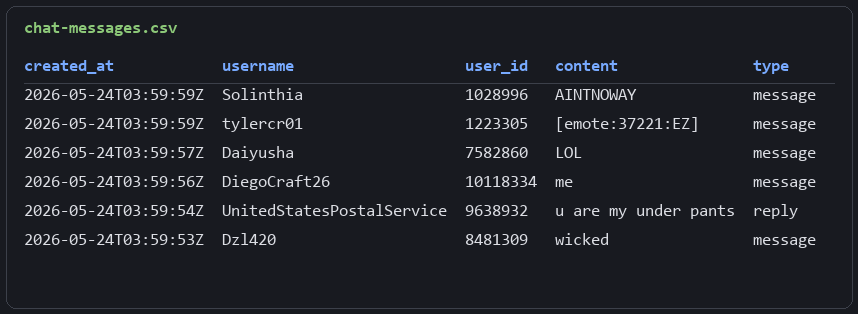
A WebSocket-era chat, reduced to rows we can query by timestamp. The shape we wanted.
Scraping Kick VODs
VODs bridge live scraping and historical analysis. Every past broadcast carries its title, view count, duration, and the start time that the chat scraper's history mode consumes. Between the two sections, a finished stream and its full chat log are both recoverable after the fact.
The Videos Endpoint
GET https://kick.com/api/v2/channels/{slug}/videos hands over the channel's recent past broadcasts in one call, around 26 items and 73 KB, no pagination to manage. Each item is a past stream with session_title, views, duration, language, created_at, and the category, plus a nested video object holding the playable VOD's uuid and privacy flag.
Two details need attention. duration is in milliseconds, so 34,539,000 is a 9.6-hour stream; we label the column duration_ms because clip durations two sections from now arrive in seconds. Two duration units in the same API. Yes. And the watch URL is not in the response at all; we build it ourselves as kick.com/{slug}/videos/{uuid}.
# 2. Fetch the channel's past broadcasts (VODs). Scrape.do default bypasses Kick's Cloudflare.
target = f"https://kick.com/api/v2/channels/{slug}/videos"
api = f"http://api.scrape.do/?token={token}&url={quote(target, safe='')}"
response = requests.get(api)
videos = response.json() if response.status_code == 200 else []

# 3. Parse. Each item is a past stream; the playable VOD lives under "video".
rows = []
for v in videos:
    vid = v.get("video") or {}
    rows.append({
        "title": v.get("session_title"),
        "views": v.get("views"),
        "duration_ms": v.get("duration"),
        "language": v.get("language"),
        "category": (v.get("categories") or [{}])[0].get("name", ""),
        "created_at": v.get("created_at"),
        "is_private": vid.get("is_private"),
        "vod_uuid": vid.get("uuid"),
        "watch_url": f"https://kick.com/{slug}/videos/{vid.get('uuid')}" if vid.get("uuid") else "",
    })
print(f"{slug}: {len(rows)} VODs")
Flat loop, no pagination, one guard on the nested video object. The hard part of this section is already behind us.
Export to CSV
Channels with no past broadcasts return an empty list, so the export checks before writing instead of crashing on a headerless CSV:
# 4. Export (a channel with no past broadcasts returns an empty list)
if rows:
    with open("vods.csv", "w", newline="", encoding="utf-8") as f:
        writer = csv.DictWriter(f, fieldnames=rows[0].keys())
        writer.writeheader()
        writer.writerows(rows)
xqc returned 26 VODs, adinross 24, and a channel with none exited cleanly on the guard. The rows carry everything needed to feed the chat history workflow:
title,views,duration_ms,...,created_at,...,watch_url
...LOCK IN...,5494,0,...,2026-05-24 00:13:07,...,https://kick.com/xqc/videos/b55b4d55-...
...LIVE...,22486,34539000,...,2026-05-22 21:13:21,...,https://kick.com/xqc/videos/d9622858-...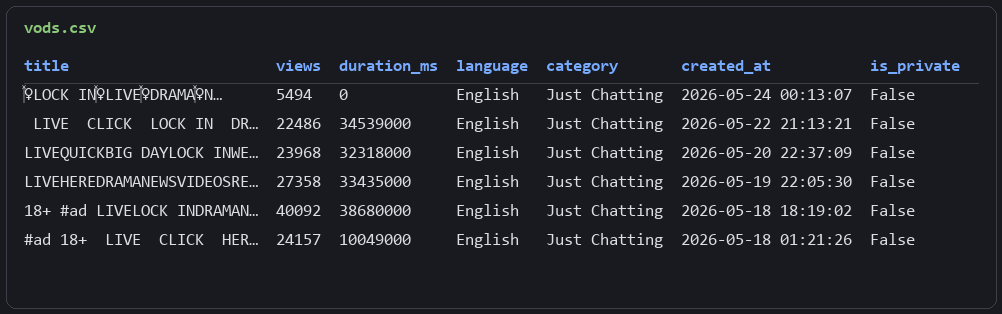
Nine columns per broadcast, watch URLs included, one request per channel.
Scraping Kick Clips
Clips are the viral unit of the platform: short highlights with their own view counts, creators, and direct playback URLs. They are also the last surface in the guide, and they arrive with one more pagination scheme to learn.
The Clips Endpoint
GET https://kick.com/api/v2/channels/{slug}/clips?sort=view&time=all serves about 20 clips per page: title, view_count, likes_count, duration (seconds this time), created_at, the creator's username, the category, and clip_url, a direct .m3u8 playlist link on clips.kick.com (downloadable like any media URL). The sort and time parameters mean "all-time most viewed clips of this channel" is a URL, not a post-processing step.
Pagination is the third distinct scheme in this one API: listings hand back full URLs, chat uses timestamp cursors, and clips return a nextCursor object shaped {"view": .., "id": ".."} where the API wants only the id passed back as ?cursor=. Three endpoints, three pagination dialects. We have seen this on other targets, but rarely all in the same API.
# 3. Page through clips with the nextCursor object returned in each response
rows = []
cursor = None
for page in range(max_pages):
    url = f"https://kick.com/api/v2/channels/{slug}/clips?sort=view&time=all"
    if cursor:
        url += f"&cursor={cursor}"
    payload = fetch(url)
    if not payload or not payload.get("clips"):
        break
    for c in payload["clips"]:
        rows.append({
            "title": c.get("title"),
            "views": c.get("view_count", c.get("views")),
            "likes": c.get("likes_count", c.get("likes")),
            "duration_sec": c.get("duration"),
            "creator": (c.get("creator") or {}).get("username"),
            "category": (c.get("category") or {}).get("name"),
            "created_at": c.get("created_at"),
            "clip_url": c.get("clip_url"),
        })
    nxt = payload.get("nextCursor")          # {"view": .., "id": ".."}; the API wants its id
    cursor = nxt.get("id") if isinstance(nxt, dict) else nxt
    print(f"page {page + 1}: {len(payload['clips'])} clips")
    if not cursor:
        break
The loop mirrors the chat scraper's shape: fetch, flatten, extract the cursor, stop on null or the page cap. The isinstance check covers both the object cursor and a plain value, in case Kick changes its mind again.
Export to CSV
# 4. Export (a channel with no clips returns an empty list)
if rows:
    with open("clips.csv", "w", newline="", encoding="utf-8") as f:
        writer = csv.DictWriter(f, fieldnames=rows[0].keys())
        writer.writeheader()
        writer.writerows(rows)
print(f"total: {len(rows)} clips")
Three pages on xqc yielded 60 clips sorted by all-time views, the top one at 316,368:
title,views,likes,duration_sec,creator,category,created_at,clip_url
soda,316368,0,30,Wasab7i,Just Chatting,2023-08-17T06:07:19Z,https://clips.kick.com/clips/dh/clip_01H811MXG4FBR62FXPE1AXABDH/playlist.m3u8
BRUHHHHH,282660,0,30,aintnoway_1,Overwatch,2023-08-01T06:55:18Z,https://clips.kick.com/clips/3q/clip_01H6QY1H0QCE582N739JNZTD3Q/playlist.m3u8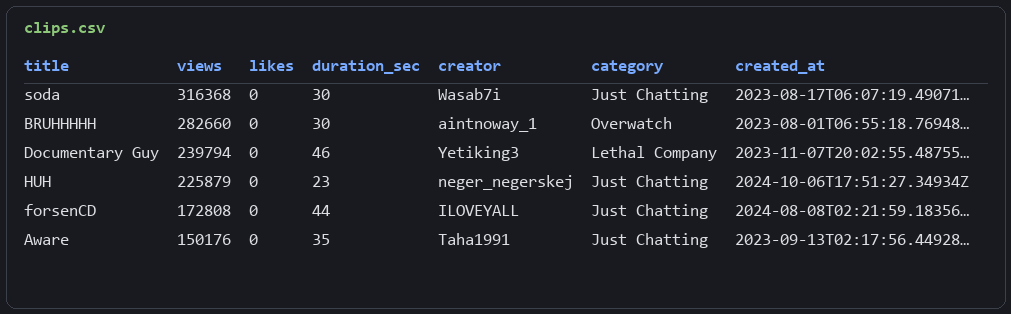
Every row ends in a playable URL. The clip surface, and with it the platform, is now rows.
FAQ
Does Kick have an official API?
Kick ships an official OAuth developer API at dev.kick.com, aimed at app integrations: scopes, tokens, webhooks, chat bots. The public site data this article collects (channels, listings, chat, VODs, clips) is served by the internal /api/v2/ REST endpoints, which require no authentication, only a request that clears Cloudflare. Integration builders belong on the official API; for data collection, the internal endpoints are the shorter path.
Can old chat messages be retrieved from Kick?
Yes, over REST. The messages endpoint's cursor is a timestamp in epoch microseconds, so seeding it with a past time returns chat from that moment and pages backward. Paired with a VOD's start time, it reconstructs the chat log of a finished stream. No WebSocket capture during the stream is required; the history is queryable after the fact.
Why do direct requests to Kick.com return 403?
Cloudflare fronts every Kick endpoint, including the JSON APIs, and rejects requests without a convincing browser fingerprint before they reach the application. The response is a 403 with a 79-byte body. A proxied request with a real fingerprint, which is what Scrape.do's default request provides, passes and receives normal JSON.
Can live streams be filtered by category?
Not through REST. The listing endpoint accepts ?category= and ?subcategory= parameters and ignores them, and the category-specific paths serve the React shell. The working approach is to pull the featured listing and filter rows by the category column, or to read per-category totals from /api/v1/subcategories/{slug}.
Five surfaces, five CSVs, one pattern: find the internal endpoint, route the request through Scrape.do, read JSON. The only anti-bot work Kick demanded was clearing Cloudflare, and that took zero parameters.
Software Engineer








