Category:Scraping Use CasesView as Markdown
How to Scrape Target.com: Product Data, Prices, and Reviews

Software Engineer


How to Scrape Target.com: Product Data, Prices, and Reviews
Target.com works fine in a browser. The problem starts when we try to scrape it. A plain HTTP request gets us HTML that looks complete but contains none of the product data we want. The prices, ratings, and reviews are all loaded by JavaScript after the page shell arrives.
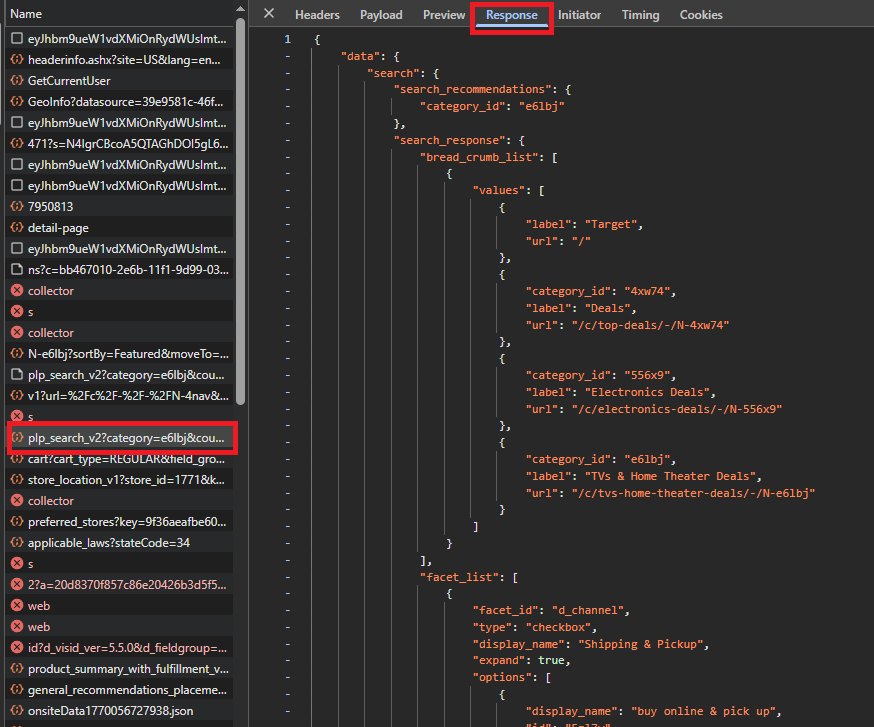
That is actually good news. Open DevTools Network on any category page and the real data source becomes obvious: two internal JSON APIs serve everything the storefront displays. The data is already structured. We do not need to render JavaScript at all. That same architecture is also why Target recently updated its terms to allow AI shopping agents: structured JSON is easier for a bot to consume than rendered HTML.
We will call both APIs directly: Redsky for catalog and fulfillment data, r2d2 for reviews and questions. Four scrapers, four clean outputs, zero browser rendering.
Challenges with Scraping Target.com
Target runs Akamai Bot Manager, a commercial anti-bot system that inspects TLS fingerprints, cookie state, and request timing before serving content. Direct requests return challenge pages or 403s. Routing through Scrape.do with super=true handles that, the same way it does on Amazon.
The harder problem is knowing where the data lives. Target runs two API systems. Redsky powers the catalog: listings, product details, fulfillment. r2d2 powers the community layer: reviews and Q&A. Each has its own API key, visible in the Network tab on its respective host.
One more gotcha: certain query parameters are path-sensitive. Shorten the category path and Redsky returns 404. We will cover this when we build the category scraper.
Scraping Target Category Listings
The category grid is the first win. Every product card on a Target deals page comes from a single Redsky endpoint, and the response is already a JSON array of product objects with titles, prices, ratings, and badges.
Shipping and pickup data lives in a second endpoint. So we make two passes: one to collect the product list, one to enrich it with fulfillment windows. The result is a flat CSV with one row per product card.
Prerequisites
Install requests. The rest is standard library.
We start with a fetch_json helper that routes any URL through Scrape.do with super=true and returns parsed JSON. We will reuse this for every endpoint we hit.
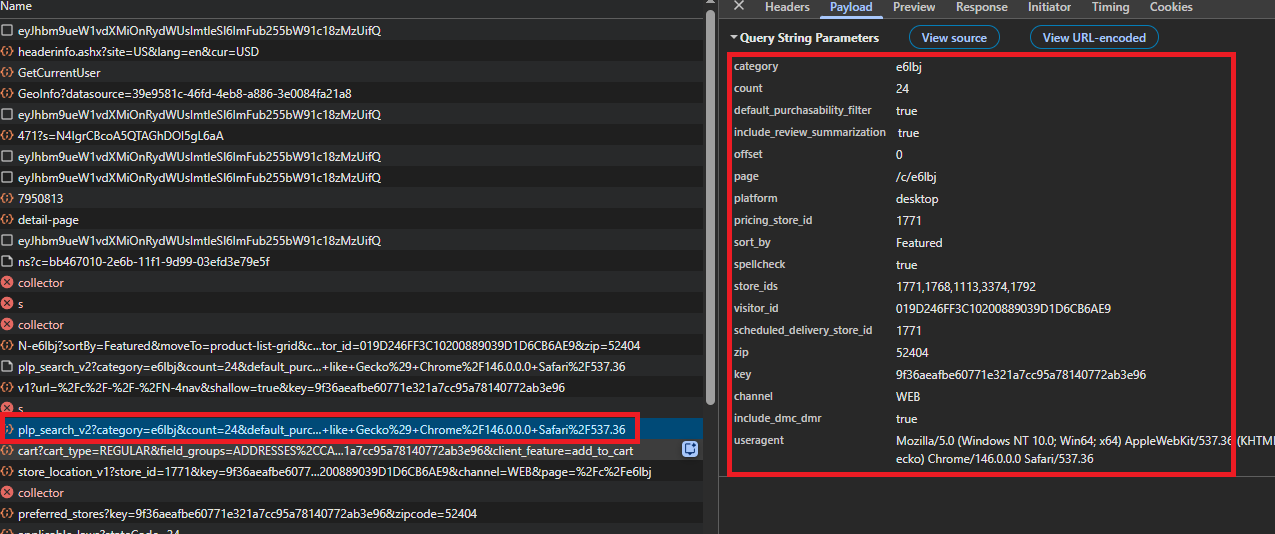
All the config values come from one place: open the category page in DevTools, go to Network, filter for plp_search_v2, and copy the query parameters. The Redsky key, visitor ID, store, and geo constants are all in that one request.
Two constants need exact values: CATEGORY_ID and PAGE_PATH. PAGE_PATH must match DevTools exactly or Redsky returns 404. A shortened slug does not work.
import csv
import html
import urllib.parse

import requests

TOKEN = "<your-token>"

CATEGORY_ID = "e6lbj"
PAGE_PATH = "/c/tvs-home-theater-deals/-/N-e6lbj"
MAX_PLP_PAGES = 3
PLP_PAGE_SIZE = 24

# Query keys from DevTools: plp_search_v2 and product_summary_with_fulfillment_v1 XHRs.
REDSKY_KEY = "9f36aeafbe60771e321a7cc95a78140772ab3e96"
STORE_ID = "1771"
ZIP = "52404"
STATE = "IA"
LAT = "41.9831"
LON = "-91.6686"
VISITOR_ID = "019D246FF3C10200889039D1D6CB6AE9"

OUTPUT_CSV_PATH = "target-category-cards.csv"
Redsky plp_search_v2 Pagination
Pagination is offset-based, nothing unusual there. The real constraint is the query itself: it needs over a dozen parameters, and missing any one of them silently returns empty results or a 404. We copy all of them from the same DevTools request.
include_sponsored=true keeps sponsored tiles in the response so our data matches the live grid one-to-one.
def fetch_json(url):
    api_url = f"http://api.scrape.do/?token={TOKEN}&url={urllib.parse.quote(url, safe='')}&super=true"
    r = requests.get(api_url, timeout=120)
    if r.status_code != 200:
        print(f"HTTP {r.status_code}")
        return None
    return r.json()
Not 200, not useful. We log the status and move on.
products_by_tcin = {}
ordered_tcins = []

for page_index in range(MAX_PLP_PAGES):
    offset = page_index * PLP_PAGE_SIZE
    # include_sponsored=true keeps sponsored tiles so the slice matches the live grid
    plp_query = urllib.parse.urlencode({
        "key": REDSKY_KEY, "visitor_id": VISITOR_ID,
        "category": CATEGORY_ID, "channel": "WEB",
        "count": str(PLP_PAGE_SIZE), "offset": str(offset),
        "page": PAGE_PATH, "platform": "desktop",
        "pricing_store_id": STORE_ID, "scheduled_delivery_store_id": STORE_ID,
        "store_ids": STORE_ID, "zip": ZIP, "state": STATE,
        "latitude": LAT, "longitude": LON,
        "default_purchasability_filter": "true", "include_sponsored": "true",
    })
    plp_url = f"https://redsky.target.com/redsky_aggregations/v1/web/plp_search_v2?{plp_query}"
    plp_data = fetch_json(plp_url)
    if not plp_data:
        break
    for p in plp_data["data"]["search"]["products"]:
        tcin = str(p["tcin"])
        if tcin in products_by_tcin:
            continue
        products_by_tcin[tcin] = p
        ordered_tcins.append(tcin)

print(f"Listing: {len(ordered_tcins)} unique TCINs")
Each response gives us data.search.products, an array of product objects. We deduplicate by TCIN because Target can reshuffle the grid between pages.
Adding Fulfillment Data
Now we have TCINs but no shipping data. The fulfillment endpoint takes a comma-separated batch of TCINs. We send 24 at a time to match the page size.
def build_product_summary_url(tcins_query_value):
    query = urllib.parse.urlencode({
        "key": REDSKY_KEY, "tcins": tcins_query_value,
        "store_id": STORE_ID, "zip": ZIP, "state": STATE,
        "latitude": LAT, "longitude": LON,
    })
    return f"https://redsky.target.com/redsky_aggregations/v1/web/product_summary_with_fulfillment_v1?{query}"
We reuse the Redsky key but hit the fulfillment endpoint instead. Store and geo parameters matter here because shipping estimates are location-specific.
fulfillment_by_tcin = {}

batch_size = 24
for batch_start in range(0, len(ordered_tcins), batch_size):
    batch = ordered_tcins[batch_start : batch_start + batch_size]
    payload = fetch_json(build_product_summary_url(",".join(batch)))
    if not payload:
        print(f"  batch failed at offset {batch_start}, skipping fulfillment for {len(batch)} TCINs")
        continue
    for ps in payload["data"]["product_summaries"]:
        fulfillment_by_tcin[str(ps["tcin"])] = ps

print(f"Fulfillment: {len(fulfillment_by_tcin)}/{len(ordered_tcins)} summaries")
Each summary comes back with shipping dates and pickup availability. If a batch fails, those columns stay blank for the affected TCINs. The export keeps going.
Flattening and Export
Both API rounds are done. Now we merge listing data with fulfillment data into flat rows.
csv_rows = []
for tcin in ordered_tcins:
    plp = products_by_tcin[tcin]
    item = plp.get("item") or {}
    enrichment = item.get("enrichment") or {}
    desc = item.get("product_description") or {}
    price = plp.get("price") or {}
    rating_stats = (plp.get("ratings_and_reviews") or {}).get("statistics", {}).get("rating") or {}

    raw_title = str(desc.get("title", ""))
    product_name = html.unescape(raw_title) if raw_title else ""
    image_url = (enrichment.get("images") or {}).get("primary_image_url", "")

    # Collect badge texts and separate the "bought recently" line
    all_cues = (plp.get("desirability_cues") or []) + (plp.get("ornaments") or [])
    badges, bought_line = [], ""
    for cue in all_cues:
        text = cue.get("display", "").strip()
        if not text:
            continue
        if "bought" in text.lower():
            bought_line = text
        else:
            badges.append(text)
Redsky returns HTML entities in titles (" for inch marks in TV names), so we unescape them. Badge texts need special handling: Target mixes marketing labels like "Bestseller" with social proof like "1000+ bought since yesterday" in the same list. We separate the "bought" line into its own column so it can be filtered independently.
    # Fulfillment fields stay blank when the summary call failed for this TCIN
    ship_status = delivery_min = delivery_max = pickup_status = pickup_date = ""
    fs = fulfillment_by_tcin.get(tcin)
    if fs:
        ful = fs.get("fulfillment") or {}
        ship_opts = ful.get("shipping_options") or {}
        ship_status = str(ship_opts.get("availability_status", ""))
        services = ship_opts.get("services") or []
        if services:
            delivery_min = str(services[0].get("min_delivery_date", ""))
            delivery_max = str(services[0].get("max_delivery_date", ""))
        store_opts = ful.get("store_options") or []
        if store_opts:
            order_pickup = store_opts[0].get("order_pickup") or {}
            pickup_status = str(order_pickup.get("availability_status", ""))
            pickup_date = str(order_pickup.get("pickup_date", ""))
Shipping dates and pickup windows come from the first entry in each fulfillment list. The code reads them directly.
    csv_rows.append({
        "tcin": str(plp["tcin"]),
        "product_url": enrichment.get("buy_url", ""),
        "product_name": product_name,
        "image_url": image_url,
        "price_current_display": str(price.get("formatted_current_price", "")),
        "price_compare_display": str(price.get("formatted_comparison_price", "")),
        "save_percent": str(price.get("save_percent", "")),
        "save_dollar": str(price.get("save_dollar", "")),
        "rating_average": str(rating_stats.get("average", "")),
        "rating_count": str(rating_stats.get("count", "")),
        "badges": " | ".join(badges),
        "bought_recent_display": bought_line,
        "ship_to_home_status": ship_status,
        "delivery_date_min": delivery_min,
        "delivery_date_max": delivery_max,
        "pickup_status": pickup_status,
        "pickup_ready_date": pickup_date,
        "is_sponsored": "true" if plp.get("is_sponsored_sku") else "false",
    })
Product URL, image, price, ratings, badges, and fulfillment all land in one flat dictionary per TCIN. The code is verbose because Target's response is deeply nested, but the output is clean.
print(f"{len(csv_rows)} rows to write")
with open(OUTPUT_CSV_PATH, "w", newline="", encoding="utf-8") as f:
    writer = csv.writer(f)
    writer.writerow(CARD_FIELDS)
    for row in csv_rows:
        writer.writerow([row.get(col, "") for col in CARD_FIELDS])
print(f"Wrote {OUTPUT_CSV_PATH}")
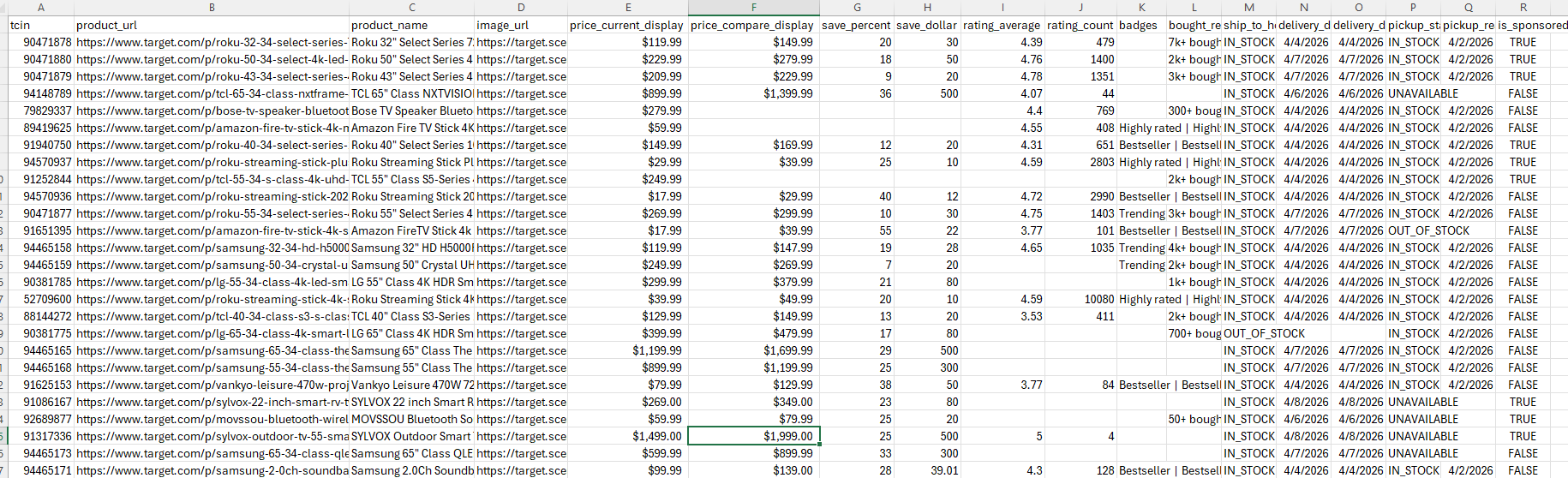
If we see a non-zero row count, the category grid collapsed into a CSV. Pricing, badges, fulfillment, all flat.
Scraping Target Product Details
The category scraper gives us breadth. The product scraper is about depth.
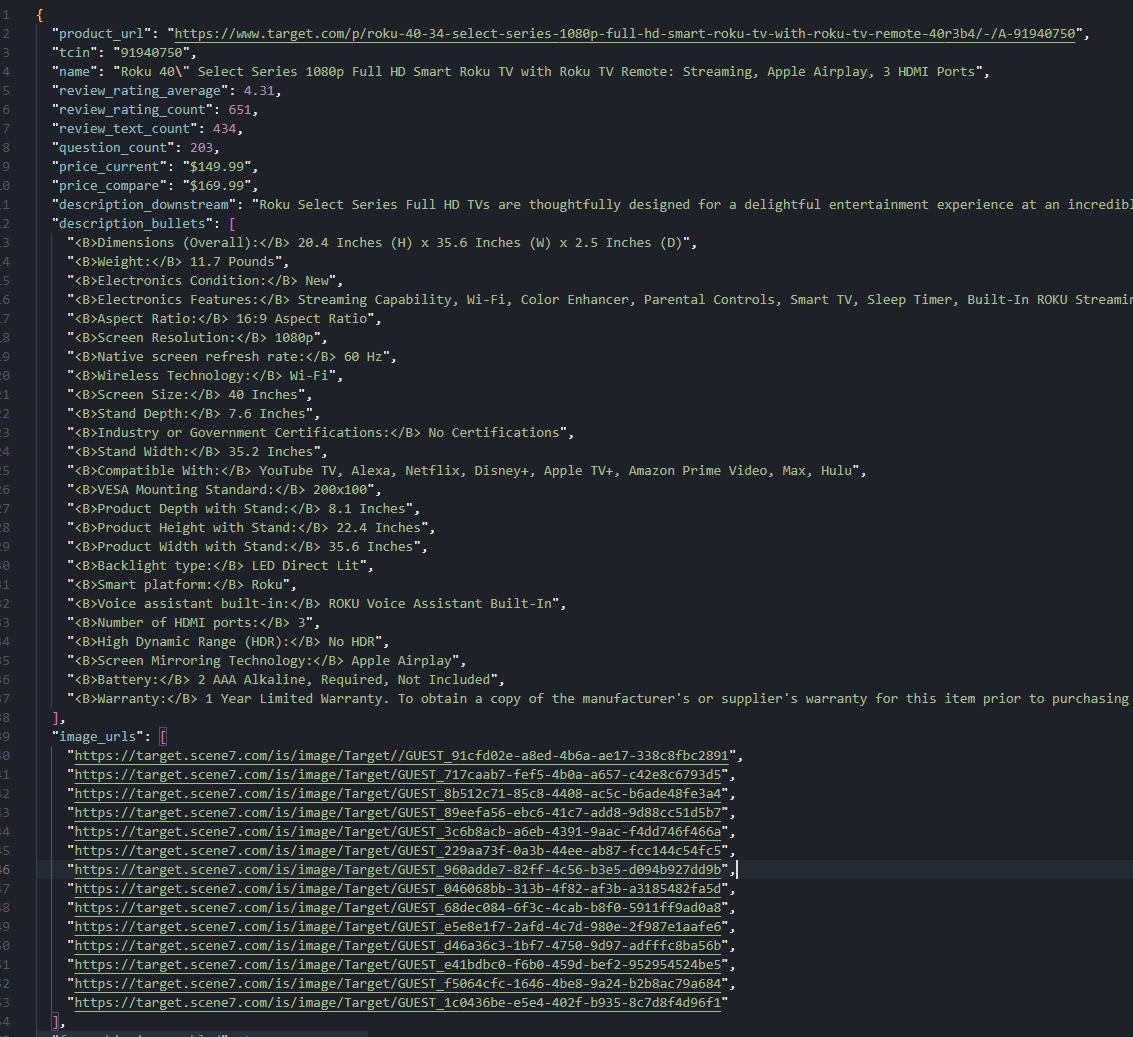
A single Redsky endpoint returns the full product object: title, description, bullet points, pricing, ratings, and the complete image gallery. We reuse the fulfillment endpoint from the category scraper to add shipping dates.
import html
import json
import re
import urllib.parse

import requests

TOKEN = "<your-token>"
PRODUCT_URL = "https://www.target.com/p/roku-40-34-select-series-1080p-full-hd-smart-roku-tv-with-roku-tv-remote-40r3b4/-/A-91940750"

REDSKY_KEY = "9f36aeafbe60771e321a7cc95a78140772ab3e96"
STORE_ID = "1771"
ZIP = "52404"
STATE = "IA"
LAT = "41.9831"
LON = "-91.6686"

OUTPUT_JSON_PATH = "target-product.json"
The Redsky config carries over from the category scraper. The TCIN comes from the /A-<digits> pattern in the product URL.
def build_pdp_client_v1_url(tcin):
    q = urllib.parse.urlencode({
        "key": REDSKY_KEY, "tcin": tcin, "store_id": STORE_ID,
        "pricing_store_id": STORE_ID, "zip": ZIP, "state": STATE,
        "latitude": LAT, "longitude": LON,
    })
    return f"https://redsky.target.com/redsky_aggregations/v1/web/pdp_client_v1?{q}"
pricing_store_id is required and must equal store_id. Miss it and Redsky rejects the request.
tcin_match = re.search(r"/A-(\d+)", PRODUCT_URL)
if not tcin_match:
    raise SystemExit("Could not parse TCIN from PRODUCT_URL (expect /A-<digits>).")
tcin = tcin_match.group(1)

pdp_payload = fetch_json(build_pdp_client_v1_url(tcin))
if not pdp_payload:
    raise SystemExit("pdp_client_v1 request failed.")

product = pdp_payload["data"]["product"]
One regex, one API call, and we have the full product object. No TCIN, no product data.
Gallery Images and Pricing
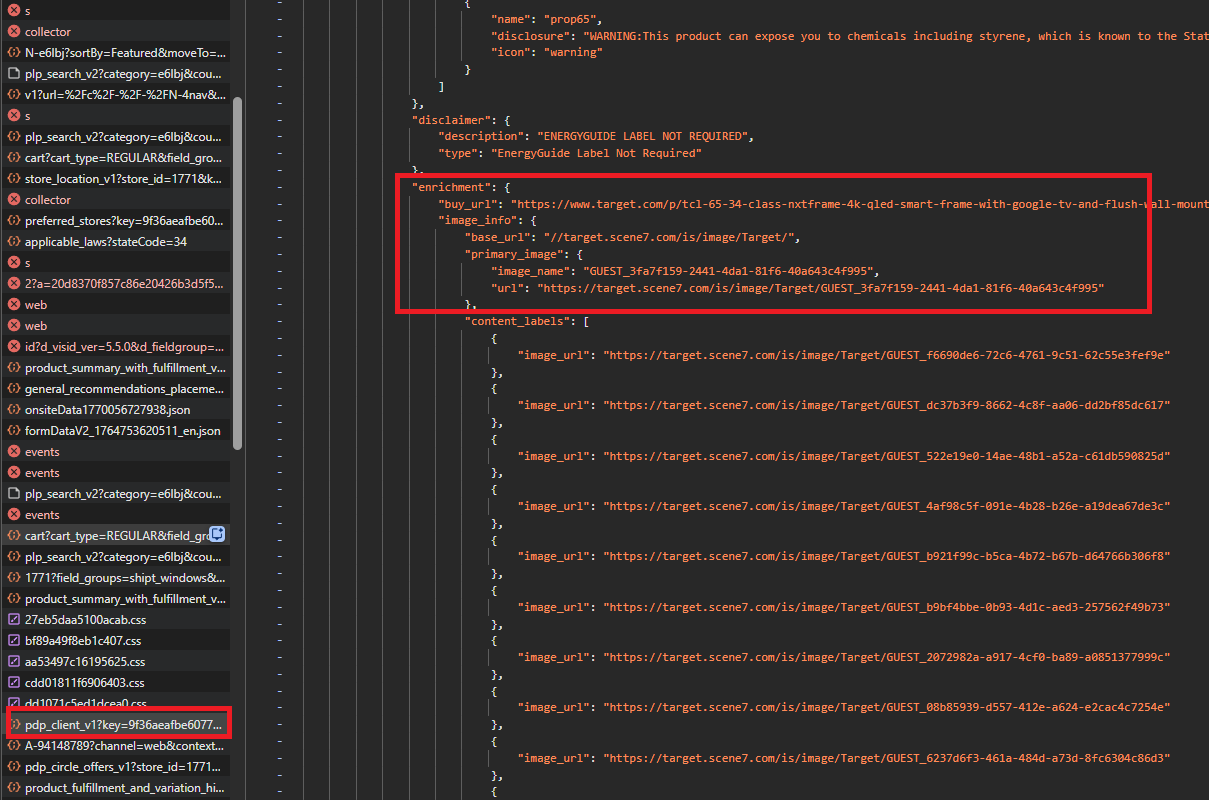
Target hosts product images on Scene7. The API gives us a base URL and a list of image names. We build full URLs by joining the two.
ship_to_home_status = delivery_date_min = delivery_date_max = ""
ful_payload = fetch_json(build_product_summary_url(tcin))
if ful_payload:
    for s in ful_payload["data"]["product_summaries"]:
        if str(s["tcin"]) == tcin:
            ship_opts = s.get("fulfillment", {}).get("shipping_options") or {}
            ship_to_home_status = ship_opts.get("availability_status", "")
            services = ship_opts.get("services") or []
            if services:
                delivery_date_min = services[0].get("min_delivery_date", "")
                delivery_date_max = services[0].get("max_delivery_date", "")
            break
We already built this fulfillment call for the category scraper. Here it runs for one TCIN. If it fails, shipping fields stay empty and the rest of the record still writes.
image_info = product["item"]["enrichment"].get("image_info") or {}
base = image_info.get("base_url", "").strip()
if base.startswith("//"):
    base = "https:" + base

image_urls = []
# Primary image
primary_name = image_info.get("primary_image", {}).get("image_name", "")
if primary_name:
    image_urls.append(f"{base}/{primary_name}" if not primary_name.startswith("http") else primary_name)
# Alternate images
for alt in image_info.get("alternate_images") or []:
    url = alt.get("url") or ""
    if url:
        image_urls.append(url)
    else:
        name = alt.get("image_name", "")
        if name:
            image_urls.append(f"{base}/{name}" if not name.startswith("http") else name)
The base URL starts with //, so we add https:. Primary and alternate images both use the same pattern. Some alternates already have a full URL; others need the base prefix. To download those images to disk, pass the assembled URLs to a file-writing loop.
Export
item = product["item"]
price = product.get("price") or {}
stats = (product.get("ratings_and_reviews") or {}).get("statistics") or {}
rating = stats.get("rating") or {}
desc = item.get("product_description") or {}

record = {
    "product_url": PRODUCT_URL.split("#")[0],
    "tcin": item.get("tcin", tcin),
    "name": html.unescape(desc.get("title", "")),
    "review_rating_average": rating.get("average"),
    "review_rating_count": rating.get("count"),
    "review_text_count": stats.get("review_count"),
    "question_count": stats.get("question_count"),
    "price_current": price.get("formatted_current_price"),
    "price_compare": price.get("formatted_comparison_price"),
    "description_downstream": desc.get("downstream_description"),
    "description_bullets": desc.get("bullet_descriptions") or [],
    "image_urls": image_urls,
    "free_shipping_enabled": (product.get("free_shipping") or {}).get("enabled"),
    "ship_to_home_status": ship_to_home_status,
    "delivery_date_min": delivery_date_min,
    "delivery_date_max": delivery_date_max,
}

with open(OUTPUT_JSON_PATH, "w", encoding="utf-8") as f:
    json.dump(record, f, indent=2, ensure_ascii=False)

print(f"Wrote {OUTPUT_JSON_PATH}")
Everything lands in one JSON file: title, pricing, ratings, the full image gallery, and shipping. Description bullets stay as a list so they are usable downstream without re-splitting.
Scraping Target Product Reviews
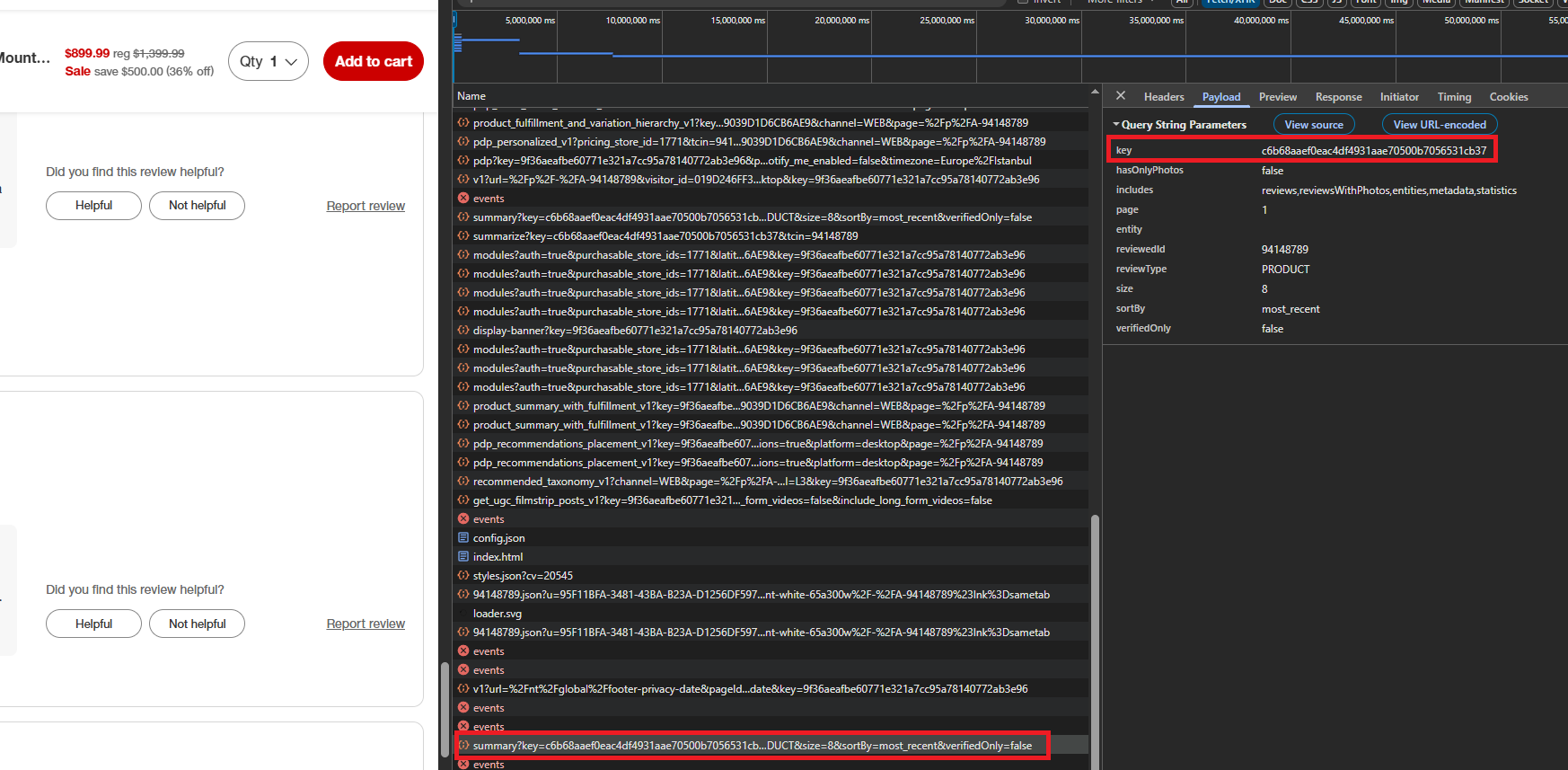
Reviews come from r2d2.target.com, not Redsky. Unlike Amazon's review data, which sits partly behind a login wall, Target's r2d2 endpoint is publicly accessible. The nova key shows up in the Network tab on any r2d2 request, the same way the Redsky key shows up on Redsky requests.
import csv
import json
import re
import urllib.parse

import requests

TOKEN = "<your-token>"
PRODUCT_URL = "https://www.target.com/p/roku-40-34-select-series-1080p-full-hd-smart-roku-tv-with-roku-tv-remote-40r3b4/-/A-91940750"
# From DevTools / embedded PDP config, not the Redsky key.
NOVA_API_KEY = "c6b68aaef0eac4df4931aae70500b7056531cb37"

PAGE_SIZE = 25
MAX_REVIEW_ROWS = 500
# API returns 400 above this page index even when JSON claims more pages.
MAX_PAGE_INDEX = 50

OUTPUT_CSV_PATH = "target-reviews-sample.csv"
MAX_PAGE_INDEX = 50 is a hard ceiling. The reason becomes clear in the pagination section below.
def build_summary_url(tcin, page_index):
    query = urllib.parse.urlencode({
        "key": NOVA_API_KEY,
        "hasOnlyPhotos": "false",
        "includes": "reviews,reviewsWithPhotos,entities,metadata,statistics",
        "page": str(page_index),
        "entity": "",
        "reviewedId": tcin,
        "reviewType": "PRODUCT",
        "size": str(PAGE_SIZE),
        "sortBy": "most_recent",
        "verifiedOnly": "false",
    })
    return f"https://r2d2.target.com/ratings_reviews_api/v1/summary?{query}"
The includes parameter controls which data comes back. Without it, the response is incomplete. Note reviewType=PRODUCT in uppercase. The Q&A endpoint flips this to lowercase type=product. Small difference, silent failure if we get it wrong.
Pagination and the Page 50 Cap
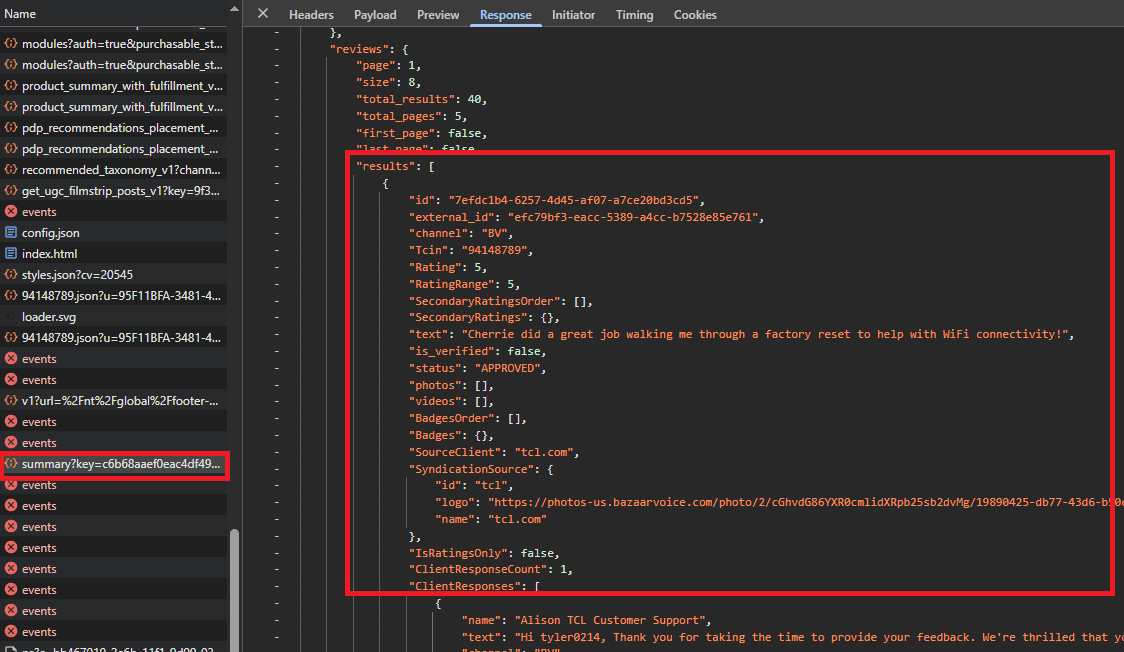
Pagination is 0-based. Page 0 returns the first batch, total_pages tells us how many exist.
Here is the catch. Target's API lies. total_pages might say 80, but requesting anything above page 50 returns HTTP 400. The real ceiling is 1,275 reviews (51 pages at 25 per page). The JSON claims more, the server disagrees. This is a hard server-side cap, not a rate limit you can work around.
product_url = PRODUCT_URL.split("#")[0].strip()
tcin_match = re.search(r"/A-(\d+)", product_url)
if not tcin_match:
    raise SystemExit("Could not parse TCIN from PRODUCT_URL (expect /A-<digits>).")
tcin = tcin_match.group(1)
TCIN extraction works the same way we did it in the product scraper.
csv_rows = []
total_pages = None

for page_index in range(0, MAX_PAGE_INDEX + 1):
    if total_pages is not None and page_index >= total_pages:
        break
    if len(csv_rows) >= MAX_REVIEW_ROWS:
        break

    payload = fetch_json(build_summary_url(tcin, page_index))
    if not payload:
        raise SystemExit("Summary request failed (check token, Scrape.do, or nova key).")

    if payload.get("message") == "Unauthorized" or payload.get("errors"):
        raise SystemExit(f"Summary API rejected the request: {payload!r}")

    reviews_block = payload.get("reviews") or {}
    results = reviews_block.get("results") or []
    total_pages = int(reviews_block.get("total_pages") or 1)

    for review in results:
        csv_rows.append([
            review.get("id", ""),
            review.get("title", ""),
            review.get("text", ""),
            review.get("Rating", ""),
            (review.get("author") or {}).get("nickname", ""),
            review.get("submitted_at", ""),
            str(review.get("is_verified", "")),
        ])
        if len(csv_rows) >= MAX_REVIEW_ROWS:
            break
The loop stops when pages run out, the hard cap hits, or we reach our row limit. One quirk: the Rating field uses a capital R. Miss that and every star rating comes back empty.
Export
with open(OUTPUT_CSV_PATH, "w", newline="", encoding="utf-8") as f:
    writer = csv.writer(f)
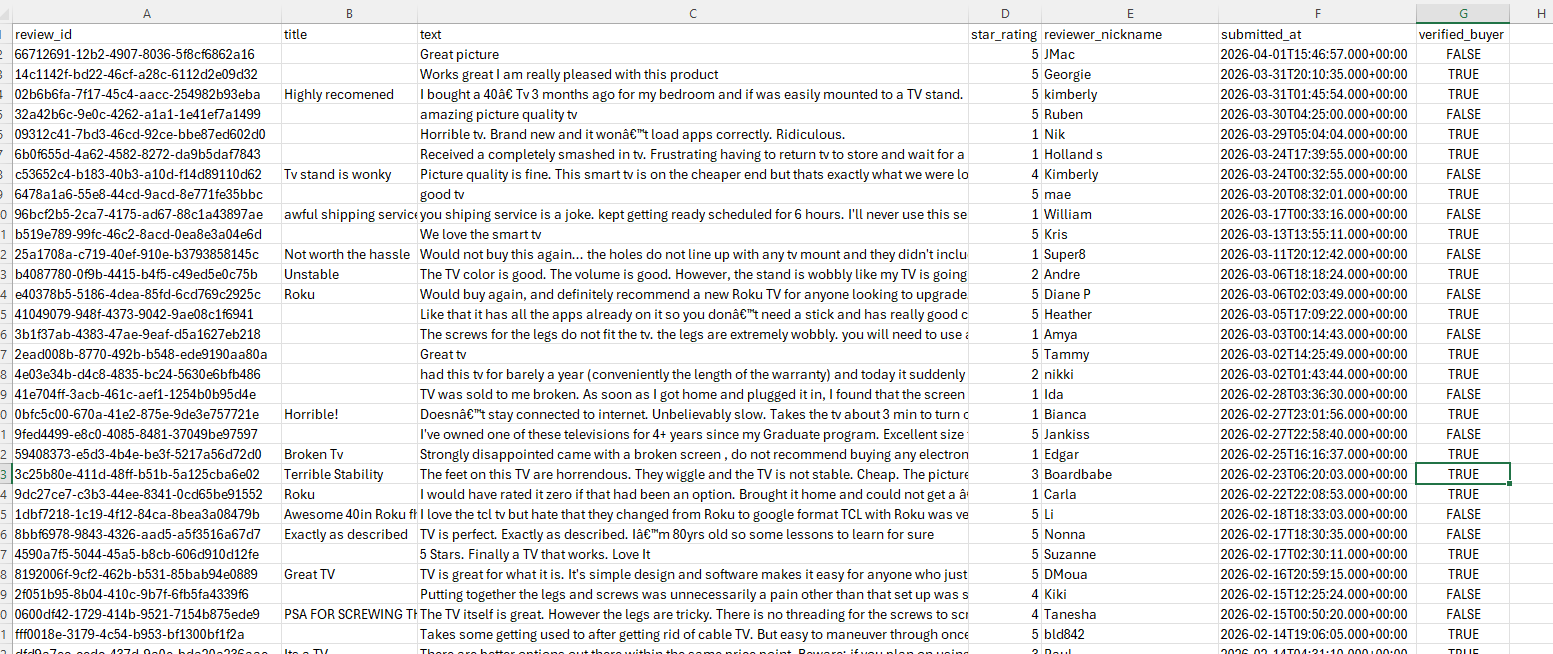
    writer.writerow(["review_id", "title", "text", "star_rating", "reviewer_nickname", "submitted_at", "verified_buyer"])
    writer.writerows(csv_rows)

print(f"Saved {len(csv_rows)} reviews to {OUTPUT_CSV_PATH}")
if len(csv_rows) >= MAX_REVIEW_ROWS:
    print(f"  hit row cap ({MAX_REVIEW_ROWS})")
One row per review, up to the platform limit. The CSV is clean enough to filter and analyze without post-processing.
Scraping Target Q&A
Q&A lives on the r2d2 host we already set up for reviews. The nova key carries over, but the endpoint and a couple of parameter names change.
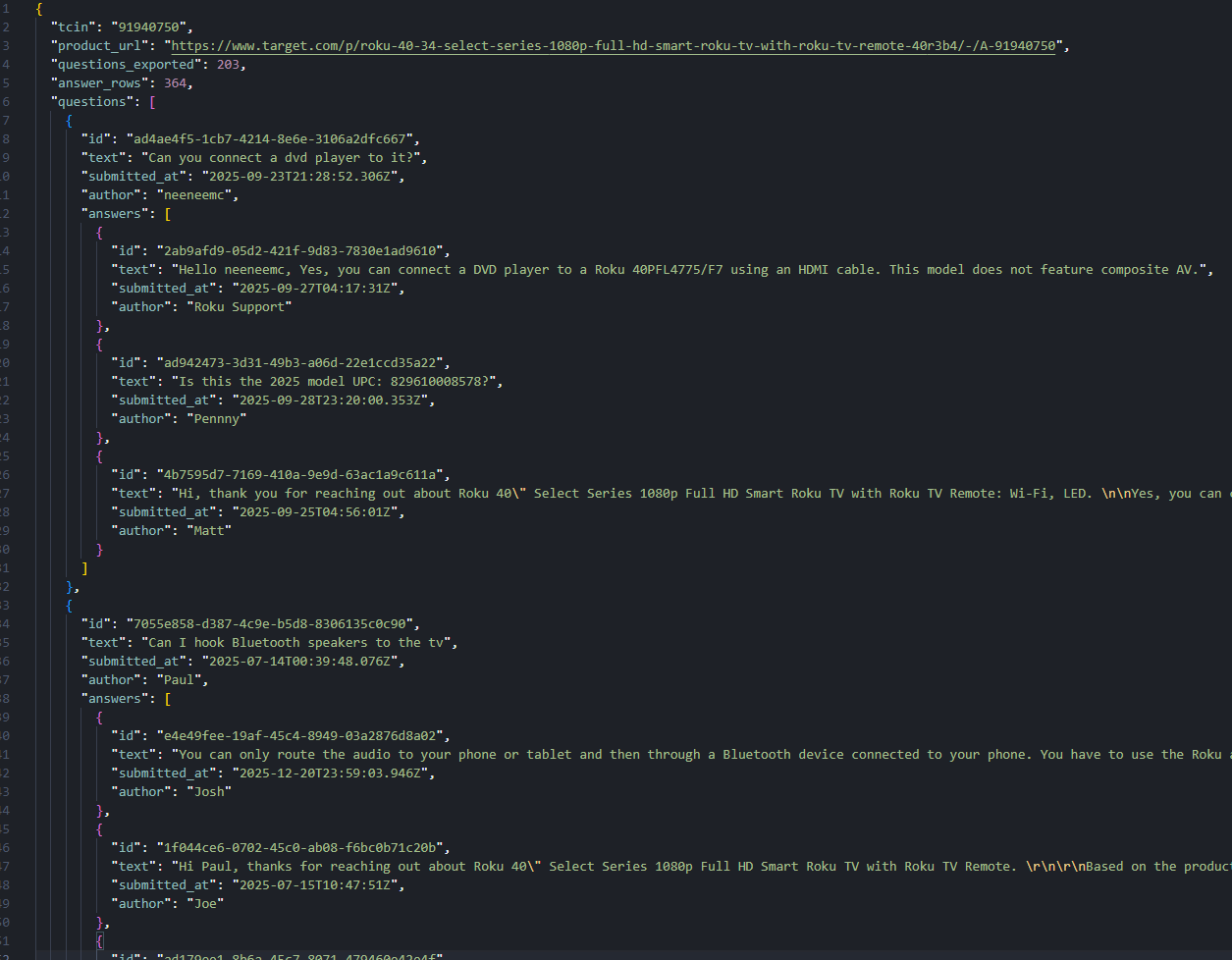
The bigger difference is the output. Each question can have multiple answers, so a flat CSV would repeat the question text on every row. We use JSON with nested answers instead.
import json
import re
import urllib.parse

import requests

TOKEN = "<your-token>"
PRODUCT_URL = "https://www.target.com/p/roku-40-34-select-series-1080p-full-hd-smart-roku-tv-with-roku-tv-remote-40r3b4/-/A-91940750"
# Nova-family API key from embedded PDP config, not the Redsky aggregations key.
NOVA_API_KEY = "c6b68aaef0eac4df4931aae70500b7056531cb37"
PAGE_SIZE = 25
MAX_QUESTIONS = 500

OUTPUT_JSON_PATH = "target-questions-sample.json"
MAX_QUESTIONS caps the export at 500.
def build_questions_url(tcin, page_index):
    query = urllib.parse.urlencode({
        "key": NOVA_API_KEY,
        "page": str(page_index),
        "questionedId": tcin,
        "type": "product",
        "size": str(PAGE_SIZE),
        "sortBy": "MOST_ANSWERS",
        "errorTag": "drax_domain_questions_api_error",
    })
    return f"https://r2d2.target.com/question-answers-api/v2/questions?{query}"
Note the casing flip from reviews: questionedId instead of reviewedId, type=product (lowercase) instead of reviewType=PRODUCT. sortBy=MOST_ANSWERS surfaces the most-answered questions first.
Questions with Nested Answers
Each question comes back with a nested answers array. We shape both levels into clean dicts.
def shape_question(q):
    answers = []
    for ans in q.get("answers") or []:
        answers.append({
            "id": ans.get("id", ""),
            "text": ans.get("text", ""),
            "submitted_at": ans.get("submitted_at", ""),
            "author": (ans.get("author") or {}).get("nickname", ""),
        })
    return {
        "id": q.get("id", ""),
        "text": q.get("text", ""),
        "submitted_at": q.get("submitted_at", ""),
        "author": (q.get("author") or {}).get("nickname", ""),
        "answers": answers,
    }
Questions and answers get the same field set: id, text, date, author. The nesting preserves which answers belong to which question.
product_url = PRODUCT_URL.split("#")[0].strip()
tcin_match = re.search(r"/A-(\d+)", product_url)
if not tcin_match:
    raise SystemExit("Could not parse TCIN from PRODUCT_URL (expect /A-<digits>).")
tcin = tcin_match.group(1)

questions_out = []
total_pages = None

for page_index in range(0, 9999):
    if total_pages is not None and page_index >= total_pages:
        break
    if len(questions_out) >= MAX_QUESTIONS:
        break

    payload = fetch_json(build_questions_url(tcin, page_index))
    if not payload:
        raise SystemExit("Questions request failed (check token, Scrape.do, or nova key).")

    if payload.get("message") == "Unauthorized" or payload.get("errors"):
        raise SystemExit(f"Questions API rejected the request: {payload!r}")

    total_pages = int(payload.get("total_pages") or 1)

    for q in payload.get("results") or []:
        if len(questions_out) >= MAX_QUESTIONS:
            break
        questions_out.append(shape_question(q))
Pagination works like the reviews scraper but without the page 50 ceiling. The loop runs until pages are exhausted or we hit the question limit.
Export
answer_count = sum(len(q["answers"]) for q in questions_out)

export_doc = {
    "tcin": tcin,
    "product_url": product_url,
    "questions_exported": len(questions_out),
    "answer_rows": answer_count,
    "questions": questions_out,
}

with open(OUTPUT_JSON_PATH, "w", encoding="utf-8") as f:
    json.dump(export_doc, f, indent=2, ensure_ascii=False)

print(f"Wrote {len(questions_out)} questions ({answer_count} answers) to {OUTPUT_JSON_PATH}")
if len(questions_out) >= MAX_QUESTIONS:
    print(f"  hit question cap ({MAX_QUESTIONS})")
The wrapper includes counts for a quick sanity check: how many questions exported, how many total answers. The nested structure means we can load the file and immediately see which answers belong to which question.
Conclusion
Target is a good example of a site that looks harder than it is. The JavaScript-rendered storefront seems like it needs a headless browser until we open DevTools Network and realize everything comes from two JSON APIs with clean, paginated responses.
The pattern repeats: find the endpoint, grab the key, paginate through structured data. Redsky for the catalog side, r2d2 for the community side. Once we know where the keys live, everything else is reading JSON.
Get 1000 free credits and start scraping with Scrape.do
FAQ
Does Target.com block web scraping?
Yes. Akamai Bot Manager blocks direct requests. Routing through Scrape.do with super=true handles that. We never request Target HTML directly; we call the JSON APIs through the proxy.
What is the difference between Redsky and r2d2 APIs?
Redsky handles catalog data: listings, product details, and fulfillment. r2d2 handles user-generated content: reviews and Q&A. Each has its own API key, both visible in the Network tab on their respective hosts.
Why can I only access 50 pages of reviews on Target?
The reviews API returns HTTP 400 for any page above 50, even when the response claims more pages exist. At 25 reviews per page, the ceiling is 1,275 reviews per product.
How do I find the Redsky API key?
Open any Target page with DevTools Network tab, filter for redsky, and copy the key query parameter from any request. The nova key for r2d2 is on the same Network tab but on r2d2.target.com requests instead.
Meta Description
Scrape Target.com product data, reviews, and Q&A with Python. Call Redsky and r2d2 JSON APIs directly through Scrape.do, skip HTML rendering, and export to CSV and JSON.
Backlink Analysis
Outbound (from this article to existing blog posts)
- Anti-bot bypass: link "Akamai is not the only bot manager we have worked around" to
https://scrape.do/blog/amazon-scraping/. - Proxy comparison: link "proxy and unblocking tools compared" to
https://scrape.do/blog/zyte-alternatives/. - Embedded JSON extraction: link "the same embedded JSON approach works on real estate sites" to
https://scrape.do/blog/realtor-scraping/. - Another API-first scraper: link "API endpoints beat DOM selectors when both are available" to
https://scrape.do/blog/best-amazon-scraper-api/. - Pagination patterns: link "pagination that fails silently without the right parameters" to
https://scrape.do/blog/reddit-scraping/. - Review scraping at scale: link "collecting product reviews from another major retailer" to
https://scrape.do/blog/scrape-amazon-reviews/. - CSV export workflow: link "exporting structured rows to CSV" to
https://scrape.do/blog/scrape-amazon-best-sellers/. - Search result scraping: link "scraping product search results at scale" to
https://scrape.do/blog/scrape-amazon-search/. - E-commerce with stable selectors: link "stable selectors on another e-commerce target" to
https://scrape.do/blog/wayfair-scraping/. - File downloads from scraped data: link "downloading files and images from scraped URLs" to
https://scrape.do/blog/python-download-file-image-from-url/.
Inbound (from existing blog posts to this article)
amazon-scraping: in the anti-bot or prerequisites section, add a link with anchor "scraping Target.com through its internal APIs" tohttps://scrape.do/blog/target-scraping/.reddit-scraping: in the pagination section, add a link with anchor "offset-based pagination on Target" tohttps://scrape.do/blog/target-scraping/.scrape-amazon-search: in the structured data extraction section, add a link with anchor "Target product listings from Redsky API" tohttps://scrape.do/blog/target-scraping/.best-amazon-scraper-api: near the Scrape.do section, add a link with anchor "Target product data via internal JSON APIs" tohttps://scrape.do/blog/target-scraping/.scrape-amazon-best-sellers: in the CSV export section, add a link with anchor "export Target category data to CSV" tohttps://scrape.do/blog/target-scraping/.scrape-amazon-reviews: in the review scraping section, add a link with anchor "paginated review extraction from Target" tohttps://scrape.do/blog/target-scraping/.wayfair-scraping: in the API or bot detection section, add a link with anchor "Target uses Akamai with a similar bypass pattern" tohttps://scrape.do/blog/target-scraping/.zyte-alternatives: in the proxy comparison section, add a link with anchor "Scrape.do super=true for Target.com" tohttps://scrape.do/blog/target-scraping/.realtor-scraping: in the embedded JSON section, add a link with anchor "API-first scraping on Target.com" tohttps://scrape.do/blog/target-scraping/.digikey-scraping: in the anti-bot section, add a link with anchor "Target.com uses Akamai instead of a custom WAF" tohttps://scrape.do/blog/target-scraping/.
Software Engineer








