Category:Scraping Use CasesView as Markdown
Scraping Copart in 2026: Extract Salvage Auction Lots, Damage Data, and Bids with Python

Software Engineer


A GET to https://www.copart.com/public/lots/search-results answers with HTTP 405 and one line of body text: Method not supported: GET. That is a rejection with the fix printed inside it, and almost nobody reads it that way.
Every Copart scraper in circulation is a browser automation project or a paid hosted actor, and each one exists because its author stopped at that wall. The endpoint was never hidden and never defended. It was answering a question nobody had asked it correctly.
The same URL, approached with the verb it named, returns the live lot board with over 100 fields per lot, and a second endpoint returns one lot in full. Two Python scripts, requests and csv, no browser, one credit per call.
Why a GET to Copart's Search Endpoint Returns 405
Copart's search results page is a React application. The lot data arrives after hydration through an XHR call, so a plain HTTP request comes back with the shell and none of the listings. The page works fine in a browser; our constraint is the raw response.
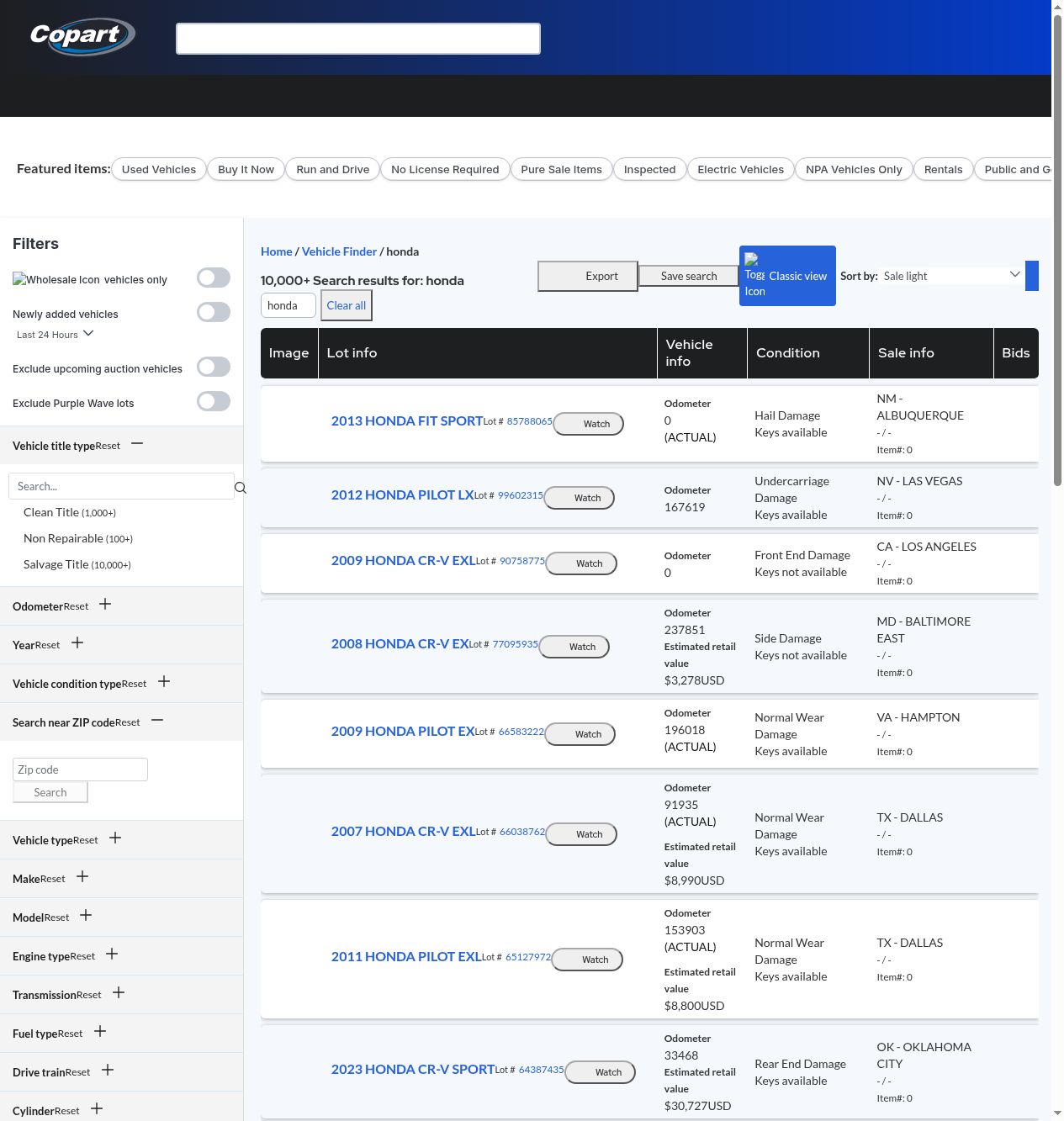
Two routes look obvious and both are wrong. Parsing the rendered HTML gets us nothing, and the markup carries no embedded page-state blob to regex out either. The third route is the one the frontend itself uses: a single JSON endpoint that takes a POST body.
Incapsula Guards the Page, Not the Data
The rendered pages sit behind Incapsula. A request for /lotSearchResults or /lot/{lotNumber} returns 200 with the challenge infrastructure present and zero listing data in the markup.
The /public/ JSON paths sit outside that perimeter entirely. Both answered 200 through Scrape.do on the plain tier, unauthenticated, at 1 credit per call.
We compared plain mode against super=true on both and the payloads came back byte-identical. The premium tier costs ten times as much and buys nothing here, so this guide teaches the cheap call. The only honest use of super=true&render=true in this workflow is screenshotting the rendered page, which is also the only place 502 ROTATION_FAILED responses showed up, roughly one call in four. The plain JSON calls never did, across more than 80 requests.
The Error Message Is the Documentation
Here is the catch, and it is the good kind. Method not supported: GET is a 405, not a 403. A 403 says the caller is unwelcome. A 405 says the caller is welcome and is holding the wrong verb.
curl -s -o /dev/null -w "%{http_code}\n" "https://www.copart.com/public/lots/search-results"
# 405

curl -s -X POST "https://www.copart.com/public/lots/search-results" \
  -H "Content-Type: application/json" \
  -d '{"query":["honda"],"filter":{},"sort":["auction_date_type desc"],"page":0,"size":20,"start":0,"watchListOnly":false,"freeFormSearch":true}'
# 200, totalElements in the tens of thousands
That 405 confirms three things at once: the endpoint exists, it is reachable without authentication, and the server is naming the method it wants. The same 405 comes back with super=true applied, which rules out the first wrong theory a reader will have. Copart's own routing is rejecting the verb, not a proxy.
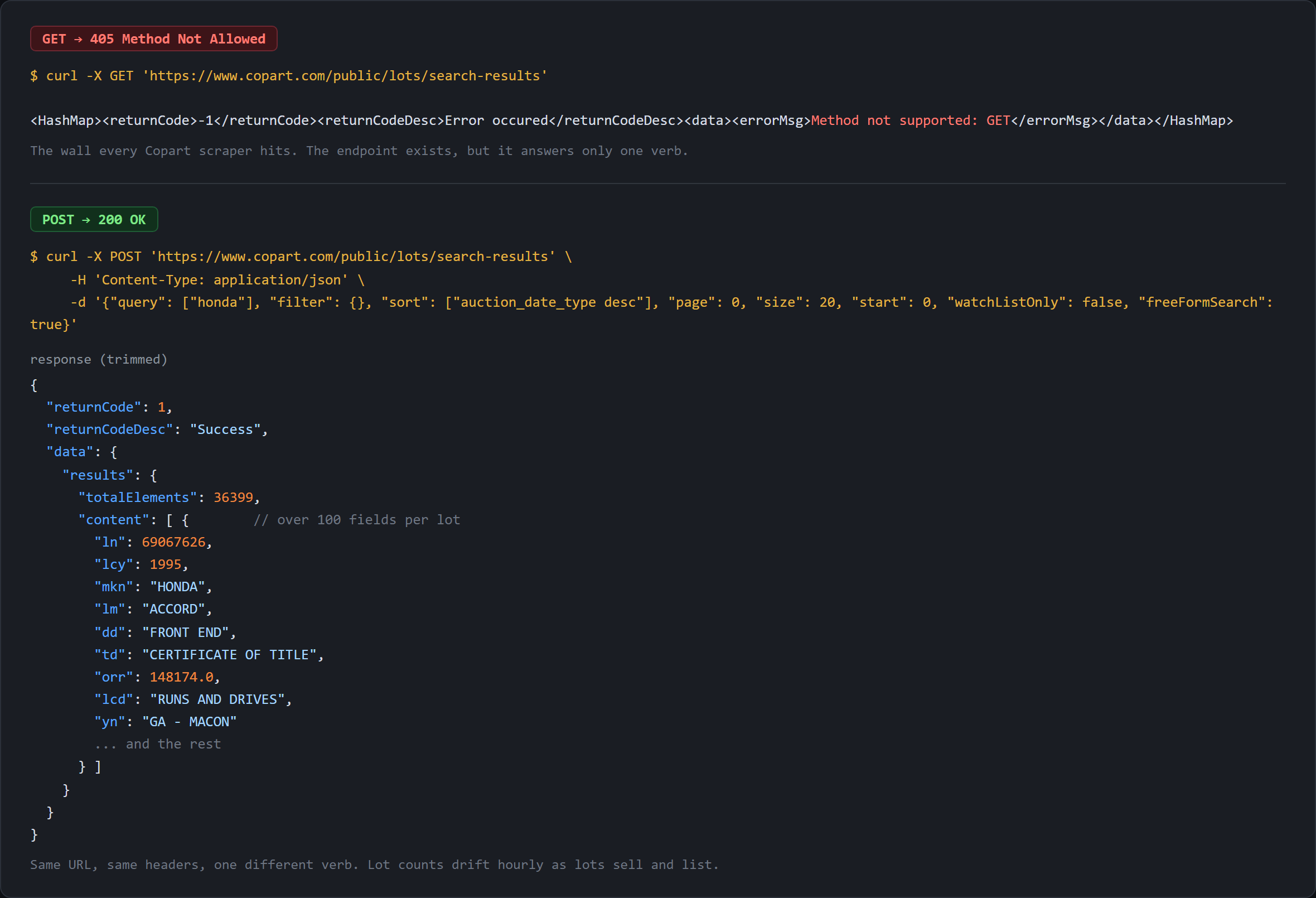
A browser address bar and a one-line requests.get() both dead-end there, which is why every existing walkthrough reaches for a browser, and why the browser was never necessary. IAAI, the sister salvage auction, runs a different stack with a different anti-bot posture and is not covered here.
Does Copart Have an API?
No public API. No developer program, no keys to request, no partner tier anyone can apply for. The related searches that turn up next to this question ("Copart API documentation", "Copart api free", "Copart API key") are the same question asked four ways, and none of them has an honest answer in the search results today.
What exists instead is an undocumented internal endpoint that the frontend calls, unauthenticated and open, with no contract and no versioning. Undocumented is the operative word: field names can change without notice, and nothing obliges Copart to tell anyone.
Where the Documentation Actually Is: facetFields
Every search response carries data.results.facetFields: 21 facet groups, each entry holding the exact Solr filter string and a live count of matching lots. The complete valid-value lists ride in there, all 216 yard names and all 241 model names at the time of the request.
One unfiltered search returns the entire current filter vocabulary. Nothing to guess, nothing to reverse-engineer. That is the real reply to "where is the Copart API documentation". The API documents itself in every response, inside the part of the payload the UI reads to draw its own filter sidebar.
Copart's Own CSV Sales Data Download
Copart publishes a "CSV Sales Data" page that ranks near the top for this keyword, so a good share of readers arrive having already seen it. It does not solve the live inventory problem. The page sits in the member navigation at /content/us/en/sales-data, resolves to ./downloadSalesData, and an anonymous request there redirects to a sign-in screen.
Sold-price history is the right source for comparables and price modeling. The public search endpoint is the right source for live and upcoming inventory. Two jobs, two sources, and the public index carries only open lots, which the lot-details section proves field by field.
Scraping Copart Auction Lots with a POST Search
Lots first. This is the surface where salvage data starts looking like rows, and it teaches the endpoint's grammar before we lean on it for single lots.
Prerequisites
pip install requestscsv, json and urllib.parse ship with Python, and a free Scrape.do account comes with 1,000 credits.
One new mechanic against a normal scrape: the target URL is still encoded once into the Scrape.do call, but the request itself is a POST carrying a JSON body and a Content-Type: application/json header, and Scrape.do forwards both unchanged. No super, no render, no cookies, 1 credit per call. Twenty consecutive POSTs at size=100 gave us zero failures and zero 429s, so no delay between requests.
Building the Search Body
We start with configuration and the single encode that wraps Copart's URL:
import requests
import json
import csv
from urllib.parse import quote

# 1. Configuration
TOKEN = "<your_token>"
SEARCH_URL = "https://www.copart.com/public/lots/search-results"
SEARCH_QUERY = "honda"
SIZE = 100        # 100 is the hard ceiling, anything higher returns SEARCH-QUERY-INJECTION
MAX_PAGES = 3

api_url = f"https://api.scrape.do/?token={TOKEN}&url={quote(SEARCH_URL, safe='')}"
That api_url gets built once and reused for every page. All the variation lives in the body, eight keys and no puzzle:
# 2. Walk pages. The endpoint rejects GET with 405, so every request is a POST with a JSON body
rows = []
for page in range(MAX_PAGES):
    body = {
        "query": [SEARCH_QUERY],
        "filter": {},                          # e.g. {"MAKE": ['lot_make_desc:"HONDA"']}
        # soonest auction first. lot_number is a unique tiebreak, without it Solr
        # reshuffles rows that tie and pages come back with duplicates
        "sort": ["auction_date_type desc", "auction_date_utc asc", "lot_number asc"],
        "page": page,
        "size": SIZE,
        "start": page * SIZE,
        "watchListOnly": False,
        "freeFormSearch": True,
    }
freeFormSearch: true tells the backend to treat query as text search rather than a structured lookup, and a lot number works there too, returning exactly that one lot. start is always page * size, and both need setting.
We send it and unwrap two levels down to the lot array:
    response = requests.post(api_url, data=json.dumps(body), headers={"Content-Type": "application/json"})
    if response.status_code != 200:
        print(f"page {page}: failed with status {response.status_code}")
        break

    results = response.json()["data"]["results"]
    lots = results["content"]
    if not lots:
        break
results also carries totalElements, the full match count, which read around 36,399 for honda at the time of writing and drifts hourly as lots sell and list.
One trap sits next to size. Anything above 100 returns HTTP 200 with returnCode: -1 and {"errorObject":"SEARCH-QUERY-INJECTION"} in the payload, so a script checking only status_code reads it as success and then dies on a missing key. The name is alarming and misleading. It is a size guard, not a WAF, and it fires purely on size > 100.
The Sort Key That Silently Loses Twenty Percent of the Results
Copart's own sort value, auction_date_type desc, is not unique. Thousands of lots share it, so Solr has no deterministic order for tied rows and reshuffles them between requests. Paginated collection then duplicates some lots and drops others, with no error and no status code change. Even the obvious sanity check passes: comparing page 0 against page 1 can return zero duplicates while the full run is lossy, because the reshuffle only bites across the deeper pages.
A search for HAIL damage in the TX - DALLAS yard reported 136 results, collected 136 rows across 7 pages, and held 109 unique lot numbers. A loss of around 20 percent. A lamborghini search reporting 42 collected 42 rows and held roughly 38 or 39 unique, and that figure moves run to run.
The fix costs one array element. sort takes keys applied in order, so a unique tiebreak on the end makes the ordering deterministic, and with lot_number asc appended those two searches returned 136 of 136 and 42 of 42. A comma-joined string in place of the array is rejected outright, while an unknown sort field is accepted silently, so a typo degrades into arbitrary order instead of failing loudly. Any Solr field sorts, lot_year desc and buy_it_now_price desc included, and all of them still need the tiebreak.
A correctness bug, not a blocked request. Nothing about the failure looks like failure.
Paginating Past Twenty Thousand Records
The size ceiling is exactly 100 and the endpoint refuses to negotiate above it. There is no total-record wall behind it, though: page 1000 at size=20, record 20,000, still returns a full page of lots. Pages 0, 5, 20, 50, 100, 500 and 1000 all came back 200 with zero overlap once the tiebreak was in place, so no slicing strategy and no date windows.
The loop ends on empty content, verified on both exit paths: a filtered search that exhausted its 136 results stopped cleanly on page 2, and a zzzznotacar query broke on the first iteration without raising.
Filtering by Make, Damage Type, Yard, and Title
filter is an object keyed by facet group code, and each value is a list of Solr fq strings. Values inside one group OR together. Separate groups AND together. That grammar unlocks the entire filter surface.
Damage type is the filter with no equivalent on a retail car site, and it is the reason somebody scrapes an auction instead of a dealership feed: DAMAGECODE_FR front end, _RR rear end, _SD side, _AO all over, _HL hail, _BN burn, _FD frame, _BC biohazard and chemical.
| Intent | Filter | Lots at the time of writing |
|---|---|---|
| Make | {"MAKE": ['lot_make_desc:"HONDA"']} |
36,399 |
| Make plus model | + {"MODL": ['lot_model_desc:"CIVIC"']} |
9,794 |
| Year range | {"YEAR": ['lot_year:[2018 TO 2022]']} |
9,229 |
| Damage type | {"PRID": ['damage_type_code:DAMAGECODE_FR']} |
217,240 |
| Yard | {"LOC": ['yard_name:"TX - DALLAS"']} |
5,754 |
| Buy It Now only | {"FETI": ['buy_it_now_code:B1']} |
24,741 |
| Clean title | {"TITL": ['title_group_code:TITLEGROUP_C']} |
39,887 |
| Odometer band | {"ODM": ['odometer_reading_received:[* TO 25000]']} |
92,971 |
HONDA and TOYOTA in one group returned 83,301, the sum rather than the intersection. Across groups it narrows: HONDA plus DAMAGECODE_FR plus TX - DALLAS came back with 256 lots. None of these strings were guessed. Each was read out of a response, in the facet group the UI uses to build its own sidebar.
Decoding Copart's Short Field Codes
Over 100 fields per lot, and almost every key is a two-to-four character code. Short codes keep the payload small when one response ships 100 lots at that width, and the saving is real. The cost is a response nobody outside the frontend can read. We map the 21 that matter:
    # 3. Map Copart's short field codes onto readable column names
    for lot in lots:
        bid_state = lot.get("dynamicLotDetails") or {}
        rows.append({
            "lot_number": lot.get("ln"),
            "year": lot.get("lcy"),
            "make": lot.get("mkn"),
            "model": lot.get("lm"),
            "damage": lot.get("dd"),
            "secondary_damage": lot.get("sdd"),
            "title_type": lot.get("td"),
            "odometer": lot.get("orr"),
            "odometer_brand": lot.get("ord"),
            "engine": lot.get("egn"),
            "drive": lot.get("drv"),
            "fuel": lot.get("ft"),
            "color": lot.get("clr"),
            "condition": lot.get("lcd"),
            "current_bid": bid_state.get("currentBid"),
            "buy_it_now_price": lot.get("bnp"),
            "sale_date": lot.get("ad"),          # epoch milliseconds
            "location": lot.get("yn"),
dynamicLotDetails comes out first with an or {} guard because the key is absent on some lots, and every column reads through lot.get() so a missing code yields an empty cell rather than a KeyError. The CarFax flag, the thumbnail and one derived URL close the row:
            "has_carfax": lot.get("hcr"),
            "image_url": lot.get("tims"),
            "lot_url": f"https://www.copart.com/lot/{lot.get('ln')}",
        })
    print(f"page {page}: {len(lots)} lots (of {results['totalElements']} total)")
Two codes deserve a caveat. ad is epoch milliseconds, so it needs dividing by 1000 before any datetime conversion. And ord is the odometer brand, ACTUAL, NOT ACTUAL or EXEMPT, the field a reader skips past while assuming the number in orr is the number. A reading of 0.0 with ord: NOT ACTUAL is not a zero-mile car.
Export to CSV
# 4. Export
with open("copart-lots.csv", "w", newline="", encoding="utf-8") as f:
    writer = csv.DictWriter(f, fieldnames=rows[0].keys())
    writer.writeheader()
    writer.writerows(rows)

print(f"total: {len(rows)} lots saved to copart-lots.csv")
Three pages of the honda search at size=100 write 300 rows across 21 columns. Blanks land almost entirely on secondary_damage, 152 of 300, genuine absence rather than scraper failure since many lots have one recorded impact point. After that it is engine 10, drive 12, fuel 11, condition 7 and title_type 1, with every other column full and 253 rows carrying a real odometer reading.
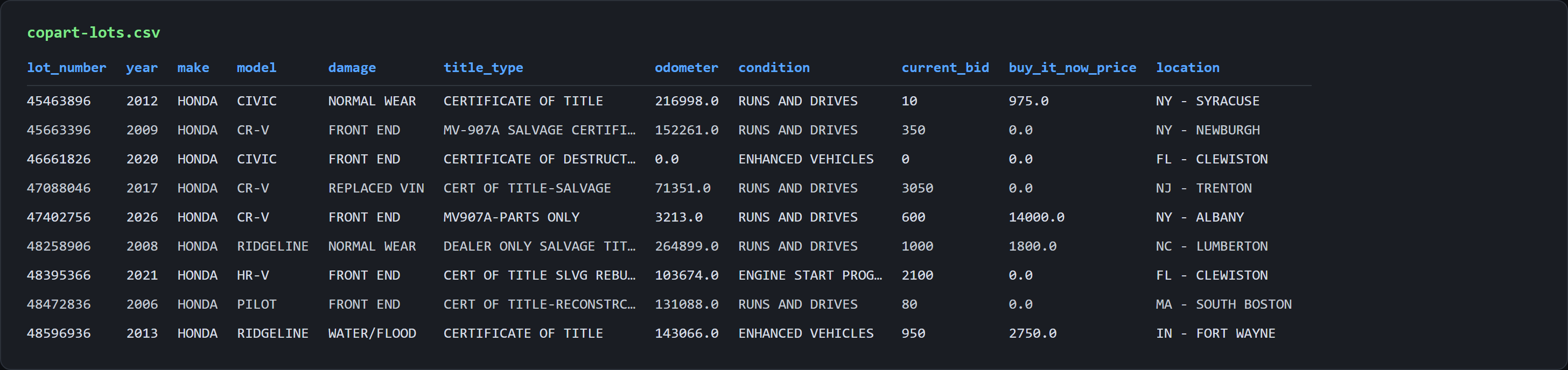
The other validation queries behaved the same: the filtered HAIL search collected 136 of 136 unique, lamborghini 42 of 42, bugatti exactly 1. A hydrated React page is now a spreadsheet of salvage inventory.
Scraping a Single Copart Lot: Damage, Title, and Condition
The search endpoint gives breadth. A single lot gives depth: the full damage breakdown, the title group, the cost triad, and two documented limits worth knowing before building anything on top.
The Lot Details Endpoint
The search wants a POST. The single lot wants a GET. Yes, on the same site.
import requests
import csv
from urllib.parse import quote

# 1. Configuration
TOKEN = "<your_token>"
LOT_NUMBER = "67272826"
target_url = f"https://www.copart.com/public/data/lotdetails/solr/{LOT_NUMBER}"

# 2. Request. This endpoint is a plain GET, unlike the search endpoint
api_url = f"https://api.scrape.do/?token={TOKEN}&url={quote(target_url, safe='')}"
response = requests.get(api_url)

if response.status_code != 200:
    raise SystemExit(f"failed with status {response.status_code}")

lot = response.json()["data"]["lotDetails"]
bid_state = lot.get("dynamicLotDetails") or {}
Around 125 fields for one lot, nested under data.lotDetails rather than the data.results.content path the search uses. Two error shapes matter. An unknown but numerically valid lot number returns HTTP 200 with lotDetails set to null instead of a 404, so anyone looping over lot numbers needs a null check beside the status check. A non-numeric value returns a real 400 with Invalid parameter: lotNumber: the endpoint validates the shape of the identifier, not whether a lot exists behind it.
Damage Codes, Title Brands, and the Odometer Brand
These fields are why salvage auction data is a different dataset from a dealership feed rather than a subset of one.
# 3. Flatten the short field codes into one readable row
row = {
    "lot_number": lot.get("ln"),
    "vin": lot.get("fv"),                      # masked for logged-out requests
    "year": lot.get("lcy"),
    "make": lot.get("mkn"),
    "model": lot.get("lm"),
    "description": (lot.get("ld") or "").strip(),   # "2006 HONDA ACCORD SE", carries the trim
    "body_style": lot.get("bstl"),
    "vehicle_type": lot.get("vehTypDesc"),
    "damage": lot.get("dd"),
    "secondary_damage": lot.get("sdd"),
    "title_type": lot.get("td"),
    "title_group": lot.get("tgd"),
    "odometer": lot.get("orr"),
    "odometer_brand": lot.get("ord"),
td is the human-readable title type (CERT OF TITLE-SALVAGE, CERTIFICATE OF DESTRUCTION, MV-907A SALVAGE CERTIFICATE) and tgd is the coarser group, such as SALVAGE TITLE. The pair earns its place: the group tells a buyer what class of paperwork they are inheriting, the type tells them which state instrument it is.
The condition and money fields finish the row:
    "has_keys": lot.get("hk"),
    "sale_type": lot.get("ess"),
    "current_bid": bid_state.get("currentBid"),
    "buy_it_now_price": lot.get("bnp"),
    "estimated_retail_value": lot.get("la"),   # -1.0 when Copart has no estimate
    "repair_cost": lot.get("rc"),
    "acv": lot.get("lotPlugAcv"),
    "sale_date": lot.get("ad"),                # epoch milliseconds
    "sale_time": lot.get("at"),
    "location": lot.get("yn"),
    "city": lot.get("locCity"),
    "state": lot.get("locState"),
    "seller": lot.get("scn"),
    "has_carfax": lot.get("hcr"),
    "lot_sold": lot.get("lotSold"),
ess returns Pure Sale, Minimum Bid or On Approval, which changes what a bid commits the bidder to, and hk returns YES, NO or EXEMPT for keys. The three numbers that make a salvage lot worth modeling are all public: estimated retail value, repair cost and actual cash value read 5122.51, 6711.49 and 6525.0 on the validation lot. The trap there is la, which returns -1.0 when Copart has no estimate. A sentinel, not a price, and averaging the column without filtering it drags the mean down silently.
What the Current Bid Reveals, and What the Masked VIN Hides
The current high bid is public. dynamicLotDetails.currentBid carries the live amount, above zero on 258 of the 300 lots in our sample, and bnp carries a buy-it-now price on 53 of them.
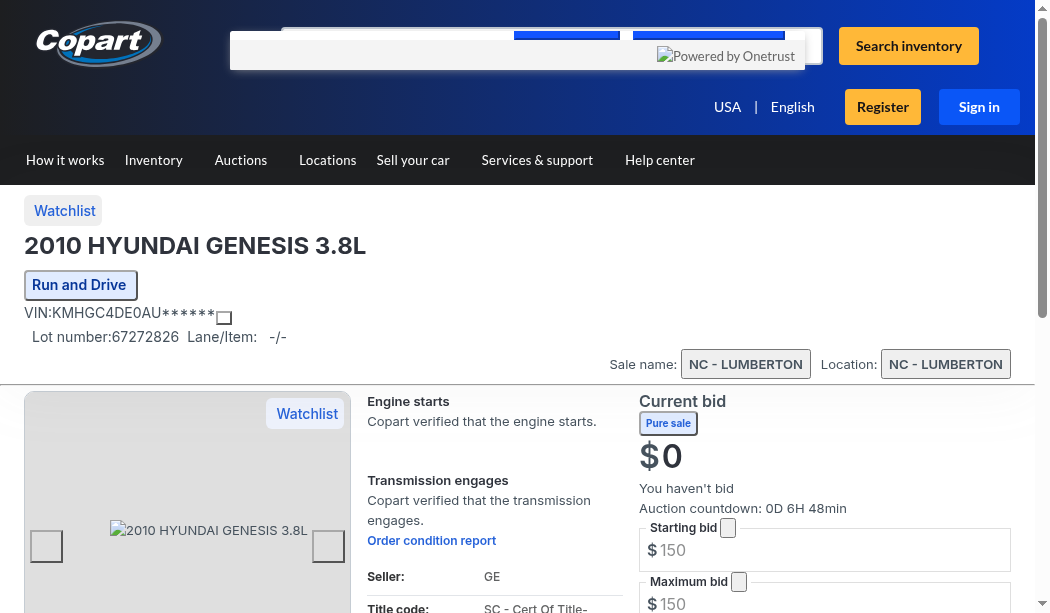
The VIN is masked. fv returns the first 11 characters followed by ******, for example 1HGCM56386A******, on 199 of 200 sampled lots, and the full value requires a logged-in member session. The masking appears in the browser too, as the screenshot above shows, so it is not a proxy artifact. Those 11 characters still decode to manufacturer, country of origin, body style and engine family. The hidden part is the sequential serial.
Final sale price does not exist logged out. Every lot sampled returned lotSold: false and lot status O, open, so the public index carries live and upcoming lots only. Copart's member-gated CSV download is the route to sold history.
Bid history does not exist logged out either. bidStatus reads NEVER_BID on every lot regardless of the bid amount, because the field describes the requesting member's own bidding rather than the lot's. buyerNumber and firstBid are session fields that mean nothing to an anonymous caller. Only the current high bid is exposed, never the sequence behind it.
Does the Lot Have a CarFax Report?
carFaxReportAvailable is the field a reader reaches for by name, and it is the wrong one. It is false on every one of more than 500 lots we tested, across clean-title, 2024-and-newer, used and inspected filters, and false in the live lot page's own state too. hcfx sits at the other extreme, true everywhere, equally useless as a discriminator.
The field that varies is hcr: true on 49 of 100 lots from 2024 onward, 9 of 100 clean-title lots, and 262 of the 300 rows in our sample. Both scripts export it as has_carfax.
What the flag is: a boolean saying Copart has a report available. What it is not: a CarFax report, a VIN history, or an API into CarFax. It is a filter rather than a dataset, and with the VIN masked that is its whole value. On a 300-lot run it separates 262 lots worth paying CarFax for from 38 that are not.
Export and Going Further
# 4. Export
with open("copart-lot-details.csv", "w", newline="", encoding="utf-8") as f:
    writer = csv.DictWriter(f, fieldnames=row.keys())
    writer.writeheader()
    writer.writerow(row)

print(f"saved lot {row['lot_number']}: {row['year']} {row['make']} {row['model']} to copart-lot-details.csv")
One row, 38 columns, and the closing print echoes year, make and model so a run confirms the right lot came back.
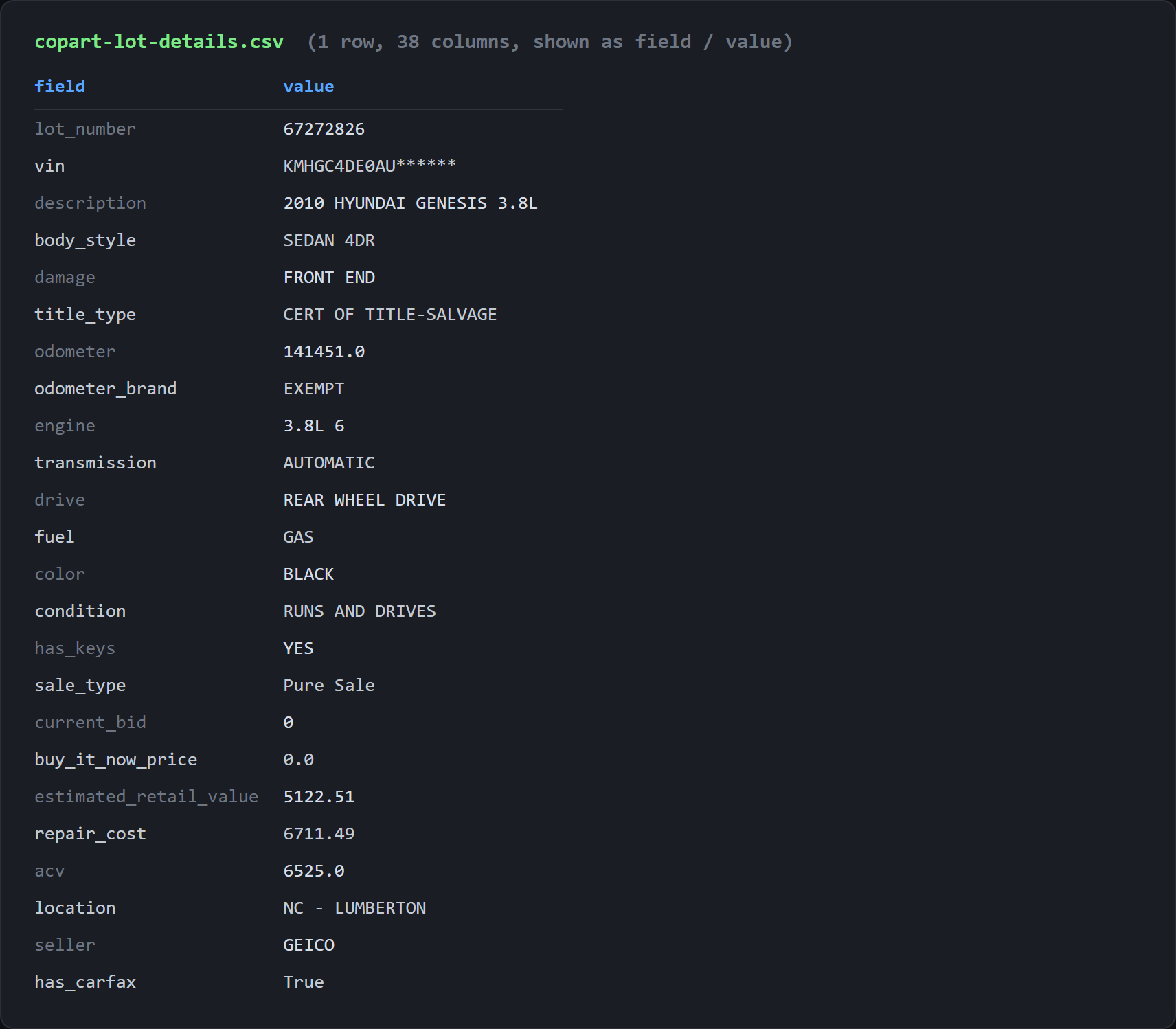
Lots in other states behaved the same way: a 2006 Honda Accord with no bid exported zero blanks, a 2019 Dodge Charger at Buy It Now blanked only on secondary_damage and seller, a 2015 Audi A3 with a live bid only on seller.
Chaining the two is a lot_number column away. Read that column out of copart-lots.csv, feed each value into LOT_NUMBER, and the breadth run becomes a depth run. For photos, /public/data/lotdetails/solr/lotImages/{lotNumber} returns data.imagesList with the full set, 14 images on our test lot, each with a full-resolution and a thumbnail URL against the single thumbnail the search gives.
Conclusion
A 405 is a more useful answer than a 403. A 403 says the caller is unwelcome and leaves them guessing. A 405 names the fix and hands it over. The transferable habit is a probe order: try the obvious verb, read the rejection carefully, and only then assume the site is defended. Most of the browser automation written against Copart is the price of skipping that step.
The pagination trap travels further than Copart does. Any Solr-backed search sorted on a non-unique key reshuffles its ties between requests, and a tiebreak on the end of the sort array fixes it everywhere. The same care pays off on Autotrader, where the constraint is a record ceiling instead.
Get 1000 free credits and start scraping with Scrape.do
FAQ
Does Copart have a public API or an API key?
No. No public API, no API key, no developer program, no partner application. The Copart frontend calls an undocumented internal endpoint that takes a POST body, which is what this guide uses, and that is not the same thing as an API. Undocumented means field names can change without notice. The closest thing to documentation is facetFields in every search response, which carries every valid filter value with a live count.
Can I get the full VIN or the final sale price from Copart's public data?
No to both. The VIN is masked after 11 characters for logged-out requests, for example 1HGCM56386A******, and the full value needs a member session. Final sale prices are not in the public search index at all; it carries open and upcoming lots only, with lotSold: false on every lot sampled. Copart's member-gated CSV sales-data download is where sold history lives. The current high bid is public. Bid history is not.
Why does my Copart scraper return fewer unique lots than the result count says?
Copart's default sort key, auction_date_type desc, is not unique. Solr reshuffles tied rows between requests, so rows duplicate across pages while other lots are dropped, with no error and no status change. Measured loss is around 20 percent and shifts between runs. Append lot_number asc to the sort array; it takes keys applied in order, so the site's ordering survives and the tiebreak makes it deterministic.
Who can actually bid on Copart, and is scraping the public search allowed?
Many lots are restricted to licensed dealers or brokers depending on the US state and the lot's title type, and public members can bid on a subset. The restriction sits per lot rather than per account. On the scraping half: the search results are public data served to every visitor, and scraping public data is generally lawful in the US, while Copart's terms prohibit automated access, which makes this a terms matter rather than a legal one. Keep volume reasonable and check whether a site allows scraping first.
Software Engineer








