Category:Scraping Use CasesView as Markdown
ChatGPT Scraping: Send Prompts and Extract Replies Without an API Key

Software Engineer


Half of your buyers now ask an AI before they ask you.
More than 50% of buyers last year made the buying decision after researching it with an AI tool while AI search referrals grew 527% year over year.
So there is a question every business now has and almost none can answer: what does ChatGPT actually say when someone asks about your product/industry?
Answering it means asking ChatGPT the same questions your buyers ask, thousands of times, and keeping every reply.
This is about pulling data out of ChatGPT on large scale.
Sending a prompt to ChatGPT without an account
Open chatgpt.com in a private window and the app still talks to us. No login wall, no email capture. A composer, and a model on the other end. OpenAI serves logged-out visitors through a separate frontend it calls unauth-mweb, and that frontend answers prompts.
That is the whole opening. No account, no cookies of our own, no API key, and a reply lands in under three seconds.
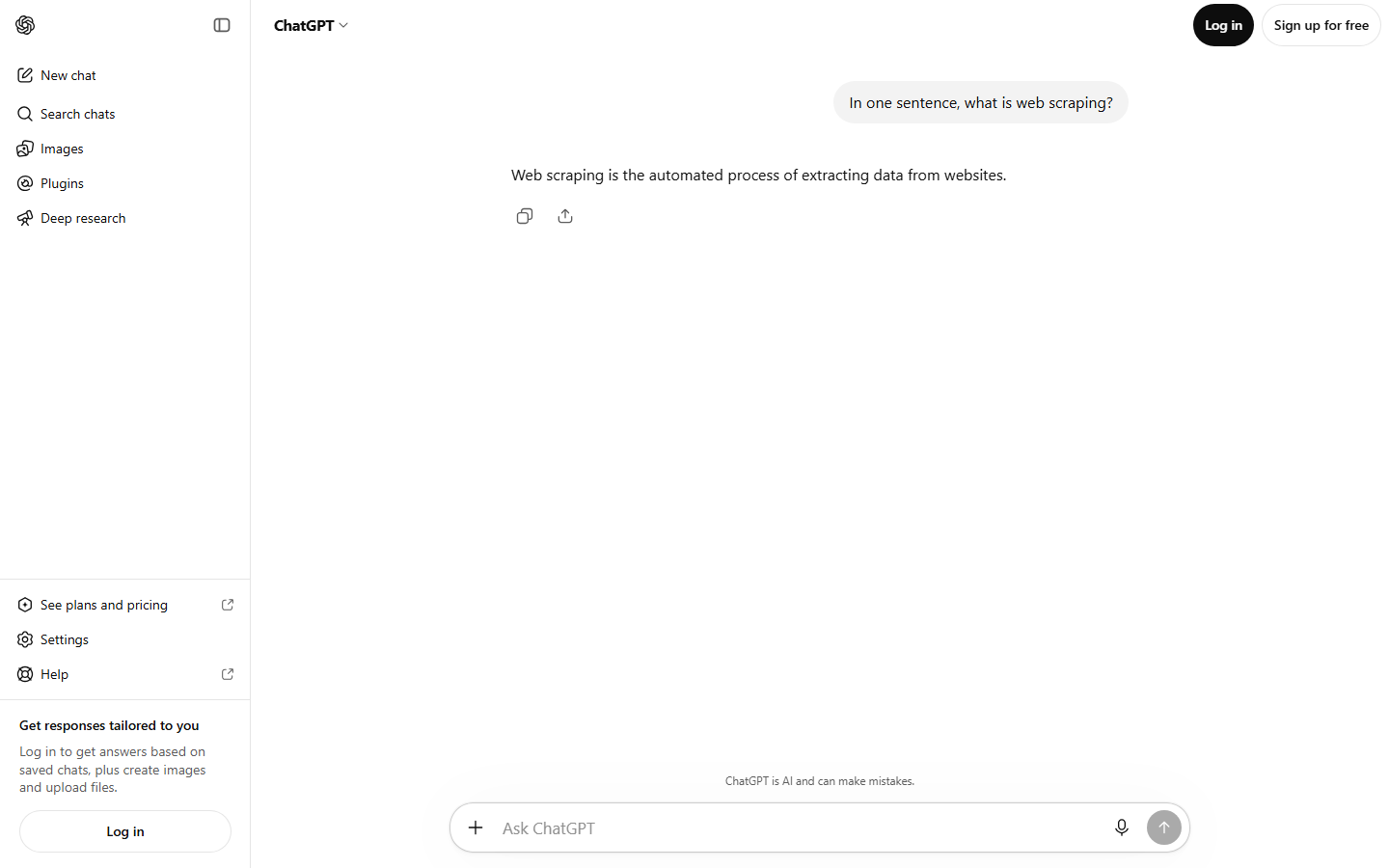
Log in and Sign up sit in the corner of that screenshot, untouched. The answer came back anyway.
The ?q= parameter submits for us
The composer is a distraction. chatgpt.com reads a q parameter off the URL, drops it into the input, and submits it during page load.
https://chatgpt.com/?q=helloLoading that URL is the entire interaction. No clicking, no typing, no waiting for an input to become interactive before we can dispatch a keystroke. We hand the page a URL and it starts generating.
The attribute everyone gets wrong
Here is where the "impossible" verdict comes from.
Open a logged-in ChatGPT conversation in DevTools and every message turn carries data-message-author-role. Search a logged-out page for that attribute and it returns nothing. Zero matches. The obvious conclusion is that the content is not in the DOM.
The logged-out app uses a different attribute:
data-message-role         <- logged out, what we need
data-message-author-role  <- logged in, what everyone searches for
One word of difference. Anyone who tests the logged-out page with the logged-in selector finds an empty result and stops, which is roughly how a "this cannot be done" thread reaches the top of Google.
The turns are <li> elements, and the conversation id rides along on a parent node.
The one line that decides whether this works at all
Playwright ships a default User-Agent that identifies the browser as HeadlessChrome. chatgpt.com will not answer it.
The failure is quiet, which is what makes it expensive. The page loads with a 200, the prompt submits, the composer clears, and no reply ever arrives. Nothing in the response says "blocked."
We tested the boundary directly:
| User-Agent | Reply |
|---|---|
Playwright default (HeadlessChrome/139...) |
none, timed out at 45s |
Same string, Chrome instead of HeadlessChrome |
yes, 7.6s |
Chrome/131 |
yes, 4.9s |
hello-world/1.0 |
yes, 6.5s |
A made-up User-Agent gets a reply. The literal substring HeadlessChrome is the only thing chatgpt.com objects to, so this is a string check rather than fingerprinting, and we treat it as one:
user_agent = ("Mozilla/5.0 (Windows NT 10.0; Win64; x64) AppleWebKit/537.36 "
              "(KHTML, like Gecko) Chrome/131.0.0.0 Safari/537.36")
We also tried --disable-blink-features=AutomationControlled, the flag every automation guide recommends. It changed nothing in either direction, so it is not in the final script. One less piece of configuration to carry around.
Extracting the reply
Two details decide whether the extraction is reliable.
The reply streams in token by token, so reading the DOM once gives us a half-finished sentence. We poll the assistant turn and wait for its text to stop changing across two consecutive checks. The app also paints a placeholder turn containing Write-only optimistic message before the real one arrives, and that placeholder has to go.
def ask(page, prompt, timeout=60):
    page.goto("https://chatgpt.com/?q=" + quote_plus(prompt),
              wait_until="domcontentloaded", timeout=60000)

    reply, stable, deadline = "", 0, time.time() + timeout
    while time.time() < deadline:
        time.sleep(1.5)
        current = ""
        for node in page.query_selector_all(TURN):
            if node.get_attribute("data-message-role") != "assistant":
                continue
            text = " ".join((node.inner_text() or "").split())
            if text.startswith("ChatGPT said:"):
                text = text[len("ChatGPT said:"):].strip()
            if text and "optimistic message" not in text:
                current = text
        if current and current == reply:
            stable += 1
            if stable >= 2:
                break
        else:
            stable = 0
        reply = current or reply
quote_plus matters more than it looks. Building the URL with a manual space swap works until a prompt contains &, at which point everything after it is parsed as a separate URL parameter and ChatGPT answers a truncated question. We caught this with compare BeautifulSoup & Scrapy: which is faster?, which quietly became a prompt about BeautifulSoup alone.
Screen-reader labels are the other trap. Every turn's text begins with You said: or ChatGPT said:, so both prefixes come off before the text is stored.
The output
Three prompts through the loop:
In one sentence, what is web scraping?     -> 97 chars
Name three common anti-bot systems...      -> 39 chars
Which is faster for parsing HTML...        -> 103 chars

3 replies saved to chatgpt-anonymous-replies.json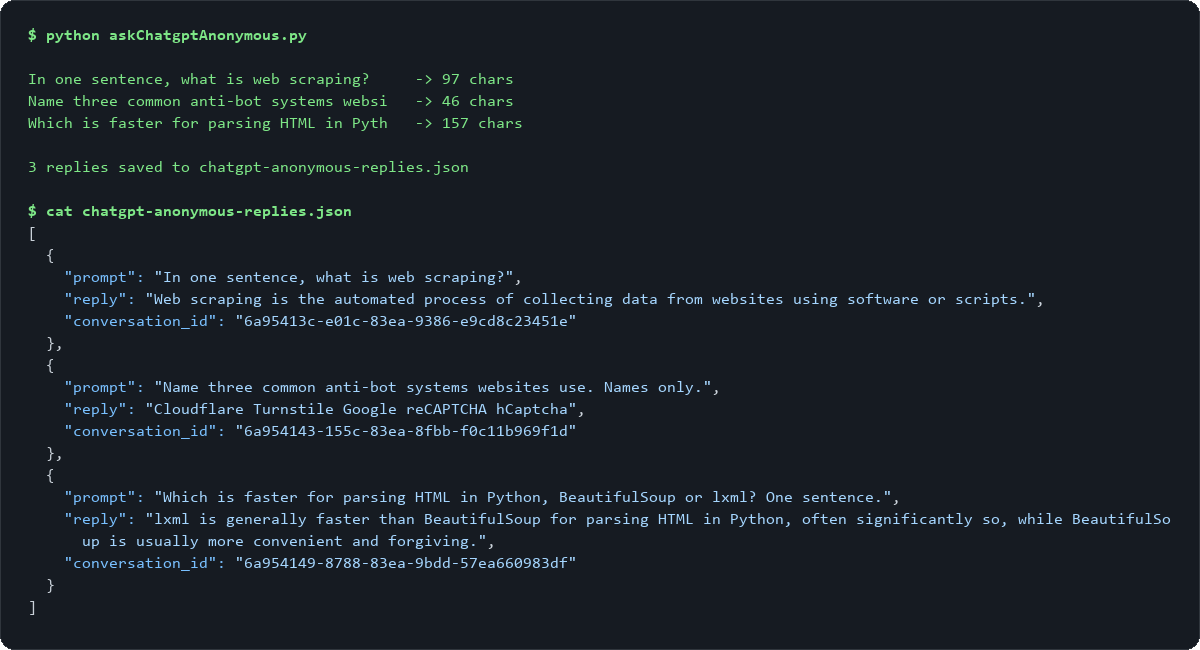
Every reply carries a real conversation id. Nine replies across three consecutive runs, no failures, no account. The shape we wanted.
Why a plain requests.post does not work here
A browser for three prompts feels heavy. The obvious next move is to find the endpoint the page calls and hit it directly with requests, the way we would with any other internal API.
We tried. It gets much further than expected, then stops dead.
Finding the real endpoint
Watching the network tab while the logged-out app answers a prompt turns up the generation call:
POST /unauth-mweb/conversation/updates?lightweight_authenticated=0&operationId=<uuid>

conversationState     = {"messages":[],"parentMessageId":"client-created-root",...}
prompt                = hello
chatRequirementsToken = gAAAAAB...
proofToken            = gAAAAAB...
Form-encoded, readable, and carrying the prompt in a plain field. It looks replayable.
How far we get without a browser
Two of the three handshake calls answer plain requests without complaint:
| Call | Result |
|---|---|
GET / |
200, sets oai-did, __cf_bm, _cfuvid |
POST /unauth-mweb/conversation/prepare |
200, returns a real conduit_token JWT |
POST /unauth-mweb/sentinel/chat-requirements/prepare |
200, returns prepare_token, persona: chatgpt-noauth |
POST /unauth-mweb/conversation/updates |
200, body reads conversation-document-upgrade-required |
The sentinel handed us a token even when we sent it a junk proof. Encouraging, right up until the last call. That final response is a 200 with a refusal in the body, and its content type gives away the reason: text/vnd.openai.web-mobile-partial+html. The endpoint expects an HTML-partial document handshake that the frontend performs, and proofToken is a proof of work computed in the browser.
Reproducing that means reimplementing OpenAI's sentinel. Possible in principle, brittle in practice, and dead the first time they change the challenge.
So the browser stays.
The contrast with Gemini
Worth putting side by side, because the same investigation on Gemini ends differently. Its StreamGenerate RPC takes a bare requests.post with no headers at all, no cookies, and no proof of work. Same task, opposite answer.
ChatGPT needs a browser where Gemini does not. That is not a failure of the approach, it is the shape of the target, and knowing it saves the next person a day of reverse engineering.
Using the Scrape.do ChatGPT Scraper API
Running a browser is fine on a laptop. It gets expensive when the job is continuous: a server with enough memory for Chrome, a process manager for when a page hangs, and proxies once the volume from one address starts looking unusual.
The Scrape.do ChatGPT Scraper API takes the browser out of the equation.
One GET, one reply
params = {"token": token, "q": prompt}
response = requests.get("https://api.scrape.do/plugin/chatgpt/chat",
                        params=params, timeout=90)
payload = response.json()
No account, no cookies, no session state, and nothing to keep between calls. The prompt goes in a query parameter and the finished assistant message comes back as JSON.
Reading the response envelope
The response is the assembled message document, not a stream we have to rebuild:
data.message.content.parts[0]          -> the reply text, citation markers stripped
data.message.metadata.model_slug       -> gpt-5-6
data.message.metadata.finish_details   -> {"type": "stop"}
data.conversation_id                   -> 6a954380-a0fc-83ea-8cc5-78187b2c5909
Export to JSON rather than CSV. The replies are multi-line Markdown, and sources and search_queries are real lists. One web-search prompt came back with 15 queries and 170 sources, so flattening that into a single spreadsheet cell keeps the first entry and throws away the other 169. That was the bug we shipped in the first version of this script.
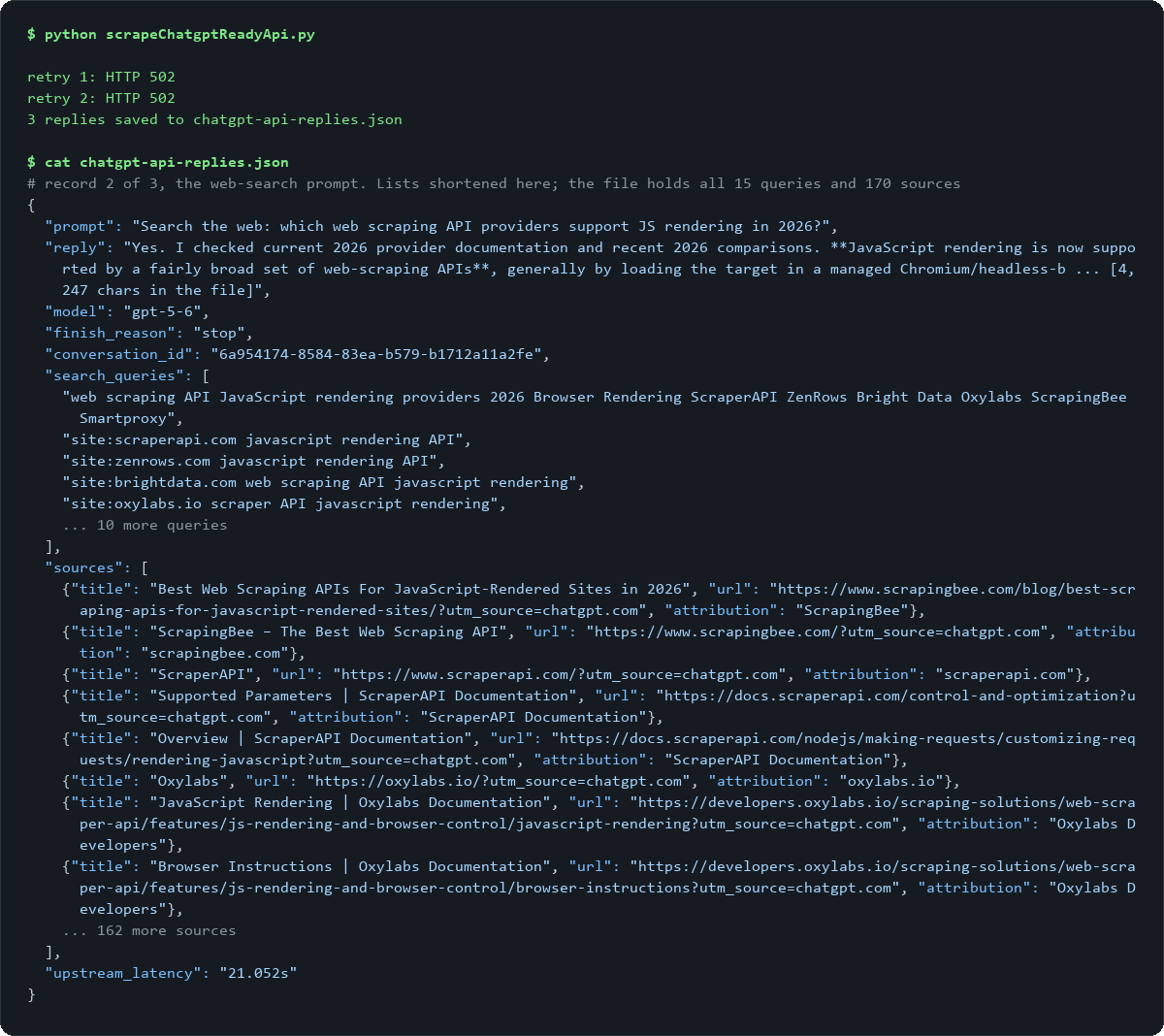
The search_queries list is the field nobody documents. ChatGPT turned one question into fifteen searches, including site: filters aimed at named competitors, and we get every string verbatim. For visibility work that is more useful than the answer text, because it maps the query space a brand has to win.
Every cited URL carries utm_source=chatgpt.com, which means publishers can already see this traffic in their analytics.
What the prompt limit really is
The documentation says 1024 characters. The server disagrees:
{"error": "q is too long (max 2048 characters)",
 "message": "Prompt is 2049 characters but the limit is 2048."}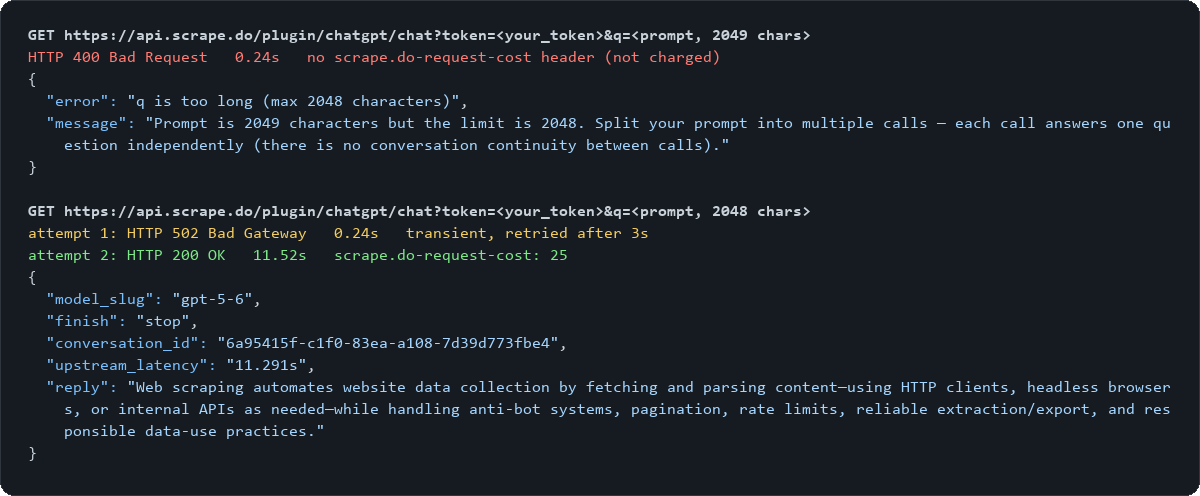
2048 exactly. A 2048-character prompt returns a reply, 2049 returns a 400, and the rejection costs nothing because it happens before any model call runs. The same screenshot catches the other two behaviours worth knowing: a transient 502 on the first attempt, and scrape.do-request-cost: 25 on the one that succeeded.
Accepting a long prompt and answering it correctly are different claims, so we checked the second one. Feeding 51 inventory rows in a 2014-character prompt and putting the decisive instruction at the very end, ChatGPT returned the right count, the right sum across every row, and the right final row id. The tail is not being quietly dropped. The full 2048 is usable.
Cost and reliability
Each successful call costs 25 credits, and the response headers meter it for us:
scrape.do-remaining-credits: 3475544Roughly one call in ten comes back as a transient 502, so the retry is not optional. The failure mode is a dropped call rather than a subtly wrong answer, which is the easy kind to handle:
for attempt in range(3):
    response = requests.get(endpoint, params=params, timeout=90)
    if response.status_code == 200 or response.status_code == 400:
        break
    time.sleep(2)
We retry the 502 and never the 400, because a 400 is our own prompt being wrong and a second attempt fails identically. Latency swings widely, from about 5 seconds to 30 for the same prompt on different days, so build around a range rather than a number.
Which method should you use?
Both work. They fail in different places, which makes the choice easy.
For a few hundred prompts on a machine we already control, the browser wins on price. It is free, Chrome is already installed, and 10 seconds per prompt is irrelevant when the job runs once a week.
Continuous collection flips it. The browser path stops being free the moment it needs a server that can run Chrome, memory for each instance, a supervisor for hung pages, and rotating proxies for address diversity.
| Browser | API | |
|---|---|---|
| Cost per call | free | 25 credits |
| Infrastructure | needs Chrome | none |
| Speed | 5-10s | 5-30s |
| Citations and model label | no | yes |
| Runs unattended | not really | yes |
Is scraping ChatGPT against the ToS?
Everything here reads our own session. We open a public page as an anonymous visitor, send a prompt we wrote, and keep the answer we were given. No account is involved, no other person's data is touched, and nothing is bypassed to get in.
The line worth respecting sits at the login. ChatGPT's internal history endpoints are session-bound, and the conversation list they return carries owner.user_email for the account holder. Reaching that requires credentials we would have to take from someone, and the data behind it belongs to them. We confirmed /backend-api/conversation refuses unauthenticated requests, and then we left it alone.
The OpenAI community thread that ranks for this question circles the same distinction without landing on it: automating your own use is a different act from harvesting other people's conversations. We are not lawyers, volume and purpose matter, and the terms change. Read them for your use case.
FAQ
Can ChatGPT scrape a website?
Not by fetching it. ChatGPT can read a page you paste in and write parsing code for it, but the fetching is still ours to do, and protected targets return 403 to whatever it writes.
Do I need an OpenAI API key to scrape ChatGPT?
No. chatgpt.com answers logged-out visitors, so a headless browser and a ?q= URL get a real reply with no account. The API key matters when you want citations, the model label, or a setup that does not run a browser.
Why does my Playwright script get no reply?
Almost certainly the User-Agent. Playwright's default contains HeadlessChrome, and chatgpt.com will not answer it. The page still loads with a 200 and the prompt still submits, so the failure looks like a timing bug. Set any other User-Agent.
Is scraping ChatGPT legal?
Reading answers to your own prompts on a public page is ordinary automated use. Reaching other people's conversations means getting past a login and handling account data including email addresses, which is a different question with a different answer. We stay on the public side.
How many requests can I send before getting blocked?
We saw no blocking at the volumes we tested from a residential address, including 50 requests at 25 concurrent. That is not a promise about sustained collection from a datacenter range, which is where residential proxies stop being optional.
Ready to collect ChatGPT answers at a scale where browsers stop making sense? Get 1000 free credits and start scraping with Scrape.do
Software Engineer








