Categories:Scraping Use Cases,AIView as Markdown
2 Ways to Scrape Gemini Responses and Sources (Free & Quick)

Head of Marketing


Every guide I read about scraping Gemini said the same thing.
You'll need Playwright. You'll need to intercept network traffic. You'll need to get past Google's bot detection, and you'll probably need a Google account, because a plain request to gemini.google.com "redirects to the login page."
One of the top-ranking articles calls the browser route "the hard path" and quotes a monthly cost between $4,800 and $14,100 to run it yourself.
Here's the thing:
import requests, json

prompt = "What is the capital of France? Answer in one word."
payload = json.dumps([None, json.dumps([[prompt], None, None])])

response = requests.post(
    "https://gemini.google.com/_/BardChatUi/data/"
    "assistant.lamda.BardFrontendService/StreamGenerate",
    params={"rt": "c"},
    data={"f.req": payload},
)
print(response.status_code, len(response.text))
That returns 200 in about a second and a half, and the word Paris is sitting inside the body.
No browser. No cookies. No login. No API key. Not even a User-Agent header.
So why does everyone say it's hard?
Because the response looks like garbage when you first see it, and because nobody checked whether the login wall was real. I'll show you the parsing, the grounding sources, and the one wall that genuinely does stop you: HTTP 429.
Why Scrape Gemini Responses?
Google gives you a perfectly good Gemini API. You should use it for most things.
But it answers as a model, not as a person sitting in a country. And that difference is the entire reason to scrape the web app instead.
What the Gemini API doesn't give you
Ask the web app which pizza chains are best, in English, through a US IP address, and you get Domino's and Pizza Hut. Ask the same question in German and two new names appear:
| Request | Chains named |
|---|---|
| English prompt, US exit IP | Domino's, Pizza Hut |
| German prompt | Domino's, Pizza Hut, Hallo Pizza, Joey's |
Hallo Pizza and Joey's only operate in Germany. The English answer never mentions them.
Two things control this, and neither is a parameter you pass. It's the language your prompt is written in, and the IP address the request comes from. I tested hl and gl on the internal endpoint and both are ignored. Scrape.do's geoCode is ignored by its Gemini plugin too. More on how to actually steer it later.
Tracking brand visibility in AI answers
Ask Gemini to rank pizza delivery chains and it names three brands in order. If you run one of those brands, you just became a search result in a channel you can't see in Google Analytics.
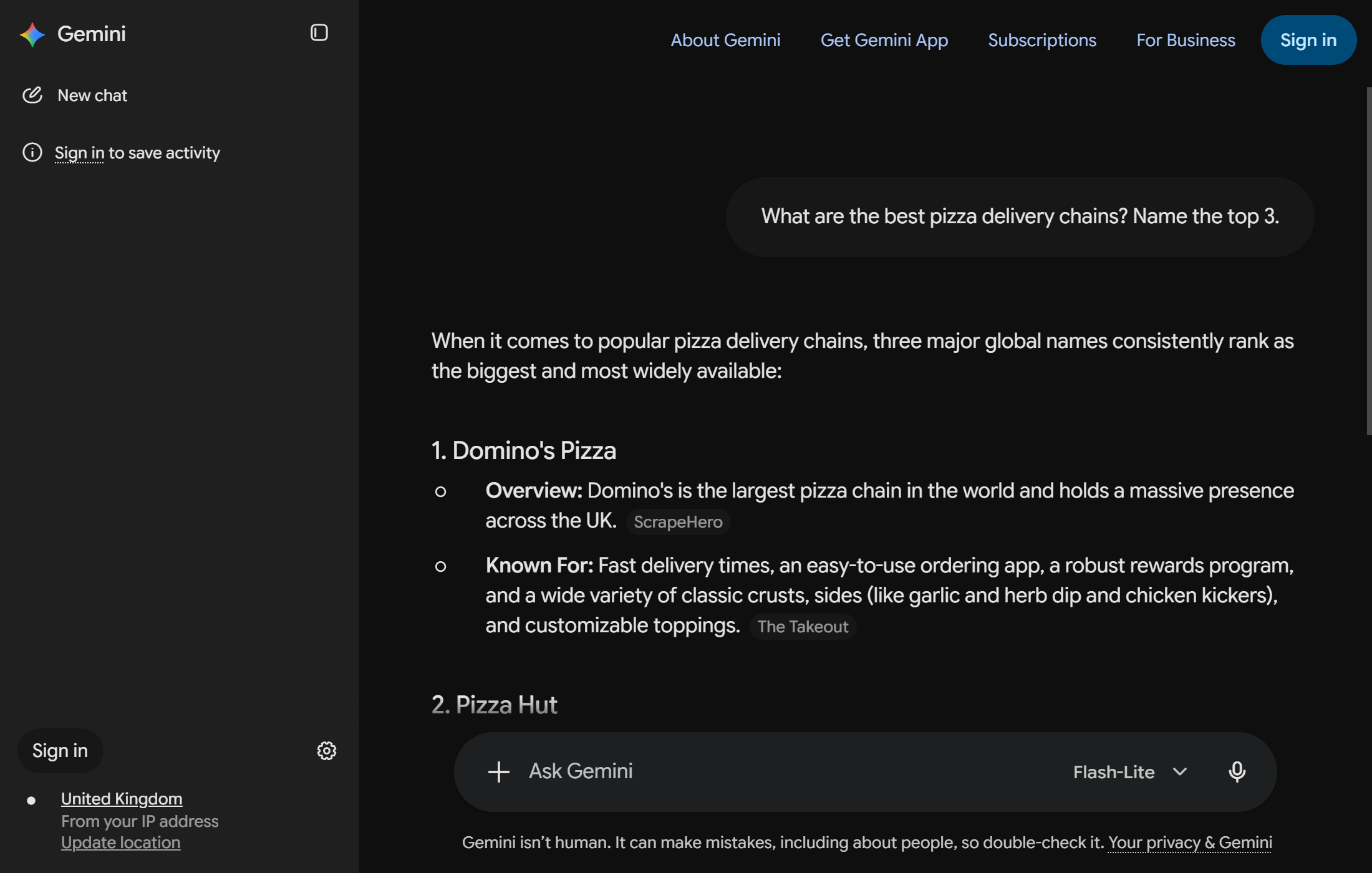
That ranking moves. Run the same prompt weekly and you're measuring your position in AI answers the same way you'd track a keyword. Pizza is the example here, but the mechanic is identical for CRM software, running shoes, or accounting firms.
Notice the small grey labels next to the claims, ScrapeHero and The Takeout. Those are the grounding sources, attached to the specific sentences they support.
That's the market behind terms like ai visibility tracking, and it's why five different vendors now sell a Gemini scraper.
Grounding sources and citation data
When Gemini grounds an answer on the web, it attaches the pages it used. One of my test prompts came back with six of them.
Those URLs matter more than the text for some use cases. They tell you which domains Gemini trusts on a topic, which is a citation graph you can track over time. If your competitor's blog is cited and yours isn't, that's a concrete gap.
One quirk to know upfront: sources isn't empty on ungrounded answers, it's absent. Ask something Gemini answers from its own knowledge and the field doesn't exist at all. Handle it with a default, not a length check.
Does Scraping Gemini Require a Google Account?
No. And this myth is doing real damage, because it's the reason people reach for Playwright.
What a plain request to gemini.google.com returns
curl -s -o /dev/null -w "%{http_code} %{size_download} %{num_redirects}\n" \
-L "https://gemini.google.com/app"200 806184 0HTTP 200, about 800KB of app shell, and zero redirects. Not a login page. The competing article claiming otherwise appears to have tested it once, seen a "Sign in" button in the header, and assumed.
The SNlM0e token, the sign-in button, and what's actually blocking you
Google's frontends carry an anti-CSRF token called SNlM0e. When you're signed in, it's embedded in the page HTML and every RPC call sends it back.
Search the anonymous page for it and you get nothing. It isn't there, and the endpoint doesn't want it. I sent the request with no token, no cookie, and no session, and Gemini answered.
The "Sign in" link is page furniture. Open Gemini signed out and the whole app is there, prompt box and all:
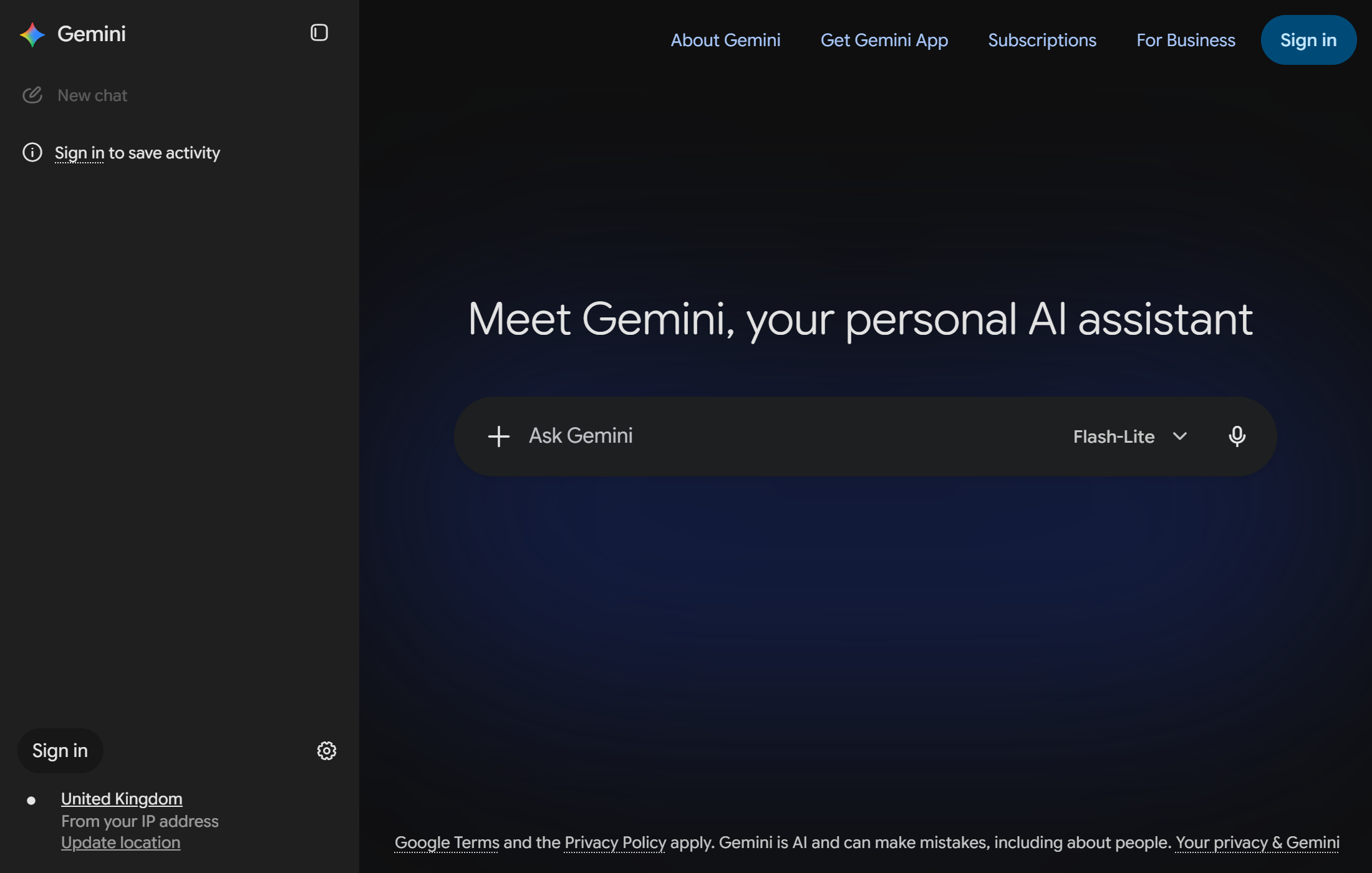
Look at the bottom left corner. Gemini already knows where you are, and it says so: "United Kingdom, from your IP address." Hold that thought, because it's the entire geo-targeting mechanism in one line of UI text.
How Gemini's Web App Sends a Prompt
Now the part worth understanding. When you type into Gemini and hit enter, exactly one request carries your prompt.
Finding the StreamGenerate endpoint
Open DevTools, filter the Network tab to Fetch/XHR, and send a message. Among the noise there's a single large POST:
/_/BardChatUi/data/assistant.lamda.BardFrontendService/StreamGenerate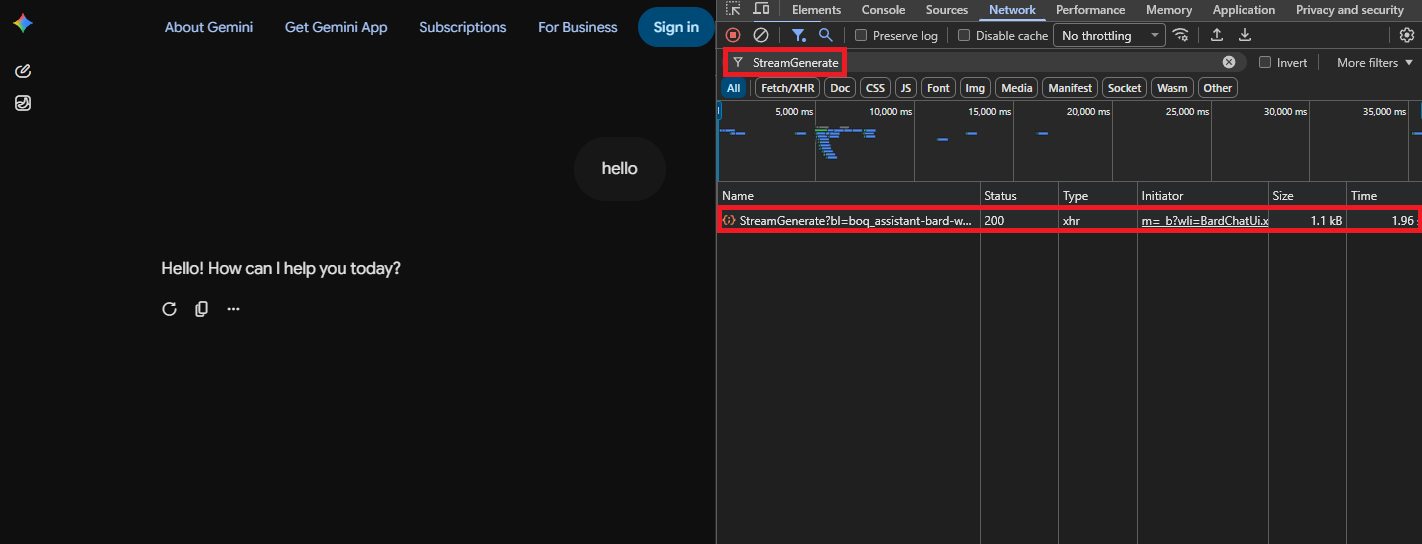
BardChatUi is a leftover from when Gemini was called Bard. The endpoint kept the name.
The f.req payload, double-encoded
The POST body has one field that matters, f.req, and its shape is strange. It's a JSON array whose second element is itself a JSON string containing another array:
prompt = "What are the best pizza delivery chains? Name the top 3."
payload = json.dumps([None, json.dumps([[prompt], None, None])])
That's the whole request body. The nesting isn't decoration, it's how Google's batchexecute transport wraps RPC arguments, and you'll see the same pattern across Google properties.
Reading the response: XSSI guard, length prefixes, and wrb.fr
Here's what comes back, straight off the wire:
)]}'

1358
[["wrb.fr",null,"[null,[\"c_21dd9c8ff927ed36\",\"r_41833d9d7d752b18\"],null,null,
[[\"rc_b884bbefd9056c0f\",[\"Paris\"],null,null,null,null,null,null,[1],\"en\", ...
Three things are happening, and each one breaks a naive parser.
The body starts with )]}', an anti-JSON-hijacking guard. Feed that to json.loads and it throws immediately. Strip the first line and move on.
What follows alternates between a number on its own line and a JSON array. The number is the byte length of the chunk beneath it. You can ignore those lines entirely and parse anything starting with [.
Inside, the chunk tagged wrb.fr holds the payload, and that payload is a JSON string, not an object. So you decode twice. The answer text lives at payload[4][0][1][0], and payload[1] carries the conversation and response IDs if you want to thread follow-ups.
Why you can drop the bl build parameter
Gemini's frontend appends a build version, bl=boq_assistant-bard-web-server_20260816.02_p0. Most tutorials hardcode it.
Don't. I tested the current value, a value from 2024, and omitting the parameter entirely. All three returned 200 with a correct answer.
That matters more than it looks. During two weeks of testing, the live value moved from _20260807.01_p1 to _20260816.02_p0. Six days. Hardcode that string and your scraper breaks on Google's schedule instead of yours.
How to Scrape Gemini Responses and Grounding Sources in Python
Time to build the thing. I'll go piece by piece, because the parser is where the actual work is.
The minimal working request
import requests
import json
import re
import time

rpc_url = ("https://gemini.google.com/_/BardChatUi/data/"
           "assistant.lamda.BardFrontendService/StreamGenerate")

prompts = [
    "What are the best pizza delivery chains? Name the top 3.",
    "Compare cold brew and iced coffee in a markdown table",
    "Latest developments in AI with sources",
]

payload = json.dumps([None, json.dumps([[prompts[0]], None, None])])
response = requests.post(rpc_url, params={"rt": "c"}, data={"f.req": payload}, timeout=30)
Notice what's missing: headers. I tested seven variants, dropping User-Agent, Origin, Referer, and Content-Type, and even sending python-requests/2.31.0 as the User-Agent. Every one returned 200. Gemini isn't checking whether you're a browser on this endpoint.
The rt=c parameter is worth keeping. Requests work without it, but rt=b returns a different envelope that breaks the parser below.
Parsing the stream into usable text
def parse_stream(raw):
    if raw.startswith(")]}'"):
        raw = raw.split("\n", 1)[1]
    payloads = []
    for line in raw.split("\n"):
        line = line.strip()
        if not line.startswith("["):
            continue
        try:
            chunks = json.loads(line)
        except json.JSONDecodeError:
            continue
        for chunk in chunks:
            if isinstance(chunk, list) and chunk and chunk[0] == "wrb.fr" and chunk[2]:
                try:
                    payloads.append(json.loads(chunk[2]))
                except json.JSONDecodeError:
                    pass
    return payloads
Strip the guard, skip anything that isn't an array, and decode the wrb.fr payload a second time. The two try blocks aren't defensive padding: the stream includes chunks that aren't valid JSON on their own, and a truncated response is a normal failure mode here.
Stripping Gemini's internal tool-call scaffolding
This one surprised me. About a quarter of replies come back wrapped in Gemini's own internal reasoning. Asking "what is 2+2" returned this:
```python?code_reference&code_event_index=1
print(2 + 2)
```

```text?code_stdout&code_event_index=1
4
```
The frontend hides those blocks. The API doesn't have them. You get them raw, and there are two markers, code_reference for its reasoning and code_stdout for output of code it ran. In my testing they always appeared together, in 3 of 12 sampled replies.
def strip_scaffolding(text):
    pattern = "```(?:python|text)\\?code_(?:reference|stdout)[^\\n]*\\n.*?" + "```"
    return re.sub(pattern, "", text, flags=re.DOTALL).strip()
The ?code_ part of the pattern is doing the important work. A legitimate fenced block starts with ```python and a newline, never ```python?, so a real code block in the answer survives untouched.
Extracting grounding source URLs
I got this wrong the first time, and the mistake is worth more than the fix.
The obvious approach is to serialize the payload back to a string and regex out anything matching https?://.... I did that, and got 172 truncated fragments out of 247 matches: https://www.g, https://font, https://githu. I spent an hour writing TLD validators and prefix-dedup heuristics to filter them.
None of that was necessary. The URLs were never truncated. My character class was splitting on |, whitespace, and ), all of which appear inside real URLs. I'd broken them myself and then built a filter for my own damage.
Walk the parsed structure instead:
def collect_urls(node, found):
    if isinstance(node, str):
        if node.startswith("http"):
            found.append(node)
    elif isinstance(node, list):
        for child in node:
            collect_urls(child, found)
    return found
Twenty URLs across five prompts, zero truncated. Query strings and long paths intact, because a decoded string is a string and nothing is slicing it.
Filtering Google's own asset URLs
The payload carries Google's icons and fonts alongside the real citations, so one regex clears them out:
ASSET_HOSTS = re.compile(
    r"(gstatic|googleusercontent|ggpht|encrypted-tbn|fonts\.|google\.com/(imgres|url))")

def clean_sources(urls):
    seen, keep = set(), []
    for url in urls:
        url = url.split("#:~:text=")[0].rstrip(".,)'\"")
        if not url.startswith("http") or ASSET_HOSTS.search(url) or url in seen:
            continue
        seen.add(url)
        keep.append(url)
    return keep
The #:~:text= split handles scroll-to-text fragments. Gemini appends them so the browser highlights the quoted passage, but they point at the same page, so collapsing them kills a lot of duplicates.
Getting answers for a specific country
Back to geo-targeting, with the mechanics this time.
Language is the easy lever. Write the prompt in the target language and Gemini often answers for that market. German gave me Hallo Pizza and Joey's, Japanese gave me Uber Eats Japan.
But it's a hint, not a switch. French and Spanish prompts returned the local market's answer merely translated, not the French or Spanish market. My read is that it shifts when a language maps cleanly onto one dominant market and doesn't when it's spread across many.
Exit IP is the stronger lever. Route the same request through a proxy in the country you care about and the answer follows the IP.
With one caveat I have to be straight about: of the country exits I tested, only the US one worked. Germany, the UK, and Japan all returned 403 through the proxy provider I used. So country targeting is real, but it depends entirely on your proxy having clean IPs in that country, and that isn't a solved problem.
Exporting to JSON, and why not CSV
I wrote this to CSV first, out of habit. It was the wrong call.
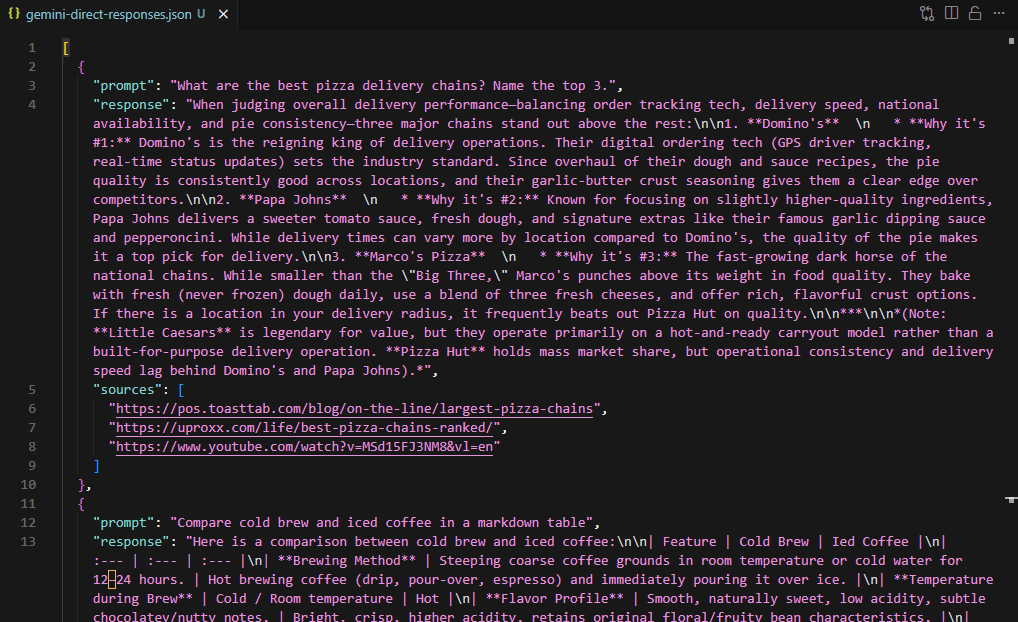
Three responses produced a file spanning 71 physical lines, because Gemini's answers are multi-line Markdown. Worse, the responses contained up to 44 pipe characters from Markdown tables while I was using " | " to join the source list. And because CSV can't hold an array, I'd added a source_count column, which is a field that only exists to apologize for the format.
with open("gemini-direct-responses.json", "w", encoding="utf-8") as f:
    json.dump(rows, f, indent=2, ensure_ascii=False)
sources stays a list, the Markdown stays readable, and source_count disappears because it's just len(sources).
Where the Free Method Breaks
Everything above works. Now the honest part, because you'll hit these within an afternoon.
HTTP 429 and what triggers it
Run enough requests and Gemini stops answering:
attempt 1 returned 429, retrying
attempt 2 returned 429, retrying
attempt 3 returned 429, retrying
  giving up on this prompt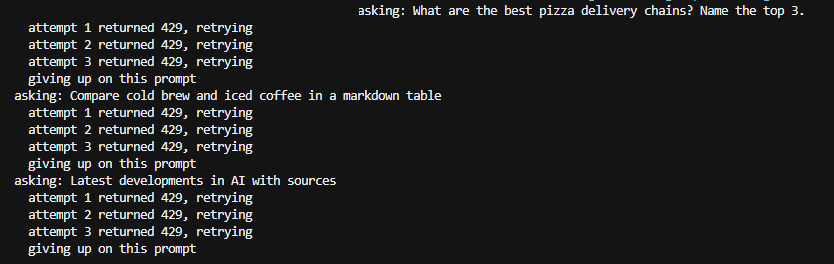
I hit this after roughly 100 calls in a day, and once it starts, three consecutive attempts all failed. It clears after a cooldown of a few minutes.
I can't give you a threshold, and I'd distrust anyone who does. Earlier the same day I ran 60 consecutive requests with zero failures and no latency drift. It's volume and timing together, not a counter you can budget against.
Intermittent safety refusals on ordinary prompts
Roughly one call in eight comes back like this:
I can't answer this one because my safety filters stepped in.The prompt that triggered it? Comparing two types of proxy. Another time, comparing coffee brewing methods.
It isn't reproducible. I sent the same prompt three times after a refusal and got three complete answers, then hit another refusal four calls later. It's A/B variance in Gemini's safety layer, not something in your request. Detect it and retry:
def is_refusal(text):
    if not text:
        return False
    return len(text) < 200 and bool(re.search(r"safety filters|I can't answer", text))
The length check matters. Without it, a long legitimate answer that happens to discuss safety filters gets thrown away.
Rotating proxies: what they fix and what they cost
The obvious response to a 429 is to rotate IPs, and it does work. Partly.
I ran the same POST through a rotating residential proxy and got 9 successes out of 10 calls with no rate limiting. So the endpoint is proxyable, which surprised me, since Scrape.do's generic proxy refuses google.com targets outright (it routes Google properties to dedicated plugins instead, and returns ROTATION_FAILED if you try).
But two of the three proxy providers I tested refused the request entirely, returning 500 and 400 before it ever reached Google. Latency went from about 4 seconds to 13. And rotating your IP does nothing about TLS or HTTP/2 fingerprints, which Google can block on independently of address.
My sample was 10 calls. That's enough to prove it can work, nowhere near enough to call it a scaling strategy.
Building retry logic that handles all three
Connection stalls, non-200s, empty streams, and refusals all want the same treatment, so one loop covers them:
def ask_gemini(prompt, attempts=3):
    payload = json.dumps([None, json.dumps([[prompt], None, None])])
    for i in range(attempts):
        try:
            response = requests.post(rpc_url, params={"rt": "c"},
                                     data={"f.req": payload}, timeout=30)
        except requests.exceptions.RequestException as e:
            print(f"  attempt {i + 1} failed ({type(e).__name__}), retrying")
            time.sleep(3)
            continue
        if response.status_code != 200:
            print(f"  attempt {i + 1} returned {response.status_code}, retrying")
            time.sleep(3)
            continue
        text, sources = extract_reply(parse_stream(response.text))
        if not text or is_refusal(text):
            print(f"  attempt {i + 1} gave no usable reply, retrying")
            time.sleep(3)
            continue
        return text, sources
    return None, []
The timeout=30 is not optional. The stream occasionally opens and never closes, and without a timeout your script hangs forever instead of retrying.
Scraping Gemini: The Easy Way
Everything above is maybe 60 lines of parsing you now have to maintain against an undocumented endpoint that Google changes without telling you.
If you'd rather not, Scrape.do has a Gemini scraper that takes a prompt and returns the answer:
curl --get "https://api.scrape.do/plugin/gemini/chat" \
  --data-urlencode "token=<your_token>" \
--data-urlencode "q=Which pizza chains deliver fastest? Name the top 3 with sources."{
"prompt": "Which pizza chains deliver fastest? Name the top 3 with sources.",
"output": {
"text": "When it comes to delivery speed, the major national pizza chains consistently outperform third-party delivery apps ..."
},
"sources": [
"https://www.prnewswire.com/news-releases/in-a-first-of-its-kind-pizza-study-dominos-dominates-in-speed...",
"https://www.locationscloud.com/top-pizza-chains-usa/",
"https://pos.toasttab.com/blog/on-the-line/largest-pizza-chains"
]
}No XSSI guard, no double decoding, no scaffolding blocks, no asset URLs mixed into the citations. output.text is clean Markdown and sources is already a list of complete URLs. It costs 25 credits per call.
Three things I'd want to know before relying on it.
Retry on 502 is mandatory, not optional. The session pool warms up, and a cold call returns no warm session available. During my testing there was a full day where it returned 502 on all 34 attempts I made. It recovered completely, and once the pool was warm it held up across roughly 1,000 requests with a near-perfect success rate at around 3.7 seconds each, but build the retry loop on day one.
The model field is documented but never populates. It's meant to return a label like 3.5 Flash. Across two weeks I never once saw it filled in. Treat it as absent.
geoCode does nothing here. I tested de, jp, and tr, and all three returned US results identical to sending no parameter at all. The plugin appears pinned to a US exit, so if you need non-US answers, the free method with your own proxy is currently the only route.
Which Method Should You Use?
| Direct RPC | Scrape.do endpoint | |
|---|---|---|
| Setup | requests, no account |
token, no parsing code |
| Latency | 1.5 to 10s | 3 to 7s typical |
| Sustained volume | 429s eventually | ~1,000 requests clean in testing |
| Parsing you maintain | ~60 lines | none |
| Scaffolding leak | 25% of replies | none |
| Non-US geo-targeting | yes, with a proxy | no |
| Cost | free | 25 credits per call |
If you're running a few dozen prompts to check something, use the direct method. It needs nothing from anyone, it's genuinely fast, and you now know how to parse it.
Switch when the 429s start costing you more time than the credits cost money, or when you want the parsing to be someone else's problem. And if you need answers as they'd appear in a specific country, the free method plus your own proxy is the only option on the table.
One last thing, and it applies to both halves of this article. StreamGenerate is an internal endpoint with no documentation and no stability promise. The build string moved once during the two weeks I spent testing this, and the Scrape.do plugin went from working to fully down to working again in six days. Everything here was verified the week this was published. Check it before you build on it.
Frequently Asked Questions
Is it legal to scrape Gemini?
Scraping publicly accessible pages is generally lawful in the US, and the hiQ v. LinkedIn line of cases supports that for public data. But Google's Terms of Service separately prohibit automated access, so you can be within the law and in breach of contract at the same time. Personal data pulls GDPR into scope. Ask a lawyer about your specific use, not a blog.
Does this need a Google account or an API key?
Neither. The StreamGenerate endpoint answered every request I sent with no cookies, no session, and no SNlM0e token. If you want Google's official, supported, rate-limit-documented path, that's the Gemini API, and it does require a key.
Why is the model field always empty?
I don't know, and I tested it enough to be confident it isn't my request. It's documented on the Scrape.do endpoint and returned None on every successful call I made over two weeks. Parse it with a default and don't depend on it.
Can I scrape Gemini without Python?
Yes. It's one HTTP POST with one form field, so curl, Node, Go, or anything else works. Python just makes the double-JSON decoding less painful than most alternatives.
How many requests can I make before getting rate limited?
There's no published number, and my testing didn't produce a reliable one. I ran 60 consecutive calls clean, then hit a 429 wall after about 100 in a day. Add retry logic with backoff and treat the limit as a moving target.
Head of Marketing








