Category:Scraping Use CasesView as Markdown
How to Scrape Yandex: Search Results and Image Search with Python

Software Engineer


Yandex serves clean HTML for web search and structured JSON for image search. It holds over 60% of the Russian search market, making it the dominant engine in the region. Two different data formats, two different parsing strategies, and both behind the same wall: SmartCaptcha. A plain request from a datacenter IP does not return results. It returns a challenge page.
The good news is that SmartCaptcha folds under a properly fingerprinted request. We do not need a headless browser or render pipeline. Scrape.do with super=true gets us past the gate on both endpoints, and we stay on raw HTTP the entire time.
The win condition: two CSV files. One with ranked organic search results, one with full-resolution image URLs and metadata. No browser overhead. The 2023 Yandex source code leak revealed close to 18,000 ranking factors behind those results, making systematic position tracking worth building.
How Is Yandex Anti-Bot Protection Configured
Yandex does not use reCAPTCHA or hCaptcha. It runs SmartCaptcha, a proprietary system built into the Yandex Cloud stack. SmartCaptcha watches for the usual signals: missing cookies, datacenter IP ranges, rapid sequential page loads, and request patterns that do not match a real browser session.

A direct call with requests.get() to yandex.com/search triggers SmartCaptcha almost immediately. The response comes back as 200, but the body is a challenge page, not search results. This is a common trap: the status code looks fine, but the content is useless. Always check the body, not just the status.
Here is the catch. SmartCaptcha is an IP and fingerprint gate, not a JavaScript execution gate. We do not need render=true or a headless browser to get past it. Scrape.do's super=true handles the fingerprinting and IP reputation on the proxy side. We pair it with geoCode=us to lock results to a consistent region, since Yandex serves different rankings based on the proxy's geolocation.
super=true is all we need for both search types. No render=true, no browser cost. If you've worked through the Amazon scraping guide, the bypass is identical: different bot manager, same proxy strategy.
Scraping Yandex Web Search Results
Yandex web search serves results as server-rendered HTML. Each page holds roughly 10 organic listings, paginated with a zero-based p parameter. The selector structure differs from Google search results, but the fetch-and-parse pattern is the same. The structure is stable enough for CSS selectors, though Yandex occasionally ships alternate DOM layouts between deploys. We will account for that with a fallback path.
Prerequisites
We need requests for HTTP and beautifulsoup4 for parsing. Install both before running the script:
pip install requests beautifulsoup4The top of the script sets up imports and configuration:
import csv
import time
import urllib.parse

import requests
from bs4 import BeautifulSoup

TOKEN = "<your_token>"
SEARCH_QUERY = "web scraping"
MAX_RESULTS = 30
RESULTS_PER_PAGE = 10
REQUEST_DELAY_SEC = 1.5
GEO_CODE = "us"

OUTPUT_CSV = "yandex-search-results.csv"
GEO_CODE is set to us on every request. Yandex serves region-specific rankings, so without a fixed geo code, the same query returns different results depending on which proxy handles the request. Pinning it keeps the dataset consistent across runs.
Parsing Organic Results from SERP HTML
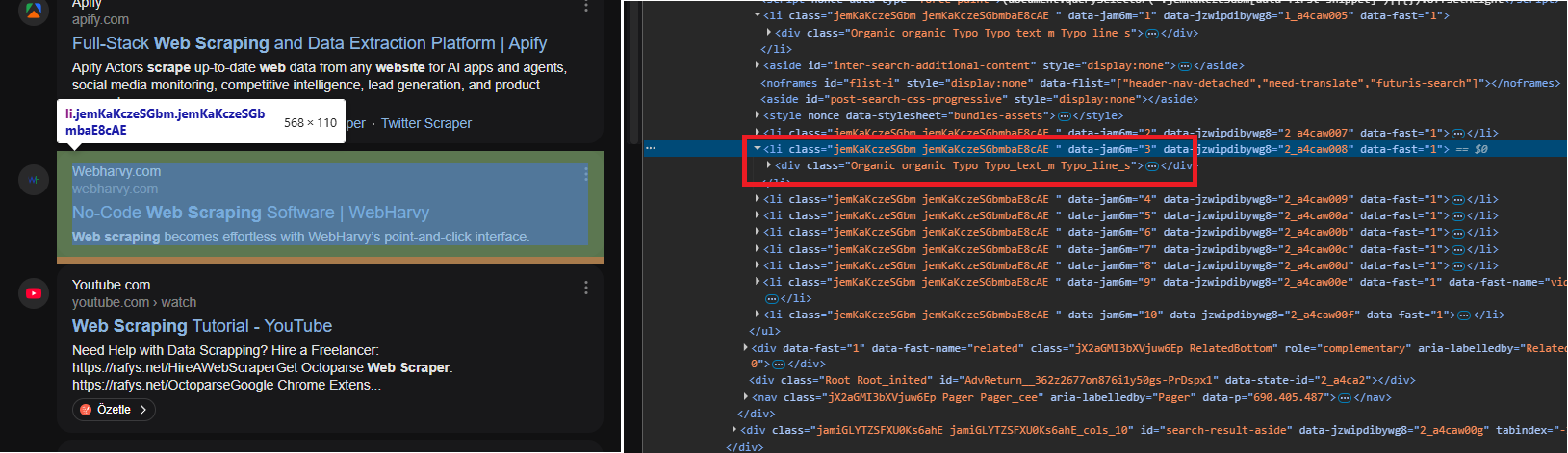
Each organic result sits inside an li.serp-item that wraps a div.Organic block. Ad results carry the class serp-item_type_ad, so we skip those to keep the dataset clean. The parsing function pulls title, URL, and description from each organic container:
def parse_organic(container):
    # Pull title, URL, and description from an Organic result block
    title_a = container.select_one("a.OrganicTitle-Link") or container.select_one("h2 a")
    if not title_a:
        return None
    title = title_a.get_text(strip=True)
    href = title_a.get("href", "")
    if href.startswith("//"):
        href = "https:" + href
    elif href.startswith("/"):
        href = urllib.parse.urljoin("https://yandex.com/", href)

    desc_el = container.select_one(
        "div.OrganicTextContentSpan, span.OrganicTextContentSpan, "
        "div.Organic-Text, .Organic-Content"
    )
    description = desc_el.get_text(" ", strip=True) if desc_el else ""
    if not title and not href:
        return None
    return {"title": title, "url": href, "description": description}
Two URL edge cases to watch: protocol-relative links starting with // and relative paths starting with /. The code expands both to full URLs so the CSV always has clickable links.
Page-Based Pagination
The main loop builds each page URL, sends it through Scrape.do, and feeds the response into the parser:
all_rows = []
max_pages = max(1, -(-MAX_RESULTS // RESULTS_PER_PAGE))

for page_index in range(max_pages):
    if len(all_rows) >= MAX_RESULTS:
        break

    q = urllib.parse.urlencode({"text": SEARCH_QUERY, "p": page_index})
    target_url = f"https://yandex.com/search/?{q}"
    api_url = (
        f"http://api.scrape.do/?token={TOKEN}"
        f"&url={urllib.parse.quote(target_url, safe='')}"
        f"&super=true&geoCode={GEO_CODE}"
    )

    response = requests.get(api_url, timeout=120)
    if response.status_code != 200:
        break

    soup = BeautifulSoup(response.text, "html.parser")
    batch = []
The ceiling division on MAX_RESULTS gives us the page cap. The loop stops early if it collects enough rows or the response fails.
After parsing the HTML, we run the two-pass selection strategy:
    # Primary: li.serp-item wrapping div.Organic
    for li in soup.select("li.serp-item"):
        if "serp-item_type_ad" in (li.get("class") or []):
            continue
        organic = li.select_one("div.Organic, .Organic")
        if organic:
            row = parse_organic(organic)
            if row:
                batch.append(row)

    # Fallback: bare div.Organic without li wrapper (alternate DOM layout)
    if not batch:
        for organic in soup.select("div.Organic"):
            row = parse_organic(organic)
            if row:
                batch.append(row)
The primary path walks the expected DOM: list items wrapping organic blocks, with ads filtered out by class name. The fallback fires only when the primary path finds nothing, which happens when Yandex ships an alternate layout that drops the list item wrapper. This is not defensive over-engineering. We have seen both layouts in production.
Between page requests, a configurable delay prevents us from hammering the endpoint. When a page returns fewer results than the expected page size, the loop stops. Without that check, the script would fire one extra request to an empty page before realizing it reached the end.
Exporting to CSV
with open(OUTPUT_CSV, "w", newline="", encoding="utf-8") as f:
    writer = csv.DictWriter(f, fieldnames=["position", "title", "url", "description"])
    writer.writeheader()
    for i, row in enumerate(all_rows, start=1):
        writer.writerow({"position": i, **row})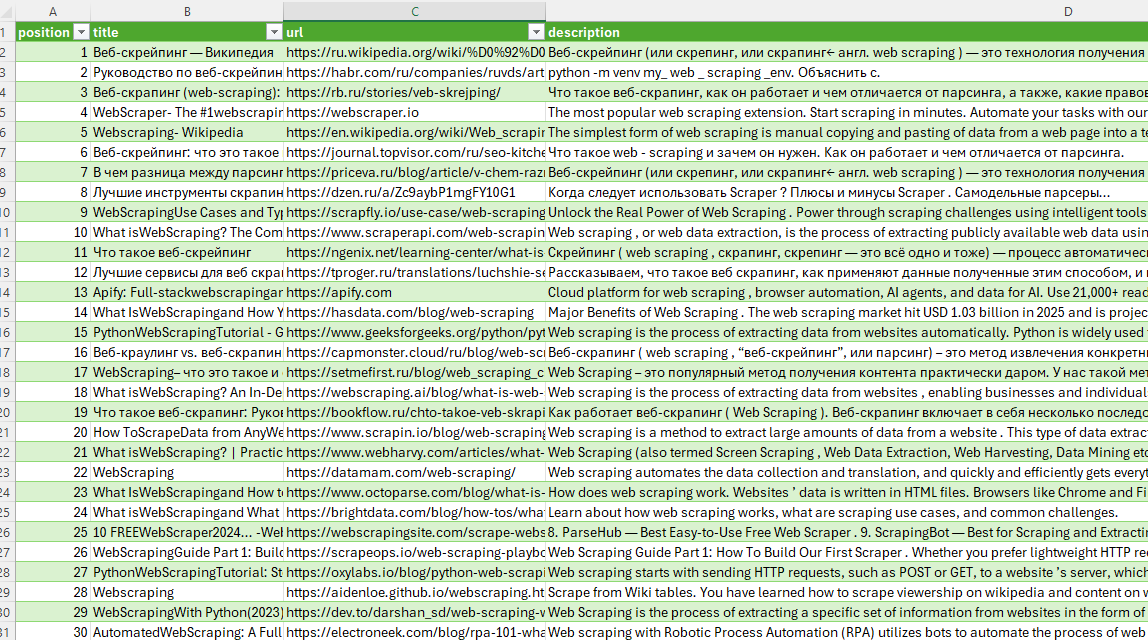
Positions are assigned sequentially across all pages, starting at 1. Every row carries a rank, a title, a URL, and a description. Yandex SERP data, flattened into rows.
Scraping Yandex Image Search
Image search is a different animal. Yandex loads images through a JSON XHR endpoint, not server-rendered HTML. Bing image search stays with HTML: same output goal, different extraction path. Scrolling in the browser triggers batch requests that return roughly 30 images each. We can replicate those requests directly, but there is a gate: the endpoint rejects calls without a valid deployment identifier extracted from the initial page load.
This is the constraint. We need a bootstrap step before we can paginate.
Bootstrapping tmpl_version from Initial HTML
The JSON endpoint requires a parameter called tmpl_version, which is a deployment identifier that Yandex embeds in the image search page HTML. Without it, the endpoint returns empty or error responses.
We make one initial request to the HTML page and extract two values: serpid (a session identifier) and tmpl_version:
bootstrap_url = f"{BASE}?{urllib.parse.urlencode({'text': SEARCH_QUERY})}"
api_url = (
    f"http://api.scrape.do/?token={TOKEN}"
    f"&url={urllib.parse.quote(bootstrap_url, safe='')}&super=true&geoCode={GEO_CODE}"
)
resp = requests.get(api_url, timeout=120)
if resp.status_code != 200:
    raise SystemExit(f"Bootstrap failed: HTTP {resp.status_code}")
html = resp.text

m = re.search(r'"serpid"\s*:\s*"([^"\\]+)"', html)
serpid = m.group(1) if m else None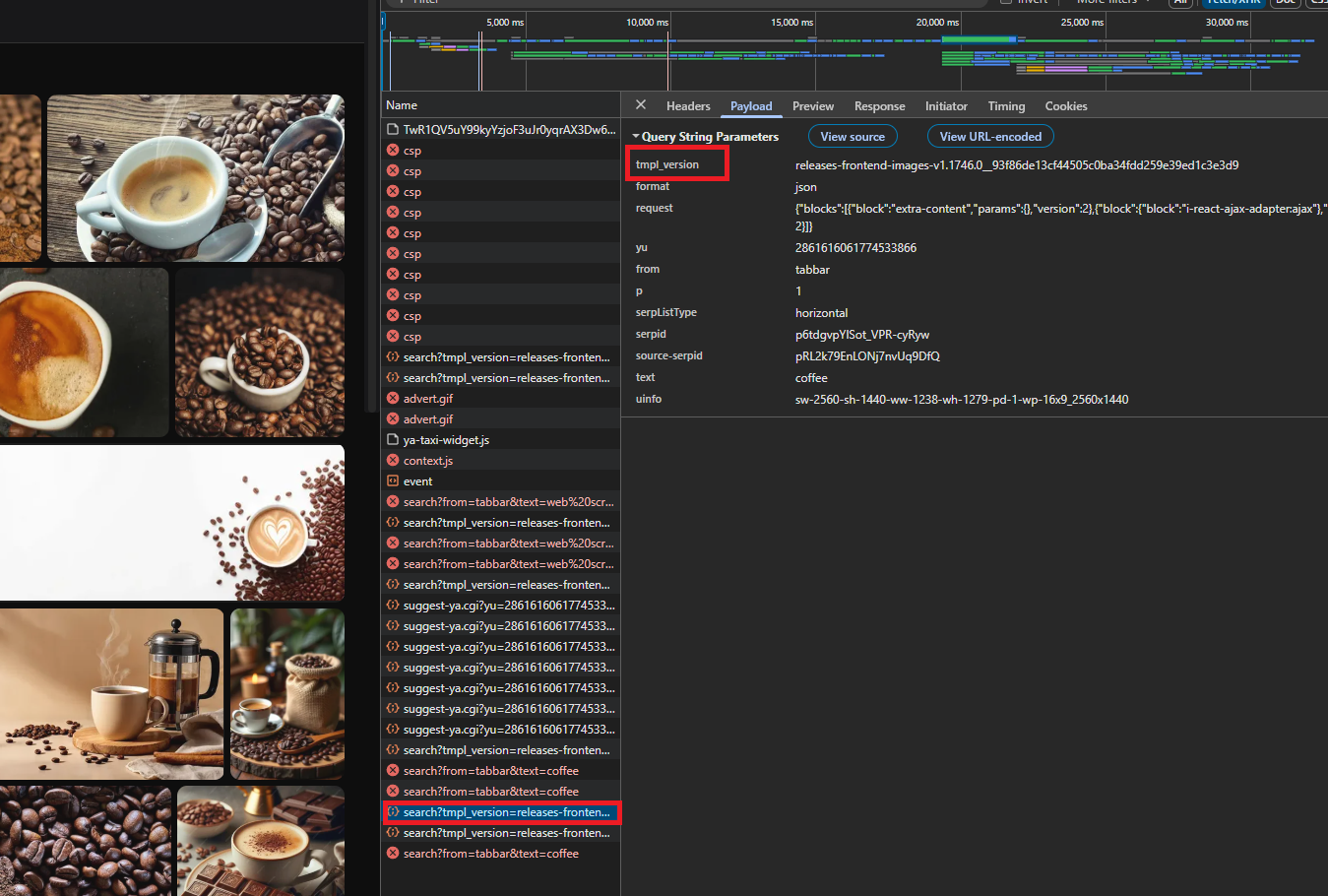
serpid is optional. Some page versions include it, some do not. When present, we pass it along. When absent, the endpoint still works.
tmpl_version is not optional. It changes between Yandex deploys and appears in three different formats across page versions. We learned this the hard way: a single regex pattern worked for weeks, then broke overnight when Yandex pushed a new frontend build. The fallback chain covers all three formats we have seen:
# tmpl_version appears in different forms across page versions
tmpl_version = None
for pattern in [
    r'"tmpl_version"\s*:\s*"([^"\\]+)"',
    r'tmpl_version=([^&\s"\']+)',
    r'(releases-frontend-images-v[\w.\-]+__[\w]+)',
]:
    m = re.search(pattern, html)
    if m:
        tmpl_version = urllib.parse.unquote(m.group(1))
        break
if not tmpl_version:
    raise SystemExit("Could not find tmpl_version in bootstrap HTML.")
The first pattern catches it as a JSON key. The second finds it as a URL parameter fragment. The third matches a raw release string that Yandex sometimes uses instead of a versioned key. If none of the three patterns hit, the script exits with a clear message. No tmpl_version, no image data.
Paginating JSON Batches
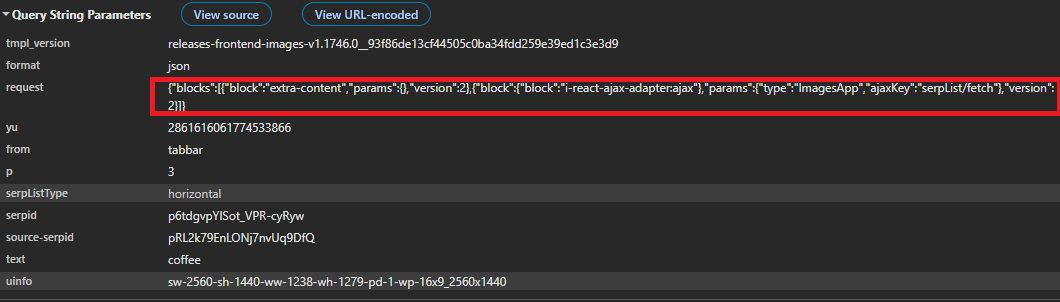
With the bootstrap values in hand, we build the AJAX request structure that mimics what the browser sends on scroll:
AJAX_REQUEST = {
    "blocks": [
        {"block": "extra-content", "params": {}, "version": 2},
        {
            "block": {"block": "i-react-ajax-adapter:ajax"},
            "params": {"type": "ImagesApp", "ajaxKey": "serpList/fetch"},
            "version": 2,
        },
    ]
}
This payload tells the endpoint which data blocks to return. The pagination loop sends it as a JSON-encoded query parameter alongside the batch index and our bootstrap values:
seen = set()
rows = []
batch_index = 0

while len(rows) < MAX_RESULTS:
    params = {
        "format": "json",
        "request": json.dumps(AJAX_REQUEST, separators=(",", ":"), ensure_ascii=False),
        "text": SEARCH_QUERY,
        "p": str(batch_index),
        "serpListType": "horizontal",
        "tmpl_version": tmpl_version,
    }
    if serpid:
        params["serpid"] = serpid

    target_url = f"{BASE}?{urllib.parse.urlencode(params, safe='', quote_via=urllib.parse.quote)}"
    api_url = (
        f"http://api.scrape.do/?token={TOKEN}"
        f"&url={urllib.parse.quote(target_url, safe='')}&super=true&geoCode={GEO_CODE}"
    )
    resp = requests.get(api_url, timeout=120)
    if resp.status_code != 200:
        break
    text = resp.text
The response body is not clean JSON. Yandex mixes HTML fragments into it, which breaks json.loads. We use regex to pull image data from the raw text instead:
    # Each image entry has origUrl, with thumb and alt nearby in the same object
    batch = []
    for m in re.finditer(r'"origUrl"\s*:\s*"(https?://[^"]+)"', text):
        image_url = m.group(1)

        # Look in a window around the match for thumbnail and description
        start = max(0, m.start() - 2000)
        end = min(len(text), m.end() + 2000)
        window = text[start:end]

        thumb_m = re.findall(r'"thumb"\s*:\s*"(https?://[^"]+)"', window)
        thumb = thumb_m[-1] if thumb_m else image_url

        alt_m = re.findall(r'"alt"\s*:\s*"([^"]*)"', window)
        description = alt_m[-1].replace('\\"', '"') if alt_m else ""

        batch.append({
            "image_url": image_url,
            "thumbnail_url": thumb,
            "description": description,
        })
For each image URL match, we open a window of 2000 characters in each direction and scan for the thumbnail and alt text keys. Why not parse the JSON properly? Because Yandex mixes raw HTML fragments into the response body, which breaks json.loads on the full text. The window approach works because each image object keeps its fields close together in the response, and 2000 characters is wide enough to catch them without crossing into the next image's data.
Deduplication happens before rows enter the final list, since Yandex sometimes returns the same image across consecutive batches:
    if not batch:
        break
    for row in batch:
        if row["image_url"] not in seen:
            seen.add(row["image_url"])
            rows.append(row)
            if len(rows) >= MAX_RESULTS:
                break

    batch_index += 1
    time.sleep(REQUEST_DELAY_SEC)
An empty batch means we reached the end. The seen set handles the rest.
Exporting to CSV
with open(OUTPUT_CSV, "w", newline="", encoding="utf-8") as f:
    writer = csv.DictWriter(f, fieldnames=["image_url", "thumbnail_url", "source_url", "description"])
    writer.writeheader()
    writer.writerows(rows)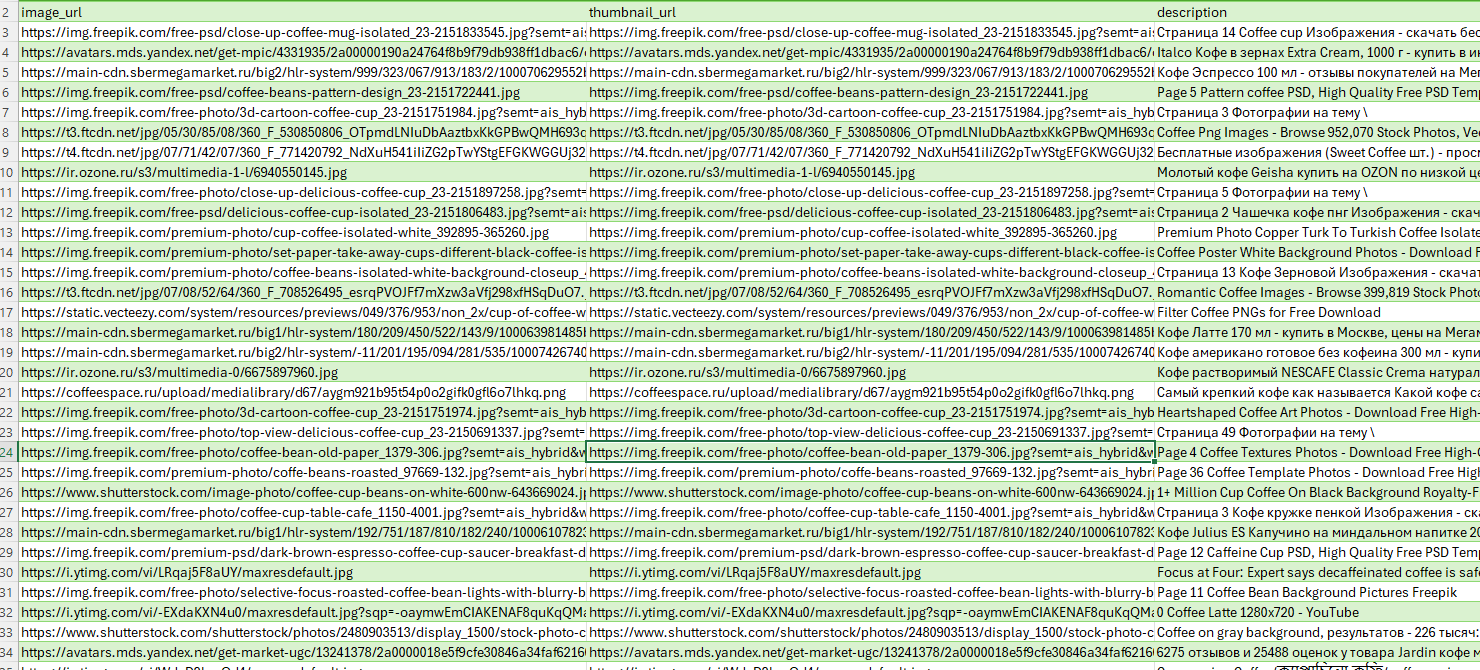
Each row carries the full-resolution image URL, a thumbnail URL, the source page URL, and a description. To download those images to disk, pass the image_url column through a file-writing loop. Yandex image search, collapsed from scroll-loaded JSON into flat rows.
Conclusion
Two parsing strategies, one proxy configuration. Web search uses server-rendered HTML with CSS selectors and a fallback for alternate DOM layouts. Image search bootstraps a deployment identifier, then paginates a JSON XHR endpoint with regex extraction instead of standard JSON parsing.
Everything runs on super=true only. SmartCaptcha is a real gate, but it is an IP and fingerprint gate, not a JavaScript execution gate. That distinction keeps the entire pipeline on raw HTTP.
Get 1000 free credits and start scraping with Scrape.do
FAQ
Does Yandex block web scraping?
Yes. SmartCaptcha triggers on automated request patterns and datacenter IPs. Scrape.do with super=true bypasses it without browser rendering.
How does Yandex image search pagination work?
Image results load through a JSON XHR endpoint, not HTML. Each batch returns roughly 30 images via a zero-based p parameter. A bootstrap request is required first to extract tmpl_version.
What is tmpl_version and why does the image scraper need it?
A deployment identifier embedded in the image search page HTML. The JSON endpoint rejects requests without it. The value changes between Yandex deploys and appears in three different formats, which is why we use a fallback chain to extract it.
Software Engineer








