Category:Scraping Use Cases
Scraping Google AI Overviews in 2026: Extract Summary Text, Source References, and Structured Data with Python

Head of Marketing


Google AI Overviews now appear on roughly 30% of all search queries, according to Ahrefs research.
I'm betting that will increase really quickly :)
They sit above organic results, pull content from multiple sources, and deliver a synthesized answer before the user ever clicks a link.
All these "AI visibility" tools you see out there scrape these overviews and a few more AI sources to generate their reports.
But AI Overviews are significantly harder to scrape than any other SERP element. Google's documentation on AI Overviews explains their intent, but says nothing about the rendering pipeline that makes extraction difficult.
They render asynchronously through JavaScript, sometimes load seconds after the initial page, and occasionally don't appear at all for the same query on consecutive requests.
Two working approaches handle this: a Playwright-based browser scraper that renders the full DOM and extracts text blocks with source references, and a SERP API that returns the same data as structured JSON without any browser overhead. If you are working on broader Google search result scraping, AI Overviews are one of several SERP elements you can extract with the same tooling.
You can find the complete scripts in the GitHub repository.
How AI Overviews Work on Google SERPs
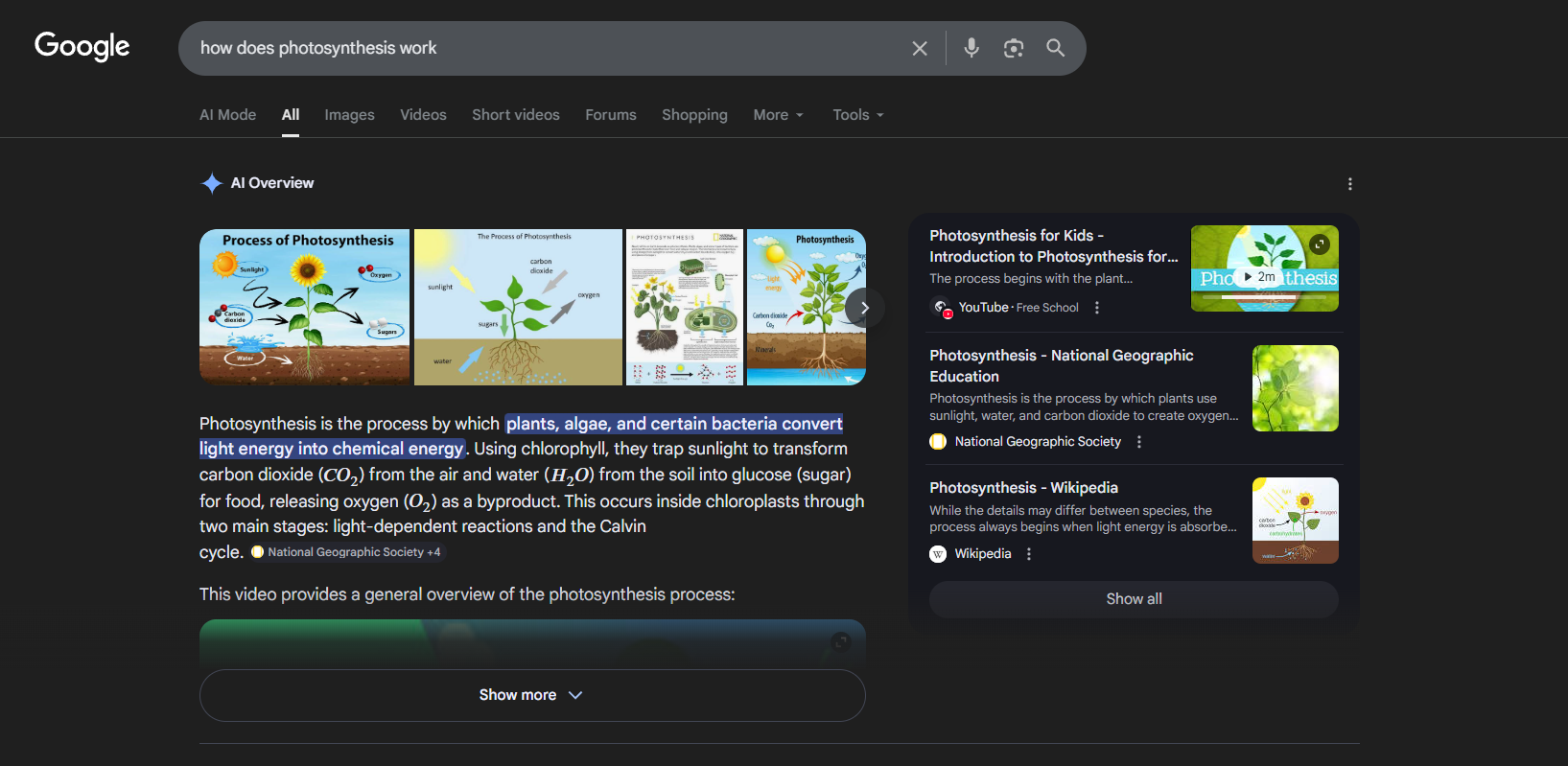
Before writing any scraping logic, understanding how AI Overviews load and where they sit in the DOM is essential. Their behavior is not consistent, and the approach that works depends on which state the overview is in.
Three States of AI Overviews
An AI Overview for any given query exists in one of three states:
Fully rendered in initial HTML. The AIO content is present in the first server response. A standard HTTP request with JavaScript rendering could capture these. But this is the minority of cases.
Deferred (async-loaded). The AIO container exists in the initial HTML as an empty shell, but the actual summary text and references load asynchronously after JavaScript execution. This is the most common state. Raw HTTP requests return an empty container with no usable content.
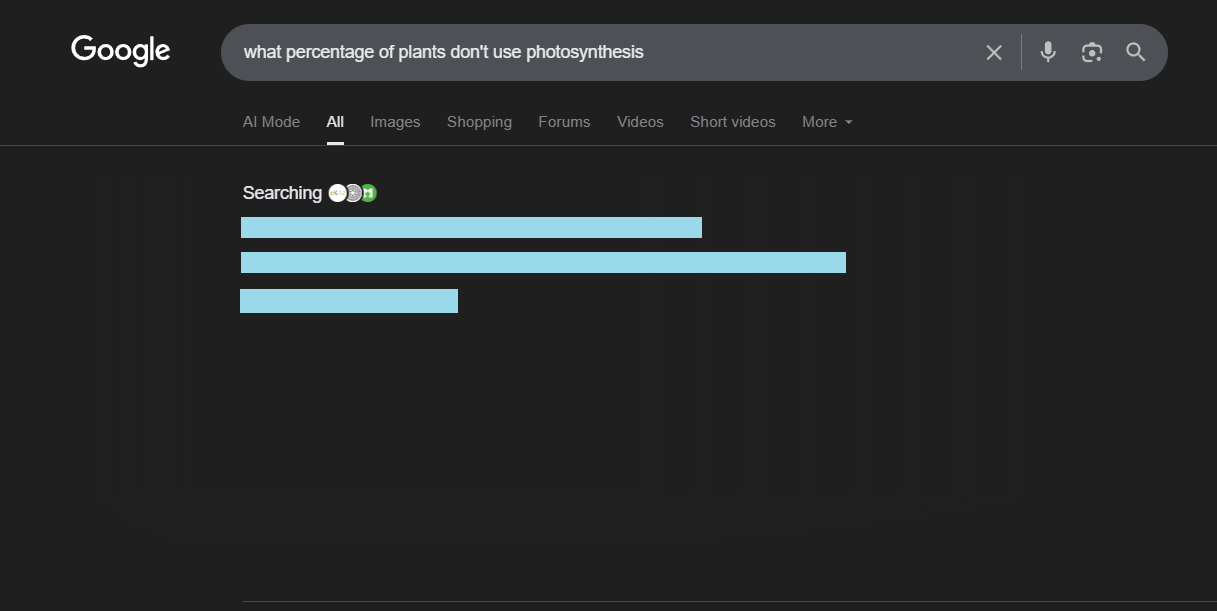
Absent. No AIO appears for the query at all. The scraper needs to detect this and exit gracefully rather than hanging on a timeout.
The deferred state is the primary challenge. Most AIO scraping attempts fail because they send a single HTTP request and get back an empty container. The state distinction also matters for the SERP API approach: a complete state means the full content is available in the response, while a deferred state means Google has not finished generating the overview. In that case, a follow-up request to a separate async endpoint is needed to fetch the completed content once it is ready. That async request costs 5 additional credits and uses a single-use session key that expires after 60 seconds.
DOM Structure of an AI Overview
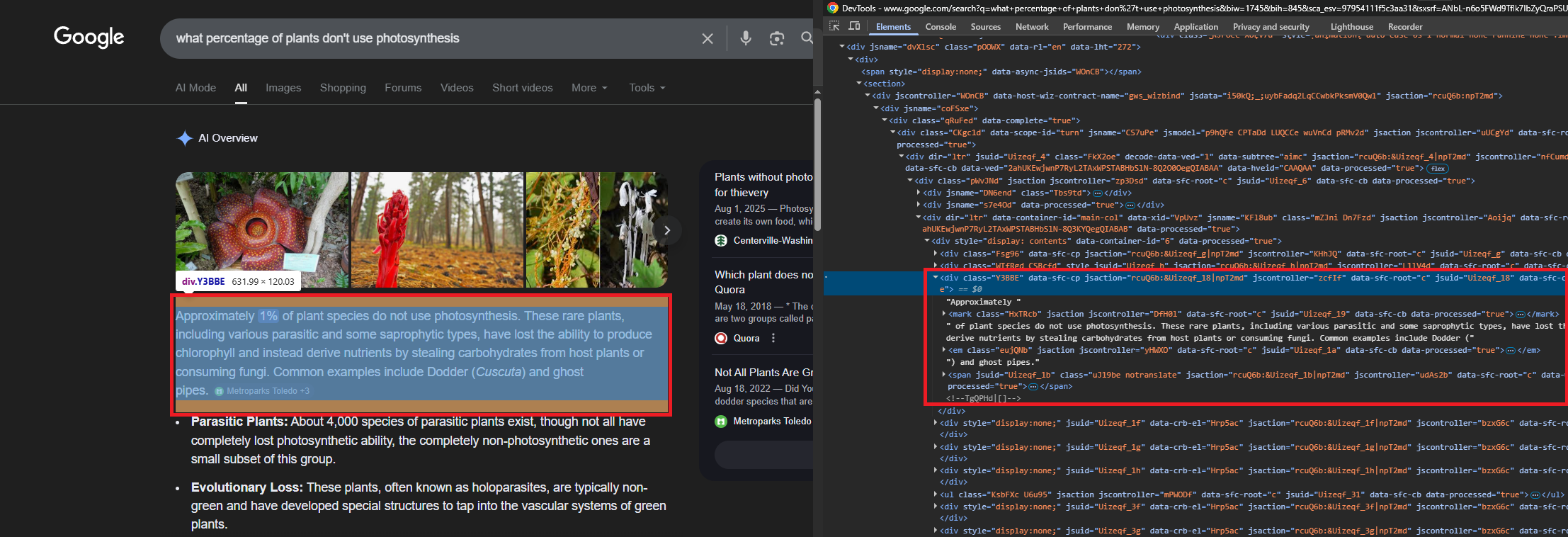
The AI Overview lives inside a container identified by the "AI Overview" heading text. From there, the content container uses the CSS class Kevs9. Inside that container:
- Summary text appears in
div.Y3BBEelements. Each one holds a paragraph of the AI-generated answer. - Source references render as
li.jydCydcards. Each card contains a title indiv.Nn35Fand an external link in ana[href]element. - Inline citation badges show the source name and a count (e.g., "Science News Explores +3"). These sit inside
span.wJwe6celements alongside the text they cite.
The container may include an expand/collapse toggle for longer summaries, but the full text is in the DOM regardless of collapse state. No click interaction is needed to extract it.
Why Raw HTTP Falls Short
A raw HTTP request with super=true and JavaScript rendering enabled can occasionally capture fully-rendered AIOs. But for deferred AIOs (the majority), the response contains the container element with the text blocks and references empty. The content loads via a secondary async call that only fires in a live browser context.
This makes raw HTTP scraping unreliable for production use. The success rate varies by query type and shifts as Google updates its rendering pipeline. Browser-based scraping with Playwright handles both states by waiting for the async content to appear in the live DOM. The same async rendering challenge applies to other Google verticals like Google Shopping and Google Maps, where product cards and place details load after the initial page response.
Scraping AI Overviews with Playwright
Playwright launches a real Chromium instance that renders JavaScript, waits for async content, and provides full DOM access. Combined with Scrape.do as a proxy, the browser traffic routes through rotating residential IPs, bypassing Google's bot detection while Playwright handles the rendering.
Prerequisites
The scraper uses Playwright for browser automation and standard library modules for JSON handling:
pip install playwright && playwright install chromiumA Scrape.do account provides the API token used for proxy authentication. Free tier available at scrape.do/register.

Proxy Configuration and Browser Launch
The script configures Scrape.do as an HTTP proxy. The token goes in the username field, and super=true in the password field enables residential proxy features:
import json
import urllib.parse
from playwright.sync_api import sync_playwright

token = "<your_token>"
query = "how does photosynthesis work"

encoded_query = urllib.parse.quote_plus(query)

google_urls = [
    f"https://www.google.com/search?q={encoded_query}&hl=en&gl=us",
    f"https://www.google.com/search?q={encoded_query}&hl=en&gl=us"
    f"&uule=w+CAIQICIYV2VzdCBOZXcgWW9yaywgTmV3IEplcnNleQ",
]

proxy_config = {
    "server": "http://proxy.scrape.do:8080",
    "username": token,
    "password": "super=true",
}
The google_urls list contains two variants: a standard Google search URL and one with a US geolocation uule parameter. AI Overviews trigger more consistently from US IP ranges, so the script tries the standard URL first and falls back to the geocoded version if no AIO is found.
Playwright launches Chromium in headless mode with the proxy config. The browser context sets ignore_https_errors=True (required for proxy TLS), a desktop viewport, and a standard Chrome user agent:
with sync_playwright() as p:
    browser = p.chromium.launch(headless=True, proxy=proxy_config)
    context = browser.new_context(
        ignore_https_errors=True,
        viewport={"width": 1280, "height": 900},
        user_agent="Mozilla/5.0 (Windows NT 10.0; Win64; x64) "
                   "AppleWebKit/537.36 Chrome/131.0.0.0 Safari/537.36",
    )
    page = context.new_page()
Detecting the AI Overview
The script navigates to the Google SERP, waits for the page to settle (8 seconds for async content), then checks whether the "AI Overview" heading exists in the DOM:
    for attempt, url in enumerate(google_urls):
        page.goto(url, timeout=60000, wait_until="networkidle")
        page.wait_for_timeout(8000)

        aio_found = page.evaluate("""() => {
            const headings = document.querySelectorAll(
                'h1, h2, div.Fzsovc, div.YzCcne'
            );
            for (const h of headings) {
                if (h.textContent.trim() === 'AI Overview') return true;
            }
            return false;
        }""")

        if aio_found:
            break
Detection searches for the literal text "AI Overview" across heading elements and known container classes. This avoids confusing the AIO with Featured Snippets or People Also Ask sections, which use different container structures but can share some parent selectors like #Odp5De.
If the first URL does not trigger an AIO, the loop retries with the US geocoded URL. If neither works, the script exits.
Getting the Content Container
Once the AIO is detected, the script walks up the DOM from the heading element to find the Kevs9 content container:
    aio_container = page.evaluate_handle("""() => {
        const headings = document.querySelectorAll(
            'h1, h2, div.Fzsovc, div.YzCcne'
        );
        for (const h of headings) {
            if (h.textContent.trim() === 'AI Overview') {
                let el = h;
                for (let i = 0; i < 10; i++) {
                    el = el.parentElement;
                    if (!el) break;
                    if (el.classList.contains('Kevs9')) return el;
                }
                return h.parentElement?.parentElement || h.parentElement;
            }
        }
        return null;
    }""")
The function finds the heading, then walks up to 10 parent levels looking for the Kevs9 class. This class wraps both the summary text and the reference cards. If Kevs9 is not found (Google may rename it), the fallback returns the heading's grandparent as a reasonable approximation.
Extracting Text Blocks
Text extraction runs as injected JavaScript on the container handle. The primary targets are div.Y3BBE elements, which hold one paragraph each:
    text_blocks = page.evaluate("""(container) => {
        const blocks = [];
        const seen = new Set();
        const skip = [/^Show (more|all|less)$/i, /^AI Overview$/i,
                       /not available/i, /try again later/i];

        for (const div of container.querySelectorAll('div.Y3BBE')) {
            const clone = div.cloneNode(true);
            clone.querySelectorAll('style, .WTfRgd, .wJwe6c')
                 .forEach(e => e.remove());
            let text = clone.textContent.trim();
            text = text.replace(/\\.[A-Za-z0-9_]+\\{[^}]*\\}/g, '').trim();
            if (text.length > 15 && !seen.has(text)
                && !skip.some(p => p.test(text))) {
                seen.add(text);
                blocks.push({ type: 'paragraph', text });
            }
        }
        return blocks;
    }""", aio_container)
Before extracting text from each Y3BBE div, the function clones the element and strips out inline <style> tags, citation badge elements (.WTfRgd, .wJwe6c), and any leaked CSS rules (Google sometimes injects style declarations into text content). A Set deduplicates blocks, and skip patterns filter out UI elements like "Show more" buttons and error messages.
Extracting Source References
Source references live in li.jydCyd card elements within the same container. Each card has a title div and an external link:
    references = page.evaluate("""(container) => {
        const refs = [];
        const seen = new Set();

        for (const card of container.querySelectorAll('li.jydCyd')) {
            const titleEl = card.querySelector('.Nn35F');
            const linkEl = card.querySelector('a[href^="http"]');
            const snippetEl = card.querySelector('.VwiC3b');

            const title = titleEl ? titleEl.textContent.trim() : '';
            const url = linkEl ? linkEl.getAttribute('href') : '';
            const snippet = snippetEl ? snippetEl.textContent.trim() : '';

            if (url && !url.includes('google.com') && !seen.has(url)) {
                seen.add(url);
                refs.push({ title: title || url, url, snippet });
            }
        }
        return refs;
    }""", aio_container)
The function filters out internal Google links and deduplicates by URL. Each reference gets a title (from .Nn35F), URL (from the anchor tag), and snippet (from .VwiC3b if available). Google renders many AIO reference links with empty anchor text, placing the article title in the .Nn35F sibling instead.
Output
After extraction, the browser closes and the script writes the results to JSON:
    browser.close()

result = {
    "query": query,
    "ai_overview_found": True,
    "text_blocks": text_blocks,
    "references": references,
}

with open("ai-overview-results.json", "w", encoding="utf-8") as f:
    json.dump(result, f, indent=2, ensure_ascii=False)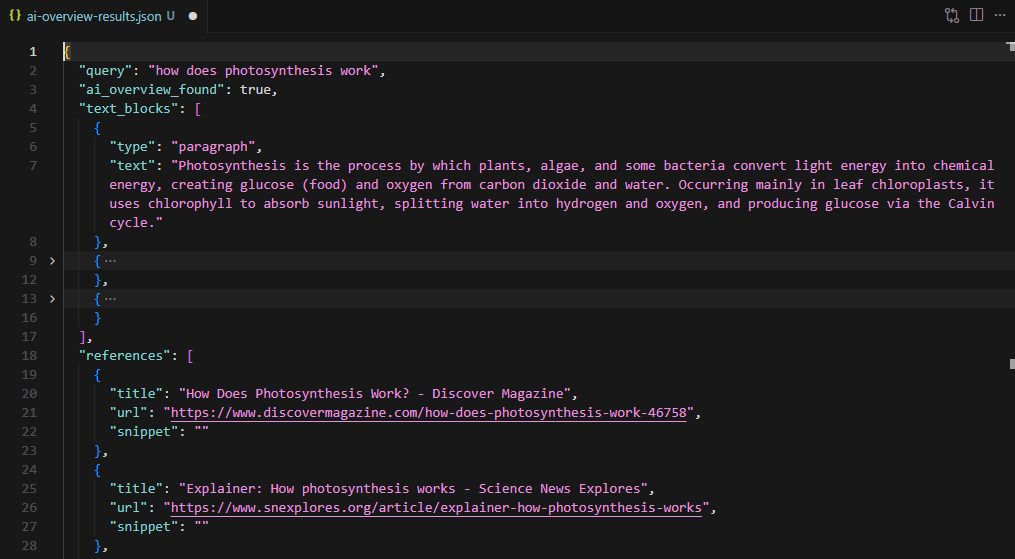
For the "how does photosynthesis work" query, the scraper extracts the summary paragraph, source references from Discover Magazine, Science News Explores, and BBC Science Focus, with full URLs and snippet text for each.
AI Overview Data via the SERP API
The SERP API approach skips browser rendering entirely. A single HTTP GET request to api.scrape.do/plugin/google/search returns structured JSON with an ai_overview field when Google generates one for the query. No Playwright, no selectors, no DOM parsing.
Sending the Request
The base endpoint takes a token and search parameters. A curl call looks like this:
curl "https://api.scrape.do/plugin/google/search?token=<your_token>&q=how+does+photosynthesis+work&hl=en&gl=us"The response JSON includes standard SERP data (organic results, related questions, knowledge graph) plus the ai_overview object. The state field tells you which of the three states you are dealing with:
complete: Full content available inline. Text blocks and references are in the response.deferred: Google has not finished generating the overview. The response includes asession_keyfor a follow-up request.null: No AI Overview for this query.
The Python Script
import requests
import json

token = "<your_token>"
query = "how does photosynthesis work"

response = requests.get(
    "https://api.scrape.do/plugin/google/search",
    params={"token": token, "q": query, "gl": "us", "hl": "en"},
    timeout=60,
)
response.raise_for_status()
data = response.json()

ai_overview = data.get("ai_overview")
The initial request returns the full SERP response. When ai_overview is None, Google did not generate an overview for this query. Navigational and branded queries typically return null.
Handling Deferred AI Overviews
When state is "deferred", Google is still generating the overview. The response includes a session_key instead of content:
if ai_overview and ai_overview["state"] == "deferred":
    session_key = ai_overview["session_key"]

    aio_response = requests.get(
        "https://api.scrape.do/plugin/google/search/ai-overview",
        params={"token": token, "session_key": session_key},
        timeout=60,
    )
    aio_response.raise_for_status()
    ai_overview = aio_response.json()
The session key is a 32-character hex string. It is single-use and expires after 60 seconds. If it expires or gets reused, the endpoint returns a 404 with {"error": "session not found"}. This follow-up request costs 5 additional credits.
Parsing the Structured Response
The API returns text blocks as a nested structure. Paragraph blocks have a snippet field. List blocks nest items inside a list array, each with its own snippet. Sub-lists can nest one level deeper:
def flatten_blocks(blocks):
    flat = []
    for block in blocks:
        snippet = block.get("snippet", "")
        if snippet:
            flat.append({"type": block.get("type", "paragraph"), "text": snippet})
        for item in block.get("list", []):
            if item.get("snippet"):
                flat.append({"type": "list_item", "text": item["snippet"]})
            for sub in item.get("list", []):
                if sub.get("snippet"):
                    flat.append({"type": "list_item", "text": sub["snippet"]})
    return flat
The flatten_blocks() function recursively walks this structure and produces a flat array of {type, text} objects. The reference_indexes array in each block points to entries in the references array, linking each claim to its source.
text_blocks = flatten_blocks(ai_overview.get("text_blocks", []))
references = [
    {"title": ref.get("title", ""), "url": ref.get("link", ""),
     "source": ref.get("source", "")}
    for ref in ai_overview.get("references", [])
]

result = {
    "query": query, "state": ai_overview.get("state"),
    "text_blocks": text_blocks, "references": references,
}

with open("ai-overview-serp-api-results.json", "w", encoding="utf-8") as f:
    json.dump(result, f, indent=2, ensure_ascii=False)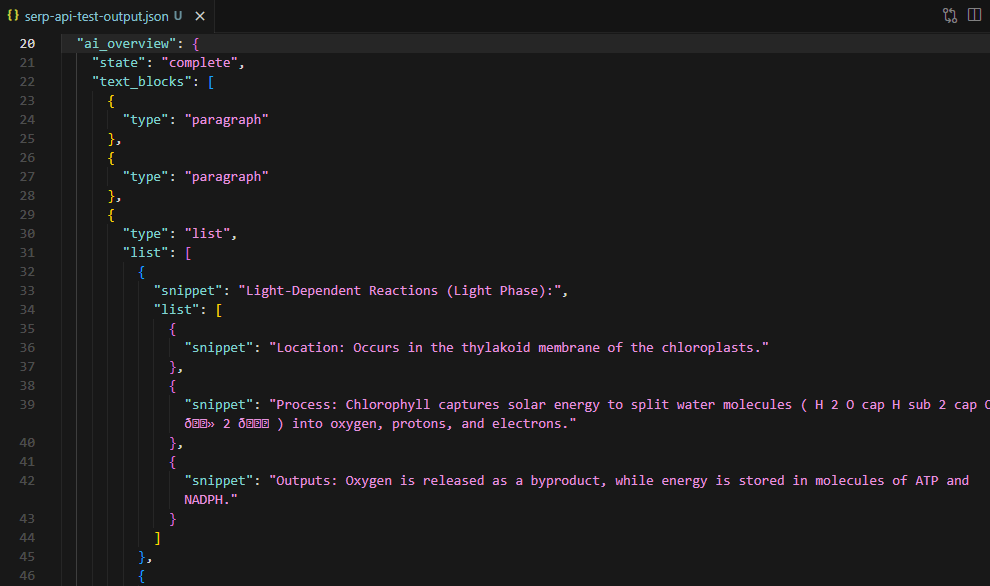
For the photosynthesis query, the API returned 12 text blocks (paragraphs and list items covering light-dependent reactions, the Calvin cycle, and chemical equations) and 9 source references from educational and scientific sites.
AI Overview state: complete
AI Overview extracted for: 'how does photosynthesis work'
  12 text blocks, 9 references
Saved to ai-overview-serp-api-results.json
Conclusion
Two approaches for the same data. Each suited to different pipelines.
The Playwright scraper provides full DOM access, works for both immediate and deferred AI Overviews, and allows custom extraction logic beyond text and references. Best for research pipelines that need raw HTML context or non-standard parsing. Similar Playwright-based approaches work for extracting Google Trends data and Google News results.
The SERP API returns structured JSON with no browser overhead, handles deferred content server-side, and requires minimal code. For a detailed comparison of SERP API providers and their AI Overview capabilities, see the best SERP APIs benchmark. Best for production monitoring, bulk query tracking, and integration into data pipelines where structured output matters more than DOM-level control. The deferred state costs 5 extra credits and requires the async follow-up request within 60 seconds.
Both approaches use the same Scrape.do token.
Get 1000 free credits and start scraping with Scrape.do
FAQ
Does every Google search query trigger an AI Overview?
No. AI Overviews appear on a subset of queries, primarily informational and how-to searches. Commercial, navigational, and ambiguous queries often do not trigger one. The scraper must handle the absent state gracefully rather than hanging on a selector timeout.
How often do AI Overview selectors change?
Google updates its SERP DOM structure without notice. The selectors (Kevs9, Y3BBE, li.jydCyd, Nn35F) have been stable through early 2026, but any raw scraping approach requires periodic validation. The SERP API abstracts selector changes away entirely since it returns structured JSON regardless of frontend updates.
What is the difference between the search endpoint and the ai-overview endpoint?
The /plugin/google/search endpoint returns the full SERP as structured JSON, including the ai_overview field. The /plugin/google/search/ai-overview endpoint is specifically for fetching deferred AI Overview content using a session key from the initial response. It is not a standalone endpoint. You always start with a search request first.
Can the Playwright approach extract AI Overviews for bulk queries?
The script handles one query per run. For bulk extraction, wrap the core logic in a loop with delays between requests to avoid rate limits. The Scrape.do proxy handles IP rotation, but adding 5-10 second intervals between requests is standard practice for sustained scraping against Google.
Are there rate limits on the SERP API for AI Overview queries?
Rate limits follow standard Scrape.do plan limits. Each search API call consumes standard credits. Deferred AI Overview fetches consume 5 additional credits per request. Check the dashboard for current usage and plan limits.
Head of Marketing








