Category:Scraping Use CasesView as Markdown
How to Scrape DigiKey: Product Data, Pricing, and Specifications

Software Engineer


DigiKey's catalog runs to over 17.5 million components from nearly 3,000 manufacturers. A plain request returns 403. Once we get access through Scrape.do, pagination is still a puzzle. The URL doesn't increment like ?page=2, and the HTML doesn't explain the mechanism.
Once we're through, the data is well-structured. Category listings are a real <table> with stable data-testid cells, and product specs can be parsed dynamically without hardcoding attribute names. We'll scrape a category into digikey-category.csv and a product into digikey-product.json with pricing tiers, a datasheet link, and whatever attributes that category exposes.
Why Is Scraping DigiKey Difficult
DigiKey pushes back early. A plain request to a category URL returns 403.
import requests

url = "https://www.digikey.com/en/products/filter/fiber-optic-cables/471"
r = requests.get(url, timeout=30)
print(r.status_code)
If we see 403, that is not a parsing problem. It's access.
Once access is handled, the second problem is extraction stability. DigiKey isn't a "hunt for one CSS selector" target. It's better than that. The category listings are already a real table with data-testid cells, and product pages expose their core fields through the same kind of hooks.
The third problem is pagination. The URL doesn't increment like ?page=2. The HTML doesn't explain the mechanism. No cursor, no next page. We generate the same LZ-String compressed cursor the site uses and attach it ourselves.
Scraping DigiKey Category Listings
Prerequisites and Scrape.do setup
This part is pure server-rendered HTML parsing. No embedded JSON blob, no API reverse engineering. The only requirement is getting a response that is not blocked.
Install dependencies:
pip install requests beautifulsoup4 lzstringSet a Scrape.do token and pick a category URL:
TOKEN = "<your_token>"
CATEGORY_URL = "https://www.digikey.com/en/products/filter/fiber-optic-cables/471"
LISTING_PAGE_SIZE = 25
FILTER_STATE_KEY = "5"
MAX_LISTING_PAGES = 5
We fetch through Scrape.do with super=true. The response is server-rendered HTML that we parse with BeautifulSoup:
api_url = f"http://api.scrape.do/?token={TOKEN}&url={urllib.parse.quote(page_url)}&super=true"
r = requests.get(api_url, timeout=120)
if r.status_code != 200:
    print(f"  HTTP {r.status_code}")
    break

soup = BeautifulSoup(r.text, "html.parser")
table = soup.select_one('table:has(td[data-testid="draggable-cell--100"])')
HTTP 200 plus a table element means we're through. No table means the page didn't return the server-rendered payload we need.
Parsing product tables with data-testid selectors
DigiKey's category page is not a div soup. It's a table with stable data-testid cells. We found these by inspecting the table in DevTools Elements: every cell carries a data-testid attribute with a numeric suffix, and those IDs stay consistent across page loads, category changes, and layout updates. Class names shift between deploys, but data-testid attributes are tied to the component logic. That makes them the most reliable anchor we have.
The select_one call we used above targets draggable-cell--100, which is the part number column. If that cell exists, the table is real and every row follows the same layout.
The one field that deserves a helper is stock. DigiKey mixes "In Stock" and "Marketplace" in the same cell and likes to sprinkle lead-time text into it. We normalize it into one stable string:
def normalize_stock(raw):
    # DigiKey mixes "In Stock" and "Marketplace" in the same cell with lead-time text
    if not raw:
        return ""
    text = re.sub(r"\s+", " ", raw.strip())
    text = re.sub(r"(?i)\s*check\s+lead\s*time\s*", "", text).strip()

    dk = mp = None
    for m in re.finditer(r"([\d,]+)\s+(In Stock|Marketplace)\b", text, re.IGNORECASE):
        qty = m.group(1).replace(",", "")
        if m.group(2).lower() == "in stock":
            dk = qty
        else:
            mp = qty

    if dk and mp:
        return f"DK:{dk}, MP:{mp}"
    return dk or (f"MP:{mp}" if mp else text)
The extraction loop turns each tbody tr into one CSV row:
for tr in table.select("tbody tr"):
    part_cell = tr.select_one('td[data-testid="draggable-cell--100"]')
    if not part_cell:
        continue
    link = part_cell.select_one('a[href*="/en/products/detail/"]')
    if not link or not link.get("href"):
        continue

    href = urllib.parse.urljoin("https://www.digikey.com", link["href"])
    serial = link.get_text(strip=True)
    name = part_cell.get_text(" ", strip=True)
    if serial and name.startswith(serial):
        name = name[len(serial):].strip()

    stock_cell = tr.select_one('td[data-testid="draggable-cell--102"]')
    stock = normalize_stock(stock_cell.get_text(" ", strip=True) if stock_cell else "")

    price_cell = tr.select_one('td[data-testid="draggable-cell--101"]')
    price_raw = price_cell.get_text(" ", strip=True) if price_cell else ""
    dollar = re.search(r"\$[\d,.]+", price_raw)
    price = dollar.group(0) if dollar else price_raw
If we can print rows out of this loop, the hard part is done. We can stop thinking about HTML and start thinking in CSV columns.
LZ-String cursor pagination
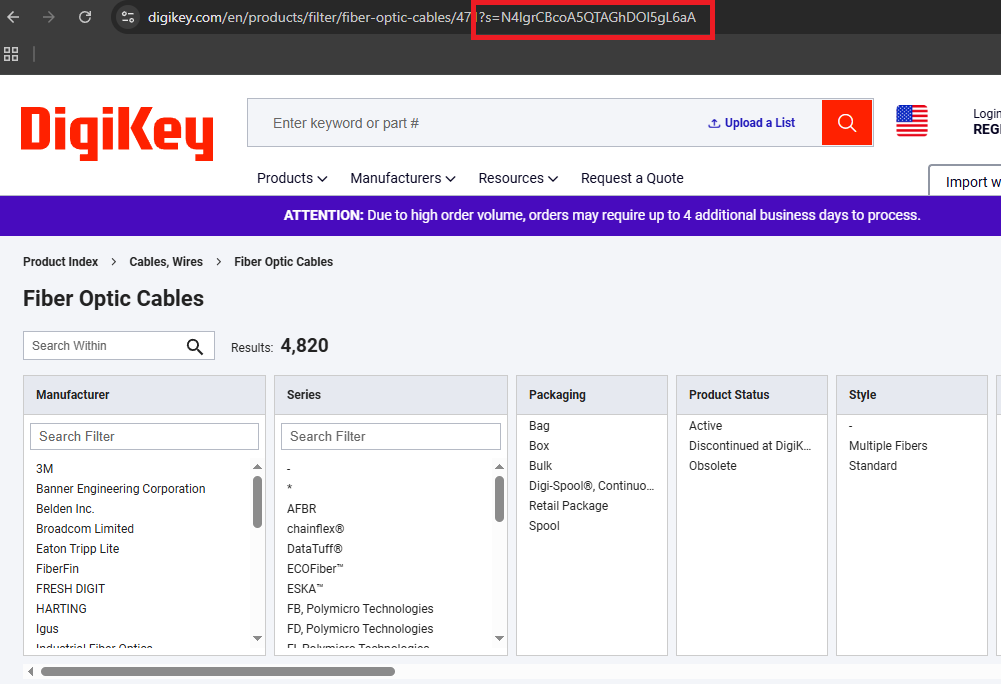
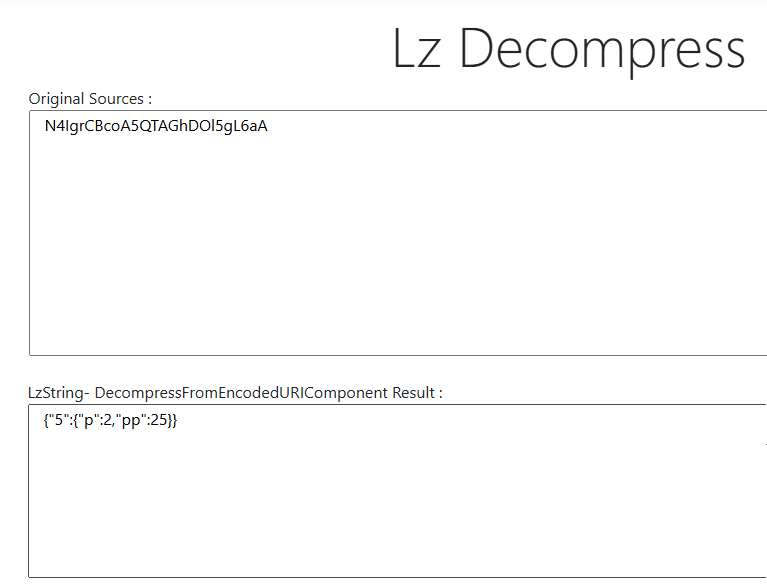
DigiKey pagination is not a "next page" URL pattern we can guess. The UI uses an s= query parameter that is an LZ-String compressed JSON payload. We discovered this by clicking "Next Page" in the browser and watching the Network tab: the URL gained an s= parameter with a long encoded string. Decoding it with an online LZ-String tool revealed a minimal JSON object with page number and page size.
We generate the same cursor by compressing that JSON shape ourselves:
def encode_cursor(page_num):
    # LZ-String compressed JSON cursor for DigiKey's ?s= parameter
    payload = json.dumps({FILTER_STATE_KEY: {"p": page_num, "pp": LISTING_PAGE_SIZE}}, separators=(",", ":"))
    return LZString.compressToEncodedURIComponent(payload)
Open DevTools Network and find any category request with ?s=.... Decode it. It matches {FILTER_STATE_KEY: {"p": ..., "pp": ...}} exactly.
Now we attach s= to the category base URL and crawl page by page:
cursor = encode_cursor(page_num)
page_url = f"{category_base}?s={urllib.parse.quote(cursor, safe='')}"
print(f"Scraping page {page_num}/{MAX_LISTING_PAGES}...")
One reliability detail matters here. DigiKey can serve the same page again when the cursor overflows or the state key is wrong. Without a check, this fails silently: the loop keeps running, the CSV grows, but every new page is identical to page 1. We catch this by comparing a signature of the first few rows against the previous page:
sig = tuple(r["serial_number"] + "|" + r["product_url"] for r in page_rows[:5])
if sig == prev_signature:
    print("  Duplicate page detected, stopping.")
    break
prev_signature = sig
Without this check, the loop scrapes page 1 forever.
Exporting to CSV
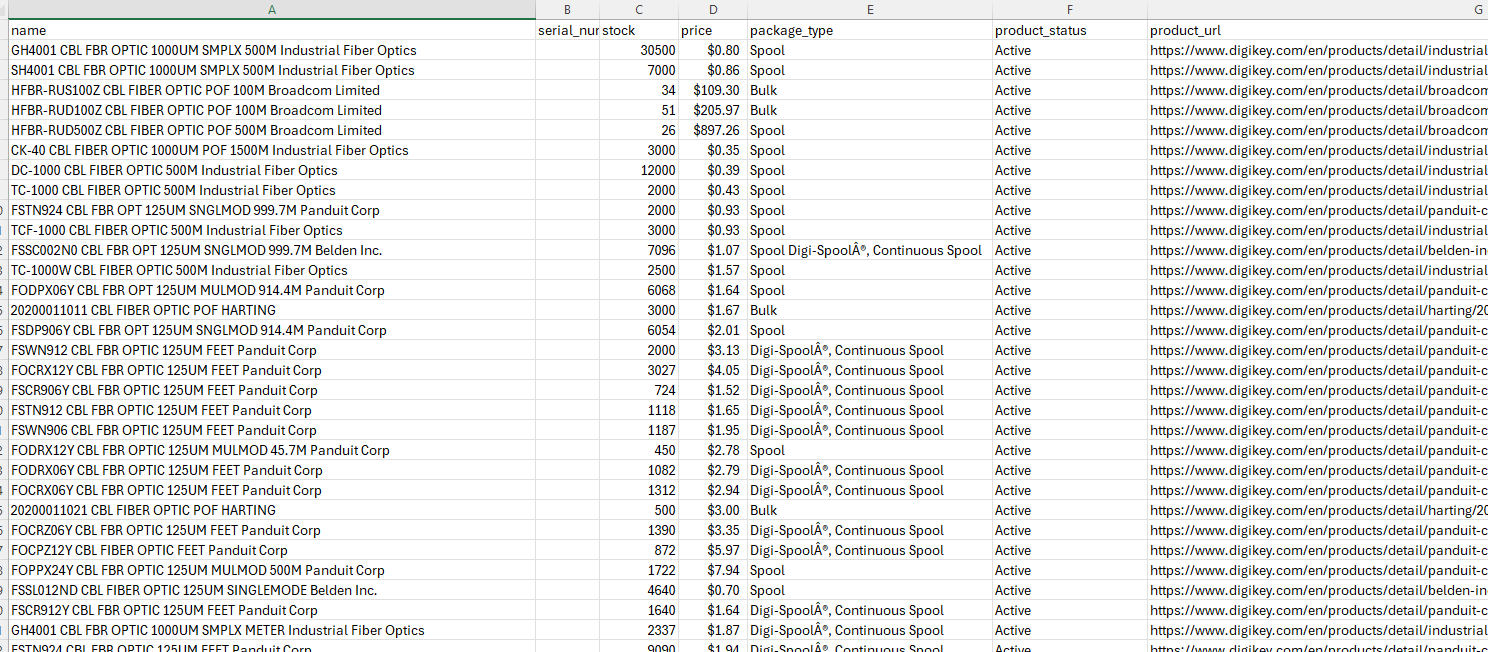
At the end, we write all collected rows to a single CSV with a fixed column order:
out_path = "digikey-category.csv"
with open(out_path, "w", newline="", encoding="utf-8") as f:
    writer = csv.DictWriter(f, fieldnames=["name", "serial_number", "stock", "price", "package_type", "product_status", "product_url"])
    writer.writeheader()
    writer.writerows(all_rows)

print(f"Saved {len(all_rows)} rows to {out_path}")
If the run is healthy, we see a non-zero row count and digikey-category.csv on disk.
Scraping DigiKey Product Pages
Dynamic attribute discovery
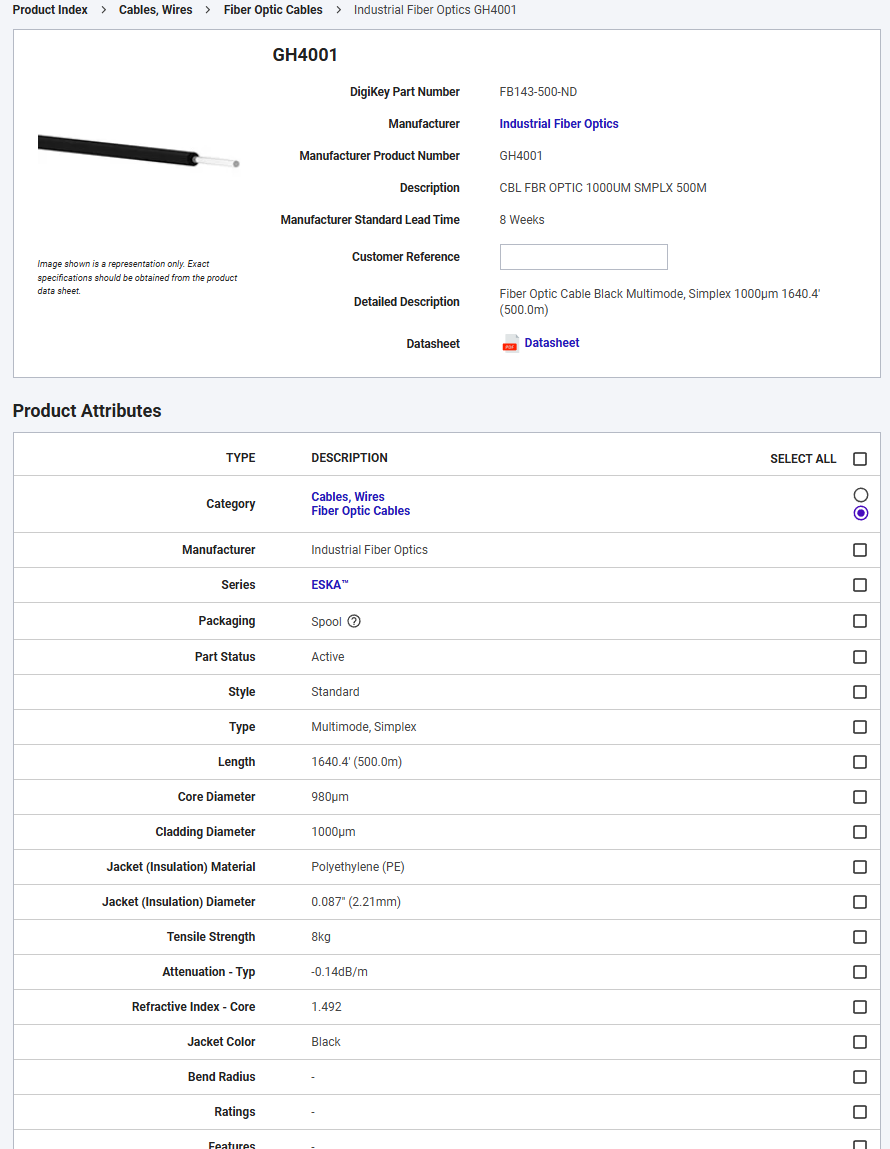
The category scraper gives us breadth. The product scraper is about depth, and DigiKey's depth is messy in a good way. Specs aren't fixed columns. They're whatever that category decides to expose.
So we don't hardcode attribute names. We discover them. DigiKey's catalog spans everything from passive resistors to AI and IoT hardware, and the attribute space shifts completely between categories.
We fetch one product page through Scrape.do with the same super=true setup:
api_url = f"http://api.scrape.do/?token={TOKEN}&url={urllib.parse.quote(PRODUCT_URL)}&super=true"
response = requests.get(api_url, timeout=120)
if response.status_code != 200:
    raise SystemExit(f"HTTP {response.status_code}")

soup = BeautifulSoup(response.text, "html.parser")
HTTP 200 and [data-testid="product-info"] in the DOM means the page is real.
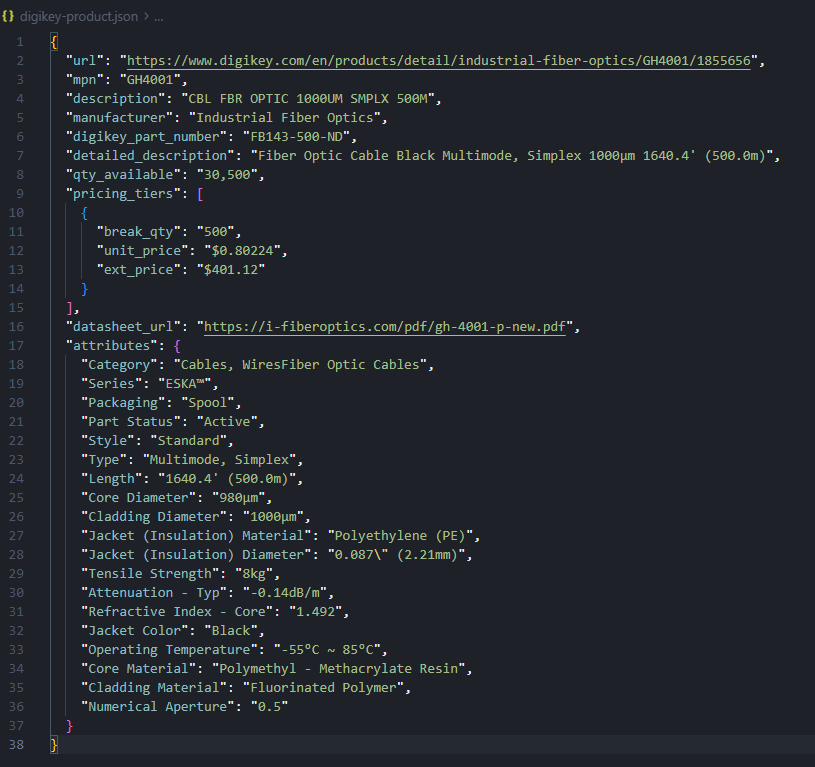
Now the dynamic attribute pass. We walk the attributes table, skip the header row, and keep whatever key-value pairs are present:
attributes = {}
for tr in soup.select('[data-testid="product-attributes"] tr')[1:]:
    cells = [c.get_text(strip=True) for c in tr.find_all(["td", "th"])]
    if len(cells) < 2 or not cells[0] or not cells[1]:
        continue
    if cells[1] in ("-", "n/a", "N/A"):
        continue
    if cells[0] == "Manufacturer" and cells[1] == manufacturer:
        continue
    attributes[cells[0]] = cells[1]
This is the payoff: the output JSON can grow to match the product, instead of forcing every product into the same schema. A fiber optic cable has different specs than a microcontroller, and the scraper handles both without any code changes.
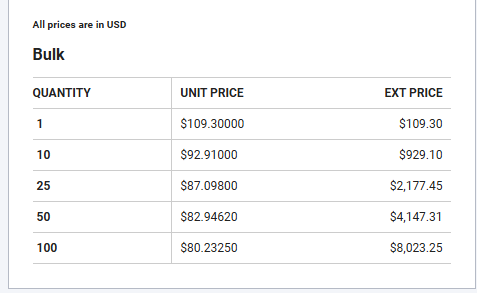
Extracting pricing tiers
Pricing is one of the most useful things DigiKey gives us, and it's structured. The page already has a tier table. We read it without assuming a single "price" number.
pricing_tiers = []
for tr in soup.select('[data-testid="pricing-table-container"] tr'):
    cells = [c.get_text(strip=True) for c in tr.find_all(["td", "th"])]
    if len(cells) < 3 or cells[0].lower() == "quantity":
        continue
    pricing_tiers.append({"break_qty": cells[0], "unit_price": cells[1], "ext_price": cells[2]})
pricing_tiers is a non-empty list, each row has break_qty and unit_price. No post-processing needed for pricing analysis or comparisons.
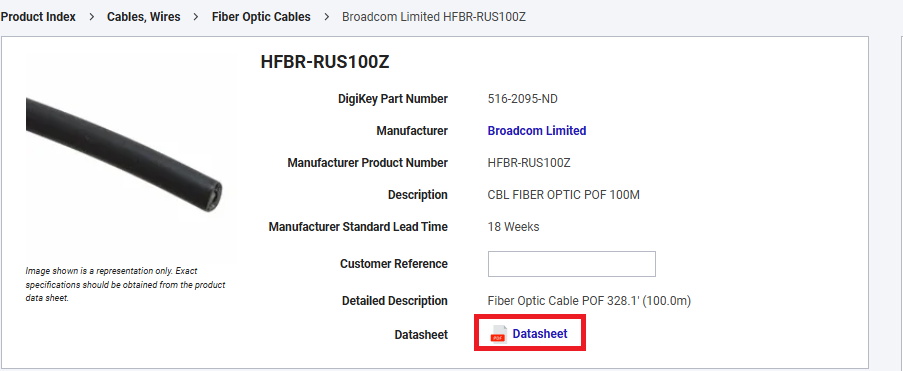
Datasheet link and core field hooks
Before we write JSON, we pull a few core fields from stable hooks. This gives us a consistent "header" even when the attributes grid changes across categories:
mpn = get_text(soup.select_one('[data-testid="mfr-number"]'))
manufacturer = get_text(soup.select_one('[data-testid="overview-manufacturer"]'), "Manufacturer")
detailed_desc = get_text(soup.select_one('[data-testid="detailed-description"]'), "Detailed Description")
qty_available = get_text(soup.select_one('[data-testid="title-messages"]'), "In-Stock:")
The datasheet link is another practical field. It's usually present and it turns a scraped record into something an engineer can act on:
ds_el = soup.select_one('[data-testid="datasheet-download"]')
datasheet_url = urllib.parse.urljoin(PRODUCT_URL, ds_el["href"]) if ds_el and ds_el.get("href") else ""
If we can extract datasheet_url, we know we're reading the real product page, not a fallback template.
The assembled JSON has a fixed header: MPN, manufacturer, description, stock, and datasheet URL. Pricing tiers come as a list, and the attributes block reflects whatever that category exposes.
Conclusion
DigiKey proves that "hard" doesn't always mean dynamic. Once we get access, the pages are structured and predictable. Category listings are a table with stable data-testid cells. Product pages expose core fields and a specs grid that we can treat as dynamic key-value pairs.
From here, we can scale the crawl the boring way. Keep delays modest, keep the duplicate page check, and keep validating the decoded s= payload as we switch categories. If the cursor shape changes, we update one function and keep producing rows.
Get 1000 free credits and start scraping with Scrape.do
FAQ
Does DigiKey block web scraping?
Yes. Direct requests return 403. Routing requests through Scrape.do with super=true returns parseable HTML for both category and product pages. Before automating at scale, verify what the site allows.
How does DigiKey pagination work?
Category pages use an s= query parameter that is an LZ-String compressed JSON cursor. We generate the same cursor and stop when we detect a duplicate page.
How do I handle varying product attributes across categories?
Treat attributes as discovered key-value pairs. Parse the [data-testid="product-attributes"] table and emit whatever labels exist on that product instead of hardcoding a fixed schema.
Software Engineer








