Category:Scraping Use CasesView as Markdown
AnyWho.com Scraping: Extract People Search and Reverse Lookup Data

Head of Marketing


⚠ No real data about a real person has been used in this article. Target URLs have been modified by hand to not reveal any personal information of a real person.
Try to scrape AnyWho with a plain requests.get() and you get a 403 because your User-Agent says python-requests, while a browser user agent on the same machine gets the full page.
That makes AnyWho the odd one out among people search sites, and even the marketplace tools built for AnyWho scraping can't agree on whether it blocks bots.
You'll leave with three Python scrapers for AnyWho people search pages (profiles, name search to CSV, reverse phone lookup) that return full data, including the phone digits, house numbers, emails and owner names AnyWho blurs.
Why AnyWho Blocks Python Scrapers
Good news first: AnyWho is the easiest site in our people search series to get into.
The other sites in the series, like FastPeopleSearch, stack a US geoblock on top of Cloudflare. AnyWho has one filter, and it reads a single header. The real work starts after the 200.
Blocked by User Agent, Not by Country
My first request came back as a 919-byte CloudFront page (X-Cache: Error from cloudfront) with a 403 and nothing to solve:
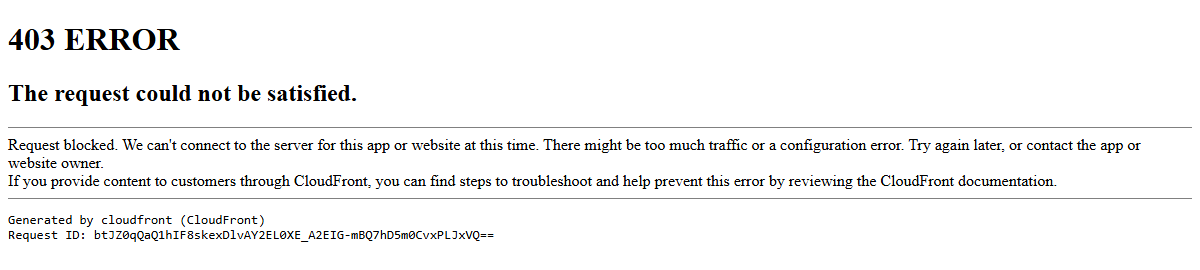
Headless Chrome gets the same page. So I tried a few user agents on one search URL:
| User-Agent | Status |
|---|---|
python-requests/2.32.4 |
403 |
Python-urllib/3.13 |
403 |
HeadlessChrome (requests and Playwright) |
403 |
curl/8.4.0 |
200 |
Empty, or a bare Mozilla/5.0 |
200 |
| Desktop Chrome | 200 |
curl gets in. Python doesn't.
That looks like a string-match rule on library and headless signatures, the kind AWS WAF runs in front of CloudFront, rather than a full bot management product. It even covers robots.txt, which also returns 403 to python-requests. Robots aren't welcome on the robots page.
Country doesn't matter. A German exit IP got the identical page, all 502,253 bytes of it, and no response carried a Cloudflare, DataDome or Akamai header.
No Person JSON-LD to Parse
TruePeopleSearch and most of its siblings lean on a Person JSON-LD block for their richer fields. AnyWho's JSON-LD stops at Organization, WebPage and BreadcrumbList.
No person.
AnyWho is a Next.js App Router site with no __NEXT_DATA__ blob, and every element wears Tailwind utility classes that change with any restyle. So we scrape it the classic web scraping way, with selectors a restyle is unlikely to touch: section ids (#phones, #addresses, #records), the show-more-item card class, aria-labels, and label text like "Lives in:".
The upside: everything, blurred values included, is in the initial HTML, so no render=true and no headless browser.
What AnyWho Shows for Free
A free profile shows full name, exact age, aliases, city, state and ZIP, address history with years lived, relatives, and the phone carrier. Four kinds of values show up blurred:
- Phones: the last four digits
- Streets: house and unit numbers
- Emails: the username after the first letter
- Reverse phone owners and their relatives: everything except the initials
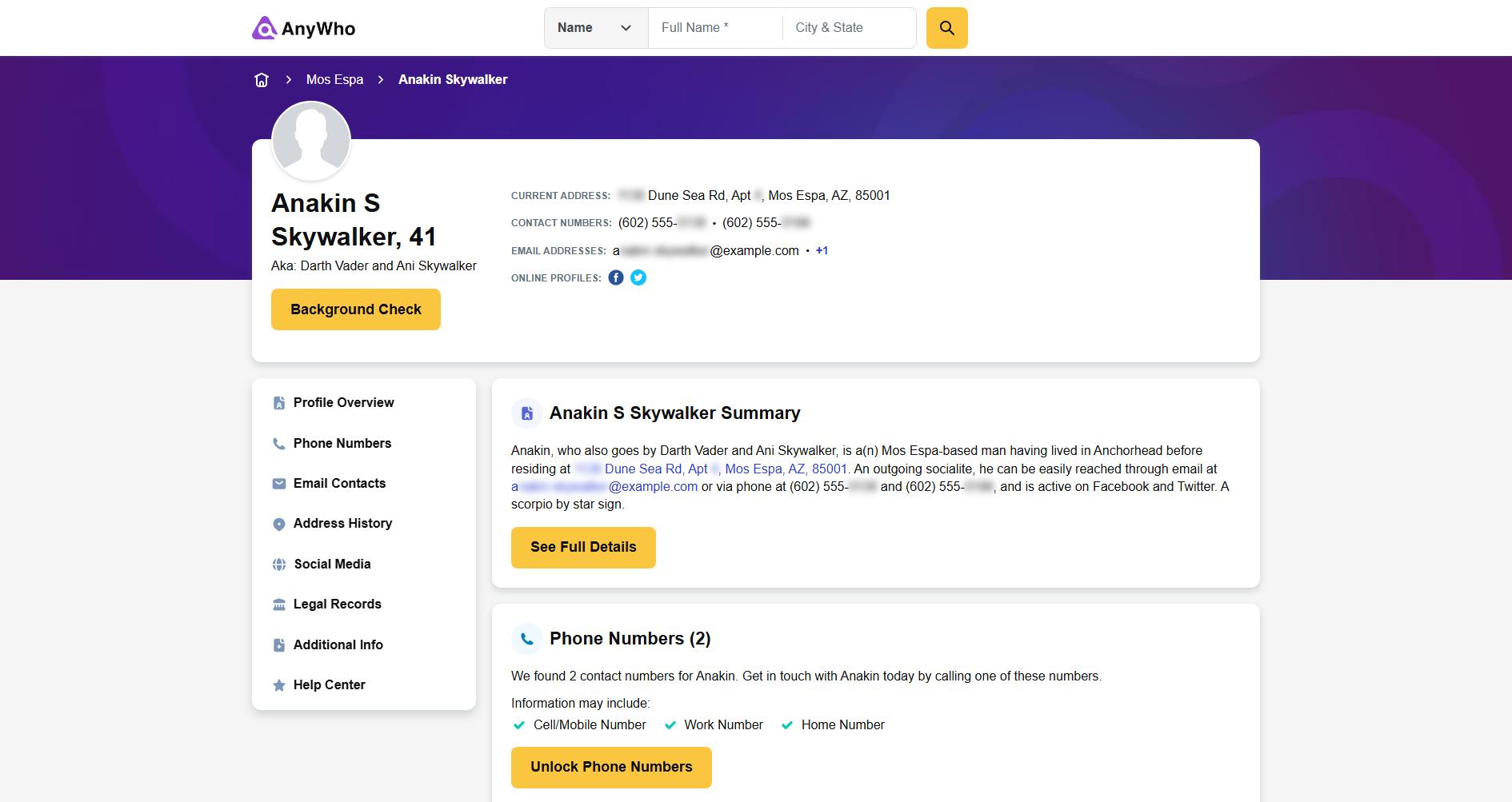
Spokeo sells the full versions (the "Unlock Phone Numbers" button leads there), and AnyWho's address and email searches hand you to Spokeo too. Compare Whitepages, which trims age to a range; AnyWho shows the exact age and blurs the last four phone digits. A name search also caps out at 20 results.
But the blurred values are all in the page. AnyWho sends every hidden digit and letter in the HTML and applies the blur with CSS, after the data has already reached your machine.
Our scrapers read the HTML, so they return every value in full.
Where Scrape.do Fits
Honest part: from a residential IP, a browser User-Agent header gets through. I sent 260 direct requests in about 21 seconds and all 260 came back 200. That's a sample, not a promise about your 26,000th request.
Through Scrape.do, the default request (1 credit) returned 200 on every search, profile and phone page I tested. super=true returned the identical page for 10 credits, so the scripts skip it and pass geoCode=us instead, which keeps the exit IP in the US at the same 1 credit.
You're paying for the parts that break at scale. Scrape.do rotates IPs and retries if AnyWho tightens that rule, and you don't maintain a user agent list. The code path also matches the heavy sites. PeopleSearchNow needs super=true to get through a geoblock, Cloudflare and a slider CAPTCHA; on AnyWho, adding it is a one-line change to the params dict if 403s ever show up at volume.
Scraping an AnyWho Profile
Every AnyWho people search ends on a profile, the densest page on the site: up to 12 fields from one request.
Profile URLs look like /people/{first}+{last}/{state}/{city}/{id}, and the search scraper's profile_url column is the easiest source. The sample data belongs to Anakin Skywalker of Mos Espa, Arizona, who is as fictional as his 555 number.
Prerequisites
pip install requests beautifulsoup4New to requests and BeautifulSoup? Our Python web scraping guide covers the basics. Then create a free Scrape.do account and copy your token from the dashboard; 1,000 free monthly credits cover 1,000 AnyWho requests.
Sending the Request
With token and target_url set at the top of the script, the target goes into a params dict, and requests handles the URL encoding:
# Passing the target as a param lets requests handle the URL encoding
response = requests.get("https://api.scrape.do/", params={"token": token, "url": target_url, "geoCode": "us"})
if response.status_code != 200:
    raise SystemExit(f"Request failed with status {response.status_code}")
soup = BeautifulSoup(response.text, "html.parser")
Anything other than a 200 stops the script through SystemExit instead of feeding an error page to BeautifulSoup. A failed run prints one line:
Request failed with status 403I never hit it through Scrape.do. On success the script stays quiet, and soup holds the full profile, blurred values included.
Unmasking Blurred Phones, Addresses, and Emails
Parse soup as is and get_text() on the phone card returns (602) 555-, with nothing after the hyphen. The street reads Dune Sea Rd, Apt, both numbers gone.
Each hidden piece is an empty <span> with its value in an attribute:
<span class="blur-sm before:content-[attr(data-content)]" data-content="0138"></span>Tailwind's before:content-[attr(data-content)] class paints the attribute in a ::before pseudo-element, and blur-sm smears it. The digits reach the screen, blurred, but the span has no text for get_text() to find:
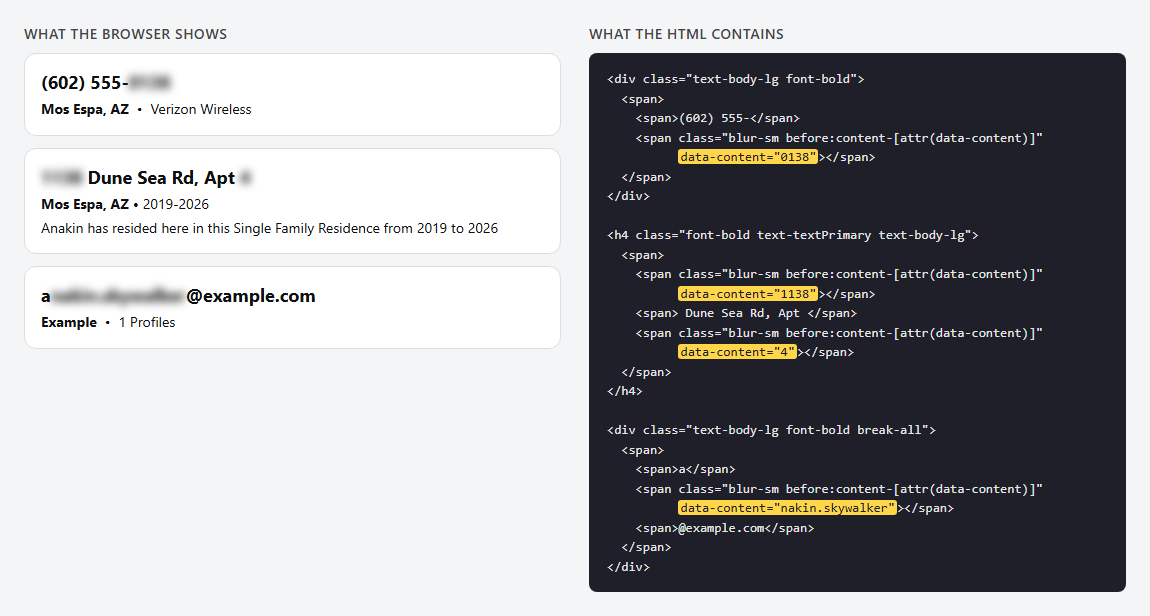
The fix is one loop, right after soup is built:
# AnyWho blurs the paid characters with CSS; the real ones sit in each span's data-content attribute
for span in soup.select("span[data-content]"):
    span.string = span["data-content"]
span.string writes each attribute value into its span as real text. The loop runs before any parsing, so every later get_text() call reads (602) 555-0138 and 1138 Dune Sea Rd, Apt 4. The search and reverse phone scripts run the same two lines.
On 12 saved profile pages (11 different people), the scraper returned 12 of 12 phones with all 10 digits, 34 of 34 streets with a house number and 5 of 5 emails with the full username. The values aren't decoys either: one profile fetched from a residential IP and through Scrape.do carried identical data-content values, 24 of 24, and they match across the search, profile and phone pages.
Two lines, and the paywall teaser turns into full data.
The phones, addresses and emails you unmask belong to real people; every value in this guide is fictional. Don't use scraped AnyWho data for employment, tenant screening or credit decisions, which the FCRA regulates. Honor opt-out requests and follow the privacy laws that apply to you.
Extracting Name, Age, and Aliases
Every field goes through one helper:
def clean(element):
    return " ".join(element.get_text().split()) if element else ""

# h1 reads "Full Name, Age"
header = soup.find("h1")
name, _, age = clean(header).partition(", ")
aliases = clean(header.find_next_sibling("p")).replace("Aka:", "").strip()
clean() collapses whitespace and returns an empty string for a missing element. After the unmask loop, that's enough: 376 saved name, address and label strings had no stray , or doubled commas. The h1 reads "Anakin S Skywalker, 41", so .partition(", ") splits it, and the aliases sit in the next <p>.
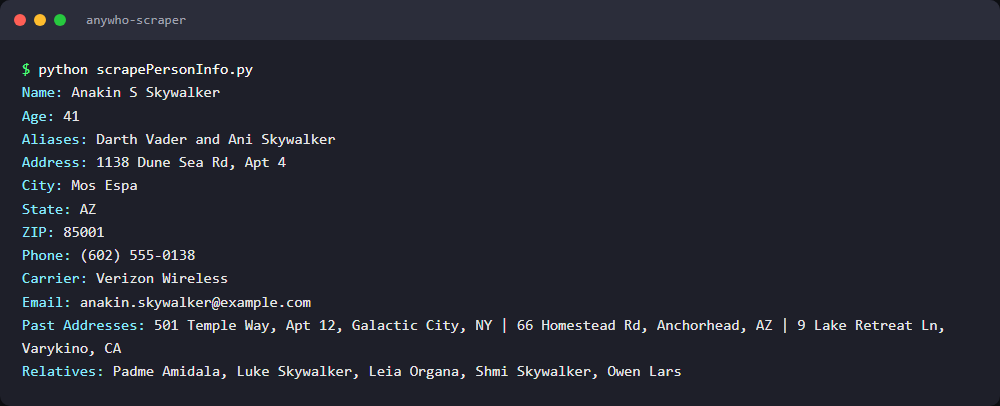
Name: Anakin S Skywalker
Age: 41
Aliases: Darth Vader and Ani Skywalker
An exact age, not a range.
Extracting the Current Address
The summary paragraph links the current address as "street, City, ST, ZIP":
# Summary links the current address as "street, city, state, zip"
current = clean(soup.select_one('#summary a[href="#addresses"]'))
street, city, state, zipcode = [part.strip() for part in current.rsplit(",", 3)]
.rsplit(",", 3) splits from the right, so a comma inside the street stays put. That matters here, because "1138 Dune Sea Rd, Apt 4" has one. This link matched the first address card on 11 of 11 profiles I checked.
Address: 1138 Dune Sea Rd, Apt 4
City: Mos Espa
State: AZ
ZIP: 85001
House number, unit, city, state and ZIP, all in one request.
Extracting Phones, Carriers, and Emails
Phones are .show-more-item cards in #phones, with the number in the first <div> and the carrier in the last <span>. Emails use the same card pattern:
# Section ids and .show-more-item outlive the Tailwind utility classes around them
phones = soup.select("#phones .show-more-item")
phone = clean(phones[0].find("div")) if phones else ""
carrier = clean(phones[0].find_all("span")[-1]) if phones else ""

emails = [clean(card.find("div")) for card in soup.select("#emails .show-more-item")]
Both values arrive complete because the unmask loop already wrote the last four digits and the email username into the page.
Phone: (602) 555-0138
Carrier: Verizon Wireless
Email: anakin.skywalker@example.com
Only some profiles have an #emails section, so emails can come back empty.
Extracting Address History and Relatives
Relatives are h3 headings in #family. Address history is the #addresses card list, where the first card is the current address:
relatives = [clean(h3).replace("Relative data result:", "").strip() for h3 in soup.select("#family h3")]

# First address card is the current one, the rest is history
past_addresses = []
for card in soup.select("#addresses .show-more-item")[1:]:
    city_state = clean(card.find("p")).split("•")[0].strip()
    past_addresses.append(f"{clean(card.find('h4'))}, {city_state}")
Each card's <h4> holds the street with its house and unit numbers, and its <p> reads "City, ST • YYYY-YYYY". That range is years lived, not a ZIP+4, so we keep the part before the •.
Past Addresses: 501 Temple Way, Apt 12, Galactic City, NY | 66 Homestead Rd, Anchorhead, AZ | 9 Lake Retreat Ln, Varykino, CA
Relatives: Padme Amidala, Luke Skywalker, Leia Organa, Shmi Skywalker, Owen Lars
Ignore "Legal Records" and "Background", by the way. They count records for same-name people in the state, not for this person.
Final Code and Output
import requests
from bs4 import BeautifulSoup

token = "<your_token>"
target_url = "<target_person_url>"  # e.g. https://www.anywho.com/people/john+smith/texas/austin/a123456789

# Passing the target as a param lets requests handle the URL encoding
response = requests.get("https://api.scrape.do/", params={"token": token, "url": target_url, "geoCode": "us"})
if response.status_code != 200:
    raise SystemExit(f"Request failed with status {response.status_code}")
soup = BeautifulSoup(response.text, "html.parser")

# AnyWho blurs the paid characters with CSS; the real ones sit in each span's data-content attribute
for span in soup.select("span[data-content]"):
    span.string = span["data-content"]

def clean(element):
    return " ".join(element.get_text().split()) if element else ""

# h1 reads "Full Name, Age"
header = soup.find("h1")
name, _, age = clean(header).partition(", ")
aliases = clean(header.find_next_sibling("p")).replace("Aka:", "").strip()

# Summary links the current address as "street, city, state, zip"
current = clean(soup.select_one('#summary a[href="#addresses"]'))
street, city, state, zipcode = [part.strip() for part in current.rsplit(",", 3)]

# Section ids and .show-more-item outlive the Tailwind utility classes around them
phones = soup.select("#phones .show-more-item")
phone = clean(phones[0].find("div")) if phones else ""
carrier = clean(phones[0].find_all("span")[-1]) if phones else ""

emails = [clean(card.find("div")) for card in soup.select("#emails .show-more-item")]
relatives = [clean(h3).replace("Relative data result:", "").strip() for h3 in soup.select("#family h3")]

# First address card is the current one, the rest is history
past_addresses = []
for card in soup.select("#addresses .show-more-item")[1:]:
    city_state = clean(card.find("p")).split("•")[0].strip()
    past_addresses.append(f"{clean(card.find('h4'))}, {city_state}")

print(f"Name: {name}")
print(f"Age: {age}")
print(f"Aliases: {aliases}")
print(f"Address: {street}")
print(f"City: {city}")
print(f"State: {state}")
print(f"ZIP: {zipcode}")
print(f"Phone: {phone}")
print(f"Carrier: {carrier}")
print(f"Email: {emails[0] if emails else ''}")
print(f"Past Addresses: {' | '.join(past_addresses[:3])}")
print(f"Relatives: {', '.join(relatives[:5])}")
The prints cap past addresses at 3 and relatives at 5, while the lists keep everything. All 144 printed values from the 12 saved pages came out with no stray spaces or commas, and a live run on a nationwide John Smith result filled 11 of 12 fields (that profile has no email section).
Scraping AnyWho Search Results by Name
An AnyWho search by name is the better deal for lead lists: 5 people per page, each with age, aliases, street addresses, phones, emails and relatives, for the same 1 credit as one profile.
Building the Search URL
Filters are path segments after /people/{first}+{last}: the full state name, then the city. An ?age_range= query takes 0-30, 31-60, 61-80 or 80.
path = f"/people/{first_name}+{last_name}" + (f"/{state}" if state else "")
next_url = "https://www.anywho.com" + path.lower().replace(" ", "+")
With state = "new york", this builds /people/john+smith/new+york, the format AnyWho expects. Leave state empty for a nationwide search.
Parsing Result Cards
Each card is a div under #name-search-results, and every row inside it is an <h3> label followed by one <div> per value. So the loop reads labels, not positions:
    # AnyWho blurs the paid characters with CSS; the real ones sit in each span's data-content attribute
    for span in soup.select("span[data-content]"):
        span.string = span["data-content"]

    for card in soup.select("#name-search-results > div"):
        # Card header reads "Full Name, Age 42"
        name, _, age = clean(card.find("h2").parent).partition(", Age")

        # Each row is an <h3> label ("Lives in:", "Emails:"...) followed by one <div> per value
        fields = {}
        for h3 in card.find_all("h3"):
            fields[clean(h3).rstrip(":")] = " | ".join(clean(div) for div in h3.find_next_siblings("div"))
The unmask loop runs once per page, before any card is read. Each label's values get joined with | on their way into fields, which makes every entry a finished CSV cell. A card without an "Emails:" row never gets that entry, and fields.get() returns an empty string instead of raising. This script's clean() also strips stray • separators from card values.
The first row it writes:
Anakin S Skywalker,41,Darth Vader | Ani Skywalker,"1138 Dune Sea Rd, Apt 4, Mos Espa, AZ","501 Temple Way, Apt 12, Galactic City, NY",(602) 555-0138 | (602) 555-0199,anakin.skywalker@example.com,Padme Amidala | Luke Skywalker,https://www.anywho.com/people/anakin+skywalker/arizona/mos+espa/a1000000001Paginating Past the First Page
A John Smith search says "71,505 Reports." Pagination ends after 13.
Across 8 test queries, nothing passed 20 results (4 pages of 5), so the loop stops at 4 pages:
while next_url and page <= 4:
    response = requests.get("https://api.scrape.do/", params={"token": token, "url": next_url, "geoCode": "us"})
    # A search with no matches comes back as a 404
    if response.status_code == 404:
        print("No results found")
        break
    if response.status_code != 200:
        print(f"Request failed with status {response.status_code}")
        break
No matches means a real 404. Scrape.do passes it through and bills it as a successful response, and the script prints "No results found" and stops. Other errors break the loop and keep the rows collected so far. Each page ends by following the "Next Page" link:
    next_link = soup.select_one('nav[aria-label="Pagination"] a[aria-label="Next Page"]')
    next_url = "https://www.anywho.com" + next_link["href"] if next_link else None
On the last page the link is missing, next_url becomes None, and the while condition ends the loop. The fictional Anakin Skywalker search fits on one page:

Real queries in my tests ran 2 to 4 pages. To reach more people, split the query: each state, city or age range gets its own 20-result window.
Export to CSV
csv.writer writes 9 columns, and newline="" stops Windows from inserting a blank line after every row. The full script:
import requests
from bs4 import BeautifulSoup
import csv

token = "<your_token>"
first_name = "john"
last_name = "smith"
state = ""  # optional full state name, e.g. "new york"

path = f"/people/{first_name}+{last_name}" + (f"/{state}" if state else "")
next_url = "https://www.anywho.com" + path.lower().replace(" ", "+")

def clean(element):
    return " ".join(element.get_text().split()).strip(" •") if element else ""

rows = []
page = 1
# AnyWho never serves more than 20 results (4 pages of 5) per query, so 4 requests cover a full search
while next_url and page <= 4:
    response = requests.get("https://api.scrape.do/", params={"token": token, "url": next_url, "geoCode": "us"})
    # A search with no matches comes back as a 404
    if response.status_code == 404:
        print("No results found")
        break
    if response.status_code != 200:
        print(f"Request failed with status {response.status_code}")
        break
    soup = BeautifulSoup(response.text, "html.parser")

    # AnyWho blurs the paid characters with CSS; the real ones sit in each span's data-content attribute
    for span in soup.select("span[data-content]"):
        span.string = span["data-content"]

    for card in soup.select("#name-search-results > div"):
        # Card header reads "Full Name, Age 42"
        name, _, age = clean(card.find("h2").parent).partition(", Age")

        # Each row is an <h3> label ("Lives in:", "Emails:"...) followed by one <div> per value
        fields = {}
        for h3 in card.find_all("h3"):
            fields[clean(h3).rstrip(":")] = " | ".join(clean(div) for div in h3.find_next_siblings("div"))

        rows.append([
            name,
            age.strip(),
            fields.get("AKA", ""),
            fields.get("Lives in", ""),
            fields.get("Used to live in", ""),
            fields.get("Phone number(s)", ""),
            fields.get("Emails", ""),
            fields.get("May be related to", ""),
            "https://www.anywho.com" + card.select_one('a[variation="invisible-wrapper"]')["href"],
        ])

    next_link = soup.select_one('nav[aria-label="Pagination"] a[aria-label="Next Page"]')
    next_url = "https://www.anywho.com" + next_link["href"] if next_link else None
    print(f"Page {page}: {len(rows)} results so far")
    page += 1

with open("anywho-search-results.csv", "w", newline="", encoding="utf-8") as f:
    writer = csv.writer(f)
    writer.writerow(["name", "age", "aliases", "address", "past_addresses", "phones", "emails", "relatives", "profile_url"])
    writer.writerows(rows)

print(f"Saved {len(rows)} results to anywho-search-results.csv")
The profile_url column feeds straight into the profile scraper. A live 2-page search returned 7 rows with 13 of 13 phones and 2 of 2 emails in full, and 3 saved searches gave 23 rows with 35 of 35 full phones.

AnyWho Reverse Phone Lookup
My favorite free page on AnyWho. An AnyWho reverse lookup by phone returns phone type, carrier, location, spam check and owner records with names, ages, addresses and relatives, all in the initial HTML. That covers most of what lead validation needs.
The URL is /phone/ plus 10 digits (AnyWho's router rejects area codes starting with 0 or 1), and only the target differs from the profile call:
phone_number = "<10_digit_phone>"  # e.g. 6025550138, no dashes or country code
target_url = f"https://www.anywho.com/phone/{phone_number}"
Numbers without owners still return 200 with the summary filled.
Reading the Phone Summary
Labels like "PHONE TYPE:" are plain text, and the value is the label element's next sibling. After the same unmask loop, one helper covers them all:
# AnyWho blurs the paid characters with CSS; the real ones sit in each span's data-content attribute
for span in soup.select("span[data-content]"):
    span.string = span["data-content"]

# "+2 more" links only jump to the owner cards below, so we drop them from the summary
for link in soup.select('a[href="#records"]'):
    link.decompose()

def clean(element):
    return " ".join(element.get_text().split()) if element else ""

# Labels like "PHONE TYPE:" are plain text, their value is the next sibling element
def field(scope, label):
    element = scope.find(string=label)
    return clean(element.parent.find_next_sibling()).replace("•", " | ") if element else ""
field() finds the label text, steps to its parent and reads the next sibling. The "+2 more" jump links would pollute the location, so we delete them first. We skip "POTENTIAL OWNERS:" and read the owner cards instead.
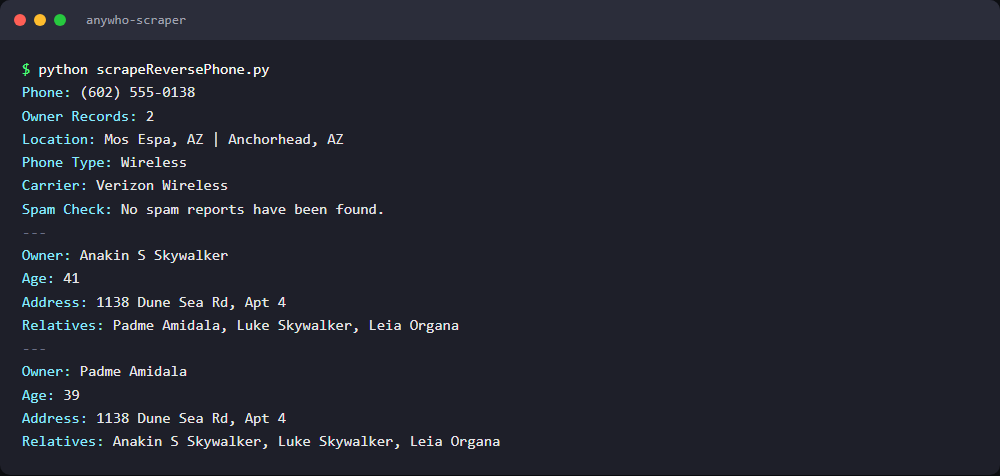
Phone: (602) 555-0138
Owner Records: 2
Location: Mos Espa, AZ | Anchorhead, AZ
Phone Type: Wireless
Carrier: Verizon Wireless
Spam Check: No spam reports have been found.
Wireless or landline, plus the carrier, for free.
Parsing Owner Records
Owner cards sit under #records, up to about 10 per number. Each card has the owner's name in an <h4> plus "AGE:", "ADDRESS:" and "RELATIVES:" labels, so the same field() reads them, scoped to one card:
# Each owner record card carries a name, age, street address and relatives
for owner in owners:
    print("---")
    print(f"Owner: {clean(owner.find('h4'))}")
    print(f"Age: {field(owner, 'AGE:')}")
    print(f"Address: {field(owner, 'ADDRESS:')}")
    print(f"Relatives: {field(owner, 'RELATIVES:')}")
The summary passes the whole soup to field(), and the loop passes one owner card. Names and relatives print in full because the unmask loop already ran. The card address has no city, so the page-level Location line supplies it.
---
Owner: Anakin S Skywalker
Age: 41
Address: 1138 Dune Sea Rd, Apt 4
Relatives: Padme Amidala, Luke Skywalker, Leia Organa
---
Owner: Padme Amidala
Age: 39
Address: 1138 Dune Sea Rd, Apt 4
Relatives: Anakin S Skywalker, Luke Skywalker, Leia Organa
Some fields stay paid, though. "EMAILS:" read "See available results" on 11 of 11 saved owner cards, so the script skips it, and one owner out of 10 on a shared landline had the same text where the age should be.
Final Code and Output
import requests
from bs4 import BeautifulSoup

token = "<your_token>"
phone_number = "<10_digit_phone>"  # e.g. 6025550138, no dashes or country code
target_url = f"https://www.anywho.com/phone/{phone_number}"

response = requests.get("https://api.scrape.do/", params={"token": token, "url": target_url, "geoCode": "us"})
if response.status_code != 200:
    raise SystemExit(f"Request failed with status {response.status_code}")
soup = BeautifulSoup(response.text, "html.parser")

# AnyWho blurs the paid characters with CSS; the real ones sit in each span's data-content attribute
for span in soup.select("span[data-content]"):
    span.string = span["data-content"]

# "+2 more" links only jump to the owner cards below, so we drop them from the summary
for link in soup.select('a[href="#records"]'):
    link.decompose()

def clean(element):
    return " ".join(element.get_text().split()) if element else ""

# Labels like "PHONE TYPE:" are plain text, their value is the next sibling element
def field(scope, label):
    element = scope.find(string=label)
    return clean(element.parent.find_next_sibling()).replace("•", " | ") if element else ""

owners = soup.select("#records .show-more-item")

print(f"Phone: {clean(soup.find('h1')).replace('Who Owns', '').strip(' ?')}")
print(f"Owner Records: {len(owners)}")
print(f"Location: {field(soup, 'LOCATIONS:')}")
print(f"Phone Type: {field(soup, 'PHONE TYPE:')}")
print(f"Carrier: {field(soup, 'PHONE CARRIER:')}")
print(f"Spam Check: {field(soup, 'SPAM CHECK:')}")

# Each owner record card carries a name, age, street address and relatives
for owner in owners:
    print("---")
    print(f"Owner: {clean(owner.find('h4'))}")
    print(f"Age: {field(owner, 'AGE:')}")
    print(f"Address: {field(owner, 'ADDRESS:')}")
    print(f"Relatives: {field(owner, 'RELATIVES:')}")
The Phone: line is the page's h1, "Who Owns (602) 555-0138?", minus the question. I tested it offline on a single-owner landline, a 10-owner landline and an unowned number, then live on the 10-owner line, where all 10 names and all 10 streets came back full.
FAQ
Does AnyWho Have an API?
No. AnyWho has no public API, and its robots.txt disallows /api/, an internal path. The data lives in server-rendered HTML, so parsing the profile, search and phone pages is the practical route.
Is It Legal to Scrape AnyWho?
This isn't legal advice (our web scraping legality guide covers the broader picture). AnyWho's help page says it is not a consumer reporting agency under the Fair Credit Reporting Act, and it tells users not to use its data for employment, tenant screening or other FCRA decisions. AnyWho's footer Terms and Privacy links now point to Spokeo, whose terms prohibit scraping and other automated access. In hiQ v. LinkedIn (9th Cir. 2022), the court held that scraping public pages likely isn't access "without authorization" under the CFAA, but hiQ later lost on breach of contract.
Why Are AnyWho Phone Numbers Partially Hidden?
Because the full number is the product: the blurred digits tease the paid report Spokeo sells behind the "Unlock Phone Numbers" button. The blur is only CSS, though: the last four digits ship in the HTML's data-content attributes, so an AnyWho phone lookup through our scrapers returns all 10. Treat those numbers as personal data and keep them out of FCRA decisions.
Can You Do an Address Lookup on AnyWho?
Not on AnyWho itself. /reverse-address-search returns a 404, and the site's address search hands you to Spokeo. For an AnyWho address lookup on a known person, the profile scraper returns the full current street with house and unit number, plus city, state, ZIP and years lived at past addresses.
Why Does AnyWho Return 403 to My Scraper?
A CloudFront rule, most likely AWS WAF, rejects library and headless user agents like python-requests and HeadlessChrome, whatever your IP or country. A browser user agent fixes small tests, and Scrape.do covers larger runs without header upkeep. Our 403 Forbidden guide walks through the other causes.
Conclusion
AnyWho's defenses fit in one sentence: a user agent string match on CloudFront. Everything after that is parsing.
- One default Scrape.do request with
geoCode=usper page, 1 credit, no premium proxies - Section ids,
show-more-itemcards and label text replace the JSON-LD other people search sites hand you - A two-line
span[data-content]loop, run before any parsing, returns the phone digits, house numbers, emails and owner names AnyWho blurs - For wider coverage, split a name search by state, city and age range, then feed each
profile_urlinto the profile scraper
Head of Marketing








