Category:Scraping Use CasesView as Markdown
How to Scrape Alibaba Product Listings, Prices, and Reviews

Software Engineer


Alibaba serves millions of B2B product listings, tiered wholesale prices, supplier histories, and buyer reviews. All of it ships as JSON blobs buried inside script tags, not readable HTML. Category pages embed window._PAGE_DATA_. Product pages use window.detailData. Buyer reviews don't appear in either; they come from a signed mobile API endpoint that requires session cookies, an MD5 signature, and a millisecond timestamp.
No BeautifulSoup, no render=true, no CSS selectors. We need a brace-balanced JSON extractor, one MTOP signing trick, and three outputs: a CSV of category listings, a JSON of a single product with dynamic attributes, and a CSV of paginated buyer reviews.
Alibaba Scraping Setup and Anti-Bot Handling
Standard requests to alibaba.com return bot-detection pages. The site fingerprints incoming traffic aggressively, and a plain requests.get will not get past the front door.
We route every request through Scrape.do with super=true and geoCode=us. No JavaScript rendering needed. The geoCode parameter matters beyond anti-bot: it controls which products appear in category results and which currency prices display in. US returns USD, GB returns GBP.
Prerequisites and Scrape.do configuration
The only external library we need is requests. All parsing uses standard library modules: json, re, csv, hashlib, time, and urllib.parse. No BeautifulSoup anywhere.
Every request goes through the same helper pattern. Here is the one from the category scraper:
def fetch(target_url):
    api_url = "http://api.scrape.do/?" + urllib.parse.urlencode(
        {"token": TOKEN, "url": target_url, "super": "true", "geoCode": "us"},
        quote_via=urllib.parse.quote,
    )
    r = requests.get(api_url, timeout=120)
    if r.status_code != 200:
        print(f"  HTTP {r.status_code}")
        return None
    return r
The token placeholder is <your_token>. Replace it with your Scrape.do API token.
The brace-balanced JSON extractor
Alibaba embeds multi-megabyte JSON objects inside script tags. A standard regex like window\._PAGE_DATA_\s*=\s*(\{.*\}) would either grab too little (stopping at the first }) or too much (greedy match running past the object boundary). The real closing brace is buried thousands of braces deep. We need a function that finds the assignment, then walks character by character tracking brace depth until it returns to zero.
def extract_json_blob(html, pattern):
    # Walk forward from the regex match, counting braces to find the full JSON object
    m = re.search(pattern, html)
    if not m:
        return None
    start = m.start(1)
    depth = 0
    for i in range(start, min(len(html), start + 3_000_000)):
        if html[i] == "{":
            depth += 1
        elif html[i] == "}":
            depth -= 1
            if depth == 0:
                return json.loads(html[start : i + 1])
    return None
The regex finds the variable assignment (like window._PAGE_DATA_ = {), and the capture group marks the opening brace. From there, the loop counts up on every { and down on every }. When depth hits zero, we have the complete object. The three-million-character cap prevents runaway iteration on malformed responses. We will reuse this function in every scraper.
Scraping Alibaba Category Listings
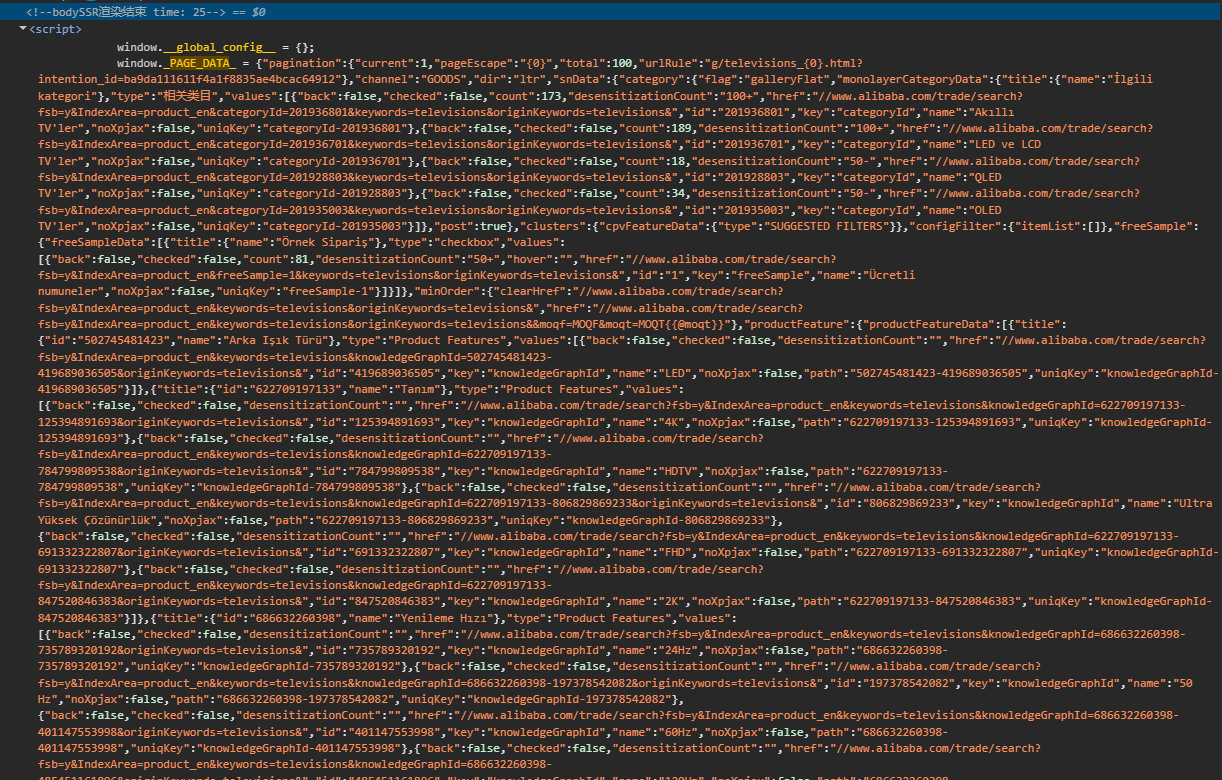
Category showroom pages list products with names, prices, images, minimum order quantities, review counts, and supplier history. All of it sits inside _PAGE_DATA_ at a predictable path. The DOM is unreliable to parse, but the data is always there.
We start by fetching the first category page and extracting the blob:
page_data = extract_json_blob(response.text, r"window\._PAGE_DATA_\s*=\s*(\{)")
if not page_data:
    print("  Could not parse _PAGE_DATA_.")
    break
No blob, no data. If this call returns None, the response was likely a bot-detection page.
Handling pagination
Here is the catch. Alibaba category pages do not use ?page=2. That query parameter has no effect. Pagination works through a URL template inside _PAGE_DATA_ itself.
# Grab urlRule from first page for subsequent pagination
pagination = page_data.get("pagination")
if pagination:
    url_rule = pagination.get("urlRule") or url_rule
The urlRule value looks like /category/televisions_634/{0}.html. Page 1 uses the original category URL. For pages 2 and beyond, we fill in the placeholder with the page number:
for page_idx in range(1, MAX_PAGES + 1):
    if page_idx == 1:
        target = CATEGORY_URL
    elif url_rule:
        # urlRule looks like "/category/televisions_634/{0}.html" -- fill in page number
        origin = "https://www.alibaba.com"
        path = url_rule.replace("{0}", str(page_idx)).lstrip("/")
        target = f"{origin}/{path}"
    else:
        print("No pagination urlRule found; stopping.")
        break
Extracting product fields
The product list sits at offerResultData.itemInfoList. Each entry has an offer object, but not every entry is a real product. Ads and store cards sneak into the list, so we filter by checking the product URL:
items = page_data["offerResultData"]["itemInfoList"]
for item in items:
    offer = item["offer"]
    info = offer.get("information") or {}

    # Skip non-product entries (ads, store cards)
    if "/product-detail/" not in str(info.get("productUrl", "")):
        continue
From each valid offer, we pull seven fields into a flat row:
    batch.append({
        "name": info.get("puretitle", "").strip(),
        "price": str(trade.get("price", "")).strip(),
        "image_url": raw_img.strip(),
        "min_order": str(trade.get("minOrder", "")).strip(),
        "review_count": str(reviews.get("reviewCount", "")),
        "review_rating": str(reviews.get("reviewScore", "")),
        "supplier_history_order_count": str(company.get("supplierHistoryOrderCount", "")),
    })
Image URLs come back protocol-relative (starting with //), so we add the https: prefix before storing them. The supplier_history_order_count is a supplier-level metric, not per-SKU units sold.
Exporting to CSV
After all pages are collected, we write the rows out:
with open(OUTPUT_CSV, "w", newline="", encoding="utf-8") as f:
    writer = csv.DictWriter(f, fieldnames=FIELDS)
    writer.writeheader()
    writer.writerows(all_rows)

print(f"Wrote {len(all_rows)} rows to {OUTPUT_CSV}")
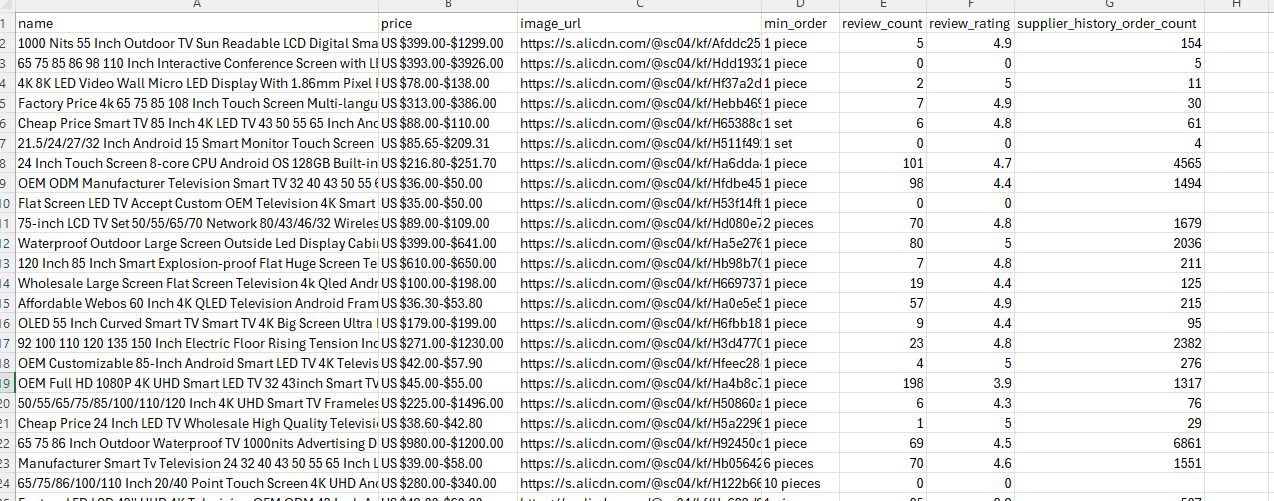
A test run on the Televisions showroom returned 116 products across 3 pages (38 + 39 + 39). Every row has name, price, image URL, and order details. The category page stops being a showroom and becomes rows.
Scraping Alibaba Product Details
Product detail pages use a different JSON variable: window.detailData. The structure is separate from _PAGE_DATA_, with data organized under globalData.product, globalData.trade, and globalData.review. The same extract_json_blob function works here; the only change is the regex pattern:
print(f"Fetching PDP: {PRODUCT_URL}")
api_url = "http://api.scrape.do/?" + urllib.parse.urlencode(
    {"token": TOKEN, "url": PRODUCT_URL, "super": "true", "geoCode": "us"},
    quote_via=urllib.parse.quote,
)
response = requests.get(api_url, timeout=120)
if response.status_code != 200:
    raise SystemExit(f"HTTP {response.status_code}")

detail_data = extract_json_blob(response.text, r"window\.detailData\s*=\s*(\{)")
if not detail_data:
    raise SystemExit("Could not parse window.detailData from HTML.")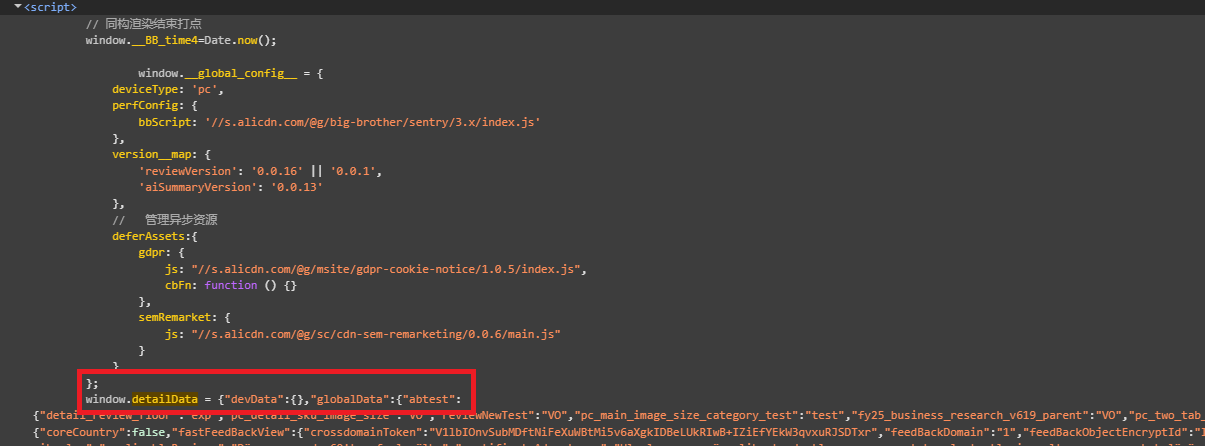
Gallery images
The gallery sits under product.mediaItems. We filter for image types and prefer the large variant:
images = []
for item in product.get("mediaItems") or []:
    if item.get("type") != "image":
        continue
    url = item["imageUrl"].get("big") or item["imageUrl"].get("normal", "")
    if url and url not in images:
        images.append(url)
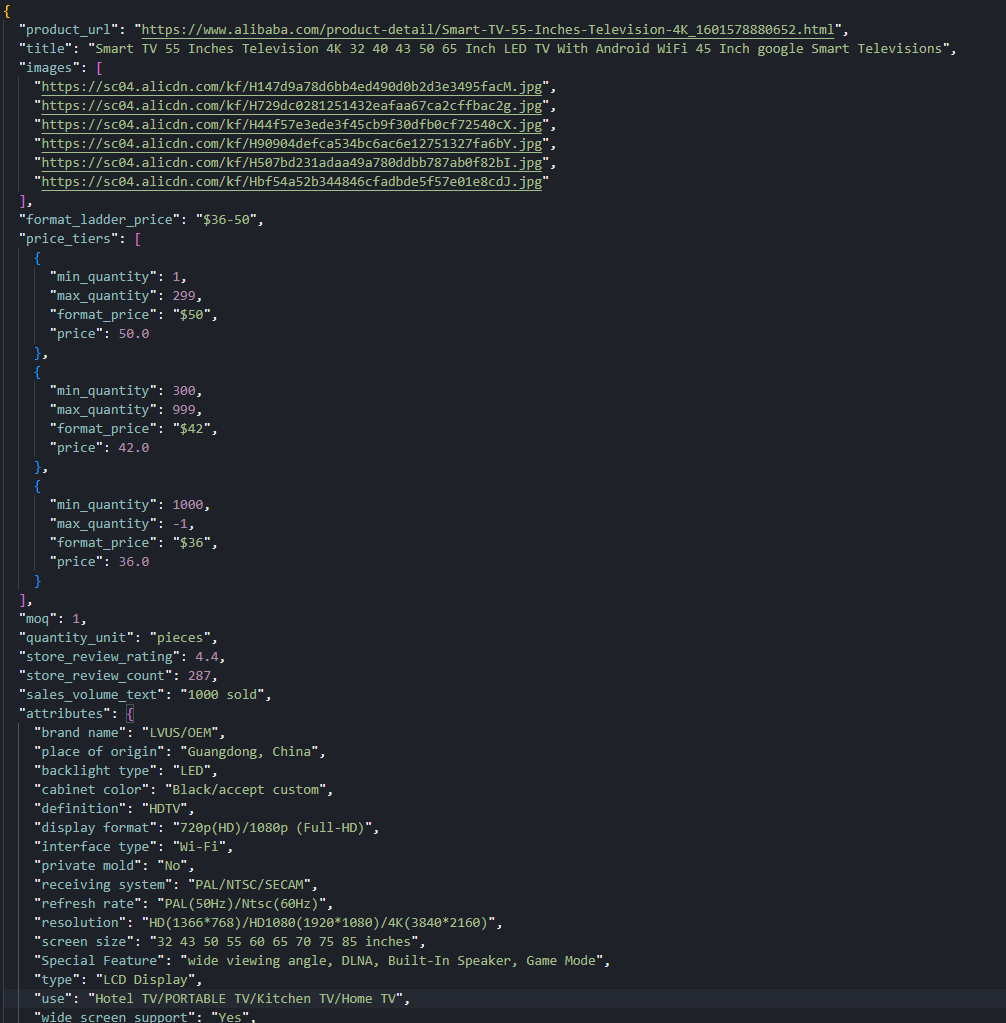
A sample TV listing returned 6 distinct gallery URLs.
Price tiers
Alibaba products have tiered MOQ pricing. Buy 1-9 units and pay one price, buy 50+ and pay less. The tiers live in product.price.productLadderPrices:
price_block = product.get("price") or {}
price_tiers = []
for tier in price_block.get("productLadderPrices") or []:
    price_tiers.append({
        "min_quantity": tier.get("min"),
        "max_quantity": tier.get("max"),
        "format_price": tier.get("formatPrice", ""),
        "price": tier.get("price"),
    })
A summary string like $36-50 is also available for quick reference without iterating the tiers.
Dynamic attributes
Product attributes vary by category. A TV has Screen Size, Resolution, and Display Technology. A textile has Material, Weight, and Thread Count. Hardcoding field names would break across categories, so we read both property lists and merge them into one map:
attributes = {}
for prop_list in ("productBasicProperties", "productOtherProperties"):
    for prop in product.get(prop_list) or []:
        name = prop.get("attrName", "").strip()
        value = str(prop.get("attrValue", "")).strip()
        if name and value:
            attributes[name] = value
The sample TV listing produced 26 attribute pairs. Because the column count varies per product, we export as JSON instead of CSV:
with open(OUTPUT_JSON, "w", encoding="utf-8") as f:
    json.dump(record, f, ensure_ascii=False, indent=2)

print(f"Wrote {OUTPUT_JSON}")
The final record includes the title, gallery URLs, price tiers, MOQ, quantity unit, store-level review summary, sales volume, and the full attribute map.
Scraping Alibaba Product Reviews
Buyer reviews are the hardest part of any Alibaba scraper. They do not appear in detailData. The globalData.review object only contains storeReview, which is an aggregate (average star, total count). Individual review bodies, ratings, dates, and attached images load through a signed mobile API: the MTOP scatter endpoint.
The flow has three phases: fetch the product page for IDs, make a dummy MTOP call to get session cookies, then send signed paginated requests for actual reviews.
Phase 1: Extract IDs from the product page
We need three IDs from detailData: companyId and aliId from the seller object, and productId from the product object.
gd = detail_data["globalData"]
seller = gd["seller"]
product = gd["product"]
store_review = gd["review"]["storeReview"]

company_id = int(seller["companyId"])
seller_ali_id = int(seller["aliId"])
product_id = int(product["productId"])
No IDs, no reviews. These three values go into every MTOP request.
Phase 2: Obtain session cookies
The MTOP gateway requires _m_h5_tk and _m_h5_tk_enc cookies for signing. The usual approach is to copy these from DevTools manually, but that means refreshing them every time they expire. We found a better way: send a throwaway request with placeholder IDs. The request intentionally fails (the IDs are fake), but the gateway issues the cookies anyway. This works because the cookie issuance happens before the request validation, not after.
def obtain_mtop_cookies():
    # Hit the MTOP gateway with a throwaway request so it sets _m_h5_tk cookies
    dummy_data = json.dumps(
        {"clusterId": 0, "currentPage": 1, "countryCode": "US",
         "pageSize": 1, "language": "en", "currency": "USD",
         "companyId": 1, "sellerAliId": 1, "productId": 1},
        separators=(",", ":"),
    )
    dummy_url = (
        f"https://acs.h.alibaba.com/h5/{MTOP_API}/1.0/?"
        + urllib.parse.urlencode({
            "jsv": MTOP_JSV, "appKey": MTOP_APP_KEY, "t": "1", "sign": "dummy",
            "api": MTOP_API, "v": "1.0", "H5Request": "true",
            "type": "originaljson", "dataType": "json", "data": dummy_data,
        }, quote_via=urllib.parse.quote)
    )
Scrape.do forwards the target site's cookies through the Scrape.do-Cookies response header. We parse them out and extract the signing token by splitting the _m_h5_tk value on its first underscore:
h5_token = mtop_h5_tk.split("_", 1)[0]
cookie_str = f"_m_h5_tk={mtop_h5_tk}; _m_h5_tk_enc={mtop_h5_tk_enc}"
Phase 3: Signed MTOP scatter requests
Each review request needs an MD5 signature built from four parts: the session token, a millisecond timestamp, a fixed app key, and the JSON data payload. The signature changes on every request because the timestamp changes. Send a request with a stale or missing signature and the gateway returns FAIL_SYS_TOKEN_EMPTY immediately.
    data_str = json.dumps({
        "clusterId": 0, "currentPage": page, "countryCode": "US",
        "pageSize": MTOP_PAGE_SIZE, "language": "en", "currency": "USD",
        "companyId": company_id, "sellerAliId": seller_ali_id, "productId": product_id,
    }, separators=(",", ":"), ensure_ascii=False)

    # MTOP requires an MD5 signature: token + timestamp + appKey + payload
    ts = str(int(time.time() * 1000))
    sign = hashlib.md5(f"{h5_token}&{ts}&{MTOP_APP_KEY}&{data_str}".encode()).hexdigest()
The locale fields in the payload (countryCode, language, currency) must match the geoCode used in Scrape.do requests. If we proxy through a US IP but request Chinese-language reviews, the response may come back in Mandarin or get filtered to a different review set entirely.
We pass the cookies back to Scrape.do on every request using the setCookies parameter:
r = fetch(mtop_url, {"setCookies": cookie_str})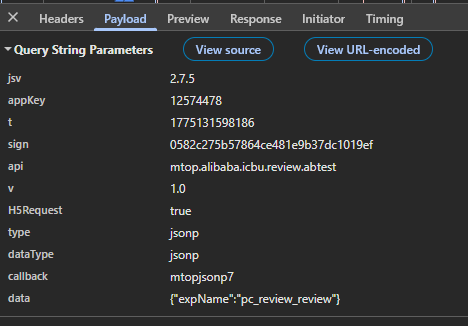
Parsing the review feed
MTOP responses sometimes arrive wrapped in a JSONP callback (mtopjsonpN({...})). This is a legacy pattern from when the endpoint served browser script tags. We strip the wrapper before parsing:
    text = r.text.strip()
    # Strip JSONP wrapper if present (mtopjsonpN({...}))
    if text.startswith("mtopjsonp") and "(" in text:
        text = text[text.find("{") : text.rfind("}") + 1]
There is another quirk: the data field sometimes arrives as a JSON string instead of a parsed object, so we double-parse if needed. The actual reviews sit at a fixed nested path:
    for block in mtop_data["target"]["mobileShopReviewVOList"]:
        for rv in block.get("productReviewVOList") or []:
            if rv.get("reviewContent"):
                page_reviews.append(rv)
We track review IDs in a seen set to avoid duplicates across pages. Pagination stops when a page returns fewer results than the page size, or when we hit the configured maximum.
Normalizing and exporting reviews
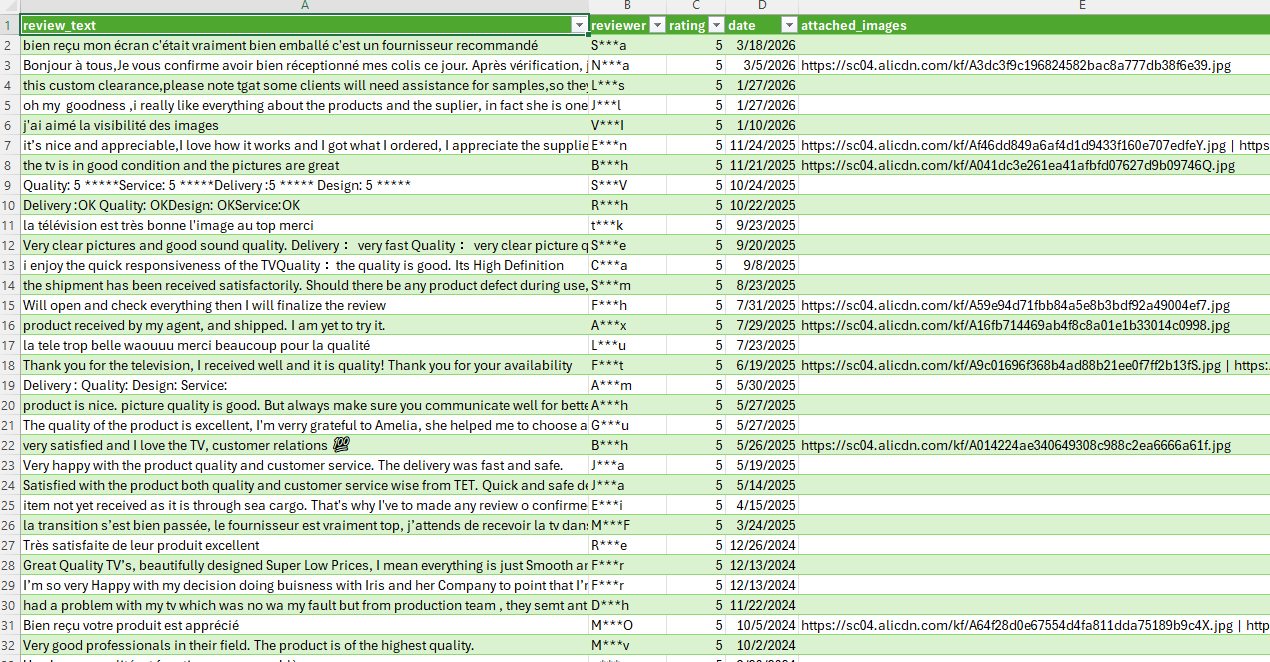
Each raw review object gets cleaned into a flat row:
def normalize_review(rv):
    text = rv.get("reviewContent", "")
    reviewer = rv.get("simpleReviewUserVO", {}).get("anonymousName", "")
    score = rv.get("latitudeScore", {})
    rating = str(score.get("score", ""))
    date = rv.get("reviewTimeFormat", "")

    # Collect review images
    images = []
    for img in rv.get("reviewImageList") or []:
        url = str(img.get("imageId", ""))
        if url.startswith("//"):
            url = "https:" + url
        if url.startswith("http"):
            images.append(url)

    return {
        "review_text": text,
        "reviewer": reviewer,
        "rating": rating,
        "date": date,
        "attached_images": " | ".join(dict.fromkeys(images)),
    }
Multiple review images are joined with a pipe separator. Protocol-relative URLs get the https: prefix, same pattern as the category scraper.
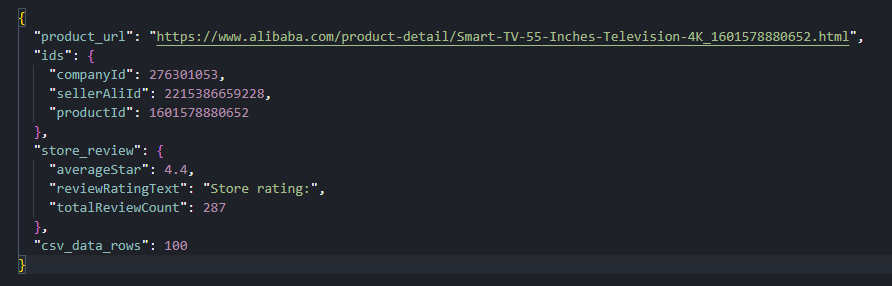
The final output is a CSV with five columns and a context JSON sidecar that stores the product URL, MTOP IDs, and store review snapshot for traceability:
with open(OUTPUT_CSV, "w", newline="", encoding="utf-8") as f:
    writer = csv.DictWriter(f, fieldnames=FIELDS)
    writer.writeheader()
    writer.writerows(reviews)

context = {
    "product_url": PRODUCT_URL,
    "ids": {"companyId": company_id, "sellerAliId": seller_ali_id, "productId": product_id},
    "store_review": store_review,
    "csv_data_rows": len(reviews),
}
with open(OUTPUT_CONTEXT, "w", encoding="utf-8") as f:
    json.dump(context, f, ensure_ascii=False, indent=2)
A test run collected 100 reviews across 10 pages, with 100% fill on text, reviewer, rating, and date fields. About 24% of reviews included attached images.
Conclusion
Alibaba delivers data through three separate mechanisms: _PAGE_DATA_ for category listings, detailData for product pages, and a signed MTOP endpoint for buyer reviews. The brace-balanced extractor handles the first two. The dummy-call cookie trick handles the third, which is the hardest part.
To scale this up, swap the single category URL for a list, tune the delays between requests, and keep an eye on MTOP endpoint versioning. The data paths are stable, but Alibaba does rotate API versions between deploys.
Get 1000 free credits and start scraping with Scrape.do
FAQ
Does Alibaba block web scraping?
Alibaba scraping requires bypassing anti-bot protection that blocks standard HTTP requests. Scrape.do with super=true and geoCode=us bypasses this without JavaScript rendering. No render=true needed.
How does Alibaba's MTOP review API work?
Buyer reviews load through a signed MTOP endpoint on acs.h.alibaba.com. Each request requires an MD5 signature built from a session token, a millisecond timestamp, a fixed app key, and the JSON data payload. The session token comes from the _m_h5_tk cookie, which can be obtained automatically by sending a dummy request to the MTOP gateway.
Can Alibaba be scraped without rendering JavaScript?
Yes. Category and product data ship in the initial HTML response. Reviews come from a direct HTTP endpoint. Everything works with super=true only.
How do product attributes differ across Alibaba categories?
Alibaba product pages display different attribute sets depending on the category. A TV listing has Screen Size, Resolution, and Display Technology. A textile listing has Material, Weight, and Thread Count. The scraper reads both property lists dynamically rather than hardcoding attribute names, producing a variable-length key-value map. This is why the product scraper exports JSON instead of CSV.
Software Engineer








