Category:Scraping Use Cases
Whitepages.com Scraping: Bypass Cloudflare and Extract People Data

Full Stack Developer


⚠ No real data about a real person has been used in this article. Target URLs have been modified by hand to not reveal any personal information of a real person.
Whitepages is one of the largest people search engines in the US, with over 260 million records spanning names, addresses, phone numbers, and public records.
Scraping it? Good luck without the right setup.
The site enforces a hard geoblock on all non-US traffic, runs every request through Cloudflare Turnstile verification, and locks detailed data like exact age and email behind a premium paywall. Your average requests script won't even get a response back, let alone structured data.
This guide walks through bypassing all of that with Python scraping and Scrape.do to extract structured profile data from Whitepages.
Find fully functioning code here. ⚙
Why Is Scraping Whitepages.com Difficult?
Whitepages serves millions of lookups daily and protects that traffic aggressively. Even a well-configured scraper will hit multiple walls before reaching any useful data.
Here's what you're up against:
Georestricted to US IPs Only
Whitepages doesn't serve content to non-US visitors. If your IP resolves to anywhere outside the United States, the connection gets dropped before the page even begins to render.
No redirect, no error message: a blank wall.
This isn't a soft block you can work around with headers or cookies. The check happens at the edge via Cloudflare and rejects the connection outright. Standard datacenter proxies and most VPNs get caught in this filter too, since Cloudflare distinguishes residential traffic from server-farm IPs with high accuracy.
Protected by Cloudflare Turnstile
Even with a valid US IP, every request passes through Cloudflare's Turnstile verification system.
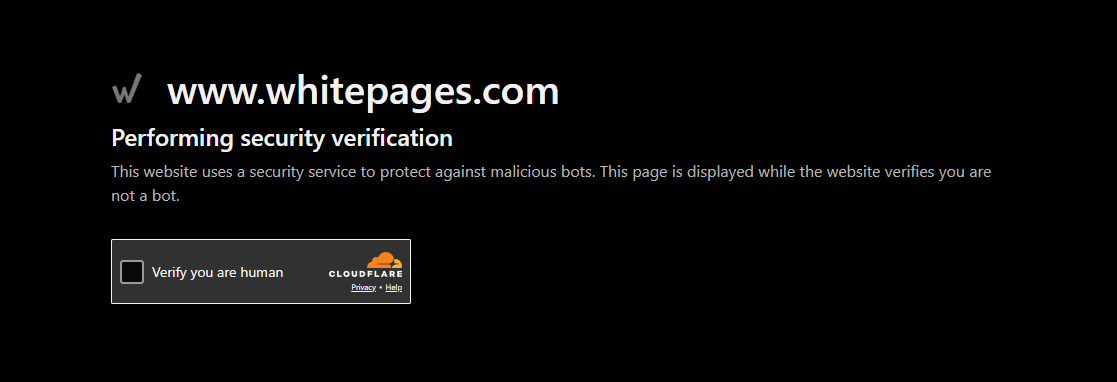
Turnstile is Cloudflare's latest CAPTCHA replacement. It runs invisible JavaScript challenges in the background to verify that the visitor is a real browser with legitimate behavior. If your request fails the check (missing JS execution, wrong TLS fingerprint, suspicious timing), you get stuck on a verification loop that never resolves.
Standard HTTP libraries can't pass this. They don't execute JavaScript, don't maintain browser state, and don't produce the fingerprints Turnstile expects. Even headless browsers need careful configuration to get through consistently.
Restricted Data Behind Paywalls
Here's what catches most people off guard: even after bypassing the geoblock and Cloudflare, Whitepages restricts key data fields on free profiles.
Exact age isn't shown; you get vague ranges like "in their 50s" or "over 40." Full phone history, email addresses, background checks, and detailed family connections are all locked behind a paid premium tier.
Your scraper can only extract what the free profile exposes: name, current address, primary phone number, and an approximate age range. Still useful for lead qualification, identity matching, and skip tracing, but important to know upfront. If you need exact age, email addresses, or family connections without paying, sites like SearchPeopleFree and TruePeopleSearch expose these fields on free profiles.
How Scrape.do Bypasses These Blocks
Scrape.do handles Whitepages' entire defense stack in one API call.
Set super=true and geoCode=us, and your request routes through premium US-based residential IPs: not flagged datacenter connections, but real residential addresses from SDO's proxies.
The anti-bot engine solves Cloudflare Turnstile challenges automatically, handling JavaScript execution, TLS fingerprinting, and browser emulation behind the scenes.
What you get back: a fully rendered HTML page with all free-tier data intact, ready for BeautifulSoup.
Creating a Basic Whitepages Scraper
We'll target a Whitepages person profile and walk through getting access, extracting each data field, and printing clean output.
No real person's data appears anywhere in this guide. The profile below has been replaced with entirely fictional information:
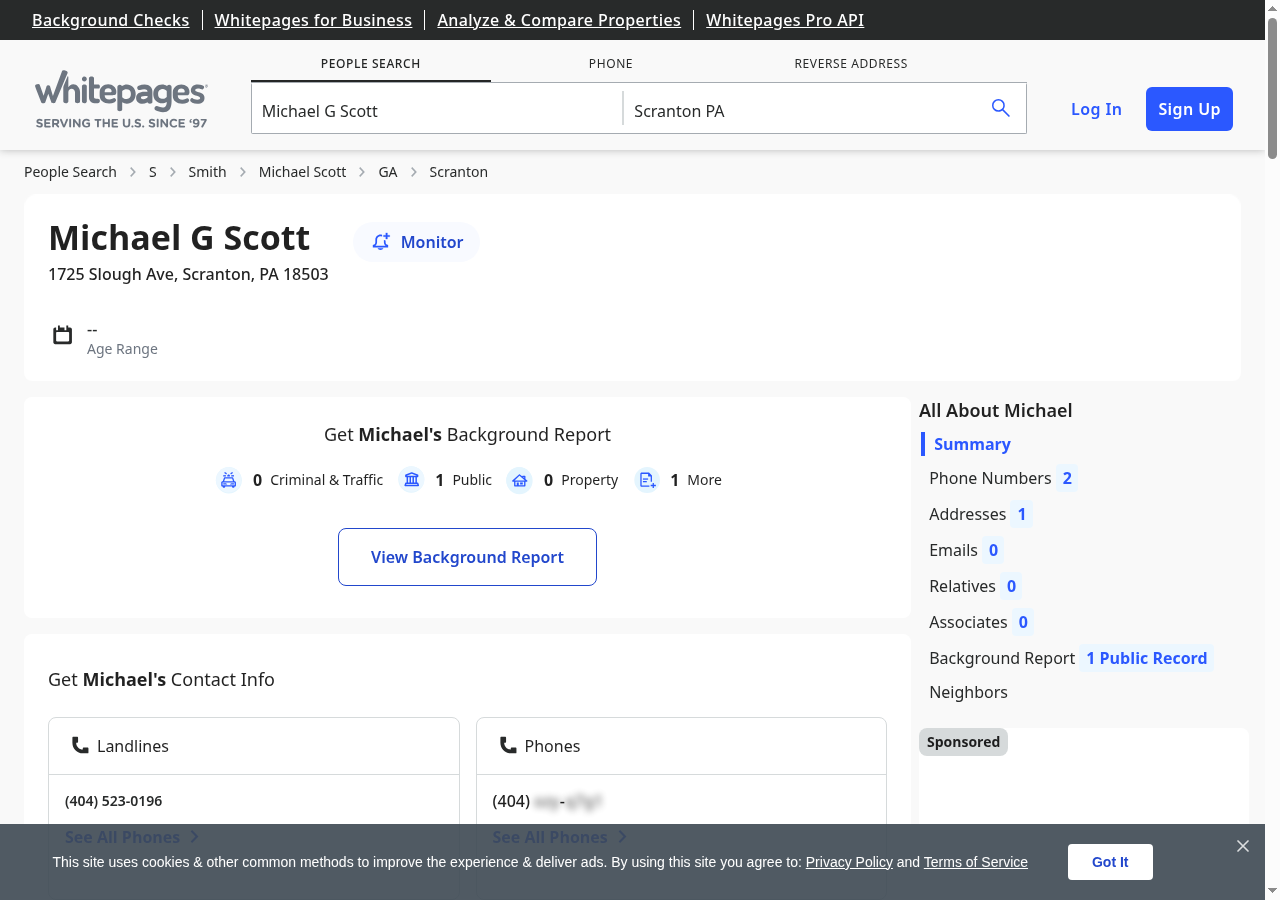
To try it yourself, run a search on Whitepages.com and grab the URL of any result page.
Prerequisites
Two Python libraries handle the heavy lifting: requests for HTTP calls and BeautifulSoup for HTML parsing.
pip install requests beautifulsoup4You'll also need a Scrape.do API token. Sign up for free (no credit card, 1000 credits/month).
Sending a Request and Verifying Access
The first step is confirming access. We send a request through Scrape.do with super=true and geoCode=us, then check for a 200 response.
import requests
import urllib.parse
from bs4 import BeautifulSoup

token = "<your_token>"

target_url = "https://www.whitepages.com/name/Michael-Scott/Scranton-PA/example123"
encoded_url = urllib.parse.quote_plus(target_url)
api_url = f"https://api.scrape.do/?token={token}&url={encoded_url}&super=true&geoCode=us"

response = requests.get(api_url)
soup = BeautifulSoup(response.text, "html.parser")
print(response)
If everything worked:
<Response [200]>That confirms we're past both the geoblock and Cloudflare Turnstile. The HTML is loaded and ready for parsing.
Extracting Name
Whitepages renders the person's full name inside a <div> with the class big-name. The site runs on a Vue.js/Nuxt SSR architecture, so the markup is structured with data-attribute selectors rather than semantic HTML.
We target the first div.big-name element:
name_el = soup.find("div", class_="big-name")
name = name_el.get_text(strip=True) if name_el else ""
print("Name:", name)Name: Michael G ScottThe if name_el else "" guard prevents crashes on profiles where the element might be missing. Rare, but it happens with restricted or removed listings.
Extracting Address, City, State, and ZIP
Address data on Whitepages splits across two <div> elements: address-line1 holds the street, and address-line2 contains the city, state, and ZIP in a "Scranton, PA 18503" format.
We parse them separately and split the location string by comma and whitespace:
address_line1 = soup.find("div", class_="address-line1")
address_line2 = soup.find("div", class_="address-line2")

street = address_line1.get_text(strip=True) if address_line1 else ""
location = address_line2.get_text(strip=True) if address_line2 else ""

city, state, zipcode = "", "", ""
if location:
    parts = location.split(",")
    city = parts[0].strip()
    if len(parts) > 1:
        state_zip = parts[1].strip().split()
        state = state_zip[0] if state_zip else ""
        zipcode = state_zip[1] if len(state_zip) > 1 else ""

print(f"Address: {street}")
print(f"City: {city}")
print(f"State: {state}")
print(f"ZIP: {zipcode}")Address: 1725 Slough Ave
City: Scranton
State: PA
ZIP: 18503The extra split logic handles edge cases where state and ZIP might not both be present. Some profiles only show city and state without a postal code.
Extracting Phone Number
Whitepages uses data-qa-selector attributes on phone number links, a pattern common in Vue.js applications where elements are tagged for automated QA testing.
We target this attribute directly:
phone_el = soup.find("a", attrs={"data-qa-selector": "phone-number-link"})
phone = phone_el.get_text(strip=True) if phone_el else ""
print("Phone:", phone)Phone: (570) 555-0100This grabs the primary listed number. Premium profiles may show additional phone records, but the free tier exposes only one.
Extracting Age from JSON-LD
Here's where Whitepages gets interesting. The age isn't in a simple HTML element; it's embedded in a JSON-LD structured data block inside a <script type="application/ld+json"> tag.
The Person schema includes a description field with text like "Michael G Scott is in their 50s." We parse that string to extract the age range:
import json
age = ""
for script in soup.find_all("script", type="application/ld+json"):
try:
data = json.loads(script.string)
if isinstance(data, dict) and data.get("@type") == "Person":
desc = data.get("description", "")
age = desc.split("is ")[1].split(".")[0] if "is " in desc else ""
break
except (json.JSONDecodeError, TypeError):
pass
print("Age:", age)Age: in their 50sWhitepages only shows approximate ranges on free profiles: no exact numbers without a premium subscription. But for most web scraping use cases like lead qualification or identity matching, a range is enough to work with.
Final Code and Output
Here's the complete scraper that handles the full pipeline from request to structured output:
import requests
import urllib.parse
from bs4 import BeautifulSoup
import json
token = "<your_token>"
target_url = "<target_person_url>" # e.g. https://www.whitepages.com/name/John-Doe/New-York-NY/abc123
encoded_url = urllib.parse.quote_plus(target_url)
api_url = f"https://api.scrape.do/?token={token}&url={encoded_url}&super=true&geoCode=us"
response = requests.get(api_url)
soup = BeautifulSoup(response.text, "html.parser")
name_el = soup.find("div", class_="big-name")
name = name_el.get_text(strip=True) if name_el else ""
address_line1 = soup.find("div", class_="address-line1")
address_line2 = soup.find("div", class_="address-line2")
street = address_line1.get_text(strip=True) if address_line1 else ""
location = address_line2.get_text(strip=True) if address_line2 else ""
city, state, zipcode = "", "", ""
if location:
parts = location.split(",")
city = parts[0].strip()
if len(parts) > 1:
state_zip = parts[1].strip().split()
state = state_zip[0] if state_zip else ""
zipcode = state_zip[1] if len(state_zip) > 1 else ""
phone_el = soup.find("a", attrs={"data-qa-selector": "phone-number-link"})
phone = phone_el.get_text(strip=True) if phone_el else ""
age = ""
for script in soup.find_all("script", type="application/ld+json"):
try:
data = json.loads(script.string)
if isinstance(data, dict) and data.get("@type") == "Person":
desc = data.get("description", "")
age = desc.split("is ")[1].split(".")[0] if "is " in desc else ""
break
except (json.JSONDecodeError, TypeError):
pass
print(f"Name: {name}")
print(f"Age: {age}")
print(f"Address: {street}")
print(f"City: {city}")
print(f"State: {state}")
print(f"ZIP: {zipcode}")
print(f"Phone: {phone}")And the output:
Name: Michael G Scott
Age: in their 50s
Address: 1725 Slough Ave
City: Scranton
State: PA
ZIP: 18503
Phone: (570) 555-0100Conclusion
Whitepages combines hard geoblocking, Cloudflare Turnstile verification, and paywalled data restrictions, a triple layer that stops most scrapers.
Scrape.do handles all three in a single API call:
- 110M+ US residential proxies that bypass Turnstile verification
- Automatic Cloudflare solving with full browser emulation
- Pay only for successful responses
Full Stack Developer








