Category:Scraping Use Cases
Scraping Wayfair with Python: Products, Categories, and Variations

Software Engineer


Wayfair blocks scrapers hard. PerimeterX challenges, JavaScript-rendered content, and behavioral fingerprinting make even basic product page requests return nothing useful.
For anyone doing Wayfair data scraping to build price monitors or product databases, that’s a real problem. Millions of listings across furniture, decor, and home goods sit behind these defenses, and standard HTTP libraries won’t get past the front door.
This guide covers three complete scrapers for web scraping with Python: single product extraction, category-wide collection with pagination, and full variation mapping across colors and sizes. Every script handles Wayfair’s anti-bot layers and outputs structured data.
Complete working code available on GitHub ⚙
Why Is Scraping Wayfair Difficult?
Wayfair’s security is top-tier. They use high-end systems like PerimeterX (now HUMAN Security) and Akamai Bot Manager to analyze behavioral signals and fingerprints. Wayfair has been a tech company from day one, and their investment in AI-powered infrastructure means these defenses keep evolving. If we send a standard request, we’re almost guaranteed to hit a block. Other e-commerce sites use Cloudflare for the same purpose; our guide on how to bypass Cloudflare covers that variant.
Bot Detection Requires Browser Interaction
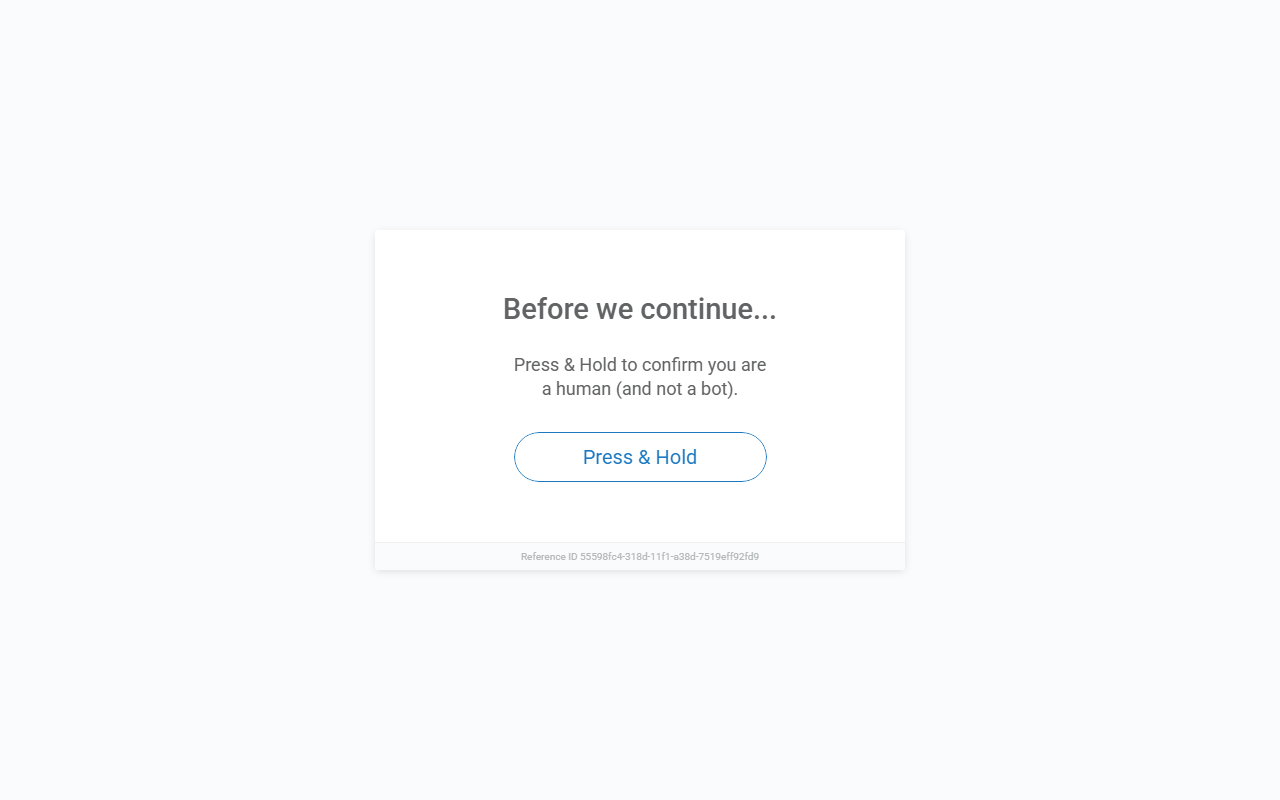
If you send a direct requests.get() to any Wayfair URL, you'll hit a "Press & Hold" challenge, a classic PerimeterX mechanism. This isn't a simple CAPTCHA you can solve programmatically; it requires actual browser interaction, including JavaScript execution and behavioral checks.
To get past this, we need a setup that doesn't just rotate IPs, but actually mimics a legitimate browser environment. We solve this by using Scrape.do with super=true and render=true. This allows our Python scripts to receive fully rendered HTML, bypassing these initial JS traps automatically. A 200 OK response with clean data instead of a block page confirms the setup works.
Product Variations Require Multiple Requests
Beyond the security, the variations are a real logic puzzle. Products with multiple colors, sizes, or styles don't expose all combinations on one page. For example, we must traverse all colors to find all possible sizes for each color. Even modest catalogs grow quickly; a product with 10 colors and 5 sizes already means 50 variation pages to visit. Mapping these IDs to human-readable names makes the final output useful for analysis.
Scrape a Single Product Page
First, we get our hands dirty with a single Product Detail Page (PDP). This is the foundation we’ll build on for categories and variations.
Setup & Prerequisites
We need two core libraries for our task:
pip install requests beautifulsoup4We also need a Scrape.do API token. Sign up here for 1000 free credits to get started.

Scrape.do handles Wayfair's bot detection by rotating proxies, spoofing TLS fingerprints, executing JavaScript with render=true, and managing session cookies automatically. Without it, you'll hit blocks after a few requests.
Initial Request
We route our target URL through the Scrape.do API. Using render=true ensures the JavaScript executes, and super=true handles the WAF layers. Once we have the rendered HTML, we pass it to BeautifulSoup to start our extraction.
import urllib.parse
import requests
from bs4 import BeautifulSoup

TOKEN = "<your-token>"
TARGET_URL = "https://www.wayfair.com/decor-pillows/pdp/mercer41-dronfield-accent-mirror-w100133415.html"

api_url = f"http://api.scrape.do/?token={TOKEN}&url={urllib.parse.quote(TARGET_URL)}&super=true&render=true"
response = requests.get(api_url)
soup = BeautifulSoup(response.text, "html.parser")
The super=true parameter enables Scrape.do's advanced bypass features, and render=true ensures JavaScript-rendered content loads before the response returns.
Extract Basic Product Information
Finding data in the DOM starts with Chrome DevTools (F12). The element picker lets us hover over elements and identify the correct selectable attributes.
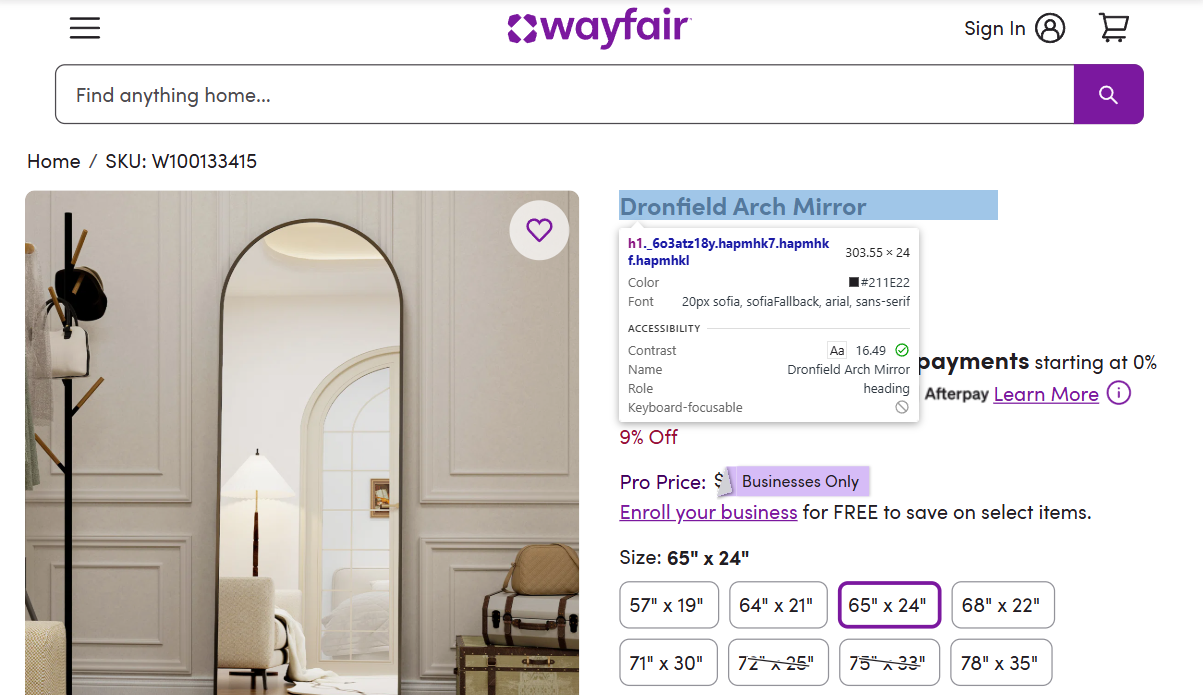
The product name sits in the main h1 tag:
product_name = soup.find("h1").get_text(strip=True) if soup.find("h1") else NoneSKU lives in the breadcrumbs. SKU positions can shift across pages, so we target the breadcrumbs-crumb-1 selector for accuracy and strip the SKU: prefix:
sku_elem = soup.find(attrs={"data-test-id": "breadcrumbs-crumb-1"})
sku = sku_elem.get_text(strip=True).replace("SKU:", "").strip() if sku_elem else None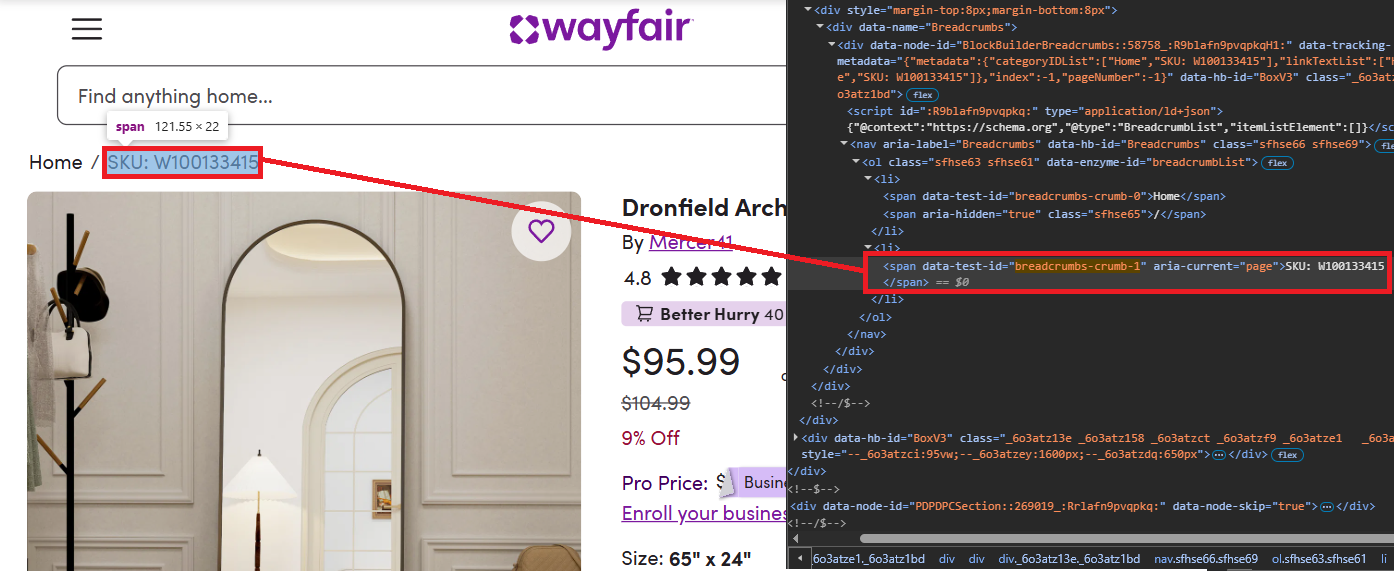
The seller/brand sits at data-rtl-id="listingManufacturerName"; we read its text and drop the leading By:
seller_elem = soup.find(attrs={"data-rtl-id": "listingManufacturerName"})
seller_name = seller_elem.get_text(strip=True).replace("By", "").strip() if seller_elem else None
Extract Price and Discount Information
Wayfair price scraping comes down to two selectors. The current price lives at data-test-id="PriceDisplay", and if a previous price exists, it’s under data-test-id="StandardPricingPrice-PREVIOUS". Comparing both gives us the discount rate.

price = soup.find(attrs={"data-test-id": "PriceDisplay"}).get_text(strip=True).replace("$", "").replace(",", "") if soup.find(attrs={"data-test-id": "PriceDisplay"}) else None

original_price = None
discount_rate = None
previous_container = soup.find(attrs={"data-test-id": "StandardPricingPrice-PREVIOUS"})
if previous_container:
    was_elem = previous_container.find(attrs={"data-test-id": "PriceDisplay"})
    if was_elem:
        original_price = was_elem.get_text(strip=True).replace("$", "").replace(",", "")
        if price and original_price:
            discount = ((float(original_price) - float(price)) / float(original_price)) * 100
            discount_rate = f"{int(discount)}%"
Extract Reviews, Description, and Images
Scraping Wayfair reviews requires two selectors: the rating at data-rtl-id="reviewsHeaderReviewsAverage" and the review count at data-rtl-id="reviewsHeaderReviewsLink". Both return plain text we parse directly:
review_rating = soup.find(attrs={"data-rtl-id": "reviewsHeaderReviewsAverage"}).get_text(strip=True) if soup.find(attrs={"data-rtl-id": "reviewsHeaderReviewsAverage"}) else None
review_count = soup.find(attrs={"data-rtl-id": "reviewsHeaderReviewsLink"}).get_text(strip=True).split()[0] if soup.find(attrs={"data-rtl-id": "reviewsHeaderReviewsLink"}) else None
Description is located at the meta tag with name="description":
description = soup.find("meta", attrs={"name": "description"}).get("content") if soup.find("meta", attrs={"name": "description"}) else NoneGallery images use data-hb-id="FluidImage"; we collect their src values and skip placeholders:
images = []
for img in soup.find_all(attrs={"data-hb-id": "FluidImage"}):
    src = img.get("src", "")
    if src and "default_name" not in src and src not in images:
        images.append(src)
images = images[:10]  # Limit to first 10 images
Complete Single Product Scraper
The combined script outputs a complete set of product fields. Ratings, gallery images, and pricing all present in the output confirms the selectors are solid.
import urllib.parse
import requests
from bs4 import BeautifulSoup

TOKEN = "<your-token>"
TARGET_URL = "https://www.wayfair.com/decor-pillows/pdp/mercer41-dronfield-accent-mirror-w100133415.html"

api_url = f"http://api.scrape.do/?token={TOKEN}&url={urllib.parse.quote(TARGET_URL)}&super=true&render=true"
response = requests.get(api_url, timeout=90)
soup = BeautifulSoup(response.text, "html.parser")

product_name = soup.find("h1").get_text(strip=True) if soup.find("h1") else None
sku_elem = soup.find(attrs={"data-test-id": "breadcrumbs-crumb-1"})
sku = sku_elem.get_text(strip=True).replace("SKU:", "").strip() if sku_elem else None
seller_elem = soup.find(attrs={"data-rtl-id": "listingManufacturerName"})
seller_name = seller_elem.get_text(strip=True).replace("By", "").strip() if seller_elem else None
price = soup.find(attrs={"data-test-id": "PriceDisplay"}).get_text(strip=True).replace("$", "").replace(",", "") if soup.find(attrs={"data-test-id": "PriceDisplay"}) else None

original_price = None
discount_rate = None
previous_container = soup.find(attrs={"data-test-id": "StandardPricingPrice-PREVIOUS"})
if previous_container:
    was_elem = previous_container.find(attrs={"data-test-id": "PriceDisplay"})
    if was_elem:
        original_price = was_elem.get_text(strip=True).replace("$", "").replace(",", "")
        if price and original_price:
            discount = ((float(original_price) - float(price)) / float(original_price)) * 100
            discount_rate = f"{int(discount)}%"

review_rating = soup.find(attrs={"data-rtl-id": "reviewsHeaderReviewsAverage"}).get_text(strip=True) if soup.find(attrs={"data-rtl-id": "reviewsHeaderReviewsAverage"}) else None
review_count = soup.find(attrs={"data-rtl-id": "reviewsHeaderReviewsLink"}).get_text(strip=True).split()[0] if soup.find(attrs={"data-rtl-id": "reviewsHeaderReviewsLink"}) else None
description = soup.find("meta", attrs={"name": "description"}).get("content") if soup.find("meta", attrs={"name": "description"}) else None
image = soup.find("meta", property="og:image").get("content") if soup.find("meta", property="og:image") else None

images = []
for img in soup.find_all(attrs={"data-hb-id": "FluidImage"}):
    src = img.get("src", "")
    if src and "default_name" not in src and src not in images:
        images.append(src)
images = images[:10]

print(f"Product Name: {product_name}")
print(f"SKU: {sku}")
print(f"Seller/Brand: {seller_name}")
print(f"Price: ${price}")
print(f"Original Price: ${original_price}")
print(f"Discount Rate: {discount_rate}")
print(f"Review Rating: {review_rating}")
print(f"Review Count: {review_count}")
print(f"Description: {description}")
print(f"Images: {images}")
The full script outputs a clean set of product fields (name, SKU, seller, price, discount, reviews, description, images) for one page.
Product Name: Dronfield Arch Mirror
SKU: W100133415
Seller/Brand: Mercer41
Price: $95.99 / Original: $104.99 / Discount: 8%
Review Rating: 4.8 / Count: 2,266
Description: <product description>
Images: ['<image_url_1>', '<image_url_2>', '<image_url_3>', '<image_url_4>']
Scrape Category Pages with Pagination
Category pages list multiple products with basic information. We'll scrape product cards across multiple pages and export everything to JSON. This same pagination pattern applies when you scrape product data from Best Buy or similar e-commerce category listings. For this example, we're scraping the "full-length mirrors" category.
Setup and Pagination Logic
Start by defining the base URL and pagination parameters:
import json
import urllib.parse
import requests
from bs4 import BeautifulSoup
import time

TOKEN = "<your-token>"
BASE_URL = "https://www.wayfair.com/decor-pillows/sb0/full-length-mirrors-c1860918.html"
MAX_PAGES = 5

all_products = []
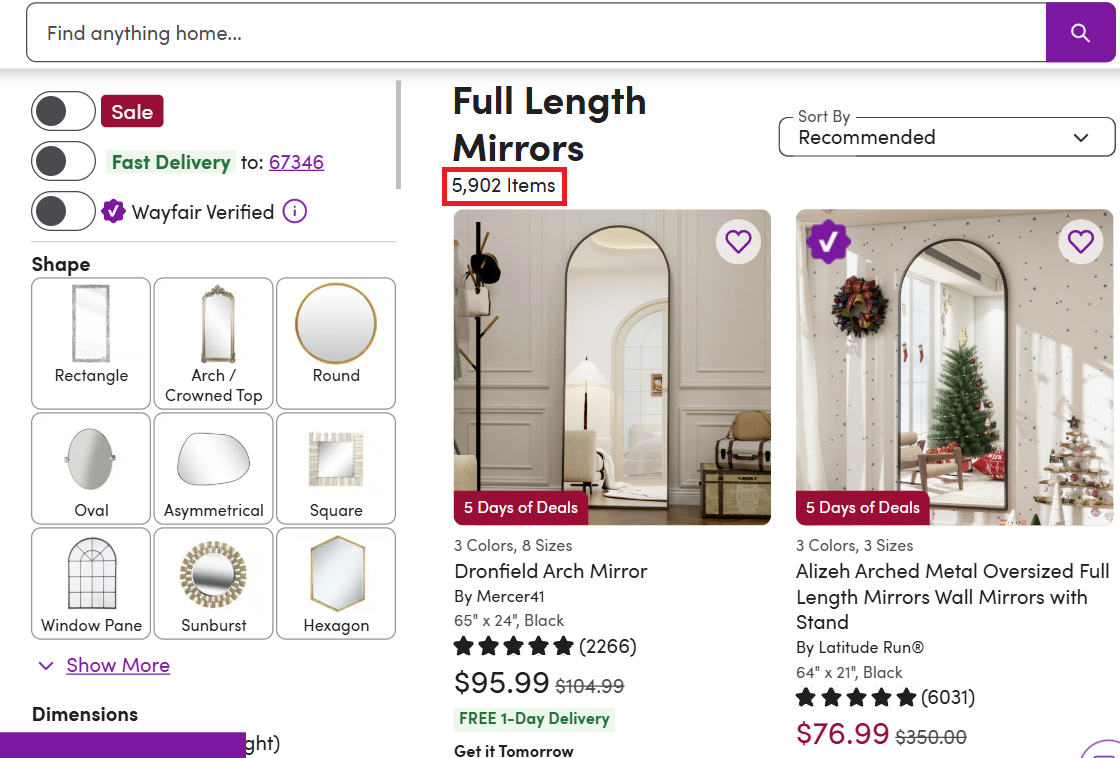
The MAX_PAGES variable limits how many pages we'll scrape. This category alone has thousands of items, so we'll cap at 5 pages for this tutorial. For large-scale extraction across multiple categories, you'd want to add multithreading, our guide on how to speed up web scraping covers async requests and other optimization strategies.
Loop Through Pages
Wayfair uses ?curpage=2, ?curpage=3 for navigation. The first page has no parameter:
for page_num in range(1, MAX_PAGES + 1):
    print(f"Scraping page {page_num}/{MAX_PAGES}...")
    target_url = BASE_URL if page_num == 1 else f"{BASE_URL}?curpage={page_num}"

    api_url = f"http://api.scrape.do/?token={TOKEN}&url={urllib.parse.quote(target_url)}&super=true&render=true"
    response = requests.get(api_url, timeout=90)
    soup = BeautifulSoup(response.text, "html.parser")
Extract Product Cards and Links
Each product appears in a container with data-test-id="ListingCard". We'll iterate through all cards on the page, capture core fields, and pull the product link from any /pdp/ anchor:
    product_cards = soup.find_all(attrs={"data-test-id": "ListingCard"})

    for card in product_cards:
        name_elem = card.find(attrs={"data-name-id": "ListingCardName"})
        if not name_elem: continue
        product_name = name_elem.get_text(strip=True)

        price_elem = card.find(attrs={"data-test-id": "PriceDisplay"})
        price = price_elem.get_text(strip=True).replace("$", "").replace(",", "") if price_elem else None

        seller_elem = card.find(attrs={"data-name-id": "ListingCardManufacturer"})
        seller_name = seller_elem.get_text(strip=True).replace("By ", "") if seller_elem else "N/A"

        img_elem = card.find(attrs={"data-test-id": "ListingCard-ListingCardImageCarousel-LeadImage"})
        product_image = img_elem.get("src") if img_elem else None

        product_link = None
        for link in card.find_all("a"):
            href = link.get("href", "")
            if "/pdp/" in href:
                product_link = "https://www.wayfair.com" + href.split("?")[0] if href.startswith("/") else href.split("?")[0]
                break

        # Optional original price and discount
        original_price = None
        discount_rate = None
        previous_container = card.find(attrs={"data-test-id": "StandardPricingPrice-PREVIOUS"})
        if previous_container:
            was_elem = previous_container.find(attrs={"data-test-id": "PriceDisplay"})
            if was_elem and price:
                original_price = was_elem.get_text(strip=True).replace("$", "").replace(",", "")
                try:
                    discount = ((float(original_price) - float(price)) / float(original_price)) * 100
                    discount_rate = f"{int(discount)}%"
                except (ValueError, ZeroDivisionError):
                    pass
Extract Review Data
Review information appears in an accessibility label:
        review_rating = None
        review_count = None
        review_label = card.find(attrs={"data-name-id": "ListingCardReviewStars-a11yLabel"})
        if review_label:
            label_text = review_label.get_text(strip=True)
            if "Rated " in label_text and " out of" in label_text:
                review_rating = label_text.split("Rated ")[1].split(" out of")[0]
            if "stars." in label_text and " total" in label_text:
                review_count = label_text.split("stars.")[1].split(" total")[0]
Deduplicate and Store Products
Before adding a product, check if we've already seen it:
        if product_link and product_link not in [p["product_link"] for p in all_products]:
            all_products.append({
                "product_name": product_name,
                "seller_name": seller_name,
                "price": price,
                "original_price": original_price,
                "discount_rate": discount_rate,
                "review_rating": review_rating,
                "review_count": review_count,
                "product_image": product_image,
                "product_link": product_link
            })

    time.sleep(1)  # Rate limiting between pages
Export to JSON & Complete Category Scraper
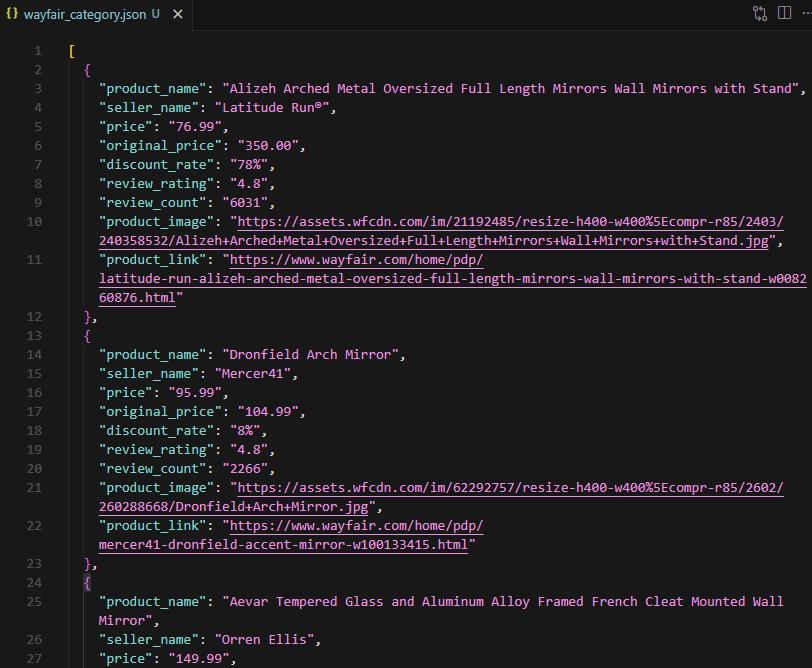
After scraping all pages, we save the results to wayfair_category.json. Each page yields 50+ products, fully structured and ready for the next step. The time.sleep(1) delay between pages helps avoid rate limits in web scraping; adjust the interval based on your volume.
import json
import urllib.parse
import requests
from bs4 import BeautifulSoup
import time

TOKEN = "<your-token>"
BASE_URL = "https://www.wayfair.com/decor-pillows/sb0/full-length-mirrors-c1860918.html"
MAX_PAGES = 5

all_products = []

for page_num in range(1, MAX_PAGES + 1):
    print(f"Scraping page {page_num}/{MAX_PAGES}...")
    target_url = BASE_URL if page_num == 1 else f"{BASE_URL}?curpage={page_num}"

    api_url = f"http://api.scrape.do/?token={TOKEN}&url={urllib.parse.quote(target_url)}&super=true&render=true"
    response = requests.get(api_url, timeout=90)
    soup = BeautifulSoup(response.text, "html.parser")

    product_cards = soup.find_all(attrs={"data-test-id": "ListingCard"})

    for card in product_cards:
        # Extract core fields
        name_elem = card.find(attrs={"data-name-id": "ListingCardName"})
        if not name_elem: continue # Skip cards without name (e.g. sponsored)
        product_name = name_elem.get_text(strip=True)

        price_elem = card.find(attrs={"data-test-id": "PriceDisplay"})
        price = price_elem.get_text(strip=True).replace("$", "").replace(",", "") if price_elem else None

        seller_elem = card.find(attrs={"data-name-id": "ListingCardManufacturer"})
        seller_name = seller_elem.get_text(strip=True).replace("By ", "") if seller_elem else "N/A"

        img_elem = card.find(attrs={"data-test-id": "ListingCard-ListingCardImageCarousel-LeadImage"})
        product_image = img_elem.get("src") if img_elem else None

        # Product Link
        product_link = None
        for link in card.find_all("a"):
            href = link.get("href", "")
            if "/pdp/" in href:
                product_link = "https://www.wayfair.com" + href.split("?")[0] if href.startswith("/") else href.split("?")[0]
                break

        # Original Price & Discount
        original_price = None
        discount_rate = None
        prev_container = card.find(attrs={"data-test-id": "StandardPricingPrice-PREVIOUS"})
        if prev_container:
            prev_price_elem = prev_container.find(attrs={"data-test-id": "PriceDisplay"})
            if prev_price_elem and price:
                original_price = prev_price_elem.get_text(strip=True).replace("$", "").replace(",", "")
                try:
                    discount = ((float(original_price) - float(price)) / float(original_price)) * 100
                    discount_rate = f"{int(discount)}%"
                except (ValueError, ZeroDivisionError):
                    pass

        # Review Rating & Count
        review_rating = None
        review_count = None
        review_label = card.find(attrs={"data-name-id": "ListingCardReviewStars-a11yLabel"})
        if review_label:
            label_text = review_label.get_text(strip=True)
            if "Rated " in label_text and " out of" in label_text:
                review_rating = label_text.split("Rated ")[1].split(" out of")[0]
            if "stars." in label_text and " total" in label_text:
                review_count = label_text.split("stars.")[1].split(" total")[0]

        # Skip duplicates and store
        if product_link and product_link not in [p["product_link"] for p in all_products]:
            all_products.append({
                "product_name": product_name,
                "seller_name": seller_name,
                "price": price,
                "original_price": original_price,
                "discount_rate": discount_rate,
                "review_rating": review_rating,
                "review_count": review_count,
                "product_image": product_image,
                "product_link": product_link
            })

    time.sleep(1)

# Save to JSON
with open("wayfair_category.json", "w", encoding="utf-8") as f:
    json.dump(all_products, f, indent=2, ensure_ascii=False)

print(f"Saved {len(all_products)} products to wayfair_category.json")
This saves a clean list of category products (name, seller, price, optional discount, reviews, image, link) to JSON.
Scrape Product Variations
Products with multiple colors, sizes, or styles require mapping every valid combination. Each combination has its own piid parameter and may have different prices, stock status, and option values. For this example, we're scraping all variations of a curtain product.
Variation Setup and Helper
Instead of visiting every page blindly, we start by extracting all displayId values from the product's base data. We'll set up a small retry helper and fetch the base page.
import json
import urllib.parse
import requests
from bs4 import BeautifulSoup
import re

TOKEN = "<your-token>"
TARGET_URL = "https://www.wayfair.com/decor-pillows/pdp/winston-porter-sevan-solid-thermal-grommet-curtain-panels-wnpo9085.html"

def fetch_with_retry(url, max_retries=3):
    """Simple retry logic for Scrape.do API requests"""
    for attempt in range(max_retries):
        try:
            api_url = f"http://api.scrape.do/?token={TOKEN}&url={urllib.parse.quote(url)}&super=true&render=true"
            response = requests.get(api_url, timeout=90)
            if response.status_code == 200:
                return response.text
        except Exception:
            if attempt == max_retries - 1:
                return None
    return None

# Start scraping
print(f"Fetching base page...")
html_text = fetch_with_retry(TARGET_URL)
if not html_text:
    raise SystemExit("Failed to fetch base page")
soup = BeautifulSoup(html_text, "html.parser")
Extract Color Options from Base Page
The base product page contains all available color IDs embedded in Next.js data. We'll build a mapping of all option IDs to their names (Colors, Sizes, etc.) from script tags:
# 1. Build a mapping of all option IDs to their names
options_map = {}
for script in soup.find_all("script"):
    if script.string and "variantChoices" in script.string:
        pattern = r'\\?"displayId\\?":\s*(\d+).*?\\?"name\\?":\s*\\?"((?:\\\\\\"|[^"\\])+)\\?"'
        matches = re.findall(pattern, script.string)
        for disp_id, name in matches:
            clean_name = name.replace('\\\\\\"', '"').replace('\\"', '"')
            if disp_id not in options_map:
                options_map[disp_id] = clean_name

# 2. Extract valid color IDs from the rendered HTML components
colors = {}
selectable_components = soup.find_all(attrs={"data-test-id": "pdp-ch-selectableComponent"})
for comp in selectable_components:
    option_id = comp.get("data-optionid-id")
    img = comp.find("img")
    if option_id and img:
        alt_text = img.get("alt", "")
        clean_name = alt_text.replace(" selected", "").replace(" is unavailable", "").replace(" is out of stock", "").strip()
        if option_id not in colors:
            colors[option_id] = clean_name
Find Size Options for Each Color
For each color, visit its page to discover available size options. Wayfair embeds piid parameters that combine color and size in the HTML:
base_url = TARGET_URL.split("?")[0]
all_variations = []

for color_id, color_name in sorted(colors.items()):
    print(f"Processing color: {color_name}...")

    color_url = f"{base_url}?piid={color_id}"
    html_text = fetch_with_retry(color_url)
    if not html_text: continue

    # Extract size piids from URL patterns in the rendered HTML
    size_piids = set()
    piid_refs = re.findall(r'piid=([^\"& \']+)', html_text)
    for p in piid_refs:
        decoded = urllib.parse.unquote(p).strip('\\')
        if "," in decoded:
            parts = decoded.split(",")
            if len(parts) == 2:
                # Add the ID that isn't the current color_id
                size_piids.add(parts[1] if parts[0] == color_id else parts[0])
Scrape Each Color-Size Combination
Now visit each combination page to extract its specific data (price, stock status, etc.):
    for size_id in sorted(size_piids):
        size_name = options_map.get(size_id, "Standard")
        if size_name == "Curtain Color": continue

        piid_combo = f"{color_id},{size_id}"
        var_url = f"{base_url}?piid={piid_combo}"
        var_html = fetch_with_retry(var_url)
        if not var_html: continue
        var_soup = BeautifulSoup(var_html, "html.parser")

        price_elem = var_soup.find(attrs={'data-test-id': 'PriceDisplay'})
        price = price_elem.get_text(strip=True).replace('$', '').replace(',', '') if price_elem else None

        stock_status = "out_of_stock" if "out of stock" in var_html.lower() else "in_stock"

        all_variations.append({
            "color": color_name,
            "size": size_name,
            "price": price,
            "stock_status": stock_status,
            "piid": piid_combo,
            "url": var_url
        })
Save Results and Print Summary
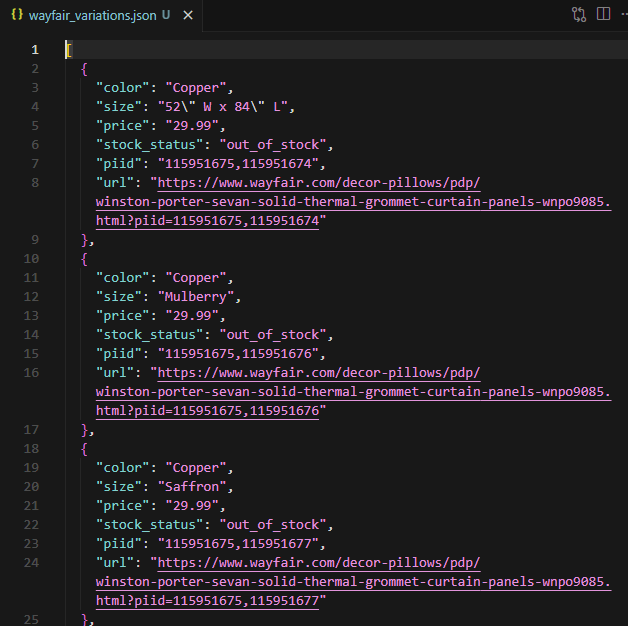
After processing all variations, we save the results to JSON. A single product can generate hundreds of variation entries, each with its own color, size, price, and stock status.
# Save to JSON
with open("wayfair_variations.json", "w", encoding="utf-8") as f:
    json.dump(all_variations, f, indent=2, ensure_ascii=False)

print(f"Scraping completed. Saved {len(all_variations)} variations to wayfair_variations.json")
This ensures that every possible combination of colors and sizes is captured and mapped to human-readable names.
Conclusion
Three scrapers, three levels of complexity. The single product scraper handles Wayfair’s PerimeterX protection and extracts detailed product data. The category scraper paginates through listings and deduplicates results across pages. The variation scraper maps every color-size combination to structured output.
Scrape.do handled proxy rotation, JavaScript rendering, and WAF bypass across all three scripts, so the Python code stayed focused on parsing and data extraction. Whether the target is one product page or hundreds of variation URLs, the approach scales.
Software Engineer








