Category:Scraping Use Cases
Scraping Rightmove in 2026: Extract Property Listings and Details with Python

Software Engineer


Rightmove has over one million active property listings across the UK. Price tracking, agent comparison, rental yield analysis: the data covers every postcode in the country, and it updates daily. Even as AI reshapes how people search for property, Rightmove remains the primary source for UK listing data.
But Rightmove has no public API. The only way to pull property data programmatically is scraping. Unlike most e-commerce and real estate portals, Rightmove runs without Cloudflare, DataDome, or JavaScript rendering. Basic datacenter proxies at 1 credit per request handle everything.
Two Python scripts cover the two main data types. One scrapes property listings across multiple search result pages with full pagination, extracting address, price, property type, bedrooms, estate agent, and phone number. The other pulls detailed property information from individual listing pages using Rightmove's embedded JSON data, which gives structured access to 15+ fields without parsing a single HTML element.
Complete working code available on GitHub ⚙
How Rightmove Serves Property Data
Rightmove delivers data differently depending on the page type, and this determines the scraping strategy for each.
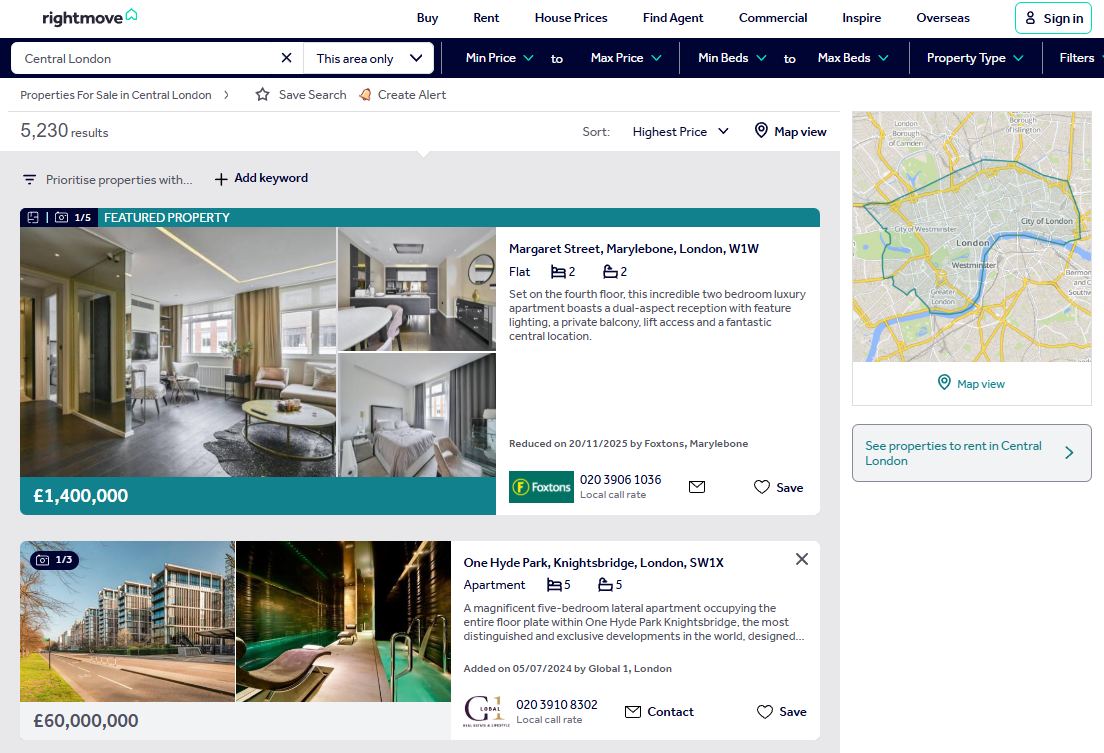
Search result pages render property cards as server-side HTML. Each card is a DOM element containing address, price, property type, bedroom count, estate agent name, and phone number. The HTML arrives fully rendered in the initial response. No JavaScript execution, no waiting for dynamic content. A standard HTTP request returns everything.
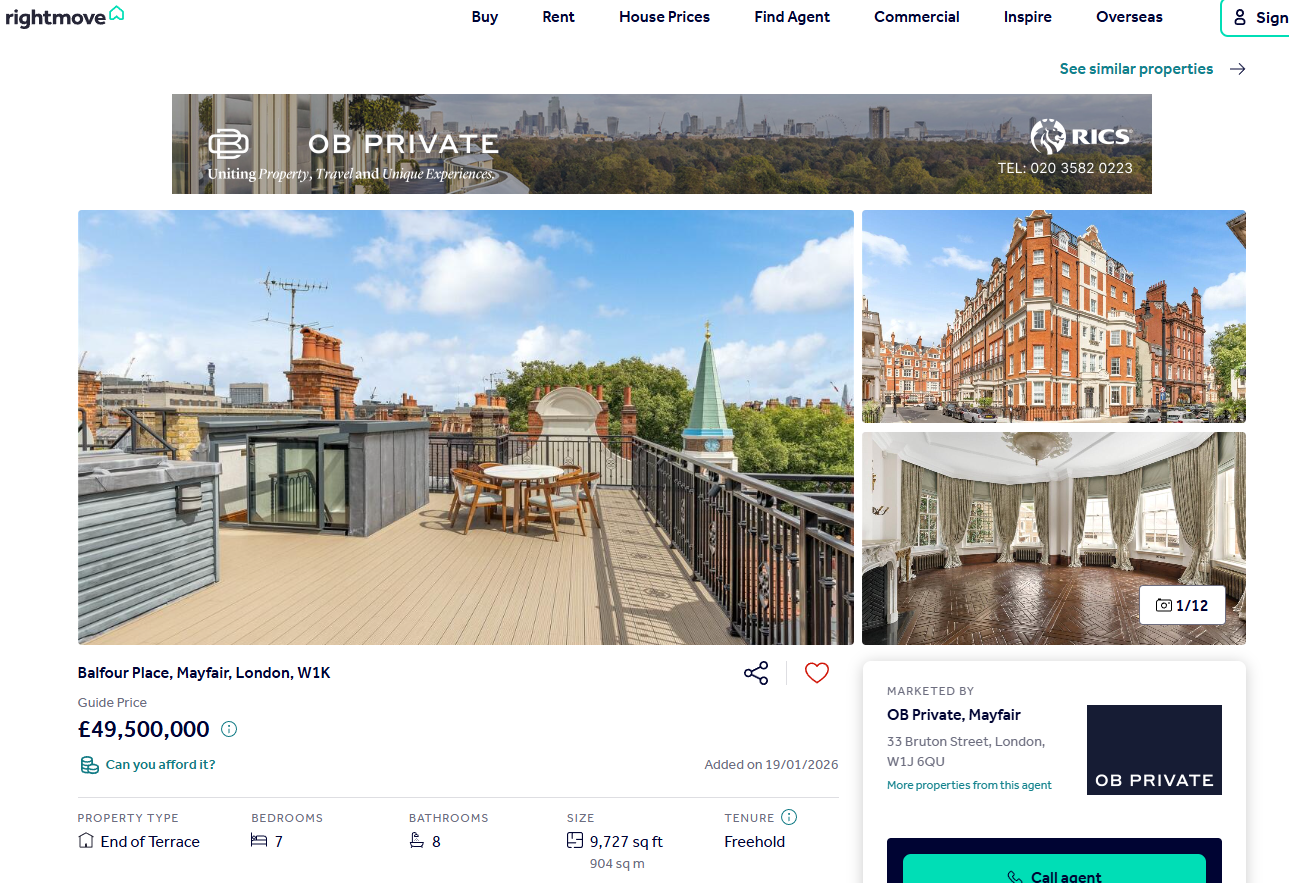
Individual property pages work differently. Instead of scattering data across HTML elements, Rightmove embeds a window.PAGE_MODEL JavaScript object inside a <script> tag. This object contains the entire property dataset as structured JSON: price with qualifier, full address with postcode, bedrooms, bathrooms, square footage in multiple units, tenure type, full description, nearest stations with distances, images, floorplans, EPC data. Parsing this JSON directly is cleaner and more reliable than hunting through nested HTML.
On the anti-bot side, Rightmove is relaxed. During testing, all six Scrape.do parameter combinations returned HTTP 200 with complete data: basic, super, render, super+render, and both with UK geo-targeting. Basic datacenter proxy requests work at 1 credit each. No residential proxies needed and no browser rendering. That makes Rightmove one of the most cost-efficient targets to scrape at scale. Where most sites require AI-driven scraping techniques to adapt to changing layouts and anti-bot measures, Rightmove's stable HTML and embedded JSON make straightforward rule-based extraction the better fit.
Scraping Rightmove Property Listings
The listings scraper targets Rightmove's property search results. A search for "Central London" returns over 5,000 results spread across 42 pages, with 24 properties per page. The scraper collects seven fields from each card: address, price, property type, bedrooms, estate agent name, phone number, and listing URL.
Rightmove's search URL uses query parameters to control everything. locationIdentifier specifies the search area, sortType controls ordering (2 for highest price), and index controls pagination. The structure is predictable, which makes multi-page scraping straightforward.
Prerequisites
Two standard Python web scraping libraries handle the work:
pip install requests beautifulsoup4A free Scrape.do account comes with 1,000 API credits. Copy the API token from the dashboard and place it in the TOKEN variable at the top of each script. All examples use <your_token> as a placeholder.
The Scrape.do API pattern is the same across both scripts: URL-encode the target page, append it to the API endpoint with the token, and fire a GET request. The response body is the raw HTML of the Rightmove page.
import requests
from bs4 import BeautifulSoup
import urllib.parse
import csv
import re

TOKEN = "<your_token>"
BASE_URL = "https://www.rightmove.co.uk/property-for-sale/find.html"
RESULTS_PER_PAGE = 24
TOTAL_PAGES = 5  # set to 42 for full scrape

params = {
    "searchLocation": "Central+London",
    "useLocationIdentifier": "true",
    "locationIdentifier": "REGION^92824",
    "sortType": "2",
    "channel": "BUY",
    "transactionType": "BUY",
}
The params dictionary holds the search configuration. locationIdentifier with REGION^92824 targets Central London. sortType=2 sorts results by highest price. TOTAL_PAGES controls how many pages the scraper processes. Set it to 5 for testing, 42 for a full scrape.
For each page, the script calculates the index offset, builds the full search URL with urlencode, then URL-encodes the entire thing with quote before passing it to the Scrape.do API:
for page in range(TOTAL_PAGES):
    index = page * RESULTS_PER_PAGE
    page_params = {**params, "index": str(index)}
    target_url = f"{BASE_URL}?{urllib.parse.urlencode(page_params)}"
    encoded_url = urllib.parse.quote(target_url, safe="")
    api_url = f"http://api.scrape.do/?token={TOKEN}&url={encoded_url}"

    response = requests.get(api_url)
    if response.status_code != 200:
        print(f"Page {page + 1}: failed with status {response.status_code}")
        continue
The double encoding matters. urlencode builds the query string for Rightmove. quote then encodes the entire Rightmove URL so it can be passed as a parameter to the Scrape.do API without breaking the request.
Parsing Property Cards
BeautifulSoup parses the response HTML and selects property cards using the data-testid attribute. Every card with a data-testid starting with propertyCard- represents one listing:
soup = BeautifulSoup(response.text, "html.parser")
cards = soup.select("[data-testid^='propertyCard-']")
There's a catch. Rightmove renders featured and premium listings twice in the HTML: once in a promotional banner at the top of the results and once in the regular grid below it. Without deduplication, the same property shows up as two entries in the output. A seen_urls set fixes this by tracking which property URLs have already been processed:
all_listings = []
seen_urls = set()

# inside the card loop:
for card in cards:
    link_el = card.select_one("a[href*='properties']")
    if not link_el:
        continue

    prop_url = f"https://www.rightmove.co.uk{link_el['href']}"
    if prop_url in seen_urls:
        continue
    seen_urls.add(prop_url)
Each card contains structured elements for the core property fields. The address sits in an <address> tag. Price is in an element with a class containing "Price". Property type uses a class containing "propertyType". Bedrooms use a class containing "edroom" (partial match catches both "Bedroom" and "bedroom" class variants):
    address_el = card.select_one("address")
    price_el = card.select_one("[class*='Price']")
    type_el = card.select_one("[class*='propertyType']")
    beds_el = card.select_one("[class*='edroom']")
Four selectors, four fields. The partial class matching with [class*=] is intentional. Rightmove uses hashed CSS class names that change between deployments, but the semantic part of the class name (like "Price" or "propertyType") stays consistent.
Extracting Agent and Phone Data
The estate agent name is buried in a span with a specific text pattern. Rightmove formats it as "Added on DD/MM/YYYY by Agent Name, Location" or "Reduced on DD/MM/YYYY by Agent Name, Location". A regex pulls everything after "by" and strips the trailing date suffix:
    agent_text = ""
    for span in card.select("span"):
        text = span.get_text(strip=True)
        if " by " in text:
            match = re.search(r"by (.+)", text)
            if match:
                agent_text = match.group(1)
                agent_text = re.sub(
                    r"(Added|Reduced) on \d{2}/\d{2}/\d{4}$",
                    "", agent_text
                ).strip()
            break
The loop checks every span in the card for the " by " substring. Once found, the regex captures the agent name and location. The second regex strips any date suffixes that occasionally appear at the end.
The agent's phone number lives in a desktop phone link element. The text includes "Local call rate" as a suffix that needs to be removed:
    phone_el = card.select_one("a[class*='phoneLinkDesktop']")
    phone_text = ""
    if phone_el:
        phone_text = phone_el.get_text(strip=True).replace("Local call rate", "").strip()
Price text needs cleaning too. Rightmove prepends promotional labels like "FEATURED PROPERTY", "PREMIUM LISTING", "Guide Price", and "NEW HOME" to the actual price value. A regex strips all of them:
    price_text = price_el.get_text(strip=True) if price_el else ""
    price_text = re.sub(
        r"(FEATURED[A-Z\s\-]*|PREMIUM LISTING|Premium Listing|Guide Price|NEW HOME)",
        "", price_text
    ).strip()
Paginating Through All Results
Rightmove's pagination uses an index query parameter. Page 1 has index=0, page 2 has index=24, page 3 has index=48. The formula is index = (page - 1) * 24.
The scraper loops through a configurable number of pages and accumulates unique listings across all of them. With TOTAL_PAGES = 5, it processes the first 120 results (after deduplication). Set it to 42 for a full Central London scrape covering all 5,000+ listings.
Export to CSV
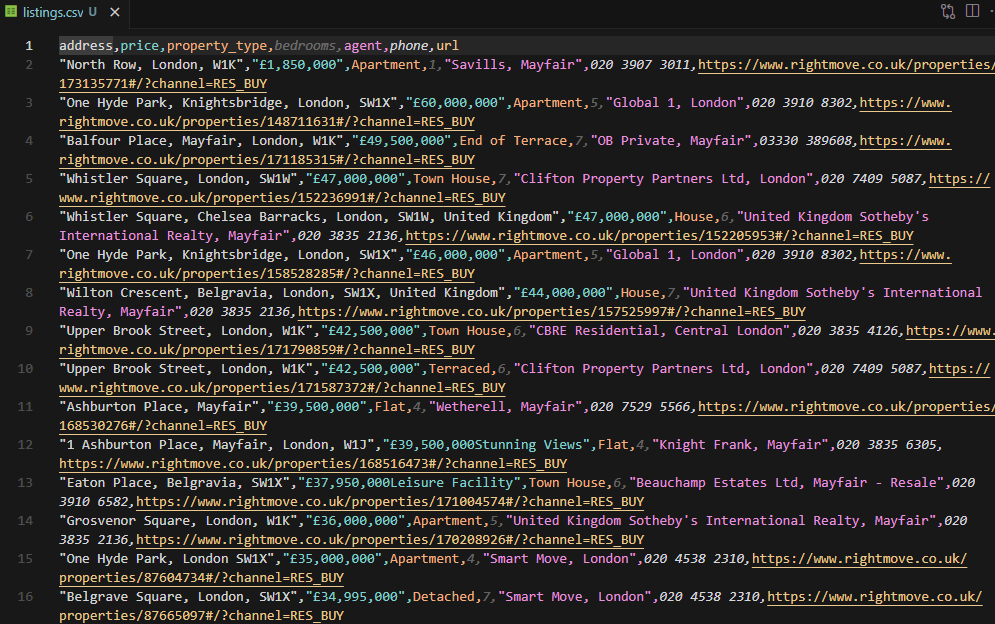
After all pages are processed, the script writes all collected listings to CSV with seven columns:
with open("listings.csv", "w", newline="", encoding="utf-8") as f:
    writer = csv.DictWriter(
        f, fieldnames=["address", "price", "property_type", "bedrooms", "agent", "phone", "url"]
    )
    writer.writeheader()
    writer.writerows(all_listings)

print(f"\nTotal: {len(all_listings)} listings saved to listings.csv")
Running the script against 5 pages of Central London results produces 125 unique listings with clean data across all seven columns.
The full script is available as scrapeListings.py in the GitHub repository.
Scraping Rightmove Property Details
Individual property pages contain far more data than the listings cards. Full description, exact postcode, price per square foot, bathroom count, property size in sqft, tenure type (freehold or leasehold), nearest transport stations with distances. All of it.
And none of it requires HTML parsing. Rightmove embeds a window.PAGE_MODEL JavaScript object in the page source. The propertyData key inside it holds every field as structured JSON, ready to parse with json.loads.
Extracting the PAGE_MODEL JSON
The scraper fetches the property page through Scrape.do (basic request, 1 credit), then scans through <script> tags looking for the one that contains window.PAGE_MODEL:
import requests
from bs4 import BeautifulSoup
import urllib.parse
import json

TOKEN = "<your_token>"
PROPERTY_URL = "https://www.rightmove.co.uk/properties/171185315#/"

encoded_url = urllib.parse.quote(PROPERTY_URL, safe="")
api_url = f"http://api.scrape.do/?token={TOKEN}&url={encoded_url}"

response = requests.get(api_url)
if response.status_code != 200:
    print(f"Request failed with status {response.status_code}")
    exit()

soup = BeautifulSoup(response.text, "html.parser")
Only four libraries needed. No csv, no re. The data comes pre-structured, so there's nothing to clean or parse from HTML.
The JSON extraction uses a brace-depth counter. The value starts after window.PAGE_MODEL = and ends at the matching closing brace. Increment on {, decrement on }, stop when depth hits zero:
page_model = None
for script in soup.find_all("script"):
    text = script.string or ""
    if "window.PAGE_MODEL" not in text:
        continue

    start = text.find("window.PAGE_MODEL = ") + len("window.PAGE_MODEL = ")
    depth = 0
    i = start
    while i < len(text):
        if text[i] == "{":
            depth += 1
        elif text[i] == "}":
            depth -= 1
        if depth == 0:
            break
        i += 1
    page_model = json.loads(text[start : i + 1])
    break
The brace-depth approach is necessary because the JSON object is massive (thousands of characters) and can contain nested objects, arrays, and string values with special characters. A simple find("}") would cut the string short. Counting braces guarantees the extraction captures the complete object.
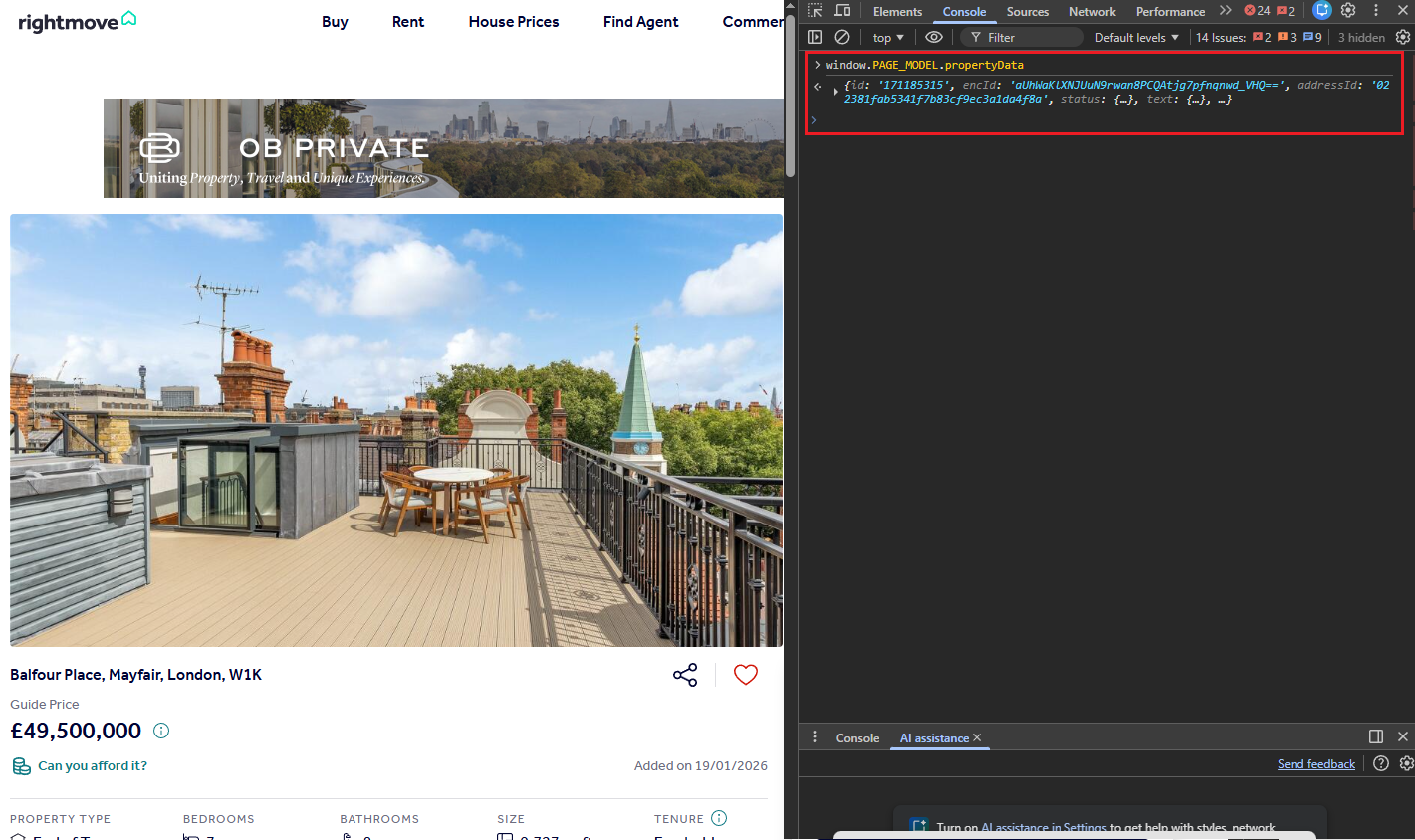
The propertyData object is the root of all property information. It contains nested objects for prices, address, sizings, tenure, and stations:
pd = page_model["propertyData"]

price_info = pd.get("prices", {})
address_info = pd.get("address", {})
sizings = pd.get("sizings", [])
tenure_info = pd.get("tenure", {})
stations = pd.get("nearestStations", [])
Prices come as primaryPrice (the displayed value like "£49,500,000"), displayPriceQualifier ("Guide Price", "Offers Over", etc.), and pricePerSqFt. Address includes displayAddress for the readable version and outcode/incode for the postcode components.
Size data arrives as an array of measurement objects with different units. The script filters for the sqft entry:
sqft = ""
for s in sizings:
    if s.get("unit") == "sqft":
        sqft = s.get("minimumSize", "")
Nearest station data is sorted by distance. The first entry is always the closest:
nearest_station = ""
station_distance = ""
if stations:
    nearest_station = stations[0].get("name", "")
    station_distance = stations[0].get("distance", "")
Output
The script builds a flat dictionary with 15 fields and prints each one to the terminal:
property_data = {
    "id": pd.get("id", ""),
    "address": address_info.get("displayAddress", ""),
    "postcode": f"{address_info.get('outcode', '')} {address_info.get('incode', '')}".strip(),
    "price": price_info.get("primaryPrice", ""),
    "price_qualifier": price_info.get("displayPriceQualifier", ""),
    "price_per_sqft": price_info.get("pricePerSqFt", ""),
    "property_type": pd.get("propertySubType", ""),
    "bedrooms": pd.get("bedrooms", ""),
    "bathrooms": pd.get("bathrooms", ""),
    "size_sqft": sqft,
    "tenure": tenure_info.get("tenureType", ""),
    "description": pd.get("text", {}).get("description", ""),
    "nearest_station": nearest_station,
    "station_distance": f"{station_distance} miles" if station_distance else "",
    "url": PROPERTY_URL,
}

for key, value in property_data.items():
    print(f"{key}: {value}")
Running this against a £49.5M Mayfair townhouse produces:
id: 171185315
address: Balfour Place, Mayfair, London, W1K
postcode: W1K 2AR
price: £49,500,000
price_qualifier: Guide Price
price_per_sqft: £5088.93 per sq ft
property_type: End of Terrace
bedrooms: 7
bathrooms: 8
size_sqft: 9727
tenure: FREEHOLD
description: A grand double fronted townhouse in the heart of...
nearest_station: Bond Street Station
station_distance: 0.35 miles
url: https://www.rightmove.co.uk/properties/171185315#/
Fifteen fields from a single HTTP request, all extracted from structured JSON. No CSS selectors, no regex. The data arrives clean. The propertyData object also exposes fields not used in this script: images, floorplans, virtualTours, rooms (with individual room dimensions), location (latitude/longitude), listingHistory, broadband speeds, livingCosts, and epcGraphs. Extending the scraper to capture those is a matter of adding more .get() calls.
The full script is available as scrapePropertyDetails.py in the GitHub repository.
Conclusion
Two scripts, two data types, and both run on basic Scrape.do requests at 1 credit each.
The listings scraper handles multi-page search results, deduplicates featured listings, and exports address, price, type, bedrooms, agent, phone, and URL to CSV. The property details scraper skips HTML parsing entirely by extracting Rightmove's embedded window.PAGE_MODEL JSON, which gives direct access to price, postcode, sqft, tenure, stations, and 15+ other fields.
Rightmove doesn't need residential proxies, JavaScript rendering, or browser automation. That makes it one of the cheapest high-value targets to scrape at scale. Extend the listings scraper to cover different cities by changing locationIdentifier, or chain both scripts together to scrape listings and then pull detailed data for each one. The same requests + BeautifulSoup approach works for scraping Google Shopping and scraping Amazon product data.
Software Engineer








