
Clay - Scrape.do Integration
Step-by-step guide to scrape any URL into a Clay table with Scrape.do and extract the fields you need with AI
Scrape.do works in Clay through the HTTP API enrichment. Put a URL in a row, Scrape.do fetches the page as markdown, and a Use AI column turns it into the fields you list for that row.
1. Create the Table and Input Columns
Before you start, you need:
- A Clay plan with HTTP API integrations: Growth or Enterprise, or the 14-day trial. The Free and Launch plans don't include them.
- Your Scrape.do API token from your dashboard. The free plan gives you 1,000 credits a month.
Create a new table in Clay and add these text columns:
| Column | Example value | Purpose |
|---|---|---|
URL | https://books.toscrape.com/catalogue/a-light-in-the-attic_1000/index.html | The page to scrape, including https:// |
Render JS | false | Set to true for JavaScript-heavy pages |
Premium Proxy | false | Set to true for protected sites |
Country Code | us | Proxy location (us, gb, de...). View available locations here |
Extract Fields | title, price, availability, contact email | The fields the AI step pulls from the page |
- Fill every cell of
Render JS,Premium ProxyandCountry Code. Scrape.do rejects an empty value instead of falling back to a default. - Add two or three test URLs. Import the full list once the first rows come back clean.
2. Send a Request to Scrape.do
Now add the column that fetches each URL through Scrape.do.
- Click + Add column, choose Add enrichment and search for HTTP API. Clay's HTTP API guide covers the panel in more detail.
- The panel opens on the Generate tab. Switch to Configure and set:
- Method -
GET - Endpoint URL -
https://api.scrape.do/
- Method -
- Add these query string parameters. Type
/in a value field to insert a column. This guide writes a column as{{Column}}.
| Parameter | Value |
|---|---|
token | Your Scrape.do API token |
url | {{URL}} |
render | {{Render JS}} |
super | {{Premium Proxy}} |
geoCode | {{Country Code}} |
output | markdown |
- Pass the
URLcolumn as it is. Don't encode it in a formula first: a URL encoded twice fails. - Under Run settings, click Add run condition so the column only runs when
URLis not empty. - Name the column
Scrape.do Markdownand save it. - Run the column on one row. The cell should hold the page as markdown, starting with
- Title: A Light in the Attic | Books to Scrape - Sandbox. That request costs 1 credit.
To check your token and settings outside Clay, open the first row's request in your browser:
https://api.scrape.do/?token=<your_token>&url=https%3A%2F%2Fbooks.toscrape.com%2Fcatalogue%2Fa-light-in-the-attic_1000%2Findex.html&render=false&super=false&geoCode=us&output=markdownIf you're unable to get a response, visit the playground and experiment with parameters like Super, Render JavaScript, and Block Resources until you get a successful response.
The Generate tab is the other way in: Clay's Sculptor fills in the HTTP API form from a plain-language description. Check every field against the table above before the first run.
3. Map the Response to Fields
Markdown is a fraction of the size of the raw HTML (14 KB against 51 KB for the books.toscrape.com homepage), so the AI step reads far fewer tokens.
- Click + Add column, choose Use AI, and name it
Extracted Data. - Use this prompt:
You are a data extraction engine. From the page content below, extract
these fields: {{Extract Fields}}.

Rules:
- Return ONLY a valid JSON object, no explanation and no code fences.
- Use the field names exactly as given, in snake_case.
- If a field is not on the page, set it to null.
- Never invent values.

PAGE CONTENT:
{{Scrape.do Markdown}}- In the outputs section, choose Fields and add one field,
data, of type Text. The JSON comes back as text in that field, so the field list can change from row to row. A JSON Schema output fixes the fields for the whole column. - Run it on your test rows. For example, the product page from step 1 gives:
{
  "title": "A Light in the Attic",
  "price": "£51.77",
  "availability": "In stock (22 available)",
  "contact_email": null
}- Each row can ask for different fields:
price, rating, stock statusfor a product page andcompany name, phone, addressfor a directory can live in the same table.
Then add a column that flags the rows to retry:
- Add a formula column named
Status. Clay formulas are JavaScript, so it's one line:
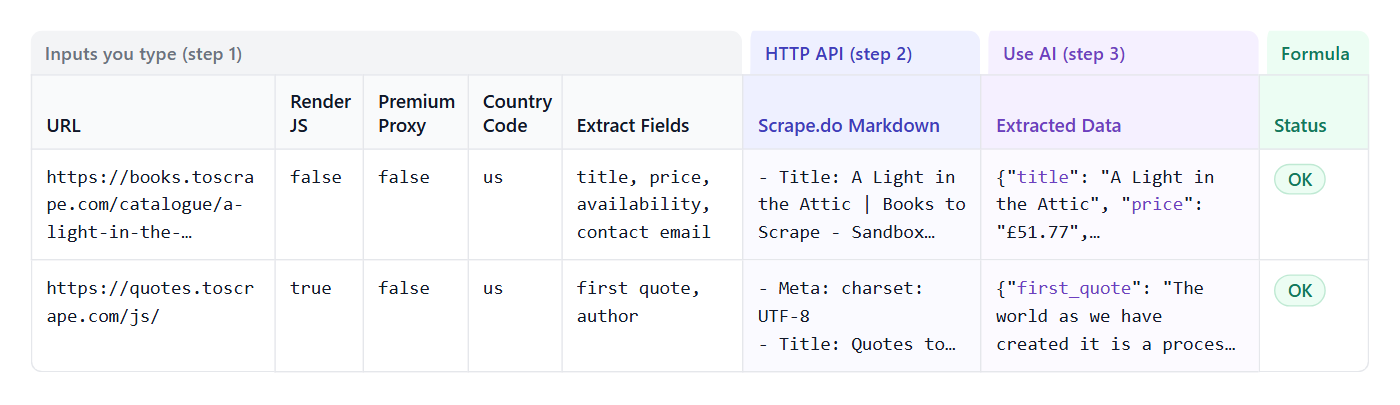
{{Scrape.do Markdown}} ? "OK" : "FAILED - retry with Premium Proxy = true"The finished table, with a second row that renders JavaScript:
4. Common Recipes
Retry Protected Pages
Failed rows are almost always protected or client-rendered sites.
- Set
Premium Proxytotrueon the failed rows only and re-run them. - If the content is still missing, set
Render JStotrueas well.
Both settings cost extra, so keep them false by default:
| Render JS | Premium Proxy | Credits per row |
|---|---|---|
false | false | 1 |
true | false | 5 |
false | true | 10 |
true | true | 25 |
Some domains apply these settings by default. See request costs for the full list.
Get Raw HTML Instead of Markdown
Set output to raw when you want to parse specific HTML elements yourself. Keep markdown for the AI step.
Run the Whole List
- Import your URLs with a CSV upload, a paste or any Clay source.
- Run a batch of 20 to 50 rows and check the
Statuscolumn. - Run the rest of the table.
Every HTTP API call uses one Clay action, and every Use AI run uses an action plus data credits, unless you connect your own model key. On the Scrape.do side you're only charged for successful responses.
Share a Table Safely
Scrape.do takes the token as a query parameter, so it sits in the HTTP API column's configuration in plain text. Before you share a table or publish it as a template, replace the token with <your_token>.
5. Troubleshooting
| Message | Cause | Fix |
|---|---|---|
Your target 'URL' is not valid! | The URL has no https://, or it was encoded twice | Use the full URL and pass {{URL}} as it is |
'Render' parameter should boolean. | Empty Render JS cell | Put true or false in every row |
'Super' parameter should boolean. | Empty Premium Proxy cell | Put true or false in every row |
GeoCode= not valid for Scrape.do. | Empty Country Code cell | Put a country code in every row |
This domain requires super=true | The site needs residential proxies | Set Premium Proxy to true for that row |
502 | A proxy attempt failed on Scrape.do's side | Re-run the row. If it repeats, set Premium Proxy to true |
429 | More requests at once than your plan allows (5 on the free plan) | Lower the request limit in the column's Rate limiting settings and re-run |
None of these responses cost credits. A 400, 404 or 410 from the target site does, because it counts as a successful result. See status codes for the rest.
If the page loads but some fields come back null, the page doesn't show that data, at least not to a logged-out visitor. The prompt returns null instead of inventing a value.