
Search Results & Categories
Search Amazon and scrape category pages with structured results
The Search endpoint performs keyword searches on Amazon and returns structured product listings. This works for both search queries and category pages; since Amazon category pages use the same underlying structure as search results, this single endpoint handles both use cases. Get product titles, prices, ratings, Prime status, sponsored flags, and position rankings all in clean JSON format.
Endpoint
GET https://api.scrape.do/plugin/amazon/searchInput Parameters
| Parameter | Type | Required | Description |
|---|---|---|---|
token | string | * | Your Scrape.do API authentication token |
keyword | string | * | Search query (must be URL-encoded) |
geocode | string | * | Country code (e.g., us, gb, de, jp) |
zipcode | string | * | Postal code formatted according to country requirements |
page | integer | Page number for pagination (default: 1) | |
super | boolean | Enable residential/mobile proxies for higher success rates. Costs 10x credits (default: false) | |
language | string | Language code in ISO 639-1 format (e.g., EN, DE) | |
include_html | boolean | When true, the response includes the full raw HTML of the page after the structured JSON output (default: false) |
Response Parameters
| Field | Type | Description |
|---|---|---|
keyword | string | The search query that was executed |
page | number | Current page number |
totalResults | string | Total results count as displayed by Amazon |
products | array | List of product results |
status | string | Request status (success or error) |
errorMessage | string | Error message if request failed |
html | string | Full raw HTML of the Amazon page (only present when include_html=true) |
Product Object Fields
| Field | Type | Description |
|---|---|---|
asin | string | Product ASIN number |
title | string | Product title |
url | string | Product detail page URL |
imageUrl | string | Product thumbnail image URL |
price | object | Price with currencyCode and amount |
rating | object | Rating with value, count, and stars |
reviewCount | string | Number of reviews as displayed |
isSponsored | boolean | Whether this is a sponsored/ad placement |
isPrime | boolean | Whether Prime shipping is available |
position | number | Position on the search results page |
badge | string | Special badge if present (e.g., "Best Seller", "Overall Pick") |
Example Usage
Step 1: Define Your Search Query
Decide what you want to search for on Amazon. This can be:
- Product keywords:
laptop stands,wireless headphones,coffee maker - Brand + product:
sony headphones,anker charger - Category browsing: Use category-specific keywords
For this example, we'll search for "laptop stands":
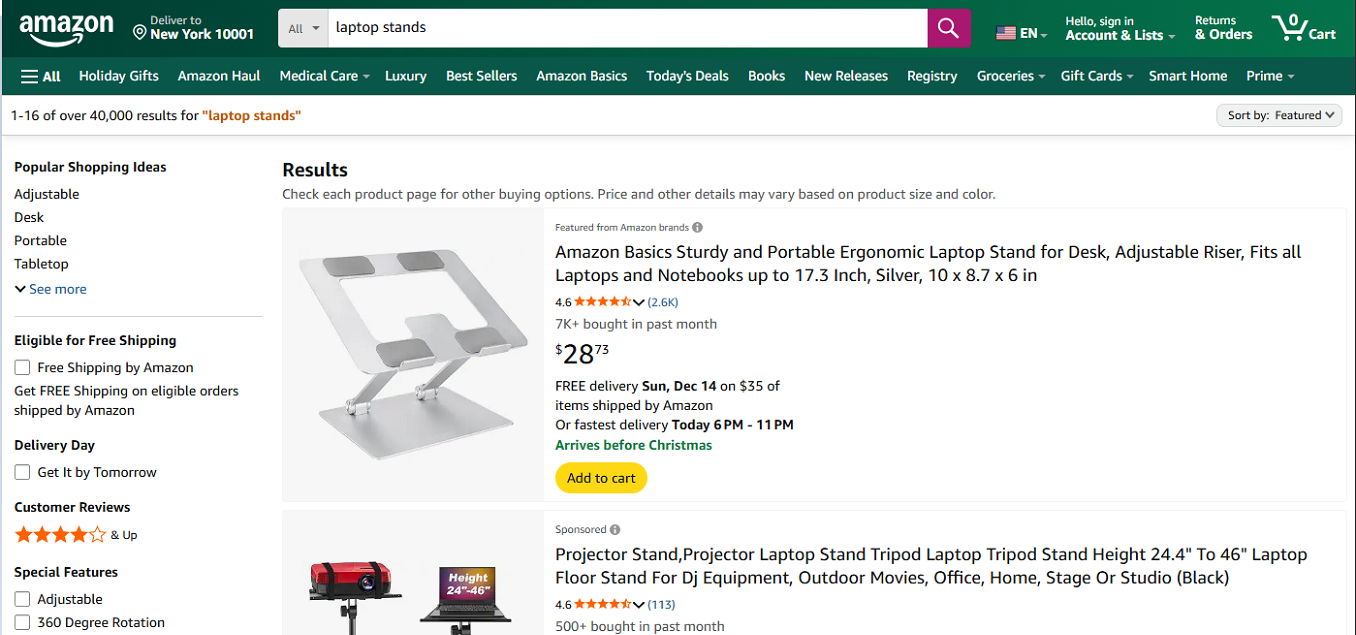
The API will return structured data for each product in the search results, including ASINs, prices, ratings, and badges like "Best Seller" or "Overall Pick".
Step 2: Send the API Request
curl --location --request GET 'https://api.scrape.do/plugin/amazon/search?token=<SDO-token>&keyword=laptop%20stands&geocode=US&zipcode=10001&page=1'import requests
import json
token = "<SDO-token>"
keyword = "laptop stands"
geocode = "US"
zipcode = "10001"
page = 1
url = f"https://api.scrape.do/plugin/amazon/search?token={token}&keyword={keyword}&geocode={geocode}&zipcode={zipcode}&page={page}"
response = requests.request("GET", url)
print(json.dumps(response.json(), indent=2))const axios = require('axios');
const token = "<SDO-token>";
const keyword = encodeURIComponent("laptop stands");
const geocode = "US";
const zipcode = "10001";
const page = 1;
const url = `https://api.scrape.do/plugin/amazon/search?token=${token}&keyword=${keyword}&geocode=${geocode}&zipcode=${zipcode}&page=${page}`;
axios.get(url)
.then(response => {
console.log(JSON.stringify(response.data, null, 2));
})
.catch(error => {
console.error(error);
});package main
import (
"fmt"
"io/ioutil"
"net/http"
"net/url"
)
func main() {
token := "<SDO-token>"
keyword := url.QueryEscape("laptop stands")
geocode := "US"
zipcode := "10001"
page := 1
apiUrl := fmt.Sprintf(
"https://api.scrape.do/plugin/amazon/search?token=%s&keyword=%s&geocode=%s&zipcode=%s&page=%d",
token, keyword, geocode, zipcode, page,
)
resp, err := http.Get(apiUrl)
if err != nil {
panic(err)
}
defer resp.Body.Close()
body, _ := ioutil.ReadAll(resp.Body)
fmt.Println(string(body))
}require 'net/http'
require 'json'
require 'uri'
token = "<SDO-token>"
keyword = URI.encode_www_form_component("laptop stands")
geocode = "US"
zipcode = "10001"
page = 1
url = URI("https://api.scrape.do/plugin/amazon/search?token=#{token}&keyword=#{keyword}&geocode=#{geocode}&zipcode=#{zipcode}&page=#{page}")
response = Net::HTTP.get(url)
puts JSON.pretty_generate(JSON.parse(response))import java.net.HttpURLConnection;
import java.net.URL;
import java.net.URLEncoder;
import java.io.BufferedReader;
import java.io.InputStreamReader;
public class AmazonSearch {
public static void main(String[] args) throws Exception {
String token = "<SDO-token>";
String keyword = URLEncoder.encode("laptop stands", "UTF-8");
String geocode = "US";
String zipcode = "10001";
int page = 1;
String url = String.format(
"https://api.scrape.do/plugin/amazon/search?token=%s&keyword=%s&geocode=%s&zipcode=%s&page=%d",
token, keyword, geocode, zipcode, page
);
HttpURLConnection conn = (HttpURLConnection) new URL(url).openConnection();
conn.setRequestMethod("GET");
BufferedReader reader = new BufferedReader(new InputStreamReader(conn.getInputStream()));
String line;
StringBuilder response = new StringBuilder();
while ((line = reader.readLine()) != null) {
response.append(line);
}
reader.close();
System.out.println(response.toString());
}
}using System;
using System.Net.Http;
using System.Threading.Tasks;
using System.Web;
class Program
{
static async Task Main()
{
string token = "<SDO-token>";
string keyword = HttpUtility.UrlEncode("laptop stands");
string geocode = "US";
string zipcode = "10001";
int page = 1;
string url = $"https://api.scrape.do/plugin/amazon/search?token={token}&keyword={keyword}&geocode={geocode}&zipcode={zipcode}&page={page}";
using HttpClient client = new HttpClient();
string response = await client.GetStringAsync(url);
Console.WriteLine(response);
}
}<?php
$token = "<SDO-token>";
$keyword = urlencode("laptop stands");
$geocode = "US";
$zipcode = "10001";
$page = 1;
$url = "https://api.scrape.do/plugin/amazon/search?token={$token}&keyword={$keyword}&geocode={$geocode}&zipcode={$zipcode}&page={$page}";
$ch = curl_init();
curl_setopt($ch, CURLOPT_URL, $url);
curl_setopt($ch, CURLOPT_RETURNTRANSFER, true);
$response = curl_exec($ch);
curl_close($ch);
echo json_encode(json_decode($response), JSON_PRETTY_PRINT);
?>Step 3: Receive Structured Search Results
The API returns a paginated list of products with all relevant details:
{
  "keyword": "laptop stands",
  "page": 1,
  "totalResults": "1-16 of over 10,000 results",
  "products": [
    {
      "asin": "B0C1HGKNG7",
      "title": "Adjustable Laptop Stand for Desk, Ergonomic Computer Riser...",
      "url": "https://www.amazon.com/dp/B0C1HGKNG7",
      "imageUrl": "https://m.media-amazon.com/images/I/71abc123.jpg",
      "price": {
        "currencyCode": "USD",
        "amount": 29.95
      },
      "rating": {
        "value": 4.6,
        "count": 9100,
        "stars": 5
      },
      "reviewCount": "(9.1K)",
      "isSponsored": false,
      "isPrime": true,
      "position": 1,
      "badge": "Overall Pick"
    },
    {
      "asin": "B0CBL1TQMP",
      "title": "Portable Laptop Stand, Foldable Aluminum Computer Holder...",
      "url": "https://www.amazon.com/dp/B0CBL1TQMP",
      "imageUrl": "https://m.media-amazon.com/images/I/61xyz789.jpg",
      "price": {
        "currencyCode": "USD",
        "amount": 18.99
      },
      "rating": {
        "value": 4.4,
        "count": 2340,
        "stars": 4
      },
      "reviewCount": "(2.3K)",
      "isSponsored": true,
      "isPrime": true,
      "position": 2,
      "badge": null
    },
    {
      "asin": "B0D7EXAMPLE",
      "title": "Heavy Duty Laptop Stand with Cooling Fan...",
      "url": "https://www.amazon.com/dp/B0D7EXAMPLE",
      "imageUrl": "https://m.media-amazon.com/images/I/51def456.jpg",
      "price": {
        "currencyCode": "USD",
        "amount": 45.99
      },
      "rating": {
        "value": 4.8,
        "count": 567,
        "stars": 5
      },
      "reviewCount": "(567)",
      "isSponsored": false,
      "isPrime": false,
      "position": 3,
      "badge": "Best Seller"
    }
  ],
  "status": "success",
  "errorMessage": null
}
Pagination
To get additional pages of results, increment the page parameter:
/plugin/amazon/search?token=...&keyword=laptop%20stands&geocode=us&zipcode=14217&page=2The isSponsored field helps you distinguish between organic results and paid placements. The position field shows the exact ranking on the page.
Search keywords must be URL-encoded. Response is limited to a maximum of 4MB.
Add include_html=true to your request to receive the full raw HTML of the Amazon search results page alongside the structured JSON output. The HTML will be included in an html field at the end of the response.








