
Raw HTML with Geo-Targeting
View as MarkdownGet raw HTML from any Amazon page with location targeting
The Raw HTML endpoint retrieves the complete HTML source from any Amazon URL, optionally with ZIP code or country-level geo-targeting. Unlike the structured endpoints (PDP, Offers, Search), this returns unprocessed HTML that you can parse yourself. This is ideal for scraping pages not covered by other endpoints, custom data extraction needs, or when you need the complete page structure.
When zipcode is provided, the request goes through the ZIP-keyed cookie pool that locks delivery location to that postal code. For marketplaces without ZIP-level delivery, pass countryName instead. Passing the marketplace's own country name (for example, countryName=Turkey with geocode=tr) is unnecessary and ignored.
Endpoint
GET https://api.scrape.do/plugin/amazon/Input Parameters
| Parameter | Type | Required | Description |
|---|---|---|---|
token | string | * | Your Scrape.do API authentication token |
url | string | * | Full Amazon URL to scrape (must be URL-encoded) |
geocode | string | * | Amazon marketplace country code (e.g., us, gb, de, jp) |
zipcode | string | Postal code formatted according to country requirements for ZIP-level marketplaces. Use either zipcode or countryName, not both. | |
countryName | string | Country-level location for marketplaces without ZIP-level delivery. Passing the marketplace's own country name is unnecessary and ignored. | |
output | string | Output format. Optional; the endpoint always returns raw HTML regardless of this value. | |
super | boolean | Enable residential/mobile proxies for higher success rates. Costs 10x credits (default: false) | |
language | string | Display language as an ISO 639-1 code, or ZH-TW for Traditional Chinese. | |
currency | string | ISO 4217 display currency (e.g., USD, EUR, ILS, CZK). | |
timeout | integer | Request timeout in milliseconds | |
device | string | Device profile for the request. Use desktop or mobile (default: desktop) |
Example Usage
Step 1: Select a Target URL
Choose any Amazon page you want to scrape. This can be:
- Product pages:
https://www.amazon.com/dp/B0C7BKZ883 - Search results:
https://www.amazon.com/s?k=laptop+stand - Category pages:
https://www.amazon.com/b?node=172282 - Seller storefronts:
https://www.amazon.com/stores/page/... - Best seller lists:
https://www.amazon.com/Best-Sellers/zgbs/...
For this example, we'll scrape a product page to get its complete HTML source:
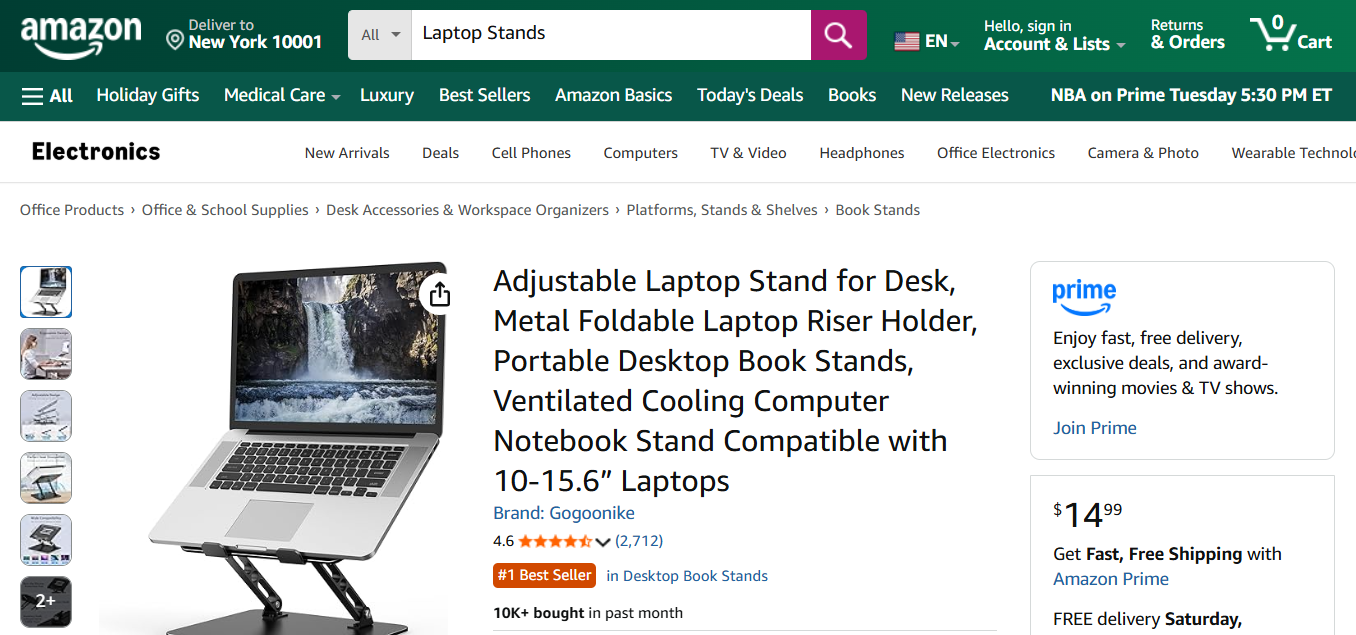
Copy the full URL and URL-encode it before passing it to the API.
Step 2: Send the API Request
curl --location --request GET 'https://api.scrape.do/plugin/amazon/?token=<SDO-token>&url=https://www.amazon.com/dp/B0C7BKZ883&geocode=US'import requests
token = "<SDO-token>"
url = "https://www.amazon.com/dp/B0C7BKZ883"
geocode = "US"
api_url = f"https://api.scrape.do/plugin/amazon/?token={token}&url={url}&geocode={geocode}"
response = requests.request("GET", api_url)
print(response.text)const axios = require('axios');
const token = "<SDO-token>";
const targetUrl = encodeURIComponent("https://www.amazon.com/dp/B0C7BKZ883");
const geocode = "US";
const url = `https://api.scrape.do/plugin/amazon/?token=${token}&url=${targetUrl}&geocode=${geocode}`;
axios.get(url)
.then(response => {
console.log(response.data);
})
.catch(error => {
console.error(error);
});package main
import (
"fmt"
"io/ioutil"
"net/http"
"net/url"
)
func main() {
token := "<SDO-token>"
targetUrl := url.QueryEscape("https://www.amazon.com/dp/B0C7BKZ883")
geocode := "US"
apiUrl := fmt.Sprintf(
"https://api.scrape.do/plugin/amazon/?token=%s&url=%s&geocode=%s",
token, targetUrl, geocode,
)
resp, err := http.Get(apiUrl)
if err != nil {
panic(err)
}
defer resp.Body.Close()
body, _ := ioutil.ReadAll(resp.Body)
fmt.Println(string(body))
}require 'net/http'
require 'uri'
token = "<SDO-token>"
target_url = URI.encode_www_form_component("https://www.amazon.com/dp/B0C7BKZ883")
geocode = "US"
url = URI("https://api.scrape.do/plugin/amazon/?token=#{token}&url=#{target_url}&geocode=#{geocode}")
response = Net::HTTP.get(url)
puts responseimport java.net.HttpURLConnection;
import java.net.URL;
import java.net.URLEncoder;
import java.io.BufferedReader;
import java.io.InputStreamReader;
public class AmazonRawHTML {
public static void main(String[] args) throws Exception {
String token = "<SDO-token>";
String targetUrl = URLEncoder.encode("https://www.amazon.com/dp/B0C7BKZ883", "UTF-8");
String geocode = "US";
String url = String.format(
"https://api.scrape.do/plugin/amazon/?token=%s&url=%s&geocode=%s",
token, targetUrl, geocode
);
HttpURLConnection conn = (HttpURLConnection) new URL(url).openConnection();
conn.setRequestMethod("GET");
BufferedReader reader = new BufferedReader(new InputStreamReader(conn.getInputStream()));
String line;
StringBuilder response = new StringBuilder();
while ((line = reader.readLine()) != null) {
response.append(line);
}
reader.close();
System.out.println(response.toString());
}
}using System;
using System.Net.Http;
using System.Threading.Tasks;
using System.Web;
class Program
{
static async Task Main()
{
string token = "<SDO-token>";
string targetUrl = HttpUtility.UrlEncode("https://www.amazon.com/dp/B0C7BKZ883");
string geocode = "US";
string url = $"https://api.scrape.do/plugin/amazon/?token={token}&url={targetUrl}&geocode={geocode}";
using HttpClient client = new HttpClient();
string response = await client.GetStringAsync(url);
Console.WriteLine(response);
}
}<?php
$token = "<SDO-token>";
$targetUrl = urlencode("https://www.amazon.com/dp/B0C7BKZ883");
$geocode = "US";
$url = "https://api.scrape.do/plugin/amazon/?token={$token}&url={$targetUrl}&geocode={$geocode}";
$ch = curl_init();
curl_setopt($ch, CURLOPT_URL, $url);
curl_setopt($ch, CURLOPT_RETURNTRANSFER, true);
$response = curl_exec($ch);
curl_close($ch);
echo $response;
?>Step 3: Receive Raw HTML
The API returns the complete HTML source of the page with geo-targeting applied:
<!DOCTYPE html>
<html lang="en-us">
<head>
  <meta charset="utf-8">
  <title>Adjustable Laptop Stand for Desk, Metal Foldable...</title>
  <!-- ... meta tags, scripts, stylesheets ... -->
</head>
<body>
  <div id="dp-container">
    <div id="ppd">
      <h1 id="title" class="a-size-large a-spacing-none">
        <span id="productTitle" class="a-size-large product-title-word-break">
          Adjustable Laptop Stand for Desk, Metal Foldable Laptop Riser Holder,
          Portable Desktop Book Stand, Ergonomic Computer Stand...
        </span>
      </h1>

      <div id="averageCustomerReviews">
        <span class="a-icon-alt">4.6 out of 5 stars</span>
      </div>

      <span id="acrCustomerReviewText" class="a-size-base">
        2,712 ratings
      </span>

      <div id="corePrice_feature_div">
        <span class="a-price-whole">14</span>
        <span class="a-price-fraction">99</span>
      </div>

      <div id="deliveryBlockMessage">
        <span>FREE delivery Monday, December 16</span>
        <span>Delivering to New York 10001</span>
      </div>

      <!-- ... complete page HTML ... -->
    </div>
  </div>
</body>
</html>
When a zipcode or countryName is provided, the HTML reflects the location-specific content for that location (local pricing, shipping estimates, stock availability). Use only one location parameter per request.
When to Use Raw HTML
Use this endpoint when:
- Custom parsing needs: You need specific data not covered by structured endpoints
- Page types not supported: Seller pages, best seller lists, deals pages, etc.
- Complete page structure: You need access to JavaScript data, meta tags, or hidden fields
- A/B testing detection: Comparing full page content across regions
- Archive/backup: Storing complete page snapshots
For product details, seller offers, and search results, the structured endpoints (PDP, Offers, Search) are more efficient as they return parsed JSON data.
The url parameter must contain a valid Amazon domain and must be URL-encoded. Response is limited to a maximum of 4MB.








