
Product Pages (PDP)
Extract structured product data from Amazon product detail pages
The Product Detail Page (PDP) endpoint extracts comprehensive product information from any Amazon product page. It returns structured JSON data including the product title, pricing, ratings, images, best seller rankings, and technical specifications (all parsed and ready to use without any HTML processing on your end).
Endpoint
GET https://api.scrape.do/plugin/amazon/pdpInput Parameters
| Parameter | Type | Required | Description |
|---|---|---|---|
token | string | * | Your Scrape.do API authentication token |
asin | string | * | Amazon Standard Identification Number (10-character product ID) |
geocode | string | * | Country code (e.g., us, gb, de, jp) |
zipcode | string | * | Postal code formatted according to country requirements |
super | boolean | Enable residential/mobile proxies for higher success rates. Costs 10x credits (default: false) | |
language | string | Language code in ISO 639-1 format (e.g., EN, DE, FR) | |
include_html | boolean | When true, the response includes the full raw HTML of the page after the structured JSON output (default: false) |
Response Parameters
| Field | Type | Description |
|---|---|---|
asin | string | Product ASIN number |
is_sponsored | boolean | Whether the product is a sponsored listing |
brand | string | Brand name |
name | string | Full product title |
url | string | Canonical product URL |
thumbnail | string | Primary product image URL |
rating | number | Average star rating (0-5) |
total_ratings | number | Total number of customer ratings |
price | number | Current selling price |
list_price | number | Original list price (if discounted) |
currency | string | Currency code (e.g., USD, EUR, GBP) |
currency_symbol | string | Currency symbol (e.g., $, €, £) |
is_prime | boolean | Whether Prime shipping is available |
shipping_info | array | Shipping and delivery information strings |
more_buying_choices | object | Alternative seller options with links |
images | array | All product images with URLs and dimensions |
best_seller_rankings | array | Category rankings with rank numbers |
technical_details | object | Key-value pairs of product specifications |
status | string | Request status (success or error) |
errorMessage | string | Error message if request failed |
html | string | Full raw HTML of the Amazon page (only present when include_html=true) |
Example Usage
Step 1: Find the Target Product
Navigate to any Amazon product page. For this example, we'll use an adjustable laptop stand:
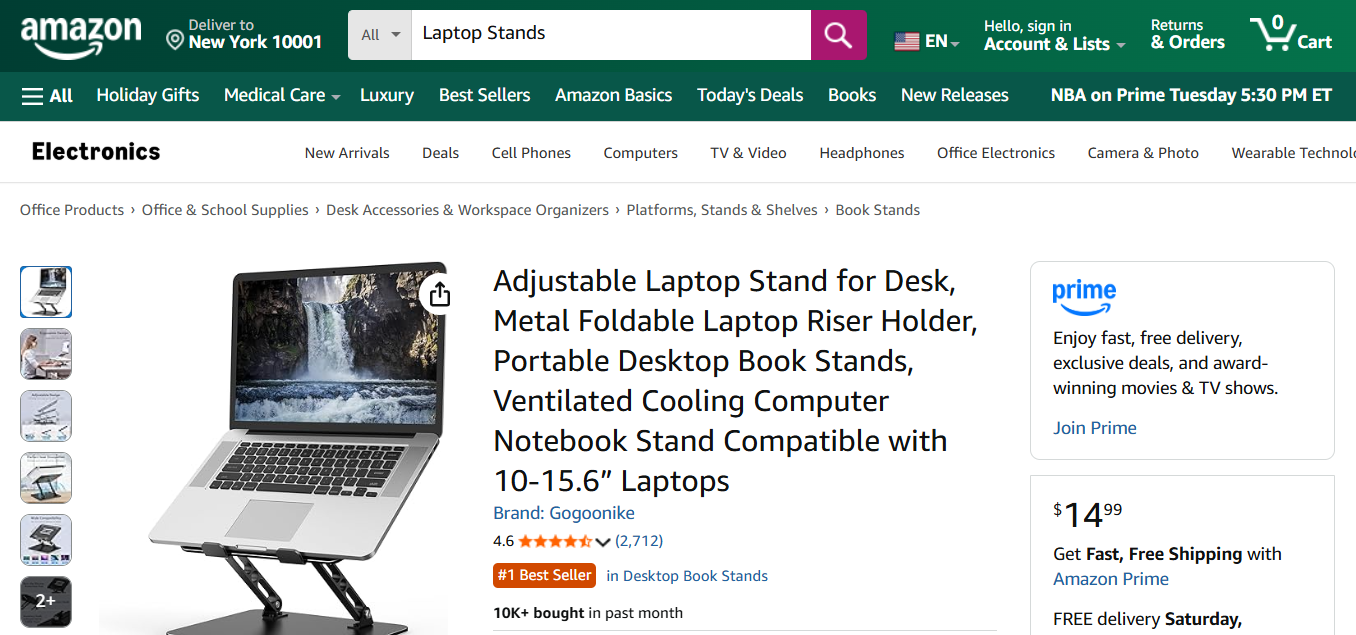
Step 2: Get the ASIN
The ASIN (Amazon Standard Identification Number) is the unique 10-character identifier for each product. You can find it in:
- The product URL:
amazon.com/dp/B0C7BKZ883(the ASIN isB0C7BKZ883) - The product details section on the page
Step 3: Send the API Request
curl --location --request GET 'https://api.scrape.do/plugin/amazon/pdp?token=<SDO-token>&asin=B0C7BKZ883&geocode=US&zipcode=10001'import requests
import json
token = "<SDO-token>"
asin = "B0C7BKZ883"
geocode = "US"
zipcode = "10001"
url = f"https://api.scrape.do/plugin/amazon/pdp?token={token}&asin={asin}&geocode={geocode}&zipcode={zipcode}"
response = requests.request("GET", url)
print(json.dumps(response.json(), indent=2))const axios = require('axios');
const token = "<SDO-token>";
const asin = "B0C7BKZ883";
const geocode = "US";
const zipcode = "10001";
const url = `https://api.scrape.do/plugin/amazon/pdp?token=${token}&asin=${asin}&geocode=${geocode}&zipcode=${zipcode}`;
axios.get(url)
.then(response => {
console.log(JSON.stringify(response.data, null, 2));
})
.catch(error => {
console.error(error);
});package main
import (
"fmt"
"io/ioutil"
"net/http"
)
func main() {
token := "<SDO-token>"
asin := "B0C7BKZ883"
geocode := "US"
zipcode := "10001"
url := fmt.Sprintf(
"https://api.scrape.do/plugin/amazon/pdp?token=%s&asin=%s&geocode=%s&zipcode=%s",
token, asin, geocode, zipcode,
)
resp, err := http.Get(url)
if err != nil {
panic(err)
}
defer resp.Body.Close()
body, _ := ioutil.ReadAll(resp.Body)
fmt.Println(string(body))
}require 'net/http'
require 'json'
token = "<SDO-token>"
asin = "B0C7BKZ883"
geocode = "US"
zipcode = "10001"
url = URI("https://api.scrape.do/plugin/amazon/pdp?token=#{token}&asin=#{asin}&geocode=#{geocode}&zipcode=#{zipcode}")
response = Net::HTTP.get(url)
puts JSON.pretty_generate(JSON.parse(response))import java.net.HttpURLConnection;
import java.net.URL;
import java.io.BufferedReader;
import java.io.InputStreamReader;
public class AmazonPDP {
public static void main(String[] args) throws Exception {
String token = "<SDO-token>";
String asin = "B0C7BKZ883";
String geocode = "US";
String zipcode = "10001";
String url = String.format(
"https://api.scrape.do/plugin/amazon/pdp?token=%s&asin=%s&geocode=%s&zipcode=%s",
token, asin, geocode, zipcode
);
HttpURLConnection conn = (HttpURLConnection) new URL(url).openConnection();
conn.setRequestMethod("GET");
BufferedReader reader = new BufferedReader(new InputStreamReader(conn.getInputStream()));
String line;
StringBuilder response = new StringBuilder();
while ((line = reader.readLine()) != null) {
response.append(line);
}
reader.close();
System.out.println(response.toString());
}
}using System;
using System.Net.Http;
using System.Threading.Tasks;
class Program
{
static async Task Main()
{
string token = "<SDO-token>";
string asin = "B0C7BKZ883";
string geocode = "US";
string zipcode = "10001";
string url = $"https://api.scrape.do/plugin/amazon/pdp?token={token}&asin={asin}&geocode={geocode}&zipcode={zipcode}";
using HttpClient client = new HttpClient();
string response = await client.GetStringAsync(url);
Console.WriteLine(response);
}
}<?php
$token = "<SDO-token>";
$asin = "B0C7BKZ883";
$geocode = "US";
$zipcode = "10001";
$url = "https://api.scrape.do/plugin/amazon/pdp?token={$token}&asin={$asin}&geocode={$geocode}&zipcode={$zipcode}";
$ch = curl_init();
curl_setopt($ch, CURLOPT_URL, $url);
curl_setopt($ch, CURLOPT_RETURNTRANSFER, true);
$response = curl_exec($ch);
curl_close($ch);
echo json_encode(json_decode($response), JSON_PRETTY_PRINT);
?>Step 4: Receive Structured Data
The API returns a complete JSON object with all product information:
{
  "asin": "B0C7BKZ883",
  "is_sponsored": false,
  "brand": "Gogoonike",
  "name": "Adjustable Laptop Stand for Desk, Metal Foldable Laptop Riser Holder...",
  "url": "https://www.amazon.com/dp/B0C7BKZ883",
  "thumbnail": "https://m.media-amazon.com/images/I/71Jz2L1pV6L._AC_SX679_.jpg",
  "rating": 4.6,
  "total_ratings": 2712,
  "price": 14.99,
  "list_price": 39.99,
  "currency": "USD",
  "currency_symbol": "$",
  "is_prime": true,
  "shipping_info": [
    "FREE delivery Monday, December 16",
    "Or fastest delivery Friday, December 13"
  ],
  "more_buying_choices": {
    "heading": "More Buying Choices",
    "offer_text": "New from $14.99",
    "offer_link": "https://www.amazon.com/gp/offer-listing/B0C7BKZ883"
  },
  "images": [
    {
      "url": "https://m.media-amazon.com/images/I/71Jz2L1pV6L._AC_SX679_.jpg",
      "width": 679,
      "height": 679
    }
  ],
  "best_seller_rankings": [
    { "category": "Office Products", "rank": 249 },
    { "category": "Laptop Stands", "rank": 2 }
  ],
  "technical_details": {
    "Brand": "Gogoonike",
    "Compatible Devices": "Laptop",
    "Material": "Aluminum",
    "Item Weight": "1.1 Pounds"
  },
  "status": "success",
  "errorMessage": null
}
Images are automatically converted to high-resolution URLs. The response is limited to a maximum of 8MB.
Add include_html=true to your request to receive the full raw HTML of the Amazon page alongside the structured JSON output. The HTML will be included in an html field at the end of the response.








