# Scrape Crypto Prices from CoinMarketCap
> Source: https://scrape.do/industries/cryptocurrency/coinmarketcap-scraper/
Scrape live coin prices, market caps, 24h volume, supply and daily OHLC history from CoinMarketCap with one API call through Scrape.do.
**Scrape Crypto Prices from CoinMarketCap**
Extract live prices, market caps, trading volume, supply figures and daily price history for every coin CoinMarketCap lists. Each coin page ships its statistics as JSON inside the HTML, so you can skip the browser. Scrape.do sends every request through rotating proxies and returns the complete page with one API call.
## How to Scrape CoinMarketCap
### Coin Page
Extract price, market cap, fully diluted market cap, 24h volume, supply figures and dominance from any CoinMarketCap coin page with a single API call.
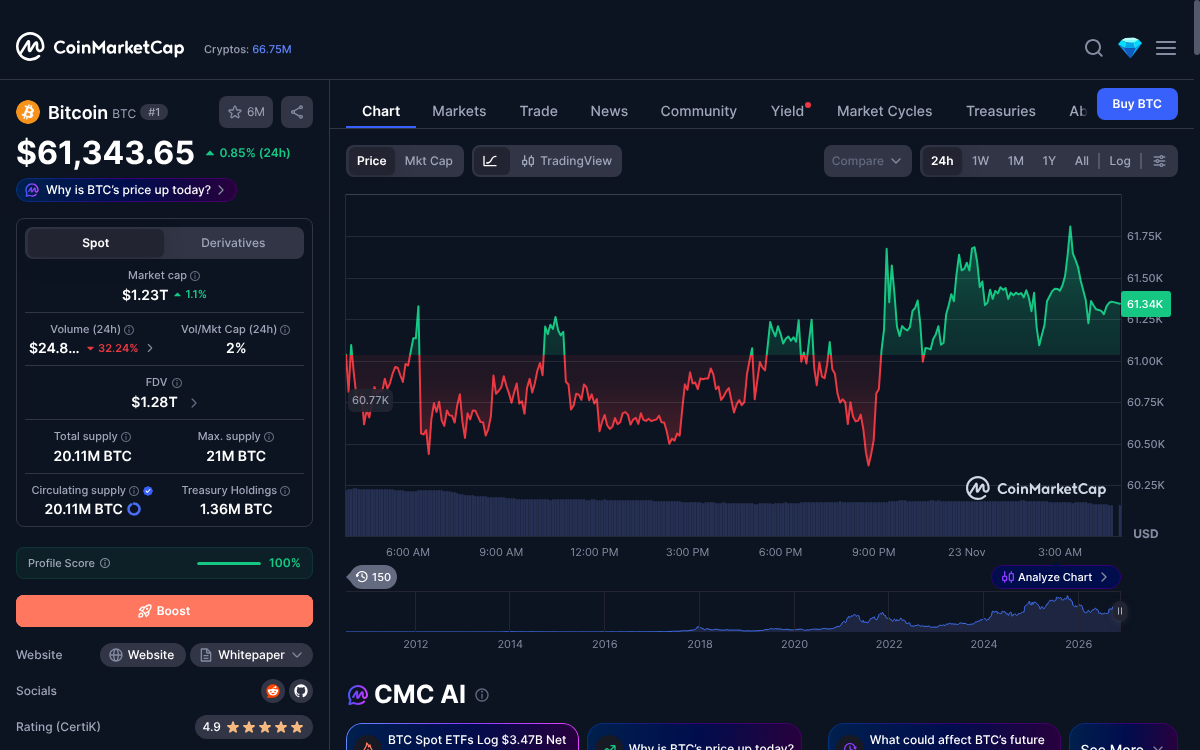
**Example response**
```html
Bitcoin price today, BTC to USD live price, marketcap and chart | CoinMarketCap
$61,343.65
```
Scrape **CoinMarketCap** (https://coinmarketcap.com) and receive the data as structured JSON.
**Example extracted fields**
| Field | Example |
| ----- | ------- |
| Price | $61,343.65 |
| Market Cap | $1.23T |
| FDV | $1.28T |
| Circulating Supply | 20.11M BTC |
### 38M+ Monthly Visits. Every Listed Coin. One API.
CoinMarketCap has published crypto prices, trading volumes and market caps since **2013** and has been owned by **Binance** since April 2020. It drew about **38.9 million visits in October 2026** and ranks **#3 in Crypto Trading and Wallets** in the US on Similarweb. Its largest desktop audiences are the **US (24.8%)**, Germany, Russia and Brazil.
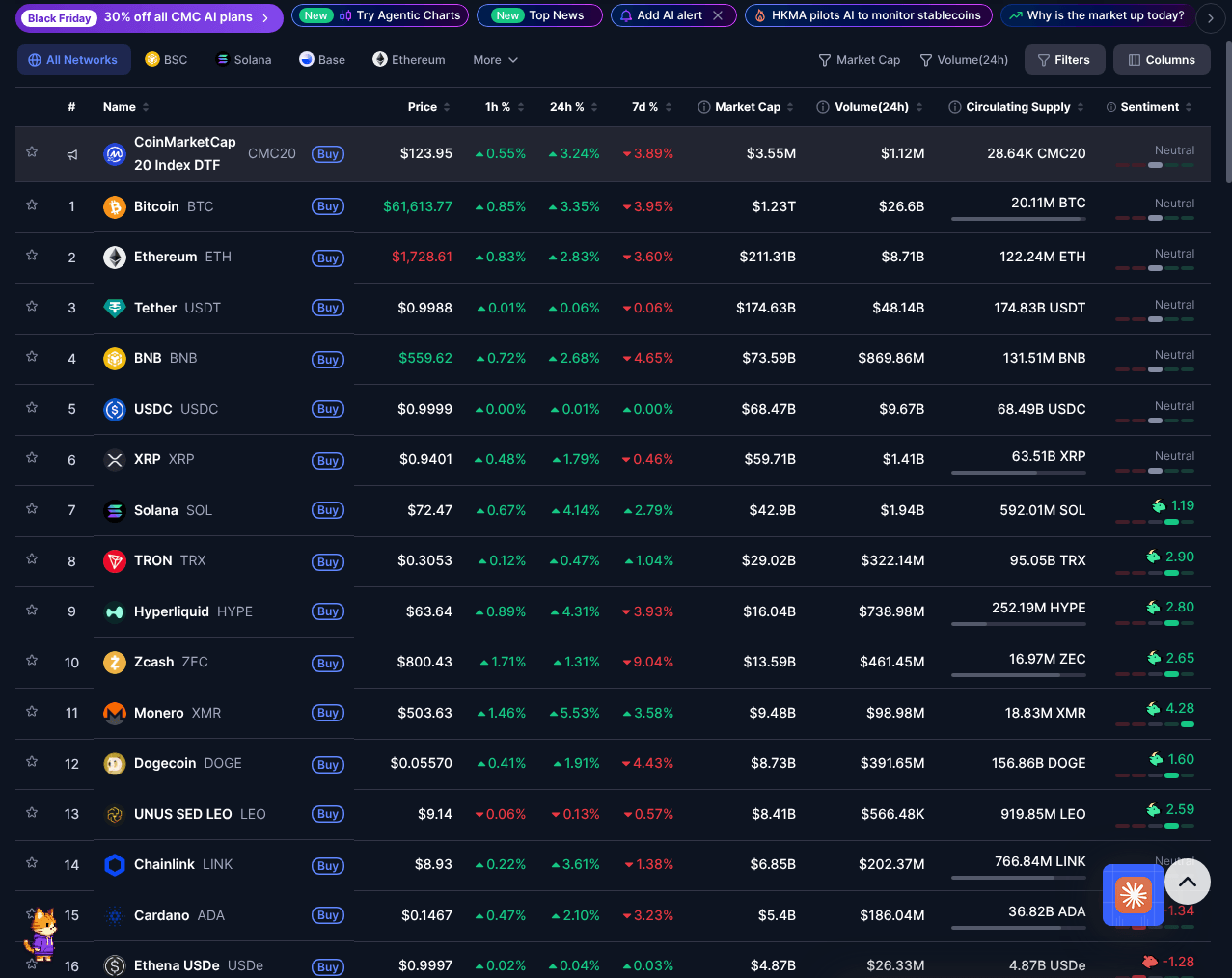
With Scrape.do you can **pull price, market cap, 24h volume and circulating supply** for any coin, rebuild **daily OHLC history** from the historical data pages, track rank changes across the ranking table, and **feed trading bots, dashboards and AI agents** with data you control. The ranking table on the homepage gives you rank, price, 1h, 24h and 7d change, market cap, volume and circulating supply for the coins on the first page in one request.
### Amazon CloudFront. Prices That Move Every Refresh. Handled.
CoinMarketCap is served through **Amazon CloudFront**, and requests sent without a User-Agent header get a **403 "Request blocked"** page instead of prices. The data you want moves between refreshes: price and 24h volume change from one page load to the next, so a useful feed means polling hundreds of pages on a schedule.
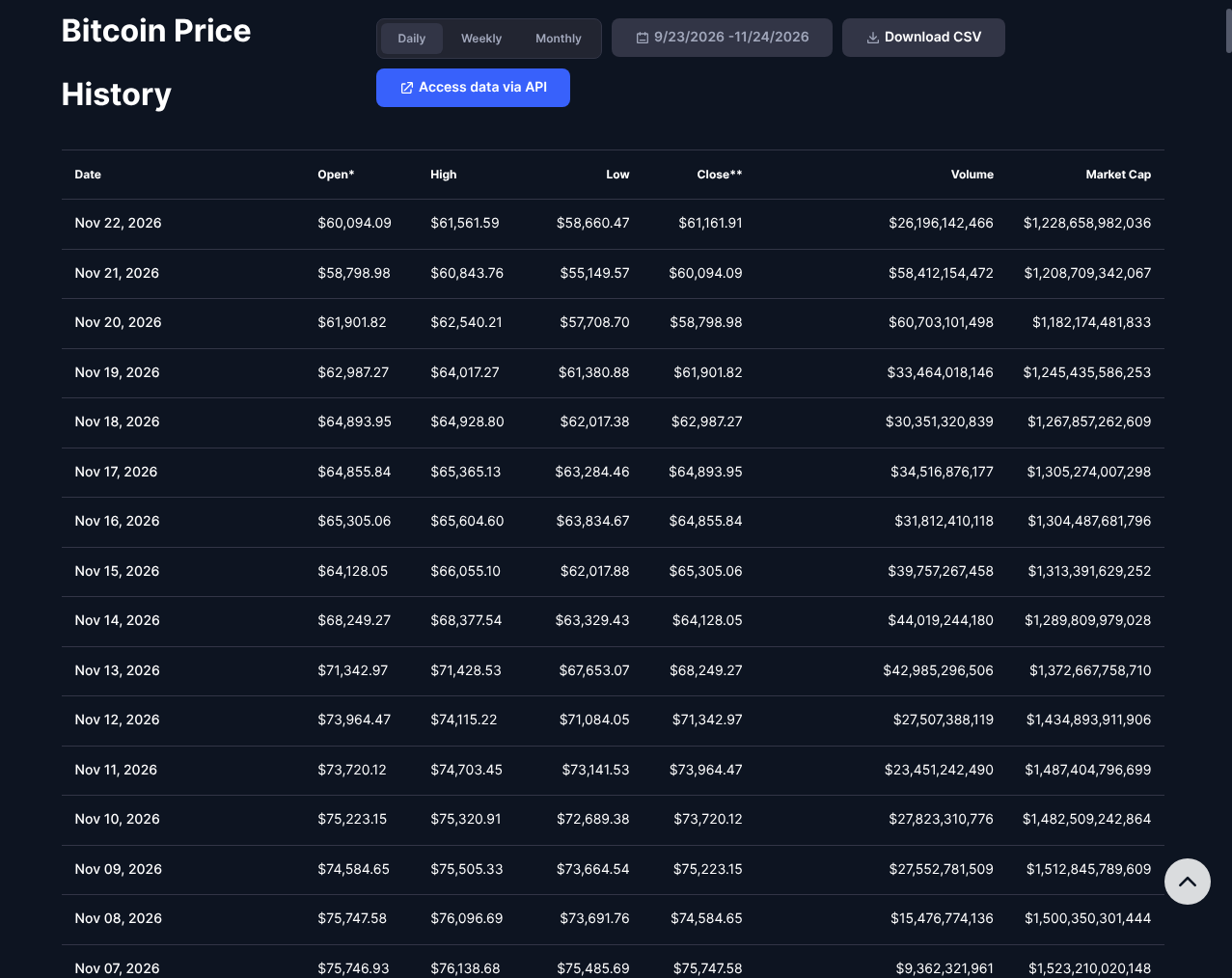
Scrape.do spreads those requests across a rotating proxy pool, sets the headers and retries failed calls, so your feed keeps running without proxy lists to maintain. Coin pages carry their statistics in the server HTML, so `render=false` is enough there. Daily history, like the **open, high, low, close, volume and market cap** table shown here, loads after the page opens, so request historical pages with `render=true`.
## FAQ
### Do I need a headless browser to scrape CoinMarketCap?
Not for coin pages. They are server-rendered and include a `__NEXT_DATA__` JSON script with the price, percent changes, market cap, fully diluted market cap, 24h volume, circulating, total and max supply, and market cap dominance, so keep `render=false` and parse that JSON. Historical data pages are different: their daily table loads after the page opens, so request them with `render=true`.
### What data can I extract from CoinMarketCap?
Coin pages give price, percent changes, market cap, fully diluted valuation, 24h volume, supply figures and the markets table by exchange and pair. The homepage ranking table gives rank, price, 1h, 24h and 7d change, market cap, volume and circulating supply per coin, and the historical data pages give daily open, high, low, close, volume and market cap.
### Should I use the CoinMarketCap API or scrape the website?
Use the official API when its endpoints cover what you need. Scraping the public pages fits when you want one pipeline across CoinMarketCap and other data sites, with the same request format for each. Scrape.do keeps that pipeline to a single API call per page.