Output & Response
Customize response
Here we present the parameters where the responses returned by our system can be customized.
Output Format
Scrape.do does support markdown output for LLM data training or other necessary purposes. You can use the output=markdown parameter to obtain the output in markdown format when the response content-type is text/html.
curl --location --request GET 'https://api.scrape.do/?token=YOUR_TOKEN&url=https://httpbin.co/&output=markdown'import requests
import urllib.parse
token = "YOUR_TOKEN"
targetUrl = urllib.parse.quote("https://httpbin.co/")
url = "http://api.scrape.do/?token={}&url={}&output=markdown".format(token, targetUrl)
response = requests.request("GET", url)
print(response.text)const axios = require('axios');
const token = "YOUR_TOKEN";
const targetUrl = encodeURIComponent("https://httpbin.co/");
const config = {
'method': 'GET',
'url': `https://api.scrape.do/?token=${token}&url=${targetUrl}&output=markdown`,
'headers': {}
};
axios(config)
.then(function (response) {
console.log(response.data);
})
.catch(function (error) {
console.log(error);
});package main
import (
"fmt"
"io/ioutil"
"net/http"
"net/url"
)
func main() {
token := "YOUR_TOKEN"
encoded_url := url.QueryEscape("https://httpbin.co/")
url := fmt.Sprintf("https://api.scrape.do/?token=%s&url=%s&output=markdown", token, encoded_url)
method := "GET"
client := &http.Client{}
req, err := http.NewRequest(method, url, nil)
if err != nil {
fmt.Println(err)
return
}
res, err := client.Do(req)
if err != nil {
fmt.Println(err)
return
}
defer res.Body.Close()
body, err := ioutil.ReadAll(res.Body)
if err != nil {
fmt.Println(err)
return
}
fmt.Println(string(body))
}require "uri"
require "net/http"
require 'cgi'
str = CGI.escape "https://httpbin.co/"
url = URI("https://api.scrape.do/?url=" + str + "&token=YOUR_TOKEN&output=markdown")
https = Net::HTTP.new(url.host, url.port)
https.use_ssl = true
request = Net::HTTP::Get.new(url)
response = https.request(request)
puts response.read_bodyOkHttpClient client = new OkHttpClient().newBuilder()
.build();
MediaType mediaType = MediaType.parse("text/plain");
RequestBody body = RequestBody.create(mediaType, "");
String encoded_url = URLEncoder.encode("https://httpbin.co/", "UTF-8");
Request request = new Request.Builder()
.url("https://api.scrape.do/?token=YOUR_TOKEN&url=" + encoded_url +"&output=markdown")
.method("GET", body)
.build();
Response response = client.newCall(request).execute();string token = "YOUR_TOKEN";
string url = WebUtility.UrlEncode("https://httpbin.co/");
var client = new HttpClient();
var requestURL = $"https://api.scrape.do/?token={token}&url={url}&output=markdown";
var request = new HttpRequestMessage(HttpMethod.Get, requestURL);
var response = client.SendAsync(request).Result;
var content = response.Content.ReadAsStringAsync().Result;
Console.WriteLine(content);<?php
$curl = curl_init();
curl_setopt($curl, CURLOPT_RETURNTRANSFER, true);
curl_setopt($curl, CURLOPT_HEADER, false);
$data = [
"url" => "https://httpbin.co/",
"token" => "YOUR_TOKEN",
"output" => "markdown",
];
curl_setopt($curl, CURLOPT_CUSTOMREQUEST, 'GET');
curl_setopt($curl, CURLOPT_URL, "https://api.scrape.do/?".http_build_query($data));
curl_setopt($curl, CURLOPT_HTTPHEADER, array(
"Accept: */*",
));
$response = curl_exec($curl);
curl_close($curl);
echo $response;
?>Downloading Pictures & Files
You don't need any extra configuration to download pictures or files. Just send a request with the target URL and get the result.
There is a 4MB response body limit per request in our system. With super proxies, this limit is 2MB.
curl --location --request GET 'http://api.scrape.do/?token=YOUR_TOKEN&url=https://httpbin.co/image'import requests
import urllib.parse
token = "YOUR_TOKEN"
targetUrl = urllib.parse.quote("https://httpbin.co/image")
url = "http://api.scrape.do/?token={}&url={}".format(token, targetUrl)
response = requests.request("GET", url)
print(response.text)const axios = require('axios');
const token = "YOUR_TOKEN";
const targetUrl = encodeURIComponent("https://httpbin.co/image");
const config = {
'method': 'GET',
'url': `https://api.scrape.do/?token=${token}&url=${targetUrl}`,
'headers': {}
};
axios(config)
.then(function (response) {
console.log(response.data);
})
.catch(function (error) {
console.log(error);
});package main
import (
"fmt"
"io/ioutil"
"net/http"
"net/url"
)
func main() {
token := "YOUR_TOKEN"
encoded_url := url.QueryEscape("https://httpbin.co/image")
url := fmt.Sprintf("https://api.scrape.do/?token=%s&url=%s", token, encoded_url)
method := "GET"
client := &http.Client{}
req, err := http.NewRequest(method, url, nil)
if err != nil {
fmt.Println(err)
return
}
res, err := client.Do(req)
if err != nil {
fmt.Println(err)
return
}
defer res.Body.Close()
body, err := ioutil.ReadAll(res.Body)
if err != nil {
fmt.Println(err)
return
}
fmt.Println(string(body))
}require "uri"
require "net/http"
require 'cgi'
str = CGI.escape "https://httpbin.co/image"
url = URI("https://api.scrape.do/?url=" + str + "&token=YOUR_TOKEN")
https = Net::HTTP.new(url.host, url.port)
https.use_ssl = true
request = Net::HTTP::Get.new(url)
response = https.request(request)
puts response.read_bodyOkHttpClient client = new OkHttpClient().newBuilder()
.build();
MediaType mediaType = MediaType.parse("text/plain");
RequestBody body = RequestBody.create(mediaType, "");
String encoded_url = URLEncoder.encode("https://httpbin.co/image", "UTF-8");
Request request = new Request.Builder()
.url("https://api.scrape.do/?token=YOUR_URL&url=" + encoded_url +"")
.method("GET", body)
.build();
Response response = client.newCall(request).execute();string token = "YOUR_TOKEN";
string url = WebUtility.UrlEncode("https://httpbin.co/image");
var client = new HttpClient();
var requestURL = $"https://api.scrape.do/?token={token}&url={url}";
var request = new HttpRequestMessage(HttpMethod.Get, requestURL);
var response = client.SendAsync(request).Result;
var content = response.Content.ReadAsStringAsync().Result;
Console.WriteLine(content);<?php
$curl = curl_init();
curl_setopt($curl, CURLOPT_RETURNTRANSFER, true);
curl_setopt($curl, CURLOPT_HEADER, false);
$data = [
"url" => "https://httpbin.co/image",
"token" => "YOUR_TOKEN"
];
curl_setopt($curl, CURLOPT_CUSTOMREQUEST, 'GET');
curl_setopt($curl, CURLOPT_URL, "https://api.scrape.do/?".http_build_query($data));
curl_setopt($curl, CURLOPT_HTTPHEADER, array(
"Accept: */*",
));
$response = curl_exec($curl);
curl_close($curl);
echo $response;
?>Transparent Response
By default, Scrape.do returns status codes specified by our system. However, in some cases, you may want to use the exact status codes that the target web page returns.
In such cases, simply pass the transparentResponse=true parameter.
curl --location --request GET 'https://api.scrape.do/?token=YOUR_TOKEN&url=https://httpbin.co/anything&transparentResponse=true'import requests
import urllib.parse
token = "YOUR_TOKEN"
targetUrl = urllib.parse.quote("https://httpbin.co/anything")
transparentResponse = "true"
url = "http://api.scrape.do/?token={}&url={}&transparentResponse={}".format(token, targetUrl,transparentResponse)
response = requests.request("GET", url)
print(response.text)const axios = require('axios');
const token = "YOUR_TOKEN";
const targetUrl = encodeURIComponent("https://httpbin.co/anything");
const transparentResponse = "true"
const config = {
'method': 'GET',
'url': `https://api.scrape.do/?token=${token}&url=${targetUrl}&transparentResponse=${transparentResponse}`,
'headers': {}
};
axios(config)
.then(function (response) {
console.log(response.data);
})
.catch(function (error) {
console.log(error);
});package main
import (
"fmt"
"io/ioutil"
"net/http"
"net/url"
)
func main() {
token := "YOUR_TOKEN"
encoded_url := url.QueryEscape("https://httpbin.co/anything")
url := fmt.Sprintf("https://api.scrape.do/?token=%s&url=%s&transparentResponse=true", token, encoded_url)
method := "GET"
client := &http.Client{}
req, err := http.NewRequest(method, url, nil)
if err != nil {
fmt.Println(err)
return
}
res, err := client.Do(req)
if err != nil {
fmt.Println(err)
return
}
defer res.Body.Close()
body, err := ioutil.ReadAll(res.Body)
if err != nil {
fmt.Println(err)
return
}
fmt.Println(string(body))
}require "uri"
require "net/http"
require 'cgi'
str = CGI.escape "https://httpbin.co/anything"
url = URI("https://api.scrape.do/?url=" + str + "&token=YOUR_TOKEN&transparentResponse=true")
https = Net::HTTP.new(url.host, url.port)
https.use_ssl = true
request = Net::HTTP::Get.new(url)
response = https.request(request)
puts response.read_bodyOkHttpClient client = new OkHttpClient().newBuilder()
.build();
MediaType mediaType = MediaType.parse("text/plain");
RequestBody body = RequestBody.create(mediaType, "");
String encoded_url = URLEncoder.encode("https://httpbin.co/anything", "UTF-8");
Request request = new Request.Builder()
.url("https://api.scrape.do/?token=YOUR_TOKEN&url="encoded_url"&transparentResponse=true")
.method("GET", body)
.build();
Response response = client.newCall(request).execute();string token = "YOUR_TOKEN";
string url = WebUtility.UrlEncode("https://httpbin.co/anything");
var client = new HttpClient();
var requestURL = $"https://api.scrape.do/?token={token}&url={url}&transparentResponse=true";
var request = new HttpRequestMessage(HttpMethod.Get, requestURL);
var response = client.SendAsync(request).Result;
var content = response.Content.ReadAsStringAsync().Result;
Console.WriteLine(content);<?php
$curl = curl_init();
curl_setopt($curl, CURLOPT_RETURNTRANSFER, true);
curl_setopt($curl, CURLOPT_HEADER, false);
$data = [
"url" => "https://httpbin.co/anything",
"token" => "YOUR_TOKEN",
"transparentResponse" => "true"
];
curl_setopt($curl, CURLOPT_CUSTOMREQUEST, 'GET');
curl_setopt($curl, CURLOPT_URL, "https://api.scrape.do/?".http_build_query($data));
curl_setopt($curl, CURLOPT_HTTPHEADER, array(
"Accept: */*",
));
$response = curl_exec($curl);
curl_close($curl);
echo $response;
?>Response Headers
By default, Scrape.do will return all the header information it receives from the target website. Our system also aims to make your work easier by adding the following header parameters to the response.
| Header | Description |
|---|---|
| Scrape.do-Cookies | All cookie information returned from the target web page, joined with ';' and returned in one header |
| Scrape.do-Remaining-Credits | Total credits remaining in your subscription |
| Scrape.do-Request-Cost | Indicates how many credits the request consumed |
| Scrape.do-Resolved-Url | The final URL after following redirects. Useful for tracking where requests end up |
| Scrape.do-Target-Url | The original URL of the target web page you requested |
| Scrape.do-Initial-Status-Code | The first response status code received from the target website. In responses with redirects, this will show the initial 30X code |
| Scrape.do-Target-Redirected-Location | When disableRedirection=true, this shows the Location header from the target website's redirect response |
Pure Cookies
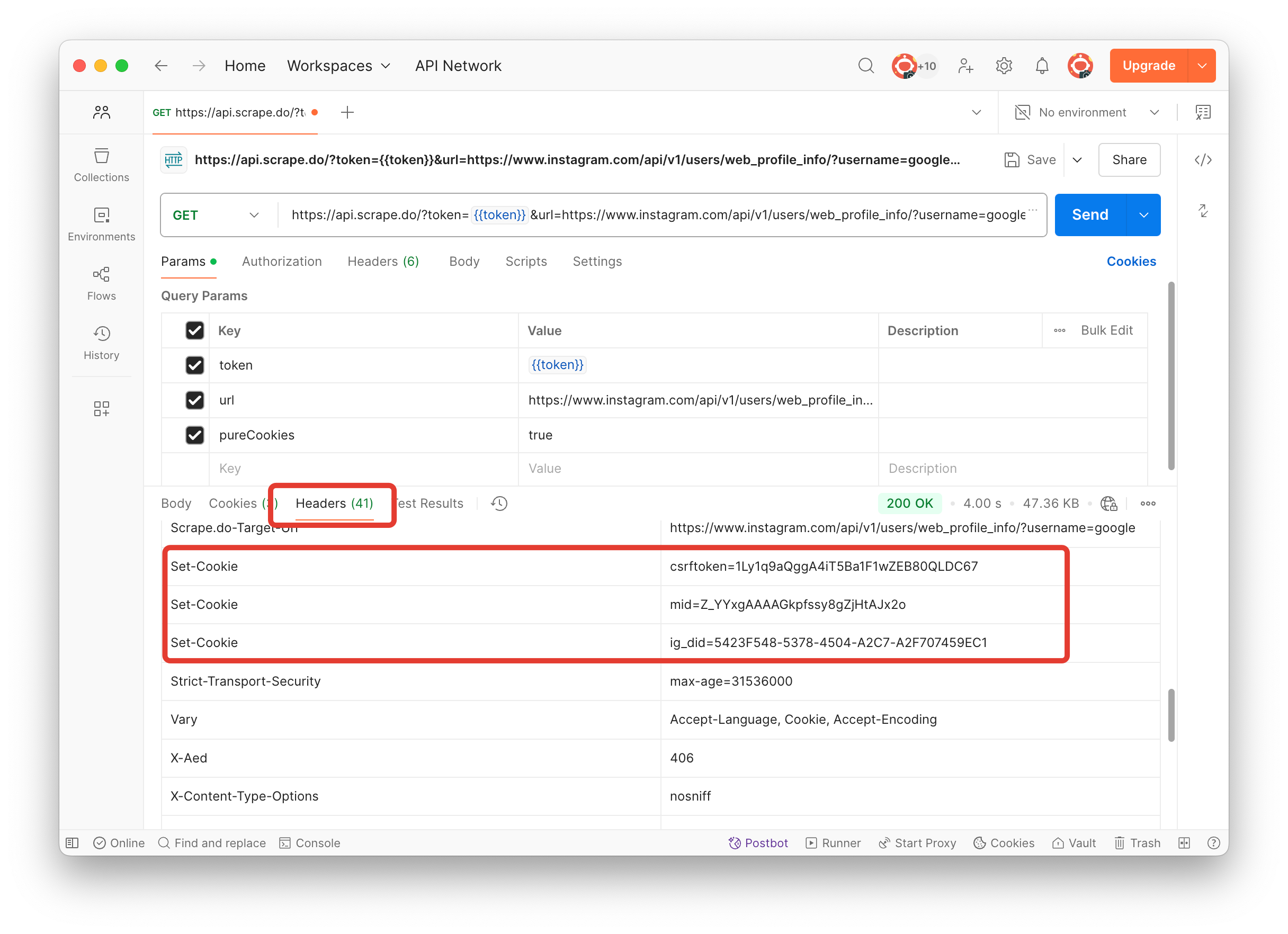
When scraping websites, you may need to process cookies in their original format. By default, Scrape.do returns cookies in a special header called Scrape.do-Cookies. However, if you need to access the original Set-Cookie headers returned by the target website, you can enable the pureCookies parameter.
When set to pureCookies=true, this parameter returns the original Set-Cookie headers from the target website instead of the processed Scrape.do-Cookies format.
curl --location --request GET 'https://api.scrape.do/?token=YOUR_TOKEN&url=https://www.instagram.com/api/v1/users/web_profile_info/?username=google&pureCookies=true'import requests
import urllib.parse
token = "YOUR_TOKEN"
targetUrl = urllib.parse.quote("https://www.instagram.com/api/v1/users/web_profile_info/?username=google")
url = "http://api.scrape.do/?token={}&url={}&pureCookies=true".format(token, targetUrl)
response = requests.request("GET", url)
for key, value in response.headers.items():
print(f"{key}: {value}")const axios = require('axios');
const token = "YOUR_TOKEN";
const targetUrl = encodeURIComponent("https://www.instagram.com/api/v1/users/web_profile_info/?username=google");
const config = {
'method': 'GET',
'url': `https://api.scrape.do/?token=${token}&url=${targetUrl}&pureCookies=true`,
'headers': {}
};
axios(config)
.then(function (response) {
console.log("HEADERS:", JSON.stringify(response.headers, null, 2));
})
.catch(function (error) {
console.log(error);
});package main
import (
"fmt"
"net/http"
"net/url"
)
func main() {
token := "YOUR_TOKEN"
encoded_url := url.QueryEscape("https://www.instagram.com/api/v1/users/web_profile_info/?username=google")
url := fmt.Sprintf("https://api.scrape.do/?token=%s&url=%s&pureCookies=true", token, encoded_url)
method := "GET"
client := &http.Client{}
req, err := http.NewRequest(method, url, nil)
if err != nil {
fmt.Println(err)
return
}
res, err := client.Do(req)
if err != nil {
fmt.Println(err)
return
}
defer res.Body.Close()
fmt.Println("HEADERS:")
for key, values := range res.Header {
for _, value := range values {
fmt.Printf("%s: %s\n", key, value)
}
}
}require "uri"
require "net/http"
require 'cgi'
str = CGI.escape "https://www.instagram.com/api/v1/users/web_profile_info/?username=google"
url = URI("https://api.scrape.do/?url=" + str + "&token=YOUR_TOKEN&pureCookies=true")
https = Net::HTTP.new(url.host, url.port)
https.use_ssl = true
request = Net::HTTP::Get.new(url)
response = https.request(request)
puts "HEADERS:"
response.each_header do |key, value|
puts "#{key}: #{value}"
endOkHttpClient client = new OkHttpClient().newBuilder()
.build();
MediaType mediaType = MediaType.parse("text/plain");
RequestBody body = RequestBody.create(mediaType, "");
String encoded_url = URLEncoder.encode("https://www.instagram.com/api/v1/users/web_profile_info/?username=google", "UTF-8");
Request request = new Request.Builder()
.url("https://api.scrape.do/?token=YOUR_TOKEN&url=" + encoded_url +"&pureCookies=true")
.method("GET", body)
.build();
Response response = client.newCall(request).execute();
System.out.println("Status Code: " + response.code());
System.out.println("\nHEADERS:");
Headers headers = response.headers();
for (int i = 0; i < headers.size(); i++) {
System.out.println(headers.name(i) + ": " + headers.value(i));
}string token = "YOUR_TOKEN";
string url = WebUtility.UrlEncode("https://www.instagram.com/api/v1/users/web_profile_info/?username=google");
var client = new HttpClient();
var requestURL = $"https://api.scrape.do/?token={token}&url={url}&pureCookies=true";
var request = new HttpRequestMessage(HttpMethod.Get, requestURL);
var response = client.SendAsync(request).Result;
Console.WriteLine($"Status Code: {(int)response.StatusCode} {response.StatusCode}");
Console.WriteLine("\nHEADERS:");
foreach (var header in response.Headers)
{
Console.WriteLine($"{header.Key}: {string.Join(", ", header.Value)}");
}<?php
$curl = curl_init();
curl_setopt($curl, CURLOPT_RETURNTRANSFER, true);
curl_setopt($curl, CURLOPT_HEADER, true);
$data = [
"url" => "https://www.instagram.com/api/v1/users/web_profile_info/?username=google",
"token" => "YOUR_TOKEN",
"pureCookies" => "true",
];
curl_setopt($curl, CURLOPT_CUSTOMREQUEST, 'GET');
curl_setopt($curl, CURLOPT_URL, "https://api.scrape.do/?".http_build_query($data));
curl_setopt($curl, CURLOPT_HTTPHEADER, array(
"Accept: */*",
));
$response = curl_exec($curl);
$header_size = curl_getinfo($curl, CURLINFO_HEADER_SIZE);
$header = substr($response, 0, $header_size);
curl_close($curl);
echo "HEADERS:\n";
$headers = explode("\r\n", $header);
foreach($headers as $h) {
if(trim($h) !== '') {
echo $h . "\n";
}
}
?>Example Result