# How to Scrape Trip.com: Hotels, Reviews, and Flight Prices with Python
> Source: https://scrape.do/blog/trip-com-scraping/
Published: 2026-08-25 · Updated: 2026-08-25 · Authors: Serhat Kurtulus · Categories: Scraping Use Cases
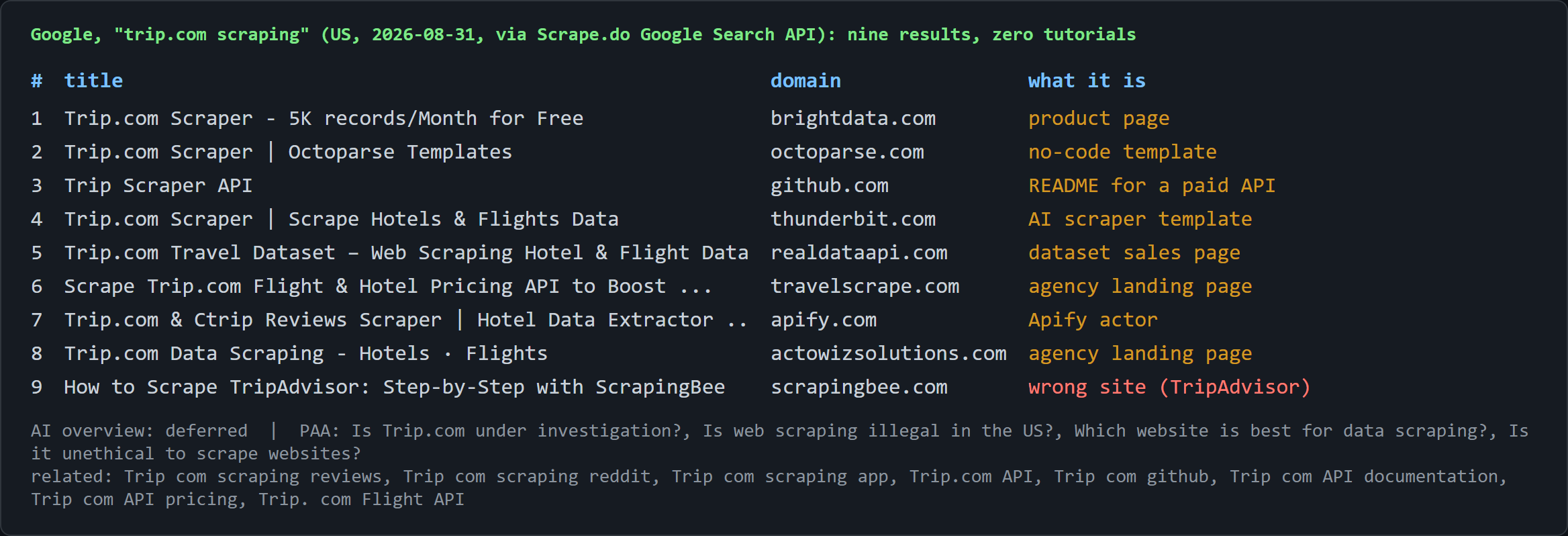
Every Google result for how to scrape Trip.com is a product page, a no-code template, or an agency landing page: no code, and no word on where the hotel or flight data sits in the response. Trip.com itself hands a plain HTTP client a 1.4 MB page with no hotel cards in it, and a headless browser gets even less: a blank list, and a sign-in wall on the detail pages. Anyone attempting travel data scraping here without a map of the internals either concludes the site has nothing to give or burns hours on a rendering detour. For the "trip.com api" searcher, one honest line up front: there is no public API, only internal JSON services, and some of them answer outsiders.
The win condition is four surfaces into four CSVs with plain `requests`: hotel search results, hotel detail pages, paginated reviews, and full flight search results with tax and seats left, plus a map of which Trip.com doors open and which stay locked no matter what client knocks.
[Full working code on GitHub ⚙](https://github.com/scrape-do/scrapedo-scrapers)
## Why Is It Difficult to Scrape Trip.com?
Trip.com works fine in a normal browser. The constraint is what our HTTP client receives when we try to scrape Trip.com: a Next.js page whose data ships as a [React Server Components](https://nextjs.org/docs/app/getting-started/server-and-client-components) stream inside `` tags, each holding a JSON-escaped fragment of one long payload. We need five lines to decode that, and we will reuse them under Hotel Listings and Hotel Details:
```python
# 3. Parse: the list lives in the Next.js RSC stream, not in the DOM
chunks = re.findall(r'self\.__next_f\.push\(\[1,"(.*?)"\]\)', response.text, re.S)
payload = "".join(json.loads(f'"{c}"') for c in chunks)
start = payload.index('"initListData"')
data, _ = json.JSONDecoder().raw_decode(payload, payload.index("{", start))
```
The regex collects every chunk's string body, `json.loads` unescapes each one (it is a JSON string literal), and [`raw_decode`](https://docs.python.org/3/library/json.html#json.JSONDecoder.raw_decode) parses exactly one JSON object from the brace after the anchor key and stops, so we never hunt for the closing brace by hand. Swap the anchor to `"hotelDetailResponse"` and the same lines decode the detail page.
One regex, one unescape, one `raw_decode`. The hard part of the hotel pages is already done.
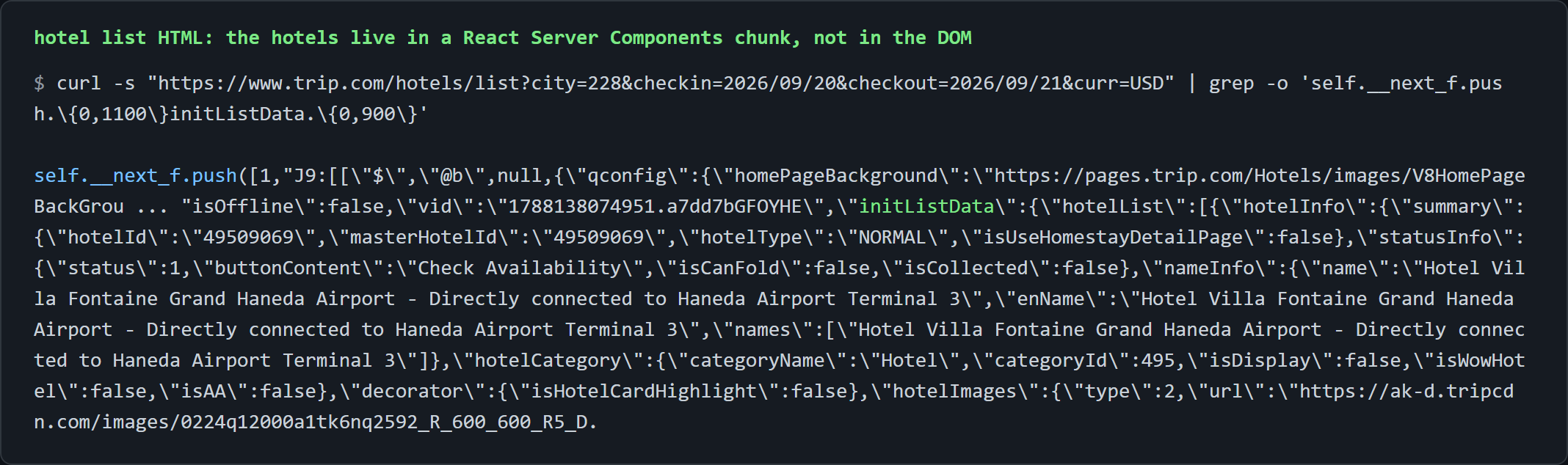
`curl` piped through `grep -o` shows the same `initListData` object from the shell, first hotel name included.
## Scraping Trip.com Hotel Listings
The list page is where the gate is loudest. It hands over 10 to 12 hotels per request and ignores every pagination parameter, so the win condition is breadth without a "next page".
The target is `https://www.trip.com/hotels/list?city=228&checkin=2026/09/20&checkout=2026/09/21&adult=2&crn=1&curr=USD`, where `city` is the numeric id in Trip.com's own list URL (Tokyo 228, Paris 192, Singapore 73). The SEO slug `/hotels/tokyo-hotels-list-228/` is a different, RSC-less page.
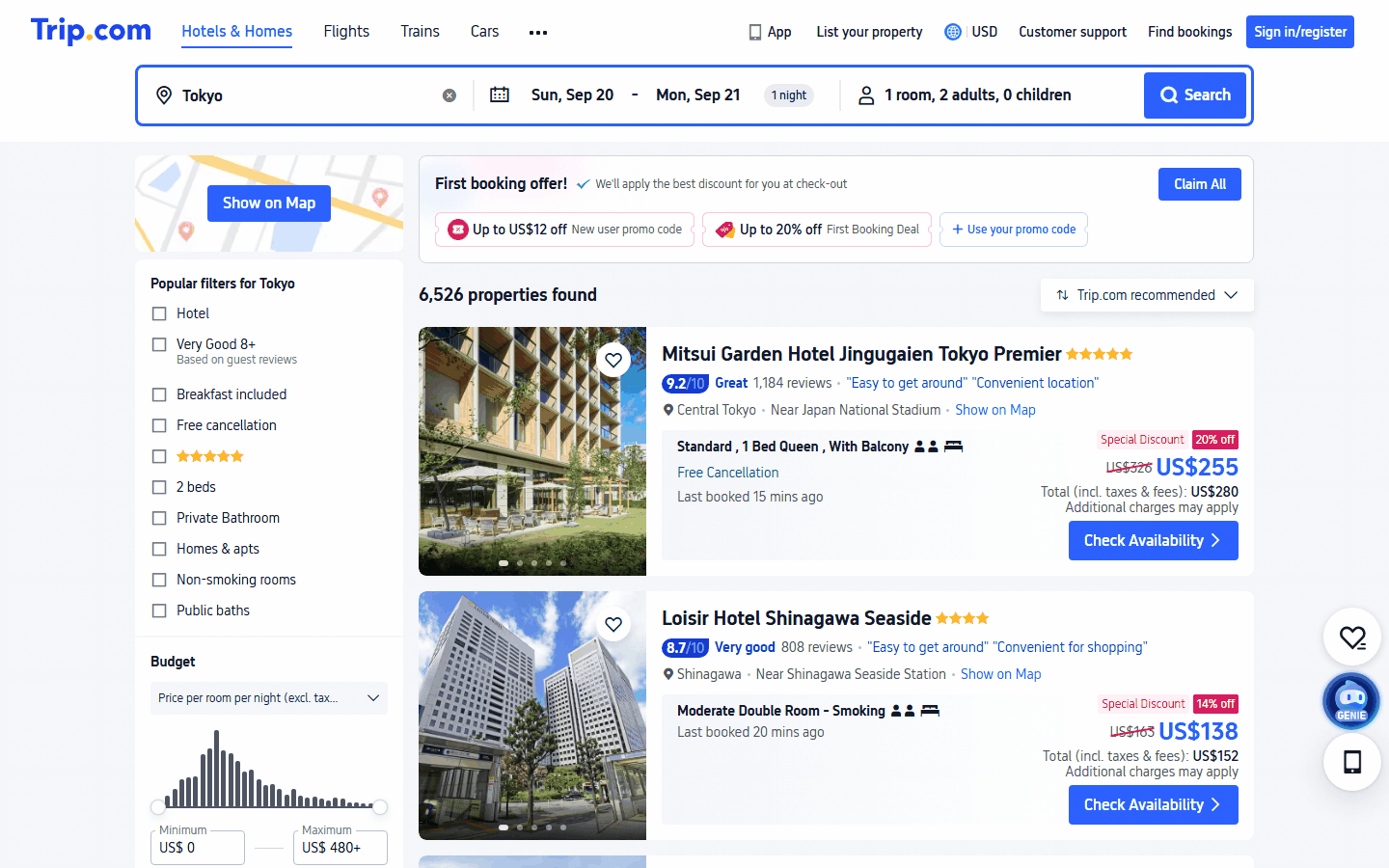
What comes out per hotel: id, name, star, category, score, review count, area, cheapest room, nightly price, total with taxes, currency, and a detail URL. That is the row most [hotel business data](https://scrape.do/blog/web-scraping-for-hotel-business-data-extraction-will-be-the-new-star/) pipelines start from, and the two price columns are the scrape hotel prices part. In a real browser the same page reports "6,526 properties found" for Tokyo.
### Decoding `initListData` from the list page
Configuration is the city id, the dates in Trip.com's own `YYYY/MM/DD` form, and a list of star slices. We will need those slices once pagination turns out to be closed:
```python
import requests
import json
import re
import csv
from urllib.parse import quote
# 1. Configuration
token = ""
city_id = 228 # Tokyo. The number in trip.com's own list URL: /hotels/list?city=228
checkin, checkout = "2026/09/20", "2026/09/21"
star_slices = ["", "5", "4", "3", "2"] # "" = unfiltered, then one request per star rating
```
We build the list URL, append `&starlist=` only when a slice is set, GET it through Scrape.do, and skip the slice on any non-200:
```python
hotels = {}
for star in star_slices:
target_url = (
f"https://www.trip.com/hotels/list?city={city_id}&checkin={checkin}&checkout={checkout}"
f"&adult=2&crn=1&curr=USD" + (f"&starlist={star}" if star else "")
)
# 2. Request
response = requests.get(f"http://api.scrape.do?token={token}&url={quote(target_url, safe='')}")
if response.status_code != 200:
print(f"star={star or 'all'}: HTTP {response.status_code}")
continue
```
We parse with the decoder from Setup, anchored on `"initListData"`:
```python
# 3. Parse: the list lives in the Next.js RSC stream, not in the DOM
chunks = re.findall(r'self\.__next_f\.push\(\[1,"(.*?)"\]\)', response.text, re.S)
payload = "".join(json.loads(f'"{c}"') for c in chunks)
start = payload.index('"initListData"')
data, _ = json.JSONDecoder().raw_decode(payload, payload.index("{", start))
```
The decoded object holds `hotelList` (10 organic hotels plus up to 2 ad slots), the city total, and `hotelSearchRequestStr`, the exact JSON body the client would send to `fetchHotelList`. The page carries the pagination request it would have sent, right next to the results, and the server then refuses that request from anyone but its own JavaScript.
### Extracting hotels, ratings, and the cheapest room price
Each `hotelList[i]` item splits into `hotelInfo` (the property, with star 0 for unrated) and `roomInfo`, a list of offers with the cheapest first. Price lives on that first room: its name, the numeric nightly price, and the "US$155" total-with-taxes string the card shows.
`roomInfo` can be an empty list; five of 25 Perlis rows in one run were homestays with no bookable offer for the dates, so we guard with chained `.get()` calls and those rows export with blank prices instead of crashing. We store results in a dict keyed by `hotel_id`, which makes the slicing loop deduplicate for free, and assemble a `detail_url` per row for the details scraper:
```python
total = data["hotelListAddtionInfo"]["hotelTotalCount"]
for item in data["hotelList"]:
info = item["hotelInfo"]
room = item["roomInfo"][0] if item.get("roomInfo") else {}
price = room.get("priceInfo", {})
hotel_id = info["summary"]["hotelId"]
hotels[hotel_id] = {
"hotel_id": hotel_id,
"name": info["nameInfo"]["name"],
"star": info["hotelStar"].get("star"),
"category": info["hotelCategory"]["categoryName"],
"score": info["commentInfo"].get("commentScore"),
"reviews": info["commentInfo"].get("commenterNumber"),
"area": info["positionInfo"].get("address"),
"location_desc": info["positionInfo"].get("positionDesc"),
"cheapest_room": room.get("summary", {}).get("physicsName"),
"price_per_night": price.get("price"),
"total_with_taxes": (price.get("priceExplanationExtend") or {}).get("highlight", [""])[0],
"currency": price.get("currency"),
"detail_url": f"https://www.trip.com/hotels/detail/?cityId={city_id}&hotelId={hotel_id}&checkin={checkin}&checkout={checkout}",
}
print(f"star={star or 'all'}: {len(data['hotelList'])} hotels on page, {total} in city, {len(hotels)} unique so far")
```
From the Tokyo CSV: `81946926`, Loisir Hotel Shinagawa Seaside, 4-star Hotel, 8.7, "808 reviews", "Moderate Double Room - Smoking", 141 USD per night, US$155 with taxes.
### Filter slicing instead of pagination
One request returns page 1 and nothing else. `pageIndex=2` in the URL is ignored, and two identical requests return different orderings because ranking is randomised per session. Tokyo has 6,526 hotels and the page shows 12.
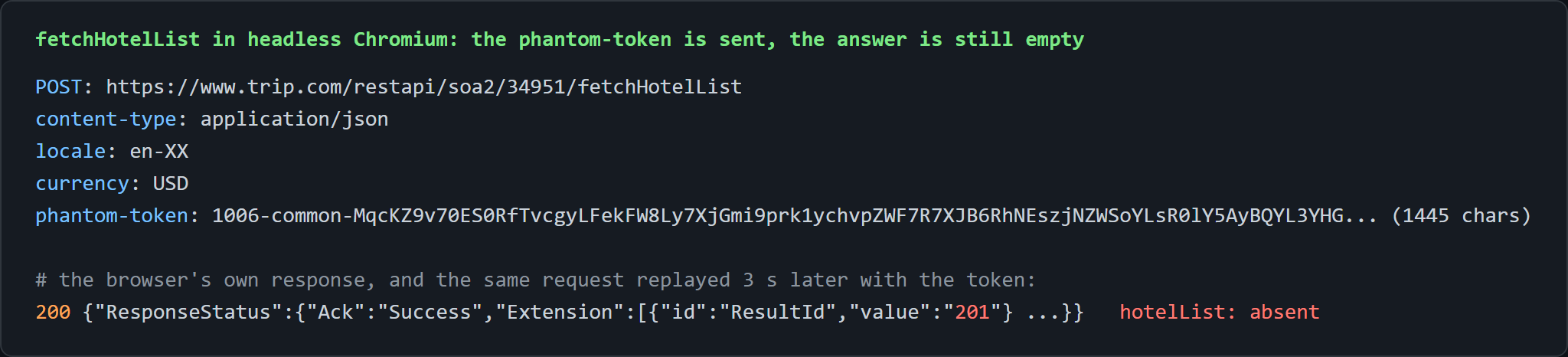
The browser paginates through `POST /restapi/soa2/34951/fetchHotelList`. Replaying it with the `hotelSearchRequestStr` body plus `pageIndex: 2` returns HTTP 400; with the browser's real body shape, captured from Playwright, it returns HTTP 200 with `ResultId 201` and no `hotelList`, token or no token.
Here is the catch. `fetchHotelList` needs the `phantom-token` that Trip.com's anti-bot JavaScript mints from the device fingerprint, and the server applies its own device verdict on top: a local headless Chromium sends a valid-looking 1,445-character token and still gets the empty `201` answer. [Target's Redsky API](https://scrape.do/blog/target-scraping/) lies about page counts; Trip.com's refuses to count for anyone who is not its own frontend.
The workaround: the SSR page honours filters, and every filter is another page 1 with a different 10 to 12 hotels. `starlist`, `lowprice`/`highprice`, `zone`, and `amenty` all work; `sort=price` and `keyword=` do nothing visible.
We ship the star slice, one request each, dedup by `hotelId` in the dict. Five requests produced 51 unique Tokyo hotels, the "unique so far" counter climbing 12, 22, 33, 40, 51. More coverage means more slices, not more pages: combine `starlist` with price bands or `zone` values and the dict keeps deduplicating. The trade-off is a broad sample per city and date rather than the full 6,526, because a complete inventory would need the locked door.
Singapore (575 hotels) gave 49 unique and Perlis (92) gave 25, with an empty five-star slice because the city has none.
**Rule of thumb:** on Trip.com's list page every filter is a page, and there is no page 2.
### Export to CSV
We hand `csv.DictWriter` the field names from the first stored row; `newline=""` with `encoding="utf-8"` keeps Japanese room names and the "US$" strings intact:
```python
# 4. Export
with open("hotel-list.csv", "w", newline="", encoding="utf-8") as f:
writer = csv.DictWriter(f, fieldnames=list(next(iter(hotels.values())).keys()))
writer.writeheader()
writer.writerows(hotels.values())
print(f"Saved {len(hotels)} hotels to hotel-list.csv")
```
The console prints one line per slice, then "Saved 51 hotels to hotel-list.csv".
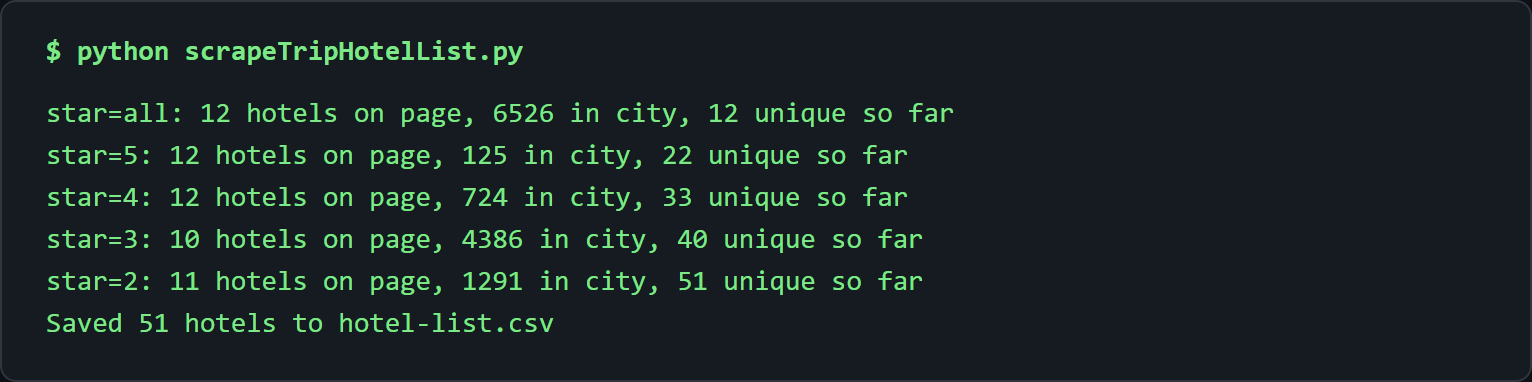
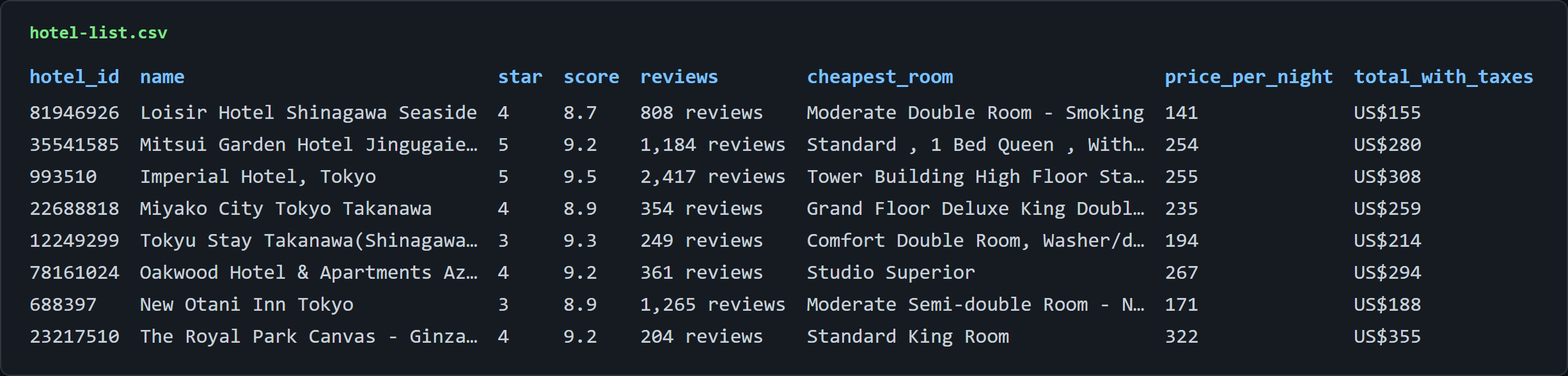
Five requests, one dict, 51 rows with a price on every one. The list page stops being a wall of script tags and becomes a spreadsheet.
## Scraping Trip.com Hotel Details
The list gives breadth. The detail page gives depth, and it looks like the easy one. It is, as long as no browser is involved.
The target is `https://www.trip.com/hotels/detail/?cityId=228&hotelId=49509069&curr=USD`, with the `hotelId` from `hotel-list.csv`. What comes out per hotel: name, local name, star, year opened, address, zone, coordinates, score, review count, "% recommended", check-in and check-out times, phone, email, popular facilities, photo count, and description. 21 columns, a fuller hotel data scraping row than the list can give.
The response is about 520 KB with 12 RSC chunks and no `` tag, because the title is set client-side. Half a megabyte of hotel and no title. The headless trap applies here too: a flagged browser gets the sign-in page, a plain client gets the data. Never render.
### The `hotelDetailResponse` object
Configuration is the city id and a list of hotel ids. We pick three different properties, a 7,563-review airport hotel (`49509069`), a mid-size hotel (`688419`), and an 8-review hostel (`107927169`), so we prove the parser on a small property with missing fields too:
```python
import requests
import json
import re
import csv
from urllib.parse import quote
# 1. Configuration
token = "<your_token>"
city_id = 228
hotel_ids = [49509069, 688419, 107927169] # take these from hotel-list.csv
```
We loop over the ids, GET each detail URL through Scrape.do, and skip the hotel on any non-200:
```python
rows = []
for hotel_id in hotel_ids:
target_url = f"https://www.trip.com/hotels/detail/?cityId={city_id}&hotelId={hotel_id}&curr=USD"
# 2. Request
response = requests.get(f"http://api.scrape.do?token={token}&url={quote(target_url, safe='')}")
if response.status_code != 200:
print(f"{hotel_id}: HTTP {response.status_code}")
continue
```
We parse with the Setup decoder, anchor changed to `"hotelDetailResponse"`:
```python
# 3. Parse the RSC stream, then cut the hotelDetailResponse object out of it
chunks = re.findall(r'self\.__next_f\.push\(\[1,"(.*?)"\]\)</script>', response.text, re.S)
payload = "".join(json.loads(f'"{c}"') for c in chunks)
start = payload.index('"hotelDetailResponse"')
detail, _ = json.JSONDecoder().raw_decode(payload, payload.index("{", start))
```
The top-level keys map one to one onto the visible blocks of the page: base info, images, facilities, position, comments, description, and policies.
### Address, coordinates, contact, and policies
We take four shortcuts so the row assembly stays readable, and build the facilities list and the check-in/out dict in the same block:
```python
base = detail["hotelBaseInfo"]
pos = detail["hotelPositionInfo"]
comment = detail["hotelComment"]["comment"]
policy = detail["hotelPolicyInfo"]
facilities = [x["facilityDesc"] for x in detail["hotelFacilityPopV2"]["hotelPopularFacility"]["list"]]
times = {c.get("title", "").strip(": "): c["description"] for c in policy["checkInAndOut"]["content"] if c.get("title")}
```
Identity comes from `hotelBaseInfo`; the local name arrives prefixed with "Local hotel name: ", so we strip it. Position surfaces in `hotelPositionInfo` with the coordinates as strings (35.543871, 139.765677), and reputation sits inside `hotelComment.comment`: score 9.3, 7563 reviews, "93% Recommended".
Policies are the one field that needs shaping: `checkInAndOut.content[]` is a list of `{title, description}` pairs, so we fold it into a dict keyed by the stripped title and read "After 15:00" and "Before 11:00" back out. The hostel has no `recommend` and no `email`; every lookup uses `.get()`, so those cells export blank and the run continues:
```python
rows.append({
"hotel_id": hotel_id,
"name": base["nameInfo"]["name"],
"local_name": base["nameInfo"].get("localNameTip", "").replace("Local hotel name: ", ""),
"star": base["starInfo"]["level"],
"opened": base.get("openYear"),
"city": base.get("cityName"),
"country": base.get("countryName"),
"address": pos.get("address"),
"zone": pos.get("zoneName"),
"lat": pos.get("lat"),
"lng": pos.get("lng"),
"score": comment.get("score"),
"review_count": comment.get("totalComment"),
"recommend": comment.get("recommend"),
"check_in": times.get("Check-in"),
"check_out": times.get("Check-out"),
"phone": ", ".join(t["show"] for t in detail["hotelDescriptionInfo"].get("tels") or []),
"email": detail["hotelDescriptionInfo"].get("email"),
```
### Facilities and photo counts
We join the popular facilities with "; " for the CSV: 16 entries for the Haneda hotel, 6 for the hostel.
The photo count is `hotelTopImage.total`, and the description keeps to one row because we replace its newlines with spaces. We close the row and print one line per hotel:
```python
"popular_facilities": "; ".join(facilities),
"photos": detail["hotelTopImage"].get("total"),
"description": detail["hotelDescriptionInfo"].get("description", "").replace("\n", " "),
})
print(f"{hotel_id}: {rows[-1]['name']} ({rows[-1]['star']}-star, {rows[-1]['score']}/10)")
```
The first console line reads `49509069: Hotel Villa Fontaine Grand Haneda Airport - Directly connected to Haneda Airport Terminal 3 (4-star, 9.3/10)`; the suffix is part of the hotel's name on Trip.com.
### Why per-room prices return `4030`
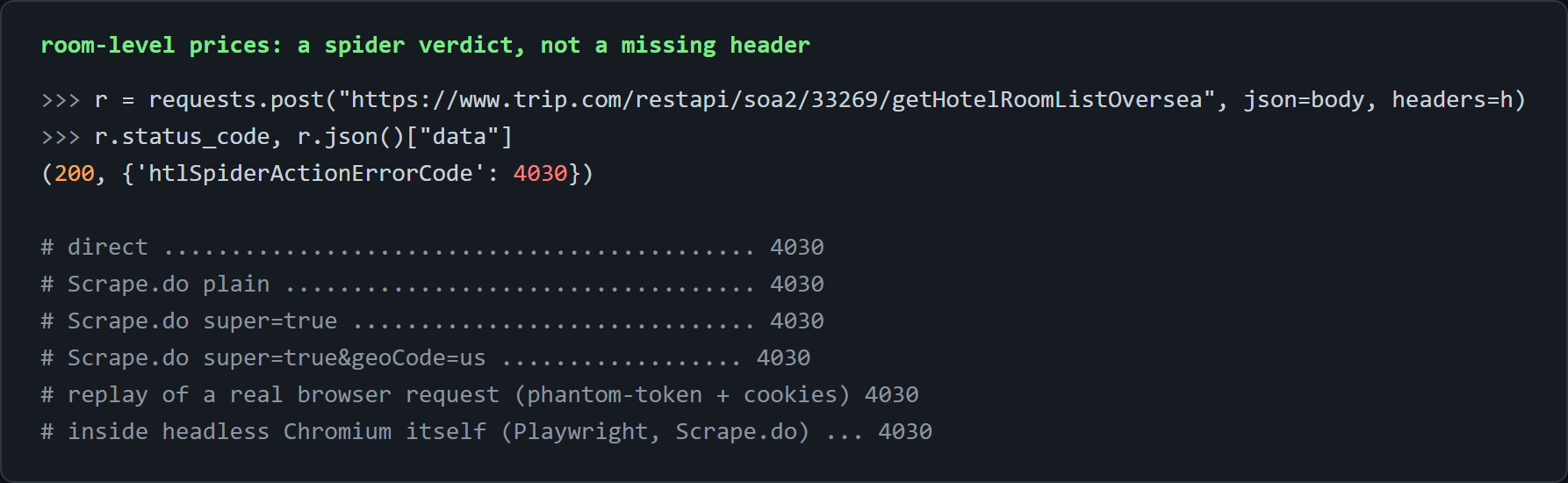
The one thing the detail page does not contain is the room list with per-room prices. In a browser that block loads through `POST /restapi/soa2/33269/getHotelRoomListOversea` after the page paints, and the answer is `{"data":{"htlSpiderActionErrorCode":4030}}` with HTTP 200 in all six configurations we tested, from a plain direct call to a replay of the captured browser request with its `phantom-token` and cookies to a local Playwright Chromium.
`4030` is a server-side spider verdict, not a missing header; real browsers sending real tokens receive it too. This is the door that stays locked, and we would rather say so plainly than promise a fix.
The practical substitute is already exported: the list page's `roomInfo[0]` with the cheapest room, its nightly price, and the total with taxes. Room-by-room pricing is out of scope for this article.
### Export to CSV
We write the 21 columns in UTF-8 so the Japanese local names survive:
```python
# 4. Export
with open("hotel-details.csv", "w", newline="", encoding="utf-8") as f:
writer = csv.DictWriter(f, fieldnames=list(rows[0].keys()))
writer.writeheader()
writer.writerows(rows)
print(f"Saved {len(rows)} hotels to hotel-details.csv")
```
The two hotels fill all 21 columns; the hostel leaves `recommend` and `email` blank, by design.


Half a megabyte of RSC in, one 21-column row out, coordinates included.
## Scraping Trip.com Hotel Reviews
Reviews are the first surface that answers like an API, because it is one. No HTML or RSC to decode, one POST per page, and the cleanest hotel review scraping path on the site.
The target is `POST https://www.trip.com/restapi/soa2/34308/getHotelCommentInfo`, with the body shape lifted from the client bundle. The bundle marks the call for signing like the gated hotel calls; the server does not enforce it.
What comes out per review: id, user, country, created and stay dates, rating (0 to 10 in halves), travel type, room, source language, content (the English translation when there is one), useful votes, and photo count. The same response also carries `totalCount`, tag counts, sub-scores, and an AI summary, more than a [TripAdvisor page](https://scrape.do/blog/scraping-tripadvisor-every-little-detail-you-should-know/) hands over per request.
A made-up `hotelId` returns `totalCount: 0` with no error, so when a Trip.com reviews scraping run comes back empty with a 200, the id is the first thing to check.
### The `getHotelCommentInfo` endpoint and its `head` block
The gate is the `head` object in the body. Without it the service still answers HTTP 200, but with a 603-byte skeleton and no reviews; with it the same request returns 55,427 bytes, `totalCount 7563`, and 10 reviews in `groupList[0].commentList`. No cookies, no `phantom-token`, none of the `x-ctx-*` headers the browser sends.
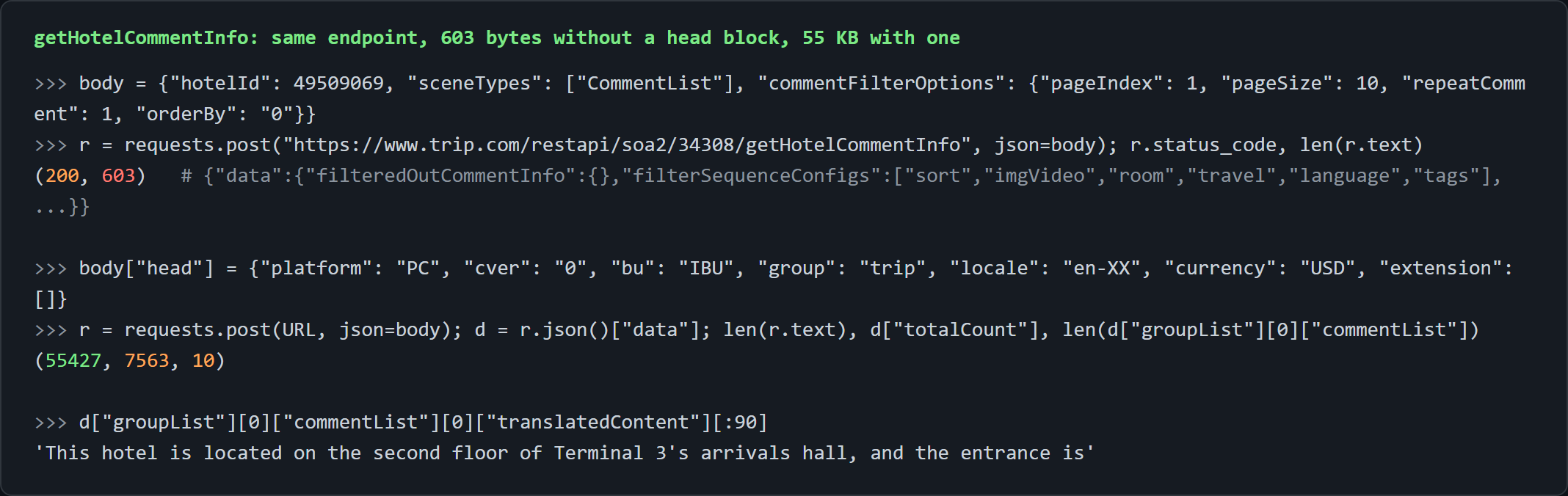
Configuration is the hotel id, the page count, and the page size (10 here, up to 100 accepted). We build the Scrape.do URL and the `head` dict once, to reuse on every page:
```python
import requests
import csv
from urllib.parse import quote
# 1. Configuration
token = "<your_token>"
hotel_id = 49509069 # from hotel-list.csv, or the hotelId= in any trip.com hotel URL
pages = 3
page_size = 10
api_url = "https://www.trip.com/restapi/soa2/34308/getHotelCommentInfo"
scrape_do_url = f"http://api.scrape.do?token={token}&url={quote(api_url, safe='')}"
# The "head" block is what separates a real answer from an empty one
head = {"platform": "PC", "cver": "0", "bu": "IBU", "group": "trip", "locale": "en-XX", "currency": "USD", "extension": []}
```
### Building the review scraper
We loop over page indexes, POST each body through Scrape.do, and read `response.json()["data"]`. We break on an empty comment list, which stops the loop at the end of a small hotel's reviews without page-count arithmetic:
```python
rows = []
for page in range(1, pages + 1):
body = {
"hotelId": hotel_id,
"sceneTypes": ["CommentList"],
"commentFilterOptions": {"pageIndex": page, "pageSize": page_size, "repeatComment": 1, "orderBy": "0"},
"head": head,
}
# 2. Request
response = requests.post(scrape_do_url, json=body)
if response.status_code != 200:
print(f"page {page}: HTTP {response.status_code}")
break
data = response.json()["data"]
groups = data.get("groupList") or []
comments = groups[0].get("commentList", []) if groups else []
if not comments:
break
```
Per review the paths are flat. Translation needs one decision: `translatedContent` is present for Chinese, Japanese, and Korean reviews and absent for English ones, so we take `translatedContent or content` and the column is English whenever Trip.com provides it:
```python
# 3. Parse
for c in comments:
rows.append({
"review_id": c["id"],
"user": c["userInfo"].get("nickName"),
"country": c["userInfo"].get("regionName"),
"created": c.get("createDate"),
"stay_date": c.get("checkinDate"),
"rating": c.get("rating"),
"travel_type": c.get("travelTypeText"),
"room": c.get("roomName"),
"language": c.get("language"),
"content": (c.get("translatedContent") or c.get("content") or "").replace("\n", " "),
"useful_votes": c.get("usefulCount"),
"photos": len(c.get("imageList") or []),
})
print(f"page {page}: {len(comments)} reviews ({data.get('totalCount')} total for this hotel)")
```
From the sample CSV: review `2085001939` by `Xuehua_` (China), rating 10, Family, language `zh`, English content starting "This hotel is located on the second floor of Terminal 3's arrivals hall", 3 photos.
### Paginating and sorting reviews
Pagination is two numbers in `commentFilterOptions`: `pageIndex` (1-based) and `pageSize`. The service accepted `pageSize` up to 100, the sensible production setting (7,563 reviews in 76 calls instead of 757). Depth holds up: `pageIndex 50` still returned reviews, and `pageIndex 700` returned an empty list, which the empty-page break handles without ever reading `totalCount`.
`orderBy` takes `"0"` for Trip.com's recommended order and `"1"` for newest by date; we ship `"0"`, and `"1"` gives strict chronological output for change tracking.
Across the three properties, the two hotels gave 30 reviews each over three pages, and the hostel returned 6 of its 8 (2 hidden by Trip.com) before the loop stopped on the empty page. Two integers and a string, and the whole review history of a 7,563-review hotel is reachable.
### Export to CSV
We export the 12 columns in UTF-8 for the untranslated reviews and the user names:
```python
# 4. Export
with open("hotel-reviews.csv", "w", newline="", encoding="utf-8") as f:
writer = csv.DictWriter(f, fieldnames=list(rows[0].keys()))
writer.writeheader()
writer.writerows(rows)
print(f"Saved {len(rows)} reviews to hotel-reviews.csv")
```
The console prints one line per page with the hotel's `totalCount`, then "Saved 30 reviews to hotel-reviews.csv".

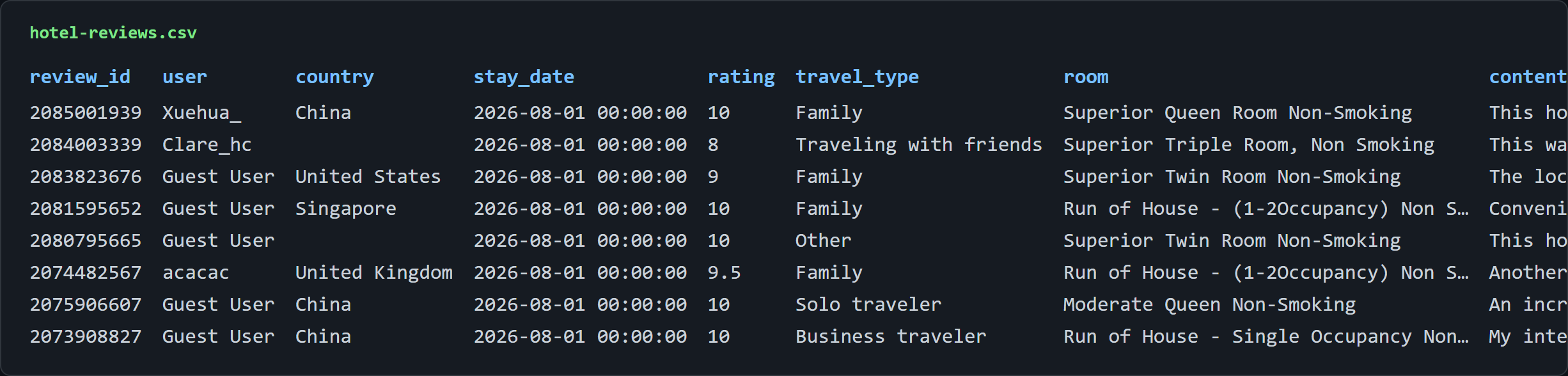
7,563 reviews behind one POST and a seven-field `head`.
## Scraping Trip.com Flight Prices
The flights page is the only Trip.com surface that refuses a plain request outright, and it is also the one where the page was never the data source. The flight scraper we build here never fetches it.
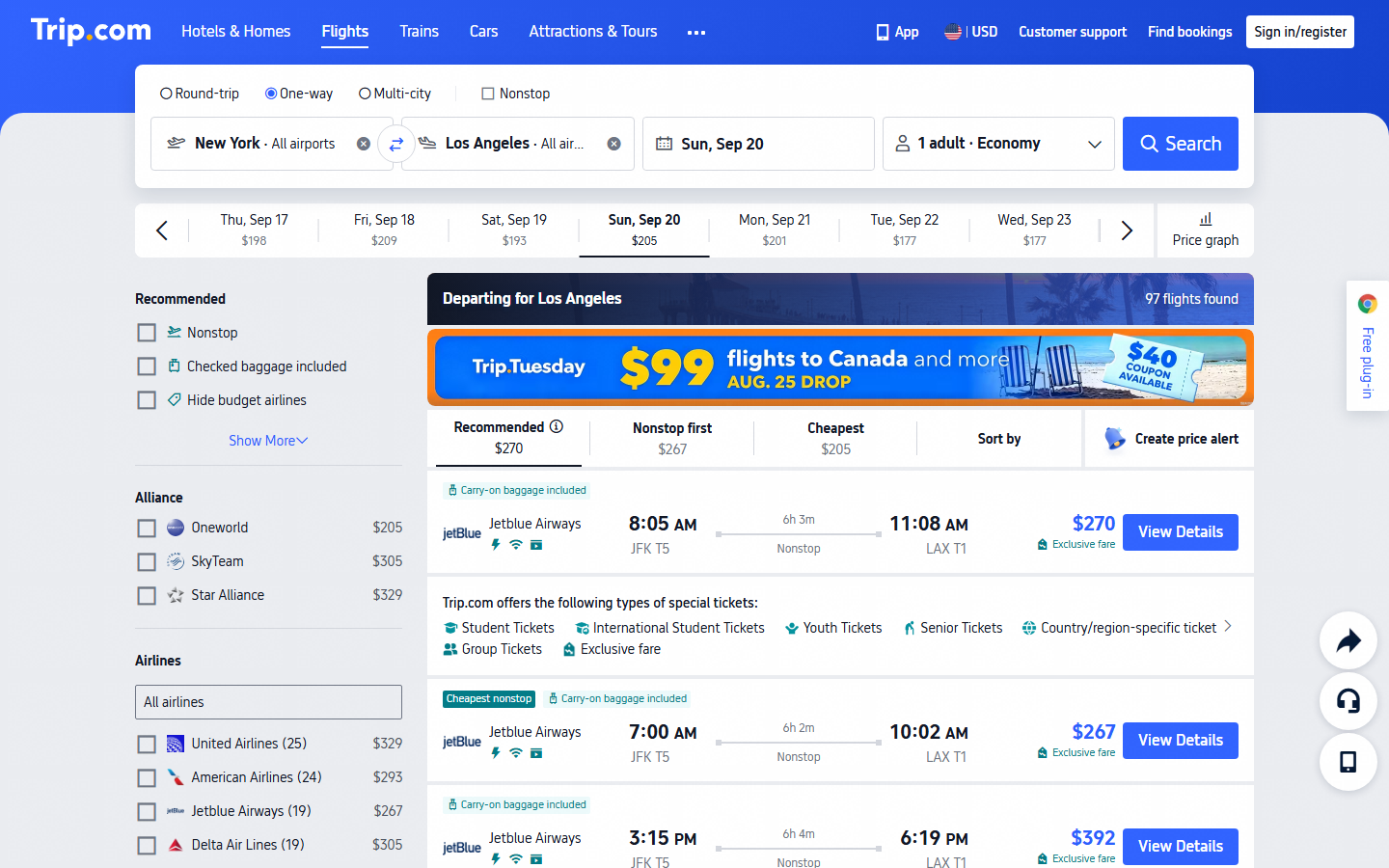
What comes out per itinerary: flight numbers (joined with " + " for connections), airlines, departure and arrival airport and time, duration, stops, aircraft, cabin, total price, tax, currency, and seats left. One POST per route and date, no pagination, because the service returns the full result set; [Expedia](https://scrape.do/blog/expedia-scraping-what-it-is-and-how-it-is-done/) makes us work harder for less. In a real browser the NYC to LAX results page says "97 flights found"; the service behind it returned 114 itineraries in our run; fare inventory moves between captures.
### The flights page is challenged, `FlightListSearchSSE` is not
A direct GET of the flight results URL with a Chrome user agent returns a 1.8 KB page titled "Challenge Validation", a `sec-cpt-if` iframe with `provider="crypto"`: an Akamai-style proof-of-work interstitial, on the HTML route only.
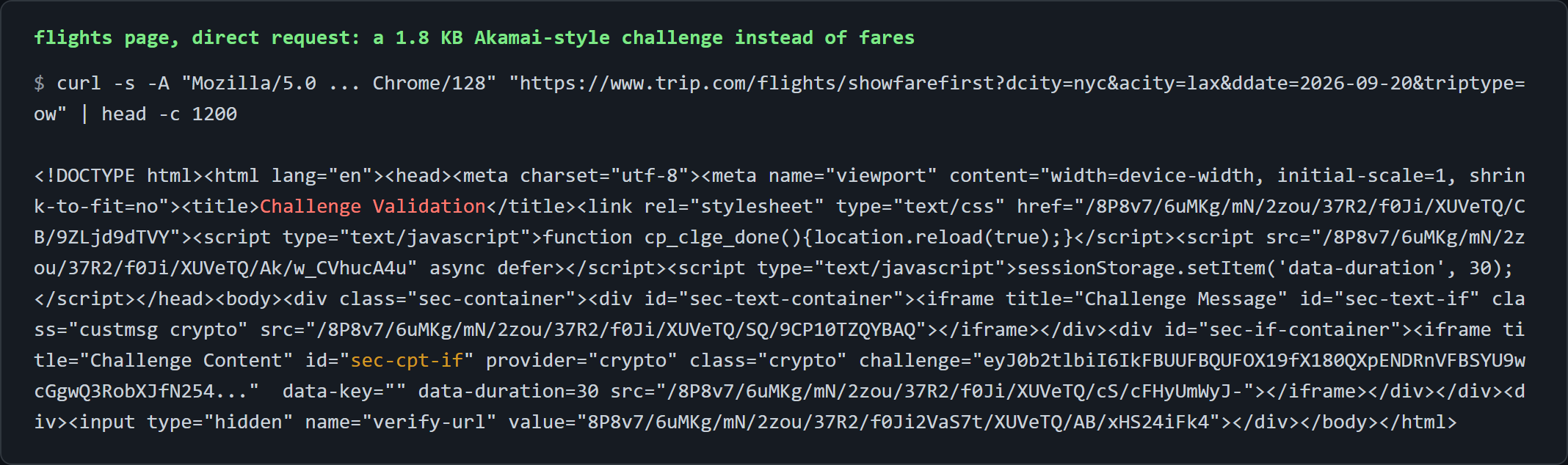
None of that matters, because the fares are not in that HTML. The flights app is a shell that fetches results from `POST https://www.trip.com/restapi/soa2/27015/FlightListSearchSSE` after load; the shell is challenged, the service that carries the data is not.
The browser decorates that POST heavily: a 697-character `token` header, several `x-ctx-*` headers, cookies, and a 24-entry `head.extension` list. We bisected it one change per request, and every variant returned 200 with 126 itineraries, down to minimal headers with the captured body. No header matters. The whole gate is inside the JSON body's `head` object.
### The minimal body that avoids HTTP 432
Two failure codes, two causes. A `head` without `appid`, `Locale`, `Language`, and `Currency` gets HTTP 432 with an empty body; dropping `sotpLocale` or `sotpCurrency` from `extension` gets HTTP 400 instead.
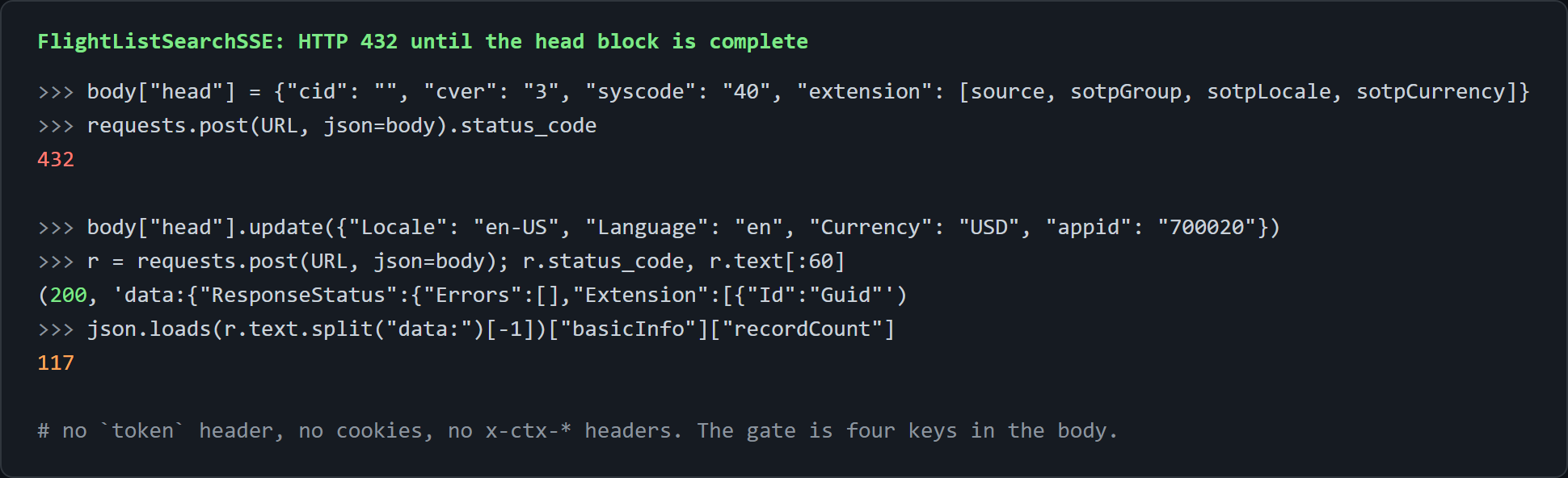
The working `head` is the legacy Ctrip dialect with `Locale`, `Language`, `Currency`, and `appid` alongside it; empty strings for the session fields are accepted. This is also where flights pin their currency, the counterpart of `curr=USD` on the hotel URLs.
The search sits in `searchCriteria`, with `departCode` and `arriveCode` as [IATA metropolitan city codes](https://www.iata.org/en/publications/directories/code-search/) such as `NYC` or `LON`; empty `departAirport` and `arriveAirport` include every airport in the city.
Configuration is the route, date, and adult count, and we build the Scrape.do URL from the service URL once:
```python
import requests
import json
import csv
from urllib.parse import quote
# 1. Configuration
token = "<your_token>"
depart, arrive, date = "NYC", "LAX", "2026-09-20" # IATA city codes, one-way
adults = 1
api_url = "https://www.trip.com/restapi/soa2/27015/FlightListSearchSSE"
scrape_do_url = f"http://api.scrape.do?token={token}&url={quote(api_url, safe='')}"
```
We write the body next, with the comment flagging the 432 cause right above the `head`:
```python
body = {
"mode": 0,
"searchCriteria": {
"grade": 1, "realGrade": 1, "tripType": 1, "journeyNo": 1,
"passengerInfoType": {"adultCount": adults, "childCount": 0, "infantCount": 0},
"journeyInfoTypes": [{"journeyNo": 1, "departDate": date, "departCode": depart, "arriveCode": arrive,
"departAirport": "", "arriveAirport": ""}],
"policyId": None,
},
"sortInfoType": {"direction": True, "orderBy": "Direct", "topList": []},
"tagList": [], "flagList": ["NEED_RESET_SORT"],
"filterType": {"filterFlagTypes": [], "queryItemSettings": [], "studentsSelectedStatus": True},
"abtList": [],
# Without sotpLocale/sotpCurrency and appid the API answers with HTTP 432
"head": {"cid": "", "ctok": "", "cver": "3", "lang": "01", "sid": "8888", "syscode": "40", "auth": "", "xsid": "",
"extension": [{"name": "source", "value": "ONLINE"}, {"name": "sotpGroup", "value": "Trip"},
{"name": "sotpLocale", "value": "en-US"}, {"name": "sotpCurrency", "value": "USD"},
{"name": "useDistributionType", "value": "1"}],
"Locale": "en-US", "Language": "en", "Currency": "USD", "ClientID": "", "appid": "700020"},
}
```
We POST it and exit with the status and the first 200 characters of the body on anything other than 200:
```python
# 2. Request
response = requests.post(scrape_do_url, json=body)
if response.status_code != 200:
print(f"HTTP {response.status_code}: {response.text[:200]}")
raise SystemExit
```
Through Scrape.do plain the call returned 200 in about 5.5 seconds.
### Parsing the SSE response: segments, fares, seats left
The response is a [server-sent events](https://developer.mozilla.org/en-US/docs/Web/API/Server-sent_events/Using_server-sent_events) stream rather than a JSON document: one or more `data:{...}` frames separated by blank lines, and the complete result is always the last frame with the JSON on its first line. We split on `data:`, drop empty pieces, take the last, and `json.loads` its first line:
```python
# 3. Parse: the answer is a server-sent-events stream, the last "data:" frame is the full result
frames = [f for f in response.text.split("data:") if f.strip()]
data = json.loads(frames[-1].strip().splitlines()[0])
airlines = {a["code"]: a["name"] for a in data.get("airlineList", [])}
print(f"{data['basicInfo']['recordCount']} itineraries, lowest {data['basicInfo']['lowestPrice']['totalPrice']} {data['basicInfo']['currency']}")
```
`basicInfo` carries the record count, the lowest price, and the currency, which is the first line we print. The `airlineList[]` dict is what makes rows say "Jetblue Airways" instead of "B6".
Each `itineraryList[]` entry has one journey for a one-way search, with `transSectionList[]` holding one entry per flight segment. Fares are `policies[]`, and `policies[0]` is the fare Trip.com shows on the card: total price and tax, seats left at that fare, and the cabin name.
We join flight numbers and airlines with " + " across segments, take the first segment's departure and the last segment's arrival, and count stops as `len(legs) - 1`. That is the scrape flight prices payload, with total and tax as separate numeric columns:
```python
rows = []
for itin in data["itineraryList"]:
legs = itin["journeyList"][0]["transSectionList"]
policy = itin["policies"][0] # first policy = the fare trip.com shows on the card
price = policy["price"]
rows.append({
"flight_numbers": " + ".join(l["flightInfo"]["flightNo"] for l in legs),
"airlines": " + ".join(airlines.get(l["flightInfo"]["airlineCode"], l["flightInfo"]["airlineCode"]) for l in legs),
"depart_airport": legs[0]["departPoint"]["airportCode"],
"depart_time": legs[0]["departDateTime"],
"arrive_airport": legs[-1]["arrivePoint"]["airportCode"],
"arrive_time": legs[-1]["arriveDateTime"],
"duration_min": itin["journeyList"][0]["duration"],
"stops": len(legs) - 1,
"aircraft": legs[0]["flightInfo"].get("craftInfo", {}).get("name"),
"cabin": policy["gradeInfoList"][0].get("gradeMultilingual"),
"price_total": price["totalPrice"],
"tax": price["totalTax"],
"currency": data["basicInfo"]["currency"],
"seats_left": policy.get("seatCount"),
})
```
From the sample CSV: `B6523`, Jetblue Airways, JFK 07:00 to LAX 10:02, 362 minutes, nonstop, Airbus A319/A320/A321, Economy, 262 total, 32.2 tax, 3 seats left. `B6223` shows a 103.2 tax on a 360 fare, which is why tax is its own column, and the lowest fare in the set is 232 even though the first row is 262, because the default sort is nonstop-first, not price.
### Round trips, passengers, and sort options
Round trip is `tripType` set to `2` plus a second entry in `journeyInfoTypes` with the return date and the codes swapped; NYC to LAX to NYC returned 62 itineraries, and a parser that wants both legs iterates `journeyList` instead of reading `[0]`. Passengers are the three counts in `passengerInfoType`, and we expose `adults` as a config value.
Sort is `sortInfoType.orderBy`: `Direct` (nonstop first, the default), `Price` (cheapest first, verified as 225 / 232 / 252 on the first three rows), `DepartTime`, and `Duration`. We did not test cabins other than economy and will not guess their values.
On the other test routes, LON to PAR returned 61 itineraries with a lowest fare of $36, and IST to BER with two adults returned 24 at $79.
A search service that answers a plain POST with tax, seats left, and aircraft for every fare, and a results page that fights a `curl`. From a scraper's point of view the gate is on the wrong door.
### Export to CSV
We write the 14 columns the same way:
```python
# 4. Export
with open("flights.csv", "w", newline="", encoding="utf-8") as f:
writer = csv.DictWriter(f, fieldnames=list(rows[0].keys()))
writer.writeheader()
writer.writerows(rows)
print(f"Saved {len(rows)} flights to flights.csv")
```
One row per itinerary, so a 114-itinerary answer is a 114-row CSV from one request.

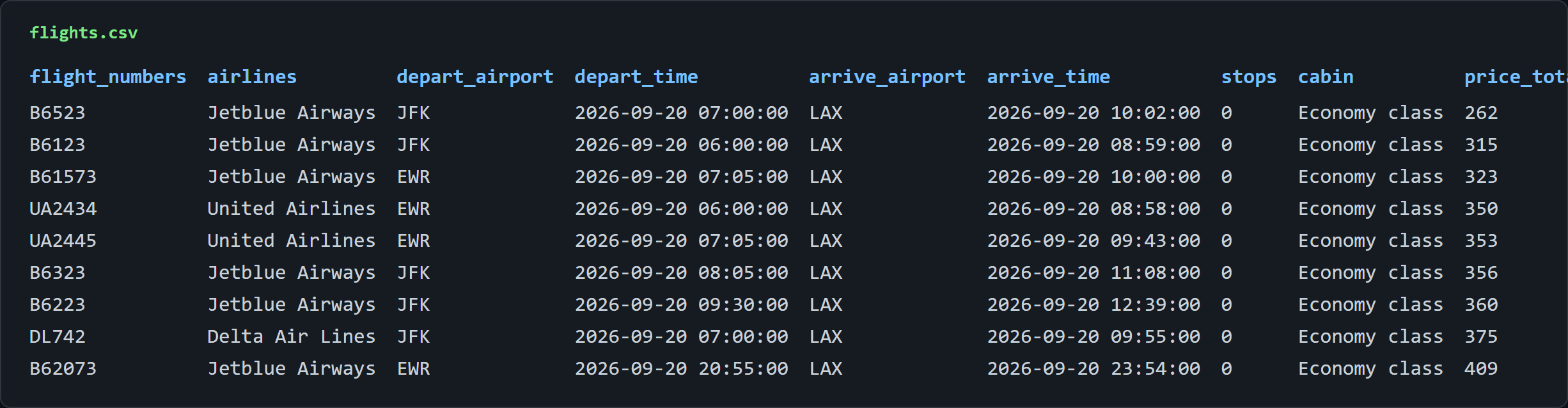
One POST, 114 fares with tax and seats left, and the challenge page never got a visit.
## Conclusion
Four data types from Trip.com with plain `requests` through Scrape.do and zero Scrape.do parameters. Two RSC pages decoded with the same five lines, two internal JSON services opened with the right `head` block.
Two doors stay locked to every client we tested, real headless browsers included: hotel list pagination and per-room prices. Filter slicing covers the first; the list page's cheapest-room fields cover the second.
The map is the deliverable. Knowing which `soa2` door opens with a body and which one no browser can open saves the whole rendering detour.
## FAQ
### Does Trip.com have a public API?
No. Trip.com publishes no developer API for hotels, reviews, or flights; what exists is the set of internal JSON services the site itself calls under `restapi/soa2/`. Two of those (`getHotelCommentInfo`, `FlightListSearchSSE`) answer a plain POST once the body carries a proper `head` block, and two (`fetchHotelList`, `getHotelRoomListOversea`) sit behind a browser-minted `phantom-token` plus a server-side spider verdict.
### Does Trip.com block web scraping?
Selectively. The flights HTML route serves a "Challenge Validation" interstitial to direct requests, the pagination and room-price services refuse even real headless browsers, and a headless browser on a hotel detail URL is redirected to sign-in. The server-rendered hotel pages, the review service, and the flight search service all answer plain `requests`, direct and through Scrape.do without parameters.
### Can I scrape Trip.com without rendering JavaScript?
Yes, and rendering is the wrong tool on this site, unlike most [JavaScript-rendered pages](https://scrape.do/blog/how-to-scrape-javascript-rendered-web-pages-with-python/). The hotel list and detail data arrive complete in the first non-rendered response, while `render=true` returned zero hotel cards for the list and a sign-in redirect for the detail page. Reviews and flights come from JSON services that never needed a page load.
### Can I get room-by-room prices from Trip.com?
Not with any client we tested. `getHotelRoomListOversea` returns `htlSpiderActionErrorCode: 4030` direct, through Scrape.do with every parameter combination, and from inside a local Playwright Chromium. The list page's `roomInfo[0]` is the practical substitute: the cheapest available room, its nightly price, and the total with taxes.
[Get 1000 free credits and start scraping with Scrape.do](https://dashboard.scrape.do/signup)