# Scraping Ticketmaster Event Data (easy and quick method)
> Source: https://scrape.do/blog/ticketmaster-scraping/
Published: 2025-02-26 · Updated: 2025-02-26 · Authors: Onur Mese · Categories: Scraping Use Cases
Ticketmaster is one of the largest online ticket marketplaces, listing thousands of events worldwide.
But **if you’ve tried scraping Ticketmaster**, you’ve probably hit roadblocks.
The platform actively prevents automated access through **IP tracking and JavaScript-rendered pages**, making traditional scraping methods unreliable.
*But as always, there’s a way around it.*
In this guide, we’ll break down **why Ticketmaster is difficult to scrape, how its defenses work, and how to bypass them** to extract event data like dates, venues, and locations.
[You can access complete code in this GitHub folder. ⚙](https://github.com/scrape-do/scrapedo-scrapers/tree/main/ticketmaster-scraper)
## Why Scraping Ticketmaster Is Challenging
Compared to heavily protected sites like Amazon or LinkedIn, Ticketmaster isn’t impossible to scrape; but it does have some defenses in place.
The biggest challenges come from **IP tracking and JavaScript-rendered content**, which can block or disrupt scrapers that don’t handle requests properly.
### IP-based blocking
Ticketmaster doesn’t impose aggressive rate limits, but it does monitor incoming traffic.
* **Datacenter IPs are easily flagged**; requests coming from cheap datacenter proxies will be easily blocked.
* **Too many rapid requests from the same IP** can lead to CAPTCHAs or temporary access restrictions.
This means a simple script running from a fixed IP might work for a while, but won’t hold up for larger-scale scraping.
### JavaScript-loaded data
Most event details aren’t included in the raw HTML. Instead, **Ticketmaster loads event information dynamically** using JavaScript.
* A standard `requests.get()` call **won’t retrieve event data** directly.
* Instead, you need to **parse JSON data from embedded scripts** or use a browser automation tool for full page rendering.
Fortunately, there’s a way to work around these challenges without overcomplicating your setup.
## How Scrape.do Makes It Easy
Instead of dealing with **IP bans, session tracking, and JavaScript-rendered content manually**, you can use Scrape.do to handle it for you.
✅ **Bypass IP Blocks**: Scrape.do automatically routes requests through a rotating proxy pool, including residential IPs, making it look like a normal user.
✅ **Access JavaScript-Rendered Data**: Need fully loaded pages? Scrape.do can render JavaScript when needed, ensuring you don’t miss critical details.
✅ **No More CAPTCHAs**: Ticketmaster sometimes triggers CAPTCHAs on repeated requests, but Scrape.do’s system **automatically retries and bypasses them**.
With this setup, **you can scrape Ticketmaster efficiently without worrying about blocks; even at scale.**
## Extracting Event Data from Ticketmaster
Before extracting event details, we need to ensure our request reaches the page successfully and returns a **200 OK** response.
Since Ticketmaster loads event data dynamically, we’ll inspect the page and extract the JSON data directly instead of scraping the rendered HTML.
### Prerequisites
Install the required dependencies if you haven’t already:
```bash
pip install requests beautifulsoup4
```
You’ll also need an API key from Scrape.do, which you can get by [signing up for free](https://dashboard.scrape.do/sign-up).
For this guide, we’ll scrape events from my favorite singer recently, [Post Malone](https://www.ticketmaster.com/post-malone-tickets/artist/2119390).
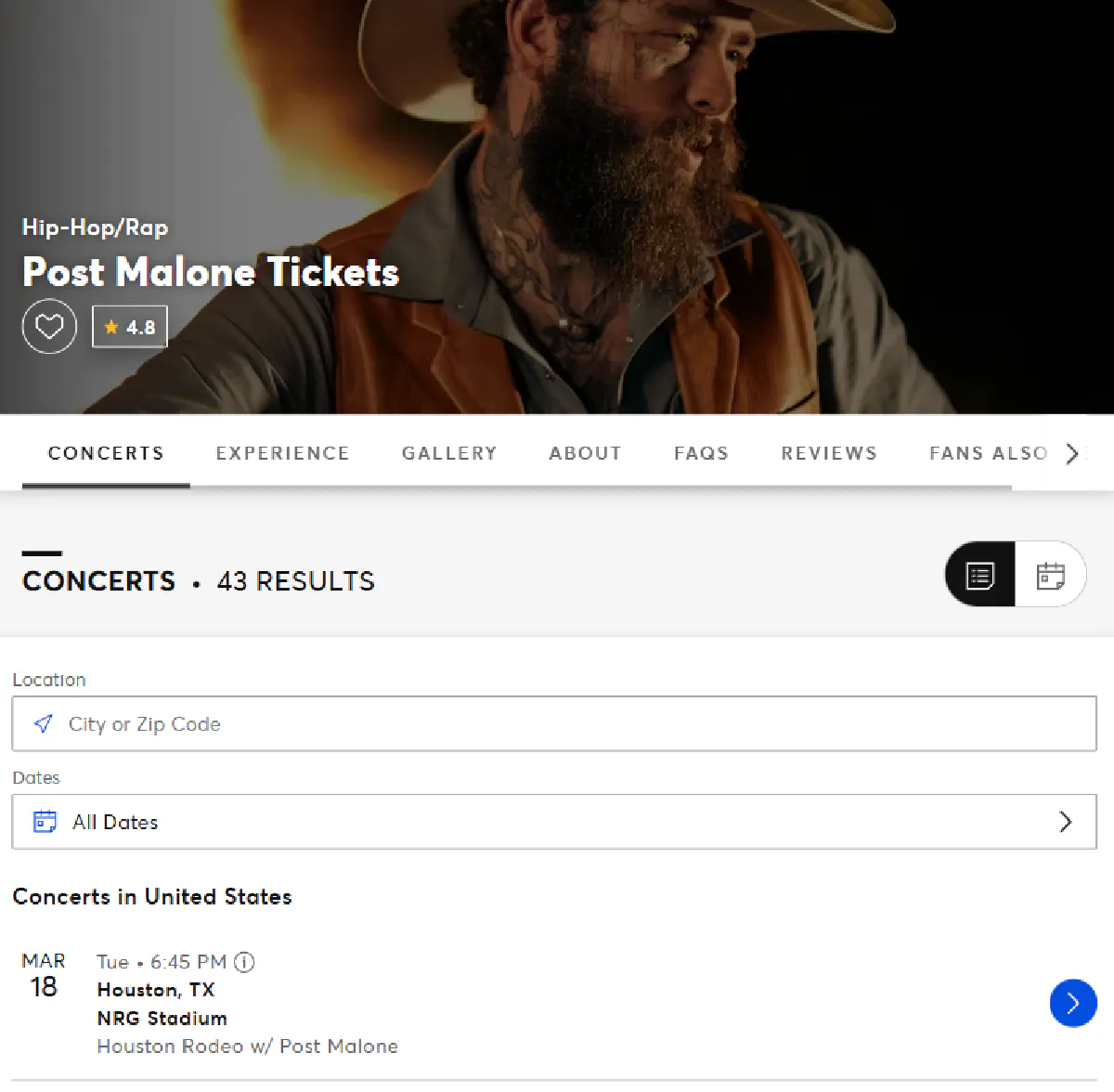
You can also scrape search results for events in certain locations, venues, genres, etc.
### Sending a request and verifying access
We’ll include a few optional Scrape.do API parameters in our request to ensure we get access:
* **`super=true`** enables Scrape.do’s super proxy mod, allowing you to access Ticketmaster through residential and mobile IPs.
* **`geoCode=us`** ensures we receive data localized for the US market, avoiding redirects or missing events.
* **`render=false`** on my attempts, I was able to extract even data because of how Ticketmaster is built, which I’ll talk about in a bit. Turning this off can also save you credits.
```python
import requests
import urllib.parse
# Our token provided by Scrape.do
token = ""
# Target Ticketmaster URL
target_url = urllib.parse.quote_plus("https://www.ticketmaster.com/post-malone-tickets/artist/2119390")
# Optional parameters
render = "false"
geo_code = "us"
super_mode = "true"
# Scrape.do API endpoint
url = f"https://api.scrape.do/?token={token}&url={target_url}&render={render}&geoCode={geo_code}&super={super_mode}"
# Send the request
response = requests.get(url)
# Print response status
print(response)
```
If everything is working correctly, you should see:
```bash
```
This confirms that the request was successful and we can now proceed with extracting event details.
💡 *When web scraping, it’s always a great idea to see if you can first get a **200 OK** response before starting parsing.*
### Extracting All Events from Ticketmaster’s JSON
Even though Ticketmaster renders pages dynamically with JavaScript, **all event data is embedded as JSON in the page source** under the `application/ld+json` script tag.
This makes scraping simpler since we **don’t need to render JavaScript**; we can extract and parse the JSON directly.
#### Why does Ticketmaster include JSON data?
Ticketmaster uses **event listing schema markup** (`schema.org/MusicEvent`) to provide structured data for search engines like Google. This helps their events get indexed, appear in search results, and drive more traffic.
For scrapers, this is **a huge advantage** because:
* We don’t need to execute JavaScript or interact with the page dynamically.
* The JSON already contains structured event data, reducing the need for complex parsing.
* We can extract everything in a single request, making the scraper faster and more efficient.
Examining the JSON return, you can find the details we need are listed as:
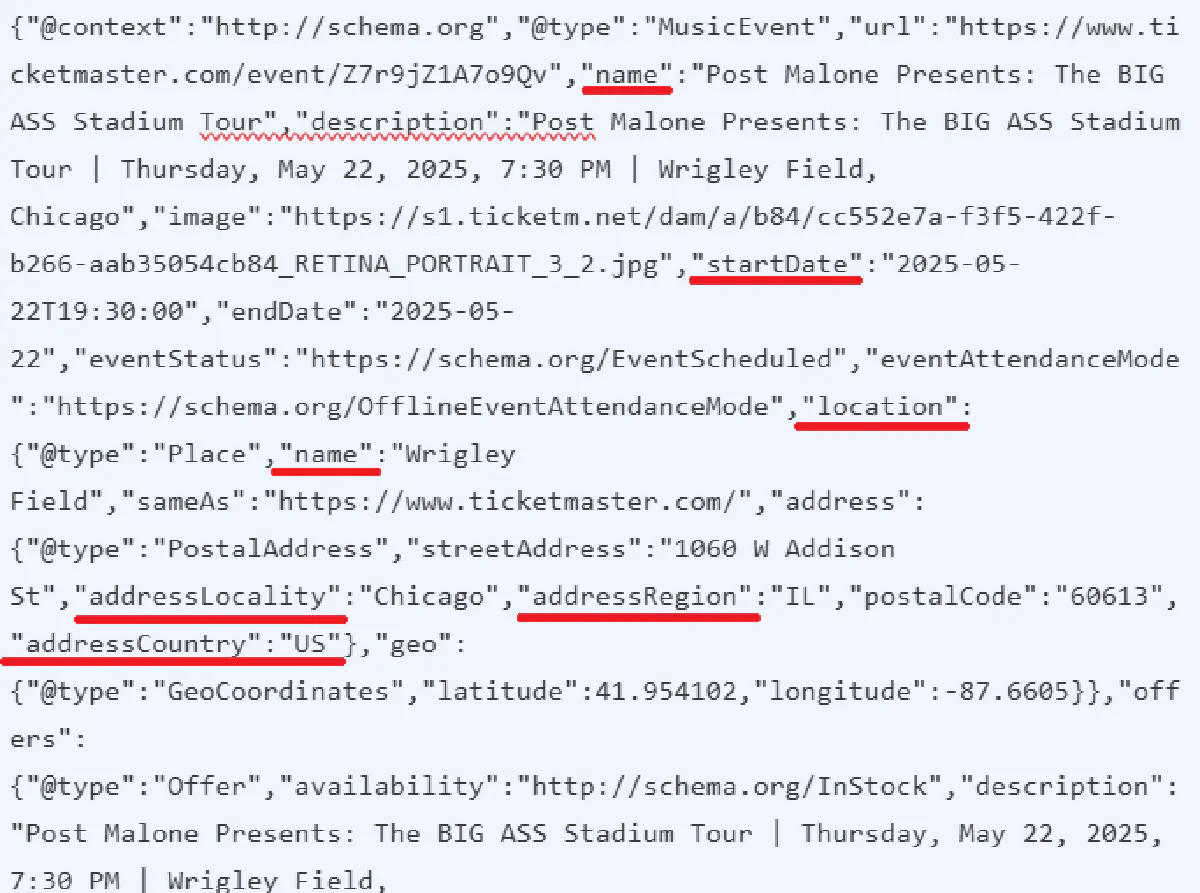
So we need to parse them using the `json` library.
This is the final script that you need to scrape all event details from a page on Ticketmaster:
```python
import requests
import re
import json
# Our token provided by Scrape.do
token = ""
# Target Ticketmaster URL
target_url = "https://www.ticketmaster.com/post-malone-tickets/artist/2119390"
# Optional parameters
render = "false"
geo_code = "us"
super_mode = "true"
# Scrape.do API endpoint
url = f"https://api.scrape.do/?token={token}&url={target_url}&render={render}&geoCode={geo_code}&super={super_mode}"
# Send the request
response = requests.get(api_url)
# Extract JSON data using regex
match = re.search(r'', response.text, re.DOTALL)
json_data = json.loads(match.group(1) if match else "[]")
# Loop through all events and extract details
for event in json_data:
print(f"Event: {event['name']}")
print(f"Date: {event['startDate']}")
print(f"Venue: {event['location']['name']}")
print(f"Location: {event['location']['address']['addressLocality']}, {event['location']['address']['addressRegion']}\n")
```
And you should be getting an output formatted as such:
```bash
Event: Houston Rodeo w/ Post Malone
Date: 2025-03-18T18:45:00
Venue: NRG Stadium
Location: Houston, TX
Event: Post Malone Presents: The BIG ASS Stadium Tour
Date: 2025-04-29T19:30:00
Venue: Rice-Eccles Stadium
Location: Salt Lake City, UT
Event: Post Malone Presents: The BIG ASS Stadium Tour
Date: 2025-05-03T19:30:00
Venue: Allegiant Stadium
Location: Las Vegas, NV
...
```
And voila! You’ve extracted all event details from Ticketmaster! 🎉
## Conclusion
Scraping Ticketmaster is **easier than many other platforms** because it includes structured event data in JSON format.
Instead of dealing with JavaScript rendering or complex HTML parsing, we can **extract all event details directly from the page source** in a single request.
With Scrape.do handling **IP rotation, anti-bot bypassing, and geo-restricted access**, you don’t have to worry about getting blocked or missing data.
If you need to scrape Ticketmaster at scale, Scrape.do makes the process effortless:
* ✅ **Bypasses IP blocks and CAPTCHAs automatically**
* ✅ **Extracts structured event data without rendering JavaScript**
* ✅ **Works at scale without rate limits**
[Get 1000 free API calls and start scraping today.](https://dashboard.scrape.do/sign-up)