` tag with a class that starts with `"app-parameter-change app-parameter-change--"` (this covers both increases and decreases).
- Determine if the number is positive or negative by checking if `"change--down"` is in the class list.
Add this **below the total visits extraction**:
```python
# Extract traffic change
engagement_list = soup.find("div", class_="engagement-list")
change_elem = engagement_list.find(
"span",
class_=lambda c: c and c.startswith("app-parameter-change app-parameter-change--")
)
raw_change = change_elem.get_text(strip=True)
# Determine if it's a positive or negative change, add - if it's negative
classes = " ".join(change_elem["class"])
prefix = ("-" * ("change--down" in classes)) + ("+" * ("change--up" in classes))
traffic_change = prefix + raw_change
# Add to the bottom of your code
print("Traffic Change (vs. last month):", traffic_change)
```
This will print out traffic change compared to previous month in percentage, and if the change is negative it will put a - as a prefix.
### Scraping Organic vs. Paid Traffic
Similarweb breaks down traffic sources into **organic** (search traffic that comes naturally) and **paid** (traffic from ads).
This gives a **clear picture of how a website gets its visitors** and whether it relies on SEO or paid campaigns, which can help you understand how their operations are built and where their resources are flowing towards.
These values are displayed as **percentages** and can be found inside specific `` elements:
- **Organic traffic percentage** is inside a div with a class containing `"wa-keywords__organic-paid-legend-item--organic"`.
- **Paid traffic percentage** is inside a div with a class containing `"wa-keywords__organic-paid-legend-item--paid"`.
We simply need to:
1. Locate each of these elements.
2. Extract the percentage value from a nested `` tag.
Add this below the traffic change extraction:
```python
# Extract organic traffic percentage
organic = soup.find("div", class_="wa-keywords__organic-paid-legend-item wa-keywords__organic-paid-legend-item--organic")\
.find("span", class_="wa-keywords__organic-paid-legend-item-value").get_text(strip=True)
# Extract paid traffic percentage
paid = soup.find("div", class_="wa-keywords__organic-paid-legend-item wa-keywords__organic-paid-legend-item--paid")\
.find("span", class_="wa-keywords__organic-paid-legend-item-value").get_text(strip=True)
# Add to the bottom of your code
print("Organic Traffic (compared to paid):", organic)
print("Paid Traffic (compared to organic):", paid)
```
This will print **organic and paid traffic percentages** extracted as clean, usable data.
### Scraping Top Traffic Source and Percentage
Similarweb also shows where a website’s visitors come from, whether it's direct visits, search engines, social media, referrals, email, or display ads.
This helps in **understanding a site's main traffic driver** and how it compares to other sources and can be a very strong factor when qualifying leads.
We'll pull top traffic source data from a summary section in a **sentence format**, such as:
> "Main visitor source for google.com is Direct traffic, driving 87.82% of visits."
This means we need to:
1. **Locate the paragraph** that contains this information.
2. **Extract the source type** (e.g., Search, Direct, Social).
3. **Extract the percentage value** that follows it.
We’ll use regular expressions to pull the source label and percentage from the text.
**Add this below the organic vs. paid traffic extraction:**
```python
# Extract the text that contains the top traffic source
traffic_text = soup.find("p", class_="app-section__text wa-traffic-sources__section-text").get_text(strip=True)
# Use regex to extract the source type and percentage
pattern = r"is (.*?) traffic, driving ([\d\.]+%)"
match = re.search(pattern, traffic_text)
top_source_label = match.group(1)
top_source_pct = match.group(2)
# Add to the bottom of your code
print("Top Traffic Source:", top_source_label, "-", top_source_pct)
```
This will output:
```bash
Top Traffic Source: Direct - 87.82%
```
More data can be extracted from Similarweb website data pages depending on your needs, and by now you get the hang of it.
Click **F12** or **right-click & Inspect** to examine HTML structure, and parse the data you want following practices we've done for the six different data points so far.
### Final Code & Output
Now that we’ve built our scraper step by step, let’s put everything together into a **complete script**. This final version will:
✅ Send a request to Similarweb using Scrape.do
✅ Extract the domain name
✅ Extract total visits and traffic change
✅ Extract organic vs. paid traffic percentages
✅ Extract the top traffic source and its percentage
**Here’s the full script:**
```python
import requests
import urllib.parse
import re
from bs4 import BeautifulSoup
# Scrape.do API token
token = ""
# Target Similarweb page (Google.com)
url = "https://www.similarweb.com/website/google.com/"
encoded_url = urllib.parse.quote_plus(url)
# Scrape.do API endpoint (super=true for residential and mobile IPs)
api_url = f"https://api.scrape.do/?token={token}&url={encoded_url}&super=true"
# Send the request and parse the HTML with BeautifulSoup
html = requests.get(api_url).text
soup = BeautifulSoup(html, "html.parser")
# Extract the domain name (first word in the title)
domain = soup.title.get_text(strip=True).split()[0]
# Function to convert shorthand numbers like 3.5M → 3,500,000
def convert_to_number(s):
num, suffix = re.match(r"([\d\.]+)([BMK]?)", s).groups()
return float(num) * {"B": 1e9, "M": 1e6, "K": 1e3}.get(suffix, 1)
# Extract total visits
total_visits_str = soup.find("p", class_="engagement-list__item-value").get_text(strip=True)
total_visits_num = convert_to_number(total_visits_str)
total_visits = int(total_visits_num) if total_visits_num.is_integer() else total_visits_num
# Extract traffic change
engagement_list = soup.find("div", class_="engagement-list")
change_elem = engagement_list.find(
"span",
class_=lambda c: c and c.startswith("app-parameter-change app-parameter-change--")
)
raw_change = change_elem.get_text(strip=True)
classes = " ".join(change_elem["class"])
prefix = ("-" * ("change--down" in classes)) + ("+" * ("change--up" in classes))
traffic_change = prefix + raw_change
# Extract organic vs. paid traffic percentages
organic = soup.find("div", class_="wa-keywords__organic-paid-legend-item wa-keywords__organic-paid-legend-item--organic")\
.find("span", class_="wa-keywords__organic-paid-legend-item-value").get_text(strip=True)
paid = soup.find("div", class_="wa-keywords__organic-paid-legend-item wa-keywords__organic-paid-legend-item--paid")\
.find("span", class_="wa-keywords__organic-paid-legend-item-value").get_text(strip=True)
# Extract top traffic source and percentage
traffic_text = soup.find("p", class_="app-section__text wa-traffic-sources__section-text").get_text(strip=True)
pattern = r"is (.*?) traffic, driving ([\d\.]+%)"
match = re.search(pattern, traffic_text)
top_source_label = match.group(1)
top_source_pct = match.group(2)
# Print results
print("Domain:", domain)
print("Total Traffic (last month):", total_visits)
print("Traffic Change (vs. last month):", traffic_change)
print("Organic Traffic (compared to paid):", organic)
print("Paid Traffic (compared to organic):", paid)
print("Top Traffic Source:", top_source_label, "-", top_source_pct)
```
As I run this code using my Scrape.do API token, this is the output I get, which is accurate to what I see on the web page:
```bash
Domain: google.com
Total Traffic (last month): 76300000000
Traffic Change (vs. last month): -9.72%
Organic Traffic (compared to paid): 94.11%
Paid Traffic (compared to organic): 5.89%
Top Traffic Source: Direct - 87.82%
```
Great! You've successfully extracted all the key info from a Similarweb page!
To turn this into something operational we'll need to work with CSV files that you can integrate with your existing workflow, so let's take a look into that:
### Import URLs from and Export Results to CSV
Instead of scraping just one domain, we can read a list of URLs from a CSV file, extract Similarweb data for each, and save the results into another CSV file with a timestamp.
This way we'll work with tens of different URLs and export the results into a more manageable format. **I'm also adding error handling so when there is no data on a website, your scraper will keep running.**
We'll:
1. **Import URLs from a CSV file** (`input_urls.csv`), where each row contains a domain.
2. **Loop through each domain**, scrape Similarweb data, and store the results.
3. **Save the output to a timestamped CSV file** (`similarweb_results_YYYY-MM-DD_HH-MM.csv`) to keep records organized.
#### 1\. Prepare the Input File
Create a file named **`input_domains.csv`** with a list of domain names (without the full URL).
**Each row should contain just the domain name, with no headers.**
```ruby
google.com
chatgpt.com
pokemon.com
```
The script will automatically format these into Similarweb URLs, trust the process.
#### 2\. Update the Script to Process Multiple Domains
Modify the script to:
- **Read domain names from `input_domains.csv`**.
- **Format them into Similarweb URLs automatically**.
- **Scrape each domain's data**.
- **Save the results to a timestamped output file**.
Update the code like this:
```python
import requests
import urllib.parse
import re
import csv
import datetime
from bs4 import BeautifulSoup
# Scrape.do API token
token = ""
# Function to convert shorthand numbers like 3.5M → 3,500,000
def convert_to_number(s):
num, suffix = re.match(r"([\d\.]+)([BMK]?)", s).groups()
return float(num) * {"B": 1e9, "M": 1e6, "K": 1e3}.get(suffix, 1)
# Get current date and time for output file naming
timestamp = datetime.datetime.now().strftime("%Y-%m-%d_%H-%M")
output_file = f"similarweb_results_{timestamp}.csv"
# Read input domains from CSV
with open("input_domains.csv", "r") as infile:
domains = [line.strip() for line in infile if line.strip()]
# Open output CSV file
with open(output_file, "w", newline="") as outfile:
writer = csv.writer(outfile)
writer.writerow(["Date", "Hour", "Domain", "Total Traffic", "Traffic Change", "Organic Traffic", "Paid Traffic", "Top Traffic Source", "Top Traffic %"])
# Loop through each domain
for domain in domains:
similarweb_url = f"https://www.similarweb.com/website/{domain}/"
encoded_url = urllib.parse.quote_plus(similarweb_url)
api_url = f"https://api.scrape.do/?token={token}&url={encoded_url}&super=true"
try:
# Send request and parse response
html = requests.get(api_url).text
soup = BeautifulSoup(html, "html.parser")
# Extract total visits
total_visits_str = soup.find("p", class_="engagement-list__item-value").get_text(strip=True)
total_visits_num = convert_to_number(total_visits_str)
total_visits = int(total_visits_num) if total_visits_num.is_integer() else total_visits_num
# Extract traffic change
engagement_list = soup.find("div", class_="engagement-list")
change_elem = engagement_list.find(
"span",
class_=lambda c: c and c.startswith("app-parameter-change app-parameter-change--")
)
raw_change = change_elem.get_text(strip=True)
classes = " ".join(change_elem["class"])
prefix = ("-" * ("change--down" in classes)) + ("+" * ("change--up" in classes))
traffic_change = prefix + raw_change
# Extract organic vs. paid traffic percentages
organic = soup.find("div", class_="wa-keywords__organic-paid-legend-item wa-keywords__organic-paid-legend-item--organic")\
.find("span", class_="wa-keywords__organic-paid-legend-item-value").get_text(strip=True)
paid = soup.find("div", class_="wa-keywords__organic-paid-legend-item wa-keywords__organic-paid-legend-item--paid")\
.find("span", class_="wa-keywords__organic-paid-legend-item-value").get_text(strip=True)
# Extract top traffic source and percentage
traffic_text = soup.find("p", class_="app-section__text wa-traffic-sources__section-text").get_text(strip=True)
pattern = r"is (.*?) traffic, driving ([\d\.]+%)"
match = re.search(pattern, traffic_text)
top_source_label = match.group(1)
top_source_pct = match.group(2)
# Get current date and hour
now = datetime.datetime.now()
date = now.strftime("%Y-%m-%d")
hour = now.strftime("%H:%M")
# Save data to CSV
writer.writerow([date, hour, domain, total_visits, traffic_change, organic, paid, top_source_label, top_source_pct])
print(f"✅ Scraped: {domain}")
except Exception as e:
print(f"❌ Failed to scrape {domain}: {e}")
print(f"\n✅ Data saved to {output_file}")
```
#### 3\. Run the Script and Check the Output
Once the script runs, it will process each domain from `input_domains.csv`, I've added "google.com", "chatgpt.com", and "pokemon.com" to my `input_domains.csv` file and ran the code while terminal printed this:
```bash
✅ Scraped: google.com
✅ Scraped: chatgpt.com
✅ Scraped: pokemon.com
✅ Data saved to similarweb_results_2025-03-13_07-14.csv
```
And here's the CSV file that the code created:

So everything works seamlessly!
💡 As I mentioned, your scraper can break when Similarweb goes for a change in their HTML structure. Locating the elements again in the page source and updating your code accordingly can get you up and running in a matter of minutes.
## Ready-to-Use Similarweb Scraper \[FREE\]
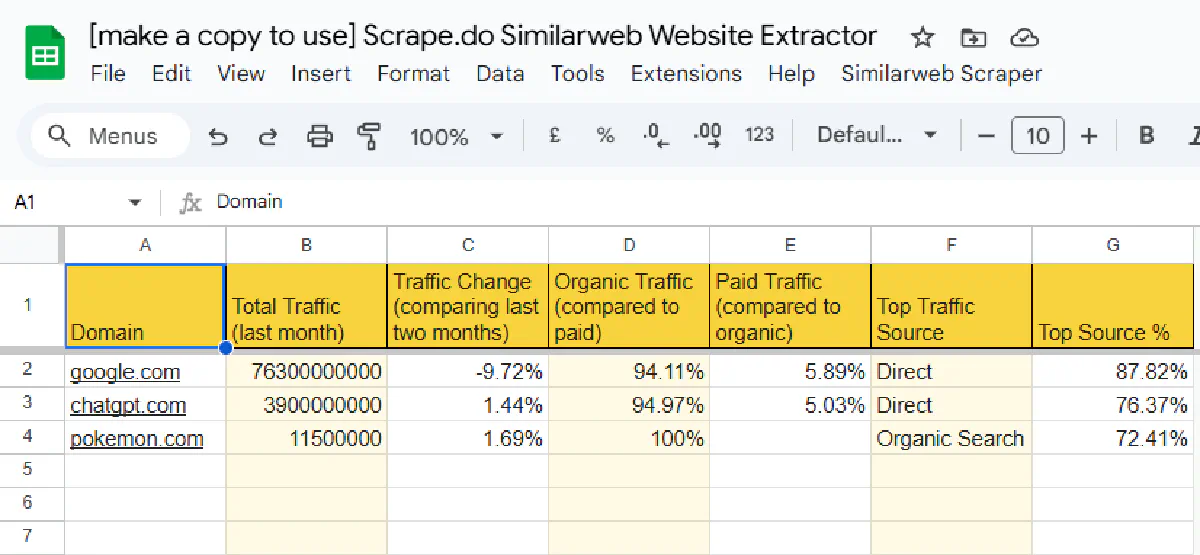
If you want **Similarweb traffic data fast** without writing a single line of code, [our Similarweb scraper built in Google Sheets](https://docs.google.com/spreadsheets/d/1U8020yKqYPBGT68KrlI4QgKjLguQVrekKrT5UGVtkfA/edit?usp=sharing) is exactly what you need.
With just **7 simple steps**, you can start scraping **hundreds of URLs in seconds**. No coding, no setup headaches, just copy, paste, and scrape.
[](https://docs.google.com/spreadsheets/d/1U8020yKqYPBGT68KrlI4QgKjLguQVrekKrT5UGVtkfA/edit?usp=sharing)
✅ **No coding required** – Just copy to your Google Drive and run it.
✅ **Scrape hundreds of domains at once** – Add URLs and click a button.
✅ **Automated reports** – A new sheet is created for every run with the date and time.
✅ **Uses Scrape.do** – No blocks, no IP bans—just clean data.
### Setup (more details in the Sheet)
1. **Copy the spreadsheet** – Make a copy in your own Google Drive.
2. **Get your free API token** – [Sign up for Scrape.do](https://dashboard.scrape.do/sign-up) and copy your token.
3. **Open the Apps Script Editor** – In the spreadsheet, go to Extensions > Apps Script.
4. **Paste your API token** – Find the correct line (line 62) and replace the placeholder (<your-token>).
5. **Save your script** - Click the save button in the top toolbar.
6. **Add your list of domains** – Enter the domains you want to scrape in the "URL_list" tab.
7. **Run the scraper** – Click "Similarweb Scraper" -> “Scrape URLs” from the top menu and let it run.
A new sheet with the key data points will be created with the right time-stamp, easy as that 🎉
[Try for yourself.](https://docs.google.com/spreadsheets/d/1U8020yKqYPBGT68KrlI4QgKjLguQVrekKrT5UGVtkfA/edit?usp=sharing)
## Conclusion
Similarweb’s free tool is **limited**, making large-scale research difficult. **Web scraping automates the process**, letting you extract traffic data for **lead qualification, SEO, and market analysis.**
We covered two solutions:
- **A Python scraper** for full control and automation.
- **A Google Sheets scraper** for a no-code, one-click setup.
Both work with **Scrape.do**, which handles **proxies, headers, and CAPTCHAs**—ensuring you get **clean data without blocks.**
You can also replace our scraping API with another provider with a few small changes, but make sure you check that they are not getting blocked, costing you time and money.
[**Start scraping with 1,000 free credits today**](https://dashboard.scrape.do/sign-up)**.**