# What Is llms.txt? How AI Agents and Scrapers Use It
> Source: https://scrape.do/blog/llms-txt/
Published: 2026-10-16 · Updated: 2026-10-16 · Authors: Selman Gökçe · Categories: AI
**llms.txt is a Markdown file at a site's root that gives AI agents a short, curated list of the pages worth reading, ideally as links to clean `.md` versions.** It doesn't block anyone the way robots.txt does, and Google says Search ignores it. The payoff is on the reading side. An agent or a scraper gets Markdown instead of HTML soup.
Everyone in SEO is arguing about whether you should create one.
I wanted to know something simpler: who actually has one?
So in October 2026, we sent one polite request per file to 55 popular sites: dev tools, docs platforms, AI labs, SaaS, the scraping APIs we compete with, and scrape.do itself.
**42 of them serve a real llms.txt.**
Ahrefs isn't one of them. Its "What Is llms.txt" article sits in Google's AI Overview for the term, but its own llms.txt returned a 404. Semrush answered our bot with a reCAPTCHA page. *(I'm not judging, our own file is missing something too. More on that below.)*
I'll cover llms.txt from the reader's side: what's in the file, how it differs from robots.txt and sitemap.xml, what the evidence says about SEO, the full 55-site results, and a Python script that turns any llms.txt into LLM context.
## What is llms.txt?
**llms.txt is a proposed standard for a Markdown file at `/llms.txt` that sums up a website for large language models and links to the pages an agent should read. It's meant for inference, when an agent needs an answer right now, not for controlling crawlers. Nothing enforces it, and no search engine requires it.**
Jeremy Howard proposed it on September 3, 2024, and the spec lives at [llmstxt.org](https://llmstxt.org/) with its source in Answer.AI's GitHub repo. The pitch is easy to buy. HTML wraps the actual content in navigation, scripts and ads. Context windows are limited, and every wasted token costs time and money.
So the site does the curation once, in a format both humans and parsers can read.
| Date | What happened | Source |
|---|---|---|
| September 3, 2024 | v1 of the proposal published | [llmstxt.org](https://llmstxt.org/) |
| By May 2026 | Chrome's Lighthouse documents an llms.txt audit in its "Agentic browsing" category | [Chrome for Developers](https://developer.chrome.com/docs/lighthouse/agentic-browsing/llms-txt) |
| June 15, 2026 | Google adds a note: Search doesn't use llms.txt, it won't help or hurt rankings | [Search Central updates](https://developers.google.com/search/updates) |
| August 2026 | v2 of the spec: link relations, both `.md` URL forms, subpath files | [llmstxt.org changes](https://llmstxt.org/changes.html) |
Who reads it? The spec says the heaviest use is software documentation, where coding agents follow the links to API references. llmstxt.org also lists an MCP server that lets agents fetch and search llms.txt files, and a VS Code extension that loads external docs as context.
## What goes in an llms.txt file?
**An llms.txt file is plain Markdown in a fixed order. An H1 with the site's name comes first, and it's the only required part. Then come a blockquote summary, optional notes, and H2 sections that list links as `[name](url): notes`. The links should point to LLM-friendly pages, usually `.md` versions.**
Here's the top of ours, trimmed:
```plaintext
# Scrape.do
> Scrape.do is a powerful web scraping API that provides unblocked access to public web data at scale. [...]
- [Sitemap](https://scrape.do/sitemap.xml)
- [Scrape.do Blog](https://scrape.do/blog.md): Explore teachings and helpful contents for web scrapers [...]
- [Documentation Index](https://scrape.do/documentation/llms.txt)
- [Full Technical Documentation](https://scrape.do/llms-docs.txt)
## Markdown Versions
> Every documentation, changelog, blog, author, category, feature, industry, product, and comparison page on this site is also served as raw Markdown at the same path with a `.md` extension [...]
## Blog Posts
- [How to Find and Read robots.txt for Crawling and Scraping](https://scrape.do/blog/robots-txt.md): Learn what robots.txt is [...]
```
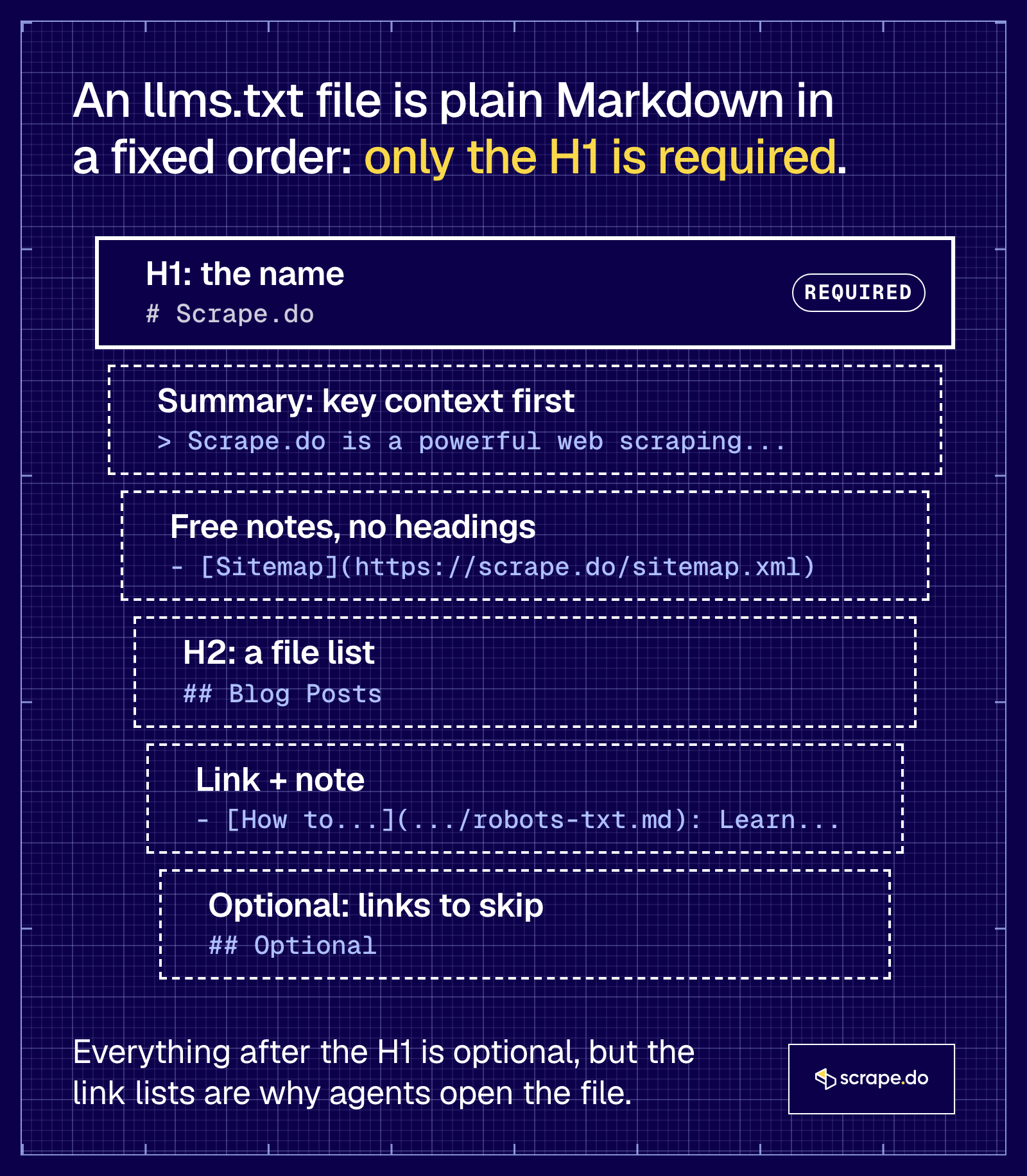
The parts, in the order the spec wants them:
| Part | Required? | What it's for |
|---|---|---|
| `# Name` (H1) | Yes, the only required part | The site or project name |
| `> summary` (blockquote) | No | Context an agent needs before it reads anything else |
| Free Markdown (no headings) | No | Notes on how to read the files, caveats, conventions |
| `## Section` with a list | No | "File lists": `- [name](url): optional notes` |
| `## Optional` | No | Secondary links an agent can skip when context is short |
In our check, all 42 valid files started with an H1, 36 had a blockquote near the top, and 12 used an `## Optional` section.
A few things changed in v2 (August 2026) that most guides haven't caught up with:
- The `.md` twin can be `page.html.md` or `page.md`. v1 only allowed the first.
- Discovery uses link relations. A page points to its Markdown version with `rel="alternate" type="text/markdown"` and to its llms.txt with `rel="describedby"`, as a `` element or an HTTP `Link:` header.
- A file covers its path. `/docs/llms.txt` covers `/docs/`, and the most specific file wins. That's how our docs work. [scrape.do/documentation/llms.txt](https://scrape.do/documentation/llms.txt) indexes only the documentation.
- `## Optional` lost its special meaning. It's still a useful convention, but v2 dropped the context-expansion tooling that treated it as "skip this".
Our own pages do half of that discovery. Every blog post ships `` in its HTML, but we don't send a `rel="describedby"` link yet.
### What is llms-full.txt?
**llms-full.txt is one file with the full Markdown content of a site's docs, instead of links to them. It isn't part of the llms.txt spec. Docs platforms made it popular, and Mintlify describes it as combining "your entire documentation site into a single file". So expect it to be big.**
How big? Of the 16 sites in our check that served a real llms-full.txt, **6 were over 1 MB**. Two of them, Anthropic's docs and Cloudflare's developer docs, were still going when our script hit its 30 MB read cap. That's a bulk download with a `.txt` extension.
Two more sites served an llms-full.txt the exact byte size of their llms.txt, so check before you assume "full" means more.
Honest part: scrape.do doesn't serve `/llms-full.txt`. Our full docs live at [`/llms-docs.txt`](https://scrape.do/llms-docs.txt) (777 KB), linked from our llms.txt. An agent that follows the links finds it, and one that guesses the filename gets a 404.
## llms.txt vs robots.txt vs sitemap.xml
**robots.txt tells crawlers which URLs they may fetch, sitemap.xml lists every URL you want indexed, and llms.txt hands an agent a short reading list of the pages that explain your site. Only robots.txt is about permission. llms.txt never grants access, and it doesn't replace either file.**
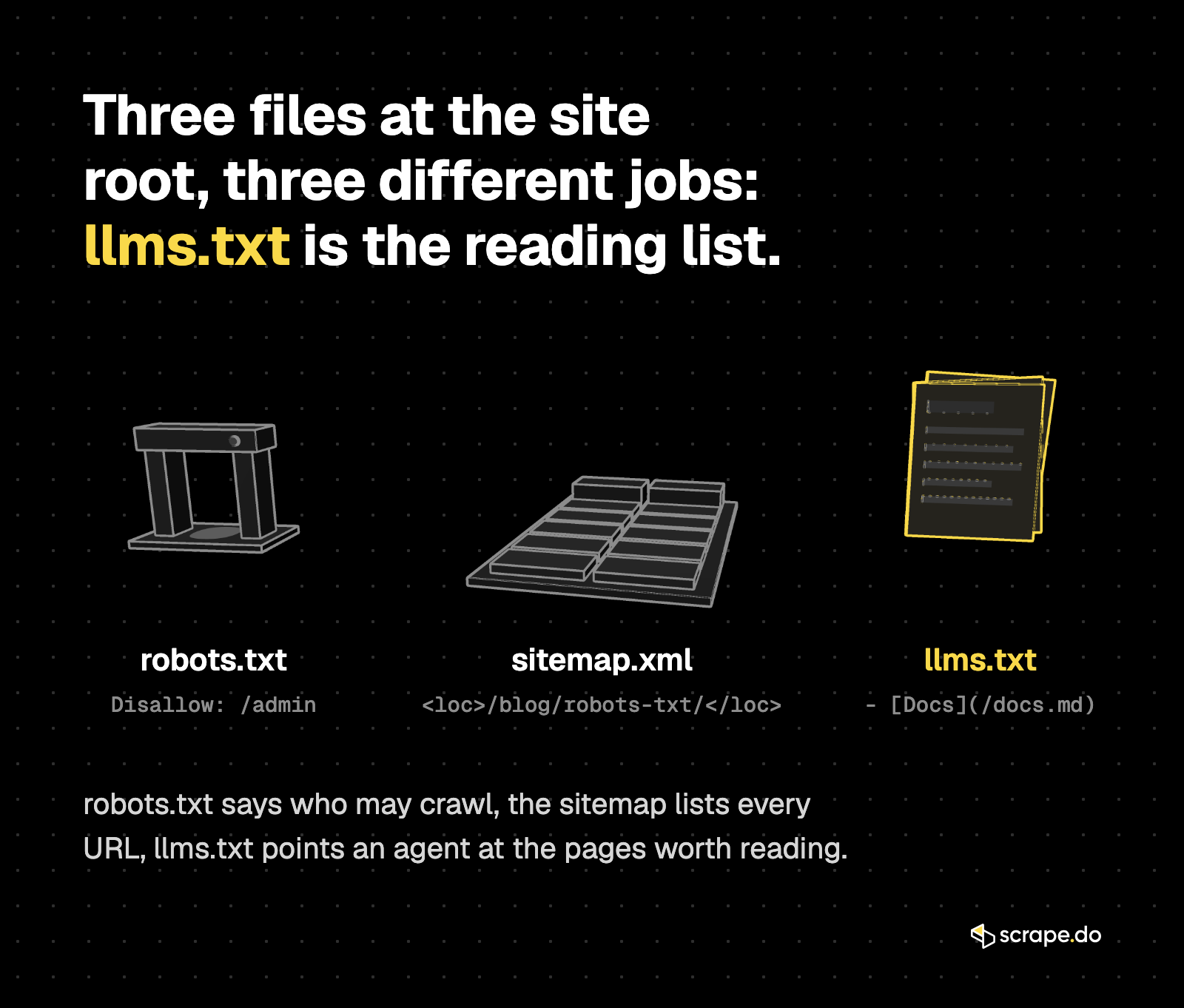
| | robots.txt | sitemap.xml | llms.txt |
|---|---|---|---|
| Job | Crawl rules: who may fetch what | Every indexable URL | Curated pages for an LLM to read |
| Format | Plain-text directives | XML | Markdown |
| Typical line | `Disallow: /admin` | `https://example.com/page/` | `- [Docs](https://example.com/docs.md): notes` |
| Read by | Search and AI crawlers | Search engines | Agents and tools at answer time |
| Points to | Paths, not content | HTML pages | Markdown or text versions |
| Status | Standard (RFC 9309) | Standard (sitemaps.org) | Proposal |
For a scraper, the order matters. Read robots.txt first, because that's the file that says what the site allows. Our [robots.txt guide](https://scrape.do/blog/robots-txt/) covers the parsing.
**An llms.txt link list is not permission.** A site can list a page in llms.txt and still disallow your user agent in robots.txt, or forbid scraping in its terms. Our checklist on [how to check if a website allows scraping](https://scrape.do/blog/how-to-check-if-a-website-allows-scraping/) still applies.
## Does llms.txt help SEO or AI citations?
**Not in Google, and there's no public evidence that it helps anywhere else. Google's AI optimization guide says Search itself doesn't use llms.txt files, and keeping one won't help or hurt your rankings or visibility. We also couldn't find a major AI assistant that says it reads other sites' llms.txt files.**
The Google part is in writing. On June 15, 2026, Google added a note to its [AI optimization guide](https://developers.google.com/search/docs/fundamentals/ai-optimization-guide#mythbusting). It says you don't need machine-readable files, AI text files, markup or Markdown to appear in Search, including its AI features, and that it's "completely fine" to keep llms.txt files for other systems that use them.
Then there's Chrome. Lighthouse has an [llms.txt audit](https://developer.chrome.com/docs/lighthouse/agentic-browsing/llms-txt), but it only flags server errors when fetching the file. A 404 is marked "Not Applicable", because the file is optional.
The AI labs publish llms.txt files for their own developer docs. In our check, `developers.openai.com/llms.txt` answered 200, and `docs.anthropic.com/llms.txt` redirected to `platform.claude.com/llms.txt`, a file with 784 links.
That tells you the labs expect coding agents to read docs this way. Whether ChatGPT or Claude reads yours is another question, and your server logs will tell you more than any SEO thread. Look for requests to `/llms.txt` and the `.md` URLs it links to.
**So treat llms.txt as a service for agents that already want your content, not as a ranking trick.**
## Who actually serves an llms.txt? We checked 55 sites
**In October 2026, 42 of 55 popular sites served a valid llms.txt, and 16 served a valid llms-full.txt. Scraping APIs had the highest rate, 15 of 16. Two AI labs blocked our self-identified bot, and Anthropic serves its file from its docs host, not anthropic.com.**
The method, so you can rerun it:
- One GET each for `https://{site}/llms.txt` and `https://{site}/llms-full.txt`, 1 request a second, redirects followed, no retries.
- A User-Agent that names the purpose and links to scrape.do. No browser headers. If a site blocked an honest bot, we recorded it as blocked.
- "Valid" means status 200 and a text file, not an HTML page served with a 200.
- For each valid file: size, number of Markdown links, and whether the linked pages exist as Markdown. That took one re-fetch of the file and one extra GET per site.
| Group | Sites | llms.txt | llms-full.txt |
|---|---|---|---|
| Scraping APIs (our competitors) | 16 | 15 | 5 |
| Dev tools | 10 | 9 | 5 |
| SaaS | 10 | 7 | 3 |
| Docs hosts (docs.*, developers.*) | 5 | 4 | 2 |
| Docs platforms (incl. llmstxt.org) | 5 | 4 | 1 |
| AI labs, main domains | 6 | 2 | 0 |
| Proxy review sites | 2 | 0 | 0 |
| Scrape.do | 1 | 1 | 0 |
| **Total** | **55** | **42** | **16** |
What stood out:
- 10 sites answered 404, including ahrefs.com, anthropic.com (its docs host has one), huggingface.co, docs.python.org, astro.build and docusaurus.io.
- openai.com and perplexity.ai returned 403 to our bot, and semrush.com returned a reCAPTCHA page. We don't know whether they serve a file.
- The median llms.txt was 15.7 KB. The smallest was llmstxt.org's own (637 bytes, 3 links), the largest Stripe's docs (97.6 KB).
- The median file had 87 links. Two files (Scrapfly and Cohere) had no Markdown links at all, only written guidance for agents.
- In 16 of the 42 files, at least half the links pointed straight to `.md` or `.txt` files. Ours is one: 265 of 270 links end in `.md`.
- For files that link to HTML pages, we tried the first page with `.md` appended. It worked on 6 of 28 sites.
That last number matters if you write agents. Most llms.txt files today point to HTML, so your reader still needs a plan for pages that have no Markdown version.
Since this is a scraping blog, here's our own corner of the market, file by file:
| Site | llms.txt | Links (to .md or .txt) | llms-full.txt |
|---|---|---|---|
| scrape.do | 73.2 KB | 270 (267) | No (full docs at `/llms-docs.txt`) |
| apify.com | 16.8 KB | 73 (34) | No |
| brightdata.com | 13.2 KB | 61 (18) | 88.5 KB |
| decodo.com | 17.7 KB | 154 (1) | No |
| firecrawl.dev | 10.6 KB | 44 (3) | 10.6 KB, same size as llms.txt |
| joinmassive.com | 28.0 KB | 186 (0) | No |
| oxylabs.io | 4.4 KB | 48 (0) | No |
| scraperapi.com | 6.7 KB | 47 (0) | No |
| scrapegraphai.com | 21.2 KB | 40 (5) | 588 KB |
| scrapfly.io | 6.6 KB | 0 (guidance only) | No |
| scrapingant.com | No (404) | | No |
| scrapingbee.com | 6.2 KB | 37 (37) | No |
| scrapingdog.com | 16.9 KB | 111 (0) | No |
| serpapi.com | 29.4 KB | 139 (125) | No |
| webscrapingapi.com | 26.6 KB | 119 (0) | 57.9 KB |
| zenrows.com | 21.4 KB | 97 (6) | 1.3 MB |
| zyte.com | 6.5 KB | 51 (0) | No |
Sizes are what we downloaded in October 2026. These files change often, so treat the table as a snapshot.
## How do you read a site's llms.txt with Python?
**Fetch `/llms.txt`, split it into H2 sections, pull each `[name](url)` link with a regex, then fetch only the linked pages you need. When the links point to `.md` files, you can join them straight into your prompt with no HTML parsing. When they don't, fall back to converting HTML.**
You need `requests`. Step one fetches the file and turns it into a dictionary of sections:
```python
import re
import time
import requests
HEADERS = {"User-Agent": "llms-reader/0.1 (+https://example.com/bot)"}
ITEM = re.compile(r"^\s*- \[(.+?)\]\((https?://[^)\s]+)\)(?::\s*(.*))?$")
def fetch(url):
r = requests.get(url, headers=HEADERS, timeout=20)
r.raise_for_status()
return r.text
def parse_llms_txt(text):
"""Return {section: [(title, url, note), ...]} from an llms.txt file."""
sections, current = {}, "(top)"
for line in text.splitlines():
if line.startswith("## "):
current = line[3:].strip()
elif m := ITEM.match(line):
sections.setdefault(current, []).append(m.groups())
return sections
```
The regex uses a lazy `(.+?)` for the title on purpose. Two of our own link titles contain square brackets, like "Building a Versatile Python Web Crawler from Scratch [2025 guide]", and a stricter `[^\]]+` silently drops them.
Step two picks the links you care about and builds one context string, with a pause between requests:
```python
def build_context(site, section, keyword, limit=3):
sections = parse_llms_txt(fetch(f"{site}/llms.txt"))
for name, items in sections.items():
print(f"{name}: {len(items)} links")
items = sections.get(section, [])
picked = [i for i in items if keyword in f"{i[0]} {i[2] or ''}".lower()][:limit]
parts = []
for title, url, _note in picked:
md = fetch(url) # already Markdown: nothing to strip
print(f"pulled {url} ({len(md):,} chars)")
parts.append(f'\n{md}\n')
time.sleep(1)
return "\n\n".join(parts)
context = build_context("https://scrape.do", "Blog Posts", "robots")
print(f"context: {len(context):,} chars from {context.count('", "url": "https://example.com/page/", "output": "markdown"}
md = requests.get("https://api.scrape.do/", params=params, timeout=60).text
```
A few gotchas we hit while checking 55 sites:
- **Soft 404s.** Some servers answer `/llms.txt` with an HTML page and status 200. Check the Content-Type and the first bytes before you parse.
- **Bot challenges.** A 403 or a CAPTCHA page means the site stopped you before you saw anything. The file may well be there.
- **Nested files.** Cloudflare's developer docs and ScrapingBee link from their root llms.txt to more `.txt` files, one per product. Your reader may need to recurse.
- **Redirects across hosts.** `docs.anthropic.com/llms.txt` lands on `platform.claude.com`. Resolve relative links against the final URL.
## Should you create an llms.txt file?
**Yes, if developers or their coding agents use your docs, API or product. It's cheap, and agents do follow these files. No, if you want rankings or AI citations, because Google says Search ignores the file and we found no assistant that says it reads one.**
My take, short version: **if you sell to developers, ship one. If you're doing it for SEO, don't bother.**
If you do build one, these are the decisions that matter:
1. **Generate it at build time.** Ours is built from the same content as the site, together with a `.md` twin of every page, so it can't drift from what's live.
2. **Link to Markdown, not HTML.** A list of HTML links saves an agent the crawl, but not the parsing.
3. **Keep it small enough to read in one go.** Put the full dump in a separate file and link to it.
4. **Add the link relations from v2.** `rel="alternate" type="text/markdown"` on each page, and `rel="describedby"` pointing to the llms.txt.
5. **Remember it's public.** Anything you list, scrapers can read too. That's the point, so list only what you're happy to have read.
And if you're on the reading side, building an agent or a scraper, check for `/llms.txt` before you crawl anything. On 42 of the 55 sites we checked, someone already did the curation for you.
## FAQ
### Is llms.txt mandatory?
No. It's a proposal, not a standard, and nothing breaks without it. Google's guide says you don't need it for Search, and Lighthouse marks a missing file as "Not Applicable".
### Can llms.txt block AI crawlers?
No. llms.txt has no directives. To ask AI crawlers to stay out, use robots.txt rules for their user agents, and know that robots.txt is a request, not a lock.
### Where do I put llms.txt?
At the root, `https://example.com/llms.txt`. Since v2 of the spec, a file can also sit in a subpath such as `/docs/llms.txt` and cover only the pages under it.
### What's the difference between llms.txt and llms-full.txt?
llms.txt is an index of links. llms-full.txt, a convention outside the spec, is the full content in one file. In our check, 6 of the 16 llms-full.txt files were over 1 MB.
### How do I check if a site has an llms.txt?
Request `https://{site}/llms.txt` and check three things: status 200, a text Content-Type (not HTML), and a first line that starts with `# `. A 403 or a CAPTCHA page means you were blocked, not that the file is missing.
[Get 1000 free credits and start scraping with Scrape.do](https://dashboard.scrape.do/signup)