` tag
* `.get_text()` extracts the readable content, removing HTML tags
* And we're left with the title of the page.
### Extracting Country Names and Capitals
The page contains a list of countries, each inside a `
` with the class `"country"`. We’ll loop through these and grab the country name and each country's capital:
```python
countries = soup.find_all("div", class_="country")
for c in countries:
name = c.find("h3", class_="country-name").get_text(strip=True)
capital = c.find("span", class_="country-capital").get_text(strip=True)
print("Country:", name, "| Capital:", capital)
```
Expected output (partial):
```bash
Country: Andorra | Capital: Andorra la Vella
Country: United Arab Emirates | Capital: Abu Dhabi
Country: Afghanistan | Capital: Kabul
...
...
```
* `.find_all("div", class_="country")` gets all country blocks
* `.find("h3", class_="country-name")` finds the country’s name
* `.find("span", class_="country-capital")` gets the capital
* `.get_text(strip=True)` ensures clean output, removing extra spaces
* What we're printing is all the countries' names and capitals on this demo website.
### Inspecting HTML for Structure
If your output is empty or incorrect, the website’s structure may have changed.
Right-click on the webpage, select *Inspect*, and find the correct tags and class names.
For example, if the country names are inside `
`, update:
```python
name = c.find("h2", class_="name").get_text(strip=True)
```
Every site is different, so when web scraping, having the skill to inspect the HTML structure the right way is crucial.
## Exporting Data
***Scraping is only useful if we can store the data in a structured format.***
Instead of just printing results to the terminal, we’ll export them to CSV and JSON files so they can be easily analyzed or shared.
Let's start with the more common format:
### Exporting Data to CSV
CSV (Comma-Separated Values) is a common format for spreadsheets and databases.
Python’s built-in `csv` module makes it easy to write structured data to a file.
Let’s take the list of country names and capitals and save it to `countries.csv`:
```python
import csv
import requests
from bs4 import BeautifulSoup
url = "https://www.scrapethissite.com/pages/simple/"
response = requests.get(url)
soup = BeautifulSoup(response.text, "html.parser")
countries = soup.find_all("div", class_="country")
# Open a new CSV file and write headers
with open("countries.csv", "w", newline="", encoding="utf-8") as f:
writer = csv.writer(f)
writer.writerow(["Country", "Capital"])
# Loop through countries and write each row
for c in countries:
name = c.find("h3", class_="country-name").get_text(strip=True)
capital = c.find("span", class_="country-capital").get_text(strip=True)
writer.writerow([name, capital])
print("Data saved to countries.csv")
```
* `open("countries.csv", "w", newline="", encoding="utf-8")` creates a new CSV file
* `writer.writerow(["Country", "Capital"])` adds a header row
* The loop extracts each country’s name and capital, then writes them as rows in the CSV
**Expected output in `countries.csv`:**
```csv
Country,Capital
Andorra,Andorra la Vella
Afghanistan,Kabul
Albania,Tirana
```
### Exporting Data to JSON
After CSV, the most commonly used data export format is **JSON**.
JSON (JavaScript Object Notation) is widely used for APIs and storing structured data.
Again, Python’s `json` module makes it simple to write our scraped data to a `.json` file.
```python
import json
import requests
from bs4 import BeautifulSoup
url = "https://www.scrapethissite.com/pages/simple/"
response = requests.get(url)
soup = BeautifulSoup(response.text, "html.parser")
countries = soup.find_all("div", class_="country")
# Create a list to store country data
data = []
for c in countries:
name = c.find("h3", class_="country-name").get_text(strip=True)
capital = c.find("span", class_="country-capital").get_text(strip=True)
# Append dictionary to list
data.append({"country": name, "capital": capital})
# Save data to a JSON file
with open("countries.json", "w", encoding="utf-8") as f:
json.dump(data, f, indent=4, ensure_ascii=False)
print("Data saved to countries.json")
```
* `data.append({"country": name, "capital": capital})` creates a dictionary for each country
* `json.dump(data, f, indent=4, ensure_ascii=False)` writes it to `countries.json` in a readable format
**Expected output in `countries.json`**
```json
[
{ "country": "Andorra", "capital": "Andorra la Vella" },
{ "country": "Afghanistan", "capital": "Kabul" },
{ "country": "Albania", "capital": "Tirana" }
]
```
With data export to CSV and JSON, we've covered the very basics of web scraping.
**But, in the real world,** you'll need to make use of more tools that scrapers use, to get complex tasks done.
## Using Headless Browsers
Most of the time, we can scrape websites by simply sending a request and parsing the returned HTML. **But sometimes, that’s not enough.**
Some pages load content dynamically using JavaScript, meaning the data we need **isn’t even in the HTML source when we make the request**.
If you’ve ever tried scraping a page, only to find the data missing or incomplete, this is why.
Headless browsers solve this problem by rendering pages just like a normal browser, executing JavaScript, waiting for elements to load, and interacting with the page when needed.
### Top Headless Browsers for Python
There are several [headless browsers in Python](https://scrape.do/blog/python-headless-browser/), each with its own advantages:
* **Selenium**: The oldest and most widely used; supports Chrome, Firefox, and Edge; great for automation but slower than newer tools.
* **Playwright**: Modern and fast; supports multiple browsers (Chromium, Firefox, and WebKit); best choice for web scraping.
* **Pyppeteer**: A Python port of Puppeteer (a Node.js tool); ideal for working specifically with headless Chrome.
### Installing Playwright
For this guide, we’ll use **Playwright** since it’s fast, reliable, and works with multiple browsers.
Install it by running:
```bash
pip install playwright
playwright install
```
The second command line downloads **Chromium, Firefox, and WebKit** (which Playwright uses under the hood).
### Loading a Page with a Headless Browser
Let’s start simple: we’ll load a webpage using Playwright and confirm that it works.
```python
from playwright.sync_api import sync_playwright
with sync_playwright() as p:
browser = p.chromium.launch(headless=True)
page = browser.new_page()
page.goto("https://www.scrapethissite.com/pages/simple/")
print("Page loaded successfully")
browser.close()
```
This script opens a browser in the background, visits the page, and closes it. Unlike `requests.get()`, this actually **renders** the page just like Chrome or Firefox would.
### Extracting Data After JavaScript Execution
A headless browser becomes truly useful when a website loads content dynamically.
To show this in action, let’s use Playwright **to extract the page title after JavaScript has fully executed**.
```python
from playwright.sync_api import sync_playwright
from bs4 import BeautifulSoup
with sync_playwright() as p:
browser = p.chromium.launch(headless=True)
page = browser.new_page()
page.goto("https://www.scrapethissite.com/pages/simple/")
# Wait for an element to be present before extracting content
page.wait_for_selector("h1")
# Get the page’s fully rendered HTML
html_content = page.content()
soup = BeautifulSoup(html_content, "html.parser")
h1_tag = soup.find("h1")
print("Page Title:", h1_tag.get_text())
browser.close()
```
This method ensures we **wait for content to appear** before scraping, crucial for handling pages that rely on JavaScript.
### Scraping a JavaScript-Rendered Page
Some websites **don’t load data immediately** but fetch it dynamically using AJAX.
If we tried scraping them with a regular request, we'd only get a partial response.
To show how headless browsers help in situations where we need to [scrape a JavaScript-rendered page](https://scrape.do/blog/how-to-scrape-javascript-rendered-web-pages-with-python/), we’ll extract data from [this list of 2015 Oscar-winning films](https://www.scrapethissite.com/pages/ajax-javascript/#2015) that loads content dynamically with JavaScript.
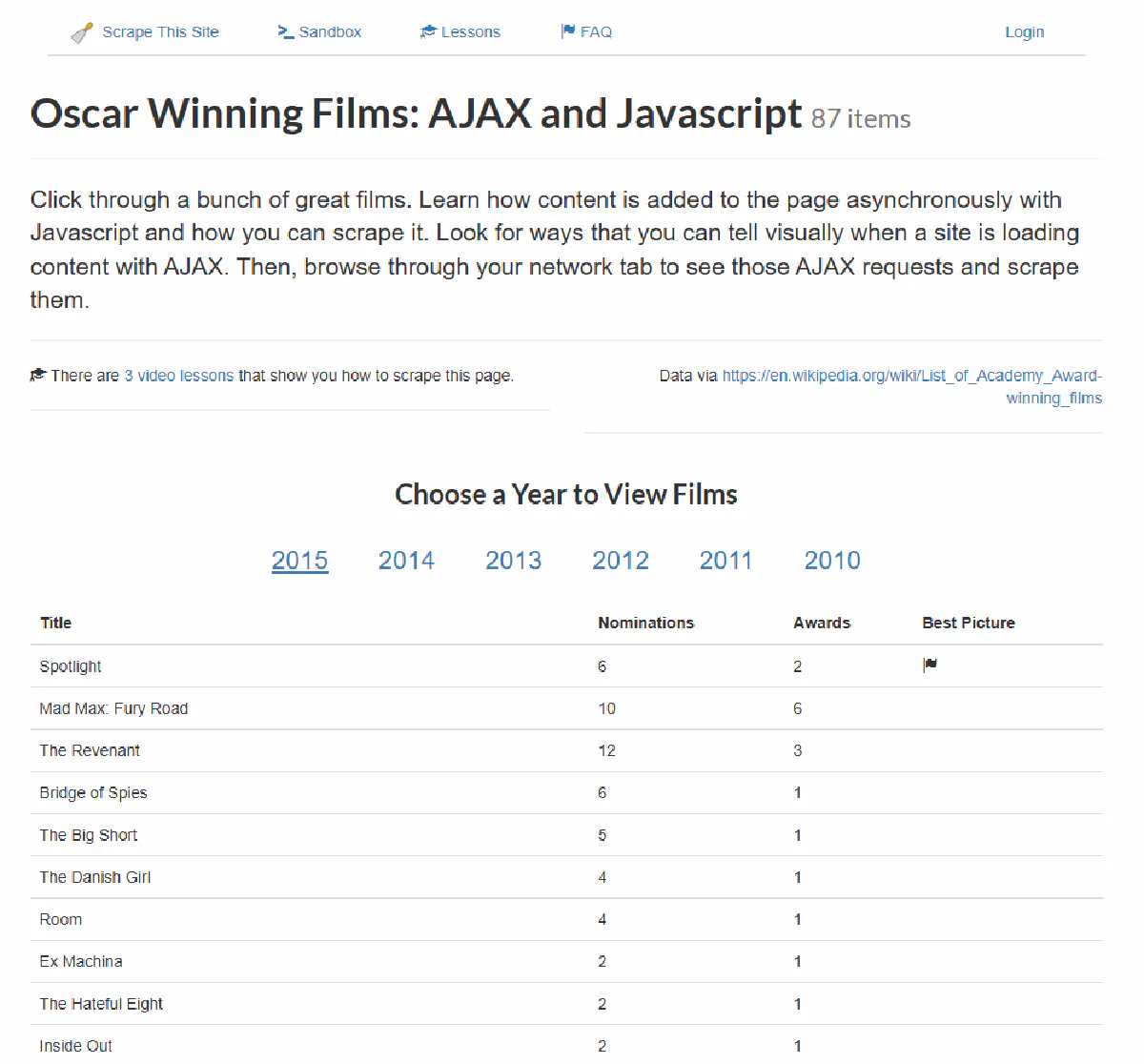
First, let's attempt to get the table data using only **`requests`**:
```python
import requests
url = "https://www.scrapethissite.com/pages/ajax-javascript/#2015"
response = requests.get(url)
print(response.text)
```
We'll get the raw HTML, but the table rows will be empty:
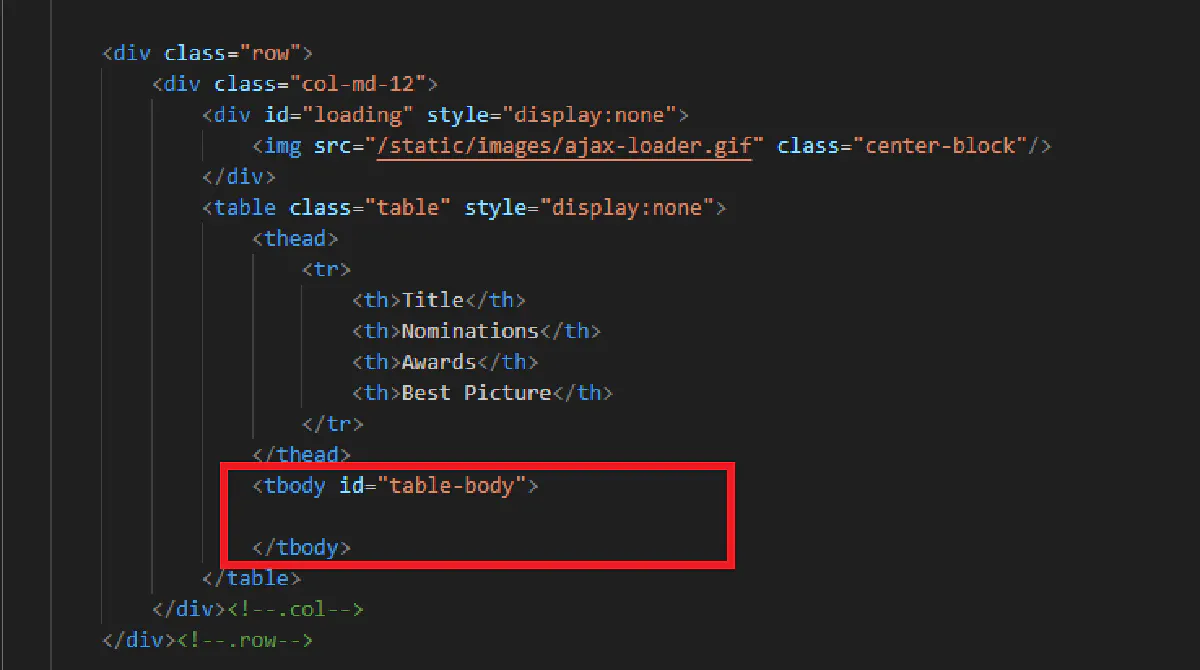
This happens because 1) without a headless browser, we're not rendering the page like a real browser and 2) we're not waiting for the page content to load.
So, using Playwright, we'll have to both render the page, and also wait 3 seconds for the page to load fully:
```python
with sync_playwright() as p:
browser = p.chromium.launch(headless=True)
page = browser.new_page()
page.goto("https://www.scrapethissite.com/pages/ajax-javascript/#2015")
# Wait 3 seconds for JavaScript to load the content
page.wait_for_Timeout(3000)
# Get the fully rendered HTML
html_content = page.content()
soup = BeautifulSoup(html_content, "html.parser")
# Extract the data
print("Extracted Content:", soup.prettify())
browser.close()
```
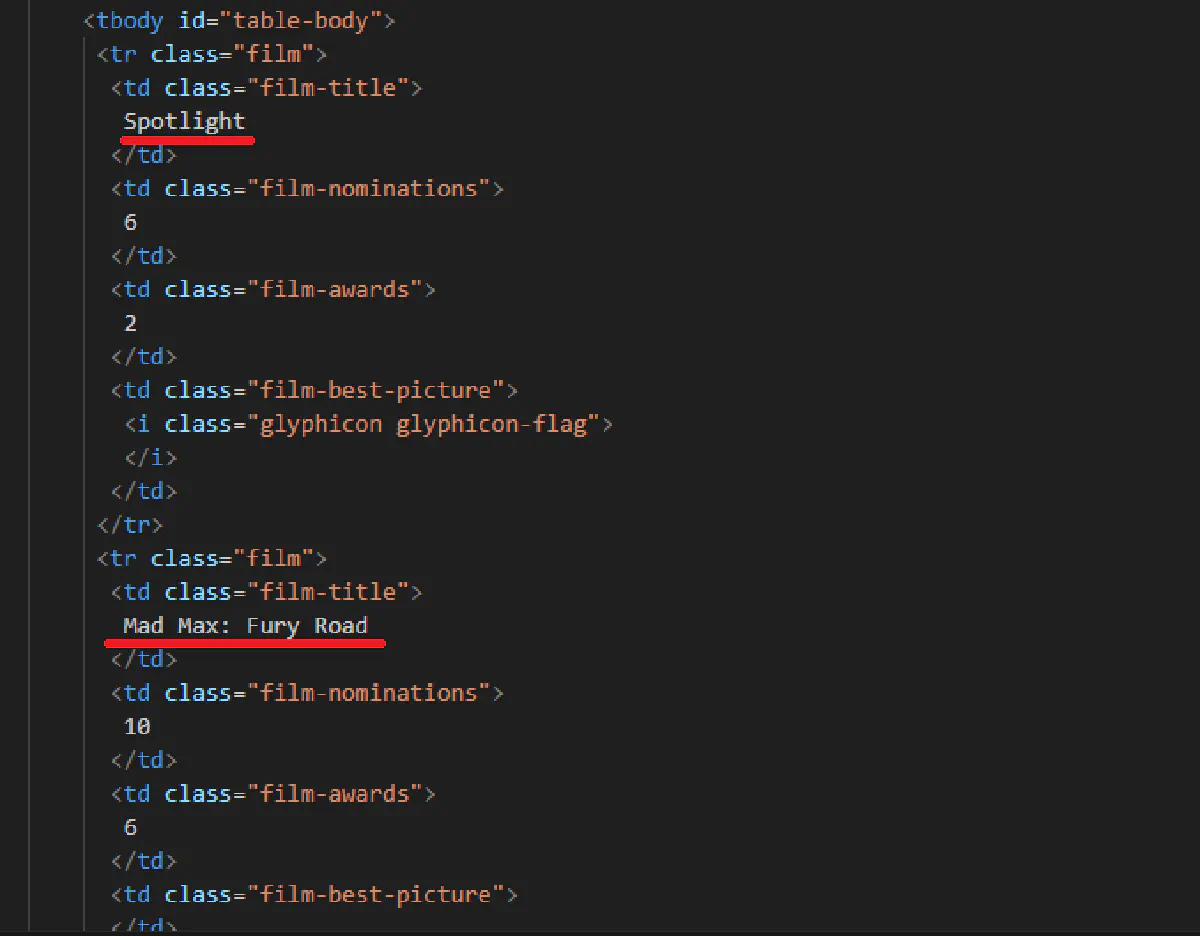
In the output, you'll see that the table rows are not empty anymore, and 2015's most Oscar winners are not extracted:
### When Should You Use a Headless Browser?
Headless browsers will help you solve a lot of issues when scraping the web, but they're not always necessary.
They come with **extra overhead**, making them slower than using `requests`.
*Use them when:*
* The website **loads content dynamically** (if data is missing in a standard request, this is why).
* You need to **interact** with elements (logins, buttons, dropdowns).
* Anti-bot measures require a browser-like presence (some sites block simple requests but allow browsers).
For everything else, a standard request-based approach is usually faster and more efficient.
## Bypassing Anti-Bot Protections
**In today's scraping landscape, this is the biggest issue.**
Many websites actively detect and block scrapers. If you've ever encountered **403 Forbidden** errors, endless CAPTCHAs, or pages that load fine in your browser but return blank responses when scraped, **you're dealing with anti-bot measures.**
These protections range from simple (checking user-agent headers) to advanced (AI-powered behavioral analysis and TLS fingerprinting).
To avoid getting blocked, we need to disguise our scraper to look like real human traffic.
### Open-Source Libraries for Bypassing Blocks
Some Python libraries help make scrapers more human-like:
* **`requests_random_user_agent`** – rotates User-Agent headers automatically.
* **`scrapy-fake-useragent`** – does the same but is optimized for Scrapy.
* **`httpx` with concurrency** – allows randomized requests across multiple IPs for better stealth.
Another approach is using tools like **undetected-chromedriver** or stealth plugins for Selenium/Playwright to mask bot signals.
These methods help with simple anti-bot protections but almost always fail against **stronger defenses like Cloudflare or JavaScript-based fingerprinting**.
So, you'll need a solution that's more capable:
### Scrape.do – The \#1 Web Scraping API
Scrape.do is the **cheat code** of web scraping.
It **handles everything for you;** proxy rotation, anti-bot detection, CAPTCHA solving, and request retries.
With all that out the way, you can focus on **extracting data instead of getting blocked**.
#### Why Use Scrape.do?
🌍 **Automatic Proxy Rotation** – Avoids IP bans with a **150M+ proxy pool**, including residential, mobile, and datacenter proxies.
✅ **99\.98% Success Rate** – Bypasses **Cloudflare, Akamai, PerimeterX, and other WAFs** automatically.
🔓 **CAPTCHA Solving** – Handles CAPTCHAs **without requiring manual input**.
💰 **Pay Only for Successful Requests** – No wasted credits on blocked or failed requests.
🎁 **1000 Free Monthly Requests** – Perfect for testing before committing or for smaller projects.
#### How Scrape.do Works
Instead of sending a request directly to a website, you send it through Scrape.do’s API.
Scrape.do handles all the hard parts; rotating proxies, handling headers, solving CAPTCHAs, and returning **a clean response, ready for parsing**.
##### Step 1: Get Your Free API Key
Sign up for free at [Scrape.do](https://dashboard.scrape.do/sign-up) to get your API key.
##### Step 2: Make a Request Using Scrape.do
Instead of calling `requests.get(url)`, we route our request through Scrape.do’s API:
```python
import requests
import urllib.parse
# Scrape.do API key
token = ""
# Target website (replace with any site you want to scrape)
target_url = urllib.parse.quote_plus("https://www.scrapethissite.com/pages/simple/")
# API request through Scrape.do
api_url = f"https://api.scrape.do/?token={token}&url={target_url}"
response = requests.get(api_url)
print(response.text[:500]) # Preview the first 500 characters
```
### When to Use Scrape.do
* You’re scraping a website **protected by Cloudflare, Akamai, or other WAFs**.
* You’re dealing with **CAPTCHAs, IP bans, or TLS fingerprinting issues**.
* You need **high success rates without constant maintenance**.
* You want to **scale up your scraping without worrying about proxies or bot detection**.
Instead of wasting hours troubleshooting, **let Scrape.do handle it**.
[**Start scraping with Scrape.do for free.**](https://dashboard.scrape.do/sign-up)
## Frequently Asked Questions
### Can Python do web scraping?
Yes, Python is widely used for web scraping due to its powerful libraries like `requests`, `BeautifulSoup`, and `Scrapy`. It allows automation of data extraction from websites efficiently.
### Is Python web scraping hard?
Basic web scraping with Python is easy, but handling JavaScript-heavy sites and bypassing anti-bot protections can be challenging. Using tools like Playwright or Scrape.do makes it much easier.
### Which Python module is best for web scraping?
For simple scraping, `BeautifulSoup` with `requests` is best; for large-scale projects, `Scrapy` is the most powerful. If dealing with JavaScript, `Playwright` or `Selenium` is recommended.