# Scraping Allegro: How to Extract Product Data Easily
> Source: https://scrape.do/blog/allegro-scraping/
Published: 2025-02-26 · Updated: 2025-02-26 · Authors: Raif Tekin · Categories: Scraping Use Cases
Allegro is **Poland’s largest e-commerce platform**, serving over **20 million users** and listing **millions of products** across various categories.
Unlike Amazon or eBay, Allegro primarily operates as an **online marketplace for third-party sellers**, making it a **goldmine for pricing, availability, and customer review data.**
But scraping Allegro? **Not so simple.**
Like many large e-commerce sites, **Allegro actively prevents bots** from accessing its data. **Traditional scraping methods don’t work,** but with the right tools, you can extract product details efficiently.
[Find functioning code on this GitHub repository.⚙](https://github.com/scrape-do/scrapedo-scrapers/tree/main/allegro-scraper)
## Why Scraping Allegro Is Challenging
Scraping Allegro **isn't impossible**, but it requires a **proper setup**. Unlike some marketplaces that allow basic requests, **Allegro enforces strict anti-bot measures** to block scrapers.
### Residential IP Requirement
One of the biggest challenges with scraping Allegro is that **it blocks non-residential IPs** almost instantly.
* **Datacenter proxies don’t work** – Allegro detects and blocks requests from datacenter proxies or cloud providers like AWS or Google Cloud.
* **Frequent requests trigger blocks** – Too many requests in a short period will get your scraper flagged.
To avoid this, **you must use residential proxies**—which mimic real users browsing from Poland.
### Allegro’s Web Application Firewall (WAF)
Allegro **employs a custom Web Application Firewall (WAF)** that adds an extra layer of protection:
* It detects and blocks **unusual browsing patterns.**
* It enforces **geo-restrictions**—you **must use a Polish IP** to access product data.
* It **injects bot-detection mechanisms** that disrupt automation tools.
### JavaScript-Rendered Pages
Most product details—like price and ratings—**aren’t present in the initial HTML response**.
Allegro **loads key product data dynamically using JavaScript**, meaning simple `requests.get()` calls **won’t fetch the information that you see as a real user**.
### How Scrape.do Solves These Challenges
Instead of dealing with **residential IPs, JavaScript rendering, and WAF bypassing manually**, Scrape.do handles it **for you**:
✅ **Residential Proxy Support** – Scrape.do routes your requests through a **Polish residential proxy pool**, ensuring access.
✅ **Automatic WAF Bypass** – Scrape.do **manages cookies and headers dynamically**, preventing detection.
✅ **JavaScript Rendering When Needed** – Scrape.do can **render pages when necessary**, but in this case, we can extract data directly from the source without extra processing.
With **Scrape.do**, **you don’t need to manage proxies, headers, or session handling**. Just send a request and extract the data with ease.
## Scraping Product Data from Allegro
To scrape Allegro, we need **consistent access and structured data extraction**. Scrape.do ensures we **avoid blocks** by using Polish residential IPs and handling cookies automatically.
Now, let's first **get a response and then extract product details**.
### Prerequisites
Install dependencies if you haven’t already:
```bash
pip install requests beautifulsoup4
```
[Sign up for **Scrape.do**](https://dashboard.scrape.do/sign-up) if you don’t have an API token yet. Replace `"your_token"` in the script below.
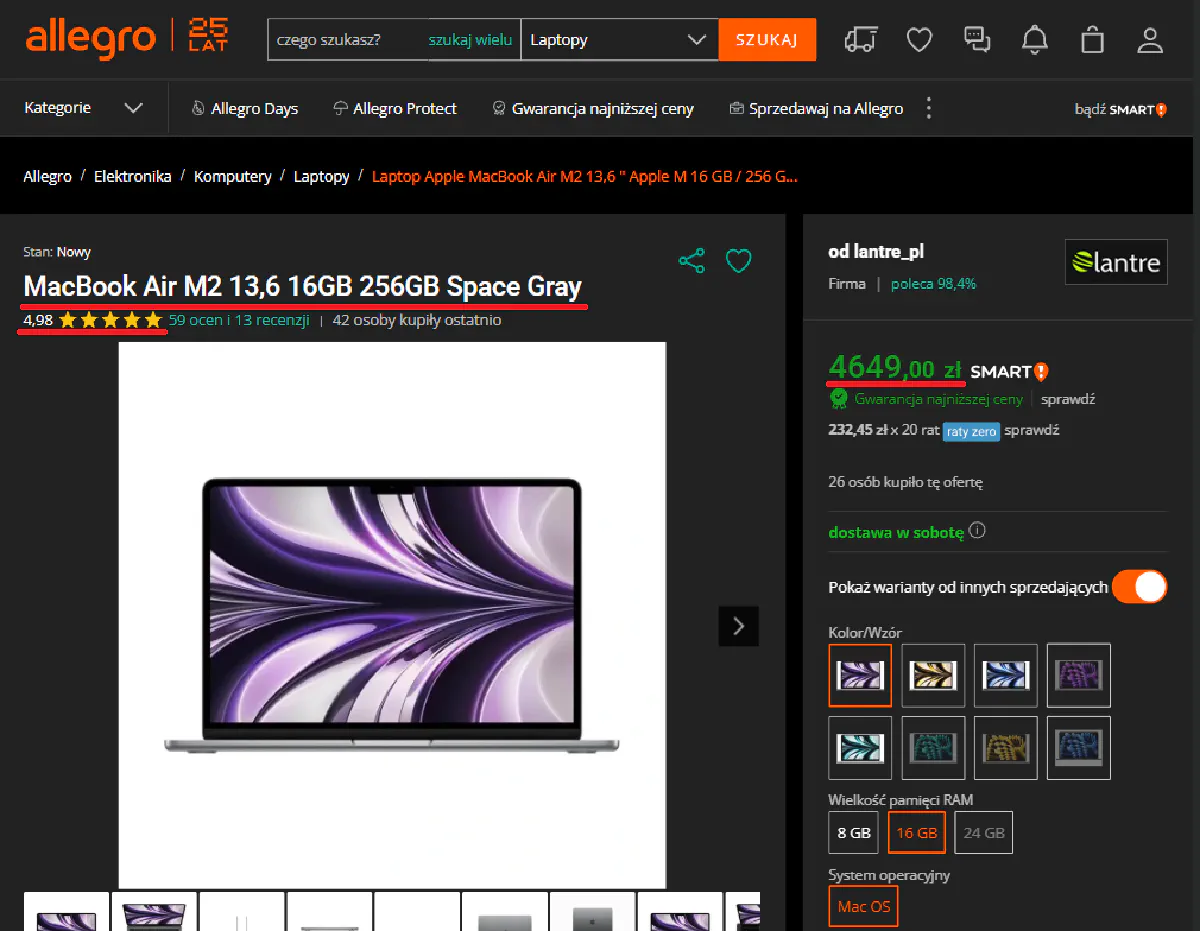
For this article, we'll be targeting this product listing for a MacBook Air M2:
### Getting Access
Allegro **requires Polish IPs**, and requests from outside Poland will fail. We configure Scrape.do to:
* **Use Polish proxies (`geoCode=pl`)**
* **Bypass bot detection (`super=true`)**
Here’s how we **send a request**:
```python
from bs4 import BeautifulSoup
import requests
import urllib.parse
# Scrape.do API Token
token = "your_token"
# Allegro Product URL
target_url = urllib.parse.quote_plus("https://allegro.pl/oferta/macbook-air-m2-13-6-16gb-256gb-space-gray-16784193631")
# Scrape.do Parameters
render = "false" # JavaScript rendering not needed
geo_code = "pl" # Ensures access to the Polish site
super_mode = "true" # Enables residential proxies
# API Endpoint
url = f"http://api.scrape.do/?token={token}&url={target_url}&render={render}&geoCode={geo_code}&super={super_mode}"
# Send Request
response = requests.get(url)
# Parse HTML
soup = BeautifulSoup(response.text, "html.parser")
# Print response status to verify access
print("Response Status:", response.status_code)
```
And here's our expected output:
```bash
Response Status: 200
```
Now that we have access, let’s start extracting data.
### Extracting Product Name
The product name is inside an `` tag.
You've already gotten the response in the previous section, so with a simple modification to the code its simple to get the product name:
```python
# Extract Product Name
product_name = soup.find("h1").text.strip()
print("Product Name:", product_name)
```
### Extracting Price and Rating
Allegro **structures prices inside a meta tag**, while **ratings** are stored in a span with `data-testid="aggregateRatingValue"` (for this guide, I'm parsing the review score from the bottom of the page rather than directly on the top of the page, because it was easier to parse and gives the same data.).
You can extract them like this:
```python
# Extract Product Price
product_price = soup.find("meta", attrs={"itemprop": "price"})["content"]
# Extract Product Rating
product_rating = soup.find("span", attrs={"data-testid": "aggregateRatingValue"}).text.strip()
print("Product Price:", product_price)
print("Product Rating:", product_rating)
```
### Full Code
Here’s everything combined into one **final working script**:
```python
from bs4 import BeautifulSoup
import requests
import urllib.parse
# Scrape.do API Token
token = "your_token"
# Allegro Product URL
target_url = urllib.parse.quote_plus("https://allegro.pl/oferta/macbook-air-m2-13-6-16gb-256gb-space-gray-16784193631")
# Scrape.do Parameters
render = "false"
geo_code = "pl"
super_mode = "true"
# API Endpoint
url = f"http://api.scrape.do/?token={token}&url={target_url}&render={render}&geoCode={geo_code}&super={super_mode}"
# Send Request
response = requests.get(url)
soup = BeautifulSoup(response.text, "html.parser")
# Extract Data
product_name = soup.find("h1").text.strip()
product_price = soup.find("meta", attrs={"itemprop": "price"})["content"]
product_rating = soup.find("span", attrs={"data-testid": "aggregateRatingValue"}).text.strip()
# Print Results
print("Product Name:", product_name)
print("Product Price:", product_price)
print("Product Rating:", product_rating)
```
Once you replace API key with your token and run the code, this is the output you'll get if all previous steps were followed correctly:
```bash
Product Name: MacBook Air M2 13.6" 16GB 256GB Space Gray
Product Price: 4649.00
Product Rating: 4.98
```
Congratulations! You're now able to scrape Allegro :)
### Conclusion
With **Scrape.do handling IP rotation and session management**, we bypass Allegro’s restrictions and extract **product details without blocks**.
This method is **fast, scalable, and works without JavaScript rendering**.
Need to scrape Allegro at scale? **Scrape.do makes it easy**:
✅ **Bypasses IP blocks with Polish proxies**
✅ **Handles cookies and sessions automatically**
✅ **Extracts structured product data efficiently**
[Get 1000 free API calls and start scraping today.](https://dashboard.scrape.do/sign-up)